Mobile menu toggle

Top Stories

Read Cult of Mac’s latest posts on Top Stories:

New platform makes it easy to craft perfect AI prompts

By

Photo of AI prompt generator VibeFarm opened on a laptop.
Quit wasting your time trying to create (or remember) the perfect AI prompt.
Photo: Cult of Mac Deals

AI prompt generator VibeFarm gives you a new way to write, revise and reuse AI prompts so you achieve the best results in the shortest time. Just use this simple but sophisticated tool to create the perfect prompt, then feed it to your AI of choice. 

After you achieve your goal, you can use VibeFarm to easily tweak your prompt and reproduce similarly stellar results time and time again. And right now, a lifetime subscription to VibeFarm costs just $99.99 (regularly $539).

iPhone 17 vs. iPhone 17e comparison: Here’s the smarter pick

By

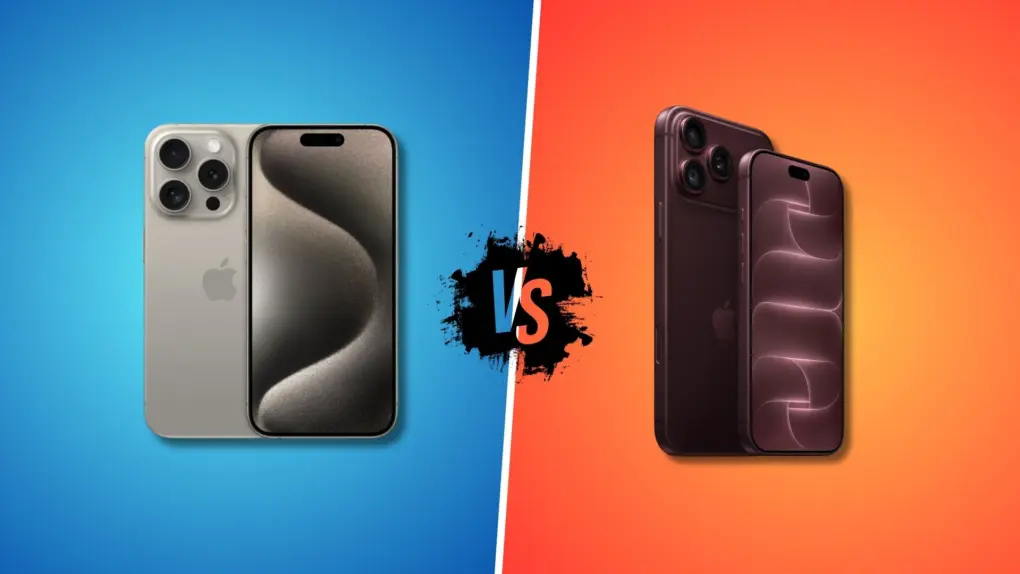
iPhone 17e vs. iPhone 17
Is the iPhone 17e a better buy than the iPhone 17?
Image: ChatGPT/Apple

Apple’s iPhone 17 lineup has a new, more affordable addition: the iPhone 17e. It may look different from the rest of the family, but under the hood, it shares many of the same core components.
If you are trying to decide between the iPhone 17 and iPhone 17e, here’s the smarter option.

4 key upgrades make new M4 iPad Air a beast

By

iPad Air now comes with a faster M4 chip.
Photo: Apple

Apple on Monday introduced a new iPad Air powered by its M4 chip, upgrading the silicon in its midrange tablet to narrow the performance gap with the iPad Pro. In addition, the device comes with more RAM that’s also faster, plus new wireless networking chips that support Wi-Fi 7.
“iPad Air gives users more ways than ever to be creative and productive, offering powerful performance and incredible versatility to help them turn their ideas into reality,” said Bob Borchers, Apple’s vice president of worldwide product marketing, in a press release. “With its blazing performance thanks to M4, incredible AI capabilities, and game-changing iPadOS 26 features, there’s never been a better time to choose or upgrade to iPad Air.”

iPhone 17e doubles built-in storage, adds MagSafe

By

iPhone 17e colors
iPhone 17e comes in several colors to catch the eye.
Photo: Apple

Apple launched the iPhone 17e on Monday, offering a new option for those who want a premium smartphone that won’t empty their bank account. The base version offers twice as much storage capacity as its predecessor, makes the jump to the latest Apple A19 processor and adds full support for MagSafe accessories.
“iPhone 17e combines powerful performance and features our users love at an exceptional value, making it a compelling option for customers looking to upgrade to the iPhone 17 family,” said Kaiann Drance, Apple’s vice president of worldwide iPhone product marketing, in a press release. “We know our customers want a product that will last, and iPhone 17e delivers just that. With A19 for incredible performance, double the entry storage, a smarter camera system, and enhanced durability, iPhone 17e is designed to stay fast, secure, and valuable for years to come.”

Save your history and recommendations: Listen to Apple Music in private mode

By

Apple Music Private Mode graphic
It’s not a built-in feature, but you can make it yourself.
Image: D. Griffin Jones/Cult of Mac

If you’re tired of your kids’ or partner’s music polluting your music recommendations and history, there’s a solution. While Apple Music does not offer a built-in private mode, you can make your own using a Focus mode.
Turn on a special Focus mode, and Apple Music will ignore all the songs, artists and albums that play next. 
It’s even possible to enable your private mode when you connect to a specific Bluetooth speaker, like a living room sound system. Or when you enter a specific location, like work. Here’s how to set it up — keep reading or watch our quick video.

Closed-back vs. open-back headphones: How to choose [Buying guide]

By

closed back vs open back headphones
Each type of headphone has plenty to recommend it.
Photo: David Snow/Cult of Mac

Ever wondered how closed-back and open-back headphones differ? Is one or the other better for your uses in your computer setup and elsewhere? What the heck is “impedance?” I recently experimented with both open- and closed-back cans in my evolving setup. I’ve laid out all the considerations and key differences for you below. And you can find my gear in the links list at the bottom of this article.

Budget MacBook: How cheap is cheap?

By

Budget MacBook price rumors
The success or failure of the budget MacBook hangs heavily on its price.
AI image: ChatGPT/Cult of Mac

There’s huge anticipation for the budget MacBook that’s rumored to launch soon. But a critical question about the laptop has yet to be answered: Just how much will it cost? We already know it’ll be the most affordable macOS notebook ever, and there’s plenty of speculation about the exact cost.

There’s definitely a level that the price cannot go above if Apple wants the low-cost MacBook to succeed. Trouble is, the ongoing AI boom might force Apple to increase the cost of the device above its original plan. That raises questions about how successful the budget laptop will be.

3 best SSDs for iPhone: Fast, secure or cheap

By

3 best SSDs for iPhone
Whether you want fast, secure or affordable, we found the best iPhone SSD options.
Image: Cult of Mac

Adding storage space to your iPhone is easy — you just need the right SSD. I’ve tested ones that work with Apple’s handset and found three standout options for holding gigabytes of images, video and more without massively bulking up the handset.
So here are the best SSDs for your iPhone. All you need to do now is decide whether you want the tiny drive to emphasize speed, security or affordability.

This tiny 45W charger is smarter than it has any right to be [Review] ★★★★★

By

Anker Nano Charger (45W, Smart Display, 180° Foldable) in a wall socket★★★★★
Anker's new miniature wall charger sports a smart display and other innovation.
Photo: Ed Hardy/Cult of Mac

The Anker Nano Charger (45W, Smart Display, 180° Foldable) — that’s its actual name — is the smartest wall charger I’ve ever used. It recognizes my iPhone and iPad when I plug them in and even displays the device’s current battery level.
I can set it to quickly or slowly juice up my device, helping to protect its battery. Or order it to slow charge my handset overnight.
Here’s why I love Anker’s tiny new charger after testing it for several weeks.

Today in Apple history: Massive layoffs clear out Apple’s ‘bozo explosion’

By

logo
This was one of the worst (and one of the most significant) days in Apple history.
Photo: Bonhams

February 25 Today in Apple history: Apple layoffs: Black Wednesday clears out the 'bozo explosion' February 25, 1981: Original Apple CEO Michael Scott oversees a mass firing of employees, then holds a massive party. The Apple layoffs follow a hiring boom that led to what Scott called a “bozo explosion” at the company. They also stand as an early sign that the fun startup culture of Apple’s early days are gone forever.
“I used to say that when being CEO at Apple wasn’t fun anymore, I’d quit,” he tells a crowd of Apple staffers. “But now I’ve changed my mind — when being CEO isn’t fun anymore, I’ll just fire people until it is fun again.”
For many people at Apple, the day is the worst in the company’s history.

Never miss a live show in your hometown with Apple Music Concerts

By

Apple Music Concerts graphic
A great new feature comes to Apple Music.
Image: D. Griffin Jones/Cult of Mac

Upcoming iOS 26 feature Apple Music Concerts solves one of music lovers’ biggest heartbreaks — finding out too late that your favorite artist already passed through your neighborhood on tour, unbeknownst to you.
The feature lets you see shows coming soon to your city, with convenient details on venues, ticketing, set lists and more. You can also look up an artist’s tour and see all their upcoming shows. 
Supposedly, Apple Music Concerts will even notify you when a tour is coming nearby. The feature, available now in iOS 26.4 beta 2, hasn’t been out long enough for me to test. But if it works like the Apple Music notifications that alert you about new tracks, it could be a lifesaver.
Unfortunately, though, there’s one serious drawback. Here’s an overview of Apple Music Concerts. 

Earth-Mars tensions flare in For All Mankind season 5 [New Apple TV trailer]

By

For All Mankind season 5
Has Happy Valley on Mars finally grown too big for its britches? Some people on Earth are up in arms.
Photo: Apple TV

Earth almost seems to have a “make Earth great again” moment in the new For All Mankind season five trailer Apple TV released Tuesday. Happy Valley, the burgeoning Mars colony that the alternative-history drama depicts, needs so much funding and resources it’s starting to piss people off — on both planets. 

The new trailer, full of new characters and aging favorites, ratchets up the tension for the upcoming 10 episodes. Season 5 debuts on Friday, March 27 on Apple TV. 

iOS 26.4 beta 2: All the new features and changes

By

iOS 26.4 beta 2
iOS 26.4 beta 2 adds more polish.
Photo: Rajesh Pandey/Cult of Mac

Apple continues testing iOS 26.4, releasing its second beta two weeks after the first developer beta. It builds on the changes introduced in the first beta, making minor improvements.

Here’s everything new in iOS 26.4 beta 2 (along with all the new features from the previous beta).

This secret iPhone gesture will come in handy everywhere [Pro Tip]

By

Photo showing the two-finger select gesture on the iPhone
This gesture comes in handy all the time.
Photo: D. Griffin Jones/Cult of Mac

Pro tip bugA hidden gesture on the iPhone and iPad lets you quickly select a bunch of items in a list — kind of like Command-A (⌘A) for Select All on a Mac. I use it all the time to select a bunch of emails to archive, a bunch of reminders to rearrange, a batch of files to sort, etc. 

Once you learn this two-finger swipe gesture, you’ll use it everywhere. It’s great for getting work done on the go with your phone. Watch our quick video or keep reading.

How Apple’s Visual Intelligence could change everything

By

iPhone 16 using Visual Intelligence
The iPhone's Visual Intelligence feature is a sign of things to come.
Photo: Apple

Apple CEO Tim Cook has a well-established habit of dropping subtle hints about where the company is headed. This time, the dropped breadcrumbs all point toward Visual Intelligence. And the impression they leave is of a company preparing to reshape how humans interact with the world around them.

16 coolest (and weirdest) keyboards in Mac setups

By

coolest (and weirdest) keyboards
This two-MacBook setup uses a Keychron Q3 Pro custom mechanical keeb.
Photo: [email protected]

For years, Mac users contentedly typed away on Apple’s sleek but simple keyboards. Then the mechanical keyboard revolution really took off, transforming computer setups everywhere.

These days, more and more Mac enthusiasts trade their Magic Keyboards for an astonishing variety of mechanical alternatives — some practical, some quirky, and some downright bizarre. I collected 16 fascinating examples below.

This app makes switching apps on my Mac ridiculously fast [Awesome Apps]

By

rcmd running on a Mac
A quick tap of a letter is all it takes to bring any app to the front with rcmd.
Photo: ChatGPT/Rajesh Pandey/Cult of Mac
Awesome Apps

I switch between apps on my Mac dozens of times every hour. For years, Command-Tab seemed good enough, but then I started using rcmd, a fantastic alternative app switcher for Mac.

This nifty piece of software completely changed how I move between apps on my Mac. It made the process faster, more precise, and far less disruptive to my workflow.

Price drop: Get 3 years of piano lessons on your iPhone, iPad or Mac for just $56

By

Person learning piano through the Flowkey piano lessons app opened on an iPad and sitting on a console piano.
Whether you're a total beginner or an accomplished piano player, this app can teach you a thing or two.
Photo: Cult of Mac Deals

You can turn your iPhone, iPad or Mac into a piano teacher with Flowkey’s interactive lessons, real-time feedback and song-first approach to learning.

Flowkey is designed to meet you where you are, whether you’ve never touched a keyboard or you already know your way around one. And it costs just $56 for three years with code SAVE20. A flesh-and-blood piano teacher might charge that much for a single lesson!

Upgrade iPhone gaming for cheap with GameSir X5s controller [Review] ★★★★☆

By

Playing Asphalt 8 on an iPhone in a GameSir X5s controller, in front of an NES★★★★☆
A better way to play games on your iPhone.
Photo: D. Griffin Jones/Cult of Mac

The GameSir X5s is a great and affordable way to upgrade your mobile gaming. Your phone, whichever model you have, slides right in the middle, and suddenly you have console-quality physical controls. It’s lightweight, ideal for traveling, and comes with a simple plastic travel case. 

It even works with the Nintendo Switch — its ergonomic grips are far more comfortable than the flat Joy-Cons. There’s also a matching accessory, the FX5 cooler, that adds active cooling to your iPhone. It’s great for high-performance pro gaming over long periods of time. 

All in all, the GameSir X5s is a great way to take mobile gaming to the next level, whether you’re playing full 3D games or 40-year-old ROMs in Delta

Easy way to avoid the ultimate texting screwup [Pro Tip]

By

Messages Backgrounds on iPhone
A background image can set a tone for the conversation.
Image: D. Griffin Jones/Cult of Mac

Pro tip bug Accidentally texting the wrong person can bring disastrous consequences, and yet it’s incredibly simple to mix up threads. Luckily, iOS 26 offers a great way to keep things straight: You can add specific backgrounds to various Messages conversations on your iPhone so you can easily tell them apart.

For instance, if you set a shimmery blue background for your group chat with co-workers, you’ll never confuse that conversation for a sensitive one-on-one text with your closest colleague. You’ll never accidentally send a message to your boss meant for your partner if the chats look obviously different.

Setting up an iPhone Messages background is super-easy — here’s how it works.

Belkin’s power bank is the perfect iPhone backup [Review] ★★★★

By

Belkin BoostCharge Power Bank 10K w/ Integrated Cable: review★★★★
Belkin's hassle-free BoostCharge Power Bank is all you need to keep your iPhone going and going.
Photo: Ed Hardy/Cult of Mac

The Belkin BoostCharge Power Bank 10K with Integrated Cable is an absolutely simple product that does one thing very well. It charges an iPhone or other device without the user needing to worry about a separate USB-C cable.

I tested it with my iPhone and iPad, looking for problems. Here’s what it’s like in real-world use.

Here’s a hopeful sign the M5 Mac Studio isn’t too far away

By

M5 Max-Ultra Mac Studio launch
Get excited about Mac Studios powered by M5 Max and M5 Ultra processors.
Image: Apple/Cult of Mac

Buying some configurations of the Mac Studio now means lengthy wait times. While that’s surely frustrating for those shopping for the powerful macOS desktop, this can be taken as a sign that it might be better to hold off on the purchase.

That’s because a new version is on the way.

Price cut: Get 88 hours of AI cybersecurity training for less than $20

By

Classroom training led by a man wearing a military uniform
You don't need an in-person course to master the latest topics in AI security.
Photo: Cult of Mac Deals

The 2026 AI Security & Cybersecurity Expert Bundle delivers 88 hours of training that covers AI, ethical hacking and real-world defense skills.

This six-course bundle doesn’t assume you’re already a seasoned security engineer (or talk down to those who are). Instead, it builds practical, real-world skills that matter, whether you’re breaking into the field or leveling up inside it. And you get the entire 2026 AI Security & Cybersecurity Expert Bundle for just $19.97 (MSRP $120).

Apple just announced its March event — here’s what could be coming

By

Apple March event 2026 logo
An Apple March event is officially on!
Image: Apple

Apple on Monday announced a product-launch event scheduled for March 4, inviting select media to attend in person what it describes as a “special Apple Experience.” The invitation offers no details on what to expect, but the company is surely preparing to unveil new hardware as it pushes into the heart of its spring product cycle.

Numerous leaks and rumors point to a busy event. A new MacBook Pro, a new MacBook Air, an entirely new low-cost MacBook, the iPhone 17e, revamped iPads and possibly more could all be on the agenda.

Top 10 MacBook Air setups

By

top 10 MacBook Air setups
A sleek MacBook Air powers this sleek triple-display rig.
Photo: [email protected]

Apple’s MacBook Air continues to prove itself as the ultimate portable powerhouse for creative professionals, students and everyday users alike. Whether you’re team M2 or M3 — or you upgraded to the latest M4 chip — these sleek laptops punch well above their weight class when it comes to driving impressive workstation setups. Our collection of the top 10 MacBook Air setups proves that point.