
Mobile menu toggle

tips and tricks - page 48

Ttturn Oonnn Kkkeeeyyy Repeeattt In Lion [OS X Tips]

By

lionkeyrepeat

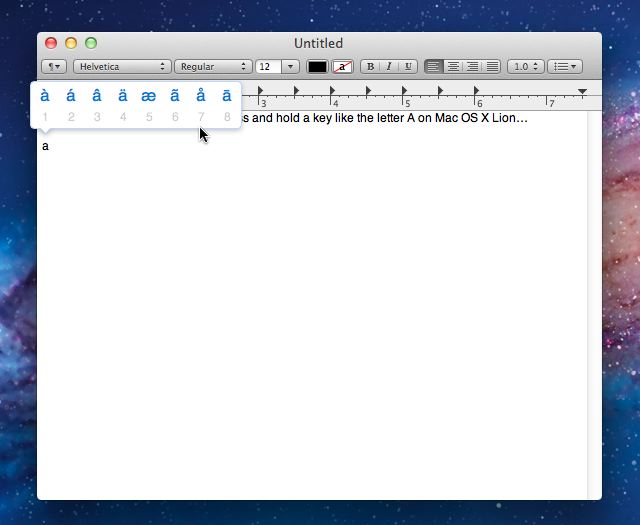
Okay here’s another annoying iOS feature that Mac OS X Lion has adopted. I actually hate this one, but it isn’t the one I hate the most I’ll talk about that next week. It’s smart if you need it, but stupid if you aren’t spending all day using different special characters. If you are a developer you might not like that fact that you cannot enter multiple letter A’s etc. The title of this post is an example of a creative way to use repeating characters that Mac OS X Lion won’t allow you to do by default.

Today, I’ll show you how to fix that.

Use Lion’s Hidden Wi-Fi Diagnostics App [OS X Tips]

By

WiFiDiagnostics

Apple has included a nice app in Mac OS X Lion that you can use to gather all kinds of diagnostic information from your wireless network. The app provides really technical information about the network that most users might find puzzling perhaps that is why Apple decided to hide it. Today’s tip will show you how to uncover this handy wireless network utility.

Get Your Scroll Bars And Your Sanity Back In Lion [OS X Tips]

By

LionSystemPreferences

It seems that no matter where I go or who I run into one of the biggest complaints about Mac OS X Lion that I hear about is, “Where the #!@#!@# did Apple put those scroll bars?!?!?” This not so subtle change in Mac OS X Lion is driving people crazy.

So if you want your scroll bars and your sanity back pull up a chair, lean in close and I’ll tell you how to bring ’em back.

Create App Aliases Or Move Apps In Lion [OS X Tips]

By

Finderapps

Apple has added a restriction to the Applications folder on your start-up disk that versions of Mac OS X didn’t have before the release of Lion. The new restriction prevents you from moving apps out of the Applications folder, but this tip will show you how to get around that.

Consolidate A Group of Files And Folders Into A New Folder in Lion [OS X Tips]

By

Findericon

Today the tip is for all you neat freaks out there. I get pretty sloppy when I’m working on a project and I tend to leave a bunch of different files on my Finder desktop. I tend to gather all these up after I complete the  project and later I throw them into a folder. I used to do it the hard way, but not any more.

How to Enable the Emoji Keyboard in iOS 5 [iOS Tips]

By

Emoji in iOS 5
Some of the original emoji in iOS 5.
Screenshot: Cult of Mac

In iOS 5, Apple introduced a slew of new features and updates to the most advanced mobile operating system on the planet. While users had to rely on third party hacks or jailbreak workarounds to enable an Emoji keyboard before, Emoji has been added as a standard keyboard in iOS 5.

Discover New English, Foreign And Novelty Text-To-Speech Voices in Lion [OS X Tips]

By

speechpanel

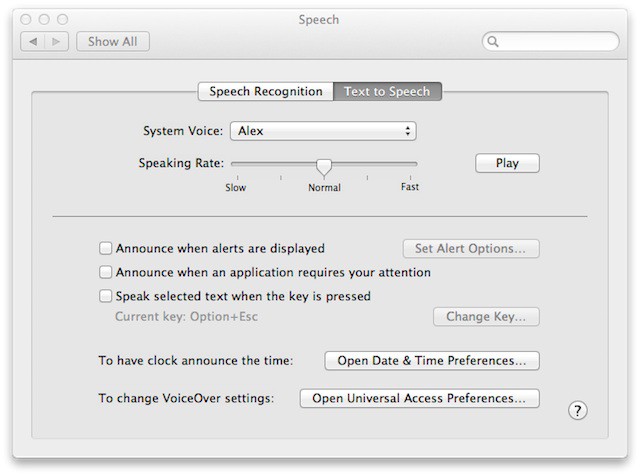
Voice-to-text speech technology quality has improved over the years and Apple is keeping up with the technology by introducing advancements in Mac OS X to support this technology. Mac OS X Lion doesn’t offer a lot of default voice choices, but armed with this tip you’ll find out that there is lot more for your ear to hear than what your eyes can see.


Personalize Your Lock Screen With New Text Display Feature In Lion [OS X Tips]

By

20110114-preferences-icon.jpg

Mac OS X Lion now allows you to add personalized text to your Mac lock screen. In earlier versions of Mac OS X this feature was only available through third-party apps or hacks. You can use this feature to add your contact information to the lock screen which might help you get your Mac back if you lose it.

Reveal The Finder Dock and App Menus in Full Screen Apps In Lion [OS X Tips]

By

SafariFSDock

I like the full screen mode that apps can run in on Mac OS X Lion, but if you are just now experimenting with this new feature you may feel a little lost. The reason you might feel lost is because while apps run in full screen mode a lot of navigations elements are missing. Today you’ll find out that they aren’t missing just hiding.

Lost Your Reading Glasses? Try Double Tap To Zoom In Safari 5.1 [OS X Tips]

By

safariicon

People can spend a lot of time surfing the web in Safari and sometimes we get to a page that we cannot read. The reasons you cannot read the page might include having misplaced your reading glasses or perhaps you just want a better look at some fine print before buying something online then this tip is for you.

How to Find Your UDID [iOS Tips]

By

udid ipad

Each iDevice has a unique device identifier number. You can need your UDID for multiple reasons, including the beta testing of apps and other diagnostic processes.

We’ll show you how to quickly find your UDID.

Discover The Hidden Password Reset Tool In Lion [OS X Tips]

By

davepwdwizard

Apple provides a password reset utility that is very handy when you really need it. In versions of Mac OS X before Lion you accessed this utility by booting your Mac with the included restore DVD. Mac OS X Lion can still reset passwords, but for unknown reasons Apple decided to hide this ability.

Today’s tip will show you how to discover the hidden password reset tool in the Mac OS X Lion Recovery HD Utility.

Adjust Displayed Web Page Width In Full-Screen Safari [OS X Tips]

By

SafariWidth

The full-screen feature supported by some applications running on Mac OS X Lion is a welcome addition to OS X. Especially since it allows you to focus on what you are doing inside of that particular application without any distractions. However, sometimes it doesn’t work very well when you are using Safari and its Reader option.

The primary reason for this might be the width of the display you are using. Luckily you can adjust the width of the page view in Safari while it is running full-screen.

Hurricane Irene Shutters New York Apple Stores

By

Picture 2

Hurricane Irene is shutting down Apple stores in New York, in contrast to the 24/7, 365-day a year store hours listed on the site Apple has issued a warning that the stores will be closed.  The Fifth Avenue, Upper West Side, West 14th, Soho stores are all bracing for the storm and will be open again on Monday.

The official message: “Due to weather conditions, we will be closed beginning Saturday, August 27. We look forward to reopening Monday.”

The desperate may want to consider a trek to the Garden State, as of this the writing the Parmus, New Jersey store is still scheduled to be open over the weekend.

We’ll keep you posted.

Follow @nmar

Quickly Access System Preferences Tied To Function Keys in Lion [OS X Tips]

By

MacBookAir2011Model

Mac OS X Lion has a lot of hidden features tied to the keyboard that are easy to miss. There are all kinds of key sequences that act as shortcuts to various system features. The tip for today will show you how to quickly access the System Preferences panes related to the function keys at the top of the keyboard on your Mac.