

Mac OS X Lion now allows you to add personalized text to your Mac lock screen. In earlier versions of Mac OS X this feature was only available through third-party apps or hacks. You can use this feature to add your contact information to the lock screen which might help you get your Mac back if you lose it.
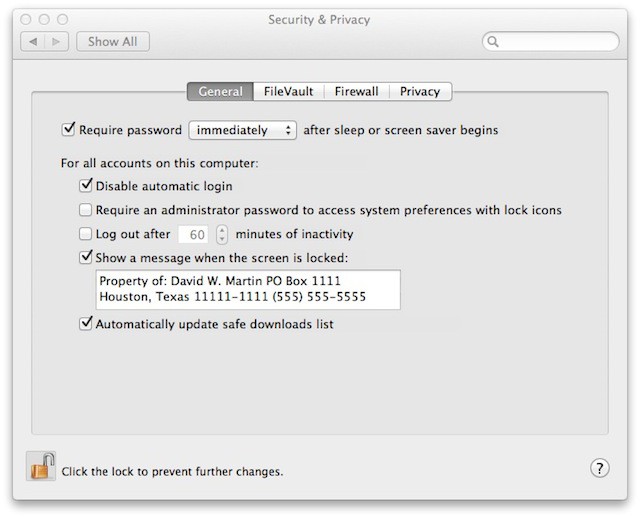
If you want to customize your lock screen just launch System Preferences, access the Security & Privacy control panel and click on the General tab. By default this tab is locked so you’ll need to click on the padlock on the bottom left side of the window and enter your admin password before you are able to make changes to the current settings.
Once you’ve done that look for Show a message when the screen is locked if you check it then you’ll be able to enter the text you want displayed on the lock screen. Just like in this example:
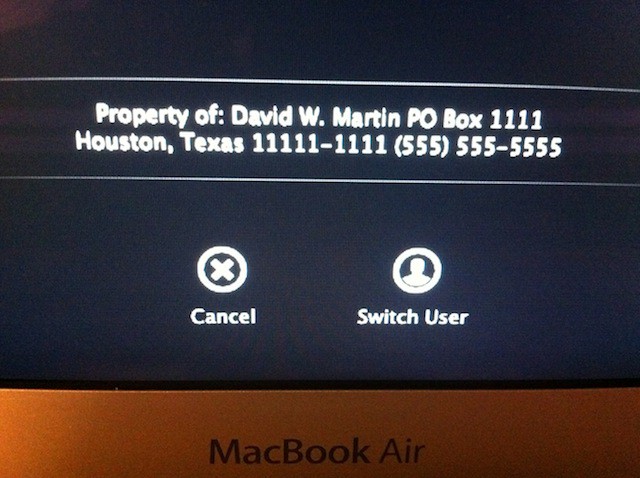
After entering my information above my lock screen now has the following displayed under the login window:
David W. Martin has more than 20 years of experience in the industry as a programmer, systems and business analyst, author, and consultant. David has written for CNET’s iPhoneatlas.com, MacLife.com, CultofMac.com, BYTE.com and recently for aNewDoman.net. He comes to Cult of Mac’s website with deep knowledge and passion for the all things Apple. Follow David on Twitter @david_w_martin or see what he’s up to now at davidwmartin.com.

Subscribe to the Newsletter
Our daily roundup of Apple news, reviews and how-tos. Plus the best Apple tweets, fun polls and inspiring Steve Jobs bons mots. Our readers say: "Love what you do" -- Christi Cardenas. "Absolutely love the content!" -- Harshita Arora. "Genuinely one of the highlights of my inbox" -- Lee Barnett.
This would be useful for mobile devices since those are the ones you may leave laying around somewhere. Text on my desktop lock screen is far less useful. I guess this is really just for laptop users.
8 responses to “Personalize Your Lock Screen With New Text Display Feature In Lion [OS X Tips]”
This was available in Snow Leopard too :-)
This would be useful for mobile devices since those are the ones you may leave laying around somewhere. Text on my desktop lock screen is far less useful. I guess this is really just for laptop users.
Man, how did I miss this??? Great tip.
Awesome, thanks for the tip. I added it to my MacBook Air.
