
Mobile menu toggle

Drag All Of An Apps Windows To A New Space In Mission Control [OS X Tips]

By

Mission Control

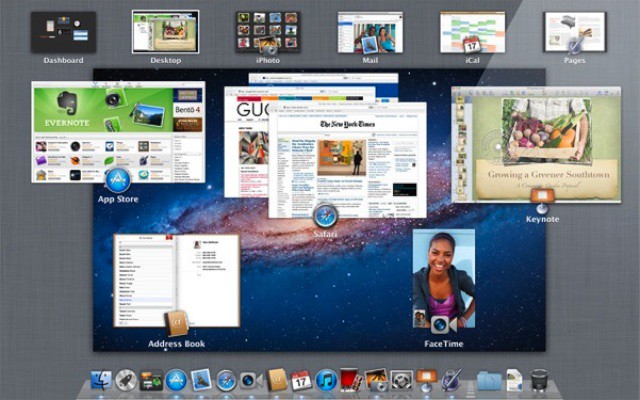
Here is another good Mission Control(MC) tip for all you MC junkies out there. You can do more than just move applications between spaces. You can even drag the application and all its windows to whatever desktop space you choose in one easy step.
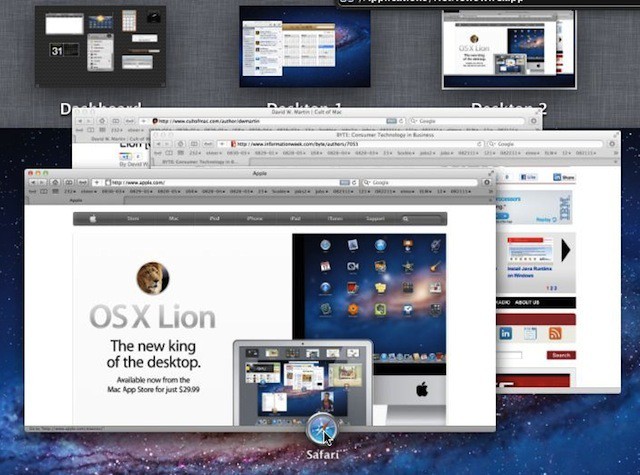
If you want to move an application and all of its windows to a new desktop space the application icon serves as a handle for all the windows connected to it. Simply click, drag and drop that icon to the desktop space you want the application and all of its windows to go and Mac OS X Lion will make it happen.

In this example I’m dragging Safari and three of its open windows from Desktop 2 to Desktop 1 where my Twitter application and iCal presently live.


  • Subscribe to the Newsletter

    Our daily roundup of Apple news, reviews and how-tos. Plus the best Apple tweets, fun polls and inspiring Steve Jobs bons mots. Our readers say: "Love what you do" -- Christi Cardenas. "Absolutely love the content!" -- Harshita Arora. "Genuinely one of the highlights of my inbox" -- Lee Barnett.

16 responses to “Drag All Of An Apps Windows To A New Space In Mission Control [OS X Tips]”

  1. John phillip says:

    when you doing these tips people will prefer videos 

  2. DavidWMartin says:

    Hi John. Thanks for the comment. Tips are tidbits like these are, but how tos are more complex and better suited for video. These might make you think a little harder, but that is part of the fun!- DM

  3. DavidWMartin says:

    Hi John. Thanks for the comment. Tips are tidbits like these are, but how tos are more complex and better suited for video. These might make you think a little harder, but that is part of the fun!- DM

  4. ElWeroOjiverde says:

    It wasn’t so difficult to try, this is a very simple and useful tip. I don’t think a video would be needed.

  5. Alan says:

    It was described using video in a Apple keynote from a while back. Can’t remember which one, maybe the last one.

  6. anonymous says:

    awesome tip. 

  7. George says:

    Well, that was easy! Great tip! :D

  8. Mitchell Busby says:

    I really liked this tip, thankyou for providing some of the less obvious ones :)

  9. Shomari Ayinde Moorehead says:

    Great tip!  I’ve been trying to figure this out for months.  With SL I used to press option (or command — can’t remember) and drag the windows.  I kept wondering if Apple took this feature out.

Leave a Reply

