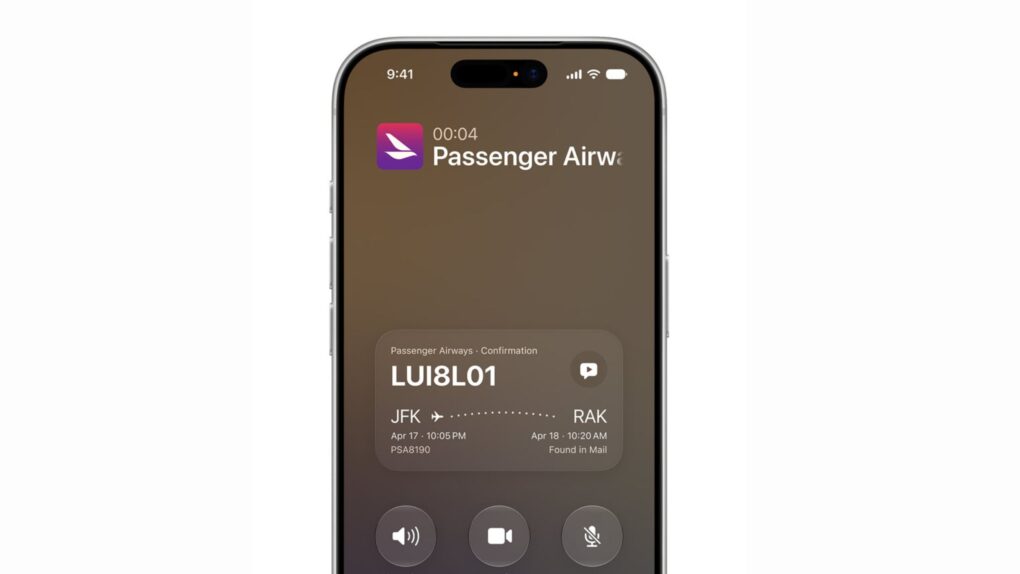
iOS 27’s Call Context feature is shaping up to be one of the most useful additions in Apple’s fall software update. The Phone app will automatically show confirmation codes, reservation details and other relevant info whenever you call a business.
The feature works by pulling information straight from your Mail app, saving you the hassle of digging through your inbox in the middle of a customer service call. And Apple processes all of this locally, without sending anything to the cloud or a third party.
How iOS 27 Call Context works during a call
This deceptively simple addition to the Phone app illustrates Apple’s broader AI strategy: using on-device intelligence to eliminate everyday friction without sacrificing privacy. It’s all about turning the iPhone, and the new Siri AI, into a reliable assistant that anticipates what you need rather than waiting to be asked.
Part of the broader Apple Intelligence upgrade coming this fall, Call Context offers yet another concrete example of how Apple’s AI draws information effectively from various apps (including ones from third-party developers). It lives in the Phone app and activates automatically when you’re on a call.
“Call Context can proactively surface relevant information from across your apps when calling a business,” Apple says on its iOS 27 page.
Apple’s own example shows how that plays out. Say you call an airline to change a flight. During the call, the Phone app scans Mail and finds your confirmation code. It then puts that code on the call screen the moment the call connects. iOS 27 can even offer to read it aloud for you.
The feature can also handle multiple matching reservations. If Call Context finds several possible matches, it will stack the extra details underneath the most relevant one. That way, the information you are looking for should be just a tap away.
The feature works in the iOS 27 beta, and one tech podcaster is already raving about its usefulness.
Ok Siri AI during a call is amazing. Had to call about a hotel reservation and my confirmation number was instantly on the call screen. Plus, I could tap and have Siri read the number for me! pic.twitter.com/PDWqSxPDrf
— Stephen Robles (@stephenrobles) July 26, 2026
How it works (while protecting your privacy)
Apple says Call Context bases its decision on who you’re calling, not on what you say during the conversation. Plus, the company says it does not collect any call data or personal information, or send any of that to any third party.
Call Context follows two helpful features Apple added to iOS 26: Call Screening and Hold Assist. Together, these additions show that Apple is finally giving one of its most-used apps some real love.
What do I need to use Call Context?
The new Call Context feature in iOS 27 requires an iPhone that supports Apple Intelligence. That includes the iPhone 15 Pro, iPhone 15 Pro Max and later models. You can also use it on compatible iPad, Mac and Apple Watch models.
Another thing to note is that it will be limited to English at launch, with no timeline shared for additional language support.
iOS 27, which includes the long-awaited Siri AI, is currently in public beta. Apple usually releases its major software updates alongside new iPhones every year, so a wider rollout is expected around September.

Anurag Chawake is a tech-focused writer specializing in smartphones, apps and consumer technology. His interest in computers began during the Windows 98 era, eventually leading him to explore everything from operating systems to mobile devices and PC hardware. Anurag previously contributed to The Indian Express, covering Apple, Android, gaming and the broader technology landscape.

