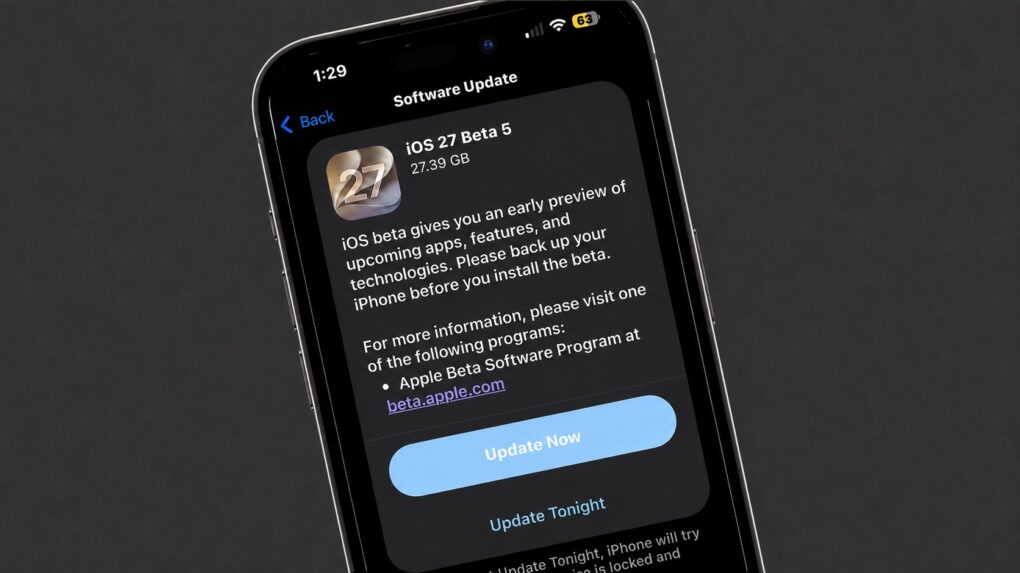
After almost a month-long gap, Apple rolled out iOS 27 beta 5 to developers on Monday. With September fast approaching, the new beta adds the necessary polish before the OS’s public release this fall.
Below are all the changes spotted in iOS 27 beta 5 so far, including the (possible) name of the first folding iPhone.
iOS 27 beta 5: What’s new and changed
New Liquid Glass icons
iOS 27 Beta 5 introduces updated Liquid Glass icons for Safari, Siri, Settings, Remote, Preview and App Store.
iOS 27 Beta 5 redesigns the Preview and Siri app icons, while the Safari and Settings icons also get some subtle refinements. pic.twitter.com/zO8oyKB0vQ
— Beta Profiles (@BetaProfiles) August 10, 2026
More Siri voice customization
The latest iOS 27 beta introduces further Siri AI voice customization options. This includes adjusting the pace and expressivity for all American and British voices.
Confirmation of folding iPhone’s name?
Macworld says it spotted the names (and internal code names) of six next-gen iPhones in iOS 27 beta 5, including a device called the “iPhone Ultra” that undoubtedly refers to the rumored folding iPhone.
Apple buried the names in “system files related to the iPhone’s battery drivers and Battery Intelligence features,” according to the publication, and the beta “explicitly lists six unreleased devices using Apple’s internal codenames”:
V62: iPhone Air 2
V63: iPhone 18 Pro
V64: iPhone 18 Pro Max
V67: iPhone 18
V68: iPhone Ultra
V69: iPhone 18e
No cellular info in Control Center
When connected to Wi-Fi, your iPhone will no longer show the carrier information in the Control Center.
Updated Contacts view
If you have neatly tagged contacts in your phone book, including their company name, those company names will now appear in the main view.
New in iOS 27 beta 5: If a contact has a company name added, it now shows in the main view pic.twitter.com/xNtSXnYY5E
— Aaron (@aaronp613) August 11, 2026
Apple Reference Image
iOS 27 beta 5 code contains references to “Apple Reference Image.” It appears to be a new camera feature that will allow you to “ask Apple to authenticate the source of your photo, such as the camera sensor that took the photo.”
iOS 27 beta 5 shows that Apple is working on “Apple Reference Image”, a new Camera feature for authenticating the source of photos.
When enabled, Reference mode embeds provenance information that can be used to verify the camera sensor that captured a photo. Authentication is… pic.twitter.com/M03XmfQgxb
— Aaron (@aaronp613) August 11, 2026
Splash screen for Calendar, Photos and Apple Music
As Apple prepares to put the final touches on iOS 27 ahead of its public release, it’s adding splash screens to some apps to highlight what’s new. iOS 27 beta 5 contains new splash screens for Apple Music, Calendar and Photos.
iOS 27 beta 5 includes new Splash Screens for Calendar, Photos, and Apple Music pic.twitter.com/TVSytZQJbg
— Aaron (@aaronp613) August 11, 2026
iOS 27 beta 4: What’s new and changed
Zoom Photos to Fill
iOS 27 beta 4 adds a new ‘Zoom Photos to Fill’ option in the Photos app. As the name suggests, it slightly zooms photos that “nearly match the screen’s aspect ratio” for a better viewing experience.
New in iOS 27 beta 4: Zoom Photos to Fill setting
Slightly zoom photos that nearly match the screen’s aspect ratio pic.twitter.com/76CSRAjfEJ
— Aaron (@aaronp613) July 20, 2026
New Siri AI splash screen
A splash screen will appear when you trigger Siri AI for the first time through the Dynamic Island in iOS 27 beta 4.
More Siri voices
There are two more customizable Siri voices in iOS 27 beta 4 on iPhone 17 Pro and iPhone Air. That’s alongside the five legacy Siri voices. Apple says even more voice options are on the way.
Pro Log 2 support
In the Camera settings, you can now choose to record videos in Pro Log or Log 2 format on compatible Pro iPhones. The latter is the newest version of the Log format that saves more information and data than before for additional flexibility in post-production.
New in iOS 27 beta 4: ProRes Log Video Encoding setting
You can choose between Log and Log 2 pic.twitter.com/lS3Ixtd6Sw
— Aaron (@aaronp613) July 20, 2026
AirPods Adaptive Audio slider in Control Center
You can now directly adjust the Adaptive Audio level of the paired AirPods from Control Center in iOS 27 beta 4.
New in iOS 27 beta 4: AirPods’ Adaptive Audio slider is now available in control center pic.twitter.com/c3qrPZB099
— Aaron (@aaronp613) July 21, 2026
Wallpaper animation removed
The fourth iOS 27 beta removes the slick new wallpaper animation that was introduced in beta 3.
iOS 27 beta 3: What’s new and changed
Siri now works with third-party apps
Siri in iOS 27 beta 3 works with third-party apps, seamlessly pulling relevant context and information from them. This is a significant upgrade that would make the Siri AI experience much better.
Siri is starting to integrate with 3rd party apps in iOS 27 Beta 3. If you ask what your vehicle is charged at, it asks which app. It’s not showing results properly yet for me, though pic.twitter.com/7q7M46qT4b
— Aaron Zollo (@zollotech) July 7, 2026
Siri voice customization
iOS 27 beta 3 adds the ability to customize Siri’s voice on compatible devices, which includes the iPhone 17 Pro and iPhone Air. The previous two beta builds only teased the feature.
You can adjust Siri’s pace and expressiveness across two voice options.
Adaptive Audio slider
New in iOS 27 beta 3:
AirPods Adaptive Audio slider in the audio mode picker pic.twitter.com/om1dFuy2He
— Aaron (@aaronp613) July 6, 2026
iOS 27 beta 3 makes it easy to control the Adaptive Audio level. It adds a slider in the audio mode, so you can easily select between transparency or higher noise cancellation.
Siri AI comes to watchOS 27
Alongside iOS 27 beta 3, Apple also seeded watchOS 27 beta 3 to developers. It brings Siri AI and a dedicated Siri app to compatible Apple Watch models.
All conversations in the Siri app sync across your devices. So, you can start a conversation on your iPhone or iPad and continue it on your Apple Watch and vice versa.
5G+ support in India
In India, iPhone users report that after updating to iOS 27 beta 3, they see a 5G+ icon in the status bar. It adds support for Voice over 5G Standalone (SA) on compatible carriers (Reliance Jio and Airtel).
New wallpaper animation
There’s a smooth new wallpaper animation in iOS 27 beta 3.
iOS 27 beta 3 adds a new wallpaper animation which is so smooth pic.twitter.com/8LzBOx3HMD
— Aaron (@aaronp613) July 6, 2026
iOS 27 beta 2: What’s new and changed
Write with Siri
Screenshot: D. Griffin Jones/Cult of Mac
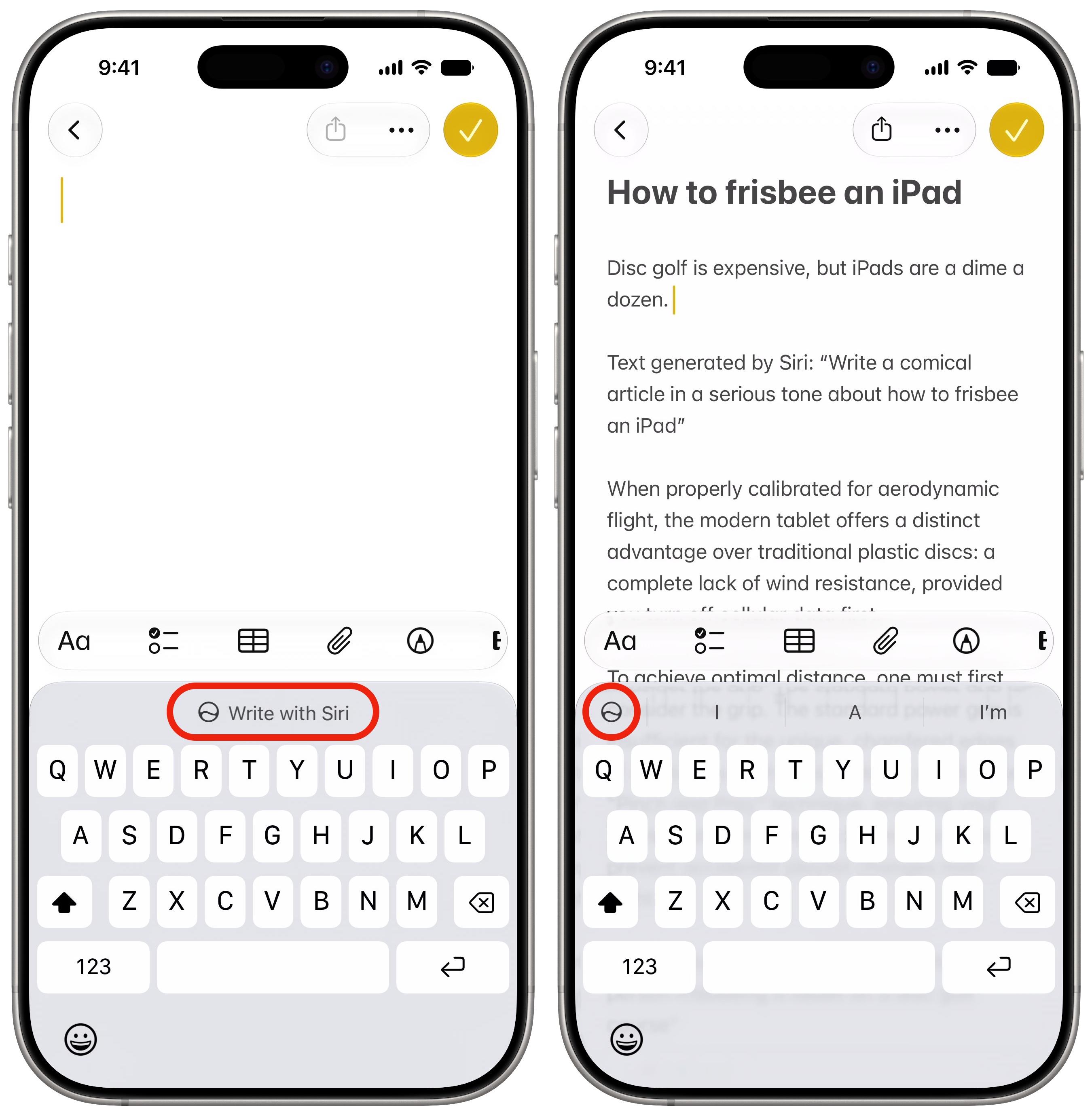
iOS 27 replaces Writing Tools with Write with Siri. And now in beta 2, the new interface has rolled out. “Write with Siri” will appear as a keyboard suggestion when you tap on an empty text field in several system apps, like Notes and Mail. When tapped, a text input field slides down from the Dynamic Island, allowing you to describe in natural language the text you want to add.
If you tap on a text field that already has some text written out, you’ll see a smaller icon with the Siri logo on the left.
Since the feature is integrated with Siri, it can analyze the on-screen text and provide relevant suggestions. It can even pull in contextual information when needed.
IOS27 Beta 2: Write with Siri pic.twitter.com/nHJVDKTu8Q
— Deandawiz (@Deandawiz) June 22, 2026
Siri AI performance improvements
Early reports on X suggest Siri AI feels faster and more responsive in iOS 27 beta 2 than in the first beta.
Customizable Siri voices coming soon
While not live, iOS 27 beta 2 teases the two sliders which customize the Siri voice. You’ll be able to change the pace (its speed) and expressivity (how flat or emotive it is). The feature is labeled as coming soon.
iOS 27.0 beta 2 adds a “coming soon” badge to Pace and Expressivity under the “Customize Your Siri Voice” settings pic.twitter.com/F0GmE2VRtN
— Aaron (@aaronp613) June 22, 2026
“Ask Siri” in Safari
Screenshot: D. Griffin Jones/Cult of Mac
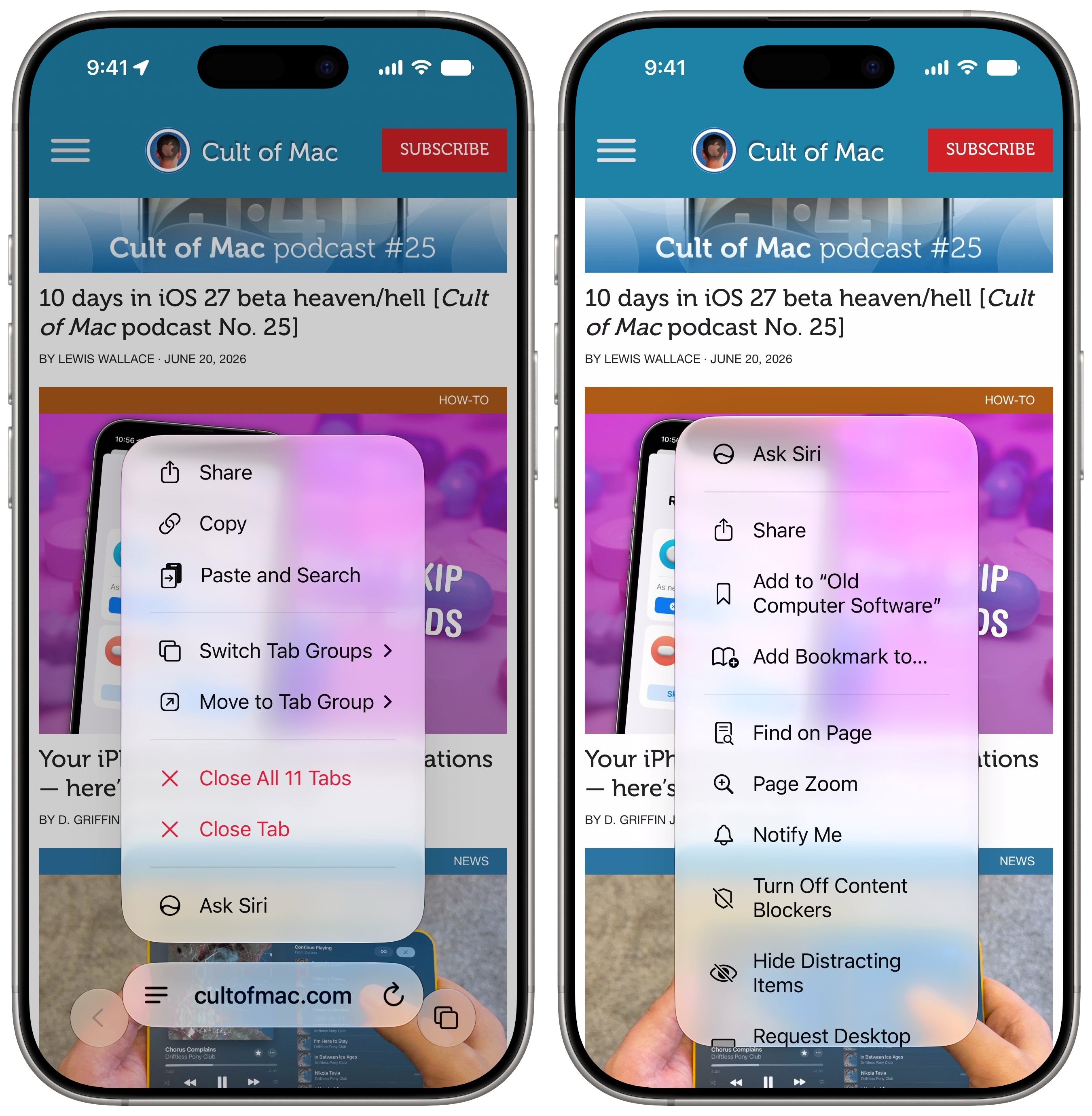
An “Ask Siri” button has been added to the address bar in Safari. When you tap and hold on the bar, the button is at the bottom of the list. When you tap the Page menu (the icon with three lines to the left of the address) Ask Siri is shown at the very top.
This feature lets you ask questions about the page you’re looking at. For example, with this very article open, I asked, “When does this update come out?” and Siri answered, “The final public release of iOS 27 is expected to launch in mid-September 2026, likely around September 14. A public beta s scheduled to become available in July 2026.” Siri was able to understand the context of what I wanted to know and piece together its world knowledge to provide an accurate and well-informed answer, citing MacWorld.
Yellow accent in Camera app
When using one of the hidden features in the iPhone’s Camera app, like Night mode or exposure control, a yellow accent will appear next to the More options button and the feature in use for easy identification.
HomeKit Cameras notification upgrade
In iOS 27 beta 2, you can long-press a HomeKit camera notification to preview the motion alert clip directly from the notification. It also includes controls for nearby lights, so you can easily illuminate the surrounding area with a single tap.
RCS upgrades
Apple continues improving the cross-platform RCS experience in the Messages app. In iOS 27 beta 2, RCS conversations gain support for inline replies.
Likewise, if you react to an image received via RCS, it will be properly displayed to the Android user. Currently, they receive a notification saying “X loved an image.”
Texture in Wallet app
When creating custom passes in the Wallet app in iOS 27 beta 2, you can now select from four different textures.
New in iOS 27 beta 2: Texture options in wallet pass creation pic.twitter.com/WYM510vYsT
— Aaron (@aaronp613) June 22, 2026
Remotely update Apple TV
The updated Home app in iOS 27 beta 2 allows you to update your Apple TV remotely. An ‘Update’ button will appear in the Settings section of the app, where all your devices are listed.
AirPort Utility retired
As part of iOS 27 beta 2, Apple announced that the AirPort Utility app will no longer be available for download on devices running iOS 27.
If you previously downloaded the app, you can download it again from the App Store, even on iOS 27. However, there’s no guarantee that the app will continue to work properly.
As evident from the changes above, Apple has focused on making little improvements to existing features in iOS 27 beta 2. The bigger user-facing changes should land with the first public beta of the OS next month.
D. Griffin Jones contributed to this article.

Rajesh has been writing about consumer technology for over a decade, with a strong focus on iPhones, Macs and Apple’s ecosystem. He enjoys digging into Apple software updates, hardware changes, and discovering new Mac apps that make work faster and more enjoyable.
You can reach out to him at mail[at]rajeshpandey.me.


One response to “iOS 27 beta 5: All the new features and changes”
I’d like to tell Siri to open my myQ garage door.