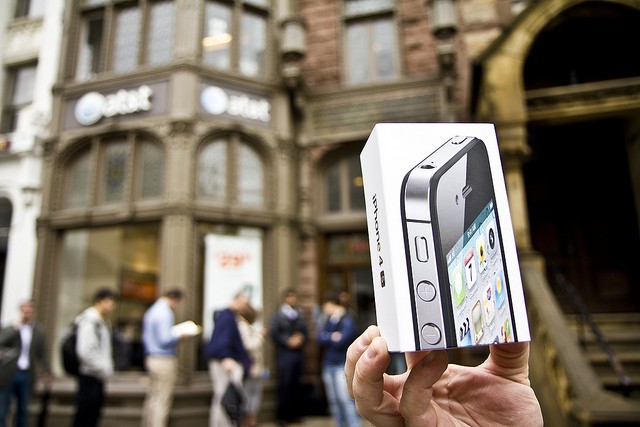
A U.S. court has today ruled that Apple’s iPhone infringes three patents owned by MobileMedia Ideas, a so-called “patent troll” jointly owned by Nokia, Sony, and Denver-based MPEG LA.
U.S. Court Says iPhone Is Patent-Infringing
A U.S. court has today ruled that Apple’s iPhone infringes three patents owned by MobileMedia Ideas, a so-called “patent troll” jointly owned by Nokia, Sony, and Denver-based MPEG LA.
Xiaojie Li, a 44-year-old woman living in Newton, Massachusetts, was pinned to the ground and tasered by police on Tuesday when she attempted to buy a few too many iPhones from her local Apple store. Li says she was buying the devices on behalf of relatives in China, and she was carrying $16,000 in cash when police arrested her.
Amazon has updated its Instant Video app for iOS today, introducing support for the iPhone and iPod touch. The service has been available on iPad since August, but this is the first time it has come to smaller iOS devices, giving Amazon Prime subscribers more than 30,000 free videos in their pockets.
Google released an official Google Maps app for the iPhone on Wednesday evening — I’m sure you’ve already downloaded it to your device — and as you might expect, it’s already incredibly popular. Users have since been rushing to reclaim the mapping service that Apple booted out of iOS with its latest iOS 6 update, helping Google Maps rocket to the top of the App Store’s free chart in just seven hours. It has knocked Apple’s own 12 Days of Christmas app down to second place.
Samsung might be Apple’s biggest rival, but it’s clear to see the Korean company loves its work. It’s been trying to make its Android smartphones more like the iPhone for many years — that’s hard to deny, no matter whose side you’re on — and it’s spawned retail stores, tablets, and even charging adapters that are remarkably similar to those form the Cupertino company.
Even Samsung’s executives can’t fight their love of Mac and iOS devices. One, Young Sohn, a chief strategy officer, admits to using a Mac, iPhone, and iPad at home, and praises Apple’s unique ecosystem.
In case you hadn’t already heard, Google finally released an official Google Maps app for iPhone on Wednesday night, and I must say, I think it’s terrific. It’s super quick, it looks fantastic, and it brings back all the mapping features you had on your iPhone before Apple gave Google Maps the boot — including Street View and transit directions. Google has also thrown its own turn-by-turn navigation into the mix for good measure.
In fact, the new Google Maps app for iPhone is so good that Google admits it’s better than the Android version. It also promises an iPad version is coming soon.
We’re all busy people, but around this time of year that level of “busy-ness” seems to increase exponentially. We seem to have less hours in the day, and that means we need to make the most out of each and every minute. And your Mac can help you do that – with the right apps in place, that is.
There’s no better opportunity than now to start building your software stack than with today’s Cult of Mac Deals offer. The Mac Variety Bundle 2.0 from Macbundler includes 9 top Mac apps valued at $527 for the amazingly low price of just $45! That’s a savings of 91%!
Scheduled as a December 13th launch, 1Password, version 4.0.2, is available now on the iTunes App Store.
The updated app brings a host of new features, and is available for $7.99, which is 50 percent off the typical price of the security app from atebits software.
I keep my iPhone in silent mode most of the time; custom ringtones mean relatively little to me. However, as anyone who keeps their iPhone on silent at work knows, text messages and other notifications that come in can still cause the iPhone to vibrate. This can be a little embarrassing, especially if you have set your iPhone on a particularly resonant surface, like a meeting table or a classroom desk, say.
The WINGStand, from the guys at BiteMyApple, is another accessory that was born on Kickstarter. It allows you to combine your iPad, iPad mini, and iPhone with your Apple Wireless Keyboard in the simplest way possible — without carrying additional an additional stand, dock, or case.
Simply attach the WINGStand clips to the back of your keyboard — they cling onto its battery compartment — and they form a stand in which you can sit your iOS devices. As you can see from the photograph above, the two almost merge into one to create a pretty little computer that’s perfect for getting things done on the go.
When you’ve finished working, simply pull the WINGStand clips off your keyboard, clip them together, and throw them in your bag.
The WINGStand is available in white and “eco friendly” black and it costs just $15. Is it worth it?
One of the better Yuletide traditions is the venerable holiday Advent Calendar, in which each day of December leading up to Christmas is marked off on a special calendar by opening its corresponding door to find a small gift, toy or chocolate squirreled away inside.
This year, we here at Cult of Mac decided we wanted to give our readers their very own Apple-themed advent calendar, filled with the year’s best apps, gadgets, stories and other curios. So each day in December, we’re going to lovingly peel back the door on the Cult of Mac 2012 Advent Calendar to reveal another delicious morsel, something really special that came out this year that we think every one of you should enjoy.
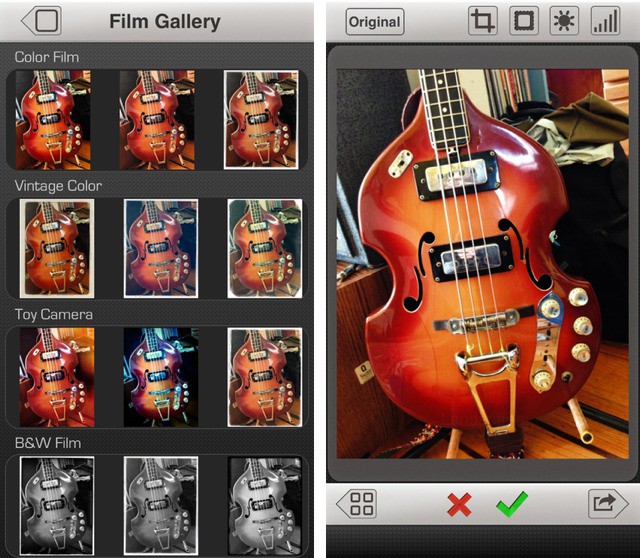
It’s Day 12! That means KitCam, one of the best camera apps for the iPhone.
Logitech produces some of the best portable keyboards there are for the iPad, and it’s just announced another that will also work with your Mac, too. But not only is it compatible with both Mac and iOS devices, its awesome ‘Easy-Switch’ feature allows you to connect to up to three via Bluetooth at the same time and then quickly switch between them at the touch of a button.
After rolling out a redesigned Yahoo! Mail on Tuesday, Yahoo! has launched a brand new Flickr app for iPhone this morning that appears to be going head to head with Instagram. It’s a completely redesign of the previous version, and it promises to be easier to use and more beautiful. It also offers new features, including 16 filters for your photographs.
LTE smartphones are all the rage these days, and Apple only has one: the iPhone 5. That hasn’t stopped Apple from quickly gobbling up nearly 30% of the global LTE market, according to research firm Strategy Analytics.
While Android handset makers have been churning out LTE devices left and right in recent months, Apple accounts for 26.7% of all LTE devices in use around the world—and that’s with only the iPhone 5, Retina iPad, and iPad mini.
We’ve seen a number of stories over the years where Find My iPhone helped iPhone and iPad owners reunite with their lost devices. Now Apple’s making things even easier for people hunting down their devices by including driving directions to each device.
Find My iPhone for iOS will now tell you the exact route you should take to get your lost iPhone back. To use the driving directions features, users must be updated to iOS 6 because Find My iPhone gives driving directions through Apple Maps.
https://youtu.be/Ha_4nrGyGPk
AgileBits has overhauled its 1Password app for iOS for version 4.0, and its begun teasing the release with a new trailer ahead of its December 13 launch. The video doesn’t give away any of 1Password’s new features, but it does show off its new look. Although you will have to keep your eyes peeled if you want to see it; blink and you’ll miss it.
Google rolled out a major update to its Gmail app for iOS last week, and it seems Yahoo! is keen to keep up. The company just introduced a brand new look to its Yahoo! Mail app for iPhone, which introduces a brand new look that I’m a big fan of. It’s not too dissimilar to Gmail’s, in fact. And in some ways it’s better.
Guy Kawasaki was one of the Apple employees behind the legendary marketing of its 1984 Macintosh, and he’s well known among the Apple community for being a former evangelist of the Cupertino company. You might think, then, that when Kawasaki’s phone rings, it’s an iPhone he pulls out of his pocket.
Well that couldn’t be further from the truth. Kawasaki’s a diehard Android fan, and he has been for about a year. He no longer uses any iOS products at all — not even an iPad.
Foxconn’s problems with worker rights are well known, and for the last year, CEO Terry Gou has been openly talking about an obvious solution to the human rights issue: replace as many of his human workers with robots as possible.
It makes sense. Robots can’t be underpaid, or overworked, and you certainly don’t need to hang suicide nets around their dormitories. Terry Gou is so enamored with the idea that he’s been openly talking about employing one million robots within the next three years.
Now it’s happening.
The future of Microsoft’s SkyDrive service on iOS looks bleak today as the company appears to have entered into a fight with Apple over its 30% cut of App Store revenues. Microsoft recently gave iOS users the ability to upgrade their SkyDrive subscriptions from their iPhones and iPads, but until the company agrees to give Apple a 30% cut of the in-app purchases, it won’t get any future updates approved.
A critical bug fix that prevents the app from crashing has now had to be placed on hold. Should Apple’s rules be a little more flexible in certain cases?
This may be too basic of a tip for most of you, but there’s bound to be a few folks out there who haven’t heard this one. I ran into someone in real life (gasp!) the other day who hadn’t known that he could hold his iPhone in landscape mode, like a real point and shoot camera, and click the button now located in the upper right of the iPhone to take a photo.
It was like a light went on over his head as soon as he tried this. If you haven’t heard of this great way to take a snapshot, now’s the time to give it a try.
We liked Cobook first time round, when it appeared on OS X as a clever little contacts database hidden inside a tiny Menu Bar icon. Now it’s on iPhone, and just as clever as before.
I am forever adjusting my iPhone’s brightness settings, whether it’s to make the screen as dark as possible so that I can use it in bed without keeping my girlfriend awake, or to make it as bright as possible when I’m rummaging around in the attic for the Christmas decorations. The problem is, Apple doesn’t make it easy to alter brightness levels on the fly.
If you’ve got a jailbroken iOS device, however, you can take matters into your own hands. Install the new BrightVol tweak on your handset and you’ll be able to adjust your display’s brightness levels using your volume buttons. It couldn’t be quicker.
You’ve got just one more chance to get The iStack Mac Bundle 2.0. In this worthy sequel to the original bundle, we’ve got 10 killer apps (and a bonus e-course for the first 3000 buyers) lined up at a massive savings of 93% off the regular price you’d pay for them separately.
That’s right…you’ll get this Cult of Mac Deals offer for only $49!
Believe it or not, Black Friday has already come and gone. Pretty soon the Christmas season will begin, and we’ll mark this midwinter festival by getting together with friends and family and continuing to drink and eat far too much.
Meanwhile, we also buy gifts for those same friends and family members, whether they want them or not. Luckily, we’re here to help, and if you follow our festive advice, your gifts just might make it into the “wanted” category.
From now until Christmas, Cult of Mac will be putting together holiday gift guys full of ideas for the special ones in your life, no matter what their interests or your budget. Today, we’re looking at gifts for people who have an unnatural love for their iPhones. Freaks.