Mobile menu toggle

How-To - page 23

Save Your Mac’s iWork Documents Directly To iCloud [Video How-To]

By

iWork

As of this point, the current version of iWork for Mac has absolutely no iCloud functionality, while the iOS version fully supports it. This tends to be frustrating when moving files around, as it makes what should be a straightforward process into a disaster. In this video, I’ll show you how you can upload your documents directly to iCloud, to make file sharing much easier.

CUI Error? Here’s How To Fix Crashing Problems With OS X 10.7.3 Update

By

CUI-CUI-CUI-error

For a lot of people, yesterday’s 10.7.3 update for OS X Lion went without a hitch using Software Update, but for a sizable (and understandably annoyed) minority, the update resulted in the widescale crashing of apps and the replacement of stock Lion UI elements with a mysterious “CUI?” error.

If you’ve been bit by this error, you have our sympathies, but buck up! In most cases, it’s a pretty easy thing to fix the update and get Lion working as it was.

How To Delete Saved Usernames & Passwords In Mobile Safari [iOS Tip]

By

clear-names-pass-safari-iphone

The ability to have mobile Safari save the usernames and passwords that we enter frequently on our iOS devices can be hugely helpful, especially for the forgetful minds amongst us. But not everyone feels comfortable having these details saved on their device. After all, if it gets into the wrong hands, anyone can login to our favorite sites at the tap of a button.

So what if you save these credentials accidentally, or you decide that you no longer want these details saved on your device. Well, fortunately, it’s very simple to delete them without having perform a complete restore on your device. Here’s how to delete saved usernames and passwords in mobile Safari.

Never Wait For A Genius Bar Appointment Again Using The Apple Store App [iOS Tip]

By

Genius-Bar-appt-iOS

Outstanding reliability is just one of the reasons why we fall in love with our Apple products. But unfortunately, everything goes wrong from time to time. That’s why we have the Genius Bar.

Did you know it’s incredibly easy to book Genius Bar appointments on an iOS device using the official Apple Store app? Here’s how to do it.

How To Forget A Wi-Fi Network On Your iOS Device [iOS Tip]

By

forget-network-ios

Once you’ve connected to a Wi-Fi network on your iPhone, iPod touch, or iPad, your device remembers its credentials and, for your convenience, connects automatically next time. However, this isn’t always helpful. Sometimes we connect to hotspots accidentally, and it’s frustrating when your device connects to a network you don’t want it to.

You can prevent this by “forgetting” the networks you’ve previously connected to. Once forgotten, your device will no longer connect automatically, and only when you tell it to. Here’s how to forget a Wi-Fi network.

How To Make iPhone Videos That Don’t Suck [Macworld / iWorld 2012]

By

iphone_video

SAN FRANCISCO, MACWORLD/IWORLD 2012 — If your iPhone videos are so lame that even your loved ones won’t watch them anymore, we’ve got some advice for you.

Cult of Mac talked to Matt Dessner, co-founder of the Original iPhone Film Festival (OIFF),  about choosing a subject, keeping it steady, getting enough b-roll and what he calls the Golden Tip of Editing.

The OIFF is about to announce 2012 winners here; with a little practice you might win next year’s competition and a MacBook Air.

How To Take Screenshots On An iOS Device [iOS Tip]

By

iPhone-in-camera

Ever wondered how you take a screenshot on your iOS device? It’s actually a lot simpler than you may think, with no need for third-party software or unauthorized tweaks.

In fact, this is one of the simplest tips we have. But seeing as though yesterday’s simple tip went down so well, we thought another one wouldn’t hurt. Here’s how to take screenshots on an iOS device.

Ditch Mobile Web And Load Pages In Their Entirety Using Dolphin For iPhone [iOS Tip]

By

Dolphin-Icon-1

The mobile Safari browser that comes baked into Apple’s iOS devices is quite possibly the best mobile browser there is. But what if you want don’t want to load mobile web pages? What if you want to enjoy websites in their entirety?

Unfortunately mobile Safari doesn’t let you do this, but a free third-party browser called Dolphin does. Here’s how to ditch the mobile web and load full, desktop websites on your iPhone.

Run Windows Apps On Your Mac With Wine [Video How-To]

By

Sweeper

Even though OS X supports more and more applications every day, there’s still some software out there that can only run on Windows. That’s where Wine comes in. Wine is a free application that allows you to run many Windows applications on Mac OS X. While it’s not flawless, and it doesn’t support all applications, it’s pretty neat, and can be helpful if there’s a certain piece of Windows software out there that you really need to run on your Mac. Heck, it even runs Minesweeper. In this video I’ll show you how to get Wine up and running, as well as how-to convert Windows applications into OS X apps.

Directly Upload Images You Take On Your iOS Devices To Dropbox With QuickShot [iOS Tip]

By

QuickShot-Dropbox

If you’re a Dropbox user, uploading images to your Dropbox account directly from your iOS devices can be incredibly handy. And with QuickShot ($1.99), it couldn’t easier. Simply link the app to your Dropbox account and images are automatically uploaded as you snap them.

This is great if you often use public computers and you need to upload multiple images, but you don’t want to send them all via email. You can also use the app as alternative to Photo Stream. Sure, Photo Stream’s great, but until Apple allows us to delete our photos individually, it’s not ideal for everyone.

By uploading your images to Dropbox instead, you have access to them on pretty much all of your internet-connected devices. Here’s how to get setup with QuickShot!

How To Fix “Error Establishing Database Connection” While Jailbreaking With Absinthe [Updated]

By

Error Establishing A Database Connection iPhone 4S

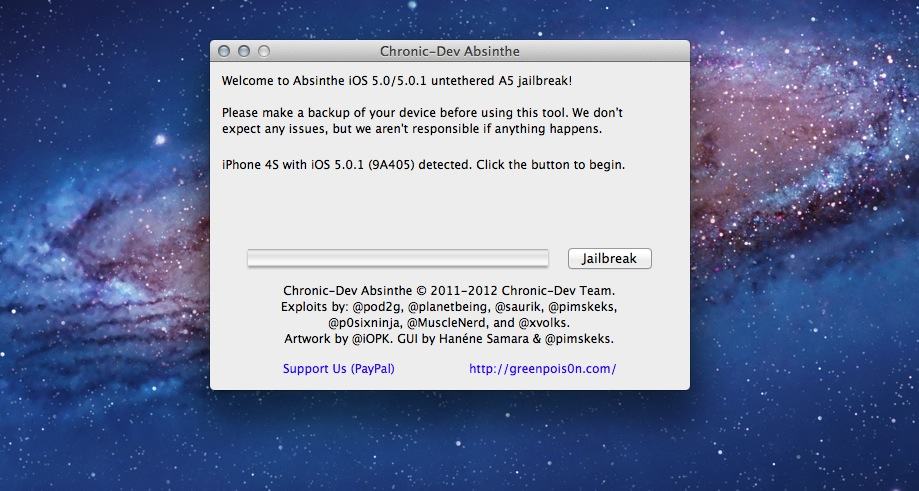
The untethered iOS 5 jailbreak for the iPhone 4S and iPad 2 has become available, and we have tutorials up for the iPhone 4S and iPad 2 already. This is a highly-anticpated jailbreak, and millions will likely use it to jailbreak their A5-based iOS devices.

As you can imagine, many are trying to jailbreak their iPhones and iPads right now with the Chronic Dev Team’s Absinthe tool, and the Greenpois0n servers are getting hammered. This means that it may be nearly impossible for many to actually get Cydia up and running right now. If you can’t manage to finish the Absinthe jailbreak on your iPhone 4S or iPad 2, we have a handy fix.

How To Jailbreak Your iPad 2 On iOS 5 The Right Way

By

IMG_0001

The untethered jailbreak for the iPad 2 has finally been released. After months of waiting, you can download the Chronic Dev Team’s free Absinthe Mac tool to jailbreak your iPad 2 in a matter of seconds.

We’ll show you how to jailbreak your iPad 2 running iOS 5.0 or iOS 5.0.1 the right way in this guide.

How To Jailbreak Your iPhone 4S On iOS 5 The Right Way

By

Absinthe Mac app

The untethered jailbreak for the iPhone 4S has finally been released. After months of waiting, you can download the Chronic Dev Team’s free Absinthe Mac tool to jailbreak your iPhone 4S in a matter of minutes.

We’ll show you how to jailbreak your iPhone 4S running iOS 5.0 or iOS 5.0.1 (both versions) the right way in this guide.

Use Siri And The Find My Friends App To Locate Your Pals By Voice [iOS Tip]

By

Find-My-Friends-with-Siri

While the feature is currently still in beta, Apple is yet to extend Siri support to apps that aren’t already baked into the iOS operating system. But did you know that the company’s own Find My Friends app, which debuted alongside iOS 5 last summer, does include Siri support, allowing you to locate your pals using only your voice?

Here’s you to find your friends using Siri.

Today At Cult Of Android: Ruling Determines Motorola Doesn’t Violate Apple’s Patents, HTC EVO 3D Update Removes Carrier IQ, And More…

By

gavel

Android may not be every Mac user’s cup of tea, but it’s the biggest mobile operating system in the world, and it’s important to know what’s going on with Android — what it’s doing right, and what it’s doing wrong. Here’s the best stories that hit today over at our sister site, Cult of Android.

How To Delete Audiobooks Directly From Your iOS Device [iOS Tip]

By

delete-audiobooks-ios

One of the nifty little features in Apple’s iOS operating system is the ability to “swipe to delete” certain items. You can use the gesture to remove songs, podcasts, videos, text messages, emails, and more from your device, but for some bizarre reason, not audiobooks.

Here’s how to delete audiobooks directly from your iOS device — without the need for a computer.