

Mobile menu toggle

Access Your Mac On The Go With LogMeIn On Your iOS Device [iOS Tip]

By

LogMeIn-iOS-feature

Have you ever arrived at the office and realized that report you need for the meeting today is still on your Mac at home? I’m sure that at some point we have all needed access to our home computer while we’re away from home, and it’s actually a lot easier than you might think thanks to the free LogMeIn app for iOS.

With LogMeIn installed on your Mac and your iPhone, iPod touch, or iPad, all you need is a data connection to access your home computer and all its files. Here’s how to get started with LogMeIn.

First, prepare your Mac by signing up for a LogMeIn account (if you don’t already have one) and installing the LogMeIn client. You can do this by visiting secure.logmein.com, and then clicking “Create an account.”

Once you’re signed up and you’ve added your Mac to LogMeIn, you’ll be given the option to install the client on your Mac. You’ll need to do this before you can connect to it. During installation, you’ll be asked to give your Mac a name, and you’ll need to login to your LogMeIn account that you just set up.

Once installation is complete on your Mac, download the free LogMeIn iOS app from the App Store. Open it up and login to your LogMeIn account, you’ll then be presented with a list of computers you have signed up to the service.
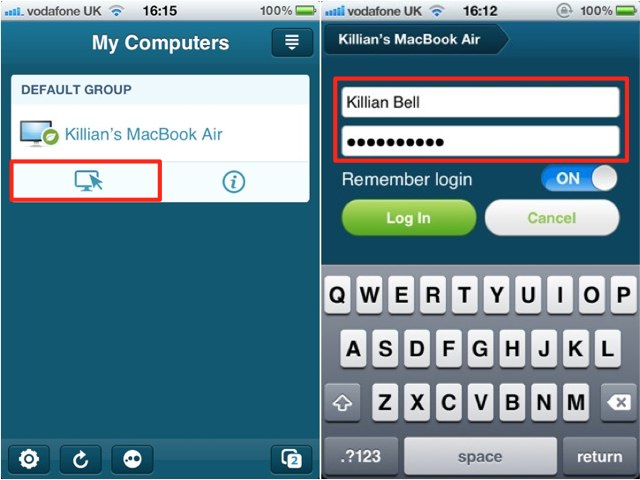
To access one of these computers, simply tap on its name, and then the little icon featuring a cursor beneath it. At this point you’ll need to login using the username and password you use on your Mac — not the details you use for LogMeIn.

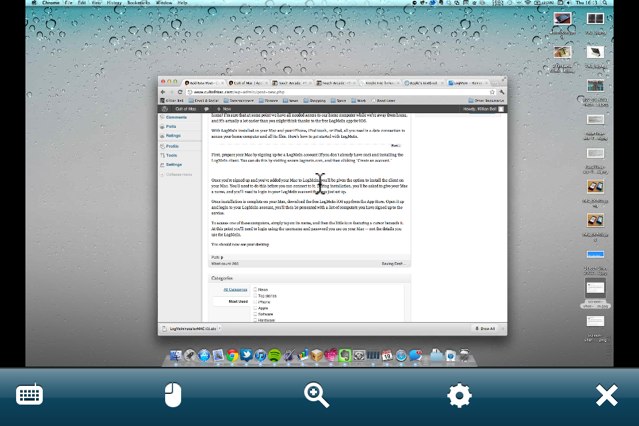
You should now be able to see your desktop, which you have complete control of with your device.
Remember: As noted by Christopher Hengge in the comments below, your Mac does need to be powered on for you to access it. If it’s shut down, or even asleep, and not connected to the internet, then (obviously) you won’t be able to reach it. Thanks, Christopher!

  • Subscribe to the Newsletter

    Our daily roundup of Apple news, reviews and how-tos. Plus the best Apple tweets, fun polls and inspiring Steve Jobs bons mots. Our readers say: "Love what you do" -- Christi Cardenas. "Absolutely love the content!" -- Harshita Arora. "Genuinely one of the highlights of my inbox" -- Lee Barnett.

13 responses to “Access Your Mac On The Go With LogMeIn On Your iOS Device [iOS Tip]”

  1. FriarNurgle says:

    Neato. So I can get flash on my iPhone?

  2. MacHead84 says:

    I could be wrong but I dont think LogMeIn lets you hear audio with their free service. Thats why I ended up going with Slpashtop Remote Desktop since it streams your audio…

  3. KillianBell says:

    Yes, I think you’re right. At least I didn’t have sound the last time I tried it.

  4. Brian says:

    Also the frame rate is slow on the free version, so you really can’t watch a video. However, being 200 miles away from my iMac and being able to make some edits to a video, upload it to the cloud, and play it off my phone that was connected to a projector all from my iPhone is just plain ridiculous.

  5. Christopher Hengge says:

    The host computer can’t be sleeping or off, correct?  That’s the only downside to LogMeIn – you need to leave your Mac on the whole time, unless I’m wrong.  But it is a great tool!

  6. Clark Wallace says:

    I prefer Jaadu iTeleport but each to their own right?

  7. KillianBell says:

    Yes! That’s correct. LogMeIn cannot connect to your Mac if your Mac isn’t connected to the internet, which means it can’t be asleep or switched off.

    I should have included that note actually. I’ll add it as soon as I can get to a computer (on an iPad now). Thanks for your feedback.

  8. LUVS_ME_SOME_MAC says:

    Um, am I the only one who finds this ironic? Why can’t you use LogMeIn to add it? 

  9. SupaMac says:

    exactly what I was thinking hahaha… shows us just how useful the app is…

  10. KillianBell says:

    Because I don’t always leave my computer on, especially if I’m going out and I know I won’t need access to it. Once the working day is over, I don’t want to look at my desktop! ;)

  11. KillianBell says:

    Now updated. Thanks again!

  12. Robert Ballard says:

    I’ve only used it while in Holland, I live in Ca, and while it did work and I was able to get a few photos and Illustrator files I  needed it was a nitemare as far as working within Photoshop and illustrator. Slow to respond and since the computer I was working on in Holland didn’t have my program additions it was not much fun. 

    Never used it on a iOS device though I do have it on my iPad.

  13. brendon fox says:

    Logmein is undoubtedly a leader in remote support industry. It works really well. Additionally, tools like RHUB remote support servers are also very much in demand nowadays b/c of its unprecedented security and on premise deployment.

Leave a Reply

