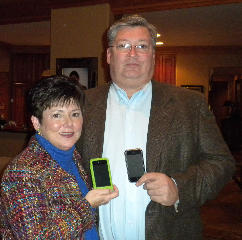
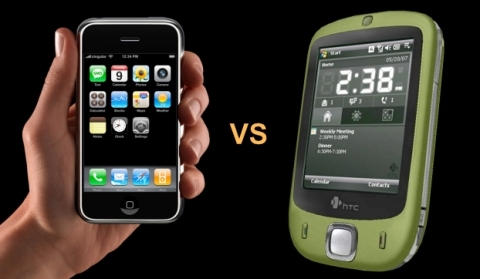
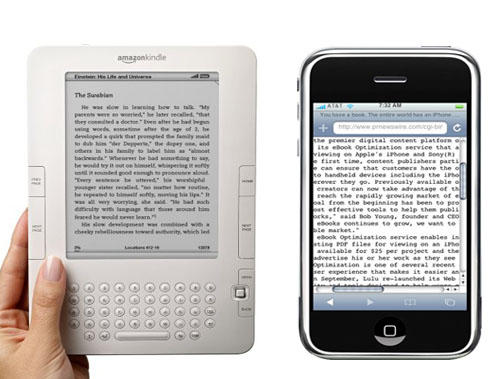
The combination of an iPod Touch and a personal WiFi hotspot like Versizon's MiFi is almost ready to replace the iPhone, one CoM reader has found. Image: Wired.com
As more and more U.S. iPhone users become fed up with AT&T, some are seriously starting to consider using Apple’s iPod Touch as a full-time phone.
Trouble is, the Touch doesn’t have cell phone radio. But pair it with a personal WiFi router, like Verizon’s MiFi, and a service like Skype, and the Touch might be a viable full-time VOIP phone.
CoM reader Alex Bowles’ contract with AT&T expires in January, so he seriously looked into replacing his iPhone with an iPod Touch and Verizon’s MiFi. Here’s what he found.
Famous iPhone hacker George Hotz (better known as GeoHot) claims to be working on a tool that might revolutionize the current jailbreak scenario! Called blackra1n, the tool promises to jailbreak all existing iPhone and iPod Touch devices with 3.1.2 installed in just a matter of seconds, according to GeoHot. However, it will NOT unlock the device, enabling it to be used with different GSM carriers worldwide.
Currently, jailbreaking an iPhone or iPod Touch is a complex and time-consuming process, requiring the creation of custom firmware, entering several different modes, etc. There are separate tools for different devices and different firmware versions. Not only this, each generally requries you to follow a different procedure. It’s a pain.
But with blackra1n, jailbreaking promises to be a few simple clicks for any iPhone or iPod Touch.
The last tool released by GeoHot was purplera1n, a simple solution, which allowed iPhone 3GS users to jailbreak any OOTB (out-of-the-box) phone with firmware version 3.0 with a single click. The procedure was simpler and less painful, compared to DevTeam‘s offerings, which required you to choose between several different options. But purplera1n contained a few bugs that forced him to kill the project after the release of firmware update 3.0.1.
However, blackra1n will be quite different from purplera1n because it is based off a completely different exploit, GeoHot says. GeoHot expects to release the tool really soon although, after dealing with some technical obstacles. Hopefully, it will be out this weekend.
Hotz is a 21-year-old hacker who is famous for unlocking the first iPhone ever soon after its debut in 2007. After a break, he recently made a comeback to the iPhone scene with the release of his jailbreak and unlock solutions for iPhone OS 3.0 that offered tough competition to the DevTeam.
Adobe has announced the release of Photoshop for your iPhone or iPod touch – although the software is closely tied to Adobe’s Photoshop.com photo hosting and sharing service.
Microsoft’s “Pink” phones, a Zune-like response to Apple’s iPhone, is on the verge of collapse, as the company ignores advice coming from the increasingly disgruntled team of Danger employees. The key mistake, according to leaks is the software giant’s demanding a firewall between the Pink program (also known as the Zune Phone) and Windows Mobile and Zune projects.
According to AppleInsider, Microsoft’s isolation of the Danger team prevented the engineers and others to pass along lessons learned while developing Danger’s Sidekick. Since acquiring the smartphone maker in 2008, Microsoft has seen most of the Danger team either be fired or walk.
If you’ve ever wondered what the point of those flashlight apps are, wonder no more: they are kick-butt investigation tools.
The next time you need to crawl down a 150-foot electrical conduit and don’t have a flashlight — your iPhone can light the way, a recent episode of CSI reminds us.
In a cheesy bit of iProduct placement, the actor hands his iPhone-cum-flashlight over to the guy who will have to brave the crawl space saying “There’s an app for that.”
There are a bunch of these apps on iTunes, most are free, ranging from Funny Flashlight to myLite (also has strobe effects), with jokey descriptions like “Are you scared of the dark?”
Has anyone found the flashlight app handy — aside from helping solve heinous crimes?
Apple has just released a new firmware update, version 3.1.2 for the existing iPhone and iPod Touch range, which contains no new features but fixes an important issue with cellular network reception. The new software fixes dropped cell connections until the iPhone is restarted, according to Apple.
However, it looks like the update does contain a new baseband version in order to fix the issue, thereforeif you have an unlocked iPhone 3G or iPhone 3GS, do not update until there is confirmation from a trusted source, like the iPhone DevTeam.If you’re planning to jailbreak, you should wait as this firmware version is currently incompatible with the latest jailbreak tools. But updates will soon be released to resolve the compatibility problem, according to the iPhone DevTeam.
The complete-ish list of changes, according to Apple’s cryptic update notes, is as documented below:
Resolves sporadic issue that may cause iPhone to not wake from sleep.
Resolves intermittent issue that may interrupt cellular network services until restart.
Fixes bug that could cause occasional crash during video streaming.
Clearly, it indicates no new features, unless there are some hidden ones. ;)
To download the new firmware for your iPhone, select the model below to download it directly from Apple’s server or open iTunes and click iTunes –> Check for Updates in the menu bar.
The New York Metropolitan Transit Authority (MTA) gave the green light to Station Stops, an app with handy time tables, after having it yanked from iTunes for intellectual property claims against the developer.
Station Stops, which costs $2.99, is back in the Apple store this week.
It’s a major victory for the developer/blogger/commuter Chris Schoenfeld, who saw his work pulled from iTunes in August and on the receiving end of a nastygram from MTA lawyers.
The app provides a timetable for the Metro-North Railroad for regularly-scheduled trains departing and arriving from Grand Central Station.
Schoenfeld ran into trouble with the MTA because although they provide schedules to Google Transit, they do not release the data publicly. To build his app, Schoenfeld did it the old way — by entering data manually from the published public schedule.
If you were around when Dennis Hopper and Peter Fonda made American cultural history in 1969 with “Easy Rider,” you may have noticed the announcement about the iBike Rider, an iPhone case and more for motorcycle riders. While quite a stir was made about helmet-mounted GPS, or the handlebar iPhone case and even the iPod bike charger, the iBike Rider is for hog-owners.
The iBike is a weather-proof case for $42 but also offers the option of piping iPhone conversations directly into your helmet for an added $85. The one drawback: the iBike currently ships from France.
Have a question? Aardvark Mobile is a great iPhone app that will find a real person to answer it – usually within minutes. It is a wonderfully useful app and has the potential to be an iPhone mainstay for years to come.
Aardvark Mobile is the latest addition to Aardvark: a social question and answer service that emerged from its beta phase earlier this year. Before Aardvark Mobile, users could only communicate with Aardvark through IM or email. The upshot of this was that if you needed a question answered from your iPhone, you had to go through your email or instant messaging app. In most circumstances you were better off finding an answer on your own using Google – even on an iPhone 2G.
But now Aardvark Mobile makes using Aardvark with an iPhone a cinch. So easy in fact, it makes Googling questions from your iPhone seem cumbersome and antiquated.
Roger Åberg of MacFeber.se has posted a quick unboxing video and first look at the highly-anticipated TomTom Car Kit for iPhone. The $120 accessory looks pretty solid, well-designed and sticks easily to the windshield. See the video above.
Thumbs up: three recent Hockney iPhone pieces. @nybooks.com
Veteran pop artist David Hockney has been demonstrating his passion for creating works on his iPhone since he started fingerpainting on one six months ago.
Turns out Hockney first got his hands on an iPhone one a year ago, when he grabbed it from Lawrence Weschler, writer and director of the New York Institute for the Humanities at New York University.
Weschler interviews Hockney about it what reads like a 1,528-word love letter to the iPhone for the New York Review of Books.
There’s been a lot on the 72-year-old’s use of the iPhone, not so much about how he gets the mini-masterpieces on touch screens.
Hockney’s technique? He doesn’t finger paint as much as thumb paint those flowers and landscapes he sends to friends daily.
Hockney limits his contact with the screen exclusively to the pad of his thumb. “The thing is,” Hockney explains, “if you are using your pointer or other fingers, you actually have to be working from your elbow. Only the thumb has the opposable joint which allows you to move over the screen with maximum speed and agility, and the screen is exactly the right size, you can easily reach every corner with your thumb.” He goes on to note how people used to worry that computers would one day render us “all thumbs,” but it’s incredible the dexterity, the expressive range, lodged in “these not-so-simple thumbs of ours.”
Brushes is Hockney’s app for painting on the iPhone — though a footnote to the story says the latest upgrade released in August is not to his liking and he continues to use the earlier version.
Interestingly, Hockney doesn’t think the art created is so great, once it’s off the device or a screen:
“Though it is worth noting,” he adds, “that the images always look better on the screen than on the page. After all, this is a medium of pure light, not ink or pigment, if anything more akin to a stained glass window than an illustration on paper.”
Ken’s trick depends on a little bit of Applescript to make it work. But not everyone knows Applescript, which is where another app called Hazel comes in handy.
The realtime city guide Buzzd has just released a slick and easy-to-use dining-and-drinking app that tells you what’s buzzing right now.
Available for free, the Buzzd iPhone/Touch app uses the company’s “buzzmeter” algorithm, which pulls in data from services like Twitter and Buzzd, to tell you what local venues are hot. Drunksourcing, it’s been called.
To drunksource venues you need to be a Buzzd member (it’s free) but the app will return hot places to eat and drink whether you’re a member or not. A quick test of my local neighborhood highlighted what looks like a pretty good list of the hot restaurants and bars around 16th and Valencia in SF’s Mission.
It’s certainly a lot easier to use than the overrated Urbanspoon app, which I’ve never really liked. Buzzd looks like a venue-finder I might actually use. Reviews are short and snappy, and the popularity of something is usually a pretty good yardstick of quality.
Plus, it’ll probably also function as a pretty good reverse warning system, alerting you to venues packed with insufferable hipsters.
With over 75 gazillion apps in the iTunes App Store now having generated more than Umpteen billion downloads, it might seem a tad preposterous to try and pick the 10 with the most beautiful GUIs.
But we’ve never let being a tad preposterous stop us before and we’re not saying these are the 10 most beautiful apps in the App Store — we’re just saying these 10 are beautiful. In almost every case, too, they have other redeeming features that make them worth checking out if you don’t have them already.
And don’t forget to let us know in comments if you’ve found something useful and beautiful that we may have missed here.
Classics is the, uh, classic reader app that lets you experience some of the greatest works of literature ever produced — in a digital format that’s so natural and so obvious, it just feels right. Meticulous care has been given to the typography and illustration of works such as Alice in Wonderland, The Art of War, Paradise Lost and many more, with sensual touches like realistic 3D page flips, a satin bookmark to remember where you left off reading and a beautiful woodgrain bookcase to store your collection.
Placebase offered a sophisticated mapping application and API called Pushpin, which can create rich, detailed maps from all kinds of public and private data sets — much more than Google. See the example above, which shows gas stations and auto service shops in the L.A. area.
Steve Jobs has always said he likes to control the primary technology in his devices. Can he be preparing to move away from Google, especially its Mapping app, which is behind some of the iPhone’s primary functions and underlies new mapping features in iPhoto?
As Weintraub notes, Apple has been fighting with Google lately over the Google Voice app, and Google CEO Eric Schmidt quit Apple’s board to avoid conflicts of interest.
I lost all my game progress, and all I got to show for it was this lousy dialog box.
One of the dumbest decisions Apple made regarding iPhone and iPod touch is devices wiping all traces of an app when it’s deleted, but providing no means for saving preferences and progress. Unless you use an uninstaller to remove an app or game from your Mac, you can usually pick up where you left off after a reinstall; savvy Mac owners can also fiddle around with preferences, moving them between Macs to ensure consistency across machines in app environments or videogame progress.
iPhone and iPod touch don’t allow such things. Spend hours making headway in Peggle and then, for whatever reason, delete and reinstall Peggle (by accident, or through having a restore go wrong), and your progress is gone—you have to start again. It’s like 1980s arcade games after the plug has been pulled, or cheap, miserly Nintendo DS games that lack a battery back-up in the cartridge, erasing progress and high scores when the device is powered down. For a platform Apple’s pushing as the best solution for handheld gaming, it’s asinine that you cannot export and import videogame progress and save states.
There is a workaround, however, using the shareware app MobileSyncBrowser, but it’s not for the faint-hearted…
The hills are alive, with an iPhone app. @University Berne, Climate Change Institute.
Europe’s Alpine glaciers are going fast — some reports have them washed away by 2050.
To stop them, some Alpine regions have tried gimmicks like heat-reflecting blankets, but the Swiss region of Jungfrau is banking on an iPhone app to raise awareness.
Developed by the University of Berne’s Institute for Climate Change, the Jungfrau Climate Guide app, also available on iTunes, shows hikers where the effects of climate change are already visible and what scientists know about the subject.
It’s a well-known fact around these parts that Tweetie is the best of all Twitter clients (and it’s exclusive to iPhone and Mac, as all great things are). Today, we got to see just how much better it can get, as developer Loren Brichter and somebetatesters shared their thoughts on the much-anticipated Tweetie 2.0, which should be released for both Mac and iPhone within the next week.
First, the bad news. Though the Mac version will be a free upgrade, Tweetie 2 for iPhone will be $2.99, given that it’s a complete rewrite (and functionally a different app). But it looks to be well worth your hard-earned $3 bill. Here’s a taste of the functionality:
Full persistence (you can do something else and come back to the app, and it’s like you never left; who needs multitasking)
Landscape support
Support for Project ReTweet API and future geolocation APIs
View threaded conversations
Sync with Address Book for full communication integration
Video support
Drafts manager
New compose screen, including @user picker, recent hashtags, multiple attachments manager and more
Short URL previews
Same code base as Tweetie for Mac
Yeah, you saw that last bullet right. From a functional standpoint, Tweetie for both platforms will be a single application, which means (most) of this goodness is coming your way. I can’t wait to get my hands on it. Take a bow, Mr. Brichter.
Maybe James Bond will finally get an iPhone, now that it has driven his iconic Aston Martin out of the top spot of cool brands for the UK market.
The iPhone was neck and neck with the high-end car maker, coming in second last year. After being in the top spot for four years in a row, the Aston is surrounded by Apple electronics.
The top four spots in the annual Cool Brands list are iPhone, then Aston Martin, Apple and the iPod. (Nintendo rounds out the top five. Other car makers like Ferrari and Mini placed 15 and 17 respectively.)
It’s an interesting victory of relatively affordable personal electronics over luxury — in the top 20, Apple also triumphed over Dom Perignon, Rolex and Vivienne Westwood.
Aston Martin, however, hasn’t quite lost its cachet, if the rumors are true that iPod designer Jonathan Ives drives this sleek little number (check out the Bond-related plates) we spotted parked outside Apple’s Rock n’ Roll event.
Orange is saying nothing yet about prices and contract tariffs, nor has the company pinpointed a launch date. It has put up a web page where people can register their interest.
O2 has had the exclusive deal since 2007 and generally done a decent job of it, although it has been criticized for poor data network reliability and high prices for tethering and roaming. A little bit of competition is probably going to be a good thing.
A few weeks back I provided a quick preview of Cadence, an app for iPhone that promised to allow a totally new way to browse your music collection — by tempo. It’s out in the App Store now for $2.99 (link will launch iTunes), and having spent time with it today, I can confirm that it does exactly what it promises to. Unfortunately, setup is both wonky and time-consuming, which was disappointing.
To find out whether Cadence is for you, click through.
With Apple’s recent ridiculous app store refusals, now is the perfect time to free your phone. Jailbreaking your device might seem too difficult to take on, but by following the steps below you can easily add a video camera to your 3G, or tether your Macbook to your 3GS. This How-To will guide you through jailbreaking your specific device using either Pwnage Tool or Redsn0w. Also included are simple instructions to unlock your device, letting you use it with different carriers.
Note: 3GS, 2nd gen and 3rd-gen iPod Touch owners who have recently updated to firmware 3.1 cannot jailbreak their phones unless they revert back to 3.0.1.
At the Tokyo Game Show, the booth babes try to keep people's minds off Apple. Pic by GodOfSpeed: http://www.flickr.com/photos/28537954@N04/3953230803/
At the giant Tokyo Game Show, everyone’s freaking out about Apple, the New York Times reports.
Sony, Nintendo and Microsoft are more worried about Apple and it’s new iPhone/iPod platform than the worst recession in decades, the Times says.
Apple’s recent foray into video games — with the iPhone, the iPod Touch and its ever-expanding online App Store — is causing as much hand-wringing among old industry players as the global economic slump, which threatens to take the steam out of year-end shopping for the second consecutive year.
The industry sees a big shift to casual gaming on cellphones and other handhelds, rather than expensive, overpowered consoles. Consumers are buying $0.99c games, rather than dropping $50 on big, blockbuster titles with multimillion dollar budgets and massive development teams. Of the 758 games debuted at the show, 168 are for cellphone platforms, the most ever.
Some game developers say Apple’s App Store is the biggest recent breakthrough in gaming, and the industry is better off trying to find new business models rather than new consoles.
“We are going to move away from a market where it’s the hardware that fights against each other,” one developer said during a presentation. “We are going to be moving to an era when different software stores fight against each other.”
AT&T’s long-awaited MMS update for the iPhone is finally ready. Just plug your iPhone into iTunes and hit the “Check for Update” button.
You should get the dialog message above, saying: “An update to your carrier settings for your iPhone is available. Would you like to download it now?”
Hit “Download and Update” and wait a few seconds. The update is done is a jiffy. Then go to your iPhone and launch the Messages app. There should be a little camera icon to the left of the text input box at the bottom. Hit it, and you’ll be able to send pictures or video with your text messages. Try it: it’s a lot of fun.
PS: Some users are reporting they have to manually reboot their iPhone after installing the carrier update.