Can’t decide whether you want your iPhone in your car, on your hip or patiently charging until your next foray? Such indecision could be the target market for USBfever’s 3-in-1 in-car/on-belt plus charger device.
The $40 gadget includes a goose-neck holder for car trips and a detachable case that also serves as a belt-clip. Finally, the unit includes a charger, complete with LED indicator and a bit of circuitry to prevent an overload.
iPhone users could potentially benefit from any one of these features if they were single-use. For instance, we’ve talked about iPhone holsters, in-dash devices and external battery packs.
Make free calls on your iPhone with Fring and Google Voice. CC-licensed pic by damienvanachter on Flickr.
If you have a Google Voice account, you can make free VoIP calls on your iPhone. You’ll need to sign up for an account at Gizmo.com and download the free Fring app for your iPhone, but after that you’re done. You can make free outgoing calls to (up to three minutes) and receive unlimited incoming calls through Google Voice.
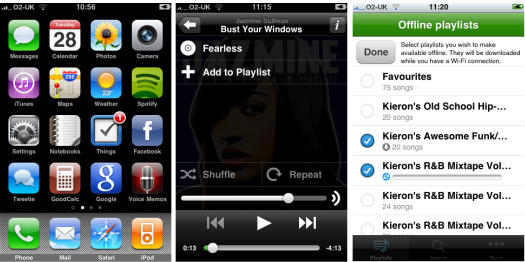
Spotify’s iPhone app has just gone live on the iTunes app store. But us poor Yankees are SOL. It’s available in Europe only — for now anyway.
The app is available here for free from Apple’s App Store, but requires a premium Spotify account to work at a cost of about £9.99 (about about $16) a month.
Neither the app nor Spotify is available in the U.S., but plans are afoot to bring the highly-rated service across the pond. It is set to come to the U.S. sometime later this year, or maybe next, pending licensing agreements with the record labels, and advertising deals that support the free service.
Because Spotify’s streaming music service is such a threat to iTunes, it was possible that Apple might somehow disable the iPhone app. Apple has disapproved of apps that replicate core iPhone functions, like Google Voice. While there is no indication yet that Apple cripples threatening apps, it doesn’t approve them. Apple perhaps doesn’t see the Spotify iPhone app as a threat while it is restricted to premium customers.
But Spotify’s app doesn’t seem to have any restrictions, except one imposed on all third-party apps — it can’t run in the background.
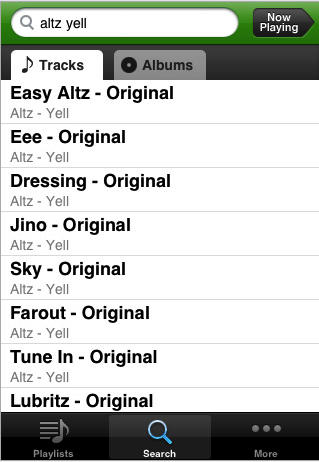
Spotify’s streaming music service has taken the world by storm with a music library that rivals iTunes — about 6 million tracks — and an interface to match. It’s dead easy to search, build playlists, and find new artists. It’s basically iTunes in the cloud — but free (with the occasional ad).
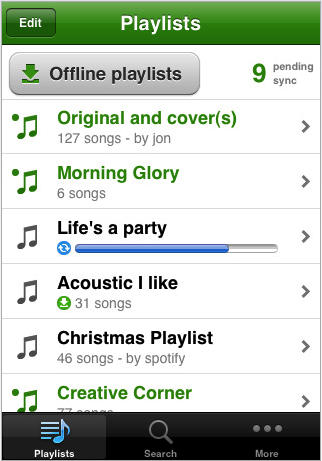
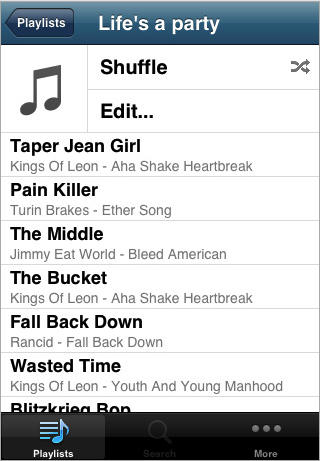
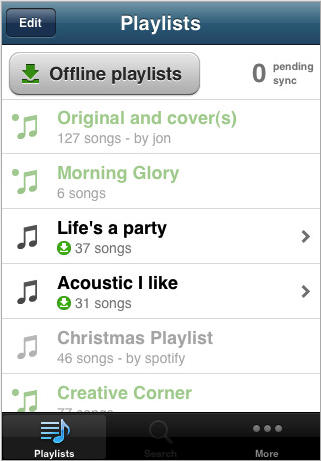
Spotify’s iPhone app adds a very important feature: it can cache full playlists to be played offline. You can store up to 3,333 songs — that’s 10 days constant listening — and they will play when the network goes dark. The offline caching service allows tracks to be played anywhere offline: on airplanes, in subways or even when traveling overseas to avoid roaming charges.
Official screenshots of the app and a video of it in action after the jump.
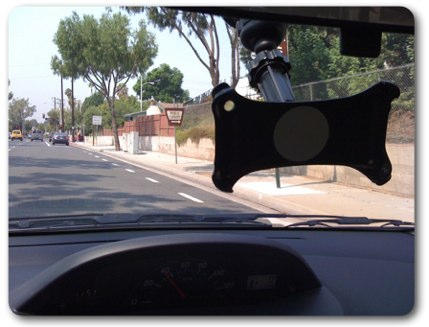
Since I mount my iPhone on my windshield for easy access to my music, I thought it would be appropriate to drill a hole in the plastic to let me take pictures and video while driving. It wasn’t difficult to do. If you have a dremel or a drill you can crank this out in 3 minutes. The plastic is durable enough to handle the pressure of the drill and there isn’t any cracking.
I have the Griffin WindowSeat which comes with adapters for ipod touch and the 1st gen iPhone. It’s a great deal/gift for someone who has an aux input in their car.
Hit the jump to see a video showing the DIY dash cam at work.
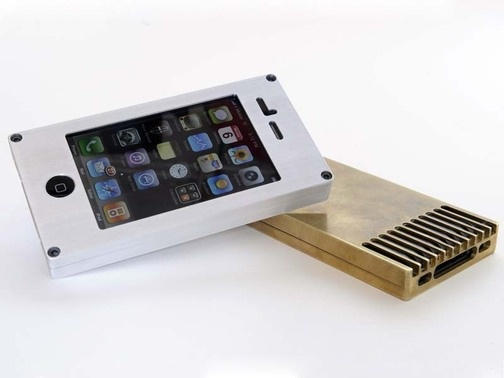
Never put your iPhone in a case, like this highly-protective metal Exovault. http://exovault.com/
When I first went to pick up my iPhone 3G, I was scared. I know what my hands are capable of: Horrible, unthinkable acts of clumsiness. I’ve hurt myself. I’ve hurt others. I’ve even hurt my kitties. So why would I want to put this salvific piece of tech gold into harm’s way? I need to protect this treasure, specifically because I don’t have another $600 to spend on a replacement. And I will be needing one soon.
But I don’t put my iPhone in a case. You shouldn’t either.
If Apple wanted to stand the world on its ear next Wednesday at the It’s Only Rock and Roll But We Like It event in San Francisco, the company would announce it is opening iPhone software development to all comers and is dropping the facade of exclusive distribution through the iTunes App Store.
Heresy, you say? Perhaps in the eyes of some, but read on to learn why those two moves would be best for the company, the platform, for developers and – most of all – consumers.
The iPhone Spotlight search feature has been improved yet again.
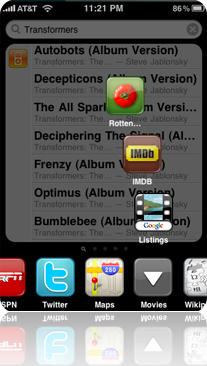
Universal Search, a jailbreak app from Efiko Software, takes searching with Spotlight to a whole new level. With this add-on installed, Spotlight can access mobile search sites and generate location-based results all from within the Spotlight search window.
Universal Search’s smart input monitoring allows the user to enter a phone number or url directly into Spotlight and options to call, text or visit the url pop up in the results. It also searches Google Maps and mobile sites directly rather than going through a search engine’s web results.
Search sites include Wikipedia, Google Maps, Twitter, CNN, ebay, IMDb, flickr, and ESPN.
Universal Search is available for $4.99 in the Cydia Store.
Multimedia Messaging Service is coming to the iPhone on September 25, AT&T just announced in a press release. The service will be available at no additional cost to iPhone customers with a text messaging plan (which start at about $20). But there’s still no word on tethering (which allows your computer to access the internet via the iPhone’s data connection).
The MMS announcement comes as AT&T draws fire for its slow, unreliable data network. MMS is likely to put more strain on the network, but AT&T claims it is ready.
“The unique capabilities and high usage of the iPhone’s multimedia capabilities required us to work on our network MMS architecture to carry the expected record volumes of MMS traffic and ensure an excellent experience from Day One. We appreciate your patience as we work toward that end.”
We’re riding the leading edge of smartphone growth that’s resulted in an explosion of traffic over the AT&T network. Wireless use on our network has grown an average of 350 percent year-over-year for the past two years, and is projected to continue at a rapid pace in 2009 and beyond. The volume of smartphone data traffic the AT&T network is handling is unmatched in the wireless industry. We want you to know that we’re working relentlessly to innovate and invest in our network to anticipate this growth in usage and to stay ahead of the anticipated growth in data demand, new devices and applications for years to come.
The MMS service will allow iPhone users to send and receive messages containing images, audio, video. MMS is widely available in other countries, and can be enabled on many iPhones with a simple hack.
Tethering is not likely to be announced for several months as AT&T builds out its network with 2,100 cell towers and 100,000 new backhaul links.
Sales of Sony’s MP3 Walkman outsold iPods for the first time in Japan for the first time since 2005.
Research firm BCN Inc. found that Sony’s share of the portable music market share rose to 43 percent last week, creeping above Apple’s 42.1 percent.
The uptick in sales is attributed to the W Series pictured above, which sells for under 10,000 yen ($108). Sony’s answer to the iPod shuffle is a 2G wearable headset that has generally met with favorablereviews.
But Sony MP3 players might not be as big in Japan as they seem. As Bloomberg notes, the jump can be at least in part attributed to people ditching iPods for the iPhone, so Apple wins either way.
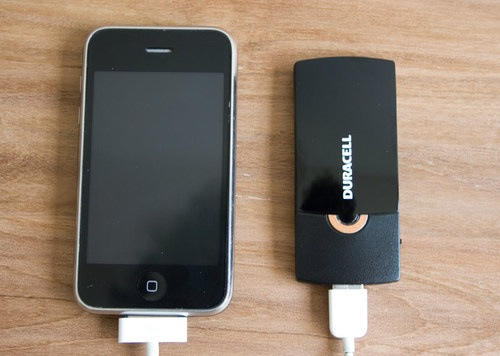
Just released, Duracell’s $20 Instant Charger is good for about half a charge of an iPhone, or a full charge of an iPod nano.
“Duracell’s Instant Charger is a perfectly executed little gadget,” Gizmodo says.
The site has seen plenty of pricey chargers with all the bells and whistles, which are usually superfluous. Gizmodo is charmed by the Instant Charger’s purity: it’s basically a rechargeable litium ion battery hooked to a USB port, and that’s it.
You plug in your own charging cables, so it’s good for iPhones, iPods, digital cameras, Bluetooth headsets and any other gadget that comes with a USB cable.
The Instant Charger ‘s bigger brother, the $50 Powerhouse Charger, stores enough juice to charge an iPhone 3G 1.2 times, or an iPod nano 4 times, Giz says. But it isn’t as compelling as the Instant Charger, which is perfectly simple and cheap.
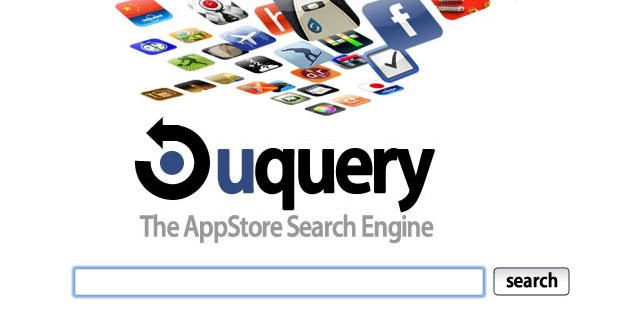
Searching the iTunes app store is much easier when you’re not using the iTunes app store. Launching today, uquery.com aims to be the vehicle for the app discovery process.
The site uses its own system of algorithms called “AppRank” to make it easy and fast to find the right app for certain tasks. Search results appear in a easy-to-navigate center column along with options to refine your search.
Unlike the iTunes App Store, you can use your browser’s “find in page” command to pinpoint your search term in the search results. It’s the little things.
At the moment, uquery.com appears to generate search results from the full text app descriptions. As the site gains visitors, search queries and tweets, the “AppRank” system will improve its ability to make the app discovery process more intuitive.
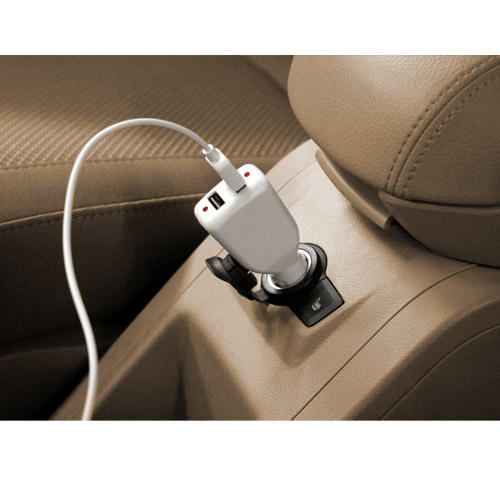
RadTech today doubled the usefulness of its AutoPower on-the-go iPhone and iPod charger, offering two USB ports. The new device also nearly halved the price, to $10 from $17 for the single-port version. The single-port option does include a 30-pin retractable cable.
The 3.3-inch by 1.3 inch AutoPower includes fuseless recharging with a sensor to avoid hardware damage. RadTech says the 5V 500mA recharger is “not for 1st -3rd Generation iPod.”
Way way back in the mists of ancient history, I owned a Palm device, and I loved the little fella.
One of my favourite apps for the Palm was AvantGo (now defunct) – a huge database of free newspaper and magazine content that the device would download every time you synced the Palm with your desktop computer.
I used to spend long train journeys catching up with news from the BBC, Wired, and a bunch of other publications. Most of it was full text, there were no ads (not that I can remember, anyway – this was a long time ago now), it was fast and quick and easy. Superb.
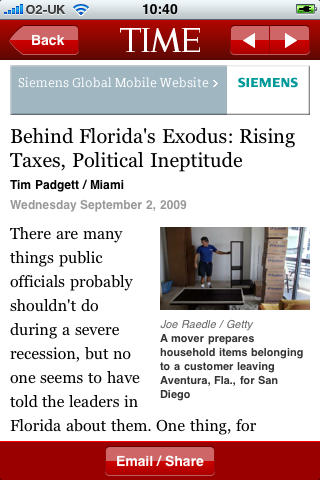
This week I noticed Time magazine’s new app, and started poking around elsewhere in the news section of the App Store. In particular, I wanted to see what the UK media were up to.
Mobile phone gadget maker Parrot Tuesday introduced one of the few in-dash car stereos meant for iPhone users. The RKi8400 ($400 in the U.S.) was unveiled at the Frankfurt Auto Show.
“All iPhone functions — music, navigation of the music directory and playlists and Bluetooth phone capabilities — have been adapted for in-car use,” said Henri Seydoux, Parrot founder and CEO.
Rockstar Games’ critically-acclaimed Grand Theft Auto: Chinatown Wars is coming to the iPhone/touch this fall, the company says.
Released last year for the Nintendo DS, the game got reave reviews and is still the highest-rated DS game on GameRankings, with an average review score of about 93%.
“Chinatown Wars is a big fat raspberry to the competition; a masterclass in not only hand-held development, but video game design as a whole, exploring exactly how to craft Liberty City around the console’s unique strengths without compromising the series’ character,” said the Daily Telegraph.
The game follows the misadventures of Huang Lee, a young Triad, as he investigates the mysterious death of his dad, kills his rivals, steals cars, deals drugs and evades the cops — all in a miniature version of the company’s infamous virtual playground, Liberty City.
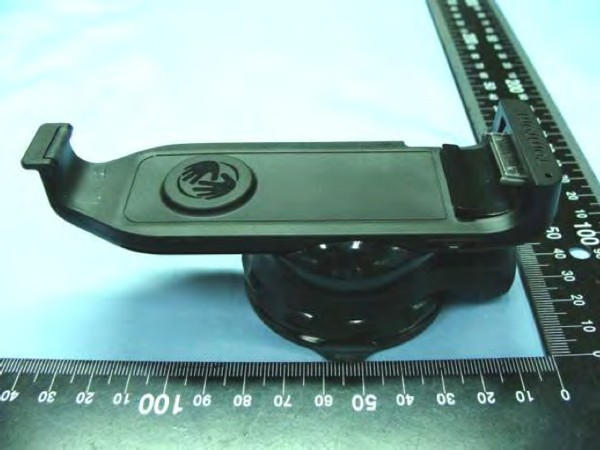
We may be getting closer to a hardware version of hands-free navigation for iPhone users. The FCC has released several documents plus photos of a planned TomTom Car Kit for the iPhone.
The kit (pictured above) includes a mount enabling the iPhone to be positioned either vertically or in landscape mode. Engadget also writes the kit includes Bluetooth and a dedicated SiRFstar GPS chipset.
The announcement may be welcome news to iPhone navigators who hoped an actual TomTom product would follow an iPhone app released earlier this month. The app, priced at $99.99 for U.S. and Canadian iPhone owners, competes with the likes of CoPilot Live ($34.99), Sygic Mobile Maps ($39.99), AT&T’s Navigator ($10 monthly fee) and Google Maps.
Birdhouse - sometimes the crazy ideas are the best.
It’s Friday and it’s time for our weekly digest of tiny iPhone reviews, courtesy of iPhoneTiny.com, with some extra commentary exclusive to Cult of Mac.
APP OF THE WEEK
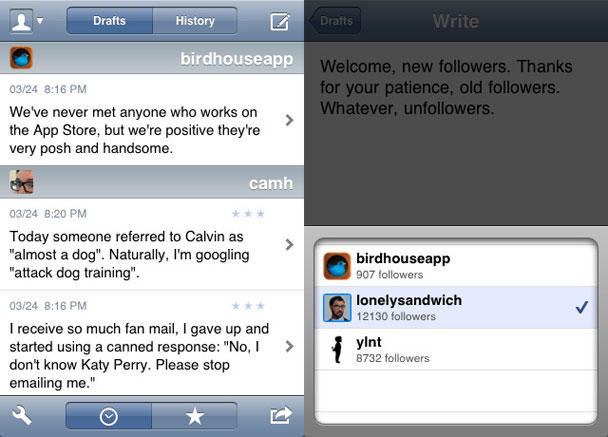
Birdhouse: Notepad for Twitter. Drafts can be rated, backed-up, published/’unpublished’. Fantastic UI. 5/5 $3.99 https://is.gd/2A56C
Shoot-Em-Up: Competent but easy, unexciting vertical shooter with annoying ship inertia. 2/5 Free https://is.gd/2wmWJ
PapiJump+: Cute vertical platformer with varied modes, but bettered in every way by Doodle Jump. 3/5 $0.99 https://is.gd/2C0uN
Mevo: Rhythm action game. OK graphics, but dullish gameplay and problematic response lag & slowdown. 2/5 $0.99 https://is.gd/2Eeys
In amongst lots of iffy games, a fun vertical platformer (PapiJump+) and Chillingo’s bloody (and furry) dual-thumb shooter (Minigore), Birdhouse appealed this week. Birdhouse is a good example of how a really odd idea can be great. The app is a drafting app for Twitter. You might wonder why you need to draft 140-character tweets, but if you’re serious about the service, it often pays to think about things and mull them over. Birdhouse is like a sounding board for your thoughts, and the interface is absolutely fantastic. The ability to rate drafts and back them up to email is also welcome.
Similar, but not the same. The Apple icon police get all angry with Convertbot.
God help us if Mac OS X ever has a system like the App Store policy. This time, Convertbot by Tapbots (a Cult of Mac favorite a while ago) was rejected. Its crime, as the image above shows, was using an icon for Time that Apple considers too similar to the one it uses for Recents.
Thing is, Tapbots just used a generic and insanely simple clock icon. Clearly, Apple—a company that bases a lot of its advertising on the fact smart people use Macs and Apple kit—thinks iPhone and iPod touch users are a bunch of f——ing morons, with no understanding of context. Perhaps they’re right and Cupertino has been inundated with frustrated iPhone users, repeatedly stabbing the Convertbot clock icon and yet not being able to access a recent calls list.
Somehow, we doubt it. Also, this icon’s the same one Convertbot’s had since the start—and this is the third point update to the app, and therefore the fourth time it’s been submitted. There were no problems at all the first three times.
With Philip Schiller’s email to John Gruber (regarding Ninjawords) and a similar communication to Panic’s Steven Frank, along with positive noises regarding C64 app finally being approved, we’re for once going to give Apple the benefit of the doubt on this (in that the decision is an isolated error). But here’s hoping things really are improving—that the Convertbot rejection is the blip, rather than the blip being Apple getting things right.
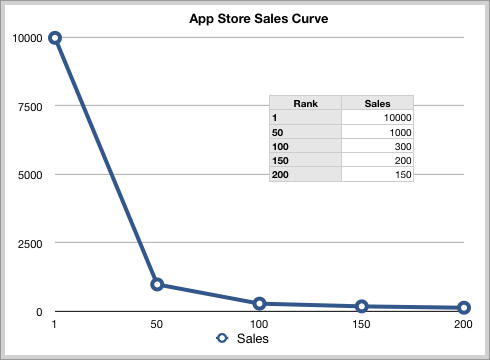
The typical App Store sales curve, according to one iPhone developer (http://www.appcubby.com/blog/files/app_store_pricing.html).
UPDATE: The Yankee Group also says the numbers are way high, and AdMob defends its estimates, kinda, sorta. See below.
Estimates that the iPhone App Store is worth $2.4 billion a year are utterly ridiculous, iPhone developers say.
Mobile advertising firm AdMob on Thursday got a ton of press for estimating that the iPhone App Store earns billions. The number was extrapolated from a survey of about 1,000 users — and is massively overstated, iPhone developers say.
“Do the math and that’s a ridiculous claim,” wrotedeveloper Layton Duncan of Polar Bear Farm, an iPhone developer based in New Zealand.
Duncan did the math: $2.4 billion divided by the 65,000 apps in the App Store is $37,000 per app, per year. And while some developers earn that, many do not. Long Tail anyone?
David Barnard of App Cubby, a developer based in Austin, Texas, says AdMob’s number is at least 5x too big. The iPhone App Store is worth $250 and $500 million per year, estimates Barnard, who keeps a close, professional eye on App Store sales.
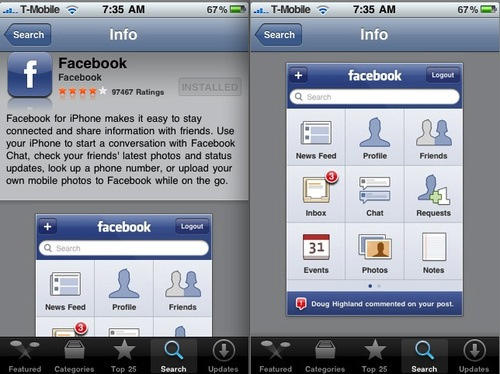
After a long wait, the new Facebook 3.0 App for the iPhone is finally live on the App Store. It offers several new features, including the ability to upload video from the iPhone 3GS, like posts and photos, and RSVP to upcoming events.
If the App Store still says version 2.5, ignore it — version 3.0 will download says developer Joe Hewitt.
– See your upcoming Events and RSVP
– See Pages and post updates and photos to Pages you administer
– Write Notes and read your friends’ Notes
– Upload videos from an iPhone 3GS
– Complete photo management (create albums, delete albums, delete photos, delete photo tags)
– Change your Profile Picture
– Like posts and photos
– See the same News Feed as the Facebook website
– Visit links in a built-in web browser
– Quickly call or text your friends
Spotify’s app for the iPhone has been approved by Apple and should be available to premium customers shortly. But alas, not in the U.S. — at least, not yet.
“The current status as of right now is it’s been approved and we hope to add the app to the more than 65,000 apps on the app store very soon,” an Apple spokesperson told PaidContent. “We’ve been in constant communication working with the developer and have already notified Spotify that the app will be in the app store very soon.”
This is fantastic news for music lovers, and a big surprise from Apple. If there’s a real threat to iTunes, it’s Spotify.
Spotify’s streaming music service has taken the world by storm with a library that rivals iTunes — about 6 million tracks — and an interface to match. It’s dead easy to search, build playlists, and find new artists. It’s basically iTunes in the cloud — but free.
The $20-a-month premium service dispenses with the occasional ads, which aren’t intrusive. A premium account will be required to use the iPhone app.
So magnificent is the service, it already has 2 million subscribers in Europe and is adding 50,000 new users every day. It is set to come to the U.S. some time later this year, or maybe next, pending licensing agreements with the record labels.
The only downside is that it’s tied to the computer. But Spotify’s iPhone app promises to change that. The app can cache full playlists to be played offline — thousand of songs can be stored on the iPhone and played at any time. You can store up to 3,333 songs — that’s 10 days constant listening — and the songs will sync over WiFi, no USB cable needed, according to Wired.com. Bye, bye iTunes. This is the future of music. Why would you buy songs any longer?
There was speculation that the app wouldn’t be approved by Apple because it is such a threat to the iTunes business model. Some feared Apple would argue that the Spotify App replicates core functions of the iPhone: IE. playing music. This was the reasoning Apple used for not approving the Google Voice app, which is still under review because it replicates the iPhone’s telephony functions — or so Apple argued to the FCC.
So big surprise that Apple’s giving the go-ahead. Of course, the app might be crippled in key ways. But perhaps the company is softening its stance in the face of ongoing controversy about the App Store? Or perhaps Apple is afraid it might become the target of an antitrust case, a la Microsoft?
Fingers crossed Spotify comes Stateside sooner than later. Here’s a cool video of the Spotify app in action. Watch the offline song caching feature at about 28 seconds in. .
The iPhone App market could be worth $2.4 billion a year, reporter Om Malik of GigaOm estimates based on new numbers from the mobile advertising firm AdMob.
This is a very big number for such a new marketplace; no wonder Microsoft, Google, Palm and everyone else is trying to replicate it.
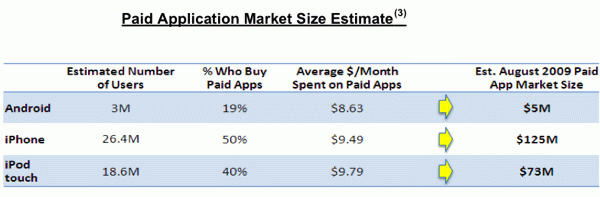
AdMob is a mobile advertising firm that serves up ads inside apps running on the iPhone, iPod touch and Google’s Android phones. In a survey of more than 1,000 users in July, Ad Mob found:
* Apple’s App Store sells $200 million worth of applications every month, a run rate of about $2.4 billion a year, according to Malik.
* Android apps are bringing in about $5 million a month, or $60 million a year.
* iPhone users download about 10 apps per month, and one in four apps is paid for.
* iPod touch users download 18 apps a month, but only two of those are paid for.
* 50% of iPhone users download at least one paid app a month.
* 40% of iPod touch users download at least one paid app a month.
* Users who download paid apps spend about $10 per month; and the average app price is under $2.00.
The upshot: Users are happy to spend money on apps, especially if they geta chance to ry them frst with a free or lite version.
Stock in the internet phone company Vonage jumped a whopping 36 percent on news it will likely soon have an iPhone app.
Vonage’s stock saw its biggest three-day rally since the ailing company went public in 2006, Bloomberg reports. The rally is tied to news that Vonage has submitted an app to Apple. The app will likely be approved after a minor technical glitch is fixed.
What the app does, no one is saying, but it’ll likely rival Skype, offering low-cost VOIP calls over Wi-Fi. Vonage also offers visual voicemail.
The company is in deep trouble and is danger of being delisted from the New York Stock Exchange. It has lost about 100,000 customers in the last year as customers opt for cheap digital-phone service by cable companies.
A week after EU regulators launched an investigation into safety issues of overheating iPods and iPhones, another French user found himself with an iPhone flambé in hand.
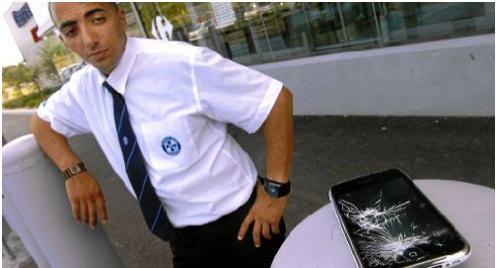
This time it happened to Yassine Bouhadi (above), a 26-year-old supermarket security guard in Villevieille, near Nîmes. He was texting his girlfriend (giving new meaning to the term “sexting?) when the device overheated and the screen shattered.
“The phone made a noise like ‘schplok’. A little bit of screen hit me in the eye and I had to remove it with a tweezer,” said Bouhadi.
The incident — similar to the teen in Aix-en-Provence whose iPhone screen shattered sending splinters into his eyes — made the front page of local paper Midi Libre.
Whether this is a copycat incident or evidence of an uptick in defective devices remains to be seen.
The EU commission is examining reports of problems with iPhones in France and an iPod in Britain.
Apple maintains these overheating issues are isolated incidents and not evidence of a general problem but is cooperating with EU investigations.