Mobile menu toggle

iPhone - page 411

Rockin’ the Holiday Classics in an iPad Band

By

cult_logo_featured_image_missing_default1920x1080

Combining equal doses of high tech gadgetry and holiday schmaltz, members of the North Point iBand in Alpharetta, Georgia staged an entertaining performance of holiday classics utilizing only iPads and iPhones as instruments. An infectious selection of holiday ditties, combined with Casio’esque sonic fidelity, ensured that a good time was had by all!

Classics performed include Carol of the Bells, Rockin Around the Christmas Tree, and Feliz Navidad. Apps used include SoundGrid, NLogFree, Melody Bell, Guitarist (Nylon String & Electric), iGog and Bassist.

Apparently these guys also didn’t get the memo about iPads being only for consumption…

[via VisualNews]

Another MONDAY GIVEAWAY: ThinSkin iPhone Custom Film

By

50313_158250234190239_274_n
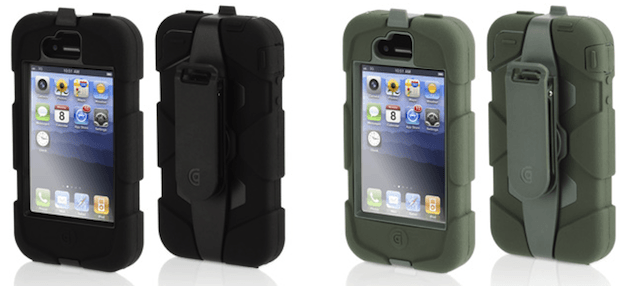
Even if you don’t use a case on your iPhone 4, you can still make a statement with ThinSkin– a custom film for iPhone 4. The Gremlin Green One is rad. Cult of Mac and True Power, makers of ThinSkin, are giving away 25 of these bad boys to Twitter followers using random select.
Here’s How To Enter:
  1. Follow Cult of Mac on Twitter
  2. Follow True Power on Twitter
  3. Tweet and replace *color* with your fav: “@cultofmac and @truepowerinc are giving away 25 ThinSkins for iPhone. I want the *color* one”
  4. We’ll choose 25 freaking winners who gave us twitter shoutouts and Direct Message you for your deets (so you HAVE to follow CoM). Contest ends 11:59 PST Wednesday, December 14th.

What You’ll Win

Each winner gets their favorite color ThinSkin FREE. Again, the Gremlin Green one is legendary.

Giveaway Details

This giveaway is void where prohibited and there is no purchase necessary to enter the giveaway.  Prizes will be shipped directly from ThinSkin.  Cult of Mac is not responsible for shipping/handling of the prize.  Please provide an accurate physical address if contacted that you are a winner.

Bowers & Wilkins Zeppelin Mini Delivers a Sensual Feast [Review]

By

zepp mini cover  1

When a company with as fabled a name as Bowers & Wilkins proffers up an iPod dock, one expects nothing less than enough oomph to satisfy even the most discerning audiophile, and enough svelteness to elicit a smile from even the most ardent aesthete. B&W’s first shot at a dock, the Zeppelin, certainly turned heads when it debuted in 2007 (at least, once word got out about it). But its sprawling, bulbous shape — and sprawling, bulbous, $600 pricetag — limited its appeal. Two years later the company followed with the Zeppelin Mini, a much smaller, less expensive dock that nevertheless tried to maintain the aesthetic and sonic reputation the company was known for.

But at $400, the Mini was still significantly pricier than almost any other dock sitting on, say, an Apple Store’s dock table. Then earlier this year B&W brought the price down to $300, placing it on a level field with other upper-mid-end docks — a league that seems to be gaining players at an almost alarming rate — and allowing it to stand out among its peers as the compact, high-performance star it is.

This Week’s Must-Have iOS Apps: OnLive Viewer, Blueprint, Flud & More!

By

post-72737-image-9d6084c969e40a559f634e49dcb9f272-jpg

One of our must-have iOS apps this week is the free OnLive Viewer that gives you a window in to on-demand, instant-play video games through the OnLive game service. Become a spectator and watch hundreds on games being played live throughout the world.

Facebook Browser for iPhone also makes our must-have list this week and provides a refreshing new way to experience Facebook on your iPhone, with a simplistic, elegant user interface.

Also among our favorites this week is Blueprint – a powerful application for iOS developers that enables you to easily plan and create stunning user interfaces for your applications.

Check out the rest of this week’s must-have iOS apps after the break!

This Week’s Must-Have iOS Games: Infinity Blade, Cut the Rope, Jenga & More!

By

post-72725-image-5750dd9c3528f7ea5888ea7570e14fe3-jpg

Featured in our list of must-have games this week is one of the most anticipated games yet for iOS. Infinity Blade uses Epic’s impressive Unreal Engine 3 technology to deliver a visually stunning sword fighter that’s packed full of adrenaline-fuelled action. Since its demo at Apple’s keynote back in September, every iOS gamer has been waiting for this game to hit the App Store.

Also on our list this week is Cut the Rope: Holiday Gift released especially for the festive season, Holiday Gift is a free gift to all of the Cut the Rope fans out there. It’s the same highly addictive puzzle game we all love, but now it’s all Christmassy.

The official Jenga game lets you take your favorite tower building game anywhere and recreate the most authentic Jenga experience on your iOS device. Designed in consultation with the inventor of the original wooden block game, Jenga features great 3D visuals, realistic physics, and multiple game modes. It’s just as entertaining as the original and deserves a place in our list of must-haves this week.

Check out the rest of this week’s must-have games after the break!

Amiga Emulator for iPhone Demoed In Action

By

iAmiga on iPhone 4
iAmiga for iOS (image: touchArcade)

There are few vintage computing clans who rival Cult of Mac members in zeal and tenacity, but fans of the Commodore Amiga come close.  The successor to the widely popular Commodore 64, the Amiga was a 16 bit multitasking computer that found great success in the gaming and video production markets.

Now the Computer-That-Never-Dies is coming to the OS of the future: iAmiga for iOS has been demoed and is (hopefully) coming soon to the App Store.

Have yourself a geeky Christmas with iGlo LED’s

By

DSC_04601.jpg

With Christmas just around the corner, most of us are setting up our homes ready for the festive season. If you are looking to add some geekery to your festive decorations this year, MEA Mobile’s latest product, the iGlo iPhone controlled LED set could be just what you are after.

iFan Charges Your iPhone with Wind Power

By

iFan Wind Charger for iPhone

Taking the windmill concept to a personal level, Dutch designer Tjeerd Veenhoven has created a custom wind-powered charger for his iPhone.  Made from a computer cooling fan and a soft rubber bumper case with integrated dock connector, the iFan recharges the phone as you walk around town:

By using a modified computer fan it took me 6 hours to charge my phone, rather long I think… but it works. I can shave off many charging hours by redesigning the fan blades, making it more efficient in catching the wind while sun bathing at the beach, doing walking trips in the mountains or just holding it outside your car window while driving along…

Perhaps not a practical solution for everybody, but it does show creativity and ingenuity in an environmentally friendly package.  Keep a good grip on that iPhone while it’s poking out the car window!

[via TUAW]

Ear-top Camera for Constant Recording Now for iPhone

By

looxcie-3-1

Looxcie for iPhone

A crazy gadget called the Looxcie LX1 sits on your ear like a Bluetooth headset. A built-in video camera records constantly, capturing everything you see.

The video recording and uploading takes place via a phone — until now an Android phone. But now, just in time for Christmas, the company has optimized their product for the iPhone.

The idea behind the $199 Looxcie LX1 is to capture every moment in order to capture any moment. What that means is that the device is constantly recording video, but dumps it continuously unless you choose to save it. In other words, unlike with a convention video camera where you choose to record video before you record it, the Looxie lets you choose to save video after an event occurs.

With the recorder going all the time, you won’t miss that alien abduction, sasquatch sighting or even being run over on the sidewalk by Steve Wozniak’s Segway – or any other sudden event.

To permanently retain footage, you have several options. The easiest is to simply press a button on the Looxcie, which grabs the previous 30 seconds and saves it on your iPhone. You use the app on your iPhone to upload a clip to YouTube, Facebook or send via e-mail. You can also connect to Mac or PC via USB.

The Looxcie LX1 talks to your iPhone via Bluetooth. It weighs 1 ounce, and records video at 480×320 resolution and 15 frames per second. You can get it at BestBuy.

Fuze Box Takes HD Group Videoconferencing Mobile

By

feature_image_mobile

Fuze Box, the company behind the groundbreaking meeting and collaboration tool Fuze Meeting, raised the bar for easy multiparty videoconferencing Thursday with the announcement of its private beta for Fuze Presence — bringing multiparty high definition (HD) video to Mac iOS and Android mobile devices.

With many video conferencing solutions tied to a desktop-only experience featuring unreliable video quality and poor latency, Fuze Presence moves the current collaboration space into the realm of H.264 codec technology promising multi-party collaboration delivered at 720P, with high fidelity sound and under 200 ms latency. The technology also supports VoIP, screen sharing, content sharing and a full suite of collaboration tools.

Apple Makes Enterprise Headway as iPads Come to Wall Street

By

ipad-suit

Wall Street investment banking icon JPMorgan Chase & Co. is giving iPads to every associate in its global investment banking division, according to a company e-mail obtained by Bloomberg News. Employees receiving the devices will get to keep them free of charge as long as they remain at the unit until the pilot program ends on May 1, 2011, Bloomberg reported on Tuesday.

Industry analysts viewed the move as a significant victory for Apple in its quest to wrest control of the Enterprise communications submarket away from Research in Motion, Ltd., whose Blackberry handheld devices have been a ubiquitous companion of “serious businesspeople” for more than a decade.

How To Jailbreak And Unlock iPhone 3G/3GS Using Redsn0w [Jailbreak Superguide]

By

redsnow-3.0

Redsn0w by DevTeam allows you to jailbreak your iPhone 3G/3GS device, to get complete control over it (see why you should jailbreak here). Currently, redsn0w version 0.9.6b5 allows you to perform a tethered jailbreak to your device that has already been upgraded to firmware 4.2.1, which means you need to use redsn0w every time you boot the device, otherwise all your jailbreak data gets wiped.

In order to unlock, you must upgrade to an earlier iPad baseband, which would mean that you can update/restore using a custom firmware file only and not a stock firmware file, otherwise, the restore will simply fail. Also, it’s not reversible and by doing this, you will be voiding the device’ warranty.

Please note that this tool will NOT work if you older iPhone 3GS, unless you use the unofficial Pwnage bundle first. (On the older iPhone 3GS, serial number, fourth and fifth digit should be either 40 or less.)

How To Unlock iPhone 3G/3GS/4 Using Ultrasn0w

By

post-71736-image-8b95b178dcd2cd27d90e50d0cad87972-jpg

Ultrasn0w is a full fledged software unlock solution for iPhone 3G and iPhone 3GS having baseband version 04.26.08, 05.11.07, 05.12.01, 05.13.04 or 06.15.00 and iPhone 4 having baseband version 01.59.00 (check Modem Firmware version under Settings –> General –> About). Unlocking the phone enables you to use it with any carrier in the world.

This means if you have older firmware, you can now upgrade to a stock 4.2.1, jailbreak using redsn0w or upgrade to a custom 4.2.1 using Pwnage Tool and still have the ability to remain unlocked.

How To Jailbreak iPhone 4 Using Redsn0w [Jailbreak Superguide]

By

redsnow-3.0

Redsn0w by DevTeam allows you to jailbreak your iPhone 4 device, to get complete control over it (see why you should jailbreak here). Currently, redsn0w version 0.9.6b5 allows you to perform a tethered jailbreak to your device that has already been upgraded to firmware 4.2.1, which means you need to use redsn0w every time you boot the device, otherwise all your jailbreak data gets wiped. However, it will NOT unlock the device, enabling it to be used with different GSM carriers worldwide.

RingtoneFeeder Entertaining Ringtones for Your iPhone [Review]

By

post-69128-image-df2f639061639f3e52c7a5f174f36849-jpg

Here’s a great way to fulfill your hunger for new and entertaining ringtones for your iPhone.

RingtoneFeeder is an inexpensive paid subscription service from which you will download short songs, sounds, and other unique audio files that you can use as ringtones. Subscribers will receive two new ringtones weekly on Tuesdays via iTunes on their computer.

Tons of iOS Apps on Sale for Black Friday

By

post-71319-image-b40495fe44dc6a1e3e5c8b64e16b1264-jpg

The Black Friday weekend means sales and discounts galore, and iOS developers are offering some crazy reductions on the some of the App Store’s best downloads.

We’ve compiled a list of some of the greatest apps on sale, such as Readdle’s Printer Pro & PDF Expert; the Quickoffice Mobile suites, AutoStitch Panorama, and many, many more.

Check out our extensive list of apps on sale after the break, and grab yourself a bargain for your iPad, iPhone & iPod Touch.

Tons of iOS Games on Sale for Black Friday

By

post-71226-image-8f62a7687f143dc4e8c88a38e8bd2f8d-jpg

The Black Friday weekend means sales and discounts galore, and iOS developers are offering some crazy reductions on the some of the App Store’s best downloads.

We’ve compiled a list of some of the greatest games on sale, such as EA’s NCAA Football, Need for Speed & Madden NFL; and Gameloft’s Shrek Kart HD, Hero of Sparta 2 & Let’s Golf 2 HD.

Check out our extensive list of games on sale after the break, and grab yourself a bargain for your iPad, iPhone & iPod Touch.

Koostik’s Attractive iPhone Speaker Docks Were Made For Your Mantle

By

koostik

While the audio benefits of an unpowered iPhone speaker dock are pretty minimal, Koostik’s line of wooden docks specially carved from assorted species of tree trunk in order to channel and boost your device’s sound volume are undeniably classy enough to live on almost any mantle. At $85 each, though, you almost wish they had at least a couple whizbang LEDs implanted within to justify the price.

What Steve Jobs Doesn’t Get: Google Closes an Eye, Android Adult App Market Booms

By

mikandi

Steve Jobs publicly vowed to make the iTunes app market porn free, telling customers if they want smut they should get an Android. Whether you want sexy stuff on your smartphone or not, there’s undeniably an appetite for adult material.

That’s why developers keep submitting salacious apps to the iTunes store – playing peek-a-boo with the public as they are approved and then shut down. Big names like Playboy and Hooters iTunes offerings are, kind of a tease – lots of skin, but no nudity and “games,” like a squeaky-clean screen washing app. Android is another story.

While there is no adult material in its official app store, almost exactly a year ago a company called www.mikandi.com launched a porn app market for the Android platform, billing it as the world’s first mobile adult shop. (See our post about what Android users get a looky-loo at when they use it).

Google adopted a hands-off policy towards this parallel porn shop – and following its pattern of keeping mum about it, a Google spokesperson declined to comment for this post. It’s also worth noting that Android’s open approach allows users to use and install third party apps without jailbreaking phones.

Cult of Mac talked in exclusive with MiKandi (it’s pronounced “my candy”) CEO Jen McEwan about what’s hot in the store and where the market is headed.

iOS 4.2 Ships today, iPad Gets Multitasking and More

By

ipad42a

Today is the day. Finally. Apple is shipping iOS 4.2 to iPads, the iPhone 3G, 3GS and 4, and second, third and fourth generation iPod touches. iPad users have the most to benefit since they will be getting app folder enhancements and multitasking for the first time. The update also includes Game Center, AirPlay and AirPrint for all devices. Find My iPhone, iPad, or iPod touch is now free to use without a MobileMe subscription and you can now rent TV episodes directly on your iPad.

The update should be available for downloading around 10:00 AM PST today. You’ll need the latest copy of iTunes (version 10.1) so make sure your Mac is up-to-date. Afterwards tether your iOS device to your Mac and check for updates in iTunes after the appointed time.

Check out Apple’s press release for complete details on this exciting new iOS release.