Mobile menu toggle

iPhone - page 413

This Week’s Must-Have iOS Apps: BEP360, Task Eater, Essay & More!

By •

Screen shot 2011-01-30 at 20.50.31

This week’s must-have iOS apps features the impressive new BEP360 application from the Black Eyed Peas, which boasts the first jaw-dropping ‘3D360’ mobile music video, as well as access to each band member’s Twitter feed, an addictive little mini-game, and more.

Task Eater is a beautifully simple task management application that helps you to stay organized with the help of your iPhone. It offers all of the great features you need to manage your todo list, including notes; color highlighting; and due dates with alarms, and its minimalistic user interface makes everything very easy.

Essay is a rich text editor that provides only the most essential formatting options to keep you focussed on your document. It uses the HTML file format and offers a wealth of features that make it a fantastic writing application for any writer.

Find out more about the applications above and check out the rest of this week’s must-haves, including 3D Audio Illusions and CelebrityBooth, after the break!

This Week’s Must-Have iOS Games: Dead Space, Zombie Cafe, Grim Joggers & More!

By •

Screen shot 2011-01-29 at 22.10.12

One of the most impressive iOS games included in our must-haves this week is the much anticipated Dead Space from Electronic Arts. Delve into an all-new Dead Space story three years on from the destruction of Marker in the first Dead Space release, and find yourself on a mission of uncertain purpose in the Mines of Titan. Experience first-hand the events that unleash Necromorph hordes once again in the first ever Dead Space storyline devised for iOS.

Zombie Cafe is a unique cafe management sim in which you use zombies for your workers as opposed to living humans. In a town where it’s hard to find good employees, you’ve partnered up with an evil corporation to use zombies as free labor to build your cafe empire. What’s great about Zombie Cafe is that when your local competition gets too fierce, you can summon your team of zombie workers to attack your neighboring rivals and steal their secret recipes.

In Grim Joggers you have control of a group of 15 joggers and your mission it to take them as far as you can before each and every one of them faces their gruesome end. This arcade-style survival game sees casual jogging become a gory bloodsport.

Find out more about the games above and check out the rest of this week’s must-haves, including Pocket Dinosaurs 2 and Aerial Assault, after the break!

Hands-On: Degrease Your iPad with the LensPen SideKick [Macworld 2011]

By •

post-79524-image-dab3c2d1cd39ff2b9f2d9a5b28948345-jpg

I realize a lot of people don’t care about how nasty their iPhone or iPad screens get—but I do—and I know I’m not alone.

Well those of us who like to keep a clean screen have a nifty new tool at our disposal: it’s called the Sidekick, and from what I saw, it works great. Peep the video to see how it works.

Need CPR? City Crowdsources First Responders with iPhone App

By •

Picture 2

A city in Northern California is crowdsourcing first responders with an iPhone app.
Called Fire Department, the app is the aimed at the 20,000 people in San Ramon trained in CPR.

Developed by the San Ramon Valley Fire Protection District for the city about 34 miles east of San Francisco, the free app sends citizens 911 alerts, including requests for CPR.

If the cardiac emergency is in a public place, the application uses GPS technology to alert citizens about urgent CPR requests. The app also tells citizen rescuers to the exact location of the closest public access Automated External Defibrillator (AED).

“It’s volunteerism in an entirely new way,” said San Ramon Valley Fire Protection District Fire Chief Richard Price.”It’s volunteering 2.0.”

Learning: Do We Really Need An App For That?

By •

Are Mobile Devices Key To This Kid's Future? Photo by: Oxtopus/Flickr
Are Mobile Devices Key To Our Kids' Futures? Photo by: Oxtopus/Flickr

When President Obama gave his annual State of the Union speech Tuesday night, he dedicated a significant portion of it to the dismal state of America’s education system.

Some educational experts responded by noting that that mobile devices such as the iPhone and iPad could potentially improve the American education system’s “productivity.”

I wonder whether this is a valid point, or yet another manifestation of Americans’ infatuation with technology.

Name Your iPhone ‘Titanic’ – Here’s Why [Humor]

By •

titanicship

I recently came across a humorous post on Facebook that made me laugh out loud so I thought I should share it. It read:

I named my iPhone Titanic, why you ask? So that every-time I plug my phone into the computer it says ” Titanic is now syncing”– haha

While the gallows tone of this tidbit of humor might offend some people it definitely makes most of them laugh at the creativity and obvious play on words.

So now the question is did you give your iPhone, iPod touch, or iPad a unique name? If you did share it with everyone by leaving a comment.

This Week’s Must-Have iOS Apps: AirView, OneNote, Cloud Connect Pro & More!

By •

Screen shot 2011-01-23 at 20.26.15

One of our favorite iOS apps to feature in this week’s must-have list lets you stream your media between your iOS devices, or from iTunes on your computer over your Wi-Fi network. AirView works in a similar way to the AirPlay feature already built-in to iOS, however, instead of streaming only to your AppleTV, you can stream straight to your iPhone, iPod touch, or iPad.

Microsoft Office users will be familiar with OneNote, the powerful note taking application for all of your ideas that syncs your notes with free Windows Live online storage account, and allows you to access them from virtually anywhere using your phone, computer, or web browser. Now the OneNote application is available for your iPhone, allowing you to make notes while you’re on the go so that you don’t forget another good idea. It’s also free for a limited time!

Cloud Connect Pro for your iPad allows you to leave your laptop at home while you’re on the go, but still gain access to the files you have stored on your Mac and PC, or online storage services like Dropbox, iDisk, or Box.net. You can also access your home computer through the built-in screen sharing feature, and view and control your applications just like you’re sitting in front of them.

Find out more about the applications above and check out the rest of this week’s must-have iOS apps, including TapnScrap HD and TalkBox Voice Messenger, after the break!

Are Apple and Nike Falling Out?

By •

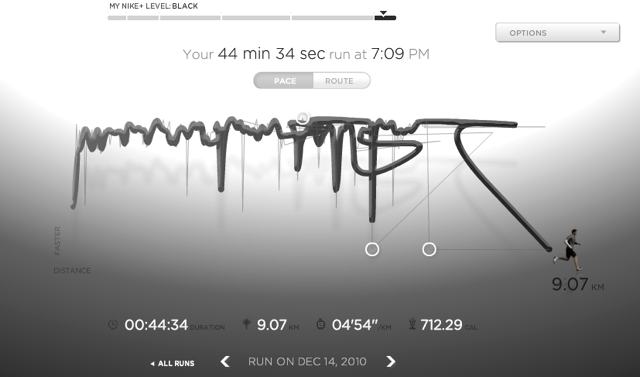
Data from Nike+GPS App goes loopy
Loopy results from Nike+GPS iPhone app

Nike released another major update to their Nike+ GPS iPhone app last week. The app uses technology from MotionX, rather than the shoe sensor that Nike jointly developed with Apple. At CES, Nike launched the Nike+ SportWatch GPS in partnership with TomTom. Apple is notably absent from these recent announcements, and it seems the elegant simplicity of Nike+ is suffering as a result.

Here’s why…

This Week’s Must-Have iOS Games: CrazyControl 2, Treasure Seekers 2, Cave Bowling & More!

By •

Screen shot 2011-01-22 at 20.10.40

This week’s must-have iOS games features a frantic side-scrolling platform game that’s unlike anything else we’ve seen. CrazyControl 2 starts with two characters running side-by-side, and you must control them both at the same time to ensure neither character stops running. However, just as you get used to controlling two characters, another is introduced until you finally have control of 6 characters all at once. This intense running game is action-packed, energetic, and a great load of fun.

Treasure Seekers 2: The Enchanted Canvases is the second instalment of the popular hidden object game Treasure Seekers, and this follow-up offers a captivating storyline about a young girl who must save her brother from a mysterious Romanian castle, where he has been imprisoned by an evil being. If you’re a fan of hidden object games, Treasure Seekers 2 is sure to please.

Warp back in time and join our forefathers in an addictive game of Cave Bowling in this physics-based pick-up-and-play game. Take aim of your bowling ball to send it flying through the rocky landscapes which are littered with crazy obstacles and prehistoric animals. See if you can take out all of the pins and collect all of the bones without knocking down your cheerful audience.

Find out more about the games above and check out this week’s other must-have game, Tiki Towers 2, after the break!

Best Apps to Help You Get a Job [New Year’s Resolutions]

By •

get a job ios

Did you promise yourself that 2011 would be the year that you would find yourself a job? Are you having trouble sticking to your new year’s resolution? Well maybe there’s an iOS app that will make things a little easier for you. Here’s our list of the best iOS apps that may help you succeed on your mission to kickstart your career.

So that you don’t just forget about your resolution by the end of January, we’ve compiled a great list of apps that will help you stick to your targets and achieve your goals. We’ve divided them up in to the most popular resolutions, and in this post we’ll look at the best iOS apps to help you get a job. We’ve chosen apps that will help you find vacancies in your home town, that will help you create a great resume, and apps that will help you prepare for those dreaded interviews.

Check them out after the break and get help to get work!

Browse Instagram’s Popular Pics At Instagreat

By •

20110121-instagreat.jpg

Instagram has become an iPhone photography phenomenon (although not everyone likes it), but like any online community with that many participants, it can be hard to find the really good stuff.

So English developer Elliott Kember has put together Instagre.at, a site that slurps up popular photos from Instagram HQ and spits them out in a very desktop browser friendly way that lets you navigate with your arrow keys.

You can flit left and right through the popular images, but try hitting the down arrow too: it lets you drill into further lists of images using a particular Instagram filter, or by a particular user. Use the up arrow, or the Escape key, to go back to the popular list. Neat stuff.

Best Apps to Help You Save Money [New Year’s Resolutions]

By •

Save Money iOS

Did you promise yourself that 2011 would be the year that you would take control of your finances and start saving money? Are you having trouble sticking to your new year’s resolution? Well maybe there’s an iOS app that will make things a little easier for you. Here’s our list of the best iOS apps that may help you succeed on your mission to save money.

So that you don’t just forget about your resolution by the end of January, we’ve compiled a great list of apps that will help you stick to your targets and achieve your goals. We’ve divided them up in to the most popular resolutions, and in this post we’ll look at the best iOS apps to help you save money. We’ve chosen apps that will help you track where your money is going, apps that will help you create a budget and stick to it, and apps that will help you find the best deals in town.

Check them out after the break and get help to save money!

T-Mobile Kinda Hints It May Be Getting iPhone 4

By •

Catherine_Zeta_Jones

T-Mobile has hinted it may be the third U.S. wireless carrier to get the iPhone.

“Ask Apple,” said T-Mobile executives when asked whether it was getting the iPhone 4 at a press conference in New York today, according to Electronista.

Though neither confirming or denying, T-Mobile’s answer suggests that talks between the carrier and Apple are ongoing. Verizon used similar language in the run up to its announcement that it would be carrying the iPhone.

One issue that T-Mobile did discuss was the readiness of the iPhone’s radio chips. To work on T-Mobile’s network, the iPhone would have to support the 1,700MHz 3G band.

T-Mobile president Philipp Humm said while the current iPhone isn’t compatible with T-Mobile’s network, future 3G chips would support more cellular frequencies.

“We’re not part of the [iPhone] chipset today,” president Philipp Humm said. “But we have chipsets which support five, or up to 10 spectrum bands in the market, so we should expect there will be more degrees of freedom going forward.”

T-Mobile may be eyeing the iPhone 5, which is rumored to have a dual-mode chipset from Qualcomm with both CDMA and GSM. If it includes both 850MHz and 1,700MHz, Apple could produce a single phone that works on almost all carriers.

Apple’s iPhone Explosion: Chart Shows It’s Just Getting Started

By •

iphone_sales_by_quarter1.jpg

Apple’s blowout holiday quarter included the sale of more than 16 million iPhones.

That may seem like a lot, but look at the chart above from The Atlantic: it looks like Apple’s just getting started.

In the last two quarters, Apple sold 30 million iPhones — half of what it sold in the previous three years (60 million units). In other words, iPhone sales are starting to seriously kick up.

Some analysts predict 100 million iPhones sold next year. Yeah, that’s right: One. Hundred. Million.

That’s a big frickin’ number.

Can the Find My iPhone App End Casual Thievery?

By •

Picture-11-e12953693654112.png

Police in Louisville, Kentucky used the “Find My iPhone” app to arrest an iPhone thief — well, more some guy who saw an unattended iPhone and took it.

It’s the latest happy ending story for the app, which debuted in June 2010, and first made the police blotter about a month later when cops recovered stolen iPads and iPhones belonging to an Apple employee.

Police say the iPhone perp is 19-year-old Kyle Just, who walked off with the phone he found on a table outside the Golden Nugget Bar. The owner says he put the phone down while having a cigarette, then turned around to find his iPhone missing.

Best Apps to Help You Quit Smoking [New Year’s Resolutions]

By •

Quit-Smoking-iOS-e12943437159851.jpg

Did you promise yourself that 2011 would be the year that you would quit smoking? Are you having trouble sticking to your new year’s resolution? Well maybe there’s an iOS app that will make it a little easier for you. Here’s our list of the best iOS apps that may help you succeed in your quest to quit this year.

The apps we’ve selected will help you find the motivation you need to stamp out those nicotine cravings. Quickly calculate how much money you spend on cigarettes each week and see how much you could save as a non-smoker; create personalized plans that are tailored to help you quit in a way that suits you; and even estimate how much of your life you might be saving by saying no to cigarettes. If that’s not enough motivation, we don’t know what is!

Check them out after the break and get help to kick the habit in 2011.

This Week’s Must-Have iOS Apps: Bills, iDarkroom, Browser+ HD & More!

By •

Screen-shot-2011-01-16-at-17.06.56-e12951977117261.png

This week’s must-have iOS apps features Bills – On Your Table HD – a fantastic finance application that helps you manage your money on your iOS device. Bills makes it simple to store and track various types of outgoing payments with specific due dates. The application has been available on the iPhone for some time, but now it’s available in HD for the iPad.

iDarkroom is the latest top photography application for personalizing your snaps. With a wide variety of effects and frames to choose from, it’s easy to make your photos that little bit more priceless.

“The internet, rethought, reinvented, and handcrafted for the iPad,” with Browser+ HD – a feature-packed web browser that claims to be the slickest way to browse the internet on the planet.

Find out more about the applications above and check out the rest of this week’s must-have iOS apps, including Timeli and OMGuitar, after the break!

This Week’s Must-Have iOS Games: Mad Skills Motocross, Road Blaster, Run Like Hell & More!

By •

Screen-shot-2011-01-15-at-19.28.201-e12951198115601.png

This week’s must-have iOS games features a motocross game that turns a fan-favorite genre on its head and delivers a side-scrolling racer that claims to be like no other game you’ll find in the App Store. Discover what players of the desktop version of Mad Skills Motocross have enjoyed for years.

Sheeple Chase is a loveable little racing game in which your aim is to guide a cute little sheep to victory against his farmyard friends. Enjoy a multi-colored visual feast as you race through the various worlds in a bid to obtain all of the winners cups, while picking up as many juicy apples as you can on the way.

Fans of run-as-far-as-you-can games will love Run Like Hell, the frantically-paced platform game that will have you running, jumping, sliding, climbing and crawling your way to safety as you try to outrun the spear-throwing tribesman.

Find out more about the applications above and check out the rest of this week’s must-have iOS games, including Road Blaster and The Blocks Cometh after the break!

WTF App Of The Week: Cat Camera

By •

20110114-catcamera.jpg

It’s a problem I’m sure you’ll be familiar with: whenever you want to take a picture of your cat, said cat suddenly becomes utterly disinterested in you and everything you stand for.

Will the cat humor you, and turn its face to the camera? Will it hell.

What you need in situations like this is Cat Camera, the camera app that makes a reasonable stab at meeowing like a cat, in the hope that this provocative sound will make your cat turn its head in the right direction. It’s a bit basic and rather buggy, but hey, it’s a start.

I tried it on my neighbour’s cat, it still continued to ignore the hell out of me, despite Cat Camera’s fake meeowings:

20110114-meeow1.JPG Didn't you hear me?

Your milage, as well as your cats, may vary.

Dev Team: Verizon iPhone Jailbreak Coming, But Not During iOS 4.3 Beta

By •

iphone-4-jailbreak-geohot1.jpg

A lot of the jailbreak dev scene is about waiting. Waiting for Apple to break a previous exploit with a new patch. Waiting to deploy a new exploit that Apple hasn’t even caught wind of yet.

No one’s better at this sly waiting game than the iPhone Dev Team, who have just let everyone know that yes, they’re working on a jailbreaking tool for iOS 4.2.5 (as seen on the Verizon iPhone) and iOS 4.3.

But don’t expect anything while iOS 4.3 is in beta: tipping the community’s hand about what exploits they’ve found before Apple’s finalized the update would be just stupid.

Anyway, according to Dev Team member MuscleNerd‘s Twitter account, It’s silly to release anything during Apple betas… [because] most people can’t take advantage.”

In short, yes, a jailbreak is coming, even for Verizon iPhones… but only start holding your breath once the Verizon iPhone is officially released.

Chocolate Maker Controls His Candy Factory With iPhone

By •

post-77113-image-7b615c1bf56fa200468613408cddb3b1-jpg

Willy Wonka would soil his britches! Chocolateer Timothy Childs controls his entire chocolate factory with his iPhone!

Childs in the co-founder of Tcho along with Wired’s Louis Rossetto and Jane Metcalf.

Tcho (“technology” and “chocolate”) has a 30,000-square-foot factory on San Francisco’s waterfront.

It includes a chocolate “lab” where Childs cooks up new flavors. It’s all controlled by a custom iPhone app. “Using iPhone, I can actually log into each of the machines and control the times and the temperatures, turn them on and off,” he says.

Check it out in the video above.

Via Apple: Chocolatology meets technology and Gizmodo.

What the iOS ‘Beta Mining’ Tells Us

By •

next-gen-iphone1.jpg

The next iPhone and iPad — both coming soon — will have no Home button on the front. “Multitasking gestures” on the screen will replace the button.

The next iPhone will have a “friend finder” feature or app similar to Google’s Latitude service. It will have built-in support for Wi-Fi hotspots (where the phone is the hotspot that supports up to five other devices). And it will have several other refinements and tweaks.

The next iPad will have a screen that’s the same resolution, but it will gain a camera.

How do I know all this? Well, I don’t. These are educated guesses. That education comes courtesy of a new beta version of the software that powers these devices.

Go here to read the story.

Belly Jam iPhone App Pushes Nudity, Taste Buttons

By •

Picture-1-e12949369552131.png

You can’t see bare-chested women in the iTunes store, but a big fat nude male torso that makes music is perfectly acceptable.

Enter the Belly Jam app, wiggly musical goodness offered gratis on iTunes. OK, musical goodness is pushing it, but the idea is you touch the tummy or chest to make 16 different sounds.

The mechanism — slap that fat to make a soundtrack – is similar to apps like iBoobs, where users shook the iPhone to jiggle a pair of breasts.