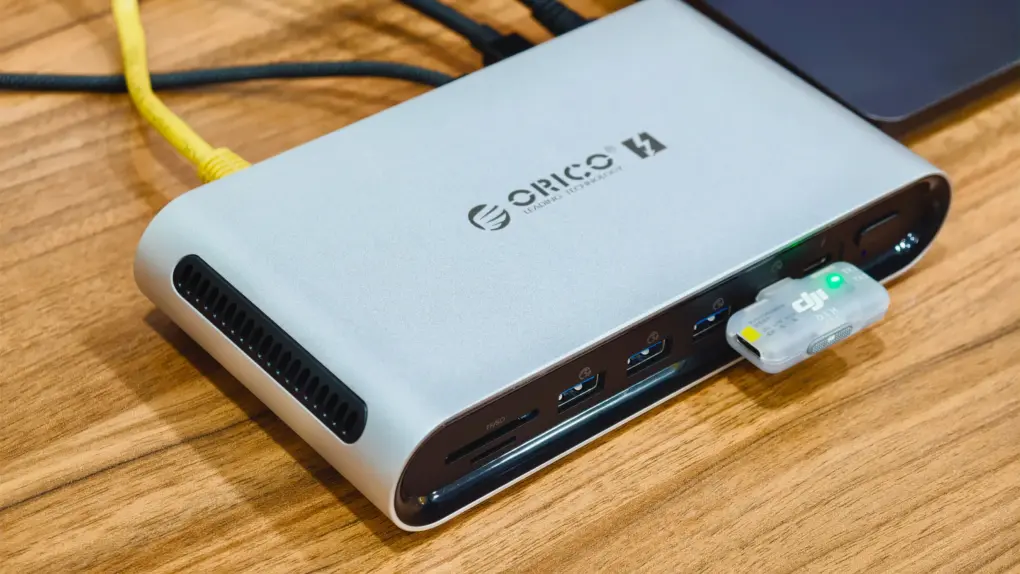
On almost every Thunderbolt dock, accessing the SSD slot means finding a screwdriver, but not the Orico TB5. This 14-in-1 Thunderbolt 5 dock hides its NVMe slot behind a magnetic plate instead, so you can swap a drive in seconds. Add three Thunderbolt 5 ports, 140W charging and both HDMI and DisplayPort, and you get a lot of dock for $330.
But Orico’s Thunderbolt 5 dock is not without its flaws. This is the first Thunderbolt 5 dock I’ve used where I could actually hear the fan. And the front ports are packed a little too tightly. After nearly five weeks on my desk, here’s how it held up.
Orico TB5 14-in-1 Thunderbolt 5 dock review
Most Thunderbolt 5 docks follow the same formula: plenty of ports, high-wattage charging, and a steep price tag.
Orico adds a twist to this tried-and-true formula. Its built-in SSD slot uses a quick-release magnetic mount for easy access, and that makes the TB5 14-in-1 worth a look for photographers, video editors and anyone else who regularly moves large files between drives. The SD and microSD readers on the front are aimed at the same people.
The rest of the dock has to hold up too, though. I made it my daily driver and plugged in the same monitor, mic and accessories I use every day to find out where it fits and where it falls short.
The Orico TB5 14-in-1 packs three Thunderbolt 5 ports, 140W charging, and both HDMI and DisplayPort into a compact aluminum body. Its magnetic cover makes accessing the NVMe SSD slot quick and easy, with no screwdriver required.
- Magnetic plate makes the SSD slot easy to reach
- Sleek and compact form factor
- HDMI and DisplayPort built in
- Audible fan
- Front USB-A ports are too close together
- Only one USB-C data port

Table of contents: Orico TB5 14-in-1 Thunderbolt 5 dock review
Hardware and design
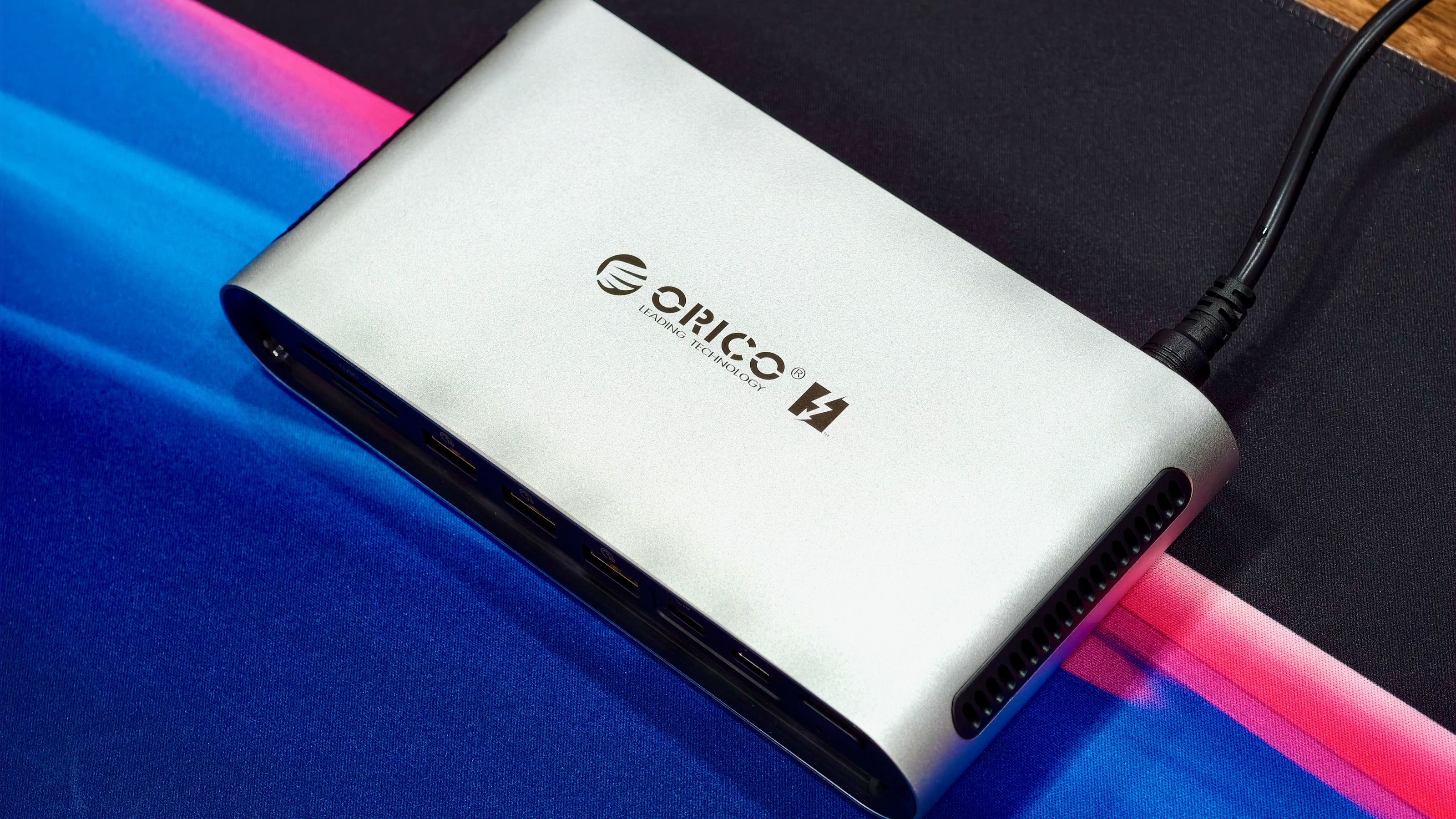
Photo: Rajesh Pandey/Cult of Mac
Orico’s Thunderbolt 5 dock is relatively compact, and its silver aluminum chassis feels solid. The design is nice, and the build quality is decent. It weighs just 384 grams, so it won’t take over your desk.
The power brick is another story. Orico bundles a chunky 180W adapter, so most of the bulk in this setup ends up on the floor or under your desk. As much as I don’t like such a big power brick, it ensures the dock itself has a small footprint.
I like the dock’s design, with a height much lower than that of competitors. The thin black vents on both sides add a bit of style, while also helping with air circulation.
If there’s a space crunch on your desk, the Orico TB5 should be your first choice when it comes to adding a Thunderbolt 5 dock. Its compact size means it will easily fit anywhere. Plus, the silver shade perfectly matches the silver color of the Mac Studio and Mac mini.
Connectivity: Too much USB-A, not enough USB-C
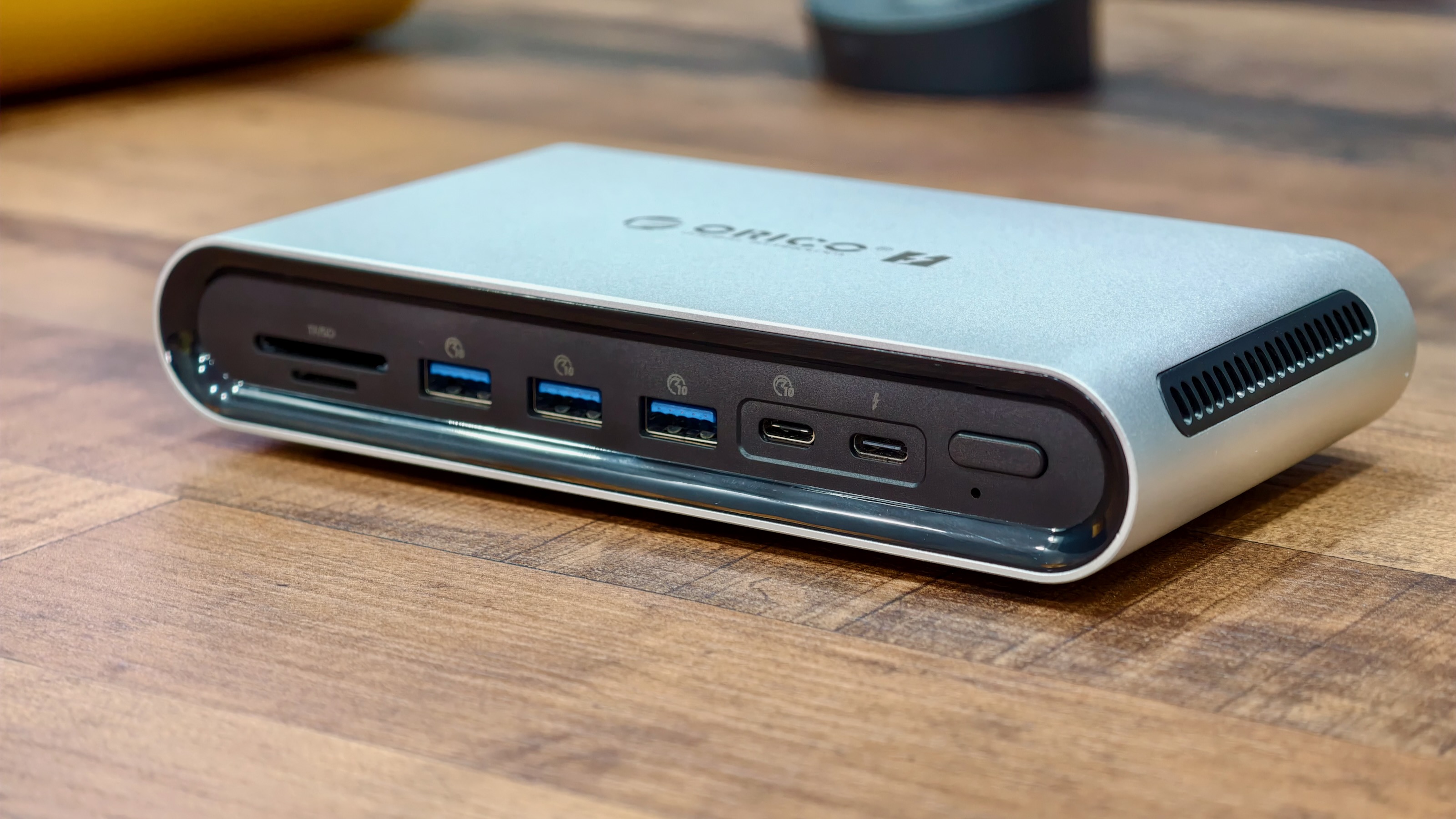
Photo: Rajesh Pandey/Cult of Mac
Some Thunderbolt 5 docks deliver nearly 20 ports. Orico’s Thunderbolt 5 dock is not one of them. It features 14 ports, including the SSD slot.
Here’s what you get:
Front ports:
- 1 × Thunderbolt 5 (downstream) — 15W power output
- 3 × USB-A (10Gbps)
- 1 × USB-C (10Gbps)
- 1 × SD 4.0 card slot
- 1 × microSD 4.0 card slot
Rear ports:
- 1 × Thunderbolt 5 (upstream/host) — up to 140W charging
- 1 × Thunderbolt 5 (downstream) — 15W power output
- 1 × HDMI
- 1 × DisplayPort
- 1 × 2.5 Gigabit Ethernet
- 1 × 3.5mm audio jack (in/out)
- 1 × DC power input (180W adapter)
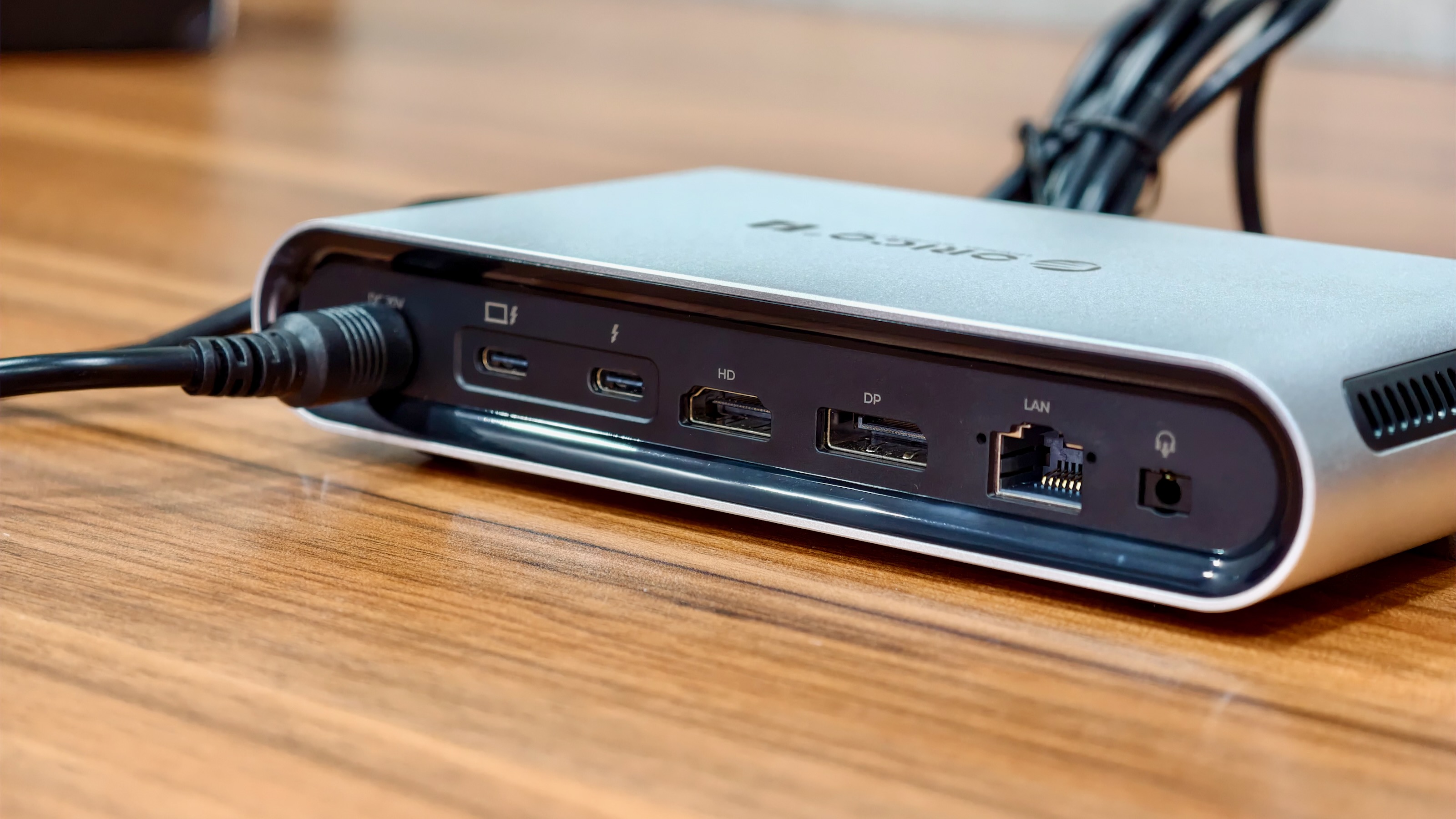
Photo: Rajesh Pandey/Cult of Mac
My biggest gripe with the port selection is that there are too many USB-A ports. I would have preferred just one, on the front or the rear, with the other two swapped for USB-C.
The spacing of the front ports only makes things worse. I plug a DJI wireless mic transmitter into the front of my docks. But doing that on the Orico TB5 blocks the USB-A port next to it. You effectively lose a port to one small accessory.
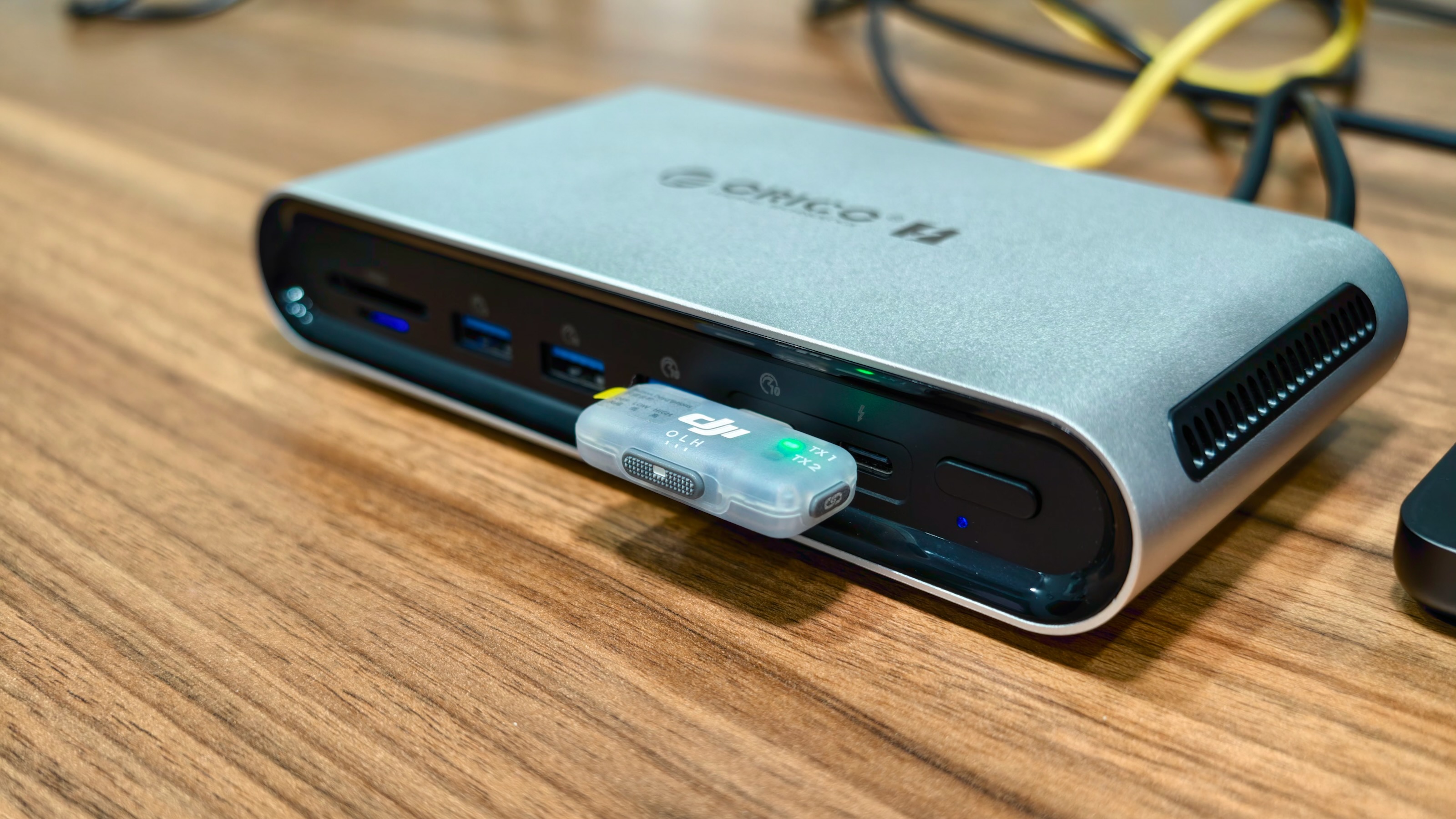
Photo: Rajesh Pandey/Cult of Mac
I would have also liked faster Ethernet than 2.5Gb. Then again, most Thunderbolt 5 docks in this price range stop there, including the Ugreen Maxidok 17-in-1.
On the other hand, the Orico TB5 14-in-1 Thunderbolt 5 dock comes with one Thunderbolt 5 port on the front, something that many competitors don’t offer. If you frequently plug in high-bandwidth accessories, you will find this useful.
Orico advertises support for up to five monitors, but keep your expectations in check. How many displays you can run depends on your Mac‘s chip, and no dock can get around that limit. Each of the HDMI and DisplayPort outputs can hit 8K at 30Hz on its own, but they drop to 4K at 60Hz when used together.
An SSD slot you can get to in seconds
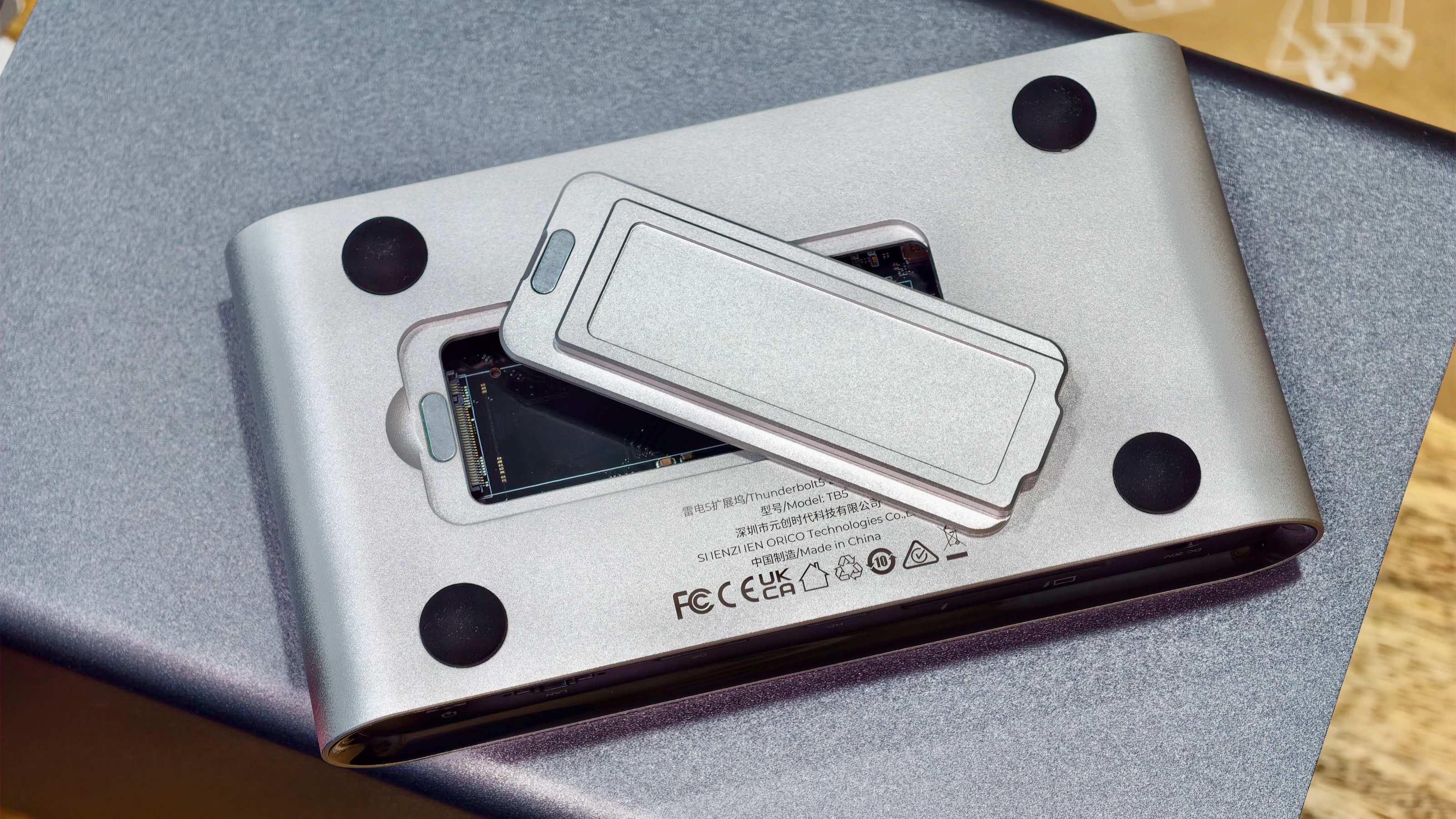
Photo: Rajesh Pandey/Cult of Mac
The most interesting design decision here sits on the bottom of the dock. The M.2 NVMe SSD slot, which supports drives up to 8TB, is covered by a magnetically secured plate. On almost every other dock I’ve used, that plate is screwed into place, requiring a screwdriver to remove it. (The Orico package does include a screwdriver, along with the SSD retaining screws and a heatsink, so you are sorted on that front.)
Easy access can be a good or bad thing, depending on your situation. If you swap drives often, you will love it. But if your dock is located where other people can reach it, that magnetic plate can be a cause for concern.
Orico rates the slot at up to 6GB/s. That’s the best case, though. If you have all the ports occupied by high-bandwidth accessories, expect slower speeds. The company lists PCIe 5.0 support, but there’s no need to pay extra for such a drive, since Thunderbolt bandwidth caps the speeds anyway.
A PCIe 4.0 SSD will do just fine, and it’s a cheap way to expand your Mac’s storage without paying the Apple tax. I didn’t have access to an M2 SSD to test the Orico dock’s SSD speeds.
Power and performance
This is the first Thunderbolt 5 dock where fan noise caught me off guard. In my silent office, with the AC and fan turned off, I could hear the fans spinning. Not too loud, just barely audible, but audible.
Compare that with the Ugreen Maxidok 17-in-1. Ugreen’s fan is so quiet that I only knew it was there because I checked the spec sheet. Even the iVanky FusionDock Ultra, with its dual fans, never drew attention to itself the way the Orico TB5 does.
To be fair, the fan does its job. The dock does not get hot, unlike some other Thunderbolt 5 docks. Still, if you work in a quiet room, this is something to keep in mind.
The Orico TB5 can push up to 140W to a connected MacBook Pro, enough for a true one-cable setup. With a 180W adapter, that leaves only 40W for everything else. Some other high-end docks ship with a 240W brick.
The ports are not much help for charging either. Orico’s spec sheet rates the USB ports at 5V/1.5A, or just 7.5W. That’s fine for an accessory but slow for an iPhone. Many other Thunderbolt docks feature a high-powered USB-C port on the front.
This is a small thing, but the Orico TB5 shows up as “KT USB” on my Mac. There’s no Orico name or branding anywhere. It doesn’t affect how the dock works, but it makes a $330 accessory feel less finished than it should.
★★★★☆
Pricing and warranty
The Orico TB5 14-in-1 Thunderbolt 5 dock costs $329.99 on Orico’s website. It’s also available on Amazon, potentially at a discount. Orico backs it with a one-year warranty.
Conclusion: Orico TB5 14-in-1 Thunderbolt 5 dock review
For the price, the Orico TB5 is a decent dock that’s a bit rough around the edges. I would have preferred more USB-C ports, faster Ethernet and, above all, a quieter fan.
If you can find another good Thunderbolt 5 dock at around the same price, get that instead. The Ugreen Maxidok 17-in-1 is the obvious pick, and at about $334 as I write this, it’s in the same ballpark, price-wise. It’s quieter, offers more USB-C ports, and charges your devices much more quickly.
- See also: Best Thunderbolt 5 docks for Macs
Still, if you don’t need many USB ports and you really want an NVMe slot you can get to in seconds, the Orico TB5 will happily do the job.
The Orico TB5 14-in-1 packs three Thunderbolt 5 ports, 140W charging, and both HDMI and DisplayPort into a compact aluminum body. Its magnetic cover makes accessing the NVMe SSD slot quick and easy, with no screwdriver required.
- Magnetic plate makes the SSD slot easy to reach
- Sleek and compact form factor
- HDMI and DisplayPort built in
- Audible fan
- Front USB-A ports are too close together
- Only one USB-C data port
Orico provided Cult of Mac with a review unit for this article. See our reviews policy, and check out more in-depth reviews of Apple-related items.

Rajesh has been writing about consumer technology for over a decade, with a strong focus on iPhones, Macs and Apple’s ecosystem. He enjoys digging into Apple software updates, hardware changes, and discovering new Mac apps that make work faster and more enjoyable.
You can reach out to him at mail[at]rajeshpandey.me.