After 30 years (and a mountain of quarters), SEGA has unleashed the next chapter of the hit classic Zaxxon. Now that you’ve defeated the evil Zaxxon, it’s time to shoot and tilt your way past Zaxxon’s evil army as you try to escape the collapsing asteroid base. This modern sequel to an everlasting classic features:
After the death of Steve Jobs last year the city of Fremont wanted to celebrate Jobs’s work by registering his original Macintosh factory as a place of historical significance. Fremont’s city council quickly went to work on getting the Mac factory – which was a state-of-the-art automation facility at the time – registered, but found out that the building isn’t old enough to meet federal criteria for a historic designation.
According to federal criteria, a building must be at least 50 years old to be registered as a historic place of significance, and Apple’s Mac factory is only 30 years old. Fremont City Council spent $45,000 in the effort to get the factory listed before realizing they wouldn’t be able to do so.
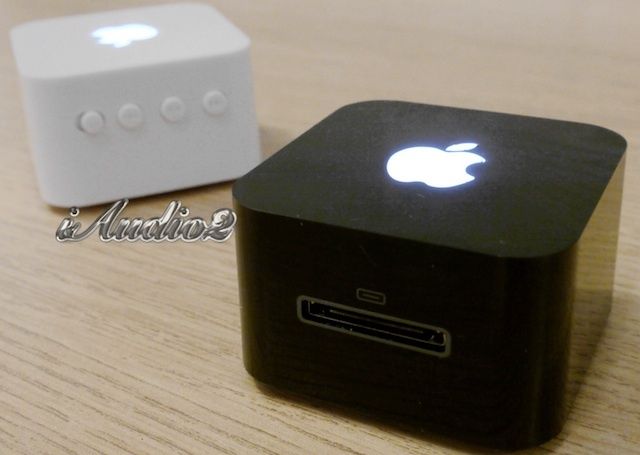
Apple’s legal team is freaky fast, and they don’t mess around. Yesterday we saw these portable speakers by iAudio2 that feature a glowing Apple logo on the casing. They’re small and probably sound like crap because they’re so cheap, but they look great. Too great. And we warned that if you wanted to get one you should act quick because Apple would be coming out with the ban hammer real fast.
Well, Apple has already sent iAudio2 a cease and desist letter telling them they better stop the sales of the iAudio2 immediately, or else. But iAudio2 has decided they’re not done having their fun just yet, and that even though Apple said to stop selling their product immediately, they’re going to keep selling them for the next 24hours before they run away scared. Unless of course Apple calls again, then they’ll stop immediately.
Here’s iAudio’s full letter to customers regarding the situation:
Camera Awesome, the iPhone camera app that actually is pretty awesome, has been update to support the iPad. Better, it’s now a Universal app, which means that if you already own the iPhone version, this one now works on your iPad, too, for no extra charge. Actually, even for new customers the app is free.
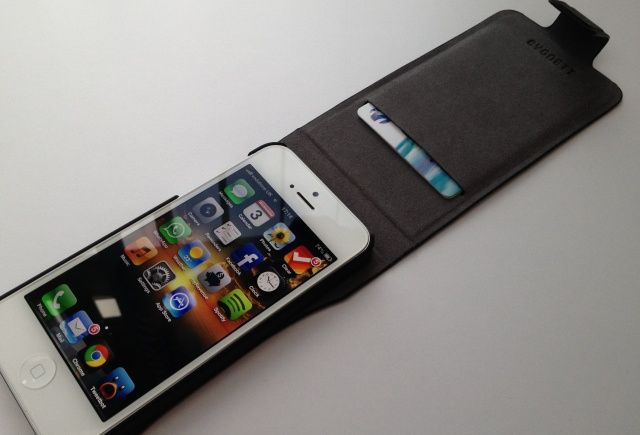
The Cygnett Lavish from MobileFun is a genuine leather flip case for iPhone 5 that contains a plastic snap-on shell that houses your device. It boasts a magnetic closure, and a card slot that will comfortable house one or two credit cards without adding too much bulk to your pocket.
The Lavish provides access to all of your ports and buttons, and can be folded back to expose your iPhone’s rear-facing camera. It comes in black or “regatta blue,” and it’s priced at $41 (£30).
It’s not the cheapest iPhone 5 case, then, but is it worth it?
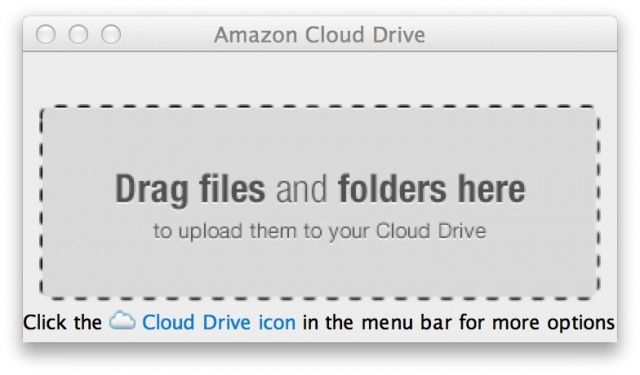
You can now upload your files to Cloud Drive from your desktop.
Amazon has today released a new Cloud Drive desktop app for Mac OS X, and it offers a number of nifty features that the web app isn’t capable of. For example, with Cloud Drive installed, you can upload files to your cloud-based locker simply by dragging them to your menu bar, and you can quickly import all of your images from iPhoto with just a few clicks.
We’ve seen all kinds of ridiculous and terrible Apple thefts, but this guy tops all of them by literally stealing an iPhone from a baby. It’s hard to make out the details in the video, but inside the carriage is a 20-month old baby, happily watching Barney on an iPhone while her mom is distracted with some shopping. The man walks up to the carriage, glances up, snatches the iPhone out of the baby’s hands and then walk away like nothing happened.
The worst part about it is police say the nasty old man followed the mom and her child into the store and deliberately targeted them knowing it’d be an easy crime to commit. The baby wasn’t harmed, but police are still looking for the suspect.
Today, I bring you news of the Smartphone Coaster, an innovation that is clearly set to take the world by storm. Well, the world of promotional marketing, at least.
What is it? The Smartphone Coaster is a steel kickstand which can be branded with your company’s logo, thus spreading your corporate message to the world whilst simultaneously depleting our precious Earth’s limited supply of minerals. Congratulations: you hate the future.
Apple is the "top riser" in the Best Global Brands survey.
Apple has climbed up to the second spot in Interbrand’s “Best Global Brands” survey of 2012, with an estimated brand value of $76.5 billion. The Cupertino company is second only to Coca-Cola, worth an estimated $77.8 billion, and it leaves IBM, Google, and Microsoft trailing behind.
As Apple patents go, it’s not always easy to tell which ideas will make their way out of Cupertino in future devices, and which will be written off. But I’m guessing this one falls into that last category. Published by the U.S. Patent & Trademark Office on Thursday, this patent covers a new feature, which could one day make its way into iOS, that would demand users change print settings by shaking their device.
Eye-Fi has updated its top-of-the-range Pro X2 SD card from 8GB to 16GB, upped the speed to Class and kept the price at the same ridiculous $99. The X2 is the card to buy if you need everything Eye-Fi has to offer: geotagging, direct transfer to your iDevice and RAW file support. But it might not necessarily be the one you want.
Photo app Camera+ has been updated to take advantage of the iPhone 5’s new low light boost mode. This feature is new to the iPhone 5, comes enabled automatically in Apple’s camera app, and is available to third party developers as an option.
Camera+ is the first non-Apple app to incorporate it.
You’ve used Quick Look a lot, right? I know I have. I’ve use it a ton to browse through bunches of images on my Desktop when trying to decide which Screenshot I want to put at the top of these OS X tips.
But there’s much more you can do with multiple files and Quick Look, including a sweet index view that I just found out about myself. Follow along at home, and I’ll show you how.
Back in early September, we reported that Acclaim’s classic radio-controller car racer, Re-Volt, was coming to iOS, and today it has landed in the App Store. The title is an exact port of the original game released on the PC and Sega Dreamcast back in 1999, only it’s been visually optimized to look great on Retina display devices, and adapted for the touchscreen.
Re-Volt boasts “fast paced, exciting driving, with explosive weapons and unique track designs [that] deliver a larger than life racing experience like no other.
Suppliers just can't make the iPad mini's rear shell fast enough, apparently.
Apple’s much-anticipated iPad mini is expected to make its debut in mid-October, but it may be a little more difficult to get hold of than other iOS devices. According to sources in the Cupertino company’s Taiwanese supply chain, iPad mini shipments are already stumbling due to the low yield rates of the tablet’s aluminum chassis.
So lifelike! Just as if the real thing were part-paper.
If the thought that you still own an iPhone 4 or 4S makes feel you all Sad Face, cheer up: there’s a low-budget way to upgrade your device to modern iPhone 5 dimensions. What it lacks in technical functionality, it more than makes up for with practicality, price and Make style. It’s called iFaux, and you can download it for free.
Missing Street View on your iPad? Good news: Google has enabled it in Mobile Safari, letting you check out street-level detail from your iOS device, right there in the browser.
If you’ve been itching to get your hands on Infinity Blade for your Android device, you’re out of luck. However, if you’re good with playing a Infinity Blade-style game, Glu Mobile just may have the answer for you. The San Francisco-based company has just released a trailer for a new game, Death Dome, that looks a whole lot like Infinity Blade with a heaping serving of Borderlands 2 thrown in for good measure. Check it out.
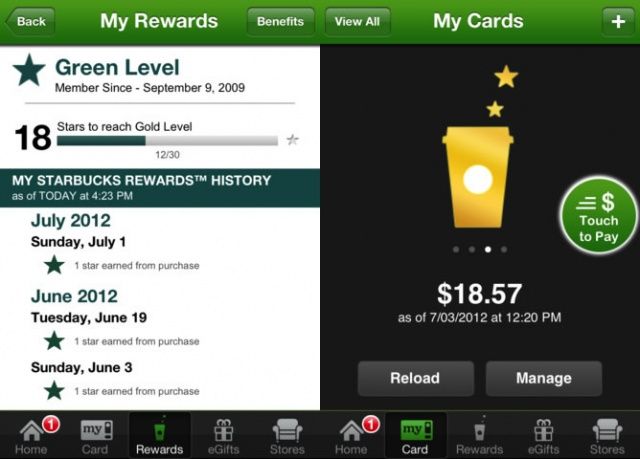
Starbucks just updated its iOS app to work with iOS 6 and Passbook, Apple’s new virtual wallet app. The update lets users store virtual card info in both the Starbucks app as well as Passbook, which will allow them to access the card much more easily, in the iPhone lock screen itself.
The update also includes an easier sign up process for Starbucks’ Rewards system, allowing for new accounts to be created within the app, as well as multiple bug fixes, data optimization, and performance improvements.
The retro-wacky Bit.Trip series, originally published on the WiiWare downloadable game service for Nintendo’s Wii console, has started showing up on Steam. The second game in a six-game series, Bit.Trip Core serves up some psychedelic visuals married to a fantastic chiptune soundtrack, which is available if you purchase the $12 version of the game.
The best part? Bit.Trip Core, like the other three Steam-available games from the Bit.Trip series, is available for the Mac.
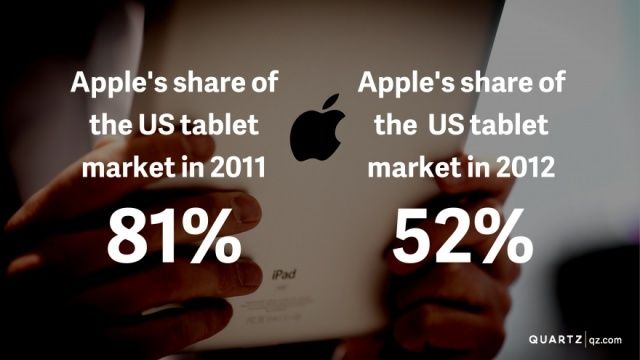
According to a new report by the Pew Internet and American Life Project, one in four adults in the United States owns a tablet of some kind. Two thirds of those adults have purchased them in the last year, according to the study, which was reported by The Economist. Further, the data doesn’t even include the new Google Nexus tablet, nor the new Kindle Fire HD from Amazon.
Is iPad in trouble? Is this a new era for Apple, one in which it must play catch up? The numbers of units do seem to tell that story.
Hoops fans rejoice, 2K’s NBA 2K13 has dribbled down from its prime-time launch to embrace our mobile devices. One of the most successful NBA video game franchises creates another slam dunk with its impressive game simulation, amazing graphics, and intuitive One-Finger controls. Head fake your way to a winning season while breaking ankles with your wicked crossovers. If there’s any hoops game to pick up for your mobile device, it’s this one.
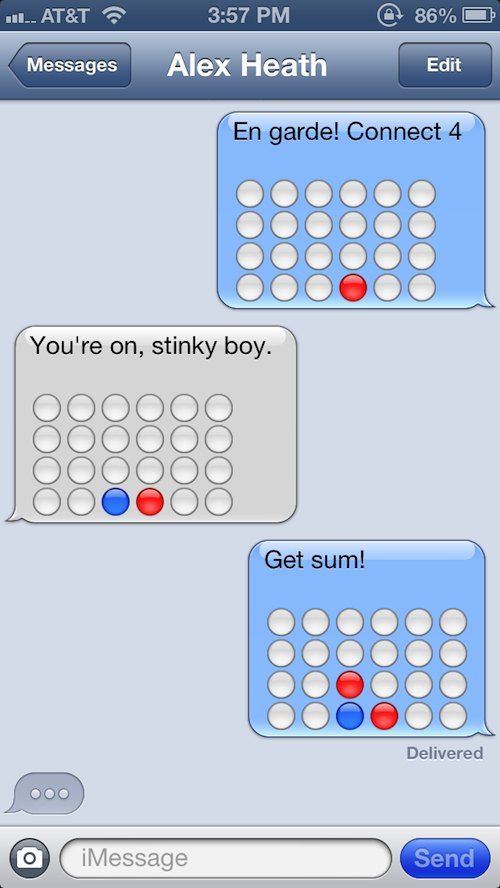
There are like 50 billion games on the App Store and a lot of them have Game Center integration so you can battle your friends at Angry Birds, or Temple Run or Tic-Tac-Toe or whatever. But if you want to see how much your friends really love you, try playing them in a emoji game of Connect Four. It’s painful and kind of tedious and you have to remember to play with virtual-gravity, but it’s also totally awesome, in a dumb way.
GsxWarranty checks AppleCare status and service information
Most software released for Macs and iOS devices is designed for the general public – programs, utilities, games and Apple’s own website. But an important and growing industry exists behind the scenes to keep all that shiny Apple gear working.
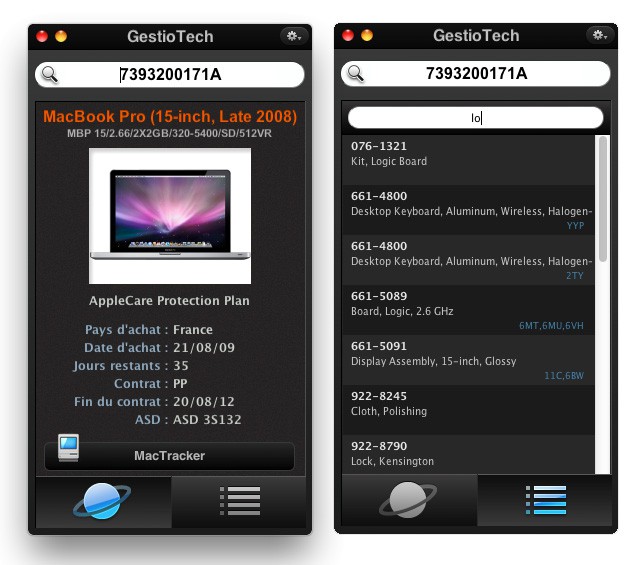
GsxWarranty is a small utility for Macs, Windows PCs and iPhones which allows a technician to quickly check warranty status on Apple products. By entering the serial number GsxWarranty displays detailed information concerning AppleCare, service parts and configuration details.