Mobile menu toggle

Leica Launches $3,000 Point And Shoot

By

Leica-X-Vario-Top.jpg

Leica, once a camera manufacturer that made great tools for photographers and now little more than a boutique fashion brand catering to dentists, has just played a fantastic little joke on the world. It’s called the X-Vario, and it proves that Leica thinks you’re a sucker. Why? Because it’s a $3K compact.

Jony Ive Is So Obsessive He Gave iOS 7 Icons The Same Rounded Corners As The iMac

By

iOS7iCons

As the new Director of Human Interface, Jony Ive has gone from making beautifully beveled Macs, to redesigning iOS into a multi-layered Parallax operating system. By drawing from his deep well of hardware design brilliance, Jony brought a lot of his hardware philosophies to iOS, and the Messages app icon shows just how insanely detailed Jony can get.

As discovered by Brad Ellis, Jony made sure that the Messages icon’s corners have the same tapered edges which can be found on the iMac and other Apple products.

The difference is just a small number of pixels that most users would probably never notice, so Brad created his awesome comparison GIF so you can actually see the changes: 

Here’s What Would Happen If We Let Jony Ive Redesign EVERYTHING [Humor]

By

windowsive

Jony Ive’s vision for iOS has received quiet a bit of heat over the last 24 hours thanks to his heavy use of flat icons, huge areas of white space and whimsical neon color gradients.

A few designers have already sought to ‘fix’ some of the uglier quirks of iOS 7, but what would happen if we let Sir Jonathan Ive redesign everything? Well, thanks to a hilarious new Tumblr called  ‘Jony Ive Redesigns Things,’ we have an answer, and it’s not pretty. Take a look:

WWDC 2013 Keynote Is Now Available For Download In iTunes

By

wwdc13-about-main_2x

Don’t have enough time to sit at your computer and watch all two hours of the WWDC keynote? Well you can take it with you on your iPhone or iPad now.

The WWDC 2013 keynote was just made available in iTunes. You can download the video straight to your device as a podcast, but with a run-time of 1 hour and 58minutes, the file is pretty big, so make sure you’re on a Wifi connection. Here’s the download link.


Source: iTunes

iTunes Radio Will Only Be Available In The U.S. At Launch

By

Ph
Ph

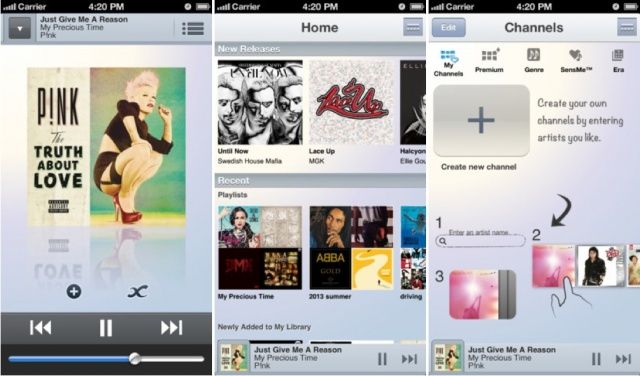
iTunes Radio is one of the staple features in iOS 7. The Pandora-like music streaming service is integrated directly into the stock Music app. Apple’s Eddy Cue demoed it for the first time yesterday, and iOS 7 beta testers can try it out now.

When iTunes Radio launches publicly alongside iOS 7 later this fall, it will not be available outside of the U.S., notes Bloomberg. This likely has to do with the fact that Apple has to setup licensing agreements with record labels in each country ahead of time.

Even The Magnifying Glass Is Flatter In iOS 7

By

Screen Shot 2013-06-11 at 5.19.23 PM

iOS 7 is a weird kind of flat. In many ways it lacks depth, but in others it’s more animated and texture-driven than iOS 6. How ever you want to define “flat,” it’s easy to see the direction Apple is headed. Just take a look at the details.

The magnifying glass in iOS 7 (the little orb that appears when you hover your finger over text) is minimalistic. iOS 6’s magnifying glass was more rounded, and the border was more pronounced. In iOS 7, it’s a nearly flat piece of glass. There’s some shadow to provide depth, but hardly any. Welcome to the future.

You Can Search For Purchased Apps In The iOS 7 App Store

By

IMG_2974

Nestled under the Updates window in the iOS 7 App Store, you can find your purchased apps. Like iOS 6, you can choose to look through all previously purchased apps and only the apps that aren’t currently installed on your iPhone.

For some weird reason, Apple never put a search bar in in this part of the iOS 6 App Store. Now it’s there in iOS 7.

7 Jailbreak Tweaks Apple Killed In iOS 7

By

iOS-7-lock-screen

A lot of innovative ideas for iOS get introduced in the jailbreak community. Hackers and developers tinker around with Apple’s software and create new ways to access settings or multitask. And then Apple comes along and kills (or sherlocks) those ideas with its own take in a future iOS release. It happens every year without fail. 2013 and iOS 7 are no different.

Here are some popular jailbreak tweaks that Apple has rendered obsolete with iOS 7:

Pros, Airs, iOS 7, Mavericks: Don’t Miss Our Full WWDC Recap On Our Special Edition CultCast

By

new-cultcast-site-promo-pic-heath.jpg

This time ’round on CultCast: iOS 7 debuts to a standing ovation, but some aren’t in love; OS X 10.9 Mavericks will have you rewatching Top Gun, we’ll highlight the new features; new MacBook Airs get insanely long battery life and more power; and Apple resurrects the rumored Mac Pro to uproarious applause—it’s our complete WWDC coverage on this very special episode of the CultCast.

Join us as we review all the great stuff Apple announced in the glorious 90-minute event know as WWDC. Stream or download new and past episodes on your Mac or iDevice by subscribing now on iTunes, or hit play below and let the good times roll.

Show notes up next.

Cultcast 76 post player image

Where Are All The Curse Words In iTunes Radio?

By

itunesradio


Apple finally announced its long-rumored iTunes Radio service yesterday at WWDC, and even though it doesn’t officially launch until this fall, we’ve been taking it for a spin in the iOS 7 beta. Initially, iTunes Radio has left us fairly impressed, except for one huge omission: all the curse words are missing.

When you stream music via iTunes Radio stations, all songs with profane lyrics are streamed in an edited edition, even on user-created stations. We’re not just talking about radio edits where more family appropriate lyrics are dubbed in. Nope, iTunes Radio just strips out the whole word so you’re left with awkward gaps in the song as your favorite artist chokes out a horrific blast of profanity.

During our time playing with iTunes Radio we haven’t come across a single explicit track that isn’t censored, so if you love to bath in the crass lyrics of hiphop’s greatest living legends, you’re out of luck. 

OS X Mavericks Isn’t Named After A Cat: It’s Named After A Dog

By

2008-06-26_White_German_Shepherd_Dog_Posing_3

Yesterday, Apple unveiled OS X 10.9 and joked that after a decade, they were ditching their scheme of naming OS X releases after cats because they’d simply run out of big cat names to use. Instead, from now on, they’d name future versions of OS X after places in California, starting with OS X Mavericks, named after a famous Californian surfing spot.

What’s pretty funny about the choice of ‘Mavericks’ as a name for OS X, though, is that the real-world location is named after a German Shephard, meaning that argue switched from naming their OS X releases after cats to naming them after dogs instead!

iOS 7 Keypad Buttons Now Morph Into Your Homescreen Background

By

newkeypadinios7


iOS 7 is full of huge UI changes and we’re just starting to scratch the surface on all the big changes, but here’s one new little feature that shows Apple hasn’t lost its touch with the little things.

The Phone app for iOS 7 got a big makeover that tossed out the old keypad buttons for a minimalist keypad adorned in white space and large helvetica numbers. The new Phone app UI is pretty plain and boring until you touch a button and watch it quickly morph into the homescreen background before its opacity pops back to white.

The new animation helps users see where they’re pressing, but you can waste tons of time with it playing Bingo or Connect Four too if you’re into that thing. Here’s what it looks like in action:

Make Your iPad More Versatile With The 3-in-1 Camera Connection Kit [Deals]

By

CoM - Camera2

Tablets are pretty impressive, but they still can’t quite effectively replace a desktop or laptop computer. This Cult of Mac Deals offer makes your iPad that much more effective a replacement option.

This 3-in–1 adapter will help bridge the gap between tablet and fully functional computer. Most importantly, the 3-in–1 iPad adapter cuts out the middle man when uploading photos to your iPad, saving you a ton of time. And Cult of Mac Deals is offering this little device for only $19 – shipping included – so you can save a ton of money as well!

Why You Probably Shouldn’t Install iOS 7 Right Now [Opinion]

By

IMG_2379

In the words of Apple itself, iOS 7 is the biggest change to their mobile operating system since the introduction of the original iPhone back in 2007. It’s more functional then ever, it’s prettier than ever: it’s the very definition of digital design purified and clarified down to the very basics of form merged with function.

Understandably, that means that many people are tempted to install it on their devices, either by forking over $99 for an Apple developer account or paying five or ten bucks to someone online to register your UDID for you.

We know it’s hard to wait, but you really shouldn’t do it. Here’s why.

Here’s What All The New iOS 7 Icons Look Like Compared To iOS 6 Icons

By

iOS6vsiOS7iConcomparison


The new icons and user interface of iOS 7 has seemed to polarize a lot of Apple fans. Nearly every Apple app is getting a new icon when iOS 7 launches, and most of the icons are incredibly different that their iOS 6 counterparts.

Some designers have already set out to work on “fixing” Apple’s new icons, but to help you see how big the changes are, here’s a handy chart that compares all the new iOS 7 icons with their iOS 6 counterparts. Take a look:

iOS 7 Passbook Ditches Forstall’s Dumb Paper Shredder Animation

By

Passbook Delete


Passbook’s virtual ticket-shredder was one of the little touches in iOS 6 that wreaked of ugly skeuomorphisism. Now that Jony Ive has declared war against all of Scott Forstall’s tacky skeuomorphic UI elements, the Passbook ticket-shredder is now a thing of the past.

When you delete a card in Passbook now it just zaps away into the digital ether, rather than sending your virtual card through a virtual paper shredder that virtually obliviates your ticket so you know it’s deleted and no one can rummage through your virtual trash and piece together all the shreddings to steal your identity.

Here’s a GIF of the new iOS 7 animation in action:

Apple Explains Why It Designs Products [Video]

By

cult_logo_featured_image_missing_default1920x1080

Apple kicked off its WWDC keynote yesterday with an animated video explaining the philosophy behind its design process. Now the segment has been uploaded to Apple’s YouTube channel for the world to see.

“Here, simple phrases paired with elegant visuals describe the thoughts and emotions that go into creating each Apple product.” The video is very much about the company’s core values, like the ad we showed you yesterday.

Bloomberg says that “ads coming this summer won’t focus on the iPhone or any other single product, instead promoting Apple’s brand appeal and its collection of products that work seamlessly together.” The most recent TV ads to come out of Apple have focused on specific aspects of the iPhone, like music and photography.

OS X Mavericks: Here’s What’s New [Gallery]

By

OS-X-Mavericks-Features-MacBook


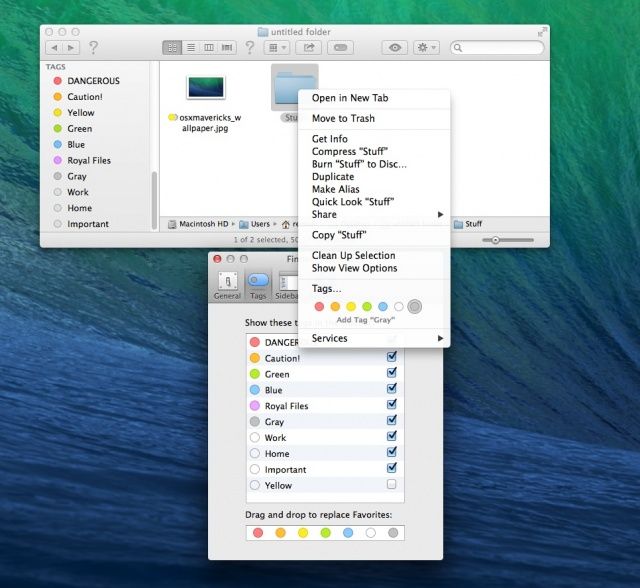
Although it’s not quite the overhaul we’re seeing in iOS 7, OS X 10.9 Mavericks is an exciting new update to OS X that crams a lot of new features into the Mac operating system, including Maps, iBooks, iCloud Keychain, a new Safari, a more powerful Finder with tabbed windows and tagging, better Notifications, far improved battery life support, and much, much more.

We’re still delving into Maverick and spotting the best features. Here’s everything new we’ve spotted so far, and we’ll be updating this post with more screenshots of the new shiny in OS X Mavericks.