Mobile menu toggle

Comcast’s Time Warner Cable Acquisition Throws Apple TV Partnership Into Doubt

By

The next version of Apple TV may allow you to take your viewing with you wherever you go. Photo: Apple

Comcast, the number one cable provider in the U.S., has announced that it plans to acquire Time Warner Cable, the second largest cable firm in the U.S., for a reported $45 billion.

The deal — set to be officially announced later today — will see Comcast offer $158.82 per share in an all-stock deal.

U.S. Customers Are Hoarding $13.4bn Of Old iPhones

By

The iPhone 5 is going to be huge.

Around half of U.S. consumers are hoarding their old iPhones in cupboards and sock drawers — representing an inventory worth around $13.4 billion in total.

According to the annual “Mobile Mountain Study” conducted by research group OnePoll for resale site SellCell.com, this figure is down from the 55% of people who admitted to holding onto their old smartphones last year — although the total amount of money being left on the table is up from last year’s sum of $9 billion, thanks to the growing smartphone market.

“Americans are still unaware of the money they can make by trading in their old mobile,” says SellCell founder Keir McConomy.

iPhone Users Have A ‘Blind Loyalty’ To The Apple Brand [Report]

By

Apple Loyalty
Apple’s-New-iPhone-5S-and-iPhone-5C-makes-history-Records1-640x360
Photo: Cult of Mac

A new survey of 2,000 iPhone users saw 3/5ths of respondents admit to having a “blind loyalty” to the Apple brand.

78% percent claimed they “couldn’t imagine having a different type of phone now,”  while 52% said they had been “really impressed” with the iPhone.

Ellen DeGeneres’ Heads Up! Game Adds New Oscars Category

By

post-266361-image-1711dcb49a6abeedd7feca5809d78f0e-jpg

Ahead of the 86th Academy Awards show, the Heads Up! app dreamed up by this year’s host Ellen DeGeneres has received a timely update — offering questions related to the Oscars.

Joining existing game categories including Celebrities, Animals, Accents, and Characters, the new time-limited Oscars game deck offers users a chance to brush up on their movie trivia knowledge in the most time-pressured setting imaginable. “It’s perfect perfect for your viewing party, or preparing for the big night starring Ellen,” the app’s developers state.

Tangent iPhoneography App Plagued By App Store Fakes

By

Pixite’s fantastic Tangent app gets a big update with v1.5, adding in a new “Urban Decay” pack that lets you point your iPhone camera at a building and have it crumble into rubble and dust, and then snap pictures as zombies and wild animals reclaim what us evil humans were only ever borrowing.

Wait, no. Urban Decay is a new set of fancy filters for grungifying your pictures. Just make sure you get the right Tangent app, as the developer has been plagued by a copycat who keeps putting fake versions of the app up on the store.

This Camera Flash Ditches The AAs For A Powerful 12-Volt Li-Ion Battery

By

Here’s a neat take on the small pocket strobe or flash. Instead of forcing you to buy and manage the charging of a ton of AA batteries to use it, the Neewer TT850 is a hot-shoe strobe that uses a 12-volt li-ion battery. This not only makes charging easier, but also means you get a lot more pops per second thanks to the fact that the battery can dump 12V instead the flash instead of the paltry 6V that 4xAAs can manage.

Punch Quest Packs A Heckuva Punch For A Pocket-Sized Game [Review]

By

punchquest

Punch Quest by Rocketcat Games
Category: iOS Games
Works With: iPhone, iPad, iPod Touch
Price: Free

Released at the end of 2012, Rocketcat Games’ Punch Quest isn’t the newest game to hit the App Store. However, as a former Flappy Bird player (yes, I admit it!) I was interested to see what else Apple’s recommender algorithms would suggests to me in terms of a substitute constant runner requiring precision-tapping.

Following those recommendations brought me to Punch Quest.

Punch Quest is pretty much a quest where you punch things. Like so many successful iOS game it basically takes a video game premise/paradigm — in this case a platformer — and strips it down to its most essential elements — in this case running and punching. Your left hand controls jumping, your right does the bulk of the punching, and the running is automatic — as if the action takes place on a giant treadmill, although you can choose to speed up or slow down within this setup.

SuperTab Adds Every Function Ever To The Mac Tab Switcher

By

Command-tab, a keyboard shortcut so ingrained in the Mac user’s finger-memory that it’s easy to find yourself hitting it when using a keyboard with your iPad, or when you’re on a PC (NB: don’t use a PC unless you have been professionally trained and are wearing a tie).

The switcher already lets you flip between apps, quit apps, view recent documents in a cool Exposé view (use the up/down arrows), and to drag and drop documents onto apps to open them. But now there’s SuperTab, an everything-but-the-kitchen-sink-style app which adds even more.

Top iOS Apps Of The Week

By

Numerus

Browsing the App Store can be a bit overwhelming. Which apps are new? Which ones are good? Are the paid ones worth paying for, or do they have a free, lite version that will work well enough?

Well, if you stop interrogating us for a second, hypothetical App Store shopper, we can tell you about this thing we do here.

Every week, we highlight some of the most interesting new apps and collect them here for your consideration. This time, our picks include a fancy number trivia app, an bed-bug checker, a photo editing and filter app for the obsessive in all of us, a new update to iDraw that brings some Photoshop-style features to the already-fantastic iPad app, and a fashion blogger app for heaps of style.

Check them all out:

Numerus is one of those weird apps that shouldn’t be as interesting as it is. But once you spend a little time clicking around, you will feel the random knowledge dropping into your head.

Did you know that in 1950, the Canadian postal system processed 1,362,310,155 items? I don’t know why you would, but you do now. Also, the human body has 248 organs, there were 129 episodes of the CBS sitcom Becker, and China contains 56 officially recognized ethnic groups. I can’t stop.

Alright, maybe one more.

Is that a Bill and Ted reference in there? This app is amazing.

Numerus: Fun Facts About Numbers – Free | Clover Studio Ltd.

Bed Bug Proof

America is seeing a resurgence in bed-bug infestations, and here’s an app to help you screen a room and identify the little biters before they introduce themselves.

To be perfectly clear, Bed Bug Proof is an app created in part to sell an anti-bed-bug spray. But the practical information and tools it provides like the inspection guide, comparison photographs, and a magnifier/light to let you use your phone to search for eggs and poop, are useful enough to let it stand on its own.

Although it will make you itchy just looking at it. Seriously.

Bed Bug Proof – Free | Terramera Inc.

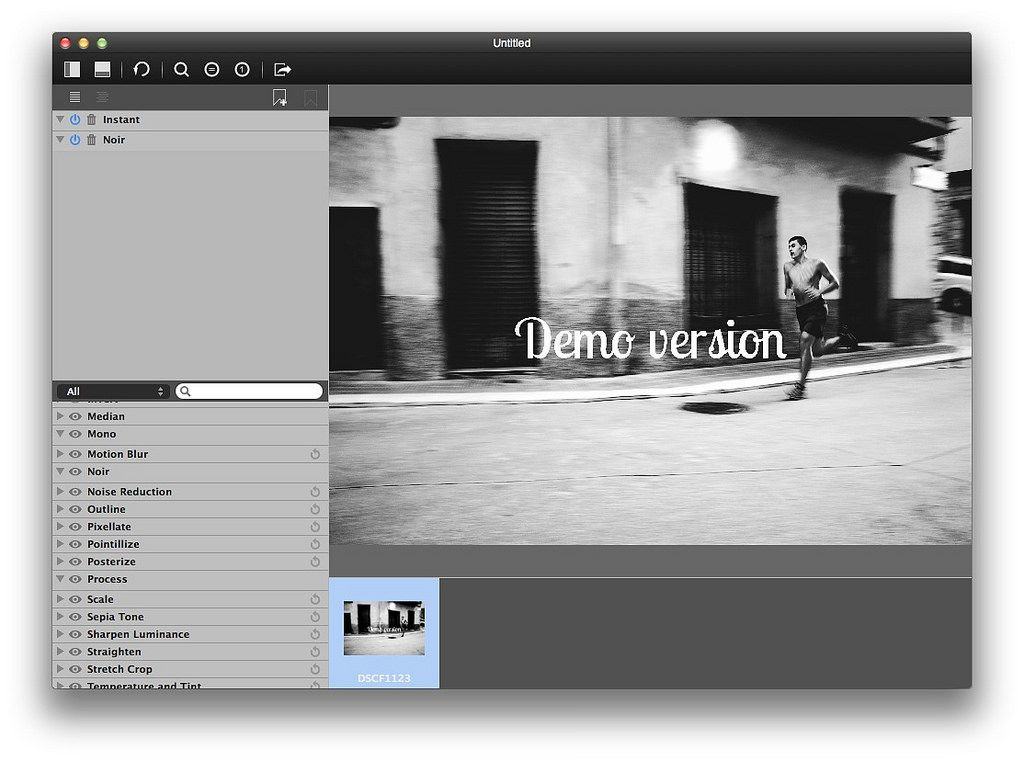
Photo editing for the obsessive compulsive in all of us.

Sure, the Camera app that came with your iPhone has a few filters, but we all know they’re pretty lame.

Instagram (and before that, Hipstamatic) made the quick filter process a no-brainer and popular to boot.

Jelly Bus’ Rookie, though, has all of them beat, with a veritable boat load of filters, effects, and all the settings you can possibly handle. If that’s not enough, there’s a bunch of stickers and text effects you can add to your photos to make even the most ordinary snapshot into a work of art.

Once you tweak and tap your way to photo-nirvana with Rookie, you can save your photo to pretty much every other photo sharing service out there, including Instagram, Facebook, Twitter, and Flickr.

Best of all? It’s a universal app and it’s free.

Rookie – Photo Editor – Free | Jelly Bus

Get a whole photo shop on your iPad for a tiny amount of cash.

Image editing app iDraw has been around for quite some time, but the new 2.0 version (released this past week) really kicked things into high gear.

If you’re looking for a solid Photoshop-style image editing program for only a little bit of scratch, iDraw 2.0 has it in spades. The app now imports and exports PSD photoshop files with full vector path and effect support, as well as shape layers and layer effects. You can also export your designs as layered PSD files.

The app has been redesigned for iOS 7 as well, and it now takes advantage of the new 64-bit A7 processors on the new iPad Air.

Seriously, there is so much jam-packed into this release as to consider it an entirely new app, which is why we wanted to share it with you now.

iDraw 2.0 – $8.99 | Indeeo, Inc.

Flink

Whether you’re a fashionista looking for new sources of inspiration or a tone-deaf jeans and t-shirt kind of dresser, new app Flink will help you connect to the world of fashion blogging.

Flink allows you to see hot new “looks” from the top fashion bloggers around the web, including Garance Doré, La revue de Kenza, Adenorah, Absolutely Glamourous, Mercredie, le blog de Lilou, Modasic, and Blondie Baby. You can also save these looks for later, visit the original blog posts, and “heart” the looks you love.

When you first launch the app, you’ll tap to follow as many of the included bloggers, and then tap your way through each of the photos included in each screen. You can tap through to see what clothes and accessories make up each look, or you can just swipe through and see various images of the different parts.

All in all, if you’re looking to kick up your fashion knowledge, or just find some new looks to recreate in your own life, Flink just might be the free app you’re looking for.

Flink – Free | Epic Dream

Are These The First Spyshots of the iPhone 6?

By

BgS_sMRCQAALjG3

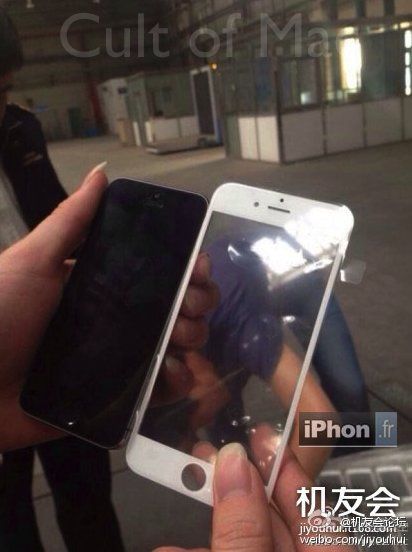
The iPhone rumor mill has been in overdrive lately, but with the iPhone 6 launch not expect until later this Fall we weren’t expecting to see any pictures which makes this afternoon’s set of alleged iPhone 6 rear casings almost too delicious to believe.

A set of images of an alleged iPhone 6 hit Twitter this afternoon, originating from obscure account but have since been picked up by Sonny Dickson, the infamous leaker who revealed the iPhone 5 as well as a number of other Apple products.

The images feature a space gray and gold iPhone, both with an edge-to-edge display and a thinner profile. The rear casing also suggest Apple will ditch the two glass sections in the back – maybe finally utilizing their LiquidMetal tech for an antenna?

We can’t confirm if the images are genuine yet, but they still give you a pretty good idea just how beautiful a bigger screen iPhone will be.

Update: Looks like these photos are fake. At least there are more surprises to come.

See for yourself:

Get All The Weather Details You Need In iOS 7’s Weather App [iOS Tips]

By

weather deets

The new iOS 7 Weather app, taking a cue from the gorgeously designed Yahoo! Weather app that came out just before iOS 7 did, has all sorts of neat details and gestures to help you keep track of the meteorological realities around you.

If a list of all the cities you add to the Weather app and the extended 7-day forecast basics aren’t enough, there’s even more to find once you dig into the app a bit.

Highly Anticipated Stratus iOS Controller Is A Mixed Bag Of Potential [Review]

By

DSC05169

I’ve been looking forward to SteelSeries’ Stratus since it was announced back in January of this year.

Stratus by SteelSeries
Category: Game Controllers
Works With: iPad, iPhone, iPod touch
Price: $79.99

The joy of most iOS titles is the ability to play using the touchscreen. The gaming world has benefitted greatly from iOS game developers learning how to best control their games without a physical controller.

However, there are a few games — especially versions of old-school console games — that just cry out for an actual button-filled controlling device that you can use while staring intently at the screen.

The Stratus, and other controllers like it, aims to fill that need with a smaller, super-portable and highly accurate controller that takes advantage Apple’s own iOS game controller code that’s built right into iOS 7.

Whether you’ll find this a successful or not depends a lot on your device, the games you want to play, and how your hands fit on the Stratus itself.

Get Over $600 Worth Of Photography And Design Assets With The SuperStacked Mac Bundle 2.0 [Deals]

By

redesign_vectorrain

This Cult of Mac Deals is the perfect software stack for any creative. It’s so perfect, you could even call it a “super” stack.

Cult of Mac Deals has assembled $650 worth of creative resources in one massive package, featuring software that is ideal for the designer and photographer. We’ve even planted an app in there that many bloggers and online writers use. And you can get all of these apps – 9 in total – for just $29 during this limited time offer!

Put Fashion First With New Blogger-Centric App, Flink

By

Flink

Whether you’re a fashionista looking for new sources of inspiration or a tone-deaf jeans and t-shirt kind of dresser, new app Flink will help you connect to the world of fashion blogging.

Flink allows you to see hot new “looks” from the top fashion bloggers around the web, including Garance Doré, La revue de Kenza, Adenorah, Absolutely Glamourous, Mercredie, le blog de Lilou, Modasic, and Blondie Baby. You can also save these looks for later, visit the original blog posts, and “heart” the looks you love.

When you first launch the app, you’ll tap to follow as many of the included bloggers, and then tap your way through each of the photos included in each screen. You can tap through to see what clothes and accessories make up each look, or you can just swipe through and see various images of the different parts.

All in all, if you’re looking to kick up your fashion knowledge, or just find some new looks to recreate in your own life, Flink just might be the free app you’re looking for.

Source: App Store: Flink | Free | Epic Dream

How A Young Steve Jobs Stole The Spotlight In National Geographic

By

(Credit: National Geographic)

To coincide with Steve Jobs’ appearance in the National Portrait Gallery’s new “American Cool” exhibition, Cult of Mac had the opportunity to speak with Charles “Chuck” O’Rear — the photographer who took the 1981 portrait of Jobs currently on display.

O’Rear, 73, recalls Jobs being aloof and preoccupied but — despite being young (he was just 27) — carried a real aura that this was someone who couldn’t be ignored.

“We had barely heard of him at the time,” O’Rear says. “With the same project I ended up photographing names like David Packard and Bill Hewlett of Hewlett-Packard, and Bill Noyce of Intel — all of who were better known than Steve. But there was a sense that Steve was a renegade, and so we should make sure we get his picture.”

Super Ball Juggling Is Flappy Bird Developer’s Newest Success [Video Review]

By

post-266151-image-99d820aa00838427762395dc0af8b4ad-jpg

The elusive developer behind the smash-hit app Flappy Bird has other games in the App Store that haven’t yet been pulled. Are they any good?

Take a look at Super Ball Juggling and see if it measures up to the hype and fame of Flappy Bird.

This is a Cult Of Mac video review of the iOS application “Super Ball Juggling” brought to you by Joshua Smith of “TechBytes W/Jsmith.”

Missing Flappy Bird? More Weird New Ways You Can Get Your Flap On

By

Flap, be free!
Flap, be free!

The buzz continues around Flappy Bird, Dong Nguyen’s scary addictive side-scrolling bird flapping game. The developer pulled the wildly successful app from both iOS and Android App Stores on Sunday, citing the fact that his game was too addictive. There are mobile devices out there on eBay and Craigslist for outrageous prices, and everyone seems to want to talk about the retro-inspired flap-fest.

While many of us have Flappy Bird still installed on our phones, it’s possible many folks didn’t get to the party until now.

We’ve already shown you a straight-up clone of Flappy Bird that you can play on any web browser, but these new ones are odd. And totally cool.

Treasure Hunters Find Steve Jobs’ Long-Lost Lisa Mouse [Video]

By

(Credit: CNet/Mike Durkin)
(Credit: CNET/Mike Durkin)

Footage has been released of a television crew discovering an original Lisa mouse used by Steve Jobs. The mouse was one of a collection of miscellaneous items found inside a time capsule in Aspen, Colorado.

Jobs had visited the area in 1983 for the Aspen International Design Conference — during which he delivered a speech predicting many of the Apple technologies which would come to pass during his lifetime — including the iPad, wireless networking, and even the App Store. Afterwards, Jobs was one of several conference attendees who donated objects for the “Aspen Time Tube” which has now been recovered.