Mobile menu toggle

iPhone - page 260

Max Out Your Designer Toolkit With The Ultimate Icon Bundle [Deals]

By •

CoM - Fonts

When you’re a designer, you can never have enough icons. This Cult of Mac Deals offer delivers icons galore!

Simply put, this massive bundle of 2500 professional-quality icons is a must-have for any designer. With The Ultimate Icon Bundle, you’ll have all the icons you could ever need for all your design endeavors – and you’ll have them right at the tip of your fingers for only $39.

There Will Be “At Least” Two iPhone 5S Models In Different Sizes [Analyst]

By •

This mockup shows what a family of different sized iPhones might look like.

Topeka Capital analyst Brian White received some criticism last week when he revealed in a note to investors that he expects Apple’s much-anticipated television set to come with a “mini iTV” tablet and an “iRing.” But rather than going into hiding until the whole thing is forgotten about, White has revealed his predictions for the iPhone 5S.

The device will be available with “at least” two screen sizes, White claims, giving those who might switch to Android for a larger display a reason to stick with the iPhone.

This iOS 7 Concept Gives You All The Toggles You Could Ever Need On Your Homescreen [Video]

By •

cult_logo_featured_image_missing_default1920x1080

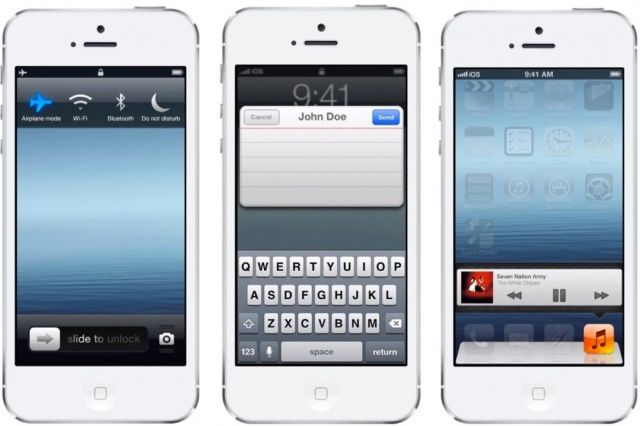
One thing that we really hope Apple adds to iOS is the ability to toggle certain settings right from the homescreen. There are a number of jailbreak tweaks that let you do it, but we’d love a Cupertino-brewed solution.

Ran Avni has a new iOS 7 concept that solves a lot of the problem with toggles. With his tweak you’d be able to adjust brightness, change songs, turn on Bluetooth or Wifi, and change your device orientation, all from a simple menu on the lockscreen. The UI isn’t perfect, but we’d love it if Apple put something similar to this in iOS 7 so we’d have one less reason to jailbreak.

Source: YouTube

Get Started Pano Glitching With Your iPhone Camera

By •

glitchy.jpg

Pano Glitches are a the new fake light leaks. Only they’re better. Pano Glitching involves setting your iPhone to shoot a panorama and then dicking with it on purpose. Instead of following the instructions to smoothly sweep the iPhone across the scene in front of you, you can quickly switch views, or just jerk the phone in your hand. 

Create, Search, And Add To Notes With Siri [iOS Tips]

By •

Siri Notes

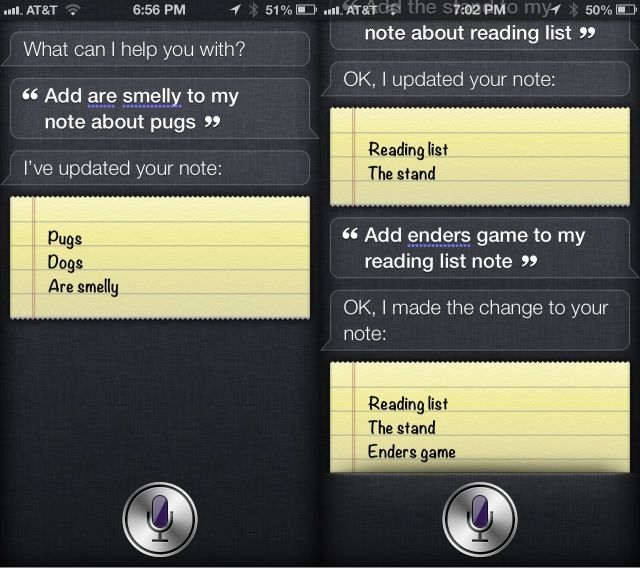
Ever been driving along when inspiration strikes? When the perfect line for that song you’ve been writing appears in your head and you just have to write it down? How about when you’re listening to the radio and you want to remind yourself to look up a book you’re hearing about on NPR?

You could pull over and rummage around your glove box for a pen that works and some paper, or pull out the Moliskine notebook you carry around everywhere (you hipster). Or, you can just have Siri create a Note about it on your iPhone. You can even have Siri add stuff to Notes you’ve already made. That way, you can just make a note of it, using your voice and the power of Apple’s personal assistant, and it will sync to iCloud (if you have it enabled), ready for action when you get home, or back to your Mac.

California Court Rules It’s Not Okay To Check Maps On Phone While Driving

By •

Apple loves the idea that you get a lot of use out of your iPhone, but it doesn't want to be responsible for car crashes! This 2008 patent filing describes a Windows Phone-style

Apple loves the idea that you get a lot of use out of your iPhone, but it doesn't want to be responsible for car crashes! This 2008 patent filing describes a Windows Phone-style "drive mode" that would use a variety of sensors or iPhone data to detect when you're operating a vehicle, and would then block certain functions that might distract you while driving.

This isn't so much a car patent as an iPhone one, but it still demonstrates that vehicular safety is a subject up for discussion in Cupertino. Could talk of self-driving cars naturally follow?


Photo:

Entire ad campaigns have been created to get people to stop texting while driving. It seems like common sense – you can’t get where you need to go if you’re busy texting your friend Sheila all about how excited you are for your date tonight.

But what if you can’t get to your date because you need to check your phone’s maps? Is it ok to look at maps while you’re driving? According to the California court of appeals, no way!

Virgin Mobile Is Giving Customers $100 To Ditch T-Mobile [Deals]

By •

post-222542-image-f561244c4689fa4203d79047bb84af43-jpg


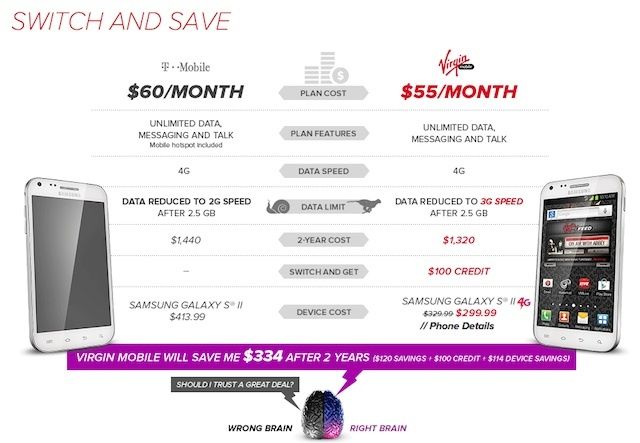
The iPhone 5 is set to launch on T-Mobile this Friday along side T-Mobile’s new “uncarrier” no contract strategy. Not wanting to get left behind, Virgin Mobile is planning to win over T-Mobile’s pre-paid customers by offering them $100 to switch sides.

In a new ad campaign called “Retain Your Brain” Virgin is offering $100 to T-Mobile customers to move their number over to one of its unlimited plans that start at $35 a month and could result in $334 of savings over two years.

PopAGraph Is A Fun Masking App For iPhoneographers: With A Twist

By •

popagraph.jpeg

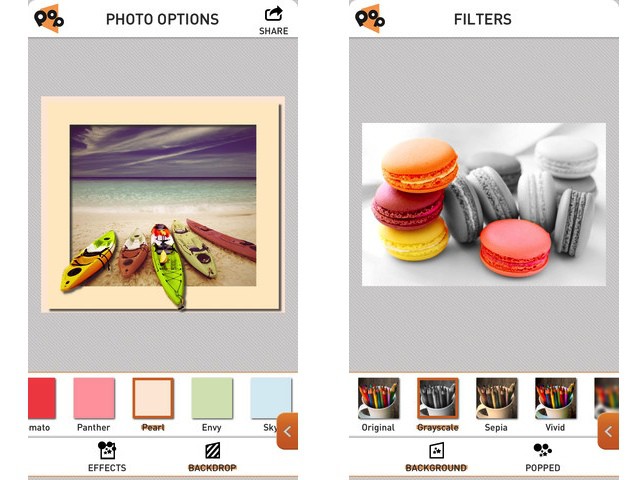
PopAGraph is Yet Another iPhone Photo Editing App (YAIPEA), but it brings a slick interface and a nice new gimmick to the game. The idea is that you create quick masks for your photos, and then apply effects to the masked (and unmasked) sections. Then – and here’s where the name comes from – you can frame the picture so that the subject pops out over the edge.

The example picture of the boats at the top of this post shows exactly how it looks.

Pixter, A Fast, Accurate And Good-Looking OCR App For iPhone

By •

pixscan.jpeg

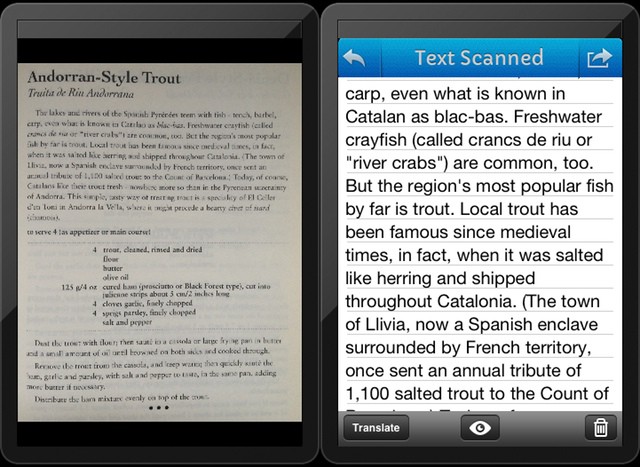
A few months back, I spent far too many hours trying to find an app which would scan a page of text and turn into actual, editable text. I found none. Or rather, I found nothing good. There are plenty of OCR (optical character recognition) apps in the store, but they were either inaccurate, or ugly, or (most often) both.

And while Evernote is excellent at letting you search on scanned pages and even your handwritten notes, you don’t get to touch the text itself.

I gave up, and now – as usually happens with my “urgent” research projects, I’ve forgotten why I needed it on the first place. Which is a shame, as Pixter Scanner has been launched,and it is quite excellent – with one huge annoyance, for me at least.

How Facebook Home Screws Apple

By •

facebook-home1

How low will Apple go?

First, Apple CEO Tim Cook was forced to grovel and kowtow to the Chinese Communist Party over their obviously false and politically motivated claims about Apple’s warranty.

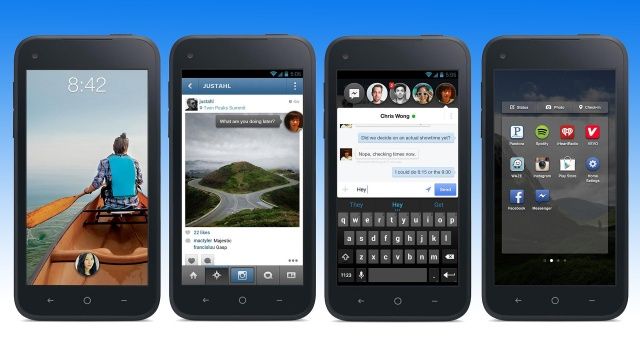
Now, Apple is being publicly insulted and used by Facebook.

There is no way Steve Jobs would have put up with this kind of humiliating abuse.

Here’s what’s going on.

Ending Soon: Backup Your Digital World With SOS Online Backup [Deals]

By •

CoM - onlinebackup3

Cult of Mac Deals is ffering you a great deal on a service that makes backing up easy. With SOS Online Backup you can backup 100 GB of your files for three years – and you can do it in a secure online backup application so you can share, access, and maintain all of your important files right in one place. This award winning automatic backup web application that will have you covered on up to five PCs, Macs, Android devices, iPhones, and iPads.

With this deal you can free up 100GB of space on your gadgets for just $29. That’s a savings of 88%!

Five Secret iOS Gestures You Need To Know About [Feature]

By •

Swipe, tap, repeat.
Swipe, tap, repeat.

The iPhone and iPad are magical devices because of one thing: the well-designed hardware and software works in conjunction to make everything just work. The iOS operating system is a thing of beauty, not least of which because there is so much to explore and learn about.

As a touch-based platform, iOS uses gestures like swipes and taps to let you control things with intuitive ease. However, there are bound to be less well-known gestural commands in such a complex set of software. Here are five of the better ones.

Why iOS 7 Will Be A Jony Ive Masterpiece On Our All-New CultCast

By •

new-cultcast-site-promo-pic-doubtfire.jpg

This week on The CultCast: Jony Ive’s huge sweeping iOS 7 changes; Apple Television and the Ring of Power; our favorite April Fools pranks; and careful, your iPad might be giving you Gorilla Arm… all that and the best listener shout out ever on this minty-fresh episode of The CultCast!

Stream or download new and past episodes of The CultCast on your Mac or iDevice by subscribing now on iTunes, or hit play below and let the good times roll.

Show notes after the jump.

Cultcast 66 post player image

Apple Devices Will Outsell Windows Devices In 2013 For The First Time Ever

By •

the apple store vs. Microsoft store

For the past few decades, Microsoft has absolutely dominated Apple when it comes to the number of Microsoft devices sold versus Apple devices, but 2013 will be the year that everything changes.

A report from Gartner claims that Microsoft’s reign is coming to an end, as 2013 will be the first year that more Apple devices are purchased than Windows devices.

The Lightning iOS USB 2.0 Data Cable: An iPhone 5 Essential [Deals]

By •

CoM - iOS Cable

There is nothing worse than going somewhere and realizing you forgot your iOS charging cable. I’ve been there – and it sucks.

I’ve seen a number of cables – manufacvtured by Apple and by others – that could serve as my alternate charging cable (for travel or for home purposes), but there’s something about the one we’re offering here at Cult of Mac Deals that is particularly appealing. Perhaps it’s the length of the cable, making it more versatile than my stock cable. Maybe it’s the quality and the durability.

Actually, it’s both of those things – and the price is appealing as well…just $14!

New iOS 7 Concept Adds Almost Every Feature You’ve Ever Wanted [Video]

By •

Screen Shot 2013-04-05 at 15.34.13

Apple is reportedly gearing up to make big changes to iOS 7, changes so big that it’s had to pull engineers away from OS X 10.9 development to help get it finished for its release later this year. I’m just hoping that the Cupertino company adds some of the features included in the latest iOS 7 concept video below.

Designed by Federico Bianco, the concept adds almost every feature we’ve ever wanted in iOS, including quick message reply, quick settings, widgets, Mission Control, and lots more. Check it out below.

Hot New VC-Funded Social App, Whisper, Aims To Let You Share Your Secrets Anonymously

By •

This is ... awesome.

Remember PostSecret? That was an app based on the PostSecret website, where people were encouraged to share secrets anonymously, with pictures and words. The app got discontinued due to potential abuses; the founder, Frank Warren, pulled it from the App Store when he thought it had gone too far.

Whisper, then, uses the same idea: allow people to post pictures with meme-like text over the top to anonymously share secret things they can’t get out there on regular social networking sites. What Whisper does differently, though, is to put the private messaging behind a paywall. You’ll need to pony up six bucks a month to be able to message users of the service privately.

Apple Widens Its Lead Against Samsung In The U.S. As Top Smartphone Maker

By •

comscoreappleiphone

While tech experts have been eager to announce the demise of Apple and the iPhone, a different story has taken place in the U.S. as Apple has continued to widen its lead against Samsung.

comScore just released its latest report on the state of the U.S. smartphone market, and their findings show that Apple managed to widen increase its marketshare. Samsung saw some growth as well (1.0% ) but Apple grew about four times more (4%).

Secret iOS Gestures: Move Between Tabs In Chrome Mobile [iOS Tips]

By •

chrome tabs 2

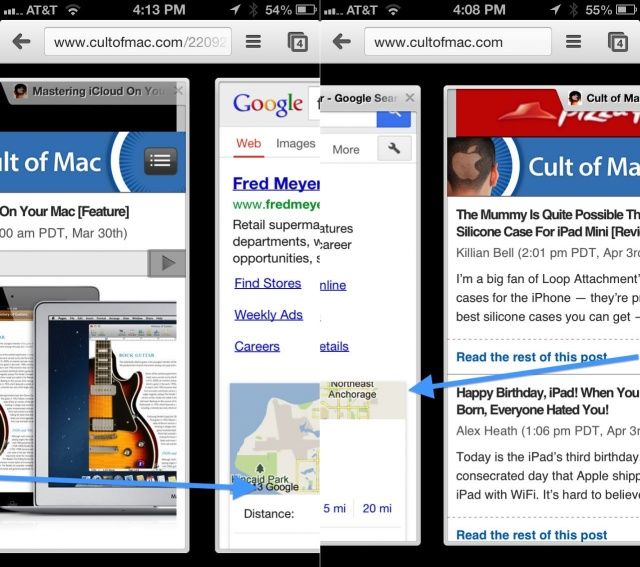
Safari is a great browser on iOS, as well as the default one. Chrome is also a fantastic browser, and I find myself using it more and more as it integrates well with its Mac version, with bookmarks and such synching nicely due to a unified Google sign in.

Tabbed browsing is great on both the iPad and the iPhone, and Chrome implements it a bit differently per device. The iPad has tabs similar to that of the desktop app, while the iPhone displays tabs only when you hit the little tab button in the top right corner of the screen.

You can also navigate between tabs in either version of Chrome using naught but a swipe gesture.