Safari is a great browser on iOS, as well as the default one. Chrome is also a fantastic browser, and I find myself using it more and more as it integrates well with its Mac version, with bookmarks and such synching nicely due to a unified Google sign in.
Tabbed browsing is great on both the iPad and the iPhone, and Chrome implements it a bit differently per device. The iPad has tabs similar to that of the desktop app, while the iPhone displays tabs only when you hit the little tab button in the top right corner of the screen.
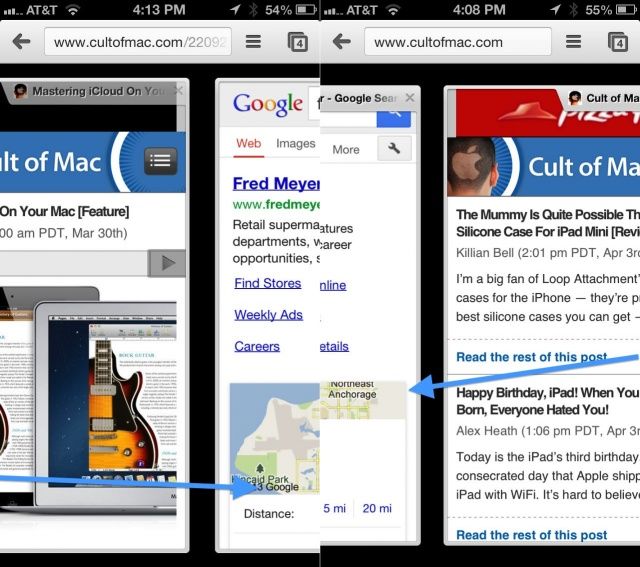
You can also navigate between tabs in either version of Chrome using naught but a swipe gesture.
To move between tabs in Chrome for iPad, swipe over from the right or left bezel (that’s the dark, non screen area around the iPad display) to move a tab left or right, in order.
This is clever in Chrome for iPad, but makes even more sense when you’re using Chrome for iPhone. Instead of hitting the button, then scrolling vertically to find the tab you want, you can swipe over from the left or right bezel to rotate through every open tab on your device. It’s a lovely time saver, and something I’d love to see Safari employ in the future.
Via: Reddit

Rob LeFebvre is an Anchorage, Alaska-based writer and editor who has contributed to various tech, gaming and iOS sites, including 148Apps, Creative Screenwriting, Shelf-Awareness, VentureBeat, and Paste Magazine. Feel free to find Rob on Twitter @roblef, and send him a cookie once in a while; he’ll really appreciate it.

