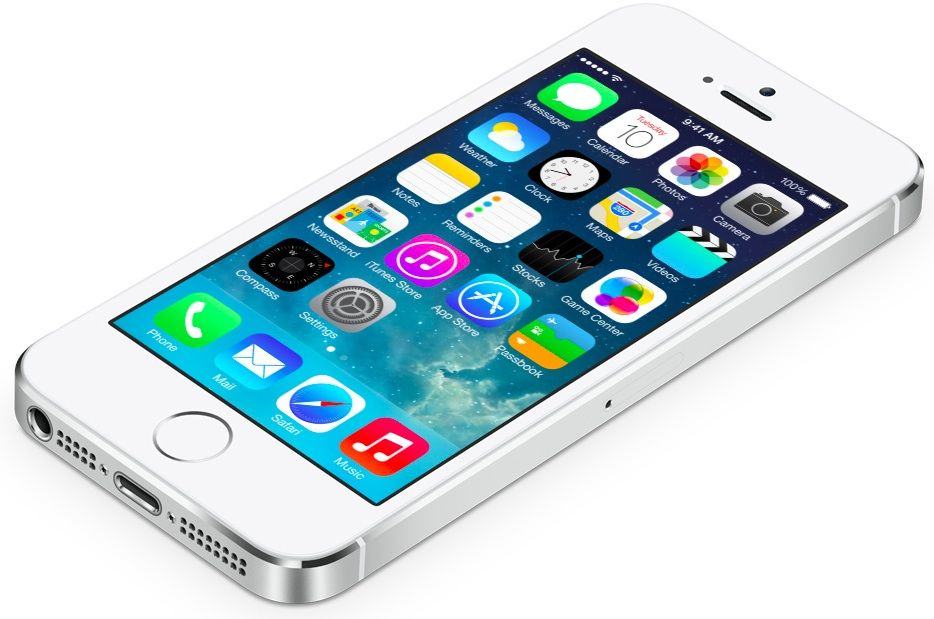
Sure, with those sleek, lean lines it looks great naked. But once you take it outside your house, it’s a good idea to have some protection, an easy way to prop it up and carry it. And speakers!
Here’s a hand-picked selection of all the iPad accessories Cult of Mac reviewed this year — but only the best ones. These add-ons all received the highest rating, or a full four stars, from our gadget-weary team of reviewers. Shine on!
Screen protector
Screen protectors are the best way to keep your device’s display in great condition, but applying them is a pain in the butt. It’s hard enough ensuring they go down straight, but you also have to worry about trapping dirt, dust, and bubbles beneath them. But not with the Tru-Fit. Inside the packaging is the Tru-Fit Film Applicator, which is essentially a plastic frame the shape of your iPad. You place the film inside the frame, then clean your iPad’s display using the included microfiber cloth.
Unlike other screen protectors, the Tru-Fit also comes with a sticky sheet that you can use on your front of your iPad’s display to ensure you’ve removed any dust and debris, and to prevent anything from settling on it while you’re getting the protector ready. It’s durable, anti-glare and has a terrific grip. Available for the iPad Air, iPad 2/3/4 and iPad Mini.
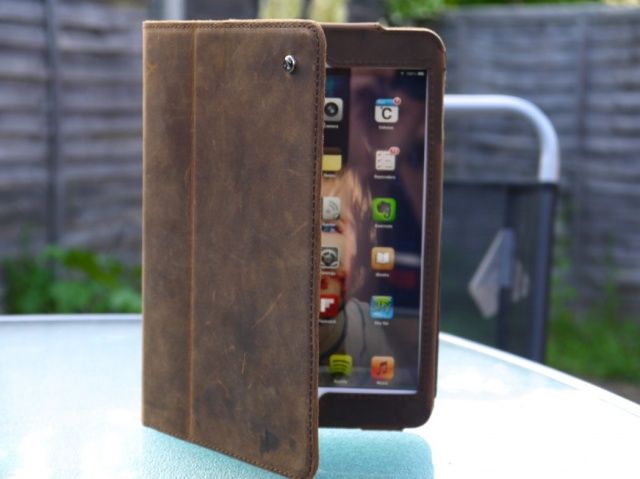
The Acase for iPad mini is a beautiful case. Its high-quality leather design provides an elegant look while providing your device with protection from head to toe — for only $40. It fits like a glove, and the iPad mini is held securely inside with a leather flap that slips in behind the device.
The build quality is excellent; the stitching is strong and neat, and I have no worries about it falling apart after months of heavy use. Acase has clearly used the best materials and built this thing to last. Reviews editor Charlie Sorrel recommends the “vintage brown” version of the case, which has a soft matte leather finish, over the black and chestnut brown versions. The vintage one gains character with a bit of wear, the other two probably won’t.
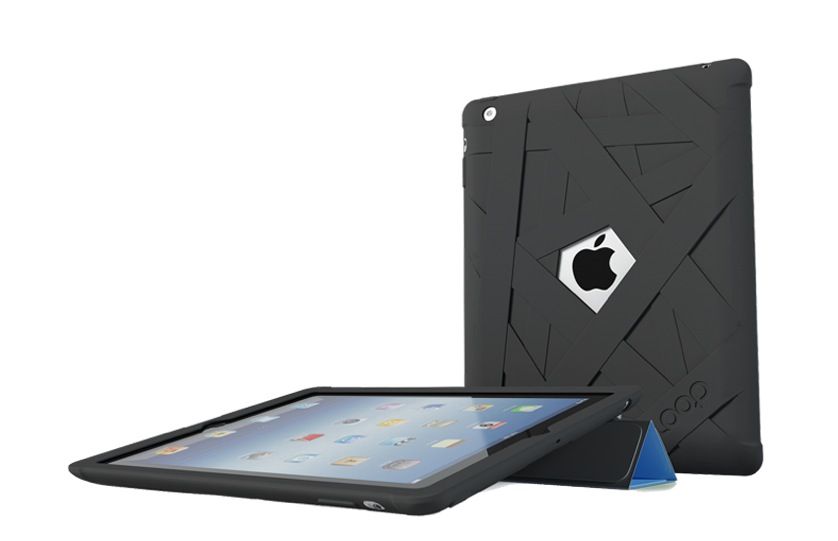
If you’re looking for excellent protection for all iPad models (plus most iPhones, too), check out Loop Attachment’s Mummy Case, which swathes your device in oops-proof rubber. What sets it apart from the cheap silicone cases on eBay for a few dollars: a special coating that not only makes it super soft and smooth, but also keeps out dirt and grime.
Reviewer Killian Bell says: “I’ll happily hand my iPad to my kids while it’s in the Mummy Case, safe in the knowledge that if they drop it on the kitchen floor, it’s not going to get damaged.” The Mummy covers a large portion of your iPad’s front bezel, which provides some protection for its display. It should be more than enough to prevent it from getting damaged if it lands flat on its face, but for added peace of mind, you can combine the Mummy with a Smart Cover.
If putting together those Lego sets hasn’t left you completely exhausted, the HiRise is the docking station for you.
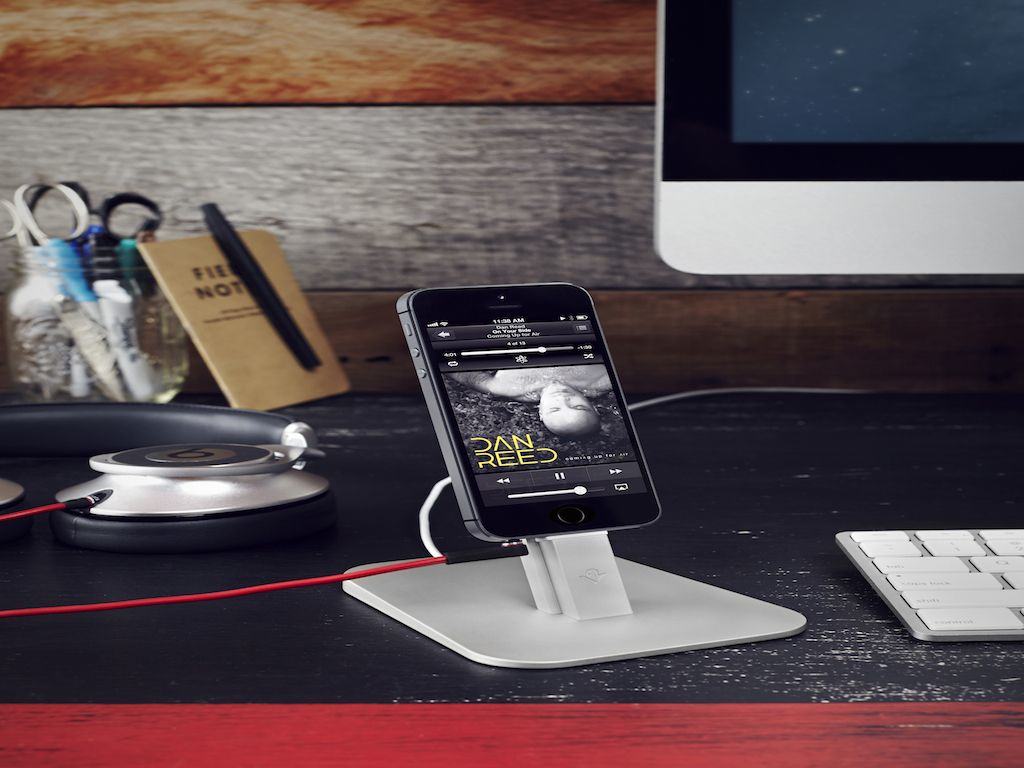
Twelve South’s HiRise for iPhone and iPad mini, is a combination dock and stand that looks great, is made of solid materials, fits both an iPad and an iPhone at the same time, works with cases, and best of all, will almost definitely work with all future iterations of iPhone and iPad that have a Lightning connector.
It also works with most cases, so you don’t have to dance the on-off fumble every time you need a charge. One caveat: putting it together. While beautifully packaged, the HiRise comes disassembled, like something you’d buy from IKEA. The screws didn’t want to fit, the hexwrenches were so small that they hurt my fingers to use, and even after I put the HiRise together, the two arms were very slightly crooked from one another.
“Once the HiRise is put together, I don’t have a single complaint about it. But I never want to put one together again,” says reviewer John Brownlee.
Bring the noise: UE Boom by Ultimate Ears/Logitech.
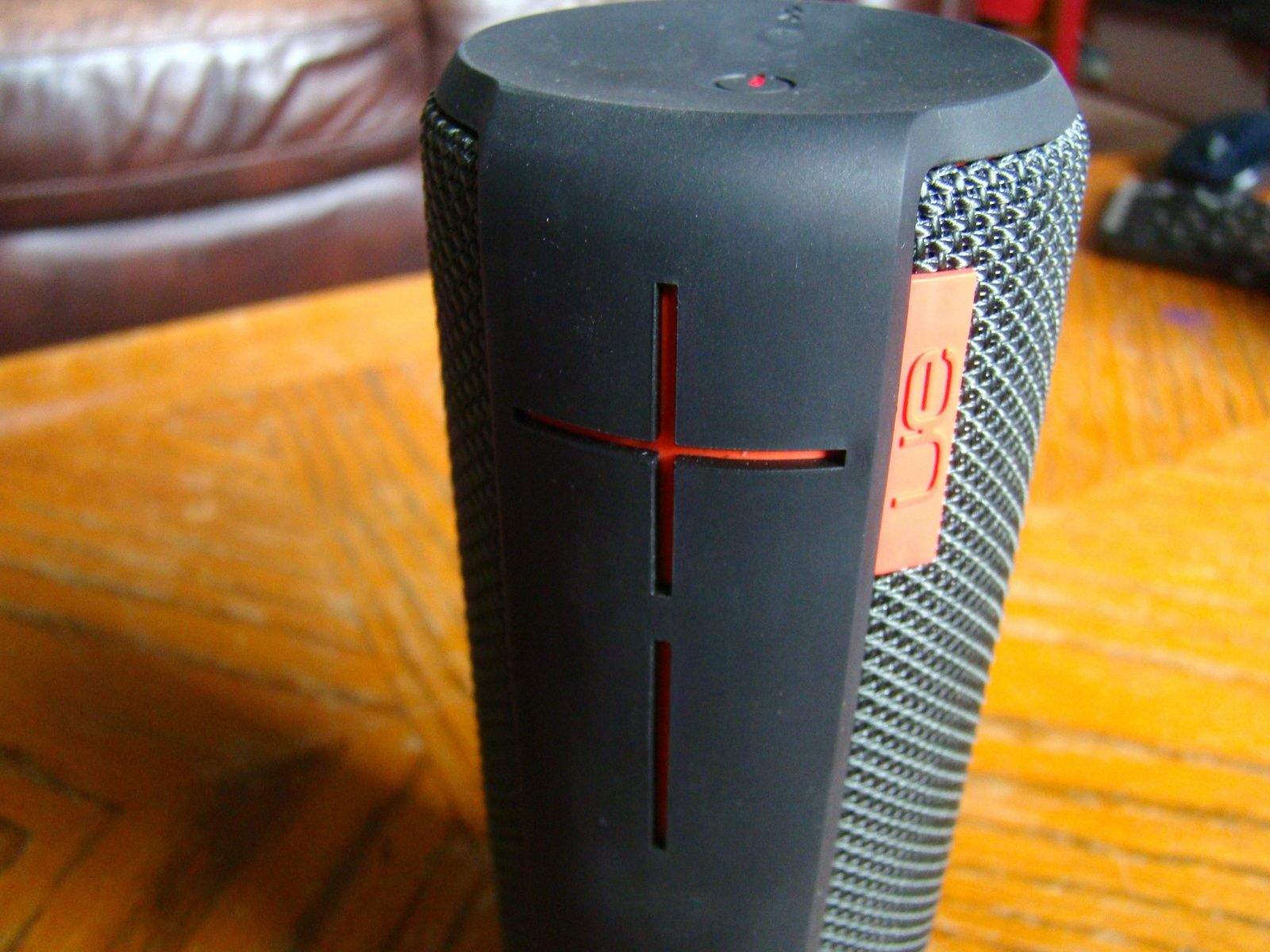
Your iPad can double as a music maker — if you grab a decent speaker. To get some serious sound from your device, check out the UE Boom by Ultimate Ears/Logitech.
“Where this intensity comes in handy is outside,” says reviewer Rob LeFebvre. “I’ve used the UE Boom in my yard, on my bike, and in my car and it’s loud and lovely in every location. I was able to provide music for a smaller outdoor BBQ just the other day with only the Boom as our speaker of choice.”
The fact that up to eight Bluetooth devices can pair with the UE Boom at one time is yet another killer feature, as it let several of the BBQ guests play their favorite tunes through the device, without ever having to re-pair between users. I let my iPhone 5, iPad mini, and Macbook Air all pair with the UE Boom so I can send audio from any one of these devices at a moment’s notice, without having to re-pair or mess with configurations.
It’s not the cheapest of speakers – coming in at a pricey $171 – but it may be the only one you’ll ever need.
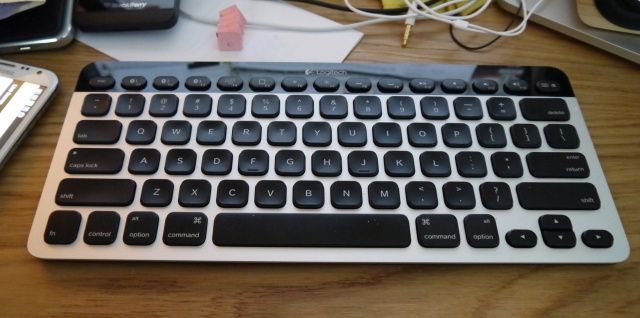
The Logitech Bluetooth Easy-Switch Keyboard K811 was so nice we reviewed it twice. Both Killian and Charlie found it the best keyboard they’d ever used – whether it was for stay-at-home or cafe-airport-train use. It’s lightweight, reliable, has a great feel.
And it works across iDevices, so you can connect it to whatever you need to type with while on the go. Charlie says, “Buy it. There’s almost no way you’ll be disappointed. Quite the opposite in fact: you’ll look forward to using it.”
These PopSockets are pretty neat. They’re flat circular buttons that pop out, accordion-style, to make little rubbery cones on the back of your iPhone, iPad or other handheld device. They aid grip, work as basic kickstands and offer a place for fiddlers and fidgiters to work off their annoying energies.
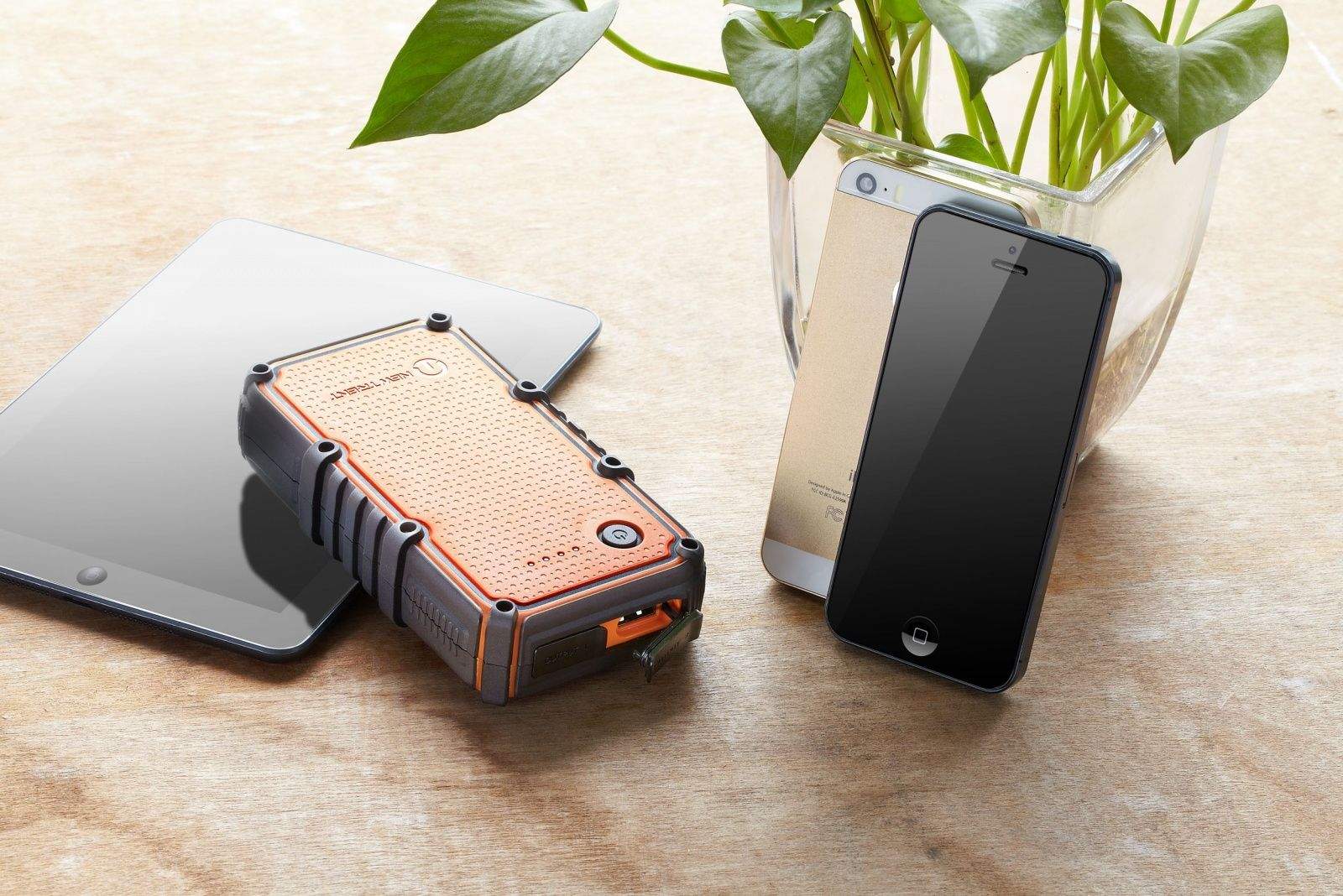
It used to be OK to ask a stranger in a bar “do you have a Nokia charger?” and borrow said charger for a while to juice your phone. These days, though, you’ll mark yourself out as a Low-Charge Loser, the kind of person who goes to bed without plugging in his iPhone. Worse, you’re probably carrying more than just a phone. Are you really going to ask a stranger for adapters to charge your iPad and Kindle too?
You are not. What you need is a beefy backup battery. And at this time of year, it should be waterproof, too.
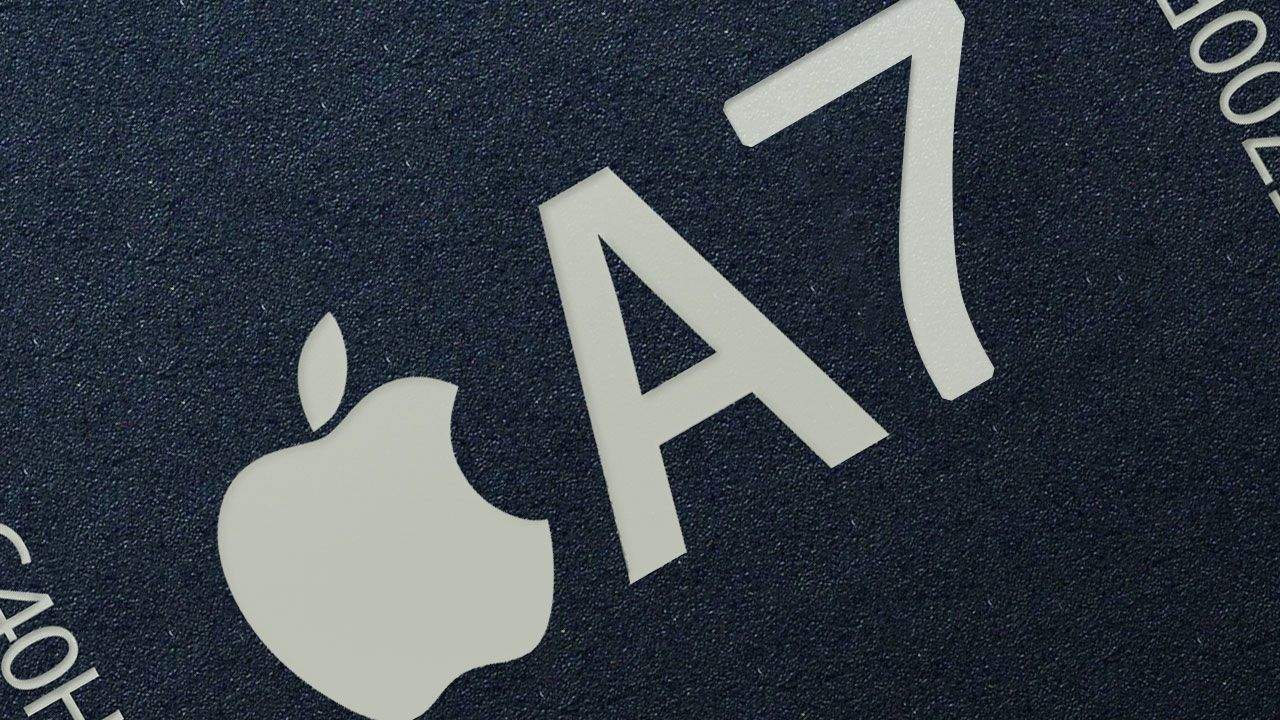
After Apple released the iPhone 5s with the A7, the world’s first 64-bit chip, ARM competitor Qualcomm made quite the fool of themselves about it. First, Qualcomm representative Anand Chandrasekher called a 64-bit ARM chip a “gimmick.” Then they ate their words, soft fired Chandrasekher, and announced their own 64-bit chip to ship in 2014.
If that seems like a disorganized, chaotic response, you’re right. But there’s a reason for that. According to a new report, Apple’s unveiling of the 64-bit A7 chip took the entire semiconductor industry with their pants down… and everyone’s now scrambling to catch up.
We talk about people who take their jobs home with them, some folks take this way too seriously. Our own Killian Bell, for instance, gave his poor disappointed daughter a Kindle Fire instead of an iPad last Christmas.
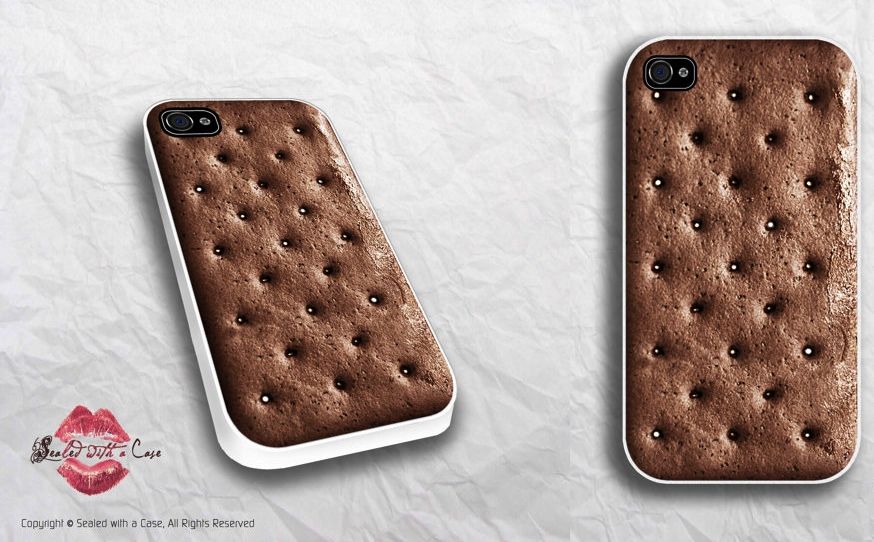
This year, Santa tells me that she has begged him for a phone with Android 4 Ice Cream Sandwich, and he’s going to give her this: an iPhone 5 with an ice-cream sandwich case. What a dad!
It’s the season for new iPhones and iPads. If you’re buying a new device you may be wondering how to best protect it from the risk of defect or damage. Aside from using a case, you may also be thinking about purchasing a supplemental protection plan.
There’s a reason why many consumer rights advocates agree that protection plans are a bad deal for consumers. The plans are expensive and only a small fraction of people that buy them actually end up using them. With that said, some people find value in the peace of mind and ease of repair that protection plans offer.
If you do decide extra protection is right for you then weigh your options carefully. Protection plans aren’t cheap and their terms and conditions vary widely from one plan to another. Buying an overly-expensive plan or assuming that a plan offers coverage where it doesn’t can be a frustrating and costly mistake.
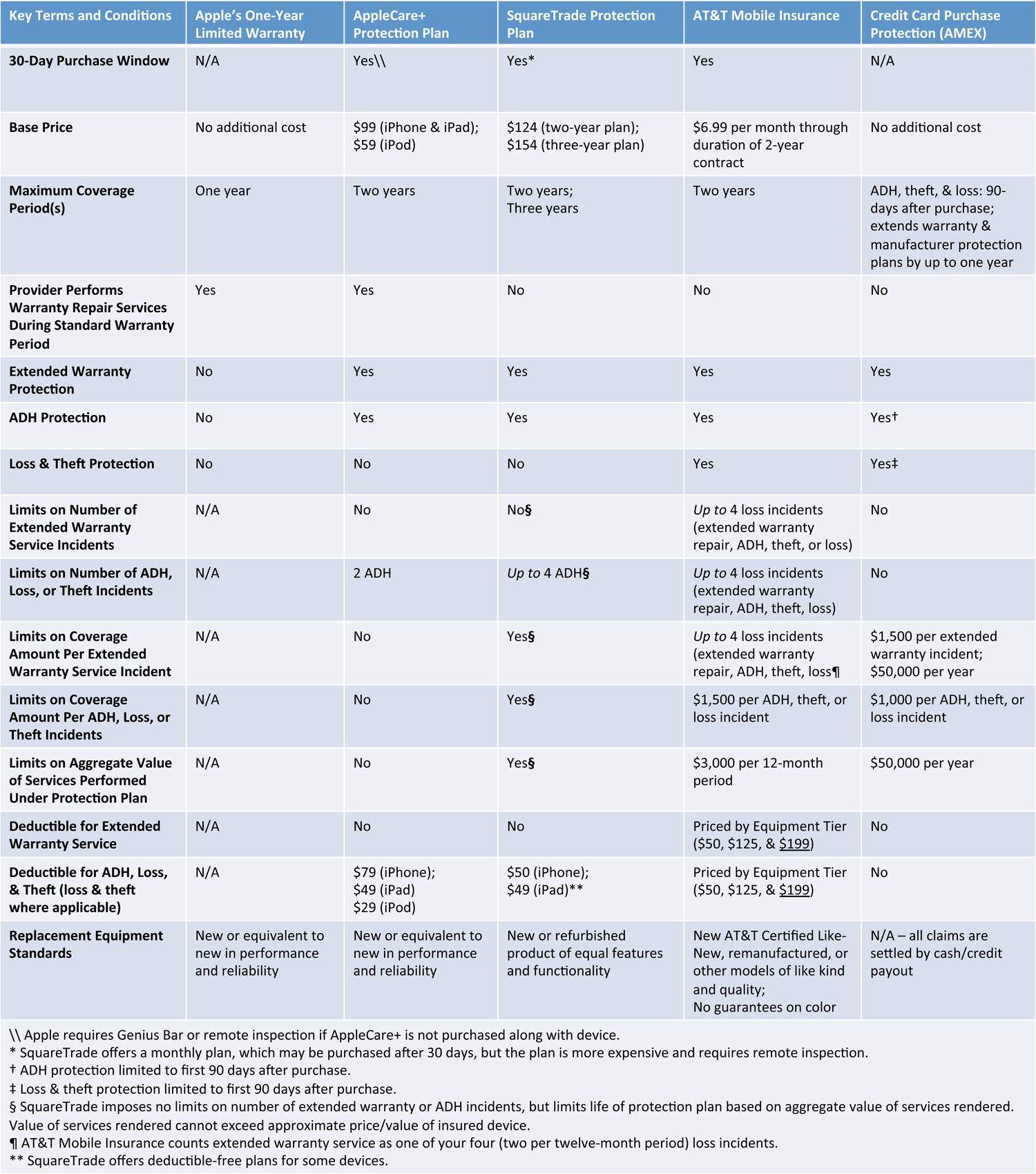
So, how do your options stack up? Let’s look at a few of them with a focus towards plans most suitable for the new iPhone 5S. Hopefully this article will give you some ideas about the types of things you can look out for when you’re shopping for protection plans. You’ll find a table summarizing the protection plans at the end of this article.
Apple’s One-Year Limited Warranty
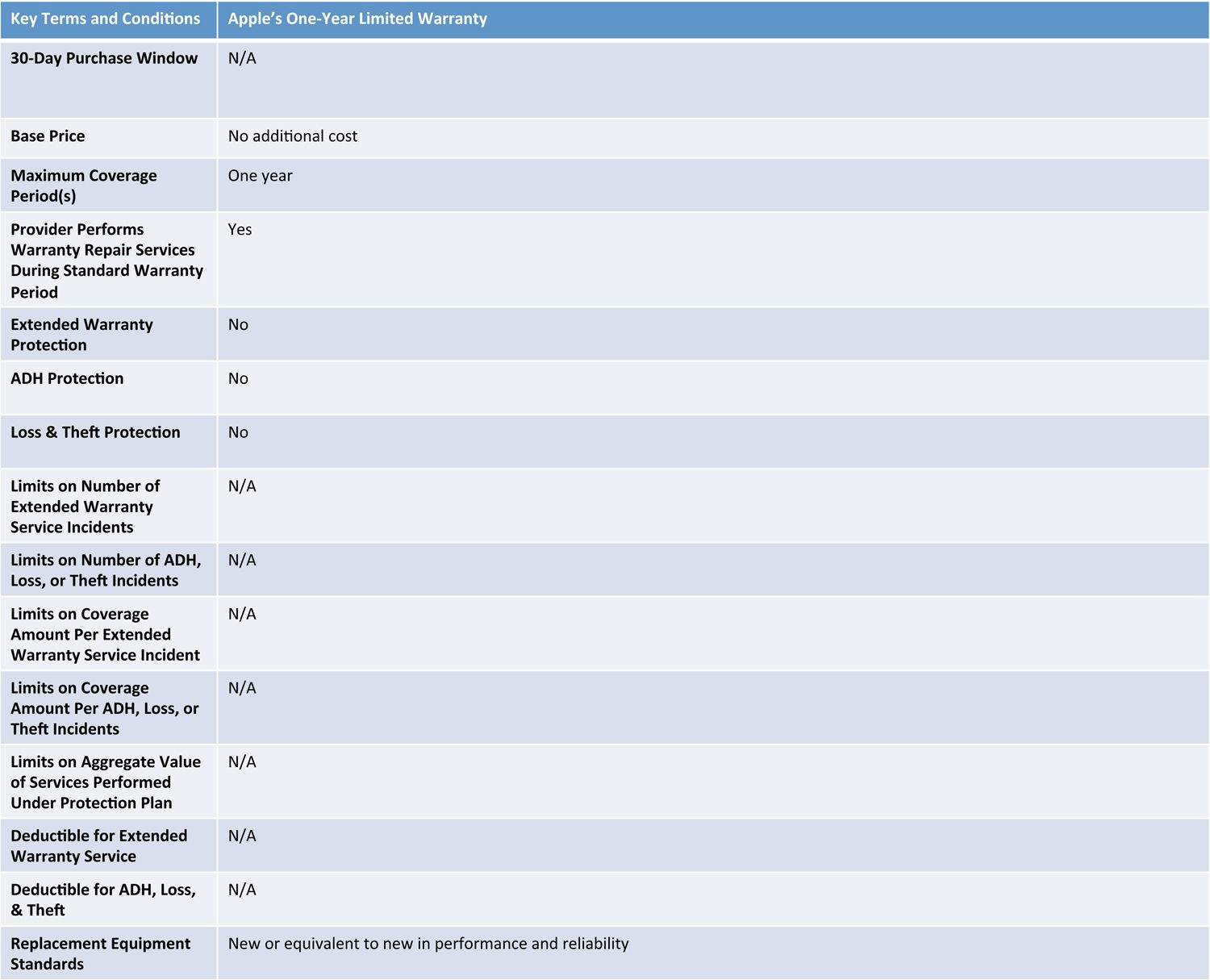
While not technically a protection plan, Apple’s One-Year Limited Warranty is your first line of defense. It comes included with every new or refurbished Mac including the iPhone and iPad regardless of where you purchase it. For example, if you buy a new iPhone 5S from your local T-Mobile store it’s still covered by Apple’s One-Year Limited Warranty. The warranty covers your device from manufacturing and design defects, but it does not protect it from theft, loss, or accidental damage. As the name suggests, it gives you coverage for one year. If you find a defect within that first year, Apple will repair or replace your device, free of charge. There is no signup fee; there is no deductible.
If defects are your main concern, then remember that Apple’s One-Year Limited Warranty provides very good protection at no extra cost to you. If, however, you are genuinely concerned about loss, theft, accidental, damage or extended warranty coverage beyond the first year then maybe a protection plan is right for you.
Apple’s One-Year Limited Warranty at a glance.
AppleCare+
Despite recent price changes, AppleCare+ is still the Cadillac of protection plans in terms of convenience and service. AppleCare+ offers extended warranty coverage and protection from accidental damage from handling (known as “ADH”). AppleCare+ is only available for the iPhone, iPad, iPod Touch, and iPod Classic and for those devices AppleCare+ is your only AppleCare option (i.e. you cannot purchase standard AppleCare for those devices).
The plan’s convenience and service quality are its standout features. First, Apple is your one-stop-shop for everything you need. You can buy AppleCare+ along with your device, or any time within 30 days after purchase. When doing the latter, Apple does require you to have your device inspected either in-person at an Apple Store or through remote diagnostic by calling (800) 275-2273. Servicing your device under AppleCare+ is also extremely convenient. You can choose from the many service options Apple offers: carry-in to an Apple Store or Apple Authorized Service Provider (“AASP”), mail-in service, do-it-yourself service (“DIY”), etc. Carry-in service often results same-day service, which is as good as it gets.
Second, you should expect parts and labor under AppleCare+ to be of the highest quality because Apple, the original manufacturer, is doing the work. It’s one thing to say Apple has a great track record in this regard, which it does, but Apple also backs it up on paper. The AppleCare+ policy states that when repairing your device Apple will use new parts or parts that are equivalent to new in performance and reliability.
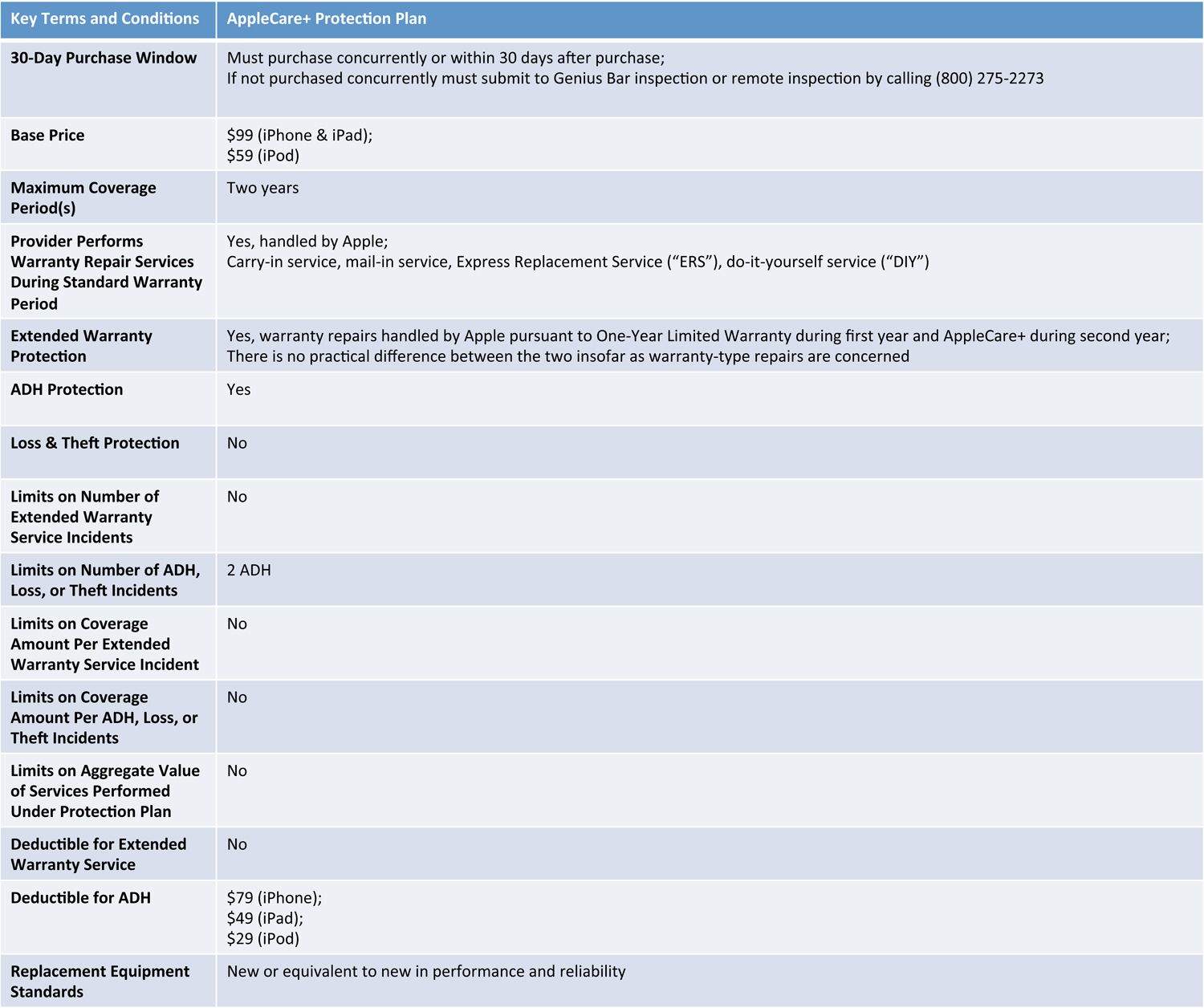
AppleCare+ does have its drawbacks. It has always been one of the more expensive protection plans and upcoming changes to AppleCare policies and procedures may, someday, render it a less attractive option. The recent increase to the ADH service fee has made it even more expensive. AppleCare+ for the iPhone will now cost you $99 up front and $79 per ADH incident (limited to two ADH incidents). AppleCare+ for the iPad will now cost you $99 up front and $49 per ADH incident (limited to two ADH incidents).
While this may sound like a great idea, remember that Apple’s current procedure for carry-in service for many devices is to simply give you a new device. The current process usually takes a matter of minutes, which is one of the plan’s best features. If these proposed changes become a reality, then you may be forced to wait while a technician performs the repair work. Time will tell whether this negatively impacts the quality of service, but it will most certainly increase the amount of time you need to wait for a repair.
AppleCare+ at a glance.
Third-Party Protection Plans
If you’re looking for coverage or pricing options that are different from AppleCare+, then third-party protection plans may be a good alternative. Third-party protection plans give you diverse options in terms of cost, coverage, and service.
However, the diversity in these plans is a double-edged sword because they vary widely depending on who is offering the plan, what you’re protecting, and specific protection options (e.g. two-year vs. three-year terms, deductible-free plans, etc.). To make things more difficult, important information is often buried deep in contract legalese.
The devil is in the details: read the fine print and evaluate your choices carefully in terms of pricing, coverage, and service. For simplicity’s sake, let’s compare SquareTrade’s iPhone 5S protection plans to AppleCare+ for the iPhone 5S (prices and plan options as of September 2013).
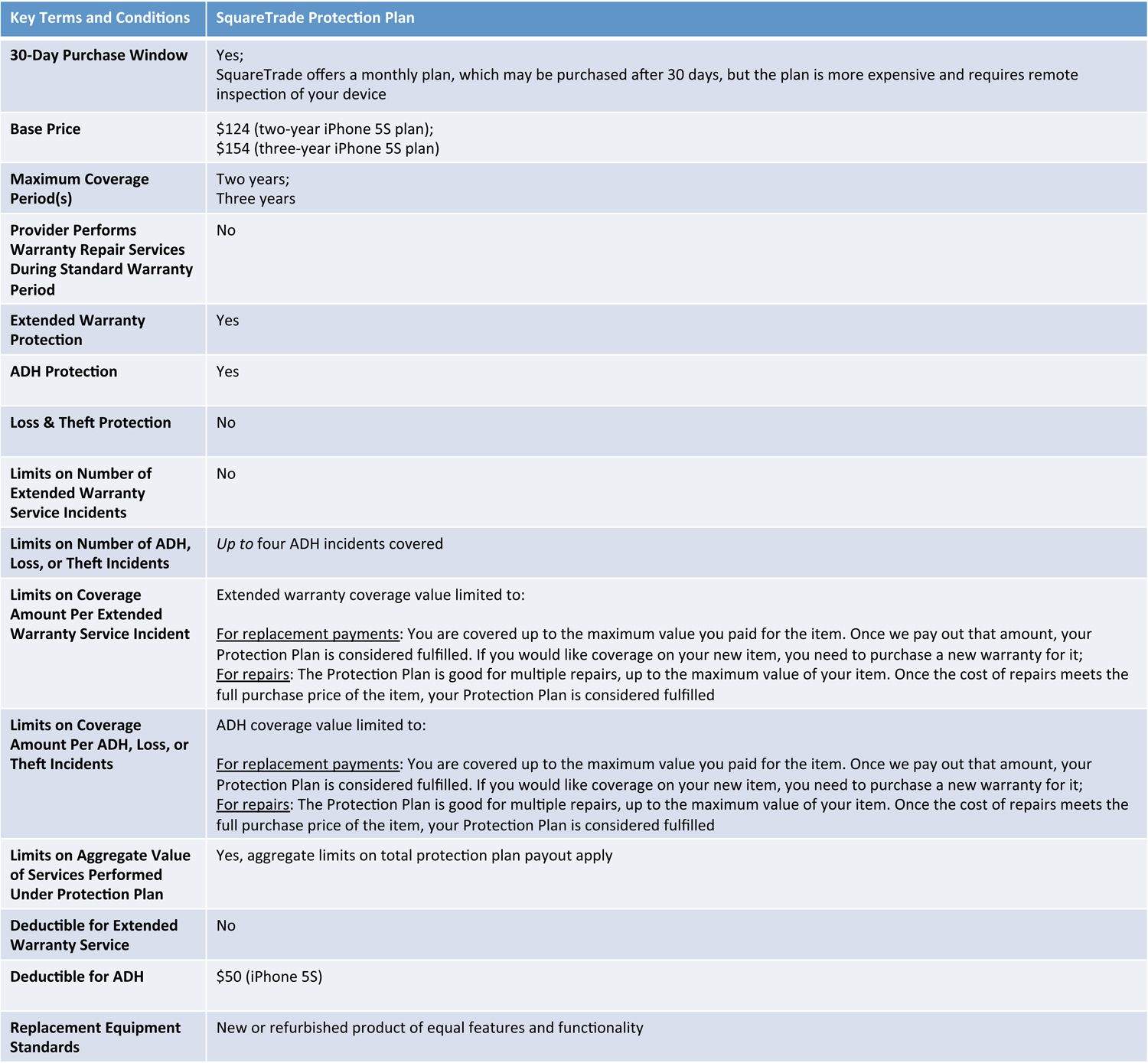
Pricing differs both in terms of the signup fee and ADH service fee. SquareTrade’s iPhone protection plans cost between $124 for up to two years of coverage and $154 for up to three years of coverage. AppleCare+ costs $99 for two years of coverage. SquareTrade does offer special promotional pricing from time to time. AppleCare prices generally do not change. For repairs, SquareTrade’s plan costs $50 per ADH incident for the iPhone 5S whereas AppleCare+ costs $79 per ADH incident.
Term of coverage is also different. AppleCare+ provides two years of extended warranty support plus two incidents of ADH. There are no other limits on support or service. SquareTrade gives you up to two or three years of extended warranty support (depending on the plan you buy) plus up to four incidents of ADH, but limits the life of the protection plan to the value of the protected device. Note the emphasis placed on “up to” when describing SquareTrade’s plan. Once SquareTrade performs repair or replacement services that, in aggregate, add up to the value of your insured device the plan is terminated and your device is no longer covered.
These differences in coverage term can impact you in unexpected ways. For example, consider how the different coverage terms play out in situations involving warranty-type defect repair (i.e. defects typically covered by warranty). If your iPhone is still under its One-Year Limited Warranty Apple will service it under that, no questions asked.
If your iPhone is no longer covered by its one-year warranty Apple will service your iPhone under AppleCare+ (assuming you purchased AppleCare+). Under AppleCare+ Apple will repair or replace your defective device with no limitations just as it did under the warranty period. Warranty-type service does not carry a deductible, it do not count as an ADH incident, and there are no limitations on number of defect repairs.
Under SquareTrade’s protection plan, SquareTrade will refer you to Apple if your iPhone is still covered by its one-year warranty. If your iPhone is not covered by its warranty, then SquareTrade will have you mail it to them so they can do the repairs. There is no deductible for warranty-type service under SquareTrade’s plans either, butthe cost of repairs will be deducted from the life of your protection plan.
For example, let’s say SquareTrade values your iPhone at $549 and during the second year of ownership a manufacturing defect in the iPhone’s screen renders it inoperable. SquareTrade will service your iPhone, but it will deduct the value of the repair from your protection plan contract. If SquareTrade values the repair at $230 then you will have $319 left of coverage ($549 – $230 = $319) under the protection plan. Should misfortune strike again, you had better hope the cost of repair doesn’t exceed $319. Under AppleCare+ the warranty service will not impact your remaining ADH coverage in any way.
Finally, the service is very different. You can expect both the process and quality of repair services to vary dramatically between third-party protection plans. No matter how you look at it, there is more red tape involved under third-party protection plans than there is under AppleCare+.
The quality of repair services also varies. As mentioned above, AppleCare+ guarantees a high standard: replacement parts are guaranteed to be new or equivalent to new in performance and reliability. Not all third-party protection programs make specific guarantees about labor or replacement parts. Many of these plans guarantee only re-manufactured parts, refurbished parts, parts of merchantable quality, or are silent on the subject altogether. SquareTrade guarantees new or refurbished parts. The quality of repair parts and/or workmanship may matter to you and, if it does, you should take time to understand how different protection plans will repair your device.
SquareTrade’s protection plan at a glance (focused on iPhone 5S).
Carrier Insurance Plans
Mobile carrier insurance plans are just third-party protection plans offered directly by your mobile carrier (usually through an affiliated insurance company). Many of the same caveats with mobile carrier insurance plans also apply to other third-party protection plans – read the fine print.
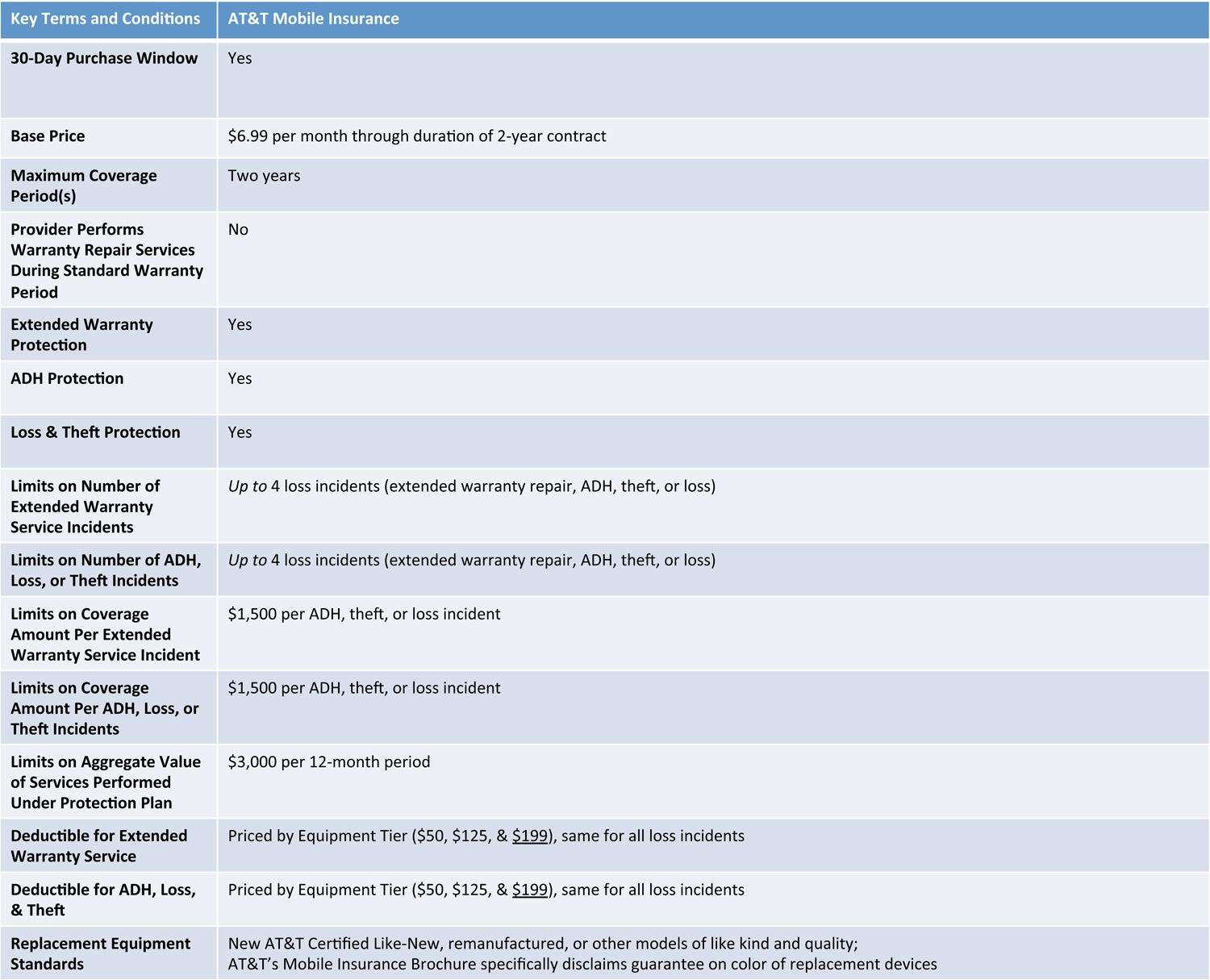
Two of the biggest advantages of mobile carrier insurance plans are their low up-front cost and extensive coverage. First, mobile insurance plans typically do not charge a hefty signup fee. For example, AT&T’s Mobile Insurance Plan for the iPhone 5S costs $6.99 per month for the duration of AT&T’s standard two-year mobile services contract. If spending $99 or more up front on a protection plan isn’t in your budget right now, then perhaps a low monthly fee would work better for you.
Second, mobile insurance plans typically offer far more coverage in terms of types of loss and amount of coverage than you might get with AppleCare+ or third-party protection plans. AT&T’s Mobile Insurance Plan protects your device from “loss,” which it defines as accidental loss, theft, ADH, or warranty-type failure outside of coverage period of the original manufacturers warranty. AppleCare+ and SquareTrade do not cover lost or stolen devices. AT&T’s Mobile Insurance Plan guarantees protection from two loss incidents per twelve-month period, for a total of four loss incidents over the life of your contract. The coverage value for each incident is capped at $1500, which is more than enough to cover an iPhone 5s (although each loss incident also carries a hefty deductible). AppleCare+ and SquareTrade have more stringent limits due to ADH allotments or limitations on value of service (discussed earlier).
The biggest disadvantages of mobile carrier insurance plans are that they’re extremely expensive in the long term and they suffer from many of the same process and service quality headaches common to third-party protection plans.
Process and quality of service considerations are similar to other third-party protection plans. AT&T’s Mobile Insurance has a claims filing process, which imposes certain duties that you need to understand. For example, if your loss incident involves any violation of law or loss of possession (e.g. your iPhone 5S was stolen) you are required to promptly notify local law enforcement and obtain proof of that notification. If you have ever had to report stolen property to the authorities, you know that it is not often a very convenient or streamlined process…
AT&T’s Mobile Insurance Plan at a glance (iPhone 5S).
Credit Card Purchase Protection
Credit card purchase protection programs offer a superb way to mitigate risk without paying out-of-pocket for a protection plan. A number of different companies offer cards (credit and debit) that include automatic purchase protection.
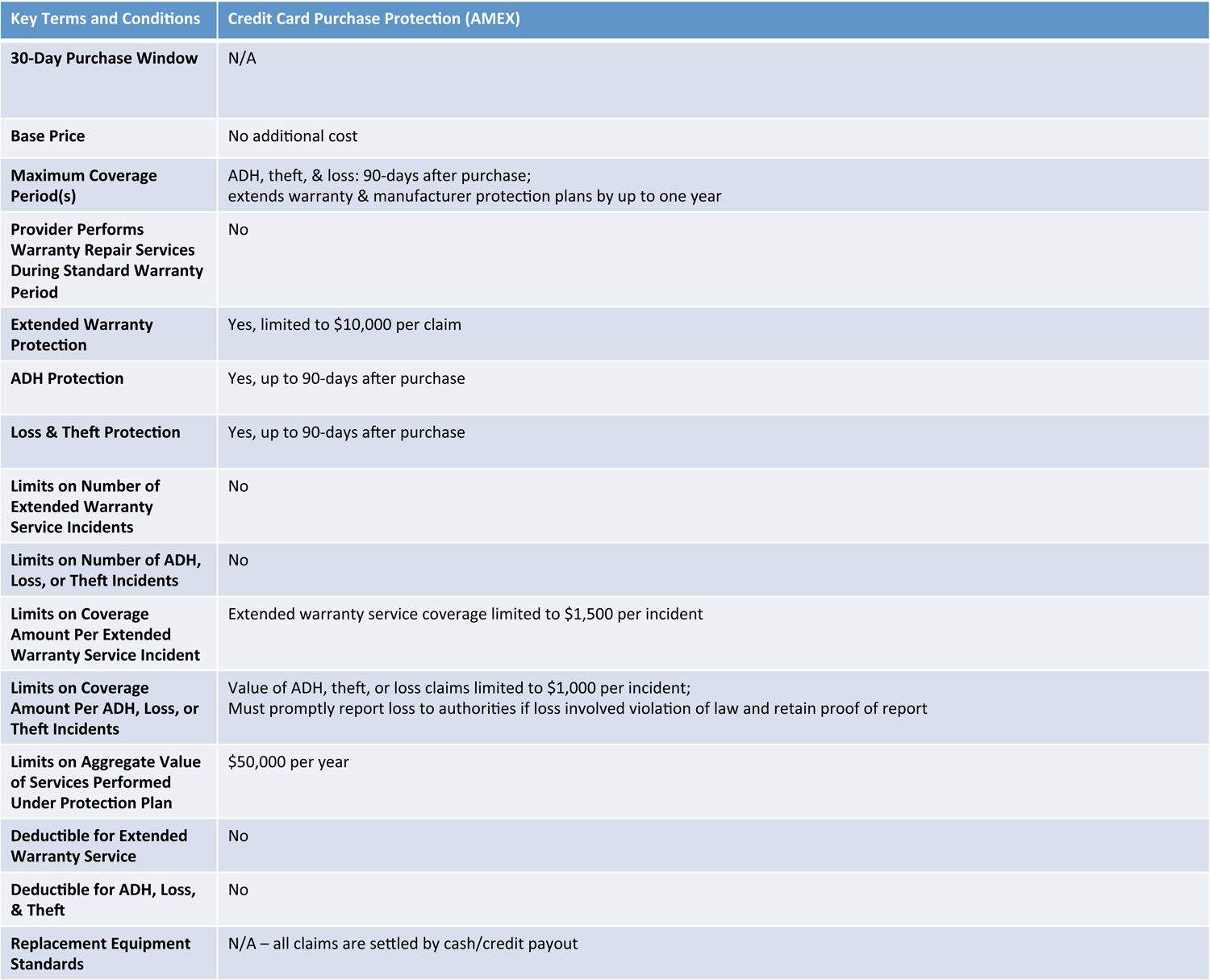
Credit card purchase protection programs give you additional but limited return, extended warranty, ADH, loss and theft protection for anything you buy using the card. There are no enrollment conditions; there are no signup fees; there are no deductibles. Although many cards that offer purchase protection charge annual fees there are plenty that do not. For example, the AMEX Blue Cash Everyday card has no annual fee and includes purchase protection as one of its benefits.
Credit card protection programs typically offer extensive coverage from ADH, loss, or theft for up to 90 days after purchase and extend the terms of any manufacturer’s warranty by a year or more beyond expiration. For example, AMEX’s purchase protection program will extend Apple’s One-Year Limited Warranty by one year after it expires. Moreover, AMEX’s purchase protection program also extends manufacturer service plans by up to one year (i.e. AppleCare+ because Apple is the manufacturer).
The biggest drawbacks to credit card protection programs are their limited coverage, varying terms and conditions, and lack of convenience compared to more comprehensive protection plans such as AppleCare+ or SquareTrade. Coverage from loss, theft, or ADH lasts only for a short time; after 90 days you’re on your own.
That should not be a surprise. We predicted it would take a full six months to jailbreak the iPhone 5s back in February, and it looks like we might not be far off. But what is happening with the iOS 7 jailbreak?
Well, a lot of intrigue. But don’t worry, things are still moving forward.
In the wake of the news concerning the 15-year-old employee who died after working on the iPhone 5c production line, Apple supplier Pegatron has revealed the high tech measures it goes to in order to avoid hiring underage workers.
According to Pegatron, the Taiwanese manufacturing firm has been employing facial recognition technology since earlier this year to screen for such an occurrence.
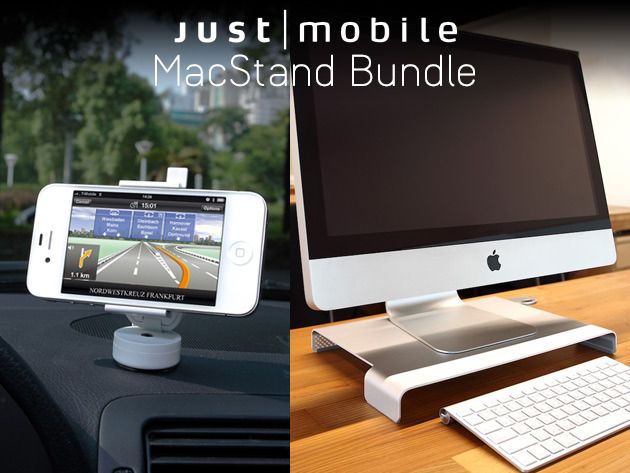
Your Apple products are pinnacles of modern design and technology, so why waste your time with Apple accessories that aren’t up to snuff? Saving precious dollars, you say?Well with this Cult of Mac Deals offer you’ll get huge savings plus top quality products – and this sleek, high-quality MacStand Bundle is another example of such a promotion.
Included in thsi bundle are the Mtable™, a multi-purpose desktop stand, and the Xtand Go™, a flexible in-car gadget mount. And you’ll get this bundle for just $79.99 – a savings of 38%!
The iPhone 5s introduced us to Touch ID. Photo: Apple
Apple has just seeded the second beta for iOS 7.1 after it released the 7.1 beta 1 nearly a month ago. Registered developers can grab the update by logging into the Developer Center.
Apple TV is also getting a new beta build for developers today as Apple has made the Apple TV Software beta 2 available to devs today, alongside the newly released Xcode 5.1 Developer Preview 2.
We’re still waiting for more info on the new goodies, but we’ll update you on new features once we’ve got them installed.
In the meantime, here are the direct download links: