My desk setup revolves around a Thunderbolt dock connected to my MacBook Pro, a few accessories and a separate charging station for quickly topping up my phone and iPad. While many Thunderbolt docks include front-facing USB-C ports that can deliver up to 60W of power, they can’t fast-charge Chinese Android phones and other power-hungry devices.
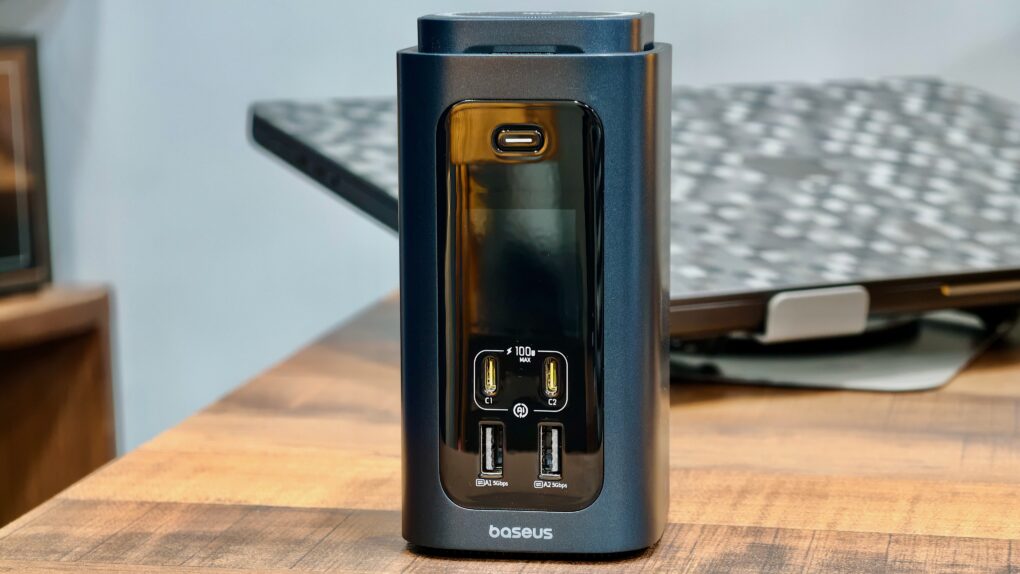
The Baseus Spacemate RD1 Pro aims to combine both products into one. It’s a 15-in-1 USB-C dock with a built-in Qi2.2 wireless charger, promising to reduce desk clutter without sacrificing functionality. But can a single device really do it all?
Baseus Spacemate RD1 Pro review
There are Thunderbolt docks, and there are USB-C docks. They may look the same, but there are significant differences between the two.
Thunderbolt docks offer substantially more bandwidth — up to 120Gbps — which makes them ideal for driving multiple high-resolution displays, external SSDs and other high-bandwidth accessories. But all that power comes at a steep price.
USB-C docks are more affordable, but they come with lower bandwidth and fewer ports. They only offer up to 10Gbps bandwidth — more than enough for regular use, but not for power users.
The Baseus Spacemate RD1 Pro falls into the latter category. Instead of chasing performance, it focuses on versatility by combining a USB-C dock, charging station and Qi2.2 25W wireless charger into a single compact device. That approach comes with its own set of benefits and drawbacks.
The Baseus Spacemate RD1 Pro isn’t a Thunderbolt dock replacement, but it doesn’t try to be one. Instead, it combines a capable USB-C dock, Qi2 25W wireless charger, and charging station into a single, compact package that makes everyday desk setups cleaner and more convenient.
- A charger-cum-docking station
- Front display
- Qi2.2 integrated wireless charging pad
- Only 160W maximum power output
- Limited dual monitor output support on Macs
- Gigabit Ethernet

Table of contents: Baseus Spacemate RD1 Pro review
- Design and build: Surprisingly small
- Ports and connectivity: So many options
- Charging performance
- Who should buy the Basesus Spacemate RD1 Pro?
- Pricing
Design and build: Surprisingly small
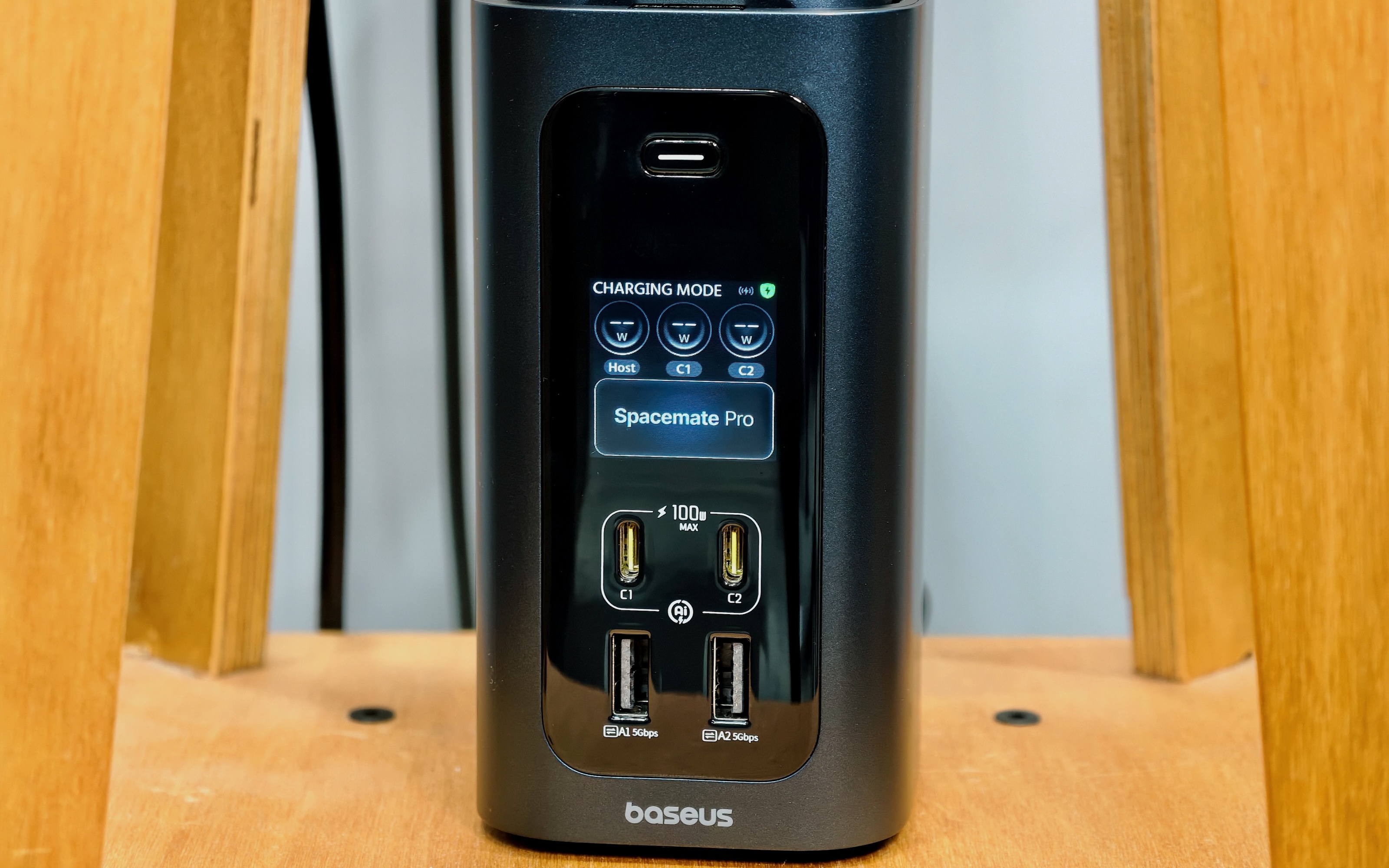
Photo: Rajesh Pandey/Cult of Mac
Most Thunderbolt and USB-C docks sit flat on your desk. The Spacemate RD1 Pro takes a different approach with its vertical design. And for a dock that packs 15 ports and a built-in Qi2.2 25W wireless charger, it occupies a surprisingly small footprint. If anything, it looks more like a premium desktop accessory than a traditional docking station.
The compact design extends to the power adapter as well. Many docks ship with a bulky power brick that can be difficult to hide and takes up valuable desk space. That’s not the case with the RD1 Pro. Despite delivering up to 180W of power, its adapter is roughly comparable in size to Apple’s 140W USB-C power brick.
Another standout feature is the front-facing display. It shows useful information like the charging status and real-time power draw of connected devices. A single press of the button at the top turns the display on or off, while pressing and holding it for two seconds switches between Hybrid and Charging modes.
As a nerd, I love being able to glance at the display and instantly see how much power my MacBook, phone and other accessories pull.
The Qi2.2 charging pad sits right at the top of the dock and can either lie flat or tilt to multiple viewing angles. It supports up to 25W wireless charging. That’s fast enough to quickly top up newer iPhones and Pixel phones.
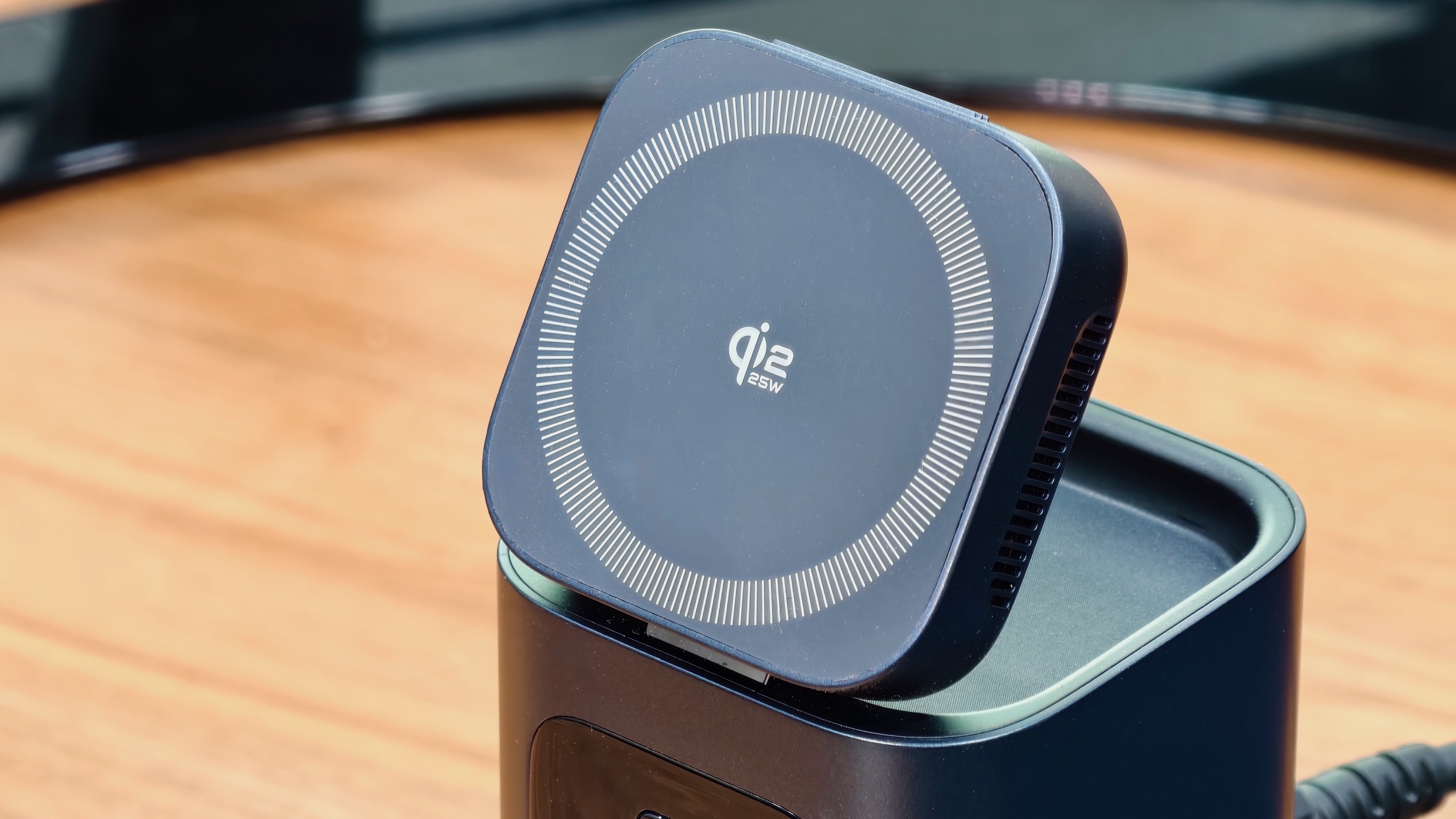
Photo: Rajesh Pandey/Cult of Mac
I particularly liked using it as a charging stand, as it kept my phone visible throughout the workday without taking up any additional desk space.
The wireless charger is complemented by a pair of front-facing USB-C ports that can deliver up to 100W of power. This effectively turns the RD1 Pro into a charging station for multiple devices, allowing me to charge my MacBook, phone, tablet and accessories from a single hub.
For the functionality it offers, the Spacemate RD1 Pro is surprisingly compact. And the lack of a bulky power brick only makes things better.
Ports and connectivity: So many options
With 15 ports packed into a relatively compact chassis, the RD1 Pro offers enough connectivity for most desktop setups. I already mentioned that the front houses two USB-C ports capable of delivering up to 100W of power. These sit alongside two USB-A ports. Around the back, you’ll find two additional USB-C ports, two USB-A ports, dual HDMI outputs, Gigabit Ethernet, SD and microSD card readers, the USB-C host connection and the DC power input.
However, not all USB-C ports are created equal. The two front USB-C ports can only charge the connected device and do not support data transfer. Conversely, the rear USB-C3 and USB-C4 ports support data transfers at up to 10Gbps but cannot charge connected devices.
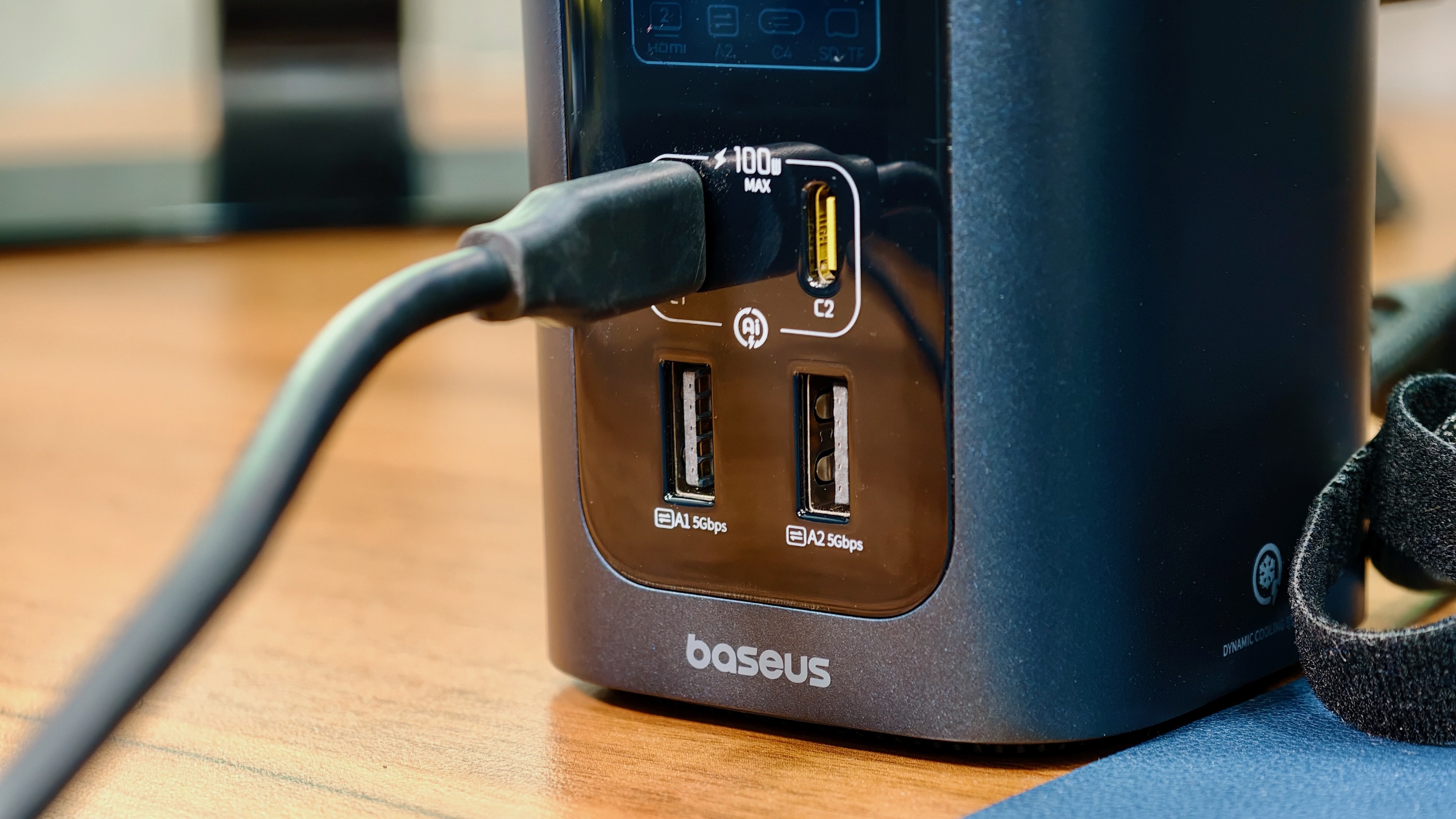
Photo: Rajesh Pandey/Cult of Mac
It’s not a dealbreaker, but it does mean you’ll need to remember which ports serve which purpose. I also wish Baseus had made this distinction a little clearer, as it’s easy to plug into the wrong port at first.
The dual HDMI outputs also come with a few caveats. The first HDMI port supports up to 4K at 60Hz, while the second maxes out at 4K 120Hz. More importantly, when connected to a Mac, the RD1 Pro cannot drive two external displays in extended mode.
You can use a single external display alongside your MacBook, but connecting a second monitor results in mirrored output rather than an independent desktop. The dock only supports dual monitors with Windows laptops.
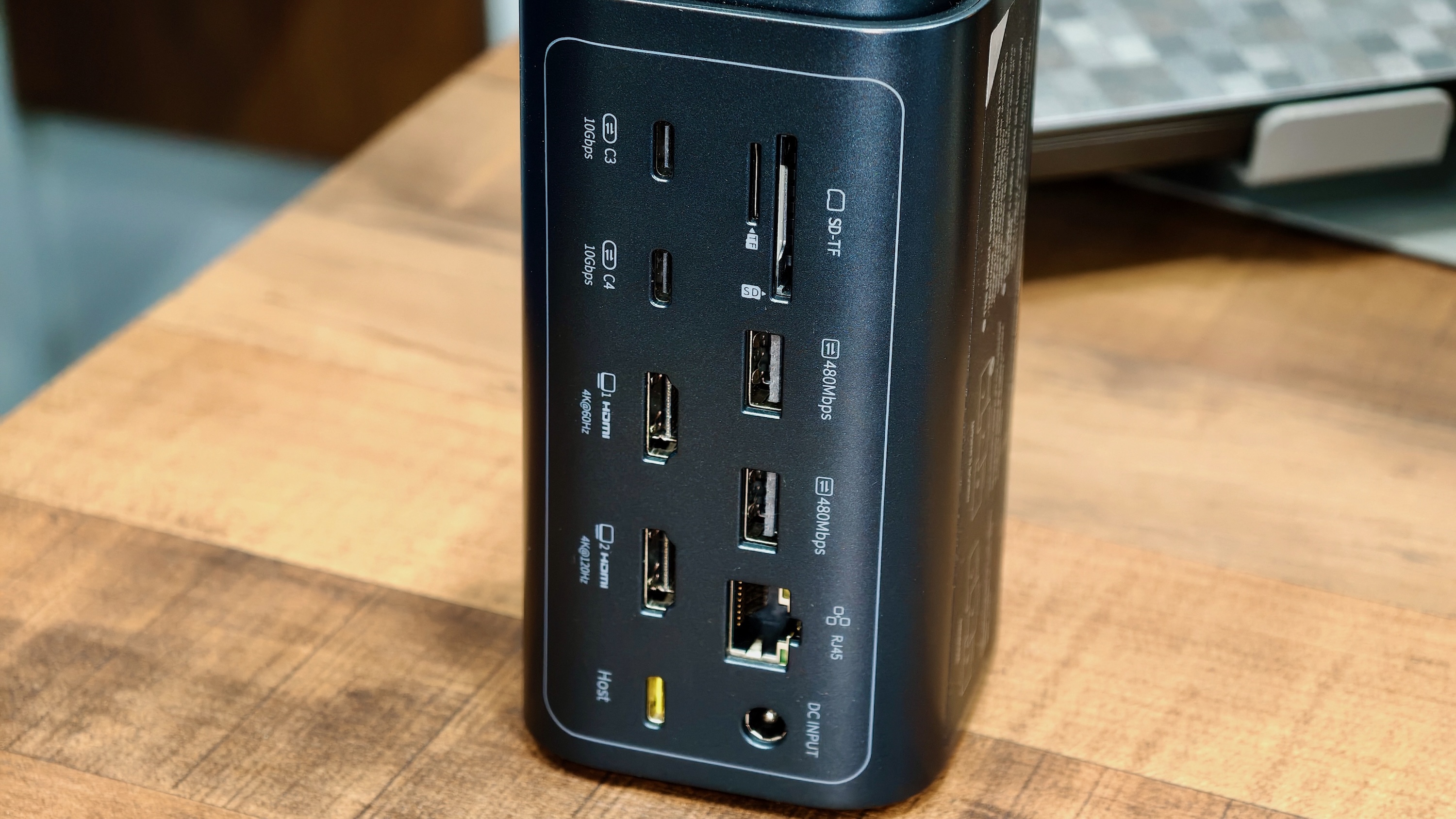
Photo: Rajesh Pandey/Cult of Mac
I use a dual-monitor setup for work, so this was a major roadblock for me. But that’s not the biggest limitation of the RD1 Pro that I ran into during testing. It’s the USB-C connection itself.
Since the RD1 Pro connects over USB-C instead of Thunderbolt to a Mac, the available bandwidth tops out at 10Gbps. That’s more than enough for everyday accessories like keyboards, mice, Ethernet, memory cards and even the occasional external SSD.
However, if you are a power user or drive multiple 4K displays with a super-fast SSD, you will eventually run into the bandwidth ceiling. With the MacBook talking to the RD1 Pro over a 10Gbps connection, you can’t connect multiple 10Gbps devices and expect them to work at full speed.
Finally, while the Gigabit Ethernet port worked flawlessly throughout my testing, I would’ve preferred to see a 2.5GbE port. It’s becoming increasingly common on premium docks and would’ve made the RD1 Pro a little more future-proof.
Charging performance
The RD1 Pro’s biggest strength is that it combines a docking station and a charging station into a single device. With my 16-inch MacBook Pro connected to the host USB-C port, I could simultaneously top up my iPhone on the Qi2.2 pad, earbuds from one of the front USB-A ports and another accessory using the front USB-C port. It made my desk noticeably cleaner, eliminating the need for a separate charging station.
The dock can deliver up to 100W of power to a connected laptop, which is enough for most MacBooks. However, this may be an issue if you use a 16-inch MacBook Pro and regularly push it to its limits. During demanding workloads, the RD1 Pro can keep the battery from draining quickly. However, it won’t fast-charge the laptop.
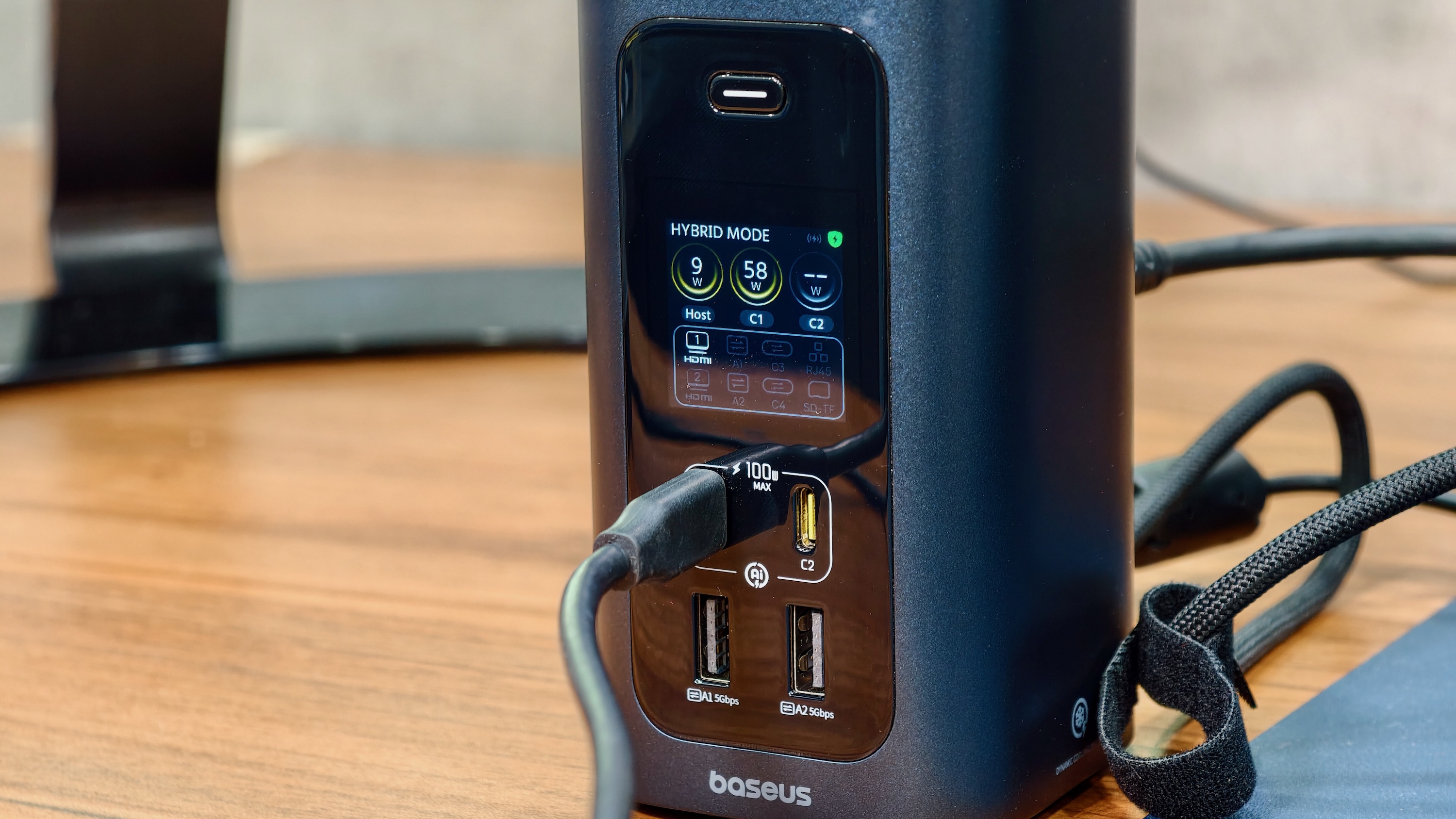
Photo: Rajesh Pandey/Cult of Mac
While this was not a dealbreaker for me, it may affect some power users. The front display comes in handy here, as you can see how much power each connected device is drawing.
There’s another limitation that’s easy to overlook. While the front USB-C ports are each rated for up to 100W, the dock itself uses a 180W adapter.
Once your MacBook starts drawing close to 100W and you have other devices plugged into the dock, they share the available power. That’s normal for a dock like this, but it does mean you shouldn’t expect every connected device to charge at full speed.
Baseus rates the dock to deliver up to 160W of power between all its ports.
One thing I did appreciate was the thermal management. The Qi2.2 charging pad includes its own cooling fan, while another fan at the bottom of the dock helps dissipate heat from the charging circuitry. Even after hours of use, I never found the Spacemate RD1 Pro becoming excessively warm.
Who should buy the Basesus Spacemate RD1 Pro?
After using the Baseus Spacemate RD1 Pro for a few weeks, I started appreciating the little things it offers more than its specs. The Qi2.2 charging pad on the top, the front display and the ability to charge multiple devices from a single dock all made my life easier and desk cleaner.
However, the RDI1 Pro cannot replace a Thunderbolt dock for me. As much as I like the convenience offered by the Spacemate, it does not have the bandwidth to power my multi-monitor setup and the accessories I use.
Ironically, I’ve found the RD1 Pro to be more useful away from my desk than on it. It’s compact enough to pack for longer trips, and in a hotel room, I can connect my MacBook Pro to the TV while simultaneously charging all the devices my wife and I carry.
If your workflow doesn’t demand Thunderbolt-level bandwidth, the Spacemate RD1 Pro is worth considering.
★★★★☆
Pricing
While its $299 MSRP is hard to justify, the Basesus Spacemate RD1 Pro dock regularly sells for around $200 or less, where it delivers excellent value.
Buy from: Amazon
The Baseus Spacemate RD1 Pro isn’t a Thunderbolt dock replacement, but it doesn’t try to be one. Instead, it combines a capable USB-C dock, Qi2 25W wireless charger, and charging station into a single, compact package that makes everyday desk setups cleaner and more convenient.
- A charger-cum-docking station
- Front display
- Qi2.2 integrated wireless charging pad
- Only 160W maximum power output
- Limited dual monitor output support on Macs
- Gigabit Ethernet
Baseus provided Cult of Mac with a review unit for this article. See our reviews policy, and check out more in-depth reviews of Apple-related items.

Rajesh has been writing about consumer technology for over a decade, with a strong focus on iPhones, Macs and Apple’s ecosystem. He enjoys digging into Apple software updates, hardware changes, and discovering new Mac apps that make work faster and more enjoyable.
You can reach out to him at mail[at]rajeshpandey.me.

