Consumer Reports‘ conclusion that the iPhone 4 Death Grip is hardware-related is a huge blow for Apple. This isn’t something Apple can ignore — or brush off as a software problem that is easily fixed. Consumer Reportsis too big and important. Apple must respond.
But is the Death Grip a fuss about nothing? Given all the complexities of cell-phone networks, is the Death Grip something that doesn’t have much effect in day-to-day use?
Consumer Reports says the iPhone 4 has a design flaw with the antenna that adversly affects reception, and cannot recommend buying the iPhone.
The leading consumer magazine says the “death grip” reception problems are not software related, as Apple earlier claimed, and cannot be fixed with an update.
“When your finger or hand touches a spot on the phone’s lower left side—an easy thing, especially for lefties—the signal can significantly degrade enough to cause you to lose your connection altogether if you’re in an area with a weak signal, ” the Consumer Reports wrote in a blogpost. “Due to this problem, we can’t recommend the iPhone 4.”
The magazine tested three iPhone 4s in a radio frequency isolation chamber, which cuts off outside radio signals, and connected the phones to a special cell-tower emulator inside the chamber. The magazine also tested an iPhone 3GS and Palm Pre and found none had reception issues. The magazine says its tests question Apple’s honesty about the issue.
Our findings call into question the recent claim by Apple that the iPhone 4’s signal-strength issues were largely an optical illusion caused by faulty software that “mistakenly displays 2 more bars than it should for a given signal strength.”
Consumer Reports is instead recommending consumers buy — or keep — the older iPhone 3GS or check out another kind of smartphone altogether.
If you still want an iPhone 4, or already own one, the magazine advises covering the antenna gap with a piece of duct tape or another thick, non-conductive material. “It may not be pretty, but it works,” the magazine said. This quick fix is in lieu of a case, which the magazine admits it hasn’t been able to test yet.
Consumer Reports had earlier reported that the iPhone 4 death grip was probably no big deal.
A federal judge greenlighted a monopoly abuse case against Apple and AT&T Inc.’s mobile phone unit, it can now move forward as a class action suit.
The June 2008 complaint took aim at locking-in iPhones for use on the AT&T network and its control over what iPhone users can install and use on the devices.
The lawsuit also says Apple secretly made AT&T its exclusive iPhone partner in the U.S. for five years. Consumers agreed to two-year contracts but found themselves bound to a half-decade relationship with AT&T, the lawsuit argued.
Judge James Ware of the U.S. District Court for the Northern District of California said parts of the lawsuit that deal with violations to antitrust law can continue as a class action, according to court documents filed July 8.
Anyone who bought an iPhone with a two-year AT&T agreement since the device first went on sale in June 2007 can join the class suit.
The lawsuit seeks an injunction to keep Apple from selling locked iPhones in the U.S. and from determining what iPhone programs people can install. It also seeks damages to cover legal fees and other costs.
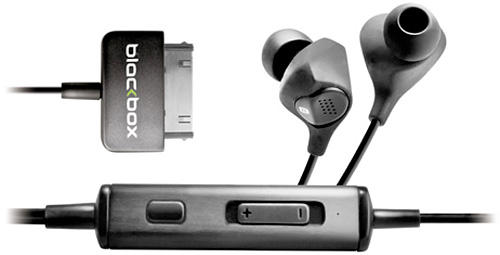
Noise-canceling ear buds deliver impressively clear sound, but at the expense of the added bulk of the in-line noise canceling unit. Blackbox’s latest i10 Noise Canceling Earphones get rid of the bulk, though, by getting rid of the usual bulk-adding battery housed in the noise-canceling unit. They’ve accomplished this by also ditching the traditional 3.5mm headphone jack; instead, the i10s use an Apple 30 pin dock connector which allows these earbuds to draw power directly from your iPhone or iPod.
That makes these $125 earbuds something of a gamble, since they’ll only work with Apple’s audio players…and even then, only as long as Apple sticks with its current 30-pin connector format.
Kirk to Enterprise: iPhoneSavior brings us news today that CBS Mobile has sanctioned and rereleased a previously banned Star Trek Communicator app for the iPhone, with classic lines and sound effects:
The newly reimagined Star Trek Original Series Communicator($2.99) for iPhone is packed full of the kind of classic fodder Star Trek fans are certain to drool over. In addition to a hidden, functional dialing pad that accesses the iPhone’s address book to make calls, the app includes several sound bites featuring Captain Kirk, one says; “Two to beam up Scotty.”
I just beamed this onto my iPhone, definitely a hoot. Now if they can only get the transporter working…
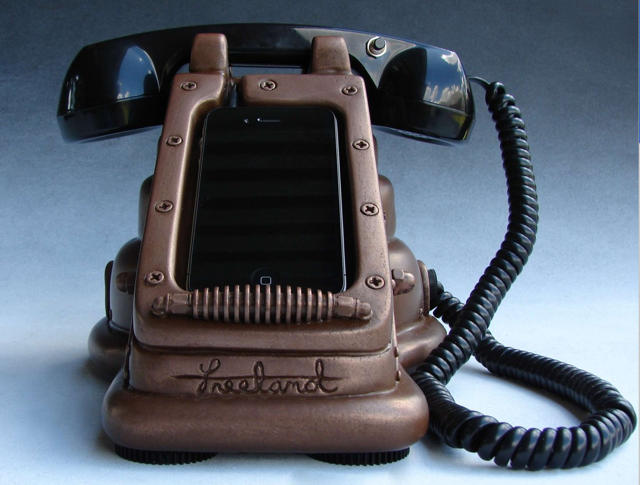
Courtesy of Brian Freeland of Freeland Studios comes this steampunk update of his original iRetrofone, the iRetrofone Steampunk Copper Edition.
It’s admittedly a more attractive dock than the original, although in this case, “Steampunk Copper” seems to mean “brown with lots of functionless plastic molded gears.” I’d rather see what the likes of Jake von Slatt could do with the concept of a steampunk iPhone dock than spend $450 on this one, but your taste might well vary.
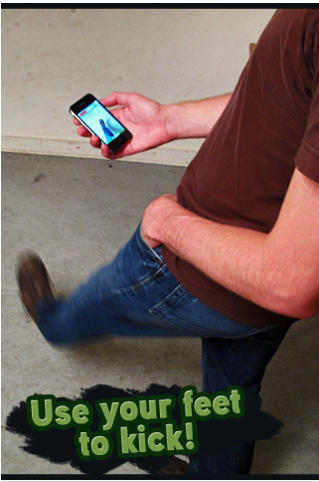
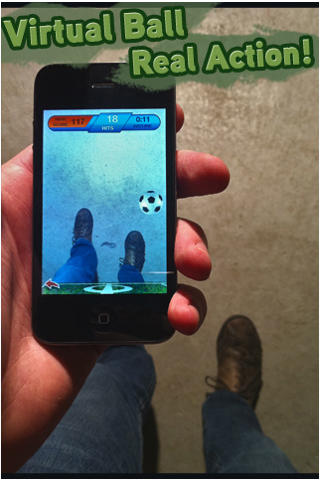
ARSoccer from Laan Labs is the first soccer game in the App Store to use augmented reality, along with your iPhone’s camera, to juggle a virtual ball with your feet.
There are two game modes; Free Play, which pretty much explains itself, allowing you to practice at will and perfect your skills; and Arcade Mode in which you try to keep the ball from dropping to the floor and get as many “hits” as you can for your highest score.
The best way to see how this game works is to check out the video here.
It’s a fantastic concept and it’s a great way to get involved in a game. I wouldn’t advise you play at the bus stop, however – you may get some funny looks.
At just $0.99, ARSoccer is a bargain! Get it in the App Store here.
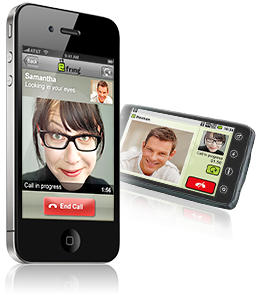
Wow I heard rumors this was going to happen, but I thought we would end up with a web app. Instead we’ve got a new free iPhone 4 app (iTunes Link) that kind of resembles the famous Chatroulette website. Sorry, but it doesn’t work on other iPhones since it uses the new front facing camera to set you up with a random chat between users.
The immediate popularity of the app and how it interfaces to Skype video and voice calls has resulted in the removal of Skype support from the app. Fring wants to concentrate on Fring-to-Fring video calling so Skype support is being temporarily reduced until some system capacity issues can be addressed.
Fring’s official statement can be found on their website.
If you haven’t updated your Fring app on your iPhone 4 or in iTunes yet you should refrain from doing so. You may still be able to access Skype using the older version. The new version without Skype support is 3.3.0.9. If retaining the old version of Fring still works with Skype for you please leave us a comment.
With outstanding 3D visuals and impressive gameplay, Glu’s best-selling Deer Hunter 3D is recognized as the greatest hunting game available for the iPhone & iPod Touch. Now Deer Hunter 3D for iPad has hit the App Store and gives fans the opportunity to enjoy this highly popular game on the iPad’s high-resolution screen.
Popular multi-IM and voice-chat service Fring has just been updated to bring 2-way video calling on iPhone 4 over 3G (Apple’s FaceTime is Wi-Fi only), as well as voice and text chat.
We’ve tested it out; while it has a few minor issues, Fring has freed videochat from Wi-Fi. If you like to videochat on your new iPhone 4, it’s a must-have app.
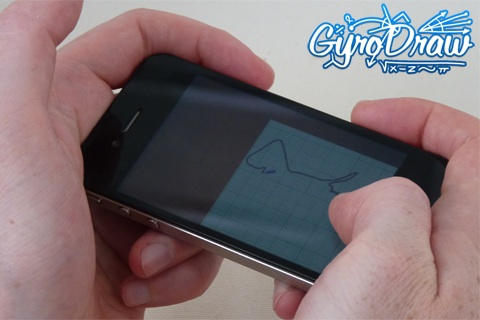
Here’s a new, strange little app; Gyro Draw lets users draw with the iPhone 4’s gyroscope, by sliding a piece of virtual paper (responding to inputs from the gyroscope) under a stationary virtual pencil. Don’t have a 4? It also works with the older iPhone’s accelerometer, only in this mode it’s the pencil that moves. Also works on the iPad.
Not sure this app’ll produce anything prettier than the etch-a-sketch masterpieces I made when I was five, but it’s free right now for a limited time, so it might be cool for a quick impress-your-gyroscopeless-friends session.
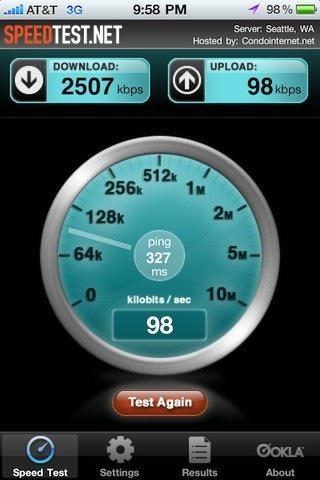
For the last few days, numerous iPhone users in major AT&T network hubs have noticed apparent 3G upload throttling. AT&T has just released a statement concerning the problem: its a bug with the Alcatel-Lucent HSUPA hardware, and they are working on it.
“AT&T and Alcatel-Lucent jointly identified a software defect — triggered under certain conditions – that impacted uplink performance for Laptop Connect and smartphone customers using 3G HSUPA-capable wireless devices in markets with Alcatel-Lucent equipment. This impacts less than two percent of our wireless customer base. While Alcatel-Lucent develops the appropriate software fix, we are providing normal 3G uplink speeds and consistent performance for affected customers with HSUPA-capable devices.
In other words, something went kablooey, and until Alcatel-Lucent gets around to fixing the problem, users with HSUPA-capable devices like the iPhone 4 will be limited to regular 3G UMTS upload speeds.
Wonder if you’re affected? If you’re in NYC, Central Jersey, Boston, Orlando, Seattle, South Jersey/Philly, Columbus, Cleveland, West Houston, Phoenix, Northern Colorado, St. Paul/Minnesota, Suffolk County/Long Island, Quad Cities, South Jersey, Denver, Detroit Metro, Cincinnati, Baltimore, Salt Lake City, Las Vegas, Kansas City, Fairfax and Minneapolis… well, could be.
This gorgeous pinhole camera on Etsy isn’t just elegantly simple in its design, but its made out of an old iPhone box. Load a standard 35mm film reel into its spool and you’ll be able to take simple pinhole snaps with the best of shoebox toting grade schoolers. It even has a built-in advance and rewind reel, enabling you to “shoot a picture, advance to the next frame, use the entire roll of film, rewind it back into the canister and take it to the drug store for processing!” Who needs iPhoto?
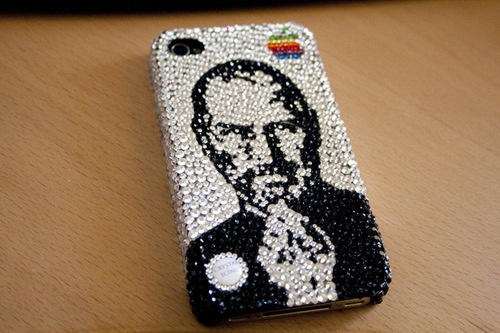
When some intrepid young capitalist coats a new gadget in superglue and then rolls it in Swarovski-brand crushed glass then reprices it for a few thousand dollars more , we usually decry the resulting product as a tacky, shameless money grab aimed at Cristal-swilling rappers, bling-encrusted divas, porn star kingpins and the like.
This $299 iPhone 4 case, on the other hand? What can we say? Has Steve ever looked so bedazzlingly fabulous?
After the fashion of their many other great infographics, GigaOm has continued their series of informative high-res JPEGs with iPhone: The Art of the Launch, which puts into perspective just how huge the iPhone has become… and some of the problems that have faced previous launches.
The most interesting part of the infographic to me? The citation of Gizmodo’s Brian Lam back in 2006, ahead of the iPhone launch: “The iPhone Will Be Announced On Monday. I Guarantee it. It isn’t what I expected at all. And I’ve already said too much.” Considering that four years later, the same site would strip a stolen and still unannounced iPhone 4 down to its bolts for its readership, that seems like an awfully coy admission of insider knowledge for Gizmodo to make, in retrospect.
The guys over at repair shop TechRestore have put together this goofily sinuous and retro-styled stop-motion video of an iPhone 4, doing a strip tease down to its very frame. Consider this the technological equivalent of a burlesque dancer slowly undressing herself down to her skeleton in a dust-free clean room. Or don’t, because that’s just plain creepy.
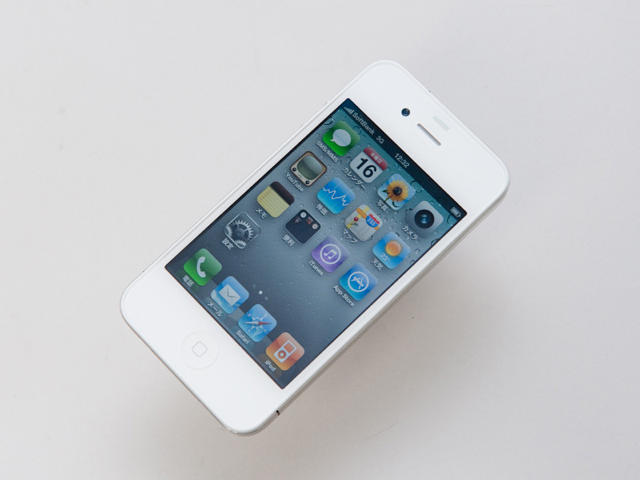
Elusive as some albino cryptozoological flora, the white iPhone 4 has been snapped in all its glory by Japanese blog Impress Watch. It looks exactly how you’d expect it to look, but since this is the iPhone 4 many of us wanted to be holding in our hands a couple of weeks ago, Impress Watch’s catalog of unboxing shots can be classified as a bit of late night gadget pornography starring that elfin, ivory love who somehow got away.
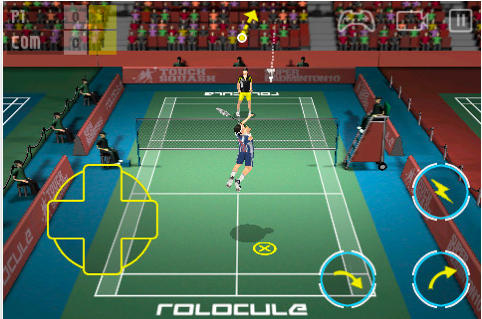
Super Badminton 2010 by Rolocule is the one and only 3D badminton game available in the App Store for iPhone & iPod Touch. Despite no current competition, this game still boasts “hyper-realistic physics,” HD quality graphics, a slick UI and realistic sound effects, all of which go towards keeping Super Badminton at the top of its game.
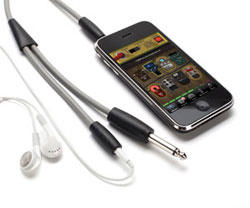
iShred LIVE, a free application from Frontier Design Group, and GuitarConnect, from the venerable peripherals company Griffin Technology look to raise the bar for making Apple’s flagship portable devices essential pieces of gear for musicians of any skill level.
The $30 GuitarConnect cable features a 1/4″ spur that connects easily into guitars, basses, or any instrument with a 1/4″ input, and a stereo 1/8″ mini-plug that connects directly to iPhone, iPod Touch, or iPad for use with audio applications such as iShred LIVE. The 6 foot cable provides an additional stereo 1/8″ mini-jack to connect headphones or audio cable for connection to a home stereo, amp, mixer, or other audio source.
iShred LIVE (iTunes Link) is a mobile app with amp modeling and stomp box effects for guitar, bass, and other instruments, letting users play real instruments through their device.
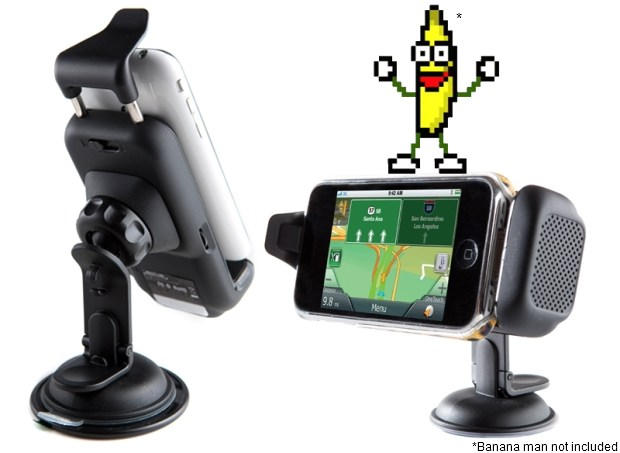
You can buy a cheap dashboard mount for your iPhone for as little as $10 bucks, but if you take your phone seriously as a replacement for your GPS unit, you might want to consider Magellan’s new iPhone car kit.
Compatible with all iPhone and iPod Touch models, the Magellan Premium Car Kit features an adjustable dash mount, a built-in speaker and noise-canceling microphone and even a GPS receiver to boost your iPhone’s signal. It’s compatible with all iOS GPS navigation applications, and it’ll even accommodate most cases without fretting.
It costs $130, which is certainly pricier than most, but then again, most dash mounts don’t have this volume of functionality. If you’re serious about GPS, the Magellan Premium Car Kit looks like money well spent.
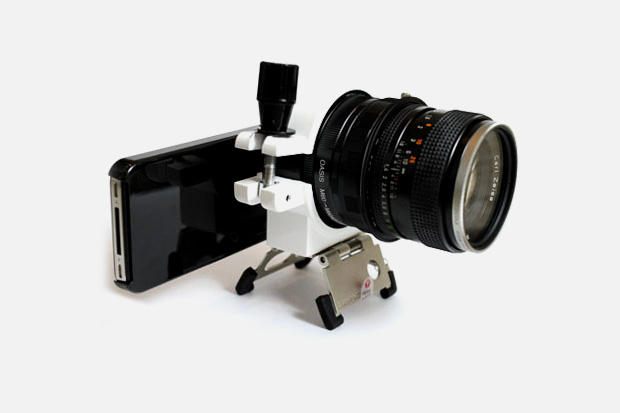
The iPhone 4 already takes some of the best smartphone snapshots around, but it’s no match for a DSLR. No worry, though: the guys over at Hypebeast just paired the iPhone 4 with a DSLR lens through a Manfrotto pocket tripod mount.
The end result? Probably worse photos than the iPhone 4 took before. But until smartphones get DSLR-style CMOSes (improbable until someone figures out how to shrink a CMOS without making the pixels less sensitive to light) and lenses (pfft), this kind of Frankenstein rig is probably the most that serious iPhone 4 shutterbugs can hope for.
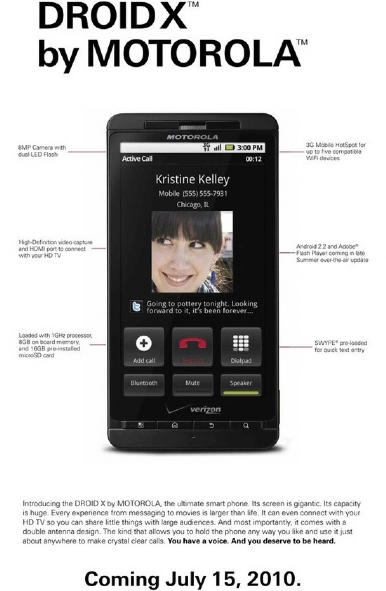
Verizon understandably relishes the opportunity to kick AT&T and the iPhone whenever they possibly can, so it’s no surprise that their latest full-page ad in The New York Times this week for their upcoming flagship Android device, the Droid X, openly mocks the iPhone 4’s death grip issue with one choice line: “And most importantly, [The Droid X] comes with a double antenna design. The kind that allows you to hold the phone any way you like and use it just about anywhere to make calls.”
One of the more frustrating aspects of Apple’s official response to the iPhone 4 reception issue is that the solution they are adopting isn’t just a non-fix, but it’s transparently just an optical illusion.
The iPhone 4 death grip is very real, but it only exhibits itself in middling reception areas. Why? Because Apple symbolizes 40% of the signal in the fifth bar of reception. If you have five bars of reception, you won’t notice a Death Grip drop, but if you have four bars or less, you’ll see numerous bars instantly drop off your iPhone if you touch it wrong.
Apple chose to capture 40% of the iPhone’s signal in the fifth bar to give the superficial appearance of excellent reception even when the cellular signal was as low as 60%. Their fix to the iPhone 4 death grip, then, is to more accurately correspond the actual cellular signal to signal bars, so the reception drop doesn’t appear to be so profound. This will make the “Death Grip” drop in reception look less serious, but on the other hand, it’ll make iPhone reception look worse across all devices. If you were used to getting a stead five bars of reception on your iPhones in the past, the update might drop it down to four or even three bars.
To pre-emptively counter complaints of signal degradation from customers, Apple’s slyly decided to make the first three bars of signal look bigger. That’s the optical illusion: they are hoping that by making the first three signal bars look larger and more tangible will stop people from complaining (or, worse, filing class-action lawsuits) about the just-as-imaginary reception degradation.
The bottom line: the forthcoming software update for the iPhone 4’s Antenna Problems will not fix anything, it’ll just make it less superficially noticeable. And now, even Apple is admitting it, specifically telling customers that the software update won’t fix the “Death Grip,” and the only solution is to either hold the phone differently or buy a case.
Come on, Apple. This is nuts. If you’re going to rely on a software update stage trick to fool customers into thinking everything’s okay, you can’t also cop to it all being an illusion through your official Customer Support organ. It’s time to just start bundling bumpers with the iPhone 4 and be done with it.
Although the iPhone 4’s reception issues get all the press attention, the iPhone 4 has another pressing issue: the tendency of the proximity sensor to misread how close your face is to the handset, which can in turn cause the touchscreen to turn on when it’s close to your face, allowing your chin or cheek the unfortunate liberty of blindly dialing or even hanging up during a call.
The proximity sensor issues are commonly theorized to be a software issue, but according to an Apple Store Genius spoken to by TUAW’s Aron Trimble, we may be looking at another design flaw.
Why? According to the Genius, Apple had to move the proximity sensor location in the iPhone 4 so that it actually points into the ear canal during a call. That means that if you have particularly glistening ear canals, light bouncing around the ear canal can mistakenly tell the proximity sensor that you’re no longer on a call.
The Genius’ recommendation on how to fix the issue? He said that you should make your calls from somewhere darker.