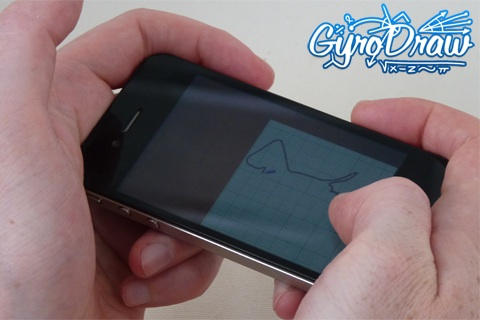
Here’s a new, strange little app; Gyro Draw lets users draw with the iPhone 4’s gyroscope, by sliding a piece of virtual paper (responding to inputs from the gyroscope) under a stationary virtual pencil. Don’t have a 4? It also works with the older iPhone’s accelerometer, only in this mode it’s the pencil that moves. Also works on the iPad.
Not sure this app’ll produce anything prettier than the etch-a-sketch masterpieces I made when I was five, but it’s free right now for a limited time, so it might be cool for a quick impress-your-gyroscopeless-friends session.
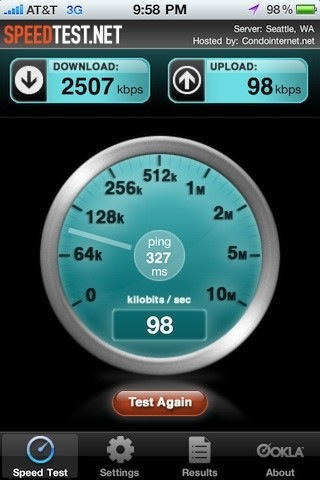
For the last few days, numerous iPhone users in major AT&T network hubs have noticed apparent 3G upload throttling. AT&T has just released a statement concerning the problem: its a bug with the Alcatel-Lucent HSUPA hardware, and they are working on it.
“AT&T and Alcatel-Lucent jointly identified a software defect — triggered under certain conditions – that impacted uplink performance for Laptop Connect and smartphone customers using 3G HSUPA-capable wireless devices in markets with Alcatel-Lucent equipment. This impacts less than two percent of our wireless customer base. While Alcatel-Lucent develops the appropriate software fix, we are providing normal 3G uplink speeds and consistent performance for affected customers with HSUPA-capable devices.
In other words, something went kablooey, and until Alcatel-Lucent gets around to fixing the problem, users with HSUPA-capable devices like the iPhone 4 will be limited to regular 3G UMTS upload speeds.
Wonder if you’re affected? If you’re in NYC, Central Jersey, Boston, Orlando, Seattle, South Jersey/Philly, Columbus, Cleveland, West Houston, Phoenix, Northern Colorado, St. Paul/Minnesota, Suffolk County/Long Island, Quad Cities, South Jersey, Denver, Detroit Metro, Cincinnati, Baltimore, Salt Lake City, Las Vegas, Kansas City, Fairfax and Minneapolis… well, could be.
This gorgeous pinhole camera on Etsy isn’t just elegantly simple in its design, but its made out of an old iPhone box. Load a standard 35mm film reel into its spool and you’ll be able to take simple pinhole snaps with the best of shoebox toting grade schoolers. It even has a built-in advance and rewind reel, enabling you to “shoot a picture, advance to the next frame, use the entire roll of film, rewind it back into the canister and take it to the drug store for processing!” Who needs iPhoto?
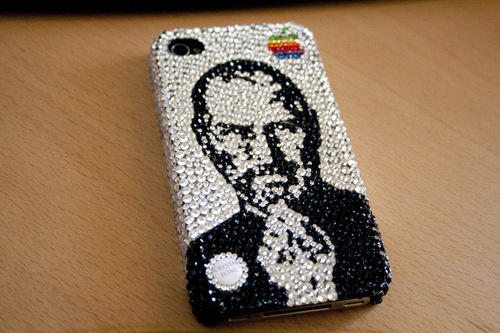
When some intrepid young capitalist coats a new gadget in superglue and then rolls it in Swarovski-brand crushed glass then reprices it for a few thousand dollars more , we usually decry the resulting product as a tacky, shameless money grab aimed at Cristal-swilling rappers, bling-encrusted divas, porn star kingpins and the like.
This $299 iPhone 4 case, on the other hand? What can we say? Has Steve ever looked so bedazzlingly fabulous?
After the fashion of their many other great infographics, GigaOm has continued their series of informative high-res JPEGs with iPhone: The Art of the Launch, which puts into perspective just how huge the iPhone has become… and some of the problems that have faced previous launches.
The most interesting part of the infographic to me? The citation of Gizmodo’s Brian Lam back in 2006, ahead of the iPhone launch: “The iPhone Will Be Announced On Monday. I Guarantee it. It isn’t what I expected at all. And I’ve already said too much.” Considering that four years later, the same site would strip a stolen and still unannounced iPhone 4 down to its bolts for its readership, that seems like an awfully coy admission of insider knowledge for Gizmodo to make, in retrospect.
The guys over at repair shop TechRestore have put together this goofily sinuous and retro-styled stop-motion video of an iPhone 4, doing a strip tease down to its very frame. Consider this the technological equivalent of a burlesque dancer slowly undressing herself down to her skeleton in a dust-free clean room. Or don’t, because that’s just plain creepy.
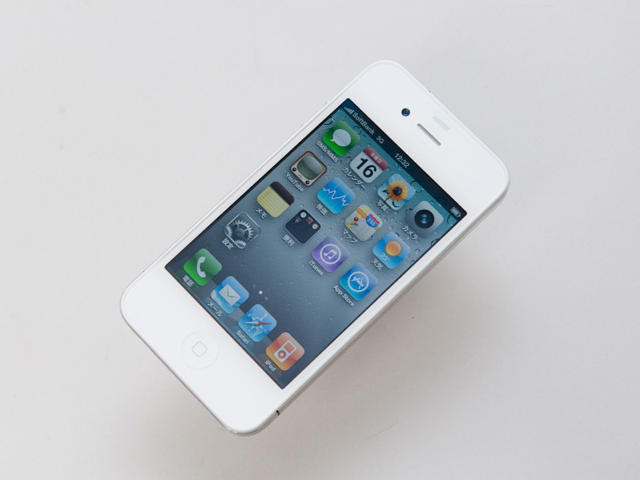
Elusive as some albino cryptozoological flora, the white iPhone 4 has been snapped in all its glory by Japanese blog Impress Watch. It looks exactly how you’d expect it to look, but since this is the iPhone 4 many of us wanted to be holding in our hands a couple of weeks ago, Impress Watch’s catalog of unboxing shots can be classified as a bit of late night gadget pornography starring that elfin, ivory love who somehow got away.
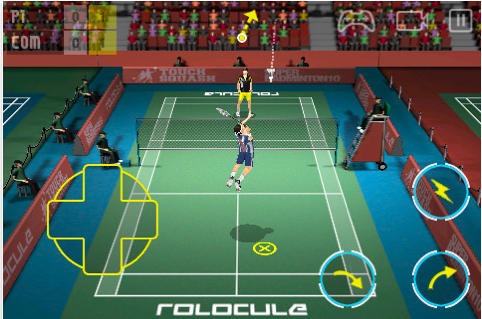
Super Badminton 2010 by Rolocule is the one and only 3D badminton game available in the App Store for iPhone & iPod Touch. Despite no current competition, this game still boasts “hyper-realistic physics,” HD quality graphics, a slick UI and realistic sound effects, all of which go towards keeping Super Badminton at the top of its game.
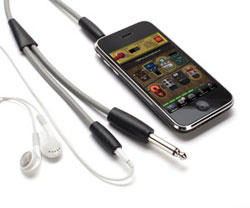
iShred LIVE, a free application from Frontier Design Group, and GuitarConnect, from the venerable peripherals company Griffin Technology look to raise the bar for making Apple’s flagship portable devices essential pieces of gear for musicians of any skill level.
The $30 GuitarConnect cable features a 1/4″ spur that connects easily into guitars, basses, or any instrument with a 1/4″ input, and a stereo 1/8″ mini-plug that connects directly to iPhone, iPod Touch, or iPad for use with audio applications such as iShred LIVE. The 6 foot cable provides an additional stereo 1/8″ mini-jack to connect headphones or audio cable for connection to a home stereo, amp, mixer, or other audio source.
iShred LIVE (iTunes Link) is a mobile app with amp modeling and stomp box effects for guitar, bass, and other instruments, letting users play real instruments through their device.
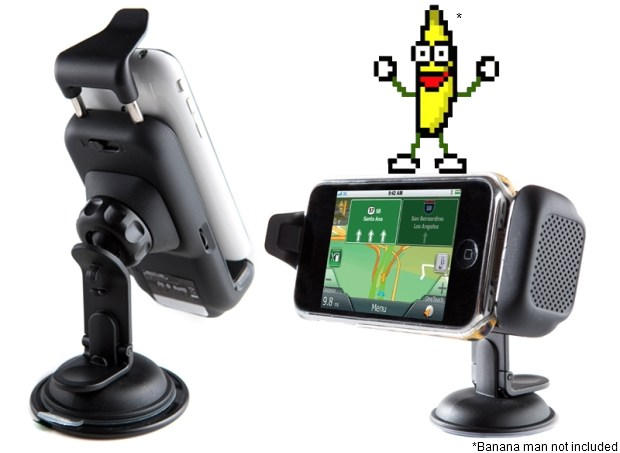
You can buy a cheap dashboard mount for your iPhone for as little as $10 bucks, but if you take your phone seriously as a replacement for your GPS unit, you might want to consider Magellan’s new iPhone car kit.
Compatible with all iPhone and iPod Touch models, the Magellan Premium Car Kit features an adjustable dash mount, a built-in speaker and noise-canceling microphone and even a GPS receiver to boost your iPhone’s signal. It’s compatible with all iOS GPS navigation applications, and it’ll even accommodate most cases without fretting.
It costs $130, which is certainly pricier than most, but then again, most dash mounts don’t have this volume of functionality. If you’re serious about GPS, the Magellan Premium Car Kit looks like money well spent.
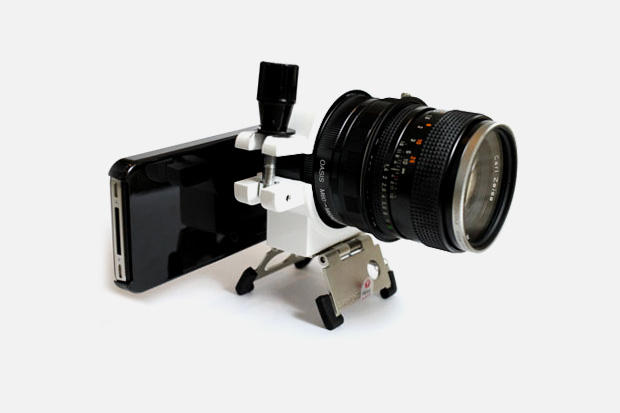
The iPhone 4 already takes some of the best smartphone snapshots around, but it’s no match for a DSLR. No worry, though: the guys over at Hypebeast just paired the iPhone 4 with a DSLR lens through a Manfrotto pocket tripod mount.
The end result? Probably worse photos than the iPhone 4 took before. But until smartphones get DSLR-style CMOSes (improbable until someone figures out how to shrink a CMOS without making the pixels less sensitive to light) and lenses (pfft), this kind of Frankenstein rig is probably the most that serious iPhone 4 shutterbugs can hope for.
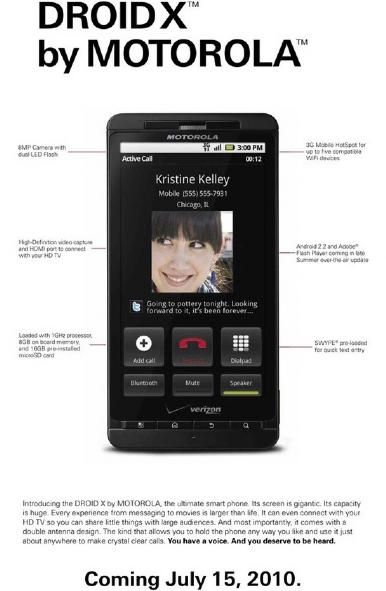
Verizon understandably relishes the opportunity to kick AT&T and the iPhone whenever they possibly can, so it’s no surprise that their latest full-page ad in The New York Times this week for their upcoming flagship Android device, the Droid X, openly mocks the iPhone 4’s death grip issue with one choice line: “And most importantly, [The Droid X] comes with a double antenna design. The kind that allows you to hold the phone any way you like and use it just about anywhere to make calls.”
One of the more frustrating aspects of Apple’s official response to the iPhone 4 reception issue is that the solution they are adopting isn’t just a non-fix, but it’s transparently just an optical illusion.
The iPhone 4 death grip is very real, but it only exhibits itself in middling reception areas. Why? Because Apple symbolizes 40% of the signal in the fifth bar of reception. If you have five bars of reception, you won’t notice a Death Grip drop, but if you have four bars or less, you’ll see numerous bars instantly drop off your iPhone if you touch it wrong.
Apple chose to capture 40% of the iPhone’s signal in the fifth bar to give the superficial appearance of excellent reception even when the cellular signal was as low as 60%. Their fix to the iPhone 4 death grip, then, is to more accurately correspond the actual cellular signal to signal bars, so the reception drop doesn’t appear to be so profound. This will make the “Death Grip” drop in reception look less serious, but on the other hand, it’ll make iPhone reception look worse across all devices. If you were used to getting a stead five bars of reception on your iPhones in the past, the update might drop it down to four or even three bars.
To pre-emptively counter complaints of signal degradation from customers, Apple’s slyly decided to make the first three bars of signal look bigger. That’s the optical illusion: they are hoping that by making the first three signal bars look larger and more tangible will stop people from complaining (or, worse, filing class-action lawsuits) about the just-as-imaginary reception degradation.
The bottom line: the forthcoming software update for the iPhone 4’s Antenna Problems will not fix anything, it’ll just make it less superficially noticeable. And now, even Apple is admitting it, specifically telling customers that the software update won’t fix the “Death Grip,” and the only solution is to either hold the phone differently or buy a case.
Come on, Apple. This is nuts. If you’re going to rely on a software update stage trick to fool customers into thinking everything’s okay, you can’t also cop to it all being an illusion through your official Customer Support organ. It’s time to just start bundling bumpers with the iPhone 4 and be done with it.
Although the iPhone 4’s reception issues get all the press attention, the iPhone 4 has another pressing issue: the tendency of the proximity sensor to misread how close your face is to the handset, which can in turn cause the touchscreen to turn on when it’s close to your face, allowing your chin or cheek the unfortunate liberty of blindly dialing or even hanging up during a call.
The proximity sensor issues are commonly theorized to be a software issue, but according to an Apple Store Genius spoken to by TUAW’s Aron Trimble, we may be looking at another design flaw.
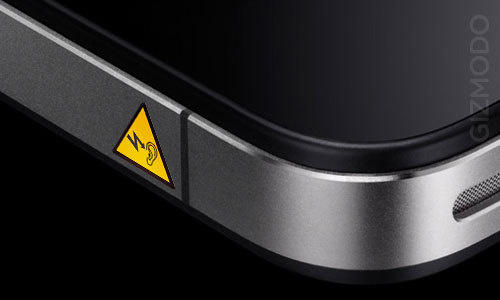
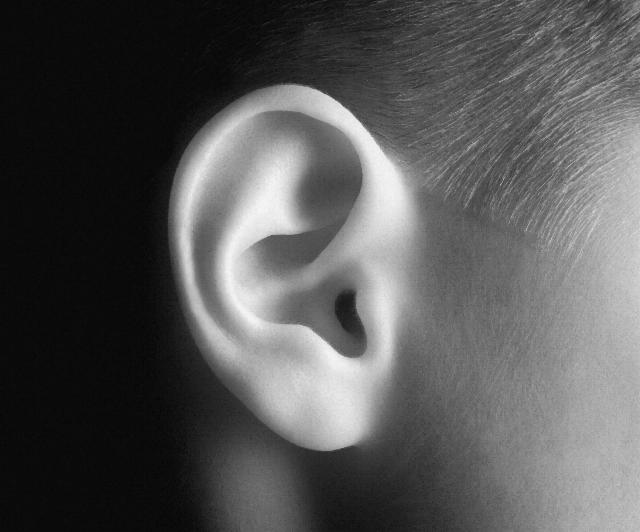
Why? According to the Genius, Apple had to move the proximity sensor location in the iPhone 4 so that it actually points into the ear canal during a call. That means that if you have particularly glistening ear canals, light bouncing around the ear canal can mistakenly tell the proximity sensor that you’re no longer on a call.
The Genius’ recommendation on how to fix the issue? He said that you should make your calls from somewhere darker.
During the WWDC keynote, Steve Jobs’ efforts to show off the improved speed of Mobile Safari on the iPhone 4 were thwarted by a catastrophic WiFi meltdown, but a month later, our good buddy Obama Pac-Man is here to prove what Steve could not: Mobile Safari on the iPhone 4 is wicked fast.
In a showdown against the iPhone 3GS on 3G with WiFi turned off, Mobile Safari rendered all the tested sites significantly faster on the iPhone 4. It’s all a matter of a few milliseconds here, a half a second or so there, but that time adds up in an app as integral to the iOS experience as Mobile Safari.
Extra points go to Obama Pac-Man for his stylistic choice of silence for the video: anyone else would have supplemented it with a loud soundtrack of moist mouth-breathing or, failing that, phlegmatic nu-metal. Bravo.
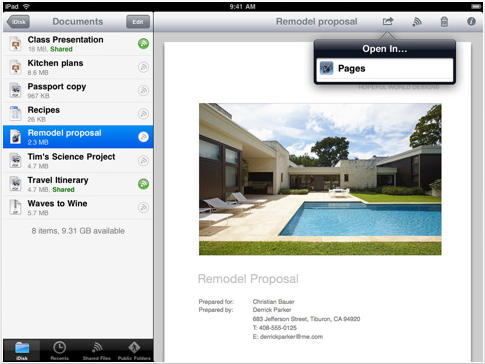
Apple has issued an update to its MobileMe iDisk application today and version 1.2 brings some welcome improvements. As well as support for multitasking and fast app switching, iDisk is now a universal application and works natively on the iPad.
What’s more, iPad users can now export documents from iDisk in to iBooks or office applications like Apple’s own Pages, Numbers & Keynote offerings.
Another big improvement is the ability to listen to music from within the iDisk application – this means you can save space on your device by uploading your tracks to an iDisk folder and then listening to them from there. Obviously this will require a data connection to your iDisk, however.
The full list of improvements is as follows:
Designed for both iPhone and iPad
Multitasking support for iPhone 4 and iPhone 3GS (iOS 4 required).
Quickly switch to another app and back to iDisk
Play audio from your iDisk while using another app
When app is opened, the last file or directory viewed is displayed
Option to open iDisk documents in compatible apps such as iBooks
When sharing a file, an email can be sent from any configured email account
The URL for a shared file can be copied and pasted
Various stability improvements
iDisk is the last of Apple’s MobileMe apps to be updated for multitasking and iOS 4. All we’re waiting on now is the MobileMe Gallery app improvements and iPad support!
Download MobileMe iDisk for your device from the App Store here.
The much anticipated Archetype first-person shooter has hit the US App Store today and claims to deliver a “high quality console-style FPS experience on iPhone or iPod Touch.”
First launched in the Czech Republican App Store, Archetype, for just $2.99, offers 3 game modes; Training, Challenge and 5-on-5 Team Deathmatch over Wi-Fi, 3G and even EDGE. With 5 maps to choose from a variety of weapons, Archetype seems a must for any online FPS fan.
Features include a precise dual joystick-style control system, the ability to rank up by earning experience points, an offline tutorial mode and the opportunity to add friends and challenge them in team deathmatch.
Developers, Villain, have also optimized Archetype for the iPhone 4’s retina display by offering high-resolution graphics that provide fantastic looking weapons and textures, and, they claim, “headshots never looked so good!”
Get your hands on Archetype in the App Store here and let us know what you think!
A Chinese gadget site has reviewed the best iPhone 4 knockoff on the market, and while it looks good ands costs only $100, it’s really a piece of junk.
Says M.I.C Gadget:
“It’s the new king in the knockoff market, built to look like a real iPhone 4 while doing its best — with features like a front-facing camera with flash, removable battery, and that outrageous imitation of the industrial design, no one would say that this knockoff is not cool.”
But under the hood, the hardware and software are rubbish. The touchscreen barely works; the back is made of plastic, not glass; it says 64GB but it’s only 64MB; video is so crappy it is unwatchable; the Mail app is MMS, not email; the “five megapixel” camera is only 0.3 megapixels, and so on.
How’s iPhone 4 carrier unlock coming along, you ask? Jolly well, says Dev Team member MuscleNerd.
Despite the fact that the baseband-unlocking code used by ultrasn0w on the last three iPhones won’t work on the iPhone 4 due to a baseband change, a carrier unlock should still be attainable.
“Next step is to keep the task backgrounded like we did for 3G/3GS,” MuscleNerd wrote on his Twitter feed. “Backgrounded task is the unlock.”
Great news for those of us who want to migrate our phones to different networks, or use the when we travel abroad without paying exorbitant rates.
I’ve been thinking a lot about the long-term future of the iPod line. Long the key driver of Apple’s revenue growth, since the launch of the iPhone, it has slipped into the background. Now, the conventional wisdom goes, Apple is going to run out the life of the scrollwheeled wonder until the entire line goes touch with the introduction of a nano-sized iOS device. The iPhone, in three short years, will have eaten the iPod entirely. For all the talk of Dell or Microsoft or Samsung or Sony developing an iPod-killer, Apple did the job better than anyone else could.
But here’s the thing: since the release of the iPhone 4, I’m convinced that Apple sees a lot more life in at least part of the iPod line. It’s simple, really. The new iPhone was made of fragile-seeming glass in order that the all-brushed-aluminum iPod line would look that much more durable. Where does this matter? With sports and with kids.
Apple’s response to the ongoing iPhone 4 “death grip” debacle is largely cosmetic, but at the end of the day, Cupertino’s made sure that everyone knows that “if you are not fully satisfied, you can return your undamaged iPhone to any Apple Retail Store or the online Apple Store within 30 days of purchase for a full refund.”
Throwing the gauntlet down and challenging your customers to return their phones if they aren’t happy with Apple’s fix is pretty daring, but at least Apple seems to be putting their money where their mouth is: Computerworld notes that simultaneously with the release of the iPhone 4 Reception memo, Apple quietly changed the terms of its return policy to exclude the customary 10% restocking fee.
According to Computerworld, Apple’s dropping the restocking fee to defend against class-action lawsuits that might otherwise cite the 10% fee as losses to be recouped. Personally, I think it’s simpler than that: Apple’s just not the kind of company to promise a full refund, then shortchange you.
The honeymoon is officially over. With the release of iPhone 4 over two weeks ago, Apple has been hit by everything except the kitchen sink. From the 3G iPad privacy concerns to the most recent App Store hack, Apple has been in full damage control mode. This makes it the perfect time to add insult to injury. Read my 5 suggestions on how to improve iOS 4 after the break.
Omino is a simple platform game recently released for the iPhone & iPod Touch which claims to ‘take you back to your childhood’ with it’s retro feel. It’s clear from the screenshots that its similarities with the old Super Mario Bros. games is uncanny, but is it as good?
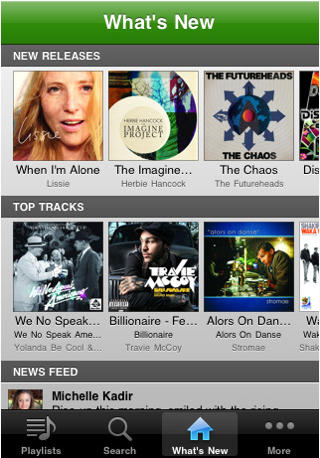
The popular Spotify music application for iPhone & iPod Touch has been updated to version 0.4.7 today for the iOS 4 software. This update brings with it the eagerly awaited multitasking support which now allows you to listen to your favourite music whilst using other applications on your device.
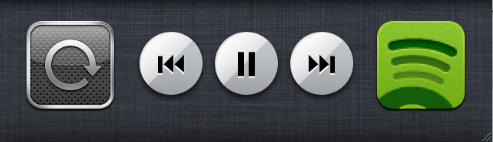
The update also features a new “what’s new” tab that displays new releases, the top 100 tracks in your country and a social news feed that displays Facebook posts. As well as the ability to use your headset remote, the multitasking dock buttons and the lock-screen buttons to control playback.
The full list of changes as listed in the description are:
iOS 4 multitasking! Play Spotify tracks while doing other things with your phone. NOTE: Only iPhone 3Gs, iPhone 4 and iPod Touch (3rd generation) support multitasking.
Use the headset remote and lockscreen buttons to control Spotify playback
“What’s new” tab has been added showing you newly released albums, the top 100 tracks in your country, and the social feed
Share tracks and albums to your Spotify friends!
Battery consumption is improved when the app is in the foreground or paused.
You can find Spotify in the App Store here (U.K.), but please note; you need a Spotify Premium account to use the iPhone & iPod Touch application.
Things to do over the weekend with your brand new iPhone 4, or Apple’s most fragile and shatterable handset yet? Why not strap it to a few helium balloons and send it off for a little jaunt along the troposphere. They weren’t entirely stupid, though: recovery of the iPhone 4 seems to have been assured by a long length of fishing wire.