Expect mobile Safari's address bar to look like this for some time.
One of the improvements Apple made to Safari 6.0 was to take the search and address bars and roll them into one — just like a lot of popular web browsers do. The change hasn’t been made to the mobile Safari app, though, which is puzzling, because it’s a more efficient use of screen space on a smaller display.
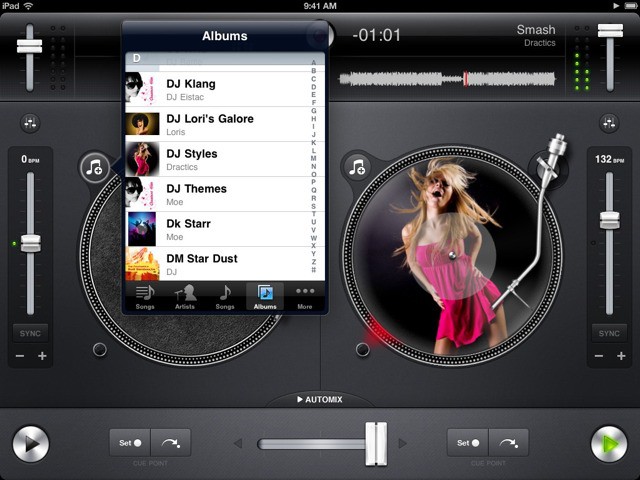
DJing on the iPad just got real. Or something. I'm not really sure if that's how disc jockeys speak. What I do know is that Algoriddim's Djay 1.6 adds some major new features thanks to iOS 6. What kind of features? Oh, you know… Just things like full dual stereo outputs for monitoring and playing different songs at the same time.
Missing Google Street View? Can't wait for it to be incorporated into a Flash-free, Mobile Safari-friendly version of the Google Maps web app? Then go download Live Street View, a Street View app which has just been updated to make it — frankly — awesome on the iPad.
Had valuable items stolen at the airport? The TSA could be behind it.
Stories about valuable items going missing at airport TSA checkpoints are worryingly common, but it’s not often you can prove your possessions have indeed been stolen by the people employed to protect you. Fortunately, Apple has made iOS devices easy to track when they go missing, and ABC News recently took advantage of this feature to catch a thieving TSA officer red-handed.
UK-based Future publishing announced earnings over the past year, claiming over $8 million in digital magazine sales, with over 12 million app downloads and five million subscribers. It offers its array of tech and sports themed magazines via Apple’s Newsstand and “container apps,” like Zinio.
I remember playing MechWarrior 2 in the mid 90s. Man, what thrill — I spent days piloting horribly destructive giant robots around a 3D battlefield, firing rockets, blasting anything that moved with terawatt lasers.
Of course, that was on my old 386 PC clone, back when I still followed the dark side of the force and hadn’t jumped onto a Mac yet. But the MechWarrior / BattleTech series of games has been around on Apple machines since day one — so I’m pretty jazzed to finally see the a MechWarrior game arrive for the iPad in the form of MechWarrior: Tactical Command.
For the past two years, Camera+ has been one of the most popular photography apps in the App Store, and now it’s finally coming to the iPad. The developers at Tap Tap Tap have also added support for the iPhone 5’s larger display and iCloud sync between the two apps.
Since it’s release, Camera+ has been downloaded 9 million times. The app has remained popular for its Instagram-like filters, sharing features, and in-depth editing options. To celebrate the new release, Tap Tap Tap has put both the iPhone and iPad versions of Camera+ on sale for only $1!
Struggling to turn this on? You're not the only one.
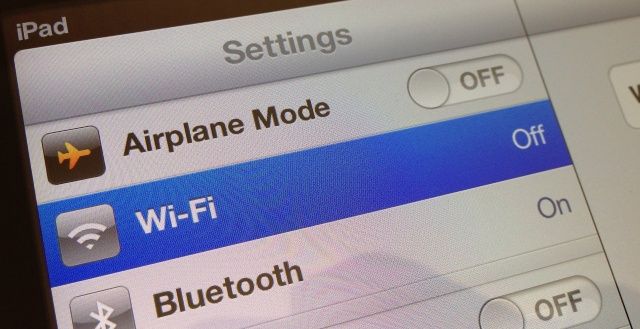
It seems Apple’s new Maps app isn’t the only thing frustrating iOS 6 users right now. A 91-page thread on Apple’s Support Communities forum is full of users who are also complaining about Wi-Fi connectivity issues, which are said to be plaguing the iPhone 4S and the new iPad after upgrading. It’s not just that Wi-Fi performance is poor; some users can’t enable it at all.
With the iPhone 5, Apple abandoned the existing aspect ratio of the iPhone (3:2) and embraced a true widescreen aspect display (16:9) instead. Now an analyst is saying that multiple people “close to Apple” have told him the iPad is going widescreen as well.
Back in 2007, Steve Jobs used a famous quote from ice hockey player Wayne Gretzky to summarize Apple’s commitment to innovation: “I skate to where the puck is going to be, not where it has been.” That’s long been true for Apple and products like the iPhone and iPad. But for more than four years, jailbeaking has pushed the boundaries of iOS even farther.
If Apple skates to where the puck is going to be, then jailbreakers have usually already been there and left. The hackers and tinkerers that find security loopholes in Apple’s software are some of the most brilliant, innovative minds in the tech world.
We’ll be covering JailbreakCon 2012 this weekend in San Francisco, the world’s first convention dedicated solely to the jailbreak community. What better way to get ready for the future of jailbreaking than to examine the past? Let’s start from the beginning:
Remember Jonathan Mann? He became popular on YouTube for writing and uploading a brand new song each and every day, and he’s famous among Apple fans for writing a song about the iPhone 4’s Antennagate, which was played at a special press event held by Apple to discuss the issue. He also did a duet with Siri, which we covered back in October.
Mann’s now back with Apple’s digital assistant for a special happy birthday song.
This is coming back to iOS... you'll just have to wait for it.
We’ve heard a lot of rumors surrounding a Google Maps app for iOS over the past week, and now The New York Times is weighing in with information from its own sources. Fortunately, it’s good news: it claims Google is indeed working on a Maps app for iPhone, iPad, and iPod touch, and that the company is hoping to have it ready and released by the end of this year.
Why’s it taking so long? Well, Google had no idea Apple was kicking Google Maps out of iOS until Apple first previewed iOS 6 back in June.
FIFA 13 promises "groundbreaking visuals" and the most responsive control system yet.
As a massive soccer fan, I love EA Sports’s FIFA Soccer series. So imagine my delight when I opened up the App Store this morning to find FIFA 13 staring back at me. This is the FIFA game I’ve been waiting for for iOS. Why? Because it’s the first to boast online multiplayer, allowing you to play against your friends over the Internet.
We’ve seen how fanatical the people at Rokform — an offshoot of Southern California-based motorcycle aftermarket outfit Two Brothers Racing — is about building the ultimate device case; back in 2011 we tested their aluminum Rokbed iPhone case and came away with the impression it was a hyper-engineered beauty.
For their new Roklock v3 iPad case, they’ve ditched the alloy in favor of polycarbonate and added more mounting options than…well, you read the headline.
It used to be that we carried spare batteries for our devices. Then Apple sealed its products’ cases shut and some of us complained. Loudly. Then we realized that carrying an external battery pack meant we didn’t have to power-down to swap out batteries, and that we could now pick and choose the perfect third-party option, and we all shut the hell up.
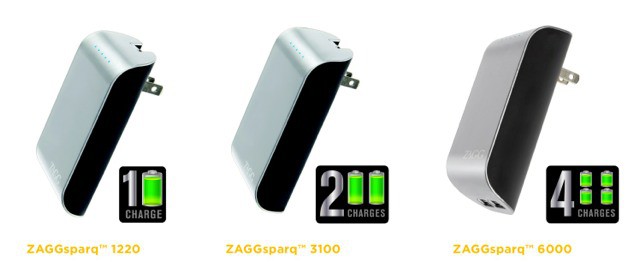
Which is my long-winded way of introducing the new Zaggsparq packs, a range of three battery packs tailored perfectly to your iCharging needs. As long as you don’t own an iPad 3, that is.
Apple is hoping Google Maps employees can help fix its new service.
Apple is said to be “aggressively” recruiting Google Maps employees in an effort to fix its highly criticized Maps service, according to an unnamed source “with connections on both teams.” The Cupertino company is reportedly using recruiters to attract individuals who have previously helped develop Google Maps, and many of them seem to be snapping up the opportunity to work at Apple.
Galaxy on Fire 2 is perhaps the best-looking space game on iOS. With astronomical scenes that call to mind a portable Eve Online, Galaxy on Fire 2 is an action space shooter with RPG elements, such as upgraded ships and weaponry, questing systems, and the like. It’s even made the move to Mac OS X.
It’s been a couple of months since FishLabs, the developers behind the title, released a teaser trailer and a vague September timeline for a release date for the upcoming downloadable content (DLC) expansion, Supernova. Well, that date is actually here, as Supernova is available on both the iTunes and Mac App Stores, for iOS and Mac OS X, respectively.
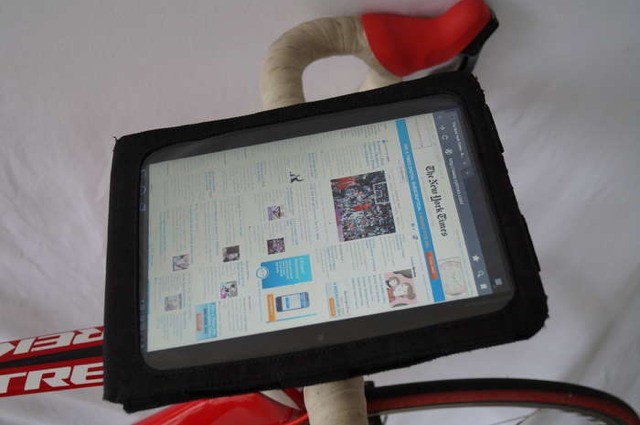
Oh man, this iPad mount is either a fantastic idea, or a lawsuit waiting to happen: you decide. It’s called the BiKASE and it mounts your iPad onto the handlebars of your bike.
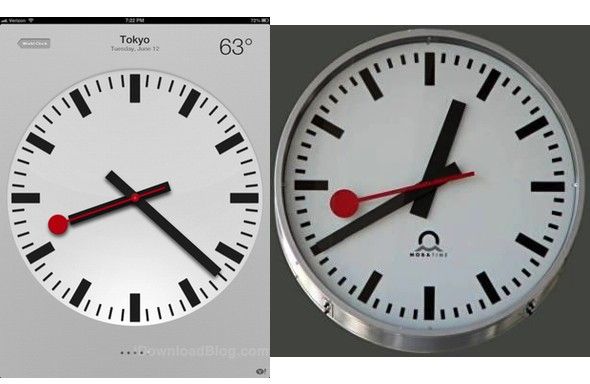
One of the best new additions of iOS 6 for iPad owners is the fact that not only do we finally get the iOS 6 clock app, but it’s absolutely gorgeous… easily Apple’s most attractive app, in my opinion.
The app’s good looks aren’t going unnoticed… and that might spell bad news for Apple. Apparently, the Swiss Federal Railway Service is livid over the clock used in the new app, says they own the trademark on the design.
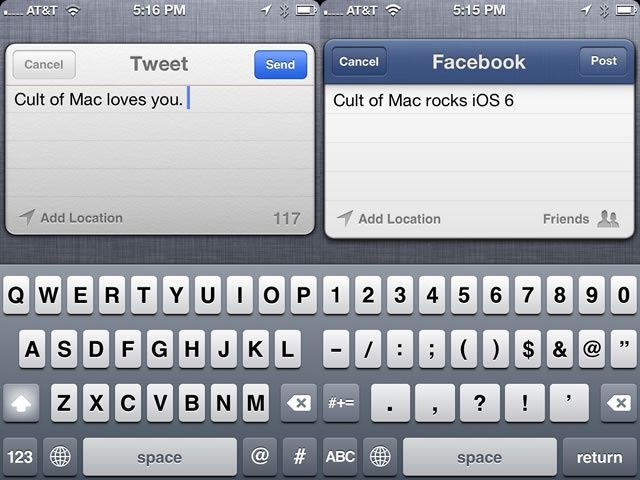
So, there you are, sitting on the bus, and inspiration strikes. You really want to fire off a quick tweet or status update to Facebook, but your stop is coming up fairly quick, and you really can’t miss it again. Opening up the Facebook or Twitter app will take precious seconds, ones you don’t have to spare! What’s an iOS 6-enabled person to do?
Now that Facebook is integrated along with Twitter in iOS 6, you don’t need to open either specific app on your iPhone, iPad, or iPod touch to get out that short message of genius.
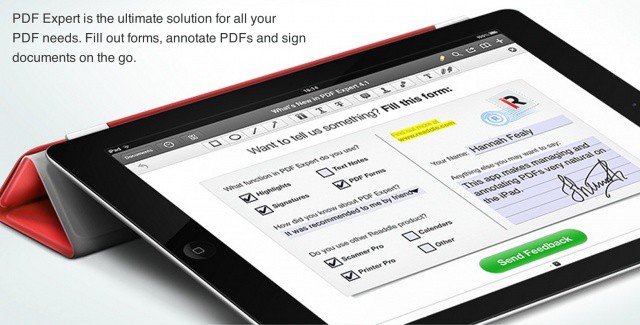
Readdle adds even more features to the iPad's best PDF management solution.
PDF Expert for iPad, arguably the best and most powerful PDF editor for iOS, has been updated today to introduce new features and improvements, including support for multiple signatures, and up to five times faster syncing.
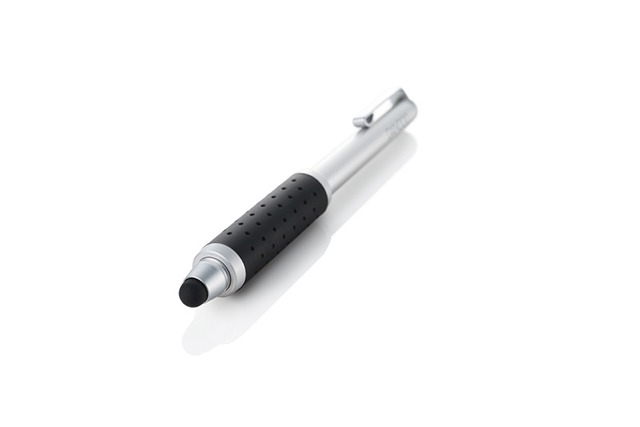
Wacom might be letting every other pen maker bring touch-sensitive styluses to the iPad first, but at least its regular dumb iPad styluses are amongst the best out there. And if you have ever hefted your Wacom Bamboo stylus and thought “This is almost perfect, but I wish it were a little stubbier,” then I have good news:
Wacom has made a stubby stylus. What’s more, it transforms into a long and slender stylus. It’s called the Bamboo Stylus Pocket.
Shortcuts were a nightmare to manage across iOS devices... until now.
After being introduced in iOS 5, keyboard shortcuts is a feature I could no longer live without on my iOS device. I use it for all kinds of things, including email addresses and usernames, so that I never have to type out the full thing 30 times a day. There is one thing the feature has been lacking, though, and that’s the ability to sync your keyboard shortcuts across all your iOS devices.
That is until now; the feature was finally added to iOS 6, which was released to the public yesterday.
Surely by now you’ve had enough time to download and install iOS 6 on your iPhone or iPad and play around a bit. It’s crammed with a crazy amount of new features, like Passbook, Maps, Flyover, VIP inboxes, new App Store, iCloud tabs, Call reminders, Panorama, Facebook Integration, Shared Photo Streams and like 200 other features I can’t even remember.
Of all the new goodies baked into iOS 6, what is your favorite? What’s surprised you so far? We want to hear all about what you think, so head over to the forums and let’s talk.