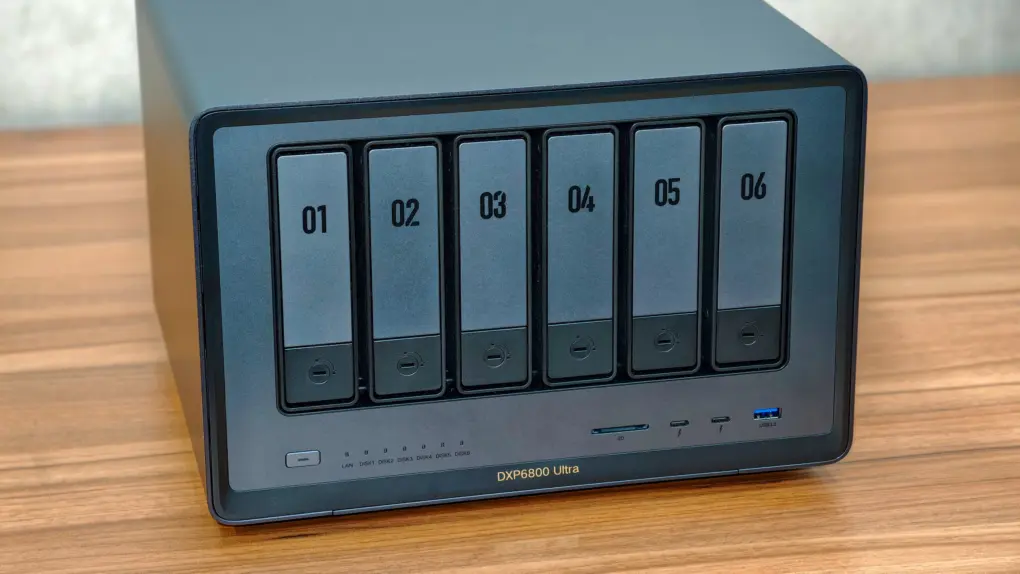
The Ugreen DXP6800 Ultra NAS takes much of what I liked about the DXP4800 Pro and gives it more room to grow. You get six hard drive bays, a more powerful Intel processor, dual 10GbE networking and Thunderbolt 4 connectivity.
There’s plenty of power and room for expansion. But in some ways, Ugreen’s newest NAS does not live up to its Ultra name.
This post contains affiliate links. Cult of Mac may earn a commission when you use our links to buy items.
Ugreen DXP6800 Ultra NAS review
A network-attached storage device is supposed to be something you buy once and rely on for years — a private cloud for your photos, videos, backups and everything else you don’t want scattered across subscription services. When I reviewed the Ugreen DXP4800 Pro, its combination of capable hardware, expandable storage and straightforward software made it easy to recommend.
The Ugreen DXP6800 Ultra follows the same formula, but it’s meant for people with even more storage needs (up to 208TB!) and heavier workloads. It shows how far the company’s hardware has come, but it comes with a steep list price of $1,449.99 (and that’s before you buy any drives or RAM). And unfortunately, much work remains to make Ugreen’s NAS software equally impressive.
The Ugreen DXP6800 Pro is a powerful six-bay NAS that packs plenty of super-fast connectivity options and drive bays for all your storage needs. It's only let down by software and a stingy 8GB of RAM.
- Six drive bays and two NVMe SSD slots
- Dual 10GbE and Thunderbolt 4 ports
- Upgradeable RAM
- Built-in power supply
- Only comes with 8GB of RAM
- No hybrid RAID support
- Software experience needs more polish

Table of contents: Ugreen DXP6800 Ultra NAS review
- More space and plenty of connections
- Powerful internals, minus the memory
- UGOS Pro keeps getting better
- Is the Ugreen DXP6800 Ultra worth the price?
More space and plenty of connections
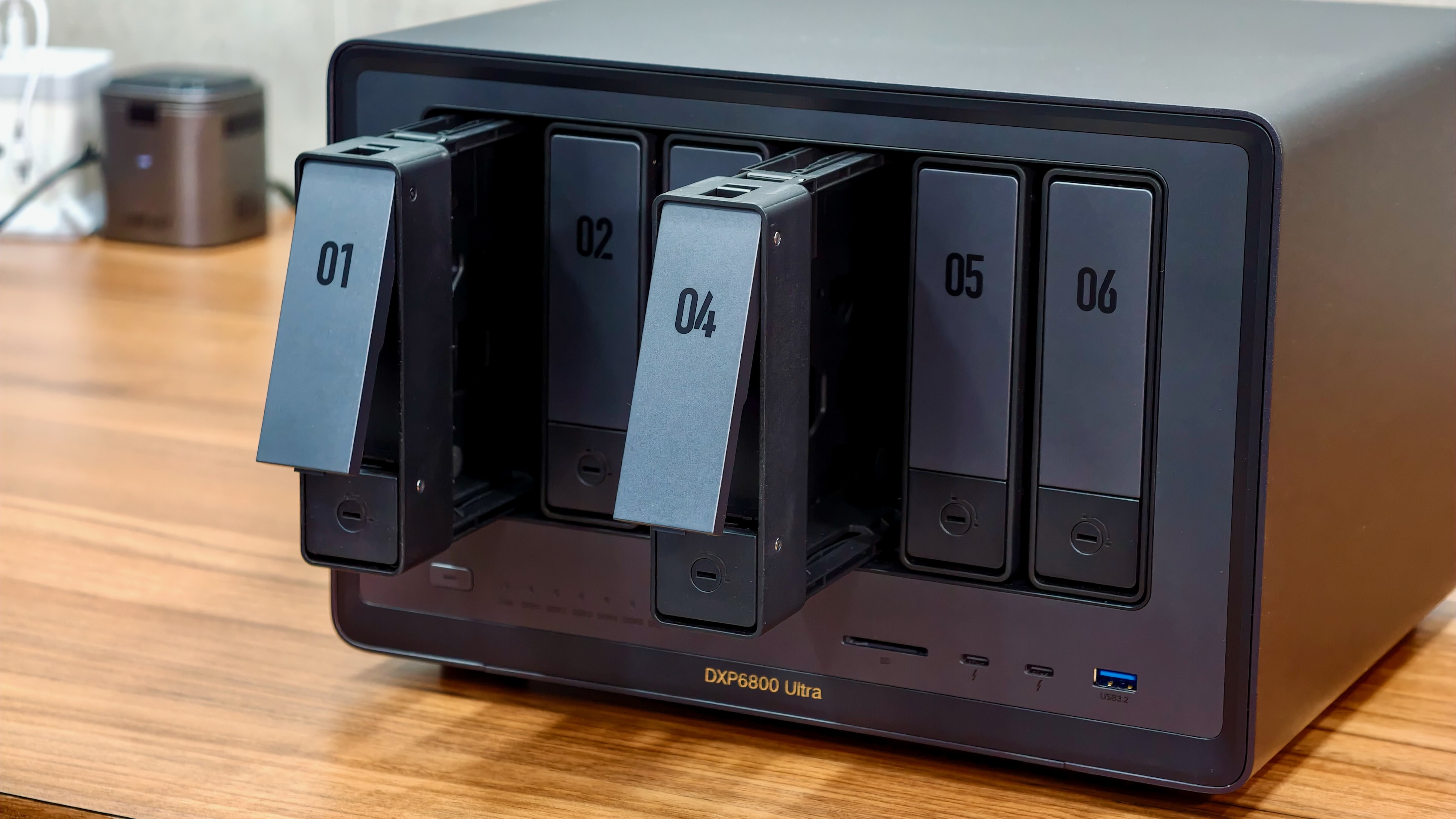
Photo: Rajesh Pandey/Cult of Mac
If you have used a Ugreen NAS before, you will find the DXP6800 Ultra’s design familiar. Numbered, lockable drive trays sit at the front, with tool-free installation for standard 3.5-inch hard drives. A removable magnetic dust filter covers the rear cooling fans.
Ugreen took the DXP4800 Pro’s design and expanded it from every angle to add two more drive bays to the front of the DXP6800 Ultra. You also get two M.2 NVMe slots for super-fast SSD storage or caching. Ugreen says you can have up to 208TB of storage on the DXP6800 Ultra by filling all the bays and M.2 slots.
There’s one huge advantage of the DXP6800 Ultra’s bigger chassis. The power supply is built into the NAS itself, unlike the smaller DXP4800 Pro and other models.
Connectivity is another highlight. Besides two 10GbE Ethernet ports, the Ultra packs two front-facing Thunderbolt 4 ports, a USB-A port and an SD 4.0 card reader. There’s also a PCIe Gen4 x4 expansion slot, opening up the possibility of adding a dedicated graphics card or other expansion cards.
The Thunderbolt 4 ports are the big deal here, as you can directly connect the NAS to your Mac if you want faster file transfers. The final speeds will depend on your hard drives and RAID setup, though.
Powerful internals, minus the memory
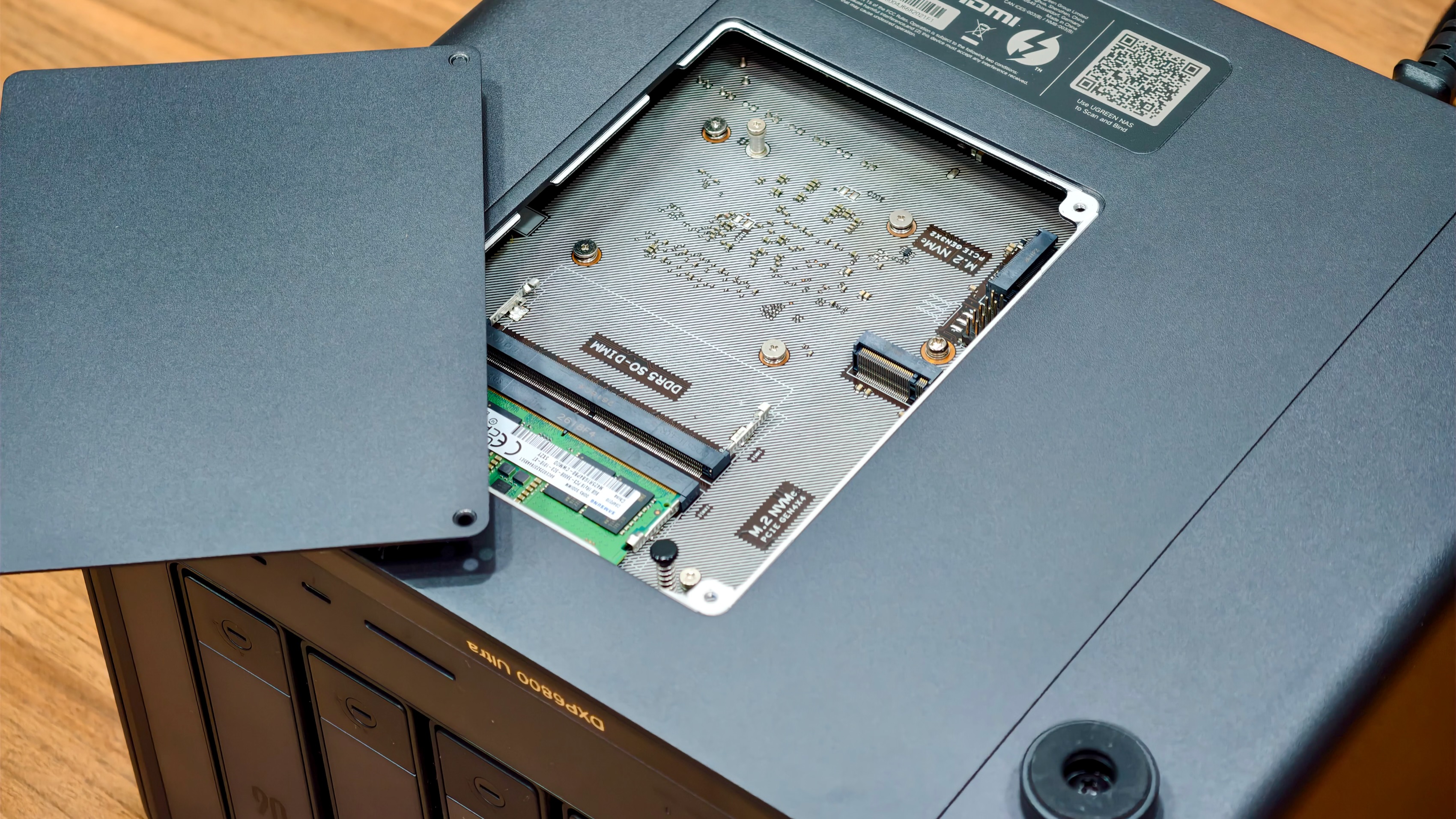
Photo: Rajesh Pandey/Cult of Mac
Ticking inside the DXP6800 Ultra is Intel’s Core 5 120U, a laptop-class processor with 10 cores and 12 threads. Combined with Intel’s integrated graphics, it delivers enough horsepower for media serving, Docker containers for running self-hosted apps and virtual machines alongside everyday storage duties.
While this is a powerful NAS, you can’t use it for running AI models locally. The Intel GPU is not powerful enough to handle these tasks.
From a NAS viewpoint, though, as with the DXP4800 Pro, the performance is top-notch and never felt like a concern. Even with the stock Photos app generating thumbnails and identifying faces in the background for more 10,000 photos and videos, I could install Docker containers and virtual machines without a hitch.
Only 8GB of RAM
But there’s one big catch with the DXP680o Ultra. While it lives up to its Ultra name in almost every aspect, it skimps on memory. Ugreen includes just 8GB of DDR5 RAM, the same as the cheaper DXP4800 Pro. That feels stingy for a six-bay NAS with an Ultra badge, especially at this price.
To be fair, 8GB has not caused any performance problems for me. But this NAS is aimed at people who might run several services, index a large photo library, or experiment with virtualization. Ugreen should have started at 16GB, although with the current DRAM and NAND pricing crisis, it’s perhaps understandable why it cut this particular corner.
On the bright side, the DXP6800 Ultra comes with two RAM slots, with only one populated. So, you can always add more RAM later — whenever RAM prices fall, with Ugreen listing support for up to 96GB of memory.
Thunderbolt and 10GbE need the right setup
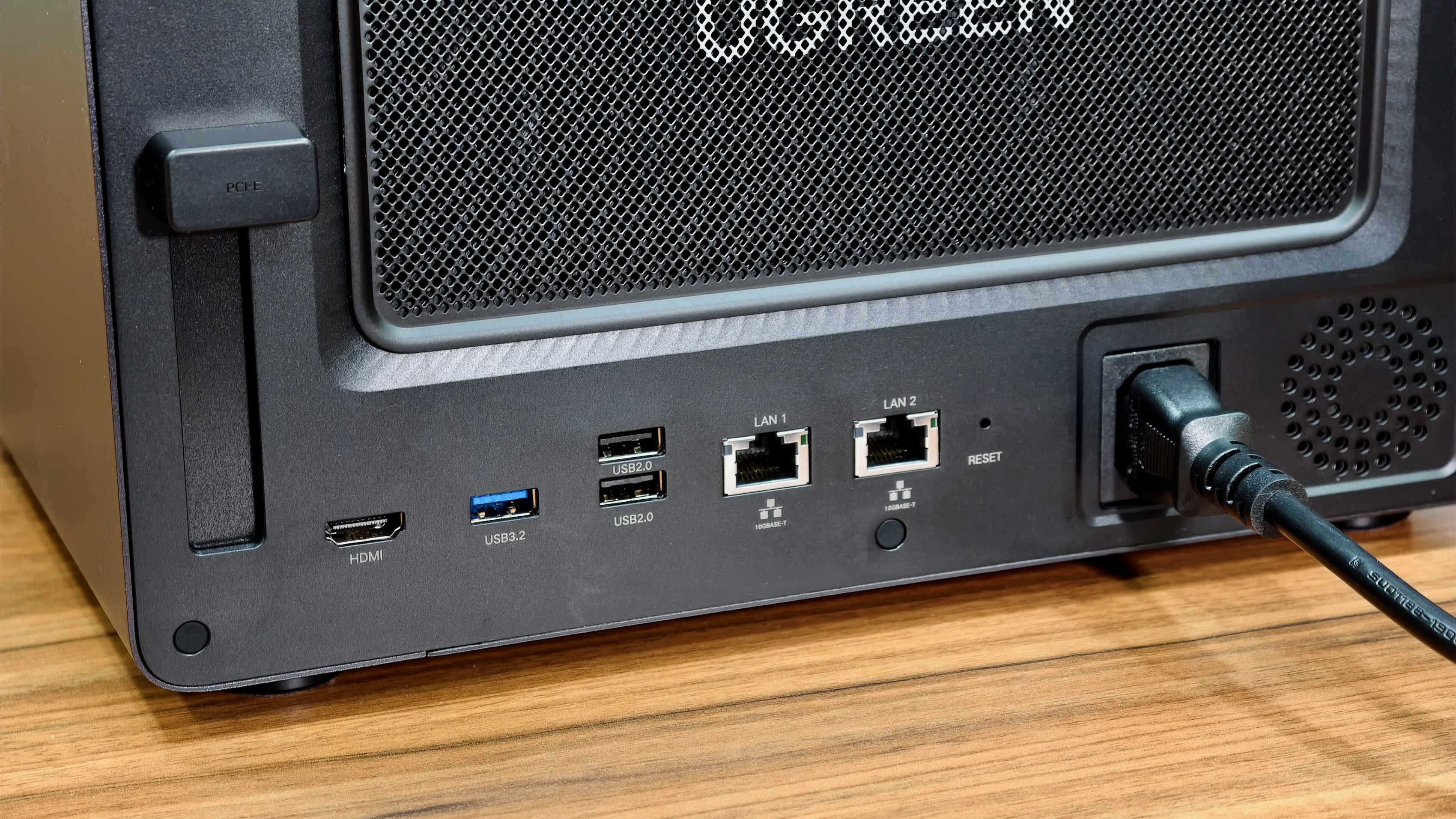
Photo: Rajesh Pandey/Cult of Mac
The DXP6800 Ultra’s dual 10GbE and Thunderbolt ports set it apart from other NAS models in Ugreen’s lineup and even other competing models from Synology.
The main question is whether your workload can justify the extra cost for these premium features. If you use a NAS in an office or in a shared workspace with heavy file-sharing needs and multiple users, the dual 10GbE ports will be a big step up. But to take advantage of them, you must have a 10GbE network switch and enough hard drives to saturate the connection.
Your Mac also needs a compatible Ethernet connection. A dock like the CalDigit TS5 Plus can add a 10GbE port to your setup.
See also: CalDigit TS5 Plus is a Thunderbolt dock without limits [Review]
You can also connect the DXP6800 Ultra directly to your Mac over Thunderbolt. But it won’t work like a regular external drive. Instead, the shared folders are accessible through SMB. That means the NAS still manages its drives, permissions and storage pools.
UGOS Pro keeps getting better, but …
Screenshot: Rajesh Pandey/Cult of Mac
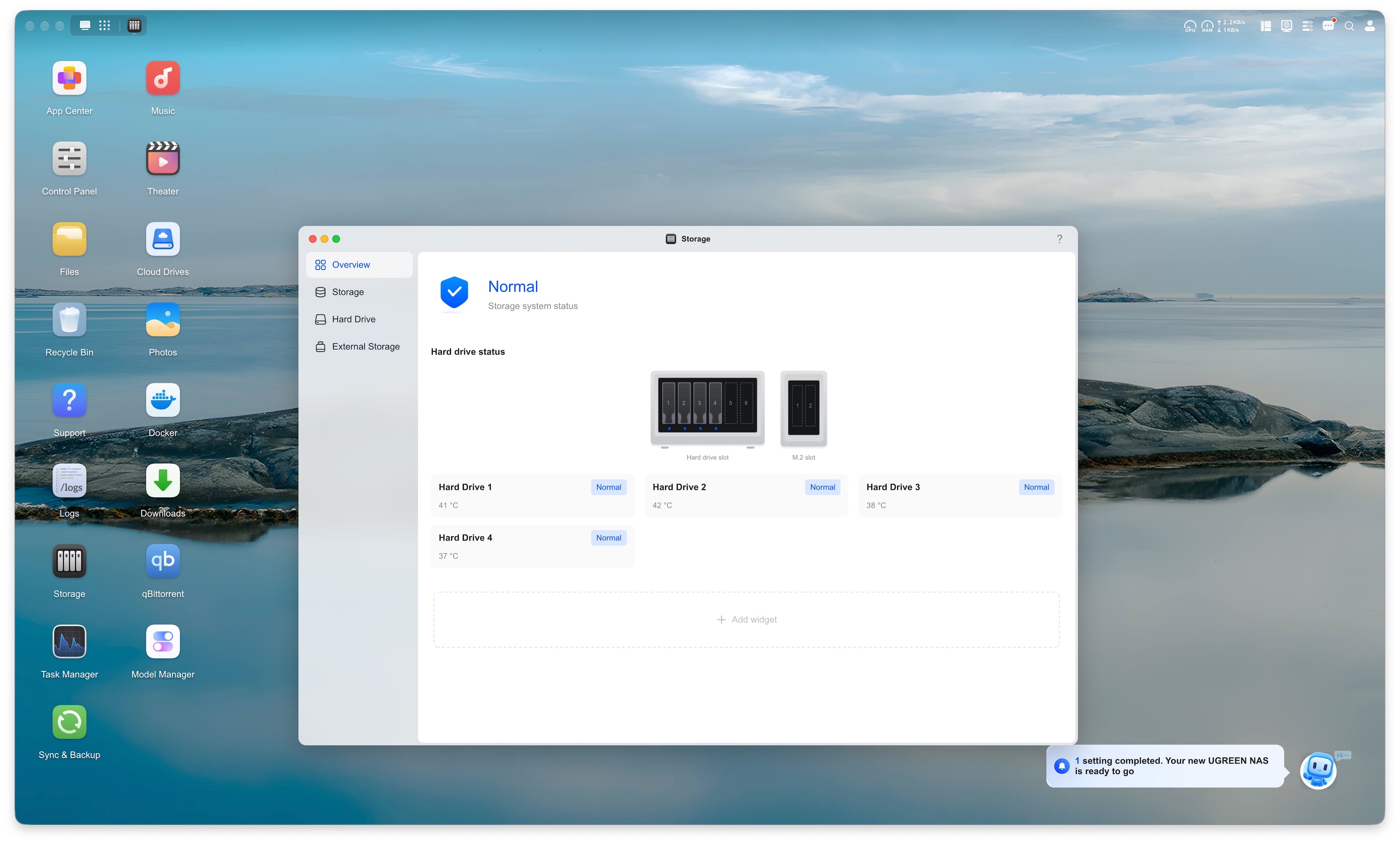
Ugreen’s network-attached storage devices run on UGOS Pro, a Linux-based operating system. As good as Ugreen’s NAS hardware is, UGOS Pro is one of the DXP6800 Ultra’s weakest aspects.
Still, things have improved, with Ugreen rolling out at least one major update every month with new features and bug fixes. Ugreen’s NAS OS has only improved since my DXP4800 Pro review. It is still easy to use, while Docker and virtual machine support let power users extend the NAS beyond the built-in apps.
More importantly, the company has addressed some earlier shortcomings with updates. This includes encryption for top-level shared folders and user folders, Backblaze B2 integration, custom fan curves, and photo management experience.
Ugreen deserves credit for that. Even so, UGOS Pro still has gaps.
No support for hybrid RAID
One is the lack of Synology-style hybrid RAID, which makes better use of mixed-capacity drives. For a company launching so many new NAS models every year, and with hard drive prices soaring, UGOS Pro’s lack of hybrid RAID support is puzzling.
On the DXP6800 Ultra, this omission stands out even more. I have multiple hard drives that I can use in the NAS, but since they are all different capacities, that’s not an option here.
Ugreen’s app store is also light on apps compared to the competition. But there’s Docker support, so you can almost always install the app you want to run. Plus, if UGOS Pro still does not meet your requirements, you can always install an alternative NAS OS like TrueNAS. Ugreen does not limit the installation of a third-party OS, and with system images available, you can always go back to UGOS Pro.
I called out the lack of transparency around security updates in my DXP4800 Pro review, and that remains a concern with the DXP6800 Ultra. For a device that stores sensitive personal and business data, security is always an issue, especially with the way AI models are improving.
To be fair, Ugreen runs a Security Response Center that lists vulnerabilities it has fixed, and every UGOS Pro entry there is marked as resolved. That includes Dirty Frag and Copy Fail, two Linux privilege-escalation flaws from earlier this year. The company also promises at least five years of security updates for its NAS models.
Photo management needs its own app
My biggest everyday frustration while testing Ugreen’s DXP6800 Ultra for this review came from the photo experience.
Ugreen still does not offer a standalone photos app. Its photo features live inside the broader Ugreen NAS iPhone app, so browsing my library or managing backups means opening an app that also handles files, storage settings and other NAS functions.
That is fine for managing the NAS. It makes less sense when all I want to do is look at family photos.
I made the same complaint in my DXP4800 Pro review, and it still stands. There’s no reason for my wife or parents to use a general NAS app just to view their backed-up photos. A dedicated Ugreen Photos app would fix that.
Another gripe from the past also remains unsolved. I must open the Ugreen NAS app to make sure it actually backs up my photos. It does not upload everything automatically in the background.
Photo backup should be something I never have to think about. Instead, I have to remember to open the app and check its progress.
Due to this, I eventually gave up and replaced Ugreen’s photos app with Immich, an open-source, self-hosted photos app. It runs in Docker on the Ultra, using the integrated Intel graphics for video transcoding and machine learning, and it has its own iPhone app. That is exactly what Ugreen is missing.
The catch is that I now maintain it myself, including updates. I would still rather see Ugreen fix its own offering. A dedicated app and more reliable automatic uploads would do more for me than a faster processor.
Ugreen DXP6800 Ultra review final thoughts: Is it worth the price?
At $1,449.99, the DXP6800 Ultra is not an impulse purchase. But it gives you plenty of hardware to grow into. Six drive bays, two NVMe slots, expandable RAM, dual 10GbE and Thunderbolt 4 make it a strong option if you need lots of local storage and flexible connectivity.
It is harder to justify if you only need basic backups and a modest media library. The DXP4800 Pro already offers enough performance for many home users. The Ultra only makes sense if you will actually use the extra bays or ports. For simpler storage needs, Ugreen’s more affordable DH2300 and DH4300 Plus are also worth considering.
Yes, 8GB of RAM feels modest for a NAS with the Ultra name, but it is not a deal-breaker. My bigger complaint is UGOS Pro, which still needs work on photo management, backups and security communication.
Ugreen has made real progress, and I am happy with the performance and the overall package. But you should buy the DXP6800 Ultra for what it does today, after checking that the software supports the features you need.
★★★★☆
The Ugreen DXP6800 Pro is a powerful six-bay NAS that packs plenty of super-fast connectivity options and drive bays for all your storage needs. It's only let down by software and a stingy 8GB of RAM.
- Six drive bays and two NVMe SSD slots
- Dual 10GbE and Thunderbolt 4 ports
- Upgradeable RAM
- Built-in power supply
- Only comes with 8GB of RAM
- No hybrid RAID support
- Software experience needs more polish
Pricing
The Ugreen DXP6800 Ultra lists for $1,449.99, without hard drives or SSDs. Factor those, plus any memory or networking upgrades, into the total cost.
Ugreen provided Cult of Mac with a review unit for this article. See our reviews policy, and check out more in-depth reviews of Apple-related items.

Rajesh has been writing about consumer technology for over a decade, with a strong focus on iPhones, Macs and Apple’s ecosystem. He enjoys digging into Apple software updates, hardware changes, and discovering new Mac apps that make work faster and more enjoyable.
You can reach out to him at mail[at]rajeshpandey.me.