Mobile menu toggle

Tim Cook To Attend Sun Valley Conference This Week

By

apple-tim-cook-coo

Apple CEO Tim Cook is on the list of guests expected to attend the annual Sun Valley conference in Idaho this week.

The conference is held by New York-based investment bank Allen & Co., and hosts over 300 industry leaders participate in panels on politics, business, tech and more over a four day period. It’s basically a place for some of the most powerful business people in the U.S. to figure out how to become more powerful as they hangout and try to strike up business deals.

Apple Sued For Selling HD Video To Older iPhones And iPods

By

itunesradio

The ability to jump into iTunes and download practically any major motion picture ever created is just one of the many reasons why the iPhone and iPad have become so successful, but a Florida lawyer claims Apple’s HD video rentals are actually a scam.

According to a class action lawsuit filed this June by Scott Weiselberg at the San Francisco federal court, Apple may have violated consumer production laws and deceived customers into paying $1 more for HD videos by serving up HD versions of iTunes video rentals on iOS devices that don’t support HD video.

Make Audio-Only Facetime Calls With iOS 7 Beta [iOS Tips]

By

facetime audio-only

Facetime is Apple’s video conferencing solution, offering high-quality video chat across any iOS or Mac device. It simply blows away any other solution I’ve tried in terms of quality and ease of use, but it’s always been a video-only proposition, leaving me sticking with Skype for audio-only voice chats.

With iOS 7 beta, however, Apple has given us the ability to make audio calls with Facetime as well, which may cause me to ditch Skype altogether (though there’s still a cross platform ability Skype wins).

Here’s how to make audio calls to other Apple users via Facetime.

Twitter For Mac And iOS Updated With New ‘People’ Button And Direct Message Syncing

By

the-beginner-s-guide-to-twitter-d5e5ee7224

Twitter is continuing to refine its Mac and iOS apps with a new update that brings direct message notification syncing and a host of other features. Now when you view a DM on your iPhone, Mac, iPad or Android or Twitter.com, all other devices with your account info will be updated to show that you’ve read the message.

The new Twitter update for iPhone and iPad also features a new reply composer to make it even easier to join conversations on Twitter. There’s also a new “People” button to help users find new accounts to follow and a ton of bug fixes.

Here are the full release notes:

Apple Celebrates App Store’s 5th Birthday With Giveaway And Timeline

By

appstore5years


As the App Store’s 5th birthday approaches this Wednesday Apple has decided to run a special promotion to celebrate all the incredible apps that have made the iPhone and iPad so successful.

“From the 500 apps available at launch in 2008 to more than 900,000 at your fingertips today, it’s been a remarkably prolific five years for the App Store. To celebrate, we’re giving everyone five landmark games and five groundbreaking apps for a limited time. Plus, look back at the key moments that have made the App Store the world’s most innovative destination for apps.”

iOS users looking for the freebies can go to the App Store to find the promotional page that offers the five landmark games and five groundbreaking apps that we mentioned earlier this morning. Apple also published a timeline on the page to commemerate the milestones the App Store has enjoyed over the past five years.

Create Compelling Websites With This UX Video Course [Deals]

By

CoM - UXUdemyMF

Your website is often the first interaction customers have with your brand; and effective UX can boost sales, bolster conversion rates, and improve customer satisfaction – so don’t you owe it to yourself to know how to implement it?

Well now you can learn how to create websites your users will love – thanks to Cult of Mac Deals – with this UX video course for only $59. That’s a savings of 70%!

New iPad To Launch This September, But New iPad Mini Could Be Delayed [Rumor]

By

Tim-Cook-new-iPad

Apple is gearing up to launch its fifth-generation iPad this September, according to sources in its supply chain. The device is expected to offer a new form factor much like the iPad mini’s, as well as some backlighting modifications and better battery life.

We may have to wait a little longer for the second-generation iPad mini, however. The sources claim Apple is still deciding whether to bring a Retina display to the 7.85-inch device, and if it does, the launch could be delayed until “the end of the fourth quarter.”

How Jony Ive & iOS 7 Helped People Stop Hating The Purple Yahoo! Weather Icon

By

1672967-inline-750-yahoo

In late April, Yahoo released a gorgeously designed new Weather app for iOS. Pretty much everyone loved the new Yahoo! Weather app, except for one thing: the purple logo.

“Officially the ugliest icon ever,” said one Twitter user in response to the app’s announcement. “Its icon isn’t home page worthy,” said another. Some used their available Twitter character counts to criticize the icon with even more ruthless efficiency: “That icon is ass.”

The icon was such a bust that less than a month later, Yahoo made the extraordinary move of replacing the logo with one that was even uglier. Despite this, the new mark was widely hailed as an improvement. Yet just last week, Yahoo updated its official Weather app again, and surprise! The original logo is back, with not a whiff of controversy.

Here’s why everyone hated the Yahoo! Weather app icon… and why Jony Ive and iOS 7 might have helped the design eventually get accepted by iPhone users at large.

READ THE ENTIRE ARTICLE AT FAST COMPANY HERE.

Apple Moves Up To 19 In Fortune Global 500 Survey

By

Apple logo
A former Apple lawyer faces criminal insider trading charges.
Photo: Cult of Mac file

Apple has moved up to number 19 in the latest Fortune Global 500 survey thanks to its financial performance throughout 2012, which saw the Cupertino company collect $157 billion in revenue. The iPhone 5 and the iPad mini have been credited for its success over the past 12 months.

Hack Your iPhone To Allow Personal Tethering, No Jailbreak Required

By

HotSpot

One of the features that still differentiates various iPhone carriers is the ability to tether your laptop or tablet to your iPhone’s data connection without paying an extra fee. Some carriers let you do this, some don’t… and if you want to avoid tethering charges, your only option is a jailbreak, or find an app that enables the functionality somehow before Apple inevitably pulls it.

Now you have another option. From the same hacker who found ways to improve network performance on AT&T, Verizon, Sprint and T-Moble, as well as hack in HD voice for a few networks, you can now turn on personal hotspot on any carrier… no jailbreak required.

Target Is Giving Away Free iTunes Money With Purchase Of Apple Products [Deals]

By

16

Do you like free money? Who doesn’t like free money? And free apps, music and movies are essentially free money.

So listen up: Target is now giving away free iTunes gift cards with the purchase of any iPhone, iPad, Apple TV or iPod touch. Buying an iPad will get you a $50 gift card, an iPad mini a $40 gift card, an iPhone 5 will get you a $25 gift card, an iPod touch a $20 gift card, and an Apple TV a $10 gift card.

Not shabby!

Via: App Advice

Update Whenever You Like – Disable App Auto Updating In Mavericks Beta [OS X Tips]

By

Disable Auto Updates

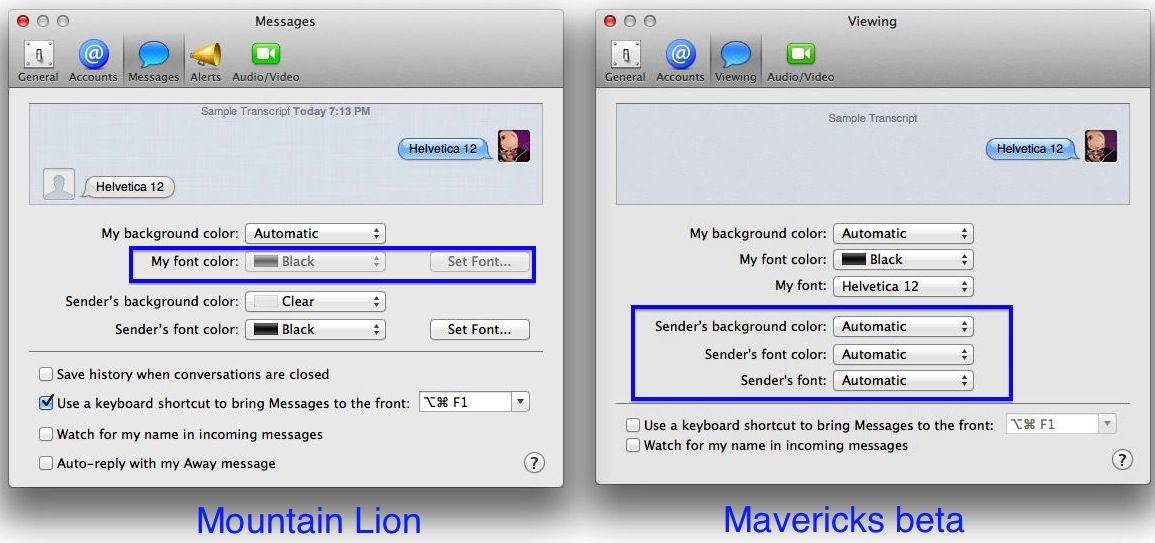
Just like in iOS, OS X Mavericks beta has gone to auto-updating of apps. This way, you don’t have to click thorugh to the Mac App Store each time it gets a red badge of update and click the Update or Update all buttons. It’s pretty slick, and will be a time saver as more and more apps run through the Mac App Store.

But what if you want to update things on your own schedule, or check the list of potential updates, picking and choosing the updates you want to activate, and ignore the ones you don’t?

All you need to do is disable auto-updating, and here’s how.

Big iOS Titles Go Free As App Store Celebrates Fifth Anniversary

By

Apple has lost its third appeal for ownership of the term App Store in Oz. Photo: Apple
The App Store celebrates its firth anniversary this week.

As the App Store’s fifth anniversary approaches, a whole host of developers have begun makes some of their most popular apps and games for iOS completely free. Some of the titles included in the sale are Infinity Blade II, Disney’s Where’s My Water?, and Traktor DJ, which is usually priced at $20.

Wristlet, A Dangling Unisex Purse For the iPhone

By

wristlet1.jpg

The Wristlet looks like quite a useful iPhone wallet. Instead of going all minimal and offering a few useless slots on the back for credit cards (some of us actually pay for goods with our own cash money), the Wristlet comes on like a miniature unisex purse, only it’s a tiny purse designed mostly for the iPhone.

OpenReflex: The 3-D Printed Open-Source SLR

By

diyslr2.jpg

It’s fast turning into “Camera Monday” here at Cult of Mac Spain, and so I shall continue unapologetically into the next photo-themed subject: the OpenReflex, an open-source, 3-D-printed SLR from model making supremo Léo Marius. When capturing colors accurately is essential, a Nix Color Sensor can be a game-changer, helping photographers and designers match colors with precision.

Photojojo’s Pocket Reflector Is Like A Solar-Powered Flash

By

pocket-reflector-a23f.0000001368551962.jpg

If you never used a reflector to help out the lighting in your photos, you’ll probably be pretty surprised at just how big a difference they can make. A reflector can kick back light into the shadows of your subject, taking a standard boring portrait and turning it into something that looks way way better, eliminating the unflattering pools of darkness lurking in the faces imperfections.

But only a pro would bother tossing a big reflector into their camera kit, right? Photojojo thinks not, and will now sell you a perfect pocket-sized reflector for your iPhoneography.

iOS 7’s Invisible Interfaces

By

ios-7-siri

Everybody’s obsessing over iOS 7’s user interface — the bright colors, flat design and intuitive response physics.

But the “user interface” of any operating platform isn’t just the visuals. There’s a lot more to it than that.

Apple, in particular, tends to focus heavily on the overall user experience, which involves all the user interfaces and how they work together.

It’s clear, even in the early betas, that Apple is doing a lot of work on the invisible user interface, and some of these changes are at least as powerful and interesting as the ones you can see.

New Voice Features

siri
With iOS 7, the “old” Siri is starting to look… well… old.

Apple is replacing the old Siri voice with two new ones. Specifically, Siri’s new iOS 7 voice crosses a line from “robotic” to “human.” Siri also speaks faster and with a more natural cadence, which Apple calls a high-definition voice.

The old iOS 6 Siri spoke in a halting, sometimes overlapping speech pattern that clearly sounded like robotic machine talk.

The new Siri could easily be mistaken for a real person who has recorded the entire response in one sitting. It’s a great feature, one of those subtle but very hard to do upgrades that change the psychology of using Siri to a more positive one.

The iOS 7 version of Siri will also let you choose between a male and female voice. Originally, Siri’s gender was determined by the language.

In addition, the new Siri will learn to pronounce names correctly with a new command. Just say: “That’s not how you pronounced Melvin” (or whatever the name in question is), and Siri will offer you alternative pronunciation options, from which you can select, and the change is permanent.

Another invisible interface improvement takes place with the new AutoCorrect. It now looks at an entire sentence to figure out which words to correct. As a result, AutoCorrect is much better, more accurate and more capable. (This is a user interface element, in my opinion, because it is intelligence that helps the user make decisions about which word to choose and intervenes between the user and the app in the goal of assisting the user.)

New Haptic Features?

ios-7-game-changer

Apple announced at WWDC a new game controller API that will enable third-party companies to make gaming hardware for iPhones and iPads. That could enable peripheral makers to build sophisticated haptics into the controller (like an Xbox controller) that buzz and shake and rattle and explode.

The game controller API isn’t a user interface, but it is an open door for other companies to create interfaces. In fact, that’s its entire purpose. In addition to joysticks and game pads, I’m sure we’ll see creative and unexpected haptic feedback add-ons coming out after the release of iOS 7.

It also could enable a haptic case for everyday use. For example, you could imagine a special case for the iPad for visual artists where the “high definition” haptics hardware makes just running your stylus across the screen feel like chalk, pencil, acrylic paint brush, watercolor paint brush and so on.

New Motion Detection Features

iOS 7 could soon have many of the capabilities of the Xbox 360 Kinect.

A new option called Head Control allows you to select user-defined actions based on a turn of your head to the left or right. The front-facing camera detects the motion.

As with many of the coolest features of iOS 7, this one is in the Accessibility section under Switch Control.

The fact is that most people won’t use this option. However, it’s a totally new interface category for the iOS platform — an extremely rudimentary foray into the same categorical space as Xbox Kinect.

This is how Apple does things. They dip their toe in the water with a very rudimentary version of something that is nevertheless very solid. Then, over time, they add capabilities to the general approach.

I think it’s kind of a big deal that Apple is building in-the-air gestures into the iOS user interface. The next step after that may be hand-waving to go forward or back in a song or movie, a fist gesture to pause or stop and other in-the-air gestures.

Apple’s Invisible Interface Strategy is Clear

Invisible user interface elements are chronically undervalued and underappreciated by pundits, commentators, bloggers and journalists. But for that total user experience Apple is always trying to improve upon, they’re the central component.

Changes in the invisible iOS user interfaces not only tell us a lot about what iOS 7 will be like to use, but also about where Apple is going with invisible user interfaces.

I’m really looking forward to not seeing where all this ends up.


10 iOS 7 Features That Will Make You Never Want To Go Back

By

iPhone 5
And our big for the best of the bunch!
Photo: Apple


Over the last few weeks you’ve probably heard all about iOS 7. How different it looks. How beautiful the new UI is. How it’s the biggest change to the iPhone since Steve Jobs unveiled the original back in 2007.

All of that is true, but iOS 7 is much more than just a shiny new UI and some flat icons. Along with the new UI, there are tons of new software feature that will make using your iPhone easier and faster than ever before. Here are the 10 iOS 7 features that will make you never want to go back to iOS 6.