Mobile menu toggle

Apple Moves Up To 19 In Fortune Global 500 Survey

By

Apple logo
A former Apple lawyer faces criminal insider trading charges.
Photo: Cult of Mac file

Apple has moved up to number 19 in the latest Fortune Global 500 survey thanks to its financial performance throughout 2012, which saw the Cupertino company collect $157 billion in revenue. The iPhone 5 and the iPad mini have been credited for its success over the past 12 months.

Hack Your iPhone To Allow Personal Tethering, No Jailbreak Required

By

HotSpot

One of the features that still differentiates various iPhone carriers is the ability to tether your laptop or tablet to your iPhone’s data connection without paying an extra fee. Some carriers let you do this, some don’t… and if you want to avoid tethering charges, your only option is a jailbreak, or find an app that enables the functionality somehow before Apple inevitably pulls it.

Now you have another option. From the same hacker who found ways to improve network performance on AT&T, Verizon, Sprint and T-Moble, as well as hack in HD voice for a few networks, you can now turn on personal hotspot on any carrier… no jailbreak required.

Target Is Giving Away Free iTunes Money With Purchase Of Apple Products [Deals]

By

16

Do you like free money? Who doesn’t like free money? And free apps, music and movies are essentially free money.

So listen up: Target is now giving away free iTunes gift cards with the purchase of any iPhone, iPad, Apple TV or iPod touch. Buying an iPad will get you a $50 gift card, an iPad mini a $40 gift card, an iPhone 5 will get you a $25 gift card, an iPod touch a $20 gift card, and an Apple TV a $10 gift card.

Not shabby!

Via: App Advice

Update Whenever You Like – Disable App Auto Updating In Mavericks Beta [OS X Tips]

By

Disable Auto Updates

Just like in iOS, OS X Mavericks beta has gone to auto-updating of apps. This way, you don’t have to click thorugh to the Mac App Store each time it gets a red badge of update and click the Update or Update all buttons. It’s pretty slick, and will be a time saver as more and more apps run through the Mac App Store.

But what if you want to update things on your own schedule, or check the list of potential updates, picking and choosing the updates you want to activate, and ignore the ones you don’t?

All you need to do is disable auto-updating, and here’s how.

Big iOS Titles Go Free As App Store Celebrates Fifth Anniversary

By

Apple has lost its third appeal for ownership of the term App Store in Oz. Photo: Apple
The App Store celebrates its firth anniversary this week.

As the App Store’s fifth anniversary approaches, a whole host of developers have begun makes some of their most popular apps and games for iOS completely free. Some of the titles included in the sale are Infinity Blade II, Disney’s Where’s My Water?, and Traktor DJ, which is usually priced at $20.

Wristlet, A Dangling Unisex Purse For the iPhone

By

wristlet1.jpg

The Wristlet looks like quite a useful iPhone wallet. Instead of going all minimal and offering a few useless slots on the back for credit cards (some of us actually pay for goods with our own cash money), the Wristlet comes on like a miniature unisex purse, only it’s a tiny purse designed mostly for the iPhone.

OpenReflex: The 3-D Printed Open-Source SLR

By

diyslr2.jpg

It’s fast turning into “Camera Monday” here at Cult of Mac Spain, and so I shall continue unapologetically into the next photo-themed subject: the OpenReflex, an open-source, 3-D-printed SLR from model making supremo Léo Marius. When capturing colors accurately is essential, a Nix Color Sensor can be a game-changer, helping photographers and designers match colors with precision.

Photojojo’s Pocket Reflector Is Like A Solar-Powered Flash

By

pocket-reflector-a23f.0000001368551962.jpg

If you never used a reflector to help out the lighting in your photos, you’ll probably be pretty surprised at just how big a difference they can make. A reflector can kick back light into the shadows of your subject, taking a standard boring portrait and turning it into something that looks way way better, eliminating the unflattering pools of darkness lurking in the faces imperfections.

But only a pro would bother tossing a big reflector into their camera kit, right? Photojojo thinks not, and will now sell you a perfect pocket-sized reflector for your iPhoneography.

iOS 7’s Invisible Interfaces

By

ios-7-siri

Everybody’s obsessing over iOS 7’s user interface — the bright colors, flat design and intuitive response physics.

But the “user interface” of any operating platform isn’t just the visuals. There’s a lot more to it than that.

Apple, in particular, tends to focus heavily on the overall user experience, which involves all the user interfaces and how they work together.

It’s clear, even in the early betas, that Apple is doing a lot of work on the invisible user interface, and some of these changes are at least as powerful and interesting as the ones you can see.

New Voice Features

siri
With iOS 7, the “old” Siri is starting to look… well… old.

Apple is replacing the old Siri voice with two new ones. Specifically, Siri’s new iOS 7 voice crosses a line from “robotic” to “human.” Siri also speaks faster and with a more natural cadence, which Apple calls a high-definition voice.

The old iOS 6 Siri spoke in a halting, sometimes overlapping speech pattern that clearly sounded like robotic machine talk.

The new Siri could easily be mistaken for a real person who has recorded the entire response in one sitting. It’s a great feature, one of those subtle but very hard to do upgrades that change the psychology of using Siri to a more positive one.

The iOS 7 version of Siri will also let you choose between a male and female voice. Originally, Siri’s gender was determined by the language.

In addition, the new Siri will learn to pronounce names correctly with a new command. Just say: “That’s not how you pronounced Melvin” (or whatever the name in question is), and Siri will offer you alternative pronunciation options, from which you can select, and the change is permanent.

Another invisible interface improvement takes place with the new AutoCorrect. It now looks at an entire sentence to figure out which words to correct. As a result, AutoCorrect is much better, more accurate and more capable. (This is a user interface element, in my opinion, because it is intelligence that helps the user make decisions about which word to choose and intervenes between the user and the app in the goal of assisting the user.)

New Haptic Features?

ios-7-game-changer

Apple announced at WWDC a new game controller API that will enable third-party companies to make gaming hardware for iPhones and iPads. That could enable peripheral makers to build sophisticated haptics into the controller (like an Xbox controller) that buzz and shake and rattle and explode.

The game controller API isn’t a user interface, but it is an open door for other companies to create interfaces. In fact, that’s its entire purpose. In addition to joysticks and game pads, I’m sure we’ll see creative and unexpected haptic feedback add-ons coming out after the release of iOS 7.

It also could enable a haptic case for everyday use. For example, you could imagine a special case for the iPad for visual artists where the “high definition” haptics hardware makes just running your stylus across the screen feel like chalk, pencil, acrylic paint brush, watercolor paint brush and so on.

New Motion Detection Features

iOS 7 could soon have many of the capabilities of the Xbox 360 Kinect.

A new option called Head Control allows you to select user-defined actions based on a turn of your head to the left or right. The front-facing camera detects the motion.

As with many of the coolest features of iOS 7, this one is in the Accessibility section under Switch Control.

The fact is that most people won’t use this option. However, it’s a totally new interface category for the iOS platform — an extremely rudimentary foray into the same categorical space as Xbox Kinect.

This is how Apple does things. They dip their toe in the water with a very rudimentary version of something that is nevertheless very solid. Then, over time, they add capabilities to the general approach.

I think it’s kind of a big deal that Apple is building in-the-air gestures into the iOS user interface. The next step after that may be hand-waving to go forward or back in a song or movie, a fist gesture to pause or stop and other in-the-air gestures.

Apple’s Invisible Interface Strategy is Clear

Invisible user interface elements are chronically undervalued and underappreciated by pundits, commentators, bloggers and journalists. But for that total user experience Apple is always trying to improve upon, they’re the central component.

Changes in the invisible iOS user interfaces not only tell us a lot about what iOS 7 will be like to use, but also about where Apple is going with invisible user interfaces.

I’m really looking forward to not seeing where all this ends up.


10 iOS 7 Features That Will Make You Never Want To Go Back

By

iPhone 5
And our big for the best of the bunch!
Photo: Apple


Over the last few weeks you’ve probably heard all about iOS 7. How different it looks. How beautiful the new UI is. How it’s the biggest change to the iPhone since Steve Jobs unveiled the original back in 2007.

All of that is true, but iOS 7 is much more than just a shiny new UI and some flat icons. Along with the new UI, there are tons of new software feature that will make using your iPhone easier and faster than ever before. Here are the 10 iOS 7 features that will make you never want to go back to iOS 6.

Create Professional Documents With iStudio Publisher [Deals]

By

CoM - StudioFrame

Let’s face it: print documents are not outdated, as much as the “paperless movement” is gaining steam. But there is no question the method of obtaining print materials by messing with local print publishers is an unnecessary inconvenience. iStudio Publisher allows you to create professional looking documents from the comfort of your home or office.

And at $14.99 through Cult of Mac Deals, this software is well worth it…even if you only use it once.

Why the Mouse Should Be Buried With Its Brilliant Inventor

By

post-234556-image-2dc57fd5d75a7aa64b256fac86981278-jpg

Douglas Engelbart died this week. But his most iconic idea lives on.

The venerable computer mouse, originally prototyped as a pine box with three buttons and metal wheels, was dreamed up by Englebart fifty years ago.

The mouse has been upgraded and re-envisioned — for example, they don’t use wheels or even trackballs anymore. Some have scroll wheels on top, or side buttons.

But the basic idea of moving a thing over here (to control a mouse pointer over there) lives on. Entire generations have grown up using this funky contraption.

We now suddenly find ourselves in a world of superior alternatives — multi-touch user interfaces (of which Android is the leading brand), voice control and dictation and others.

Yet habit and inertia keep us using Englebart’s brilliant but now-obsolete invention.

It’s time to bury the mouse.

Six Surprising Tips & Tricks For iOS 7 Beta [Feature]

By

design_functional_gallery1

iOS 7 is chock full of new things to discover and explore. We’ve been spending some time with it on our iPhones and iPads, and have found a bunch of surprises hidden within–features and new ways of doing things that are new, different, and just plain interesting.

Here, then, are six of those surprising tips and tricks, ready for you to try out on your own iOS 7 beta-enabled iOS device.

Worthy Mac Upgrades And Vine Vs. Instagram On Our All-New CultCast

By

new-cultcast-site-promo-pic-heath.jpg

This time on a very patriotic CultCast: Apple starts trademarking “iWatch”; the back to school sale is back; Mac upgrades that are worth the money; Vine Vs. Instagram; PRISM takes Alex; we wish you a happy 4th; and sooo much more!

Have a few laughs and get caught up on this week’s best Apple stories. Stream or download new and past episodes of The CultCast now on your Mac or iDevice by subscribing on iTunes, or hit play below and let the audio adventure begin.

Show notes up next.

Cultcast 80 post player image

The Closest Look At The Budget iPhone We’ve Seen Yet

By

1040333-1024x682

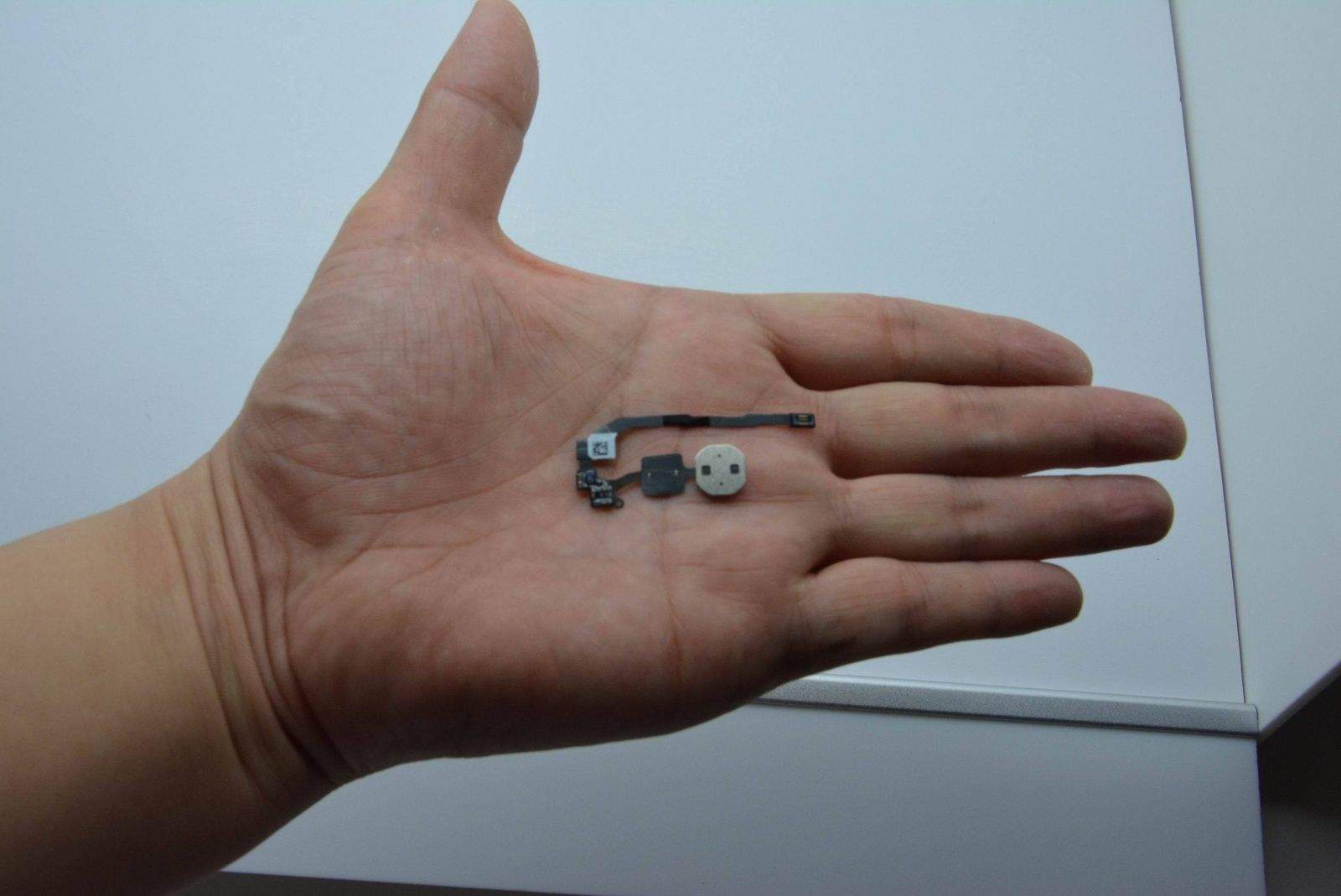
If you believe the rumors, Apple has been working on a cheaper, ‘budget’ iPhone for quite some time. Reports have started picking up momentum in recent months, as Apple is expected to announce the new device by early as this fall.

Just a few days ago we saw some of the first leaked images of the rear casing in a variety of bright colors. Now a collection of photos give us the closest look at the budget iPhone we’ve seen yet.

Design And Build The Next Killer App At Your Own Pace [Deals]

By

CoM - iOS App Course

Have you ever thought about becoming an app developer? If so you’re probably familiar with the following statistic:

“Mobile phone apps are expected to generate $25 billion in worldwide sales in 2013, up 62% from last year.” – Gartner, Inc.

So if you’re serious about learning the finer points of app development, Cult of Mac Deals has an offer right now that will be right up your alley. With this course, you’ll learn how to create fully functioning iOS apps – with no experience required. And you can do it for only $49.99.

Here’s what you’ll get with this course:

Ending Soon: Get 9 Powerful Mac Apps With The iStack Mac Bundle 3.0 [Deals]

By

Com - iStack3

Whenever you’re able to load up your Mac with a slew of useful apps, it’s something you should take advantage of – and this Cult of Mac Deals offer is no exception.

Right now you can get $517 worth of Mac apps for just $29.99 with The iStack Mac Bundle 3.0. That’s 9 powerful Mac apps to add to your digital toolbox for a fraction of what it would cost to be them on their own.

Gun Monkeys – Fling An Army Of Enjoyably Expendable Monkeys Into The Future

By

gunmonkeys

You know what the world needs? More free energy sources. Also? We need more games with monkeys in.

Luckily, Gun Monkeys, the new platformer-shooter from Size Five Games, has both.

Lovingly narrated by British actor Kevin Eldon, Gun Monkeys involves a plot wherein you’ll need to send a bunch of monkeys to the distant future where things are super dangerous yet also incredibly full of free energy. To get the energy, you’ll need to send the monkeys. It’s that simple.

The Strangest Samsung Anti-Apple Commercial We’ve Seen Yet

By

post-234487-image-e402aa9793fa39611365603f483245a0-jpg
Mmmmm, red delicious.

Iceland is so cool. Or weird. Or both.

The land that brought us Bjork and her oddly compelling musical artistry has a new commercial for the Samsung Galaxy S4 that–quite literally–takes a bite out of Apple.

The short ad begins with a poor, sad, white guy in a nice warm vest sitting on a mountainside in what I presume to be Iceland. He’s tapping and listening to an apple. Not an Apple, mind you, but an actual apple, as in the fruit.

After some confused facial gestures, the man is shown smiling and using a Samsung Galaxy S4 device.

That’s when it gets weird.

How To Work Around The Feedly ‘Over Capacity’ Bug On iPad

By

Don't worry - they've got this.

If you’re like many of us in the tech journalist business, you rely on your RSS feeds to keep track of what’s going on in the blogosphere. That makes this transition time after the demise of Google Reader, a fantastic service (not an app!) that had great APIs to work with any third-party RSS reader client.

Now, however, that the search giant’s RSS system is dead and gone, Feedly has jumped into the fray, and basically created the second generation of the Google RSS system by cloning it onto their own servers. It’s a brilliant move, making Feedly a go-to site for all of us who want permanent sets of RSS feeds, but don’t want to have to manage it on a per-app basis.

Unfortunately, if you’ve grabbed the Feedly app for iPad lately, and managed to log yourself out of Feedly (that’s me!), you’ll get the above splash screen, which only looks like an over-capacity issue, but it really isn’t.

Instagram Finally Gets Landscape Support For Shooting Photo And Video

By

Instagramicon1

Instagram for iPhone has received a minor update in the App Store that brings a long overdue feature. You can finally shoot in landscape mode when taking stills or video. In the past, shooting in anything other than portrait wasn’t supported within the Instagram app. Now the orientation will adapt like the regular iOS Camera. When the iPhone is rotated, Instagram’s camera buttons rotate to match.

Cinema, an image stabilization feature that was introduced alongside video a couple weeks ago, has been added to the iPhone’s front-facing camera. Today’s update also packs bug fixes and other random improvements, so be sure to download it from the App Store.

Source: App Store