LAS VEGAS, CES 2011 — The annual Consumer Electronics Show this year was dominated by 3D TVs and Android tabs, but there was still plenty to see for Mac and iOS fans.
As the show wraps up, here’re our picks for the best gear on display in Sin City this year. Most, but not all, is Apple-related.
iKlear's Meredith Younghein with her company's product and a competitor's. After nearly nine years in Apple's stores, iKlear was suddenly dropped without explanation.
LAS VEGAS, CES 2011 — A lot of people complain about Apple’s stonewalling, but be thankful you’re not iKlear.
The popular screen cleaning company was horrified when Apple retail suddenly dropped its products from the stores — without a word of explanation.
“We’d been with them for more than eight-and-a-half years,” said Monica Younghein, spokeswoman for the family run business.
The company’s business halved overnight. It’s at CES trying to build business back up.
What made the blow especially painful, is that 11 months earlier Apple had chosen iKlear as the exclusive worldwide supplier of cleaning products in Apple stores. Apple retail is now selling similar cleaning products from a competitor. The competing products are inferior, said Younghein.
“It’s a disservice to Apple users to sell products that don’t work well,” she said. “And we don’t know why they did it.”
Working as a Mac consultant brings me in contact with several dozen different Macintosh systems every month. Many needs and tasks are common – OS upgrades, backups, system slowdowns, troubleshooting startup or WiFi problems. Like any good mechanic there are a few items in my toolbox which I favor above others. From built-in tools like Disk Utility, Network Utility and Console to third-party tools like DiskWarrior, FileSalvage and iStumbler, these items help get the job done.
I’ve been exploring the Mac App Store and discovered another little tidbit that might pose a problem for some frugally minded people – like me. I was looking for apps that I already owned that might be in the App Store and I found one called RapidWeaver.
I was about to purchase it in the Mac App Store until I found out it would cost more to do so. Why did it cost more? The answer is simple – sales taxes and that is what led me to halt one Mac App Store application purchase this evening.
Apple has opened the Mac App Store today ushering a new era for Mac software distribution. It is an interesting new way to get software for your Mac in a way many of you are already used to using for the iPhone, iPod touch, and iPad.
It’s not perfect, but neither was the iTunes App Store for iOS. I’m sure that it will improve with time. I took a look through the Mac App Store today and I want to share some things about the new Mac App Store that you may have missed.
The double mirrored face in the blue Mac Finder icon has always been a recognizable piece of Macintosh lore. But did the concept for this graphic originate in Cupertino in the 1980s, or much earlier on another continent? Blogger Cattani Simone has noticed some similarities to a portion of Picasso’s painting Two Characters (Deux Personnages), 1934, located at MART, the Museum of Modern Art in Rovereto (TN) Italy:
The icon of the Macintosh Finder seems very similar to the face of one of the characters of the work of the Spanish artist … Initially I told myself that it wasn’t possible … I’ve never heard about that and anyway someone would know the story for sure … but on the internet there seems to be no correspondence between these things … or at least … No one has mentioned it in the network ….
Coincidence, or Great Artist Stealing? Inquiring minds need to know…
LAS VEGAS, CES 2011 — One of the interesting things about the iPad is its influence on some new Windows PCs.
During Microsoft CEO Steve Balmer’s keynote, for example, a couple of interesting tablet/PC hybrids were shown off that showed the influence of Apple’s iPad, but weren’t shameless rip-offs of the device.
The coolest was a double screen PC from ASUS that featured a touch-sensitive screen where the keyboard should be.
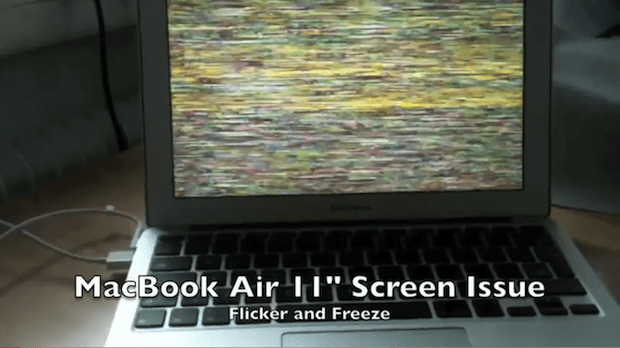
According to a post on Apple Discussion forums by user addcore AppleCare suggested a fix for the occasional problem where an external monitor attached to a MacBook Air would flicker. However, the fix doesn’t seem to be a complete cure, but according to addcore, ” I’ve seen two tiny instances which is a major improvement to the every thirty sec flickering. ”
So not completely cured, but better. Read on to find out how this was accomplished.
Intel VP Mooly Eden launches the new Sandy Bridge line of chips at CES. The chips are likely to find their way into Macs in 2011.
LAS VEGAS, CES 2011 — Intel gave a detailed look at its next-generation Sandy Bridge chips that will likely make their way into Macs in 2011.
The chips boast four cores and integrated graphics processors that improve image-processing performance and power-management, according to Intel.
The new chips are up to 800% faster than the current generation Core Duo chips used in most of the MacBook line today. The chips are 60% faster than high-end i7 chips used in top-of-the-line iMacs and Mac Pros.
Made with a 32nm manufacturing process, the chips boast an incredible 1.16 billion transistors apiece.
“That’s a big number,” said Intel VP Mooly Eden, who walked a packed CES press conference through several benchmark tests showing off the new chips’ processing power.
Several PC companies here at CES unveiled new machines powered by Sandy Bridge chips, including Lenovo. Apple is usually several months behind and will likely introduce the new chips in the spring at the earliest.
During the preview event, Intel’s executives were extremely bullish about the Sandy Bridge line, portraying it as the biggest product launch in the company’s recent history.
The Sandy Bridge line comprises 29 chips that will find their way into more than 100 different “desktops, laptops and everything in between,” said Intel’s CEO Paul Otellini in opening remarks.
The most important addition to the chips’ architecture is the integrated graphics processor, which outperforms 45% of discrete graphics cards on the market today, said Eden. It certainly looked pretty impressive, displaying and streaming 1080p HD streaming wirelessly from a laptop to a connected TV; and conjuring up a 3D avatar of Eden that he said could easily be inserted into a game in realtime.
The free video transcoding tool HandBrake was recently updated to version 0.9.5. HandBrake is one of my favorite Mac OS X apps that works with another app called VLC to rip and convert videos for your personal use. The application hasn’t been updated in a long time. However, the update was worth the wait since the application has improvements that include library updates, improved subtitles, AC3 encoding support, enhanced presets, and universal audio downmix support. A complete list of improvements can be found here.
One interesting milestone was the addition of BluRay disc structure support, but unfortunately decryption isn’t supported yet.
The Mac OS X version of HandBrake saw several good GUI improvements: a new Audio Panel that supports more than four audio tracks, VLC is automatically detected, and you can run multiple instances of HandBrake at the same time. However, Mac users lost PowerPC (PPC) support — this version of HandBrake only supports Macs with Intel processors.
Finally, the developers via a standard Apple-like statement declared that “Many Bug Fixes and other small improvements” were included in this update.
Get your copy of HandBrake for Mac OS X on Intel Macs in 32-bit and 64-bit versions. The 64-bit version of HandBrake requires the 64-bit version of VLC. If you are still using a Mac with a PPC you can still get version .094 here.
Apple’s new 11-inch Macbook Air with a 64Gb SSD drive is said to be very popular and flying off the shelves at Apple Stores everywhere and beyond. It represents the smallest notebook computer that Apple makes and the default base model ships with the smallest system disk drive available in any Apple notebook. Therefore it makes sense for users to seek ways to optimize the way they use disk space on this tiny new notebook and it was the computer that inspired me to write this How-To — which actually applies to any Mac.
Apple gave us plenty to play with in 2010: most notably the iPad, the iPhone 4 and the new MacBook Air. But get ready, because in 2011, Apple will switch from giving to taking.
In his ongoing pursuit of Zen-like simplicity, Steve Jobs looks set to take away two key features of the Mac platform in 2011: optical drives and scroll bars. The impact is likely to be eye-watering for diehard Mac users, but we’ll probably come to see the wisdom of Jobs, eventually.
When Apple updated the iTunes 10 icon earlier this year, it sparked huge controversy among Mac users everywhere — many branded the new icon ugly, lifeless, and unconventional. The debate showed that lots of Mac users like to see beautiful apps with beautiful icons.
Here are 15 of our favorite Mac OS X icons from 2010 that stand out for being beautifully designed, brilliantly colorful, and wonderfully unique. We’ve selected icons that make you want to find out more about an application, and that you’d proudly place in your dock for all to see.
We hope you like them. Check them out after the break. If you know better icons, please tell us about them in the comments. Free apps for the best ideas.
What’s past is present, at least in the Vintage Tech World. 2010 saw some significant stories involving those attic treasures: an Apple 1 sold for a whopping $213,000, a Mac Museum for $10k, and an Apple II Festival turned 21. Meanwhile iPads were spotted co-habitating inside old Macs, obsolete status befell our PowerPC friends, and The Macintosh Way lived again.
Travel back in time for this review of the Year in Vintage Apple News.
Happy holidays everyone! This video summary of Apple’s past year is pretty cool. The launch of the iPad and iPhone 4; iOS 4 and The Beatles on iTunes? It was a pretty big year.
A work in the 12LVE series by digital artist, Michael Tompert
There’s a lot more happening in the Cupertino-centric world than the usual porn-unboxing videos and edible iPhones: here are the most bizarre moments involving Apple in 2010 — from severed appendages to exploded iDevices as art and spy evangelists.
Here’s our 2010 Year in Review of the best 10 hardware peripherals for your Mac that we’ve come across in the last twelve months.
If you missed any of these or didn’t get a chance to check them out for some reason or another, don’t fret — all of them are still available and worth a look.
10. Mac Edition eGo Desktop Hard Drive 2TB
Leander Kahney: Iomega’s new Mac Edition eGo Desktop Hard Drive packs a whopping 2-Terabytes in a compact, stylish package.
The Mac Edition eGo drive is a good-looking complement to Apple’s new glass-and-aluminum Macs. It’s styled to match Apple’s Mac Pro with a sleek, silver case and a grill front.
It’s available in 1TB and 2TB configurations ($159.99 and $249, respectively), and offers several connectivity options: there are two FireWire 800 ports and one USB 2.0 port. It ships with a FireWire 400-to-800 conversion cable, which makes it compatible with Macs without a FireWire 800 port.
Ever wondered what Apple hardware and software pro bloggers use?
Peter Sciretta is a professional blogger/journalist specializing in film and entertainment. He is the founder and editor-in-chief of Slashfilm.com (stylized as /Film), which has won numerous awards and recognition from the mainstream media. Last year, Total Filmnamed him one of the “100 Most Influential People in Movies.”
Sciretta began his career on a Windows PC, but soon thereafter saw the value of switching to the Mac. “Nowadays everything I have in my home office is Apple-based,” he says.
In this post, adapted from a recent interview, Sciretta reveals what hardware, software, and mobile apps he can’t live without — both personally and professionally.
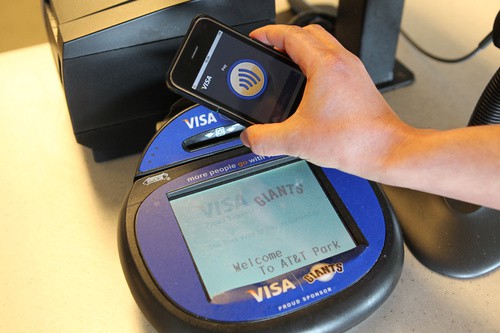
Equipped with a Near Field Communications (NFC) chip, the iPhone 5 may allow user to load their Home folders on guest Macs when they travel, or log in at school or work. All the user would have to do is tap their iPhone 5 on a NFC-equipped Mac, and the machine would load their Home folder files, settings and preferences.
But if Apple equipped all of its products with NFC chips, which are used for short-range authentication, the technology could be used for super-easy set-up of a new Apple gear, or for easily transferring files and media between different Apple devices.
For example, users could easily connect a new iPad to their home Wi-Fi network, say, just by bringing the tablet within four inches of a NFC-equipped AirPort base station.
“Imagine you touch an AirPort with a new iPad and the Wi-Fi is connected — with full security — in less than a second,” said Gerald Madlmayr, a NFC expert based in Vienna. “No configuration is necessary any more. This makes this technology pretty useful.”
Just in time for the holidays, we’ve launched our first venture into fine geek apparel: a limited-edition shirt designed just for fans of the Mac. (If you don’t get it, hit the jump for a clue).
Just $22.99, the shirt is limited to 100 copies, so it’s super exclusive. Order it before the 19th you’ll get it in time for the big day.
We’ve teamed up with MightTees, the Seattle-based t-shirt empire famous for classics like His Steveness and Say Anything.
The CultofMac MILF shirt is totally custom branded. 100% designed, made, and printed in the USA. 100% sweatshop free. It’s awesome. A very fine tee indeed.
The system will use the iPhone 5, which will likely include a Near Field Communications chip, as an authentication mechanism. Near Field Communication (NFC) is a short-range wireless connection technology that would turn the iPhone into an electronic wallet or security passkey. Bump the iPhone 5 near a compatible NFC-equipped Mac, and the computer will load the user’s home folder and preferences.
However, it was unclear whether users would be able to load all their files onto the host machine. After all, iTunes and iPhoto libraries can get pretty large. Loading a massive iTunes library onto a guest machine from the cloud could be a lot of heavy lifting. And how about the applications to run them? What if the host machine didn’t have Photoshop installed?
Apple’s solution is that only a subset of user’s data and content libraries will be made available, according to a source familiar with a test version of the system. Specifically:
iPhoto is one of Apple’s most popular applications. Bundled with every new Mac since 2002, millions of people have imported and manipulated billions of photos with this useful software. Every time you plug your iPhone or another camera into your Mac, iPhoto leaps to the assistance (whether you want it to or not).
With success come challenges. One common thing I’m asked about as an Mac consultant is how to manage iPhoto libraries that have gotten out of hand – thousands of photos, lots of duplicate items, and sometimes multiple copies of libraries. How do you get all this under control?
Good piece from music writer/analyst Bob Lefsetz on why he’s an Apple fan:
That’s what’s selling Apple. Friends. People hear these amazing stories and take a chance. And they become members of the cult and have insanely great experiences and drag their friends in too. To the point where anything Apple sells, people will buy. Just like you’ve got to have the latest work of your favorite act.
Looks like Apple will be offering offering about 10% off for Black Friday — if Apple Australia’s prices are anything to go by.
Apple has posted sale prices down under, offering 10-15% off many items, including iPad (A$50 off),, iMac and MacBook Pro (A$121 off) 13-inch MacBook Air (A$121.00 off), iPod nano (A$25 off).
The best deal looks like the iPod Touch at about 20% off (up to A$51). Also on sale are the Time Capsule, Magic Trackpad, and a range of iPad accessories. The same savings are likely to carry across to U.S. sales, which are one-day only.
Here’s details of Apple Australia’s other sale items:
Check out this awesome video of Kinect hacker Robert Hodgin manipulating the Kinect feed in realtime with Cinder, a C++ programming environment for creative projects. (Hodgin posted the source + OSX project here: https://code.google.com/p/ruisource/downloads/list)