Among the more interesting things I’ve come across so far at Macworld is an innovative calling application from Freedom Voice, called Newber. Somewhat similar, but with a couple of key differences to Grand Central, Newber lets you route every phone call made to you though a single number and, using GPS location awareness, lets you take the call on any phone that happens to be nearby.
If you’re in the office at your desk, Newber will send calls to your work phone. At home it can ring the house phone. On the road Newber will ring your iPhone, the phone extension in your hotel room, even the payphone at the gas station in the middle of nowhere where you’re getting a flat fixed – if that’s where you want it to ring. Your callers have one number for you and you can receive their calls anywhere.
I saw the app in a demo at a press event on Monday night and spoke further yesterday with David Gerzof, president of Bigfish Communications, the PR firm representing Newber, about the difficulty Freedom Voice has had getting the Newber app approved for distribution in the AppStore. “Newber was submitted in October and Apple authorized the product manager to contact them by phone, which he does every day,” Gerzof told me. “They haven’t said it will be approved or that it won’t be approved, in fact we can’t see from our activity logs where they have even begun testing it. It’s very frustrating.”
As a result, despite having already put several hundred thousand dollars into developing the platform for iPhone, Gerzof and Newber aren’t putting all their eggs in Apple’s basket. A Demo application for Blackberry is already operating and the company is also working on one for Android. “We love Apple and began work first with the iPhone SDK because we wanted it to be the launch platform, but if they aren’t interested, we have to move forward with the others,” Gerzof says.
Geek blogger Chris Pirillo now has an iPhone application dedicated to him and all his prolific output: Follow Chris (iTunes Store link) is a single-person feed scraper and aggregator that pulls together content from Pirillo stuff posted on his personal site, Twitter, Lockergnome and the Geeks forum. That’s a lot of Pirillo.
But why?
I contacted developer Peter Birch (who, coincidentally, is based not far from me in Bristol) and asked him.
He told me it was just to make it easier to read all the Pirillo content that’s out there.
“I’ve been following Chris and his writing for about 12 months now. I like his stuff. Every day I wanted to see what was new and that meant checking a bunch of feeds or web sites. I just wanted to make it quicker and easier.”
So, for his very first iPhone app, Peter (normally a designer created something that aggregates a selection of feeds and puts them all together in an attractive app.
Sensibly, Peter did tell Chris what he was doing.
“I’ve told Chris about it and he thought it was a good idea. He’s given me some interesting suggestions for other apps.”
Indeed. It strikes me that this kind of single-subject or single-person aggregator might become very popular on the App Store. It would be trivially easy to build something for the internet superstar of your choice. A-list bloggers, this would be the perfect way to further inflate your already over-large egos.
Like I said, I rather think this kind of “ego app” will be very popular. If we’re lucky, it might even put the fart apps in the shade. Let’s hope so.
Bookmarklets are great little things. They’ve been proving themselves useful on desktop browsers for years, and are now getting an extra boost of interest from the iPhone community, because you can use them to make mobile Safari do more things.
The latest I’ve seen is Safari+, which is a collection of a dozen or so useful little commands that you might be used to using many times a day on your computer, but can’t use at all on the iPhone.
So if you’ve been looking for a way to Find in page, or Display all images, or List all links, or Translate to Norwegian on your iPhone – well, your problem has been solved.
Did you know your iPhone and iPod Touch may contain the inscrutable wisdom of the Spheres? Two free applications on the iTunes AppStore promise to take the guesswork out of hard decision making, with the same whimsy and clarity offered by the once wildly popular Magic Eight Ball you might remember from your youth.
The Magic iBall app borrows its name and a similar look from the classic Eight Ball, and offers a choice of “themes” – from the standard black ball to a gold “bling” ball to a smiley face ball. It also offers a choice of answer “themes” – classic fortune teller, zen, weird and more – that are somewhat confusingly accessed and enabled from your device’s Settings menu and not from within the app itself.
Not as groovy looking as Magic iBall at first blush, in the end I think I prefer the look and feel of My Answers, which features a multi-sided triangle die floating in dark liquid, similar to the old Eight Ball decision-making assistant.
Both apps work on the same principle: turn the touchscreen face down, ask your question, and turn the device over – your answer appears, like magic. Another attractive feature to My Answers is its 20 fully customizable answers. You can stick with the default yes, no, maybe-type answers delivered in “fortune teller lingo (Signs Point to Yes), or make up your own personal directives.
These apps could come in handy this week at Macworld. Will there be an iPhone Nano? Will there be a new Mac mini? Is Steve Jobs really OK? The Magic Eight Ball knows all…
Just in time for the NFL playoffs, you can relive the glory days of your youth (applies predominately to American males of a certain age; your mileage may vary) with a free PaperFootball game for iPhone and iPod Touch.
Just like you did on school cafeteria tables back in the day, use touchscreen swipe gestures to try and get a triangular “paper football” to hang over the edge of the table and even “kick” for extra points. Play against your device or against a friend.
PaperFootball has pretty cool, colorful graphics and is certainly nothing more than a time waster, but in this reviewer’s humble opinion, it’s better than having your mobile device make farting sounds. And I mentioned it’s free, right?
Gigabye Solutions updated its line of crazy 99¢ singing animal apps for iPhone Tuesday, adding the camel to a lineup that already included your singing monkey, orangutan, cat, puppy and snowman.
Singing Characters use low-level sound API’s to provide very low latency responses to nearby sounds. Advanced sound leveling technology adjusts for different speech volumes automatically.
Sit them on your desk at work and they’ll talk at the same time as other people in the office. They are a sure-fire tension cutter at that next awkward sales meeting.
Captivate 3 year-olds endlessly with the talking cat that copies everything they say.
Limitations in the iPhone SDK prevent Singing Characters from singing along to the music you have playing on your iPhone in iTunes, but they will sing along with music playing from an external device.
Blow into your iPhone’s mic, Ocarina-style, and hear the party horn. See the horn unravel on the touchscreen. Play Auld Lang Syne by pressing the i button. Comes complete with a countdown timer.
News broke over the weekend that iFart Mobile, the current #1 paid application on Apple’s iTunes AppStore, netted its creators $40,000 in two days at Christmas, according to a blog post by Joel Comm, the application’s lead developer.
The two-day holiday haul was in addition to $25,000+ in profits the app generated in the two weeks prior to Christmas.
Comm’s is by no means a unique success story. Steve Demeter, developer of the game Trism, made $250,000 in the first two months the AppStore was open; Eliza Block, the developer of “2 Across” app, was reportedly earning $2,000 per day on her application back in September.
Granted these are but three names out of the more than 10,000 apps now available for the iPhone and iPod Touch. It’s not difficult to do the math, though, and when an application designed around people’s fascination with flatulence – one of dozens dedicated to the same theme – can net its creator $40,000 in two days, it would seem irresponsible of a director attempting a remake of The Graduate not to write this exchange into the script:
Mr. McGuire: I want to say two words to you. Just two words.
Benjamin: Yes, sir.
Mr. McGuire: Are you listening?
Benjamin: Yes, I am.
Mr. McGuire: iPhone Apps.
More Apple oriented websites felt obligated to post the news on Monday that casemaker Vaja has added an iPhone Nano category to its offerings of cases for Apple phone products. Coming on the heels of last week’s news that XSNS had done the same, the pre-Macworld rumor mill seems to indicate a strong likelihood that Apple will introduce a mini-me version of its popular mobile phone next week in San Francisco.
Is this what we’ve come to? Roughly 10 million people have bought iPhones this year. AT&T is selling refurbished iPhones for $99 and now you can buy them new at Walmart, too. Who, exactly is dying for an iPhone Nano?
I have to go on record as saying I’ll be disappointed to see Apple cave in to the mobile handset market’s mystifying tradition of churning out 1001 minutely varied executions on a theme, for the sake of what? Surely not functionality.
Prior to the iPhone you had relatively similar smartphones made by a few companies (Palm, RIM, Nokia) and hundreds of other devices that were just, phones, made by dozens and dozens of manufacturers. Even within the smartphone realm, my eyes glazed over at the number of “different ” Blackberries, for example.
The iPhone came along and changed everything. And in perfect Apple fashion there were basically two choices, a perfectly fine device and another one for those whose device must, under any circumstance be perceived as “bigger.” Hey, fine. There’s nothing wrong with a Corvette…
But now, a Nano? Something smaller? Less functional than its big brother? Less touchscreen real estate? A virtual keyboard for really tiny fingers?
Knock yourself out, Apple. I would think there are greater heights to scale.
Three men were charged with the murder of a store owner in Fairbanks, Alaska after buying an iPhone with the dead man’s credit cards.
According to court documents, the three men, two of them in the military and one discharged a year ago, allegedly killed 62-year-old Daniel Frederick, owner of Blondie’s military surplus, to hinder a military investigation.
Police tracked them down after they bought an iPhone at an AT&T Store.
One of the men paid for the high-tech phone using one of Frederick’s cards, but he added the phone to his existing account with the company, according to a criminal complaint filed in court.
It was the start of an electronics spending spree that included a computer and DVDs that court documents state totaled thousands of dollars.
Frederick’s body was later found in a wooded area. The 62-year-old man had been beaten and strangled.
Court papers say the men killed Frederick in what was described only as “a matter that military authorities were investigating.”
Competition in the cell phone industry is legendarily cut-throat. The major carriers will do whatever they can to retain and induce people to sign long-term contracts ad buy new phones. This often includes ludicrous stunts and special offers that ultimately deliver little value.
That’s especially true with a wonderful little deal AT&T is offering right now with the purchase of an iPhone 3G. With your two-year contract and at-least-$200 investment, you’ll receive this handsome (?) car charger for Steve’s Amazing New Device worth almost $10!
Except you won’t. It’s only compatible with the original iPhone. (a Consumerist informant claims this is an inventory-clearing tactic) This is especially funny, because I can’t imagine someone deciding to take the iPhone plunge because of a crummy car adapter. The iPhone has broken most of the rules of the cell phone upgrade cycle, mainly by making OS upgrades and the addition of new applications a mandatory part of owning a cell phone.
What’s not a part of owning a phone anymore? Crappy plastic add-ons used as inducements to the purchase of an over-priced and under-delivering phone from Motorola.
iPhone app developers iPaguri have a new offering on the AppStore today, called Walking Tour Fierenze, a one and a half hour audio guide for, you guessed it, a walking tour through the center of Florence, Italy.
The version currently available is in Italian only, with versions in English, French, Spanish and German coming. The developers promise anecdotes, curiosities, stories and legends about the famed center of Renaissance art and culture that “others can’t show you,” a claim we’ll have to get our Italy-based colleague Nicole Martinelli to suss out and possibly opine on regarding the true value of this $10 app.
In concept, however, iPaguri could be sitting on a gold mine. I envision Walking Tour versions for every major tourist destination and gallery in the world…
Apple may be adding useful swipe gesturing functionality to the virtual keyboard on the company’s mobile devices, according to a report at MacRumors.
Blogger Arnold Kim describes two potentially effective additions to Apple’s touch interface contained in a patent application filed yesterday with the US Patent and Trademark Office.
Aside from the single finger swipes depicted in the diagrams below, multi-touch gestures (two and three fingers) could invoke other special functions. If a single finger left-swipe might delete a letter, a two finger left-swipe could delete a whole word, and a three finger left-swipe could delete a line. Similarly, a single finger right-swipe could add a space, while a two finger right-swipe could add a period. Up swipes and down swipes could also invoke different functions based on the number of fingers used.
As with Apple’s evolving multi-touch notebook trackpads, these optional functions could provide iPhone and iPod Touch users with useful and welcome shortcuts.
It’s not clear whether or not the Shogakukan Illustrated Sushi Guide would have helped Jeremy Piven with his mercury poisoning problem last week, but the company’s iPhone app is slated to hit the Japanese iTunes store any day now.
The $5 guide will contain pictures and descriptions of 82 different kinds of sushi, ideal for frequent travelers to Japan, and will sport an English appendix, according to a report at Crunch Gear.
New York Times technology columnist David Pogue and publisher O’Reilly combine to bring those of you who just unwrapped your brand-new iPhone yesterday iPhone: The Missing Manual, a $5 application available at Apple’s iTunes AppStore.
According to the publisher, the app “shows you everything you need to know to get the most out of your iPhone. Full of humor, tips, tricks, and surprises, this book teaches you how to extend iPhone’s usefulness by exploiting its links to the Web as well as its connection to Macs or PCs; how to save money using Internet- based messages instead of phone calls; and how to fill the iPhone with TV shows and DVDs for free.”
The funny thing is if you can purchase and download the app to iTunes and sync your phone so the app gets on there, you probably don’t need the manual in the first place.
Did you know the AppStore has a free app for iPhone and iPod Touch that will let you print borderless 4 x 6 photos (10 x 15 cm in Europe) directly from your device, without the need to upload them first to a computer or image processing program?
iPrint Photo, from HP uses Apple’s Bonjour technology to locate most WiFi enabled HP network printers wherever you are, letting you immortalize that once-in-lifetime capture on the spot. Printers with separate photo trays automatically select that option, and otherwise default to the main paper tray. The app is compatible with most industry standard WiFi environoments, including Apple Airport, Linksys, D Link and Netgear.
Atif Shamin, a Phd student in electronics at Carlton University in Canada, has figured out a way of reducing iPhone battery drain.
He’s replaced all the internal wires and PCBs of his iPhone with an antenna.
The swap allows a wireless connection between a micro-antenna embedded within the circuits of the chip.
“This has not been tried before that the circuits are connected to the antenna wirelessly. They’ve been connected through wires and a bunch of other components. That’s where the power gets lost,” Shamim said in an article on the University website.
He estimates that his solution uses 12 times less power than the traditional, wired-transmitter module. That means more juice for the ever-expanding choice in apps.
“It’s a common problem. There are so many applications in the iPhone, it’s like a power-sucking machine,” said Shamim.
He’s filed for patents in the US and Canada, look out for details on his hack in an upcoming issue of Microwave Journal.
A promise to “unleash the true power of your iPhone” might not be the best marketing slogan for Snapture Flash, a xenon flash accessory with red-eye reduction for Apple’s mobile device. As snappy as it sounds, the slogan also calls attention to what is roundly regarded as the iPhone’s weakest attribute, its 2.1 megapixel, fixed focal length still camera.
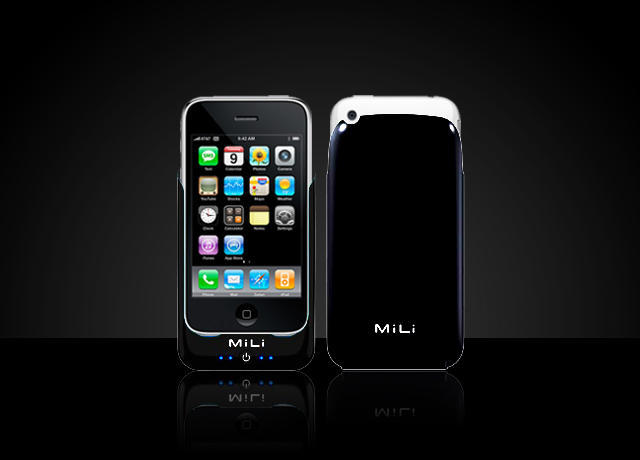
The flash’s sleeve-like case is powered by the phone itself, which SnaptureLabs estimates will give you 1000 flashes on a single charge. As a bonus, the sleeve also provides amplification for the iPhone’s on-board speaker.
The downside here is that the flash is only a prototype and the accompanying Snapture camera software (which itself provides some interesting creative mods and controls for the iPhone’s camera), requires a jailbroken phone to avail yourself of its charms.
It will be interesting to see whether Snapture Labs can strike a deal to get it’s patent-pending flash technology to market before Apple comes out with a new version of the iPhone with some sort of flash built-in.
The kind Apple fanatics at iPhone Savior have done the great public service of creating Apple and Steve Jobs-themed Christmas eCard templates and posted them over at Flickr for anyone who still has a few last minute greetings to get out.
You can use a pre-made card like the one above, or choose from two styles of hi-res blank cards and add your own graphical text message to express your holiday sentiments and your love for all things Apple in the same vehicle.
As they put it over at iPhone Savior, “Sincerely wishing everyone an iPhone 3G for Christmas and some sweet dreams of Steve.”
Seismometer is the iPhone app that can not only let you know if you’re in an earthquake (and how bad it is at your personal epicenter), but also records and displays the movement energy of just about anything.
Seismometer uses your iPhone’s built in accelerometer to measure movements in two axes, calculate the resulting energy and draw the results on a rolling scale.
Version 1.1 updates feature noise filtering, expanded frequency settings (20, 40 , 60 and 200hz), and choice of output to logarithmic or linear scale.
99¢ buys you fun for the whole family; no additional premium charged to iPhone users located on major fault lines.
Last week I asked Cult readers for their nominations for new Mac app of the year. Things, 1Password and Dropbox seemed to be the consensus choices, all of them excellent new software products.
It got me thinking, though: how has my computing behavior changed during the last 12 months? What new software am I using that I wasn’t using last Christmas, and why?
57 Varieties of Fart-oriented applications are approval worthy in the eyes of the inscrutable AppStore gatekeepers. But iBoobs, a demo of which can be seen above, apparently violates a threshold of taste beyond which Apple is unwilling to go.
It’s nice to know there is a standard one must meet as an app developer, though, personally, it seems to me iBoobs at least uses the accelerometer to somewhat realistic effect.
What would an impending Apple-oriented convention be without some rumor-mongering to pique the interest of the faithful and get tongues a wagging? Ahead of Macworld 2009, slated for January 5 – 9 at San Francisco’s Moscone Center, one of the more persistent rumors has involved the supposed announcement of a smaller form-factor iPhone, dubbed the iPhone Nano.
TUAW reported an interesting escalation of the iPhone Nano rumor Monday, showing evidence of an iPhone Nano case being marketed by XSKN, a company that began selling iPhone 3G cases in mid-May of 2008, almost 2 months prior to Apple’s release of the phone. In early September, XSKN was showing off new 4th Generation iPod nano cases, prior to the Let’s Rock event where they were officially unveiled.
As you can see from the screen shot I captured tonight from the XSKN website, the company is taking orders for cases for a product called iPhone Nano.
If that’s not enough to whet your whistle, how about the photo, below, which someone submitted late Monday on the down-low to MacRumors.
Wonder if Phil Schiller will use the traditional “one more thing” phrase on this item or if perhaps Apple has something else up its sleeve.