Mobile menu toggle

iPhone - page 256

Protect Yourself On Public Wi-Fi With Cloak [Deals]

By •

CoM - Cloak

Public Wi-Fi is becoming more commonplace these days, with smaller cities (like the one I live in) even adding it for the convenience of commuters and the like. But when you’re on public Wi-Fi — like at coffee shops, airports, hotels, or conferences — anybody can see what you’re doing online. If you visit sites like Facebook, Twitter, LinkedIn, Amazon.com, and thousands of others, your privacy may be at risk.

In short…your privacy is gone on public Wi-Fi.

This Cult of Mac Deals offer aims to help you combat those who might try to compromise your devices while surfing public Wi-Fi with Cloak. Cloak is the antidote to hackers and hacker tools like Firesheep. With just one click…you’re safe. And thanks to this deal, you can have that safety for only $59.99.

Use Your iPad or iPhone Without Hardware Buttons Via Assisted Touch [iOS Tips]

By •

Assisted Touch

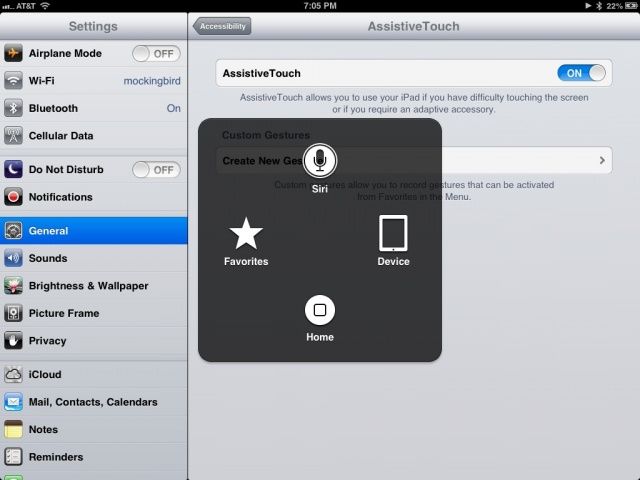
Assisted Touch is an accessibility feature for iOS, usable on any iPhone, iPad, and iPod touch, that recreates the hardware buttons and other gestures that someone with a motor disability might need to use. It also lets other folks use the Home, volume, screen lock, wake/sleep, and multitasking bar without using any of the hardware buttons themselves.

This can be pretty handy if you have the device in a case or holder of some type where accessing the buttons is tricky or impossible, like a home-made picture frame, for example.

Here’s how to activate this useful feature.

Muji Splash-Proof Speaker Keeps Your iPhone Safe Inside

By •

1366879766.jpg

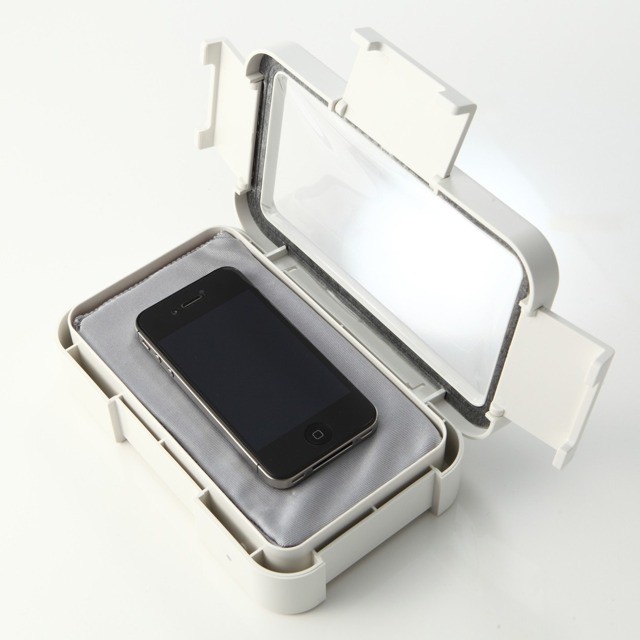
I’m a big fan of waterproof speakers. Not just for in-shower podcast listening, so I can get all excited about CultCast host Erfon Elijah’s sweet vocal tones as I froth myself into a soapy lather. No, I also like to listen to Erfon in the kitchen as I cook, perhaps kneading a soft and supple bread dough by hand, or washing the dirty dishes with my rough hands plunged into the hot suds…

Anyway. Splash-proof speakers. Muji makes one .

Have Your iPhone Highlight And Speak Selected Text Out Loud [iOS Tips]

By •

Speak Selection

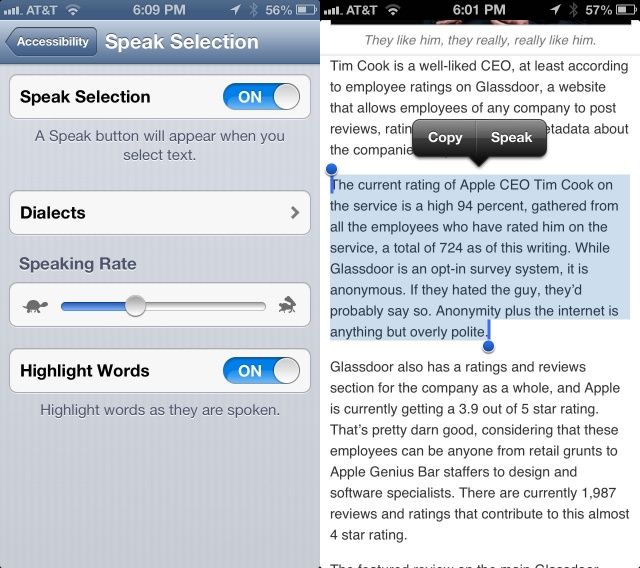
Another accessibility option like VoiceOver and Zoom, originally created for those with visual impairments, is Speak Selection. There are times when you may not want to turn the entire VoiceOver system on, having Siri read every button and icon on the screen, but would prefer to just have your iOS device speak text you’ve highlighted on the screen.

As an added bonus for those with print or learning disabilities, you can have your iPhone or iPad highlight the words as it speaks them for true bi-modal output (seeing and hearing the words at the same time).

Here’s how to make this happen.

What Are You Most Excited To See At WWDC 2013? [Let’s Talk]

By •

WWDC

WWDC 2013 was just announced. Finally, Apple’s going to end this year’s drought, and show off some new stuff after going the entire first four months of the year without a single keynote or product announcement.

But now that WWDC is in our sights, what are people most excited about? There are tons of hardware rumors about the iPad, iPhone and even the iWatch but we doubt we’ll see either of those three. We’ve also heard that iOS 7 is going to have some huge changes, and we should see some of the next version of OS X. What are you guys most excited to see at WWDC 2013? Software or hardware?

Click here to go to the Cult of Mac Forums and tell us what you’re looking forward to the most at WWDC 2013.

Sprint Reports Q1 2013 Results: 5 Million Smartphones Sold, $643 Million Loss

By •

post-224736-image-4899c59455eafec9b43bb9263f86ea82-jpg

Sprint has this morning reported its financial results for the first quarter of 2013, and they show yet another loss for America’s third-largest carrier. The company announced a $643 million net loss on $8.79 billion revenue, though it did manage to generate a positive operating revenue of $29 million.

Sprint sold 5 million smartphones during the period, 1.5 million of which were iPhones.

Tim Cook On New Products In The Fall, Larger iPhone, iMac Delays, And More

By •

timcookipadmininote

Today Apple announced its financial earnings for the last fiscal quarter, reporting the first year-over-year loss in profit the company has seen in ten years. The tone of Apple’s call with investors was quite different than past quarters. Tim Cook and co. seemed very much on the defensive, as Wall Street has been hammering AAPL for the past several months.

There were still several interesting tidbits from the call that we’ve rounded up. Tim Cook spoke vaguely about exciting new products in the fall and throughout 2014. Comments were made about the possibility of a larger iPhone, iMac supply constraints, and, of course, plenty of numbers.

Use Zoom And Large Text Options To Help See Stuff On The Screen [iOS Tips]

By •

Zoom

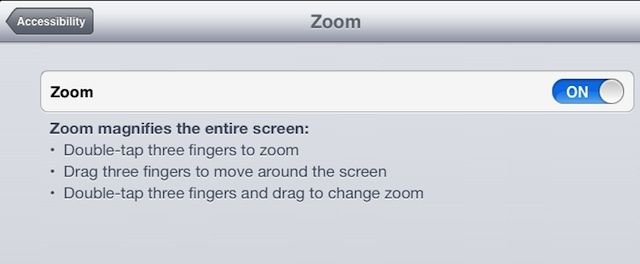
Another accessibility option built right into iOS is Zoom. Like VoiceOver, it was originally created to help those with a visual impairment access their iPhone, iPad, or iPod touch. Zoom is made for those who need things magnified on the screen, and it can be pretty darn helpful for those of us who may not have a specific visual disability. If your iPhone is zoomed in on lock screen and you’re unsure how to fix it, there are simple ways to adjust this setting.

Some apps zoom in within the app itself, like Maps, Safari, or Google Earth. That doesn’t help if you need the buttons and iOS controls magnified, or the text in apps like Mail, right?

Here’s how to set things up with Zoom.

Your iPhone Becomes A Waterproof Beach Camera In The Seidio Obex Case [Review]

By •

Obex is a like scuba suit for your iPhone.

If extreme outdoorsman Bear Grylls has an iPhone 5, he no doubt needs to protect it from all sorts of dangers, like rain, dirt, mud, and when things get really tough, his own micturitions.

Obex Case by Seidio
Category: iPhone Cases
Works With: iPhone 5
Price: $90

That’s exactly the kind of over-the-top protection Seidio’s Obex case promises—total refuge from water, dust, sand, and grime. Add to that submersion protection in up to three feet of water and an anti-reflective glass camera cover that maintains image quality, and you’ve got the perfect case for taking iPhone photos on the beach.

This Is What Afghanistan’s Unofficial Apple Store Looks Like [Image]

By •

apple-store-af


The Genius Bar is a little sparse, and the flooring never would have been approved by Steve Jobs, but if you find yourself in Kabul with a deep thirst for the latest Apple gadgetry, the unofficial Apple Store of Afghanistan is the place to go.

While Apple has been busy dominating the retail world with its highly profitably shops, poor Afghanistan has been left without an official Apple Store to call its own, so someone decided to open one up.

Analysts Expect Apple To Announce Revenues Between $41 Billion And $43 Billion

By •

applemoney

Apple will announce its second quarter financial results at 5 p.m. EST today, and this could be one of the company’s most interesting earnings calls for some time. Wall Street has been less than optimistic about the Cupertino company’s recent performance, and some believe that Apple will post its first quarter of negative growth income for over a decade.

But some analysts are a little more positive. According to averages put together by Yahoo! Finance, Apple is likely to announce revenue between $41 billion and $43 billion for the second quarter, with margins between 37.5% and 38.5%.

Namco Brings Three Idolm@ster Games To iOS, Charges $55 Apiece

By •

Namco-Idolmaster

Namco Bandai’s Idolm@ster series has been exclusive to Japan since it first debuted in 2005, so you’ve probably never heard of it, despite their popularity. But Namco has translated three of the titles into English and ported them over to iOS, giving fans all over the world the chance to experience the Japanese sensation for the first time.

The only problem is, they’re priced at $54.99 each!

Allowance Manager iPhone App Can Help You Track What You Really Owe Your Kids

By •

Kids. Can't live with them, can't manage their allowance.

I don’t know if you have kids or not, but one of the more difficult things to keep track of, at least for me, is their allowance. Yeah, you might say, just write it down on a piece of paper or something. While that may seem to have merit, it rarely works out in my family. Let’s say my son gets $5 every two weeks for allowance. That’s a $5 bill I need to have each and every week.

Honestly? It never works out that way. So we tried using a calendar, on which I created a repeating event, set for every two weeks, figuring we could just count it up when he needed something. Well, that didn’t really work out, either. We’d be at a store, and he’d want something, and it’d be some non-multiple of five, and we’d try to remember to write it down, and so on.

Suffice it to say that I am doing a poor job at helping my kid keep track of his allowance, and an equally poor job of prepping him for real life money management.

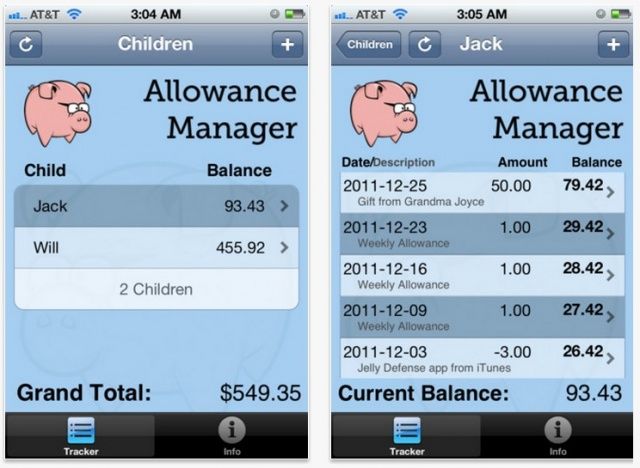
So imagine my joy when I saw Allowance Manager for iOS, a Universal app that basically does what we need: tracks allowance on the iPhone or iPad. Win!

AppShopper Is Back In The App Store With AppShopper Social

By •

Welcome back, AppShopper. I mean, AppShopper Social.

Alternative iOS informational website, AppShopper, had an app that was pulled from the App Store last December due to a conflict with new App Store rules that went into effect at that time. The team behind the app, who also run the website, have spent the hiatus working hard on a new app that is both compliant with Apple’s current App Store rules and useful to consumers.

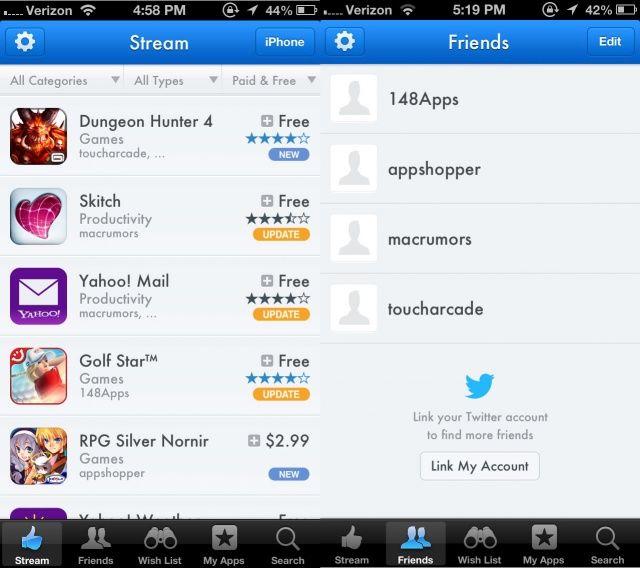
AppShopper Social was announced today as live in the App Store, bringing with it a host of new social discovery systems along with the familiar Wish List functionality it’s always had.

This is a completely separate app, so if you still have the original AppShopper app on your iPhone or iPad, you can use them both alongside each other.

Enable VoiceOver And Have Your iPhone Or iPad Read Twitter To You [iOS Tips]

By •

VoiceOver controls in iOS

Screenshot: Cult of Mac

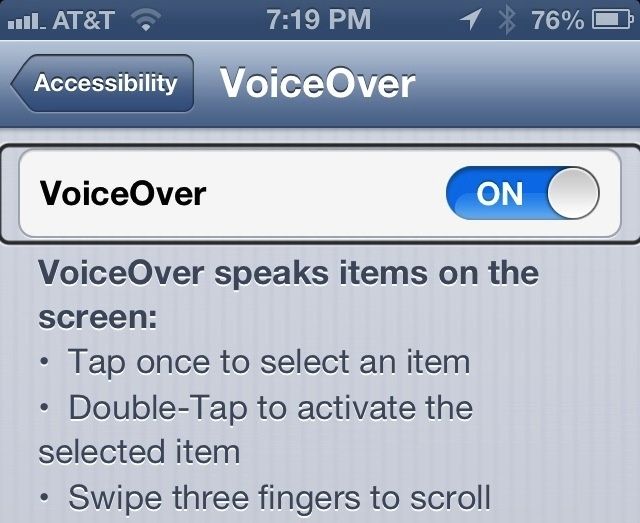
VoiceOver is the name of the amazing text-to-speech feature in iOS and Mac OS X that allows those with visual impairments to use their Apple devices right out of the box, without needing help from a sighted person. On the iPhone or iPad, it empowers those with a visual disability to become more independent and function on a day to day basis in a world that isn’t really set up for them.

As an individual without a visual impairment (aside from a slight nearsightedness), I use VoiceOver to have my iPhone read to me when I’m in the car but need to catch up on email or want to hear what folks are doing on Twitter. Here’s how to set that up.

Why Wall Street Is Being Totally Idiotic About Apple’s Fortunes Right Now

By •

ian-63

Earlier today, we reported that the Wall Street consensus was that Apple’s profit in this last quarter probably shrank for the first time in a decade, and that results will be even more dire next quarter, with iPhone sales units being extremely low.

But Wall Street’s pessimism in regards to Apple is, as usual, nuts. For Apple to perform as low as Wall Street thinks it will next quarter, Apple would have to show zero growth in the iPhone market compared to the same spring quarter a year ago. This would rank it as one of the smartphone industry’s worst disasters ever. Which is crazy, because Apple’s selling more iPhones than ever.

Cricket Wireless Cuts Prices On iPhone Plans To Compete With T-Mobile And AT&T

By •

cellhelmet-iPhone-5

Over the last few weeks, T-Mobile has stolen a lot of the prepaid carriers’ thunder with its new “Uncarrier” plans. But Cricket Wireless is eager to make sure no one forgets about it.

Starting today, Cricket Wireless is cutting the price of its iPhone plans to help it compete against the likes of T-Mobile and AT&T. The new family bundle plan offered by Cricket includes two smartphone plans for $40 each a month. If you just want an iPhone on your own plan, individual plans now start at $50 a month.