Mobile menu toggle

Rob LeFebvre - page 51

Smooth As Silk Shadow Blade Shines Beyond Its Tricky Controls [Reviews]

By

IMG_0192

Crescent Moon Games has published a string of fantastic iOS games of late, including cute-as-pie Mimpi, deep RPG Ravensword: Shadowlands, first person shooter Neon Shadows, and the unforgettable Space Chicks. Each one approaches controls for touch screens in a unique and fairly successful way.

Shadow Blade by Crescent Moon Games & Dead Mage
Category: iOS Games
Works With: WORKS WITH
Price: $PRICE

The publisher’s 2D side-scrolling action platformer Shadow Blade takes things even further, utilizing a complex but ultimately responsive control scheme. The game is made in Unity, giving it fluid, console-quality animations, a lush eastern-flavored soundtrack, and a gorgeous look and feel.

This is a fine effort from first-time iOS developer Dead Mage, for sure.

Productivity Boost – Copy Files From One Tab To Another [OS X Tips]

By

Tabbed Finder

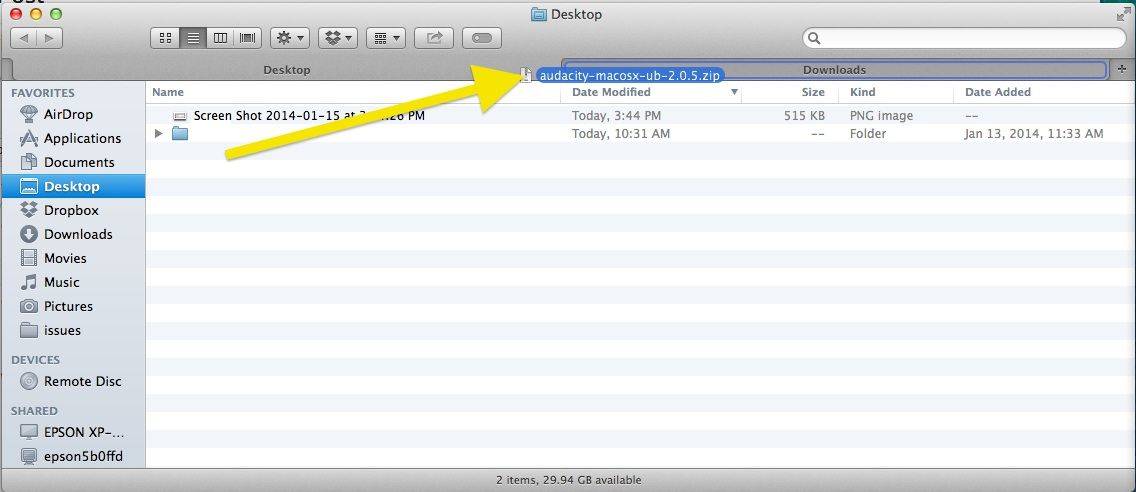
Copy and Paste has been around for a good long while, obviously, and drag and drop even longer. Moving files from one spot to another in the Finder is a fairly easy, well-rehearsed process that one wonders if we really need another way.

OS X Mavericks has introduced, however, yet another way to move files with the new tabbed Finder feature. It seems like a pretty cool way to move stuff from one folder to another without having to clutter up your Mac screen with a bunch of windows.

How To Add Photos To Existing Albums On Your iPhone [iOS Tips]

By

New Album

Ahh, iOS 7, you are so beautiful. Yet you are also confusing, especially to old-timers like myself who wonder where certain features have moved to.

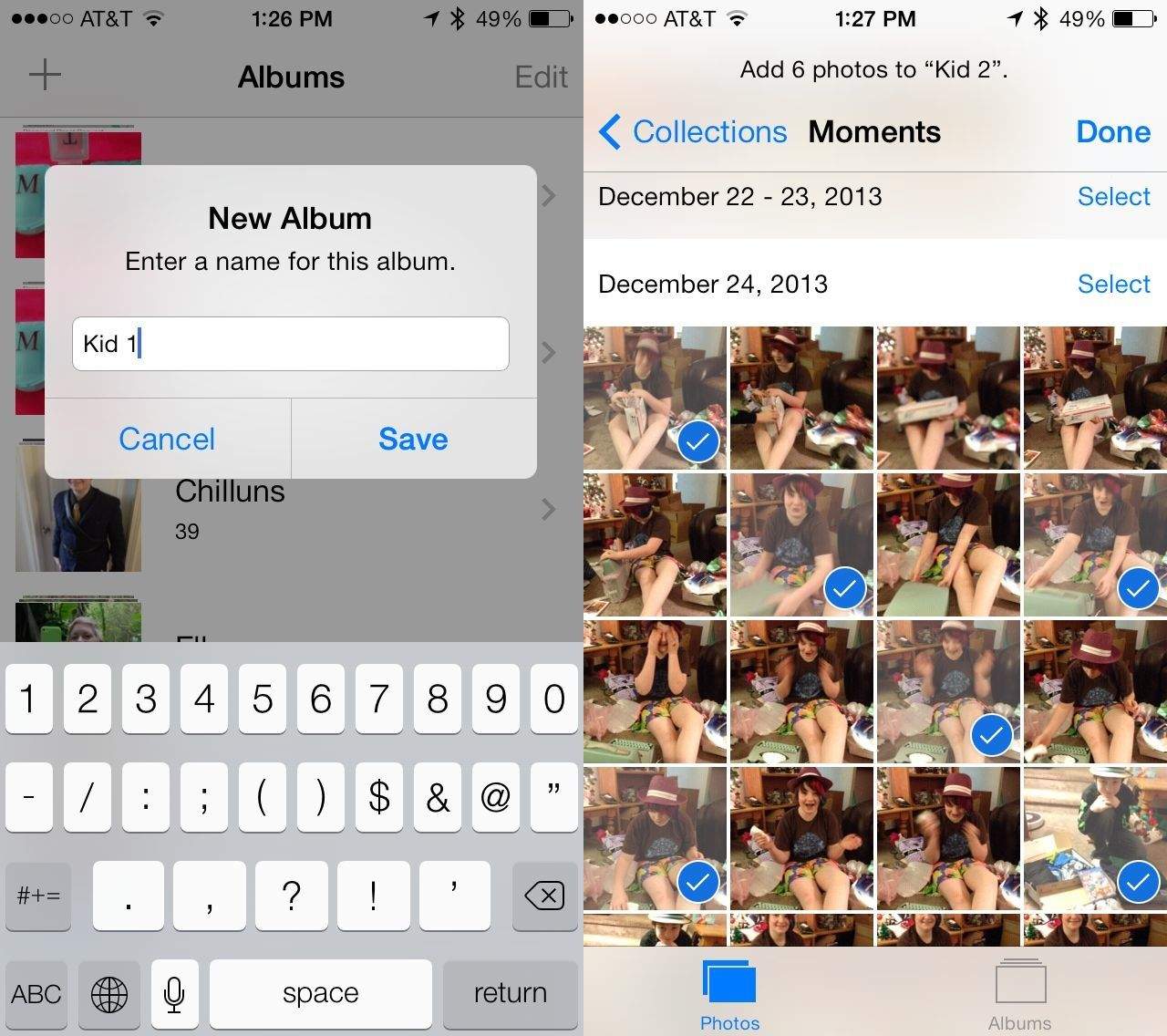
I recently created two new albums in my Photos app, one for each of my kids. When I created each album, I was able to add as many photos as I wanted to, and then save the album.

Later, I wanted to go back and add more pictures of each child to each new album. But I realized I had no idea how to do so. I tried tapping the Share button, but found no “Add to Album” option. I was super sad.

Luckily, Apple has provided a way to add photos to existing albums, and, while it’s not as intuitive as I’d like, it’s not too difficult.

Bluetooth Guitar Pedal Will Thrill Your Ears But Hurt Your Brain [Review]

By

DSC05111

IK Multimedia is responsible for a veritable boat-load of music peripherals and apps, like the hard-rocking guitar crunch of effects app Amplitube and the portable MIDI keyboard iRig Keys. If you’re a musician interested in working with iOS devices on stage, IK Multimedia is the place to go.

iRig BlueBoard by IK Multimedia
Category: Music Peripherals
Works With: iPad, iPhone, iPod touch
Price: $99.99

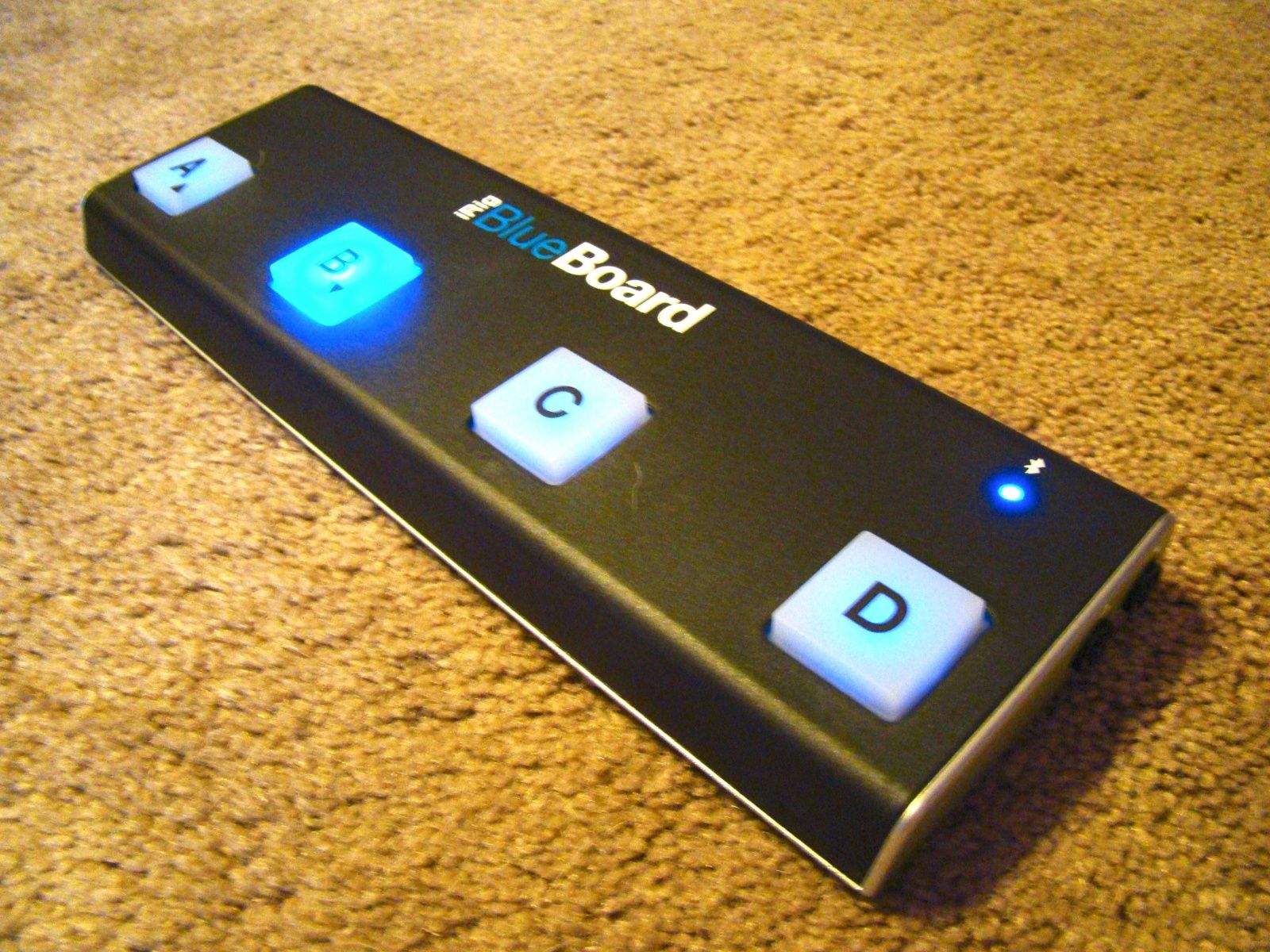
It was with excitement, then, that I opened the latest review gadget from the musical company, the iRig BlueBoard, a small footprint Bluetooth-enabled pedal board meant to help you switch effects in a guitar app like Amplitube or piano sounds in something like iLectric Piano, both IK Multimedia apps.

The BlueBoard is a great idea, especially if you’re working with a guitar or keyboard hooked up to an iPad or iPhone. Being able to switch settings on the fly with a foot-operated switch is something I do all the time with my analog guitar foot pedals. Having it do so via Bluetooth is even better, as it won’t take up the 30-pin or Lightning connector, leaving that free to connect a guitar or MIDI interface, like the iRig HD guitar adapter or the iRig Keys.

Unfortunately, that’s where the great idea stops and the difficult to figure out begins.

How To Set Up FileVault Protection On Your Mac [OS X Tips]

By

Screen Shot 2014-01-14 at 7.08.29 PM

If you want to be sure your data is secure on your Mac, Apple has provided an easy way to do so. They’ve created File Vault, accessed via the System Preferences, to encrypt your startup drive with some heavy duty file security.

You’ll need OS X Lion or later, and you’ll have to have an OS X Recovery partition on your drive. This last bit is typically installed on newer Macs, anyway, but to test it out, reboot your Mac and hold the Command-R key down. If you see an OS X Recovery screen, you’re good to go.

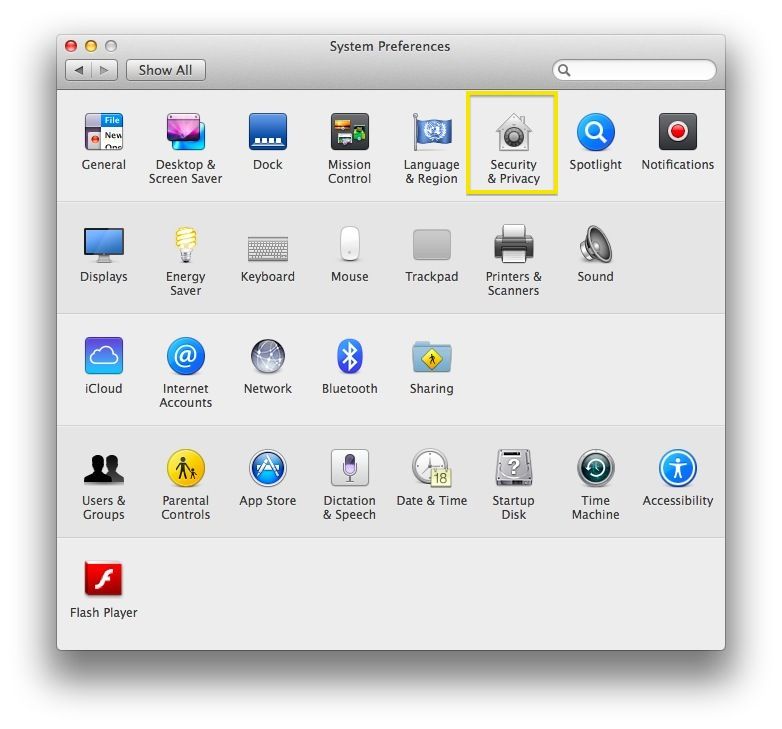
Setting up FileVault is even easier than that. Just launch System Preferences and click on Security & Privacy to get started.

Allow Mobile Safari To Store Passwords For All Sites [iOS Tips]

By

Safari Passwords

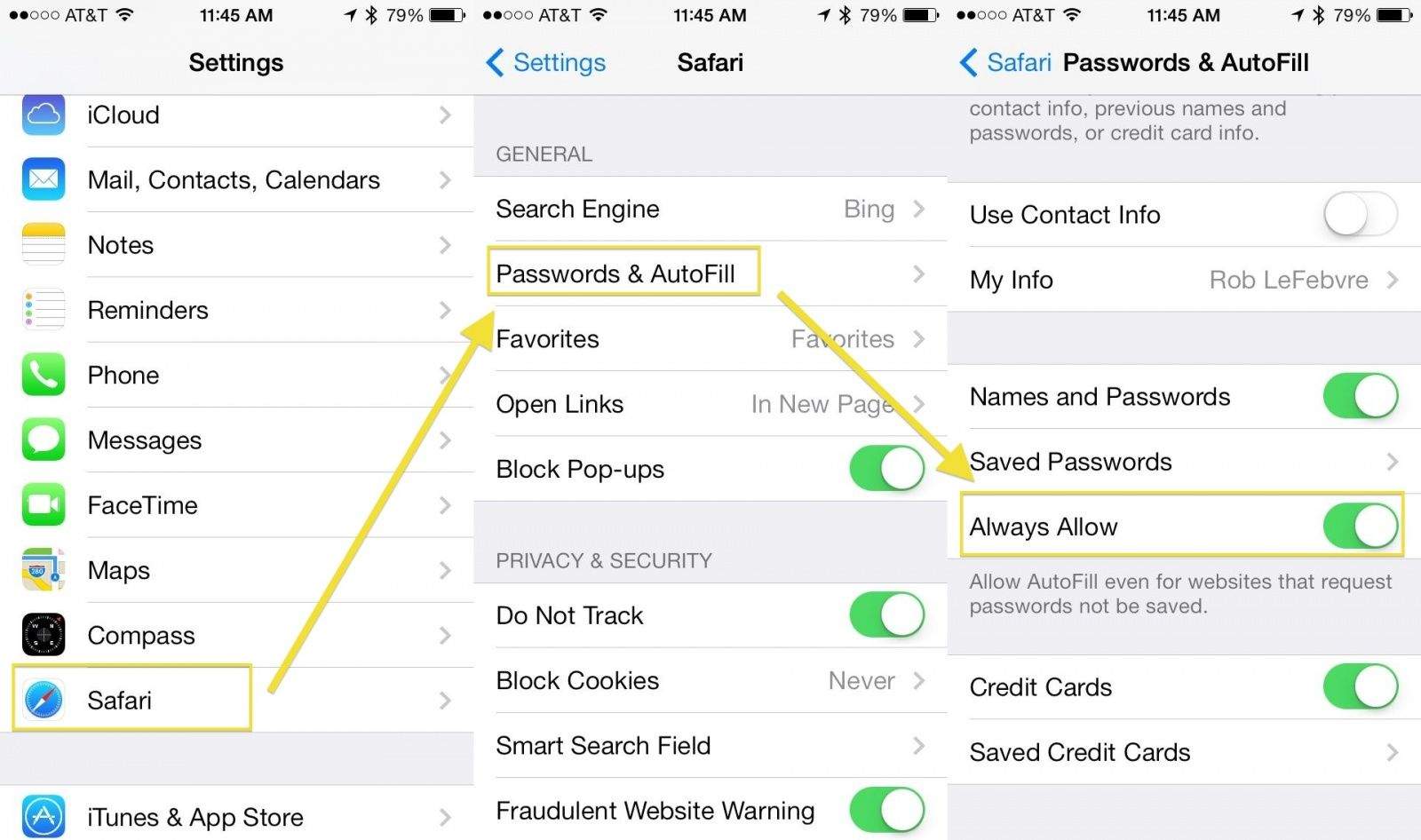
When you browse the web with mobile Safari, you’ll come across sites that ask you to create a login, and that usually requires a password.

You can save your passwords in mobile Safari automatically, but there are some sites that request passwords not be saved. There’s a workaround, though, if you feel like you should be able to save whatever passwords you darn well please, and it’s buried in the Settings app.

Don’t Let Your Kids Play This Appalling Barbie Liposuction Game

By

before and after
Which one is better? Sigh.

As if we didn’t have enough fat shaming to go around, there’s a new game on the App Store called Plastic Surgery For Barbara, and it’s a doozy.

The idea here is that Barbara (or Barbie, if you will) is overweight. The developers want kids aged 12+ to play a game in which they can assume that fat is ugly, and that the only way to fix a weight problem is through surgery.

“Barbara likes to eat a lot of burgers and chocolates and once she found out that she looks ugly,” says the App Store description. “She can’t make it up with this situation any additional second. And today plastic surgeon is going to make operation on her body and face in order to return cute Barbara’s look.”

So, she’s fat, which means she’s ugly, and she can’t wait any longer. If she just gets surgery, she’ll be “cute” again. Whew.

Gag.

Make Your Mac Even More Secure With A Firmware Password [OS X Tips]

By

IMG_1544

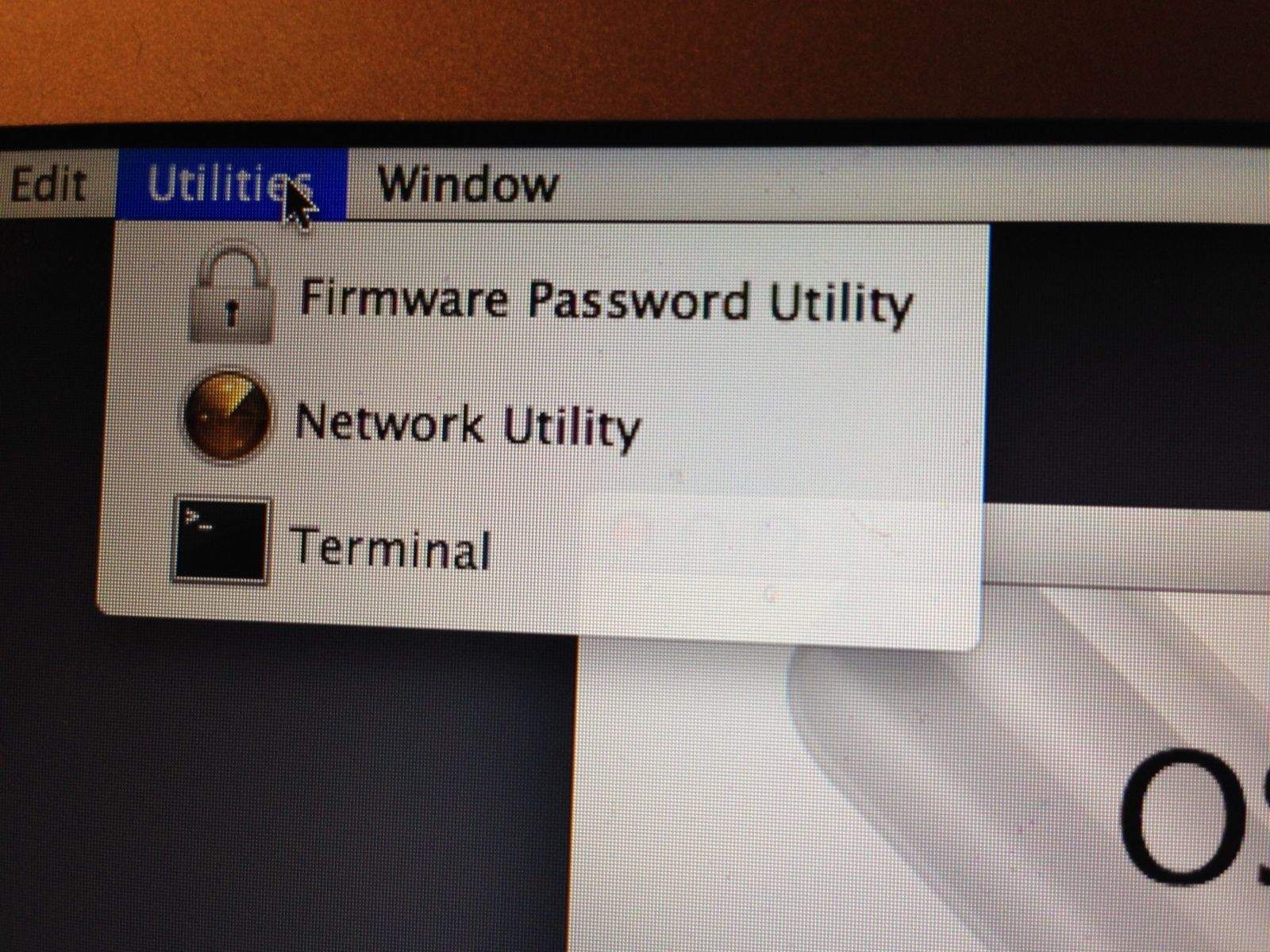
You probably have a regular login password for your Mac, which you type in when installing software or maybe even when you deactivate the screensaver. It’s fairly secure, but there are indeed ways around it.

If a malicious person with physical access to your Mac wants to get at your data, they can simply boot into a different mode, like Recovery Mode, Single User Mode or Verbose Mode. Or, they can boot your Mac using a USB drive and get around the password that way.

Setting a firmware password will add another, lower level of security to your Mac, and will make it so anyone who wants to boot into an alternate mode will need your second password. It’s fairly easy to enable, too.

Look Before You Leap – Preview Links On Your iPhone or iPad [iOS Tips]

By

Preview Link

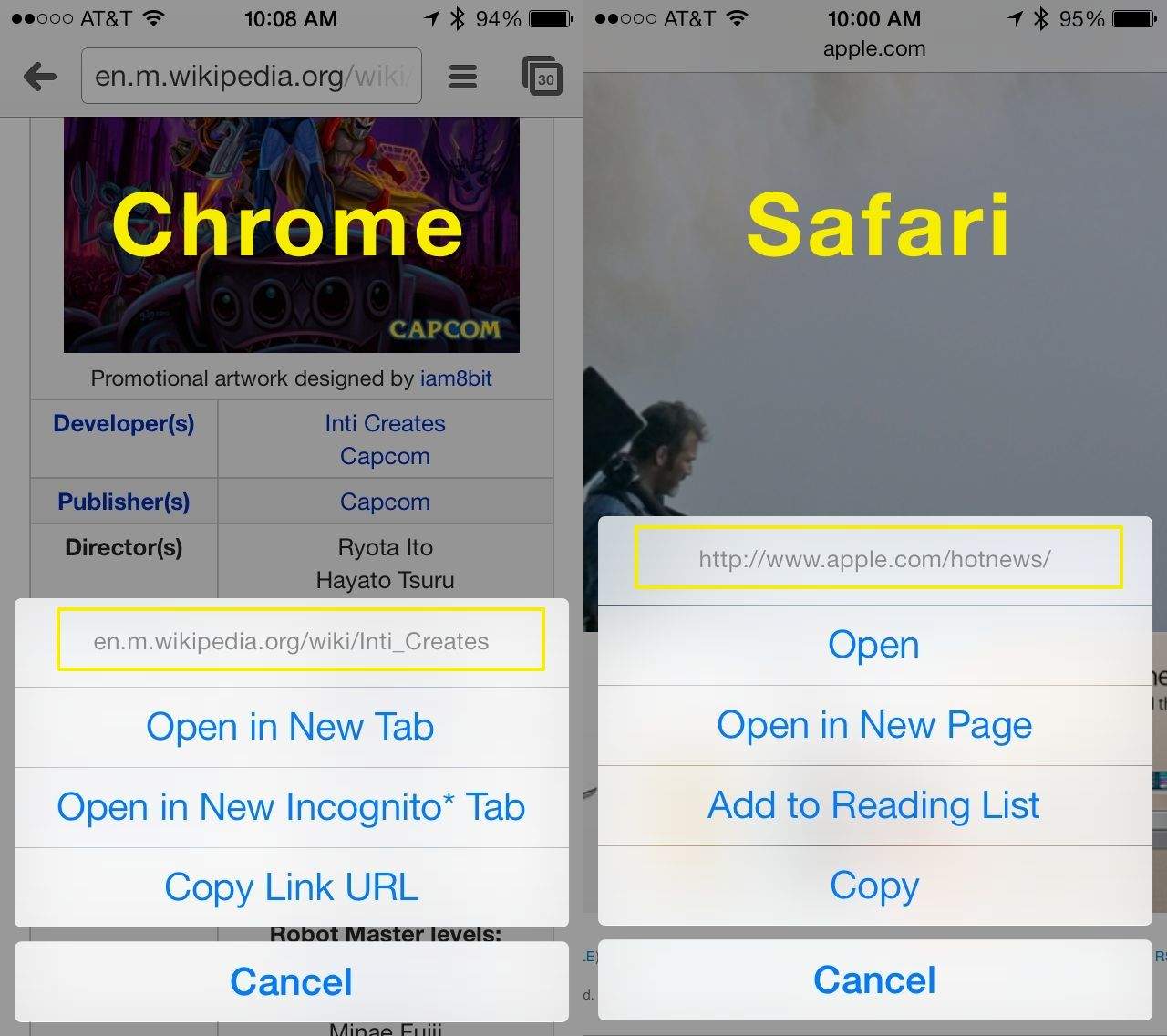
The web is full of all kinds of links, both clearly labeled ones as well as links with varying degrees of treacherousness (Rick Roll, we’re looking at you). While finding yourself sent to a video of Rick Astley may be fairly innocuous, there are times when you’re on the web and you come across a link that could possibly do something more serious.

That’s where the mobile web browsers in iOS 7 come in. I’ve tried this trick in both Safari and Chrome, but there may be other, less popular browsers that do the same thing: your mileage may vary.

How To Collaborate With Calendar Via Message Or Email [OS X Tips]

By

Collaborate Calendar1

Calendar has a few new features in OS X Mavericks, like Facebook event integration, new Time Zone support, and continuous scrolling.

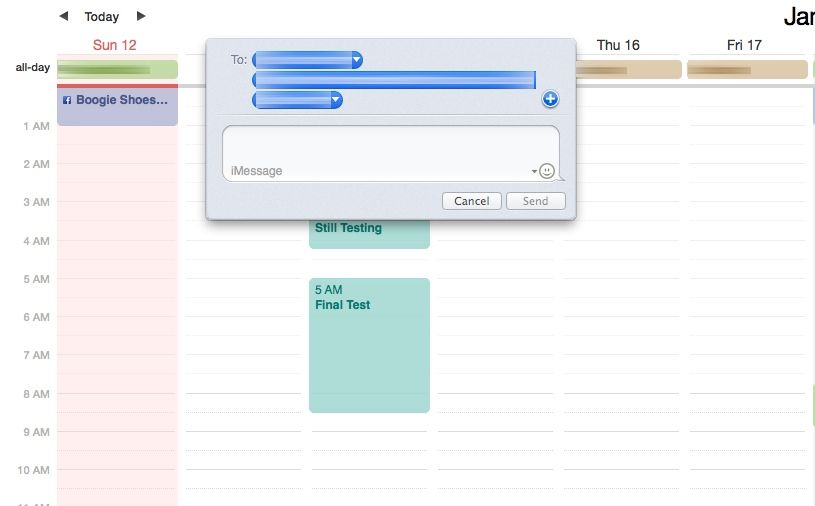
Another cool addition to the Calendar experience is the ability to collaborate with others. You can send invites via email to any number of contacts, and then email or message them all from the Calendar event proper.

Fix Your Forehand With This Motion-Sensing Tennis Racquet [CES 2014]

By

post-261750-image-c72ad2e07b84d6ae85a6352a8d2b98f0-jpg

The Babolat Play is a tennis racquet for those of us who want to improve our game without having to hire a real coach. Those folks cost a lot of money!

For $399, though, you can purchase this new app-enabled, Bluetooth-connected, motion-sensing tennis racquet for your very own. The company has stuffed a ton of sensors into the handle of this thing without even affecting the balance or weight.

You can connect the racquet to your iPhone or iPad and get real-time feedback, or just let the Babolat Play record your performance information and sync it up later for analysis.

The Babolat Play is available now in the US, and should release worldwide very soon.

94Fifty’s Smart Sensor Basketball Helps Improve Your Game [CES 2014]

By

post-261743-image-bf1ce18a1db632c6c9dc3098a364d1d0-jpg

There’s nothing better than a good coach for any sport. When learning how to be good at something like basketball, you need good feedback and suggestions based on how you perform. It’s a dynamic process for sure.

94Fifty thinks so, too, and decided to create a smart basketball that pairs with a free app for your iPhone and iPad. The ball is loaded with sensors and bluetooth and gets you instant, quality feedback on how you’re tossing the rock to the hoop.

The 94Fifty Smart Sensor Basketball will run you $295 at Apple retail stores or online, while the app is free for anyone to download, though it won’t do you a whole lot of good without the ball.

Get To Sleep – And Wake Up – Perfectly Using The Withings Aura [CES 2014]

By

New Withings Aura helps you make the most of your sleepy time.
Photo: Cult of Mac

CES 2014 bug LAS VEGAS — If you’ve ever had trouble falling asleep, or you’ve felt crappy waking up, it might be worth your while to check out the Withings Aura. The new app-enabled sleep machine comes from the folks that brought you other fitness gadgets like the Wi-Fi Body Scale and the Pulse.

Get Yourself Up A Hill Faster With This Electric Bicycle [CES 2014]

By

Cult _of_Mac_CES_2014_80x80

LAS VEGAS — We spent a few minutes with Larry Pizzi of Currie Tech to talk about the company’s eflow bicycles. These bad boys are powered by the same battery technology that’s in your MacBook Pro, and they provide a “True hybrid” electric bicycle experience.

You can use the eflow to provide anywhere from a low to a high assist boost, which will get you up a hill and down the road at speeds of up to 20 to 30 miles an hour. You can test drive one of these, too, so head on over to the Currie Tech website to find out where.

This Sensor Gadget Is The Only Mother You Want Living With You [CES 2014]

By

Cult _of_Mac_CES_2014_80x80

LAS VEGAS — Seriously, everyone has a mother, but not everyone wants to live with her.

Here comes Mother, the remote sensor gadget we got to play with a bit at CES in Vegas this week. It’s a small, shmoo-shaped object that sits in your house, and tracks the sensors you can then attach to a variety of mundane objects like your toothbrush, your pill bottles, your mattress, or your refrigerator.

Mother then interacts with one of the 15 entry-level apps that come with the device to help you track what you do: how many times do you brush your teeth a day? Are you eating too much in the evening? How’s your sleep?

The initial bundle, available only at CES this week, is $222 for the Mother sensor hub and four cookies. The retail price will likely be higher when Mother hits stores.

Chug Plug Gives Your MacBook Extra Hours Of Power [CES 2014]

By

Cult _of_Mac_CES_2014_80x80

LAS VEGAS — We got a chance to hang out a bit with Daniella Hernandez at the Lenmar booth at CES in Vegas, learning more about the innovative Chug Plug, a 65W external power pack that you can use to extend the portable staying power of your MacBook.

The first-of-its-kind Chug Plug integrates into your already existing power plug set up, with your power brick attaching to the right side of the Chug Plug to both charge the external battery pack as well as use your MacBook at the same time.

When you need to leave that comfy seat near the wall plugs at the coffee shop, the Chug Plug then provides an extra two to three hours of portable power so you can continue your work or play away from the tether.

Chug Plug is available now for $159.99 at online retailers.

Hands On: SteelSeries Drops The First Bluetooth iOS 7 Game Controller [CES 2014]

By

Cult _of_Mac_CES_2014_80x80

LAS VEGAS — We’ve been SteelSeries fans for quite a while now, what with their stellar line up of headphones and gaming peripherals for both Mac and iOS.

The Chicago-based company just released what they’re calling the first Bluetooth-enabled official iOS 7 gaming controller, the Stratus.

We hung out with the team a bit at CES, and what we saw looks pretty damn sweet. Check it out.

Hands On: Capture Home Invaders, Not Freaky Time In Your Living Room [CES 2014]

By

Cult _of_Mac_CES_2014_80x80

https://youtu.be/_RenT6bTtis

LAS VEGAS — Webcams are such a thing of the past. The Canary is an Indiegogo-funded security camera and app that uses algorithms to detect abnormal movement in your home and send you an alert.

Which means, of course, that you can use the Canary not only to get notifications when there’s out-of-the-ordinary activity recorded, but also to capture video you can look at later that may not have tripped a notification.

We talked with the Canary crew at CES, as you can see in the video above.

Hands On: Corning’s New Antimicrobial Gorilla Glass Will Clean Your iPhone [CES 2014]

By

Corning Antimicrobial Gorilla Glass is here to help your iPhone pass the ick test.
Would your phone pass the ick test?
Photo: Cult of Mac

CES 2014 bug LAS VEGAS –Your iPhone is dirty. You know how we know? We subjected our intrepid reporter’s iPhone to Corning’s on-site contaminant test at CES in Vegas.

Corning is there, talking to Cult of Mac about its new Gorilla Glass, which will have a layer of ionic silver embedded in it. That will decrease the amount of bacteria on your iPhone screen while still being crazy-strong and scratch-resistant.

The result? It’s pretty gross.

Hands-On: AnkiDrive Shows Off iOS-Powered Toy Car Racing [CES 2014]

By

Cult _of_Mac_CES_2014_80x80

LAS VEGAS — Remember Anki, the little iOS-powered toy car app that Apple brought up on stage for its World Wide Developers Conference last year?

We got to catch up with them at this year’s Consumer Electronics Show to talk about the app, the AI-controlled toy cars, and how they’ve created the latest must-have toy gadget with Apple’s help.

One Trick To Close All The Tabs In Mobile Safari At Once [iOS Tips]

By

Safari Tabs

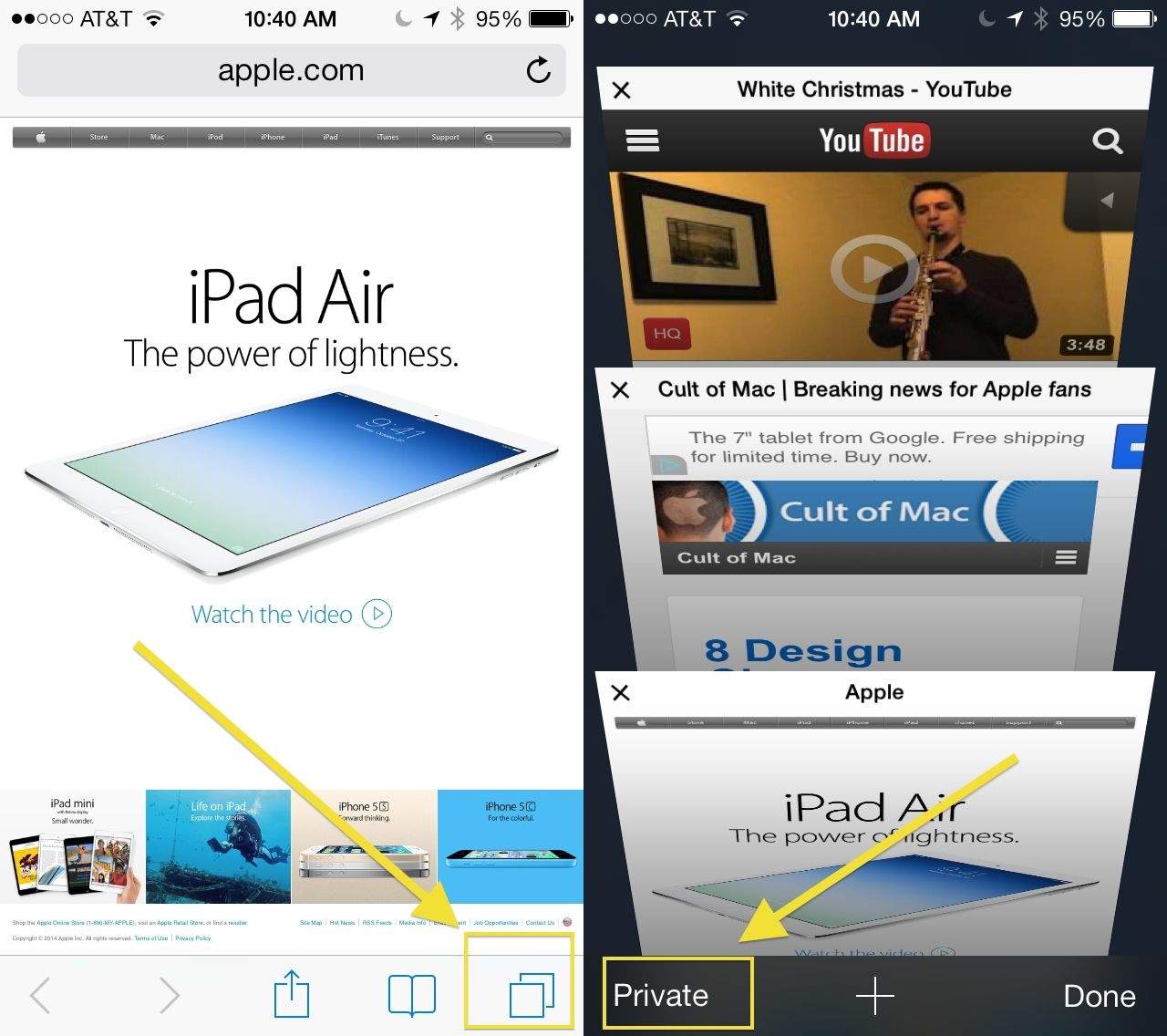
On the Mac, you can close all the tabs in Safari (or any browser of your choice, really) with the keyboard combo of Option-Command-W. Hit that, and all the tabs in all the windows open will close at once. It mirrors the Finder command, which will close all Finder windows.

You can swipe away the tabs one at a time when you’re browsing on your iPad or iPhone, but there’s no keyboard command equivalent to close them all at once. How can you close all the tabs you have open in one fell swoop?

Surprising Number of iOS & Mac Games Make Indie Hit List

By

Dominique Pamplemousse in
Dominique Pamplemousse in "It's All Over Once The Fat Lady Sings!"

The Independent Games Festival (IGF), held every spring at the Game Developers Conference (GDC) in San Francisco, is a celebration of the independent spirit. It’s both a gauge of the cutting edge in game design as well as an increasingly popular event among gamers of all stripe.

This year, the list of nominees for the awards contains a veritable boat-load of games that are available on iOS or Mac. It’s a who’s-who of the hot new games tat everyone’s talking about as well as a notice that mobile gaming is definitely on the map.

Signal’s Beefy Game Controller Turns Your iPhone Into A Console [CES 2014]

By

signal

CES 2014 bugJust after we waxed rhapsodic about the new SteelSeries Stratus iOS 7 gaming controller comes a new controller to the news cycle, the Signal RP One.

If the picture above is any indication, this one is sized more like a typical console controller in the Xbox style than SteelSeries’ mini stature, which could bode well for Signal, as not everyone has the tiny hands to deal with a smaller controller device.

How To Rearrange The Order Of Accounts In Mavericks Mail App [OS X Tips]

By

Mail App Order

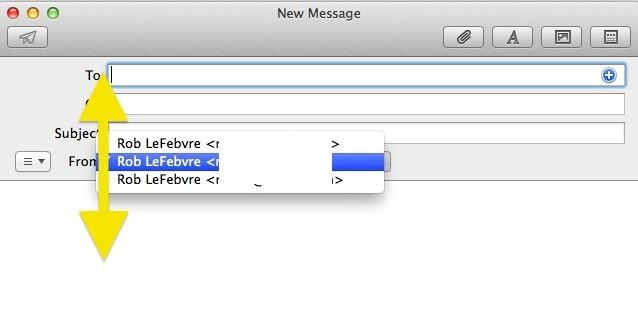
When you create a new email message in OS X Maverick’s Mail app, you can choose–assuming you have more than one email account in there–which account you’re sending the email from. For example, you might want to send an email from your work account rather than your personal one if it’s work related, and vice versa if it’s about a party you’ve recently attended.

The problem is, when you choose from the drop-down menu in the mail composition window, the account you want to send from may not be in the top spot. It might be a couple of slots down the list. If you want to rearrange the order of these accounts, you can search in the Mail preferences until the cows come home because the ability to do so just isn’t in there.

It is, however, possible to do.

How To Turn Off Vibration When In Silent Mode In iOS 7 [iOS Tips]

By

vibrate on Silent

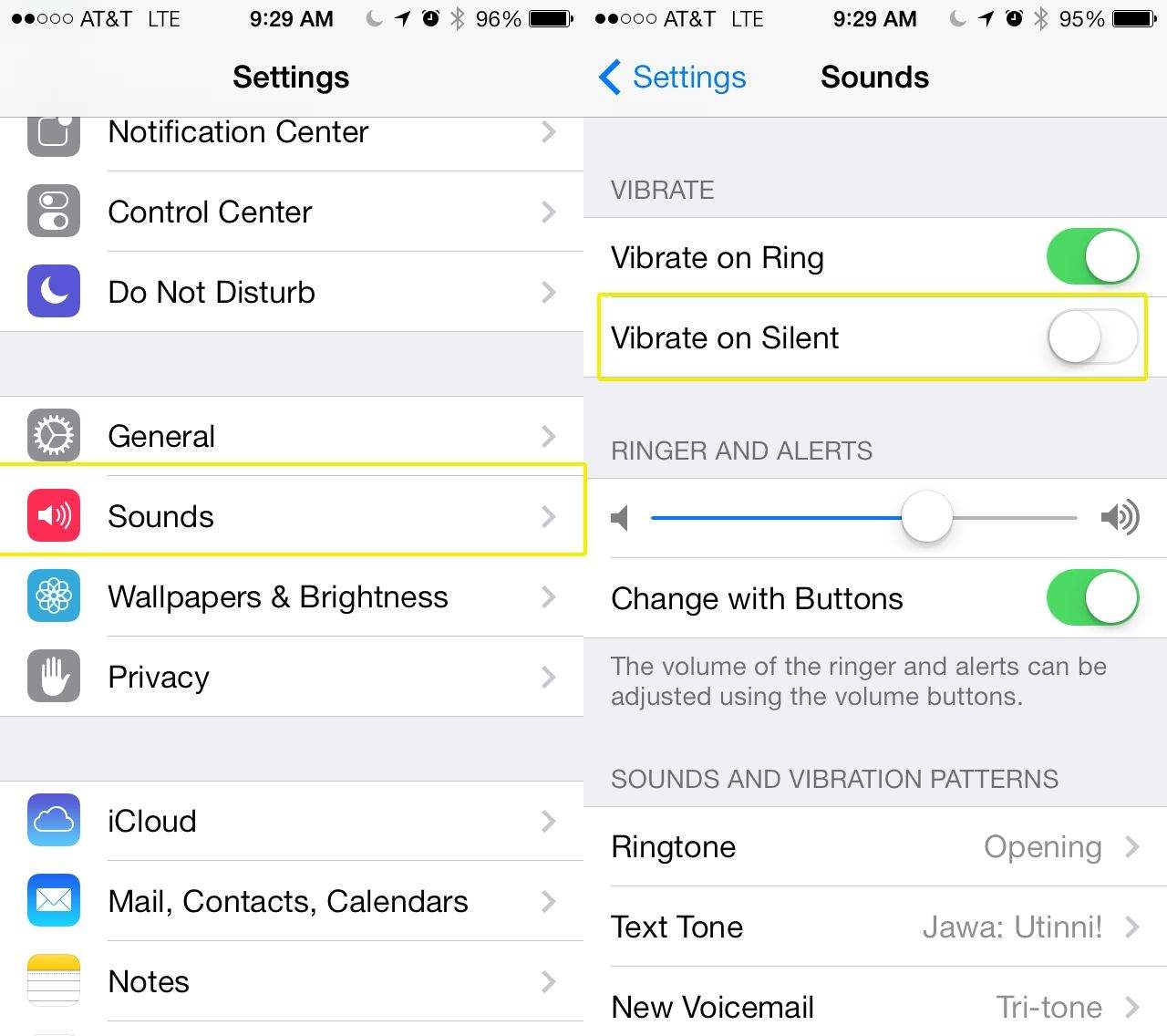
There you are, in an important meeting. You’ve silenced your iPhone with the button on the left-hand side of the device like a good employee. You set your iPhone on the table to show your boss you’re not afraid of the ringtone.

Suddenly, your buddy texts you. Like, four texts in a row about some foolishness that you’d love to read, but you can’t, because you’re in a meeting. But your iPhone betrays you, buzzing like a mad bee, over and over. Your face turns red, you grab the device off the resonating wood conference table and mutter, “I put it on silent…um…sorry.” And then you jam it into your pocket, your plan to impress the chief gone in an instant.

You could have avoided this embarrassing scenario fairly easily, though.