Mobile menu toggle

Top stories - page 863

Developer Gets Google Maps Working Under iOS 6 With ‘A Little Trickery’ [Video]
By

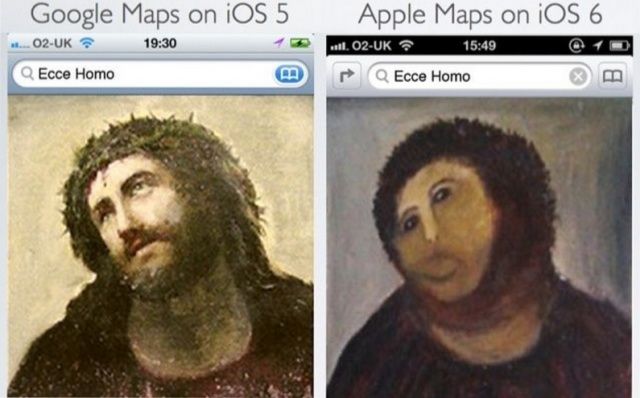
Google Maps is gone in iOS 6, but some users are desperate to get it back.

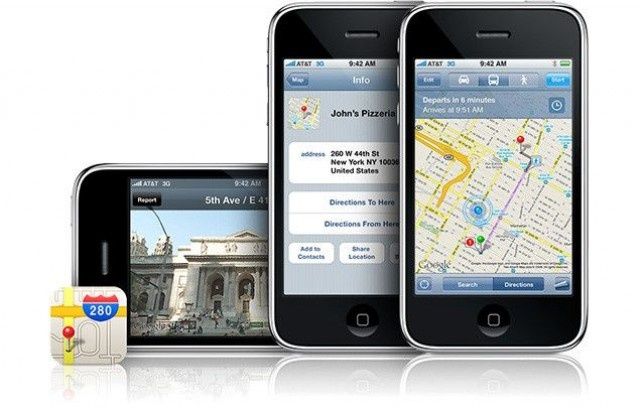
iOS jailbreak developer Ryan Petrich has successfully gotten the old iOS Maps app, which was powered by Google and boasted features like Street View and walking directions, running under iOS 6. The port is said to be unstable at the moment, but it’s working, and with a little more work, it could be available in all its glory to users with jailbroken iOS devices.

When It Comes To The iPhone 5, White Is The New Black [First Impressions]

By

IMG_0690

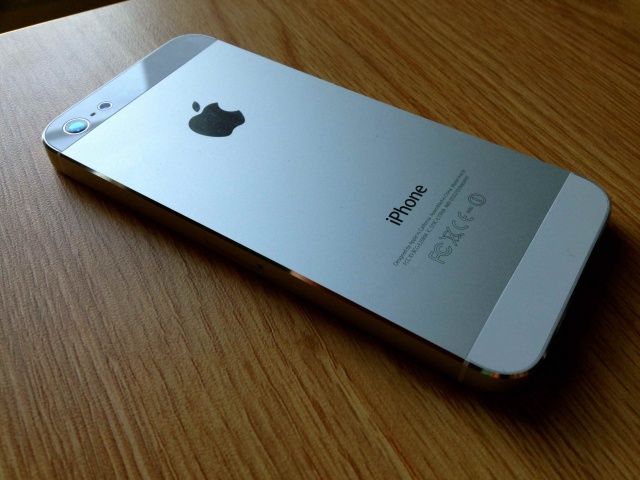
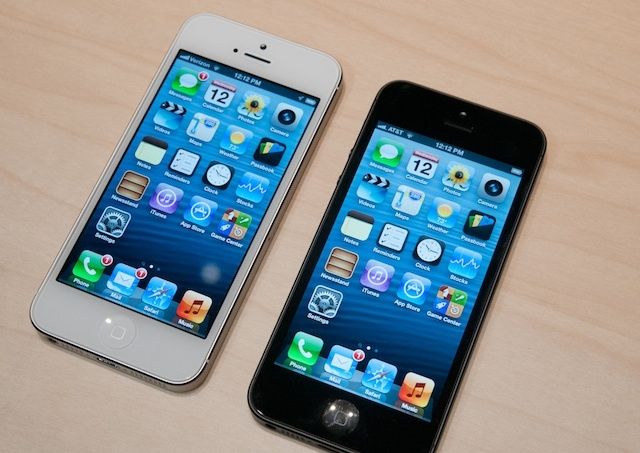
Today I did something I swore I’d never do: I bought a white iPhone. Like my fellow Cult of Mac colleagues and many of you readers, I too bought a brand spanking new iPhone 5. Deciding not to brave the crazy lines, I took my chances and waited till later in the day before I picked one up.

Black has always been my color of choice when it comes to iOS devices. I’ve always owned black iPhones, iPads and iPods. But for some reason I decided to go with white this time around, and I’m happy I did. The white iPhone 5 is absolutely gorgeous.

Verizon iPhone 5 Comes Unlocked Out Of The Box, Works On GSM Carriers Like AT&T

By

Some really good news just surfaced for current and potential Verizon iPhone 5 owners.

It’s been confirmed that Verizon is actually selling the iPhone 5 factory unlocked out of the box, and you can pop in another SIM card to use the device on even a GSM network like AT&T. Jeff Benjamin of iDownloadBlog has already tried inserting an AT&T SIM card into his CDMA Verizon iPhone 5, and it worked!

iPhone 5: How Can Apple Possibly Top This? [First Impression]

By

iphone5impressions
Holy crap.

Every review of the iPhone 5 makes great efforts to talk about how light it is. I’ve read those reviews over and over again since Tuesday. Even so, when taking my iPhone 5 out of the box for the first time, I so misjudged the weight that it went flying from my fingers and onto the floor. This is lightness to the point of ephemerability. It’s so hard to believe, and yet it’s testament to the iPhone 5’s construction that such a thin slate of glass and aluminum doesn’t break apart between your fingers like a communion wafer when you touch it, let alone when you — as I did — accidentally fling it across a room. But my iPhone 5 wasn’t even scratched.

This isn’t our review of the iPhone 5. Far from it: we’ll be posting an in-depth review first thing on Monday morning, once we’ve had a chance to put it through its paces in full. These are our first impressions, and let’s say it right off the bat: from the second it comes out of the box, the iPhone 5 seems like such a leap over the iPhone 4S that it’s like picking up your first MacBook Air after lugging around a lunky 2008 MacBook Pro for years. In a couple of years, Apple has improved the design of the iPhone 4/4S so much that the latter now seems absolutely antediluvian.

Must-Have Apps That Truly Take Advantage Of What Your New iPhone 5 Can Do [Roundup]

By

Screen Shot 2012-09-21 at 15.42.31

After lovingly unboxing your new iPhone 5 today, the first thing you’ll do is install all your favorite iOS apps. But what if you don’t have any? What if this is your first iPhone? Well, we’ve compiled a list of must-have apps for iPhone 5 to get you started. We’ve got Facebook, Twitter, and YouTube clients; news readers; note-takers; word processors, and more — and everything in the list has already been updated to take advantage of the iPhone 5’s larger display.

So dive in and check out the best apps to get you started with your new iPhone 5.

Weirder Every Year: The History Of iPhone Launch Lines [Gallery]

By

applestorenyc1

iPhone launch days, like today, are freaking insane. Rabid fans across the globe line up for hours or even days just to make sure they get Apple’s newest iPhone. It’s always been that way and it gets weirder every year.

Even though this is only the sixth iPhone launch day in the history of the world, iPhone launch days have a rich history of being a little bit odd, with people wearing funny costumes, crazy attention, Apple retail staff cheering like crazy, and just straight up weirdness surrounding the launch of a new electronic device.

Here’s a look at each iPhone launch day in history:

For The Unemployed, Waiting In Line For The iPhone 5 Is A Job [Gallery]

By

Charlie_Hufnagel

SAN FRANCISCO — This is Charlie Hufnagel, who was paid $1,500 to be first in line for the iPhone 5 at Apple’s flagship store here in the city.

Hufnagel was hired through TaskRabbit, an increasingly popular freelance odd-job company in this economy. He’s been camping out in front of the store for 94 hours (nearly 4 days) to snag a new iPhone for a “private investor.”

In fact, there are about 70 “TaskRabbits” in line here in San Francisco, who are being paid $55 to wait up to four hours for other people. A TaskRabbit rep estimated that one in four in line here are TaskRabbits.

Bypass the Mac App Store to update Mountain Lion software

By

Terminal softwareupdate

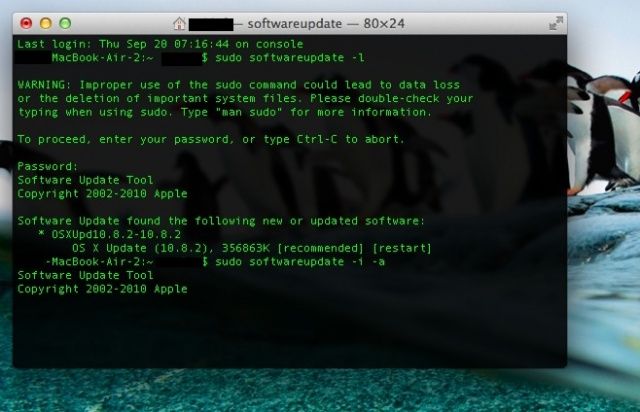
The Mac App store provides a nice, simple, graphical way to keep your Mac updated with the latest software, letting you know when system updates as well as Apple and third-party apps have a new update to be downloaded and installed.

If you don’t want to use the Mac App store, though, you can use the Terminal app along with some Terminal commands to do the same thing. When would you use this? Well, maybe when the Mac App store gets wonky, or if you’re not at the current Mac, and want to securely and remotely administer the Mac in question, that’s when.

It’s fairly simple. Here’s how.

iPhone 5 Goes On Sale In The U.S.

By

A happy iPhone 5 customer.

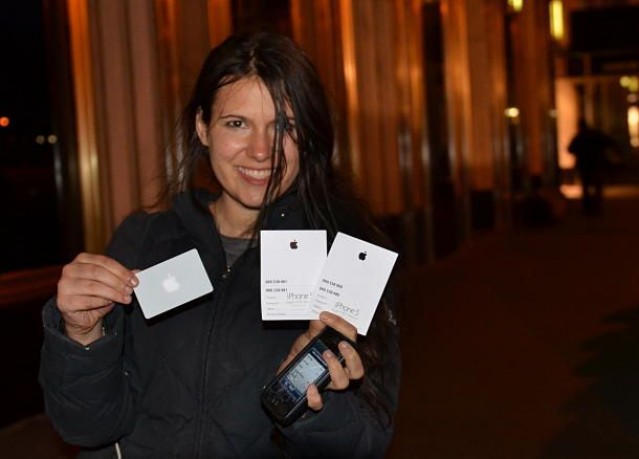
The iPhone 5 just went on sale across the East Coast of the United States. As expected, the device has spawned lengthy queues outside of Apple retail stores all over, with more than 700 people in line outside of Apple’s flagship store on Fifth Avenue in New York.

Discover The Best New And Hidden iOS 6 Features On Our All-New CultCast

By

iphone-5-cultcast-header-image.jpg

Update: Some of you have let us know that episode 32 is not showing up in iTunes yet. We’re not sure why, but if you subscribe via iTunes or Apple’s Podcasts App, it downloads fine.

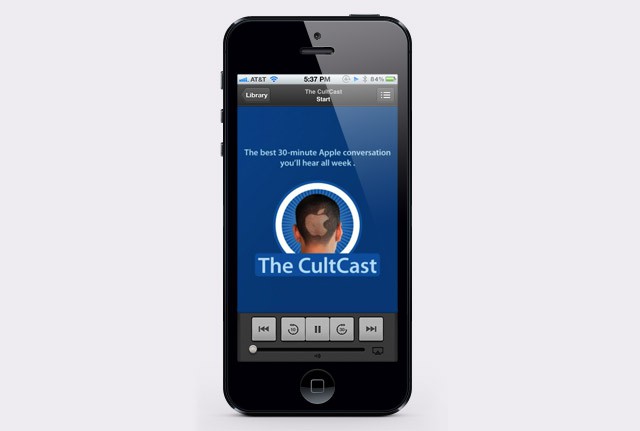
Two HUNDRED new features — that’s what Apple claims they stuffed into iOS 6, and on this week’s CultCast, we’ll tell you which of those new additions delight us, and which lesser-known features we positively love.

Then, back by popular demand, direct from our Facebook page, we answer your listener questions, and boy, are some of you guys weird imaginative.

Subscribe to The CultCast now on iTunes, or easily stream new episodes right on your iPhone or iPad with Apple’s newly updated and freshly debugged Podcasts App.

Read on for the show notes!

Lines For The iPhone 5 Already Getting Crazy, As Apple Expects Lines Tomorrow To Persist “All Day Long, Into The Evening”

By

iphone5line
Australian Apple fans waiting in line for the iPhone 5.

If you’re planning on waiting in line for an iPhone 5 tomorrow, be warned: judging by the numbers of people already waiting outside some of the big Apple Stores, the iPhone 5 launch is looking like it’s going to be an absolute zoo. There have never been this many people in line this far ahead of an official Apple product launch, ever. And Apple themselves anticipate long lines outside of their stores “all day long, into the evening.”

How To Fix iOS 6 Maps [Feature]

By

My, though, aren't these new maps purty?

A lot has been written over the last day or so about the crappy maps in iOS 6, and the fact that Apple’s new data engine doesn’t live up to its pretty new map tiles and spectacular flyover feature.

I thought exactly the same thing when I first installed a beta of iOS 6 on my iPad a month or two back. But while Apple’s maps are definitely a step back in many ways, it’s not all as bad as it seems. Not quite anyway.

But guess what? If you’re willing to use a couple extra apps until Apple fixes things, you can get everything back that you’re missing.

How Early Should You Get In Line For The iPhone 5? Between 4AM & 6AM. Here’s Why [Guide]

By

Applestoreline640

Last year, iPhone 4S pre-orders sold out in 22 hours before shipping dates slipped to 2-3 weeks. This year iPhone 5 pre-orders sold out in 1 hour before shipping moved to 2-3 weeks. Apple is going to sell iPhone 5s faster, and in more volume, than they’ve ever sold anything.

If you didn’t manage to secure a pre-order in time and are facing the prospect of standing in line at the Apple Store to get an iPhone 5 on launch day, you’re probably wondering how early you need to wake up and get in line. There’s not a clear formula on how it all works, and only Apple knows for sure how much stock they have, but the experience of the last five iPhone launches have given us some important information.

Teardown: This Is What It Looks Like Inside The iPhone 5 [Gallery]

By

IMG_5005-1024x682

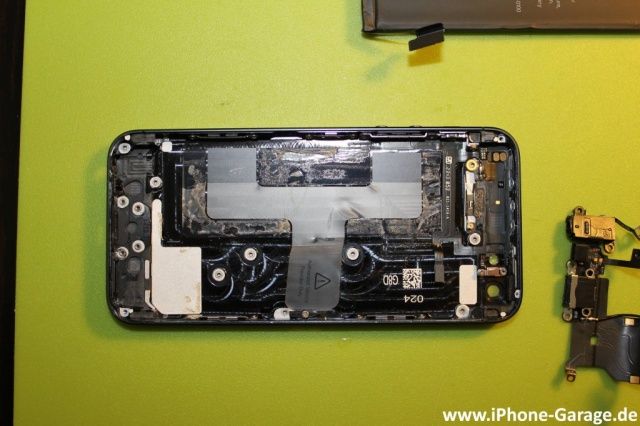
iPhone-Garage.de has the first teardown pictures of the iPhone 5, if you want to see Apple’s latest engineering and design miracle at work. Their site is being absolutely hammered now, and it keeps on going down, so we’ve put some of the best images in a gallery below the fold so you can see for yourself. iFixIt will doubtlessly have a more nuanced take, but for right now, all I can say is…man, what a tightly packed phone.

Didn’t Preorder? How To Get An iPhone 5 A.S.A.P. [Buyer’s Guide]

By

iphone5

The iPhone 5 pre-orders kicked off last Friday at 12:00 a.m. PST and it only took a few hours for delivery estimates to start to slip well into October. A little perspective – it took nearly a day (approximately 22 hours) for last year’s iPhone 4S pre-sale to begin to run out; the iPhone 5 did the same in about an hour.

Hopefully Apple will be able to keep up with the demand for the iPhone 5. But if not here are a few tips based on what we have learned from past iPhone releases that might help lessen headaches and improve your chances of getting your hands on an iPhone 5 this season.

Apple Kills Serious iPhone SMS Spoofing Flaw With iOS 6

By

iphone-sms-text-message
Another great reason to install iOS 6.

Back in August, we told you about a serious SMS security flaw with the iPhone that opened the door to text message spoofing. At the time, Apple told users they could protect themselves by using its iMessage service rather that traditional SMS messages, but the Cupertino company appears to have rectified the issue in iOS 6.

iOS 6 [Review]

By

IMG_1244

Editor’s Note: This review has been stickied to the top of the front page. There are likely new posts below it.

After months of testing, iOS 6 — the most recent major update to Apple’s mobile operating system — is now here. Featuring an entirely new Maps, a new Passbook app, some impressive new updates to Siri (who also comes to the iPad with this release), a great Do Not Disturb feature and a lot more, iOS 6 is a great refurbishment of the world’s best mobile OS. But all is not perfect, and in at least one way, iOS 6 might prove disappointing to people upgrading from iOS 5.

Over the last few months, we’ve been putting iOS 6 to the test on our iPhones and iPads. Here’s what we thought.

The Ten Killer Features Of iOS 6 [Feature]

By

IOS-6-ten-killer-features

Today, three months after its first preview at WWDC, iOS 6 has been released to the public and is now available to download via iTunes. We’ve already presented you with a comprehensive guide to everything that’s new — big and small — but which of those features really stands out?

So that you can jump into iOS 6 and quickly start using its killer new features, we’ve compiled a list of our top ten for you to check out. These may not necessarily be the biggest features Apple has introduced, but we’re confident that once you start using them, you’ll agree that they’re the best.

OS X Mountain Lion 10.8.2 Has Been Released With Facebook Integration, Battery Life Fixes & More

By

Screen Shot 2012-09-19 at 1.07.14 PM

Along with iOS 6’s release, Apple has just pushed out OS X Mountain Lion 10.8.2, adding Facebook integration to Mountain Lion as well as reportedly finally solving the battery issues people have been experiencing since OS X 10.8.0.

You can download it now through Software Update; the change list should be found here in good time, though the link is not functioning as of writing.

Main changes look to include:

• Facebook integration with Contacts, Photos, Sharing and Notification Center
• Power Nap support for late 2010 MacBook Air
• iMessages sent to your phone number now appear in Messages on your Mac
• Passbook support for Safari and Mail
• Shared Reminders lists
• FaceTime now receives calls sent to your phone number.
• Dictation now supports new languages.

Here’s the complete change list:

Every Single Feature That Is New In iOS 6 [Mega-Guide]

By

iphone5
iOS 6 drops today!

We’ve all been itching to get our hands on iOS 6 since it got its first unveiling at WWDC back in June, and today, three months after that announcement, the software finally gets its public debut. Apple’s packed a ton of new features into this update, including some major new features like Map and Passbook, plus some enhancements to existing apps and features, such as new Siri capabilities and a VIP inbox in Mail.

Apple’s been promoting some of these features on its website, but there are tons you may not have heard about. With that said, here’s your comprehensive guide to everything that’s new in iOS 6.

Apple Releases iOS 6 To The Public — Download It Now!

By

It's finally here.
It's finally here.

Apple has finally released iOS 6 to the public, more than three months after the software was first previewed at WWDC. It brings more than 200 new features to the iPhone, iPad, and iPod touch, including Apple’s brand new Maps and Passbook apps, Facebook integration, FaceTime over cellular, enhancements to Siri, Mail, and Phone, and lots, lots more.

iPad Mini Dummy Unit Gets Shown Off In Hands-On Video

By

It might be just a dummy, but it looks pretty darn impressive.

Remember that iPad mini that surfaced on Tuesday? Rather naively, I suggested it could have been the real thing, but as it turns out, it was nothing more than a dummy unit — as you can see from the video above. Admittedly, it is a rather impressive dummy unit, and it’s likely to be almost identical to the real iPad mini.

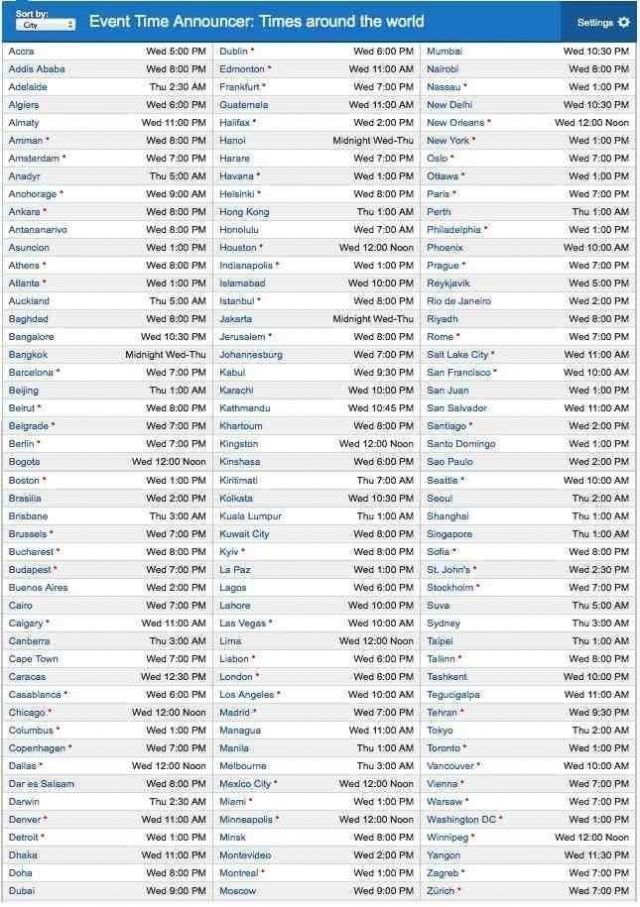
iOS 6 Expected To Arrive At 1 P.M. Eastern, 10 A.M. Pacific

By

What time will iOS 6 arrive in your country?

With iOS 6 making its public debut today, I’m sure some of you are sitting in front of iTunes with your iOS device plugged into your computer, mashing that ‘Update’ button as much as humanly possible in the hope that any time now, Apple will open the gate. Well, you may want to give your fingers a rest, because it could be a few hours yet before iOS 6 drops.