Mobile menu toggle

Top stories - page 1021

Sexy Dice Game Apps Nudge Past Censors on iTunes

By

post-13095-image-a8b8c74170c27badb46273b474427e0f-jpg
Let the Good Times Roll? The Love Dice App on iTunes

After our story on peek-a-boo apps, sexy content OK’d by Apple despite the smut ban, a reader wrote in to say we missed a whole genre: sex game apps.

(You can read a Q&A about how sex games get approved with James Miller of Trichotomy Media about their Naughty Loaded Dice app here).

Sexy dice are full-contact party games that — much like the real-world equivalent — are intended to boost lagging passion or tease friendships beyond platonic lines.

While the premise is as old as spin-the-bottle, the apps are feather caress away from violating Apple’s policy about “no inappropriate content” apps for sale on iTunes.

Surprisingly, of the half-dozen sexy dice apps available, some are deemed suitable for ages 9 and above for “infrequent/mild/mature/suggestive themes,” others are rated 17+ for “frequent/intense/mature suggestive themes.”

More details and screen shots after the jump.

Nigella Lawson Solves Insomnia With iPhone

By

nigella-20090716.jpg
Nigella in cake form, by <a href="https://commons.wikimedia.org/wiki/File:Paul_Harvey,_Nigella_Lawson.jpg">Paul Harvey</a>
Nigella in cake form, by Paul Harvey

Everyone’s favorite yummy mummy and sleb chef, Nigella Lawson, has just “succumbed” (as she puts it), and bought herself an iPhone.

To store recipes, perhaps? No.

To take photos of her magnificent meals and upload them to the net? No.

To Twitter her celebrity lifestyle to fellow celeb Twitterers? No.

No, none of these. It turns out that Nigella’s fave app is White Noise, which she uses to lull herself to sleep.

Kern Better With Typography Manual for iPhone

By

post-13044-image-eb20c1f32834c0b9dce0b0f8a90490e3-jpg

Here’s a neat little iPhone app for all you typography nerds: Typography Manual is a pocket reference book for everything you could wish to remember about fonts and typefaces.

Better still, it’s more than a reference book. It’s a toolbox as well, with a font size calculator, em calculator, conversion tables for switching inches and millimetres into points and picas, and a list of HTML character codes. If none of those things mean a thing to you, don’t buy Typography Manual. But if they do, you might find it hard to resist. It’s only five bucks.

My favorite review is the last one on the testimonials page: “One of only a handful of programs I’ve seen on the iPhone that hyphenate properly.” (And yes, I know I’m using straight quote marks there. I know, I know.)

How MacBook Pro Converted A Prominent Apple Hater

By

post-13027-image-afde91b764145e7cc48c85d7dfa464f0-jpg
John C. Dvorak

Image credit: Randy Stewart

And these children that you spit on
As they try to change their worlds
Are immune to your consultations
They’re quite aware of what they’re going through.
– David Bowie

One day, people may point to an article published Monday at PCMag.com (perhaps the preeminent Windows-foucused tech magazine around) by long-time Apple-baiting columnist John C. Dvorak, as a signal for the storming of Microsoft’s figurative Bastille.

“If I was going to buy a new laptop this minute, a MacBook Pro is probably what I’d get,” are words almost no tech watcher of the past 20 years would ever figure to come from Dvorak, the smart, engaging veteran columnist who has taken over the years a nearly perverse glee in stirring up the bee hive of Apple loyalists in tech journalism.

But that’s exactly what Dvorak had to say after seeing first-hand “all these whiz-bang features” of his son’s brand-new MacBook Pro that, he said, “make me realize that I have fallen behind.”

But don’t go thinking Dvorak has fully consumed the kool-aid or that his enmity for Apple will abate completely anytime soon. The real reason he’s kindly disposed to an Apple product at this point, aside from “that hard aluminum unibody that makes the thing feel like a rock,” is a piece of software his son required, DEVONthink, which organizes and sorts PDF files into manageable database blocks – and has no Windows-based counterpart. “It’s about as close to a killer Apple app as anything I’ve seen since VisiCalc in the late ’70s,” he gushed.

Of course no Dvorak piece would be complete without a pointed jab at something Apple, and he dutifully reported his son’s experience at the Apple Store as something akin to “a car dealership in the ’70s, with layers of various salespeople, each trying to screw you.”

“I actually think that the Apple Stores are barriers to sales, and people only buy Macs because the machines have clearly moved ahead in genuine usefulness,” he wrote, saying, “overall, it’s a pathetic indictment of the entire PC scene.”

Well, perhaps it’s a reach to tar the entire PC scene with the same brush, but clearly change is in the air and more and more people such as Dvorak’s kid are coming around to just how far Apple machines have moved ahead.

It’s at least a bright sign that someone like Dvorak has finally noticed.

Site Gives Away App Promo Codes, a Resource for Devs and Users Alike

By

post-13013-image-e023fc44fd017910a0b88cca9a35a68b-jpg

If you’re looking for an interesting portal into the iTunes App Store’s 65,000+ titles with as little risk as possible, www.appgiveaway.com may be a resource worth checking out.

The website, which launched this spring and is gaining traffic steadily, posts descriptions of 5 – 8 apps per day in different categories (games, entertainment, utilities, business, etc.) and gives promo codes away randomly to users who register and indicate their interest in particular apps.

The site was originally conceived as a marketing vehicle for app developers, with the enticement for iPhone and iPod Touch users who like the idea of possibly getting a paid app for free.

“We seek out developers and they also find us,” said Al Lijee, an AppGiveAway spokesman, adding, “Developers have been kind and posted us in forums and are linking back to us from their websites.”

Posted apps currently get between 40 – 70 people registering for promo giveaways, Lijee told Cult of Mac, and the site gives away around 30 codes for each app it features.

Cult of Mac Favorite: Daisy Disk Makes Disk Forensics Fun

By

post-13000-image-b1524f2c22612dc2ead870a836f78999-jpg
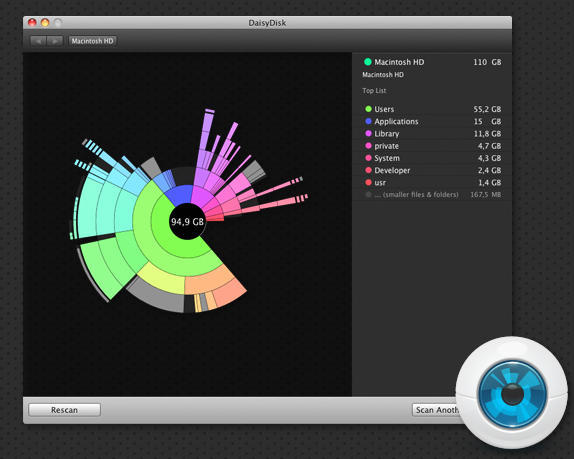
Daisy Disk has a super awesome UI

What it is: Daisy Disk is Mac utility software that, sadly works only on machines running OS 10.5 and later, because it’s the kind of thing that could make you want to investigate your hard disk daily.

Why it’s cool: The interface is just plain awesome. Daisy Disk scans any mounted disk and displays it on a beautiful sunburst map, where segments mean files and folders, and are displayed proportionally to their sizes.

The map is easy to read and navigate and lets you quickly preview any file and reveal it in Finder to delete.

It’s essentially like running the Mac’s built-in disk utility on your volume, but where’s the fun in that?

Where to get it: Download a free 15 day trial version or buy it outright for $19.95 from the secure online Daisy Disk store.

Screenshots after the jump.

[Thanks mustardhamsters]

Vintage Mac Jewelry Brings New Life to Dead Computers

By

post-12975-image-de87e8be272b2aae42ddc6a0df70d729-jpg

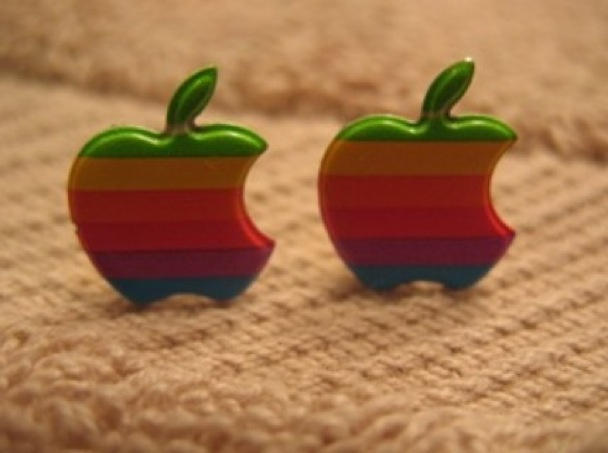
Macs continue to live on, long after they’re on the scrap heap – these vintage Apple logo earrings or pin are made by a woman whose family runs an electronic scrap business.

She plucked little plastic Apple logos (like the ones decorating the front of the 128K, though other Apple products had the rainbow logo, too) from devices bound for the dump.

This isn’t the first time we’ve run across ways to adorn yourself with Macs — including silver power button cuff links or earrings or, similarly pricey rings and pendants from keyboards — the ones above go for a modest price of $13.99 (earrings) or $8.99 (pin).

What’s the verdict: geek chic or unwearable e-waste?

Via Etsy

Big Problems With Little Mophie Battery Pack?

By

post-12908-image-d8e1151e6a026861621718e661e3c99c-jpg

After my post yearning for more battery life out of my iPhone 3GS and hoping that the Mophie Juice Pack Air might hold the solutions to all of problems, a reader, who shall remain anonymous, tipped me off to some unresolved problems with the current generation fo the combination iPhone case/battery pack.

At left is one of two screenshots he sent me purporting to show the Juice Pack Air refusing to provide power to his iPhone (which kind of defeats its purpose). He bought one, was told it was defective, was given a replacement, and found it had the same troubles.

Here’s his explanation:

“It only happens if you discharge your iPhone to 20% warning. Then allow the Mophie to charge your iPhone 3GS until its depleted. Once it’s at zero charge the errors happen in the iPhone 3GS every time. I think those errors even crashed the phone once, but this is unconfirmed but feel its right since it was left to charge, placed in an outer mesh pocket of a laptop bag and found unresponsive later until removed from the Mophie and hard reset. Sigh.”

Anyone else seen these issues? I’ll admit, it has me back in a wait-and-see mode again…

Cult of Mac Favorite: Pix Remix iPhone App Livens Up Your Photos

By

post-12735-image-1922328faad2a824057f0280070ad6c9-jpg
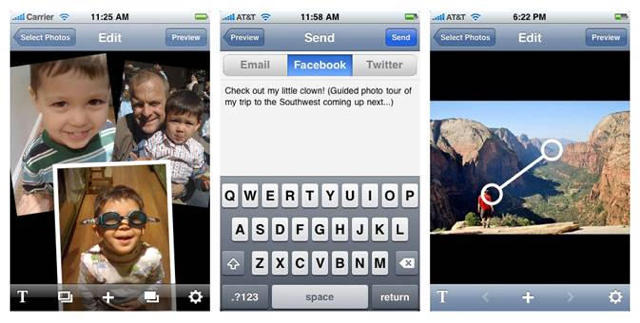
Make easy photo collages & slideshows with Pix Remix

What it is: Pix Remix is a new iPhone app from Bay Area-based Jump Associates and Originate Labs that lets you turn photos – taken with or stored on your iPhone – into slideshows, collages, and interesting pan & zoom presentations — and makes it incredibly easy and intuitive to share them in email or post them to Twitter and Facebook from right within the app.

Why it’s cool: Impressive for an initial release, Pix Remix is loaded with effective tools for personalizing your photo shows, with built-in transitions including fade/dissolve, push, drop and spin out; and the collage function makes it easy to drag, resize and bring photos to the front or back. The pan and zoom function lets you become an instant documentarian, guiding your viewers’ eyes from one spot to another on individual pictures, zooming in to a special detail area. Text can be added to give photos captions or tell a story about your show.

Once you’ve got your photo show together, Pix Remix makes it easy to share in email or to post to your Twitter page or your Facebook profile. Email recipients have the option of viewing your work on a web page or within the Pix Remix app on their iPhone; updates to your Twitter status automatically append a bit.ly url that sends viewers to the Pix Remix web page for your show; shows can be posted directly to your Facebook profile, where your contacts can view your creations right within Facebook, without ever having to leave the site.

Pix Remix is so intuitive and easy to use, I made my first collage and sent it to myself in email while I sat on the porcelain throne in my office during my morning constitutional today!

Where to get it: Pix Remix is available now on the iTunes App Store; it sells for $2.99.

Important Disclosure: Cult of Mac contributor Pete Mortensen is the communications lead at Jump Associates and works in the firm’s growth strategy consulting business. He was involved in the original brainstorming sessions that led to the development of Pix Remix but was in no way affiliated with the writing of this product review, nor did his association with Cult of Mac influence the author’s use of the application or his conclusions regarding its quality or value.

iPhone Dropped in Swimming Pool Is Still Going Strong

By

post-12768-image-6c6ae5162d61f56f6f78dabf88c531b0-jpg

khena_kara_t

Two weeks after an iPhone 3GS was dropped in a swimming pool while recording video, the phone is still frickin’ working says its owner.

“I’m talking to you on it now,” says Khena Kara, the iPhone’s owner, speaking from his home in Nashville, TN. “It’s still going strong.”

Kara’s iPhone 3GS gained internet fame after Kara accidentally dropped it in a swimming pool while recording a video. The iPhone kept recording as it sank to the bottom, and as he fished it out. “It still frickin’ works!” he says in surprise as he pulls the iPhone from the pool. Kara posted the footage to YouTube, and it spread fast on blogs and Twitter. It has now been watched more that 500,000 times.

But many questioned the video’s authenticity. Most notably, Mashable wondered whether it was real.

“Yes, it’s real,” says Kara of the video. “It was the pool in my subdivision.”

Above is a video still of Kara taken from the iPhone video right after it was fished from the pool. And below it is a new picture of Kara taken with the same iPhone.

The new picture’s metadata appears to back up Kara’s story.

Copycats Target $30 Apple Earbuds, And They’re Near Perfect

By

post-12465-image-8c66354008020d61ea69054e78f38a13-jpg
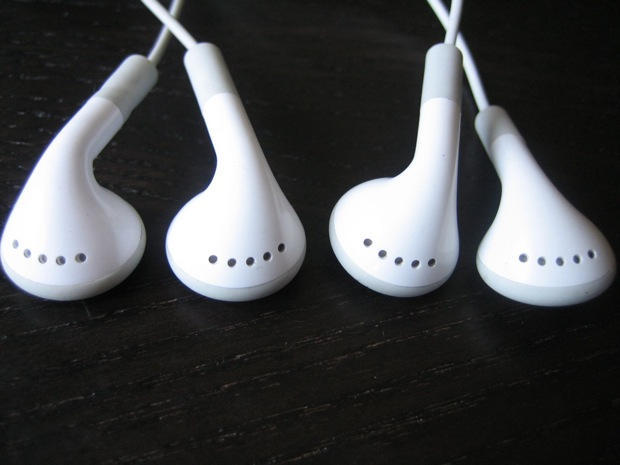
One of these iPhone headsets is from Apple; the other is a knockoff.

Spot the difference? One of these is a $30 iPhone Stereo Headset from Apple. The other is a $14 knockoff from the Philippines.

Thing is, the $14 copycat is as almost good as the original. It’s nearly physically indistinguishable. The sound is exceptionally good. And the microphone/remote works the same as it does on the genuine article.

Even the packaging is remarkably realistic.

Except there’s a few things that are off — a few minor details that give them away as fakes. Plus, they broke down after a week.

Apple Receives Middling Marks In GreenPeace Green Computing Survey

By

post-12445-image-a0d566179a817a854fc4cd2da37eedf8-jpg
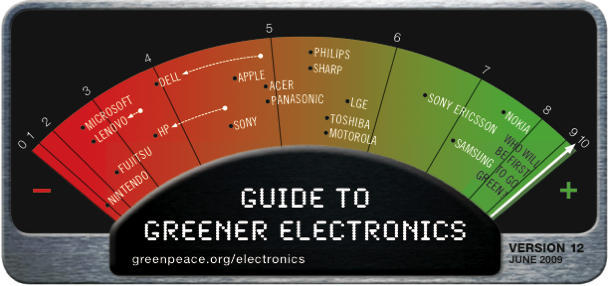
Despite touting its green credentials, Apple is ranked fairly low in Greenpeace's latest survey of green electronics.

Despite touting its green credentials in new TV ads, Apple is ranked fairly low in Greenpeace’s latest survey of green electronics.

Greenpeace’s quarterly green scorecard was released on Wednesday, and while Apple got high marks for reducing toxic chemicals, it got low marks for not supporting global recycling initiatives or using more recycled plastics.

Overall, Apple scored 4.7 out of 10, putting it in the lower half of a pack of 18 electronics manufacturers. Nokia came top with a score of 7.45, and Nintendo came bottom with a score of 1.

Apple has been advertising the green credentials of its new MacBook line in TV ads — proclaiming them the greenest laptops ever.

Greenpeace’s 12th Guide to Greener Electronics ranks tech companies on three main criteria: reducing overall environmental impact, eliminating toxic chemicals, and recycling efforts.

Marvel At the Ingenuity of the Chinese iPhoney, iPhone Knockoffs Now Near Perfect

By

post-12286-image-f0ae61b3f8639097364e0b834cf6ead4-jpg
Fake iPhones are getting much better. This iPhoney is almost identical to the genuine article, until it's booted up. It was bought by Steven Fernandeez of Toronto. CC-licensed picture by Steven Fernandez.

Counterfeit iPhones have come a long way. They’re now almost identical to original iPhones, fooling bargain hunters on sites like eBay.

Look at the video below from Dana Stibolt, founder of MacMedics, who was given a fake iPhone bought on the auction site.

At first glance, it’s almost identical to current models, from the touchscreen to the volume switches on the side and the dock connector on the bottom.

“It looks EXACTLY like an iPhone,” says Stibolt. “But it does not work very well, and when it does work, it is very slow.”

Last year, knockoff iPhones were easy to spot. They were thicker, bulkier and often had extra buttons or keyboards.

Get David Hockney Mini Masterpieces for Your iPhone

By

post-12382-image-9730f389e246f1d7dbb71367e42a0b2e-jpg
Image © David Hockney

In a move that’s a bit like thumbing his brush at the lawyers who sent a nastygram when we mistakenly reported David Hockney’s gallery artworks were created on his iPhone, the artist is offering free downloads of three wallpapers made on his device.

The unsigned trio of flower paintings from the 72-year-old pop artist maestro — painted with the Brushes app on his iPhone (it’s revealed  for certain this time) — do sort of look like something you could  do yourself.

Turning on iPhone Tethering Even Easier Than We Thought

By

post-12341-image-e4a0f903b90662b7e07f8016e4555d97-jpg

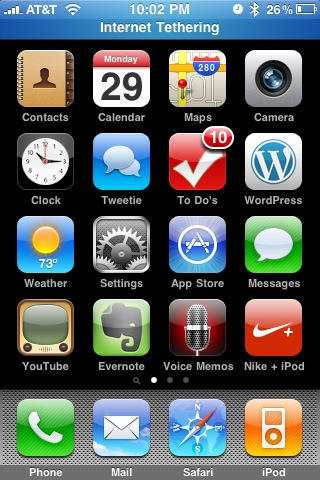
Remember when Lonnie told you about an easy, fool-proof way to turn on iPhone tethering in the US? Well, there’s a way, way easier method, and it’s much, much more foolproof.

Simply point Mobile Safari to https://help.benm.at, select your country, download the profile for your carrier, and install. The settings menu will add an Internet Tethering toggle in the Network section. Then just pair with your computer over Bluetooth or plug in via USB  and go. No restart required. It’s really that easy.

Performance has been rock-solid in my experience, both for tethering Mac and Windows machines. Performance is terrible on EDGE and very nice on 3G, with battery life not noticeably worse than just browsing on Safari. And maybe a little bitter once the display goes to sleep. But I’m not running BitTorrent through the thing, either.

AT&T should have a killer offering on their hands once this actually ships. It would also be nice if AT&T tweaks the interface so you can turn on tethering without pulling your phone out of your pocket. Honestly, the only complaint I have. Anyone tried it outside the US? Really seems like something that should fly under the radar so long as you’re not downloading the whole Internet over it…

And, it goes without saying, this is use at your own risk and Apple will laugh at you if you brick your phone.

(And yes, I know we’re late, but I never recommend running something risky on your hardware if I haven’t done it myself. This is as close to safe as it gets.)

Richard Lai via Engadget

iPhone 3GS Dropped In Pool, Records Video Underwater

By

post-12270-image-1b9d15d416f4ddd5d1ef9615e6603e0f-jpg
Is the iPhone 3GS waterproof? This one kept recording, even after its owner dropped it in a swimming pool.

A Parisian iPhone owner was videoing friends in a backyard swimming pool when he accidentally dropped it in the water. Amazingly, the iPhone kept recording and was working fine when he fished it out.

“It still frickin’ works,” he says amazed into the still-recording camera. Watch the video of the entire episode below.

And it still works fine, says the owner. “Phone still working fine with no issues whatsoever,” he says in the comments to the video. “I’m probably the luckiest guy alive!!”

Although the iPhone 3GS is an exceptionally well-made piece of hardware, it is NOT waterproof. This iPhone had a rubbery condom cover on, which probably helped it survive the dip in the pool.

Tracking Steve Jobs’s Private Jet Over the Internet

By

post-12048-image-3aec8954dd8845e49885db60d9412c2e-jpg
Steve Jobs's private Gulfstream jet on the runway at TK. Photos reproduced with the kind permission of Rich Snyder.

Jobs has blocked the FAA from officially tracking his jet’s flights (a routine request; some simple paperwork with the National Business Aviation Association). But his 15-seater Gulfstream 5 has a distinctive tail number — N2N — that makes it easy for aviation buffs to track its movements on the Internet.

And while it looks like he flew to Memphis on March 23, possibly for a liver transplant — as CNBC claims to have independently confirmed — his jet made many more flights in April.

Review: iPhone 3G S — Rob Old Ladies to Get It

By

post-11972-image-bac7c75ad85d77740dc406a2f35c02fb-jpg

There’s plenty of naysayers pooh poohing the iPhone 3G S. It’s a minor upgrade, they say. Not worth the money, especially for 3G owners.

But after buying one on Friday morning and playing with it all day, I can say with 100% certainty that that’s complete and utter rubbish.

The 3G S is a major step up from the iPhone 3G, worth every penny. Sell the car; sell the house; sell the kids: you must have this phone.

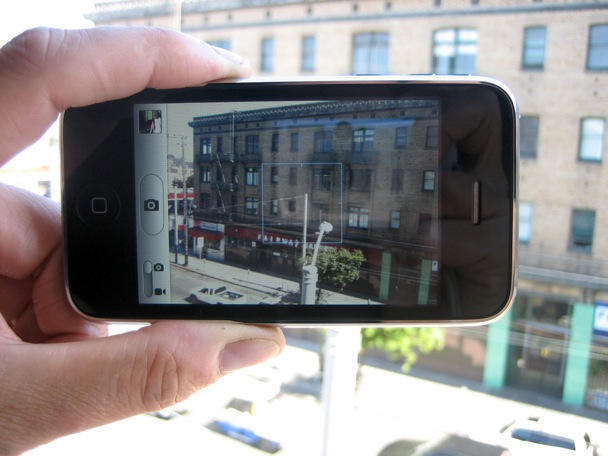
The full review after the jump, plus plenty of test photos and video shot in sunny San Francisco.

How To: Make a Profit Upgrading To The iPhone 3G S

By

post-11786-image-17f65d674d33c406ec0fc94f59628101-jpg

Before you rush out and buy that brand new iPhone 3G S, consider the suggestions here. For some iPhone 3G owners, the 3G S may be unnecessary. For those who simply cannot wait read on, because there are ways to minimize the overall cost of the upgrade. In fact, you may even turn a profit.

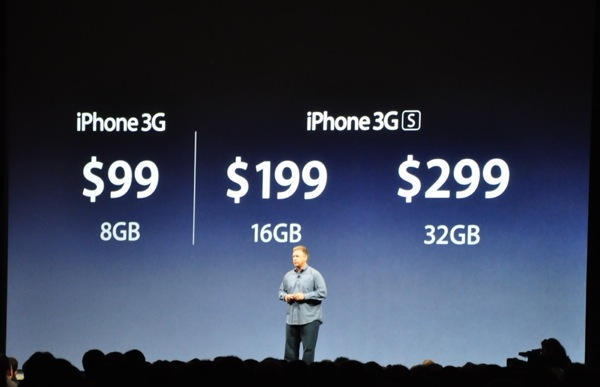
The iPhone 3G S will be subsidized by AT&T for qualified customers ($199 for the 16 GB model and $299 for the 32 GB model). Unfortunately, if you currently own an iPhone 3G you are not a qualified customer because you entered into a two-year contract with AT&T last year. Unsubsidized, the iPhone 3G S is priced at an exorbitant $599 and $699 (plus the $18 setup fee).

AT&T is probably not going to alter its stance on the matter because, like it or not, offering subsidized phones only to new customers is standard industry practice. If you are an existing iPhone 3G owner, and do not have money to burn, consider all your options after the jump.

Review: 2009 MacBook Pro 13-Inch Is Freakin Awesome

By

post-11850-image-6f340ce57c2858f8d0de129fbe266039-jpg

Last fall I bought a 13-inch unibody MacBook, and I fell in love. For the last seven months I’ve been head-over-heels with the machine. But now there’s a new love in my life: a brand new 13-inch MacBook Pro, which is shaping up to be the perfect laptop.

Released last week, Apple’s MacBook Pro 13″ is an amazing machine. It’s priced as a starter, but it’s now truly a “Pro” laptop. It’s worthy of real work. It adds many of the “Pro” features previously reserved for its higher-end siblings, but costs hundreds of dollars less.

It now has an awesome, all-day battery; a bright, energy-sipping screen; and a backlit keyboard. Firewire is back, and there’s an indispensible SD Card slot. And yet it starts at just $1,200. For a computer of this quality and power, that’s a steal.

Full review after the jump, including real-world benchmarks and tons of pics.

MacBook 13″ Teardown Reveals Battery Is User Upgradeable, And It’s Dead Easy

By

cult_logo_featured_image_missing_default1920x1080

sogf2cf5knpjwseflarge

The “sealed” battery in Apple’s new 13-inch MacBook Pro is easily replaced with standard screwdrivers, a teardown by iFixit shows.

The MacBook battery is not supposed to be changed by the user. Sealed inside the case, Apple encourages customers to pay Apple $130 to change the battery and dispose of the old one.

However, the battery is easily accessed with a standard Phillips screwdriver, and the battery removed with a tri-wing screwdriver, iFixit found when dissassmbling the device on Tuesday.

In addition, iFixit notes that the single audio jack (see post below) is innapropriate for a “Pro” machine. The jack supports analog and digital audio-out, and analog audio-in, but not digital audio-in.

“If you need digital audio-in, this is not the machine for you.” said iFixit CEO Kyle Wiens in an email.

Wiens also said the MBP’s new SD card slot is “rather unimaginative.”

“Half the card hangs outside the computer,” said Wiens. “Apparently, Apple couldn’t free up enough space for a slot that would make the card completely captive.”

Wiens notes the battery is beefier (360 grams, about 60 grams heavier than the old one), but is rated 60 Watt-hours, compared to the older battery’s 45 W-h. Apple claims the battery will last for 7 hours. The previous MacBook’s battery was rated 5 hours (yeah, right!)

More details and pictures from iFixit after the jump.

Design Problems With The New 13-inch MacBook Pro? UPDATED

By

post-11647-image-3a5397211df6dc21a2f1246110430e53-jpg

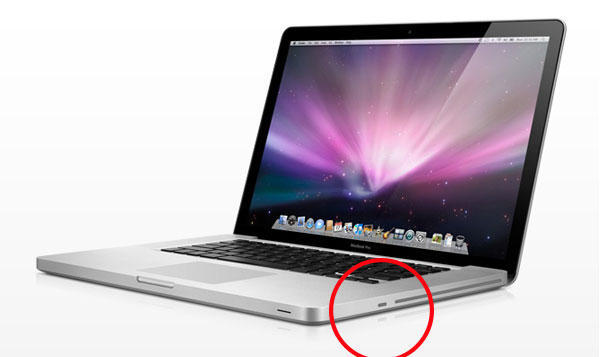
UPDATE: The security lock on this device does not block the SuperDrive. See our review

Eagle-eyed reader Ronald Kang thinks the new 13-inch MacBook Pro may have some design problems.

Poring over pictures of the machine on Apple’s website, Kang is worried about two things: the Kensington Security Slot blocking the Superdrive; and the single audio I/O jack, which makes the machine unsuitable for “Pro” audio recording.