Mobile menu toggle

Search results for: shortcuts

Screens 2 Takes VNC To A Whole New Level With iCloud, AirPlay Siri And More

By

screens-for-ios-ipad-screenshot-004

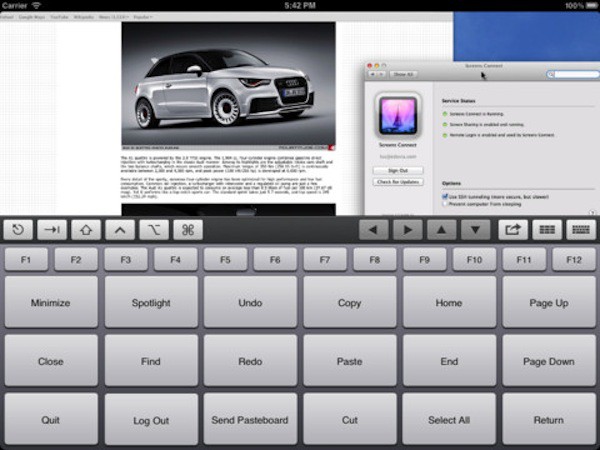
Screens is one of many VNC apps available for the iPad and iPhone. Screens 2.0, which was released today, takes the concept of remote controlling a Mac or PC to another level. The update offers some very nifty features to the two year old app including integration with iCloud Siri, and AirPlay.

Screens isn’t one of the cheapest VNC solutions for iOS – it has a price tag of $19.99. The software backs up its somewhat steep cost by delivering a great user experience.

Skip Tunes: A Simple Way To Control iTunes Or Spotify From Your Mac’s Menu Bar [Review]

By

Screen Shot 2012-02-14 at 12.31.57 PM

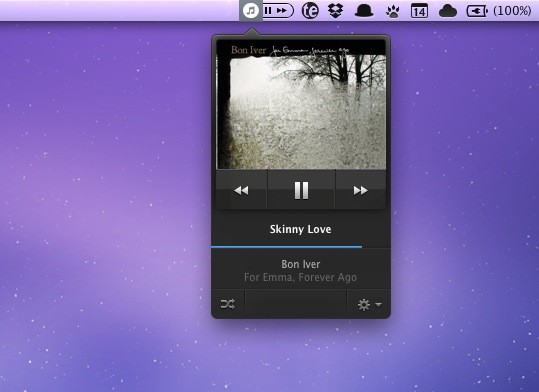
I’m always looking for ways to enhance my music listening experience on the Mac. For the last several months I’ve been using Bowtie to control iTunes with keyboard shortcuts, and Ecoute is another great alternative for managing iTunes in a minimal, simplified way.

When the developers of Skip Tunes contacted me, I was intrigued by the app’s menu bar interface. For quick access to simple music playback controls, it doesn’t get much better than this.

Make The Volume Ultra-Quiet [OS X Tips]

By

quiet

Here’s how to access a secret setting to make your Mac’s volume very quiet indeed—ideal if you’re trying to listen to something in a very quiet room where somebody else is working or sleeping, for example. As a tip this can be filed under the category, “Cool! I never knew that!”.

The Best From Macworld’s RapidFire Event [Macworld / iWorld 2012]

By

MwiW

SAN FRANCISCO, MACWORLD/IWORLD 2012 — One of the closing events from the first day at Macworld / iWorld was the RapidFire session. If you wanted to learn about one cool thing about a variety of Apple-related stuff, it was the place to be.

Each presenter delivered a quick-paced talk that offered information, tips and tricks that shed some light on a little known or understood piece of software or hardware. The scope of the talks ranged from unconventional uses of Photo Booth to how to fix some of your Apple devices on your own, but here were the ones that I felt were the best of the bunch.

Hands On With the Uber-Useful Launch Center, An Automator For iOS [Macworld 2012]

By

post-142837-image-bbdac9ff890764cb492c5e1d7fe14faa-jpg

Here’s a quick look at AppCubby’s $0.99 Launch Center app, a very cool and useful app launcher that’s like Automator for iOS.

The app allows you to set up all kinds of actions and schedule them. Version 1.1 adds actions to iOS’s Notification Center. Take checking your Facebook messages, for example. This normally takes several steps: searching for the Facebook app, launching it and finding the messages tab. In Launch Center, you can set it up to check your messages every morning from just one finger-tap on the Notifications screen.

The app can be configured to work with a ton of apps and perform pretty complex actions, like calling your mom every week or adjusting the screen brightness down every night. Today’s update has prope and is already in the App Store’s Top 100. Here’s the app’s creator, David Barnard, showing how it works.

How To Make iPhone Videos That Don’t Suck [Macworld / iWorld 2012]

By

iphone_video

SAN FRANCISCO, MACWORLD/IWORLD 2012 — If your iPhone videos are so lame that even your loved ones won’t watch them anymore, we’ve got some advice for you.

Cult of Mac talked to Matt Dessner, co-founder of the Original iPhone Film Festival (OIFF),  about choosing a subject, keeping it steady, getting enough b-roll and what he calls the Golden Tip of Editing.

The OIFF is about to announce 2012 winners here; with a little practice you might win next year’s competition and a MacBook Air.