The BBC’s technology correspondent Rory Cellan-Jones wanted to find out which smartphone was the best listener, so he conducted a quick test of his own.
He spoke the same text into a Siri-equipped iPhone 4S and a Samsung Galaxy Tab, and compared the transcribed results.
The Guardian‘s new iPad app is a triumph. It’s an excellent daily newspaper in tablet form, designed to make the most of the tablet format without over-indulging in it.
I confess: when I first looked at Apple’s new Newsstand app when iOS5 was released last week, I felt nonplussed. There didn’t seem to be any content in the store that I’d want to subscribe to. I became one of the many people who tried to find ways to hide the Newsstand icon altogether.
Although they missed the chance to picket his funeral and memorial service, the Westboro Baptist Church still plans to stage two hate-mongering protests for Steve Jobs in Cupertino on October 19.
The Kansas-based congregation, infamous for picketing the burials of slain soldiers and its “God Hates Fags” slogan, plans to picket outside Apple headquarters during the employee celebration of Jobs and at a local high school.
In a rambling online statement, the church cited the immorality of “some nerdy people possessing ONLY what God loaned them for a very short while, have stolen God’s glory and given it to themselves.”
Earlier, the church had announced plans to picket Jobs’ funeral on October 6.
Celebrities and industry leaders have come out of the woodworks over the last couple of weeks to pay tribute to Apple co-founder Steve Jobs. His passing has spurred dozens of anecdotes from those that have come into contact with Jobs throughout the years.
Famous singer/songwriter John Mayer is known for loving Apple products. He has taken the stage at Macworld multiple times to help introduce products like Garageband. As it turns out, Mayer developed a personal friendship with Jobs years ago.
Well if you had any doubts about this past weekends iPhone 4S sales you can rest easy it was a blockbuster weekend for Apple and all the carriers. Millions of customers are out trying all the new features in iOS 5, on their iPhone 4S and in iCloud. It also looks like a lot of you are trying to find your friends with Apple’s new Find My Friends app and related services. Well it looks like this morning that the service is experiencing activation problems.
If you like your bleepy music with a healthy dose of retro, you might like to know that right now on the iOS Store you can grab a copy of the latest virtual synthesizer from electronic music pioneers Moog – for just 99 cents.
Many of us are convinced our computers have minds of their own. In this bizarre case of iTunes moving music files around, there may well be a ghost in the machine:
Ok. I got one for you that has stumped EVERYONE that I have proposed this problem to, including Mac Geniuses and numerous techie friends.
iTunes keeps all music organized inside the Music folder in the Home folder. For the last several months, periodically when I add a new song, or change something regarding songs already in the library (add artwork, adjust genre, etc) SOME songs will relocate themselves to Macintosh HD >Music >iTunes >iTunes Music [outside the Home folder].
Since Steve Jobs passed away on October 5, we’ve seen a stack of awesome of tribute images created from MacBook parts, Minecraft building blocks, and even salt. However, this has to be one of my favorite: a portrait of Steve created with 4,001 Post-it notes.
If you are an AT&T Customer and you upgraded to an iPhone 4S this weekend you might want to check your account settings. Something fishy is going on with customer messaging plans. I got wind of it from a friend who is currently traveling in Alaska.
Apparently if you previously had Messaging Unlimited with Mobile to Any Mobile Calling on your old phone you’ll find out like I did that AT&T switched you to the Messaging Unlimited plan. That plan does not including the Any Mobile to Mobile calling feature.
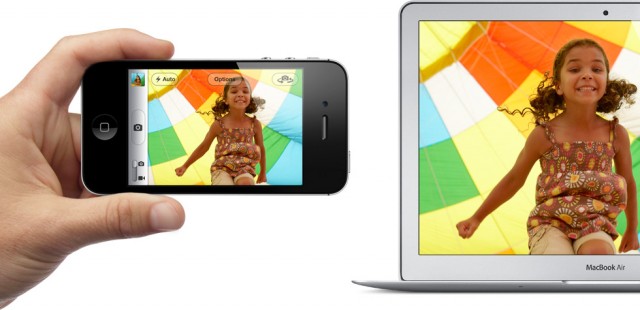
Photo Stream is a feature in iCloud that allows Apple users to wirelessly sync photos and video between multiple devices. The service lets you take a picture on your iPhone or iPad 2 running iOS 5 and have it uploaded automatically in the background to your Photo Stream folder. That folder is then made available on all of your devices that are logged into iCloud, including iPhoto on your Mac.
There currently isn’t a way to individually delete photos from Photo Stream, but there is a way to completely reset Photo Stream and start over.