Mobile menu toggle

Mac OS X Lion Adds Recovery Partition Support [Gallery]

By

LionRecovery1

Mac OS X Lion recovery partition.

Apple’s new Mac OS X Lion adds support for a recovery partition as part of the OS installation and while this may not seem important to most users — it is.  Apple is making the tools and resources available to you that will allow you to perform disk repair and recoveries on your mobile Mac while on the road or on your desktop Mac at home. The utilities will be readily available and therefore you won’t have to go hunting for that always elusive DVD or USB stick.

This is because the new partition labeled Recovery HD acts just like the DVDs and USB sticks that Apple has traditionally shipped with its computers. You simply press and hold the Option key after starting your Mac. You are eventually presented with a list of the available boot partitions.

You use the arrow keys to select the boot drive and press Return. The system will then boot from the selected disk. In this instance you would choose the Recovery HD disk to access the Mac OS X Lion recovery partition.

It looks like Apple is going to have another blockbuster OS release later this year. I don’t know about you, but I cannot wait until Lion hits store shelves (virtual or otherwise).

Check out more photos after the read link.

First Look: Lion’s New Mail Client Is So Good [Video]

By

post-83707-image-9c840805d5cc72ca6ae0b75965aea9e1-jpg

https://www.youtube.com/watch?v=cX928KC8jiA

Here’s a quick video tour of the new Mail client in OS X Lion. It’s got a three-pane view, nicely threaded “Conversations,” and a goes full screen. It’s very good. Mail alone is a good reason to upgrade to Lion.

Cult of Mac OS X 10.7 Lion Screencast and Q&A Starts At 12PM EST/3PM PST

By

cult_logo_featured_image_missing_default1920x1080

Curious about the changes in OS X Lion? Starting at noon PST or 3pm EST, our own Jose Guitierrez will be doing a live screencast of OS X Lion, in which he’ll field questions, demonstrate features and even test software suggested to him by Cult of Mac’s readers.

If you’d like to take part, see Lion in action and ask Jose some questions, the screencast is embedded above, or you can go to the Livestream directly by clicking here.

According to Jose, the show will last at least an hour, but will probably last until he’s fielded all questions. Why not join us and see Lion in all its glory on this slow Friday afternoon?

Shareholders Report: Nearly 4.8M Votes Against Keeping Jobs on Apple Board

By

An Apple shareholders' proposal presses for CEO succession plan transparency.

Maybe its a need for Silicon Valley to compete with the Oscar ceremony this weekend in Los Angeles. Maybe its just a slow news day. For whatever the reason, people have gone through Apple’s SEC Form 8-K and discovered almost 4.8 million votes against keeping Steve Jobs on the Cupertino, Calif. company’s board of directors.

Although the Apple co-founder kept his chair, a relative unknown outvoted Jobs as perhaps the most popular board member. Despite not appearing all in black or unveiling some of the sexiest technology, Ronald D. Sugar garnered the most share votes for re-election to the Apple board of directors.

Diagnose Your Skin Woes via iPad at Clinique Counters

By

@inger klekacz, http://www.flickr.com/photos/ingernet/74132774/


Head to a department store and instead of confessing the heartbreak of your breakouts or the consternation about those new wrinkles to an immaculate sales person, you can find that elusive elixir to solve your skin troubles using an iPad.

Clinique is rolling out an iPad “self-guided skin care diagnostic tool” at select counters in the US later this month.

Clinique, a dermatologist-created line owned by Estée Lauder, has always tried to project a “scientific” image, with sales women wearing white lab coats. I seem to remember a 1.0 analog diagnostic tool — a counter device that you could slide parameters for your skin type to suggest products (the result – you always needed more products.

This is the latest instance of companies putting iPads into customer hands – from menus to store playthings – they just might end up replacing a few sales people.

Should Using Find My iPhone App Result in Arrests or Just Returned Gadgets?

By

Picture-11-e1295369365411


We do a lot of police blotter reading around here. (We’re old-school like that). So we’ve noticed a divide in cases involving iPhones and iPads that go missing and then get found with Apple’s Find my iPhone app.

Within a month of launching the service, police in San Jose used it tracked down a pair of thieves who broke into the house of an Apple employee. Busted. Arrested. Makes sense.

But what if you left your iPad on a train? Or the roof of your car? Or on an airplane? Or in a shopping cart?

No arrests were made in any of these recent cases.

Back Up iPhone W/Out Computer With Iomega’s SuperHero Dock [Review]

By

P1110059

Lucky me. I got the husband’s cast-off iPhone 3GS. But only after my old Razor phone fell in a lake. Although I do love the iPhone (who wouldn’t?), I am often forgetful and lazy with it. Meaning that I never charge it and never download photos to the computer.

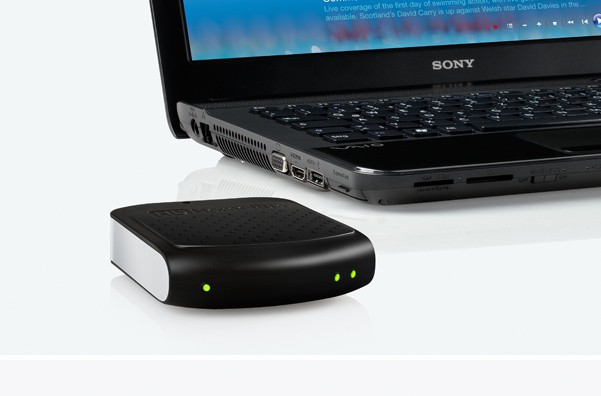
This is where the Iomega’s SuperHero Backup and Charger for iPhone saves the day. This small portable dock charges your iPhone and downloads your data simultaneously.

So when I inevitably drop my iPhone in the garbage disposal, at least I won’t lose my address book.

Analysts React to Apple’s Update of MacBook Line

By

macbook_lineup

Analysts began to weigh-in on the import of Apple’s update of the MacBook line. Along with more powerful processors and the souped-up Thunderbolt connection, the Cupertino, Calif. company may also get a boost – on Wall Street.

“Every incremental 100,000 portable Mac units would add about two cents per share in EPS in [the second quarter of the fiscal year], assuming a slightly lower gross margin,” UBS analyst Maynard Um wrote. There are six weeks remaining in the second quarter.

Sparrow Lite Now Available On The Mac App Store

By

tumblr_lh62awxU1m1qbptnpo1_500

We loved Sparrow for Mac when we reviewed it a couple of weeks ago for treating your inbox more like Twitter, describing it as “the equivalent of skipping stones, not piloting a submarine.”

Much as we loved it, though, that approach to email isn’t for everyone, especially power users. If you’d like to give Sparrow a try without paying, though, you now can: Sparrow Lite is now available on the Mac App Store, allowing you to use Sparrow to drive a single Gmail account for free, if you don’t mind an advert subsidizing the experience.

Give it a shot. You can download Sparrow Lite for free by clicking here, or searching for it on the Mac App Store.

iFixIt’s 2011 MacBook Pro Teardown: Better Repairability, But May Be Prone To Overheating

By

Macbook-pro-teardown

As is their wont, the boys and girls over at iFixIt rushed out to the Apple Store and picked themselves up a new 15-inch MacBook Pro to spill its guts for all of us to see.

Although externally not much has changed, internally, there’s some nice design revisions that have led iFixIt to bump the MacBook Pro up a notch on their repairability scale. It now rates a 7 out of 10, which makes the new Pros one of the more self-repairable Apple computers of recent memory: Cupertino’s engineers chose to eschew their new pentalobe torx screws entirely in the 2011 Pros.

The RAM of the new Pros has been upgraded to PC3-10600, which is the same RAM used in the 2010 revision of the iMac line, and a welcome speed boost over earlier models. The wireless card has also gotten a bit of a bump and now includes four antennas instead of three, so it might hold onto your wifi connection a little bit better.

The biggest eyebrow archer about the new MacBook Pros is this observation from iFixIt:

We uncovered gobs of thermal paste on the CPU and GPU when we removed the main heat sink. The excess paste may cause overheating issues down the road, but only time will tell.

This alarms me. The original MacBook Pros similarly used too much thermal paste, and their consequent overheating issues are now legendary. As iFixIt says, only time will tell, but it’s enough to be wary about.

Report: Apple’s Bought Lala As “Insurance,” Won’t Undermine iTunes Dominance With Streaming Subscription Service

By

mobile-me

Ever since Apple purchased Lala back in 2009, it’s been assumed that iTunes was going to make a leap into the cloud with a streaming music on demand service pretty much any minute now.

According to a new report by the Financial Times, though, Apple’s just been messing with us: Apple has no intention of undermining the market for paid music downloads that it absolutely dominates.

Instead, Apple keeps its plans for the cloud and its Lala acquisition as a form of insurance. An ace up their sleeve, in case the likes of Spotify, Rhapsody or Last.fm looks posed to become an industry-shaking juggernaut, similar to the way Netflix is changing the home video market.

First Look: Mission Control and Launchpad In OS X Lion. One’s Good, One Not So

By

post-83643-image-79c4b1208e84dabaedbf227ed0e28a93-jpg

https://www.youtube.com/watch?v=UC4cguWNFlg

Here’s a quick overview of Mission Control and Launchpad in OS X Lion, Apple’s upcoming major update to OS X.

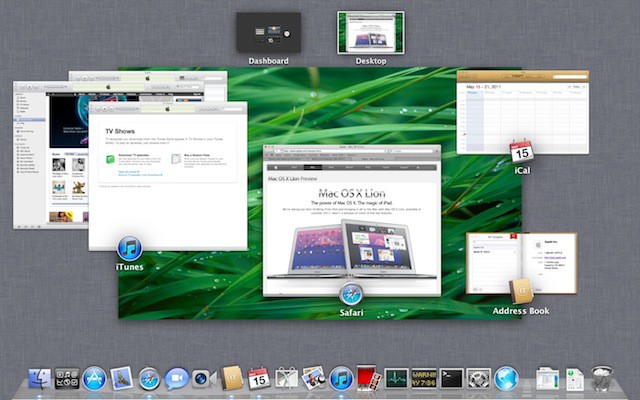
Mission Control is like Expose, Spaces and Dashboard on steroids: Hit a hot corner and all the open windows fly away. You then get an overview of all the running applications, with thumbnails of open windows. There’s also your Dashboard widgets and virtual desktops in Spaces. When it was first previewed by Apple last year, critics said Mission Control was a mess, but I think it’s pretty good. It works really well. It’s much clearer than Expose, and I can see it becoming a central part of my workflow.

Launchpad, on the other hand, won’t be. Launchpad is like the Home screen on the iPad. Icons for all your apps are displayed in a grid. But it suffers from the same problem as the iPad — it’s hard to find the app you’re looking for among the clutter. Much easier to launch a search. Same in Lion.

Apple Now Reporting Battery Life More Honestly

By

xlarge_batterrrry

The new MacBook Pros are seemingly superior to the last generation in every possible way, one notable downgrade seemingly lies in battery life: while old MacBook Pros were rated between eight and ten hours of battery life, the new models only get “up to 7 hours” across the board.

What’s the story? You might think it’s because of the bump to Sandy Bridge: after all, faster processors often suck up more juice. In fact, that may be part of the cause, but overall, the reason the battery life has “decreased” is because Apple is now reporting it more honestly.

It’s extremely common for computer manufacturers to wildly exaggerate battery life. That laptop you bought with ten hours of battery life might be lab tested as such just by leaving it open, idle, with the WiFi off and the display notched down to quarter brightness.

Apple’s now using a more honest testing method to arrive at battery life. Called Wireless Web protocol testing, they take each device, set the display to 50 percent brightness and then surf the 25 most popular websites, performing the main function of those sites over and over again, including playing Flash video.

So when the new MacBook Pros say they get up to 7 hours of battery life, it’s not really a downgrade: unlike the ten hours of battery life you were supposed to get last gen, but would be lucky to get half of, you can really bank on that 7 hours.

[via Techcrunch]

Feast Your Eyes On Lion Server [Gallery]

By

LionServerIcon

Lion is the next version of Mac OS X that will be released later this year. Apple released a developer preview today and it included a surprise inside — Mac OS X Lion Server. Mac OS X Lion Server is now a core feature of OS X Lion and included for the time being at no extra cost. You will be able to selectively setup your Mac as either a regular Mac OS X client or as a Server during the OS installation.

Once your Mac is transformed into a server you will be able to perform local or remote administration and implement server features that include: configuration of users and groups, file sharing, contacts, chat, Time Machine, VPN, mail, calendaring, push notifications, web, and wikipedia — all services that run under Mac OS X Lion Server.

MobileMe Goes AWOL At Apple Retail And Online Stores

By

mobileme_login

The single and family license packs of MobileMe have gone AWOL in Apple online and retail stores and according to AppleInsider resellers have been advised that these products have been declared end-of-life by Apple.

The abrupt departure by these apps from retail channels indicates that something is going to happen and some of it might happen tonight during a scheduled outage that will last about a half-hour later tonight.

Why Is Scrolling Backwards In OS X Lion?

By

post-83576-image-5b59bbf63d5d78df58bac063a6e6fa73-jpg

https://www.youtube.com/watch?v=GPzRWca53Is

As you’ve probably heard, touchpad scrolling is backwards in OS X Lion. Instead of pulling your fingers down to scroll down a window, you know push your fingers up.

Confused? You will be. It undoes years of muscle memory. So why would Apple do this?

It’s easy: because of iOS. It’s the same gesture you make on the screen of an iOS device when you scroll up and down the screen. You want to scroll down? You pull the content up.

It’s another example of the influence of iOS on OS X.

Get Your Hands on Mac OS X Lion Now Without Being a Dev!

By

Mac OS X 10.7

Now that you’ve read all those stories of the nice new features packed into Mac OS X Lion, I’m sure you’re dying to get your hands on the Developer Preview and try them out for yourself. Luckily for those of you not signed up to the Mac Developer Program, there are already a few websites out there that are selling access to the beta release.

Unfortunately, it’s not quite as easy as just downloading and installing the software onto your Mac – your system first needs to be authorized to use developer releases. This means signing up to the service at $99 per year – which is pretty costly just to play around with Developer Previews.

That’s where LEi Mobile comes in: all they ask for is a donation of at least $10 and in return they’ll authorize your Mac through their developer account and enable you to download and install the Lion preview on your system. But be quick – they’re already selling like hot cakes and won’t be around for too long.

We’ll keep hunting for other sites offering this service and update this story as frequently as necessary. If you know of another site offering this service, let us know in the comments!

Please note that installing developer previews on your Mac is very risky, and not recommended on your main system. The previews are previews for a reason and lots can go wrong with these builds. Cult of Mac is in no way associated with any of the websites selling Lion access, and we accept no responsibility for any damage to your system or data.

Why Apple’s Report Won’t Fix Chinese Manufacturing

By

Foxconn Factory

Last week, Apple released a document called The Supplier Responsibility 2011 Progress Report, in which they detailed findings of a series of audits of factories that make Apple hardware. Apple also laid out their intentions in the report for addressing the problems they discovered.

We’ve been down this road before. Every few years, some Western country is either shamed into disclosing or issues a report voluntarily about the ghastly realities of Chinese manufacturing. Everybody vows to try harder. The factories and outsource manufacturing firms claim to implement new programs to curtail abuses and violations. Workers get a raise (never mind that they’ll be forced to retire in their 30s so management can bring in younger, more timid and lower-paid workers).

And the Chinese government often announces bold new initiative and laws to fix the problems. Everybody is reassured, and then it’s back to business as usual.

The problems never really get fixed. There are three reasons why.

Click here to read the rest of this article.

Mailplane Dev Announces New Replies App

By

20110224-replies.jpg

Brand new from the maker of desktop Gmail client Mailplane is Replies, an app designed for people who do a lot of customer support.

The idea was born from Mailplane developer Ruben Bakker’s own success with Mailplane. He was soon so inundated with support requests, he found himself writing similar replies time and time again.

So, enter stage right: Replies, an app to make that part of his job easier.

Reuben points out that, far from turning all his emails into clones of each other, Replies saves him time on writing the dull stuff and frees up time to add personalised extras. So his messages end up being more personal and more useful, yet take less time to write than before.

One nice touch is that Replies indexes the emails in your Sent items folder, which means you can quickly search for replies you’ve written before, then insert them into new messages.

The app will be in beta soon, so if you’re interested in trying it out, go sign up to the announcement list.

Happy-Birthday-Steve-Jobs.com Survive Attacks, Displays 13K B’Day Wishes

By

happybirthdaystevejobs

The HappyBirthdaySteveJobs.com tribute website is going gangbusters.

Thrown up a couple of days ago, the site has survived attacks from malicious hackers and has seen more than 45,000 visitors from 147 countries.

It is currently displaying more than 13,000 birthday wishes to Steve Jobs, whose birthday is today.

One of the site admins, London student Raoul-Gabriel Urma, says he’s been up for 48 hours trying to keep the site running. Here are the stats:

Daily Deals: 2.3GHz MacBook Pro $1,199, iPhone App Freebies, iPad App Price Drops

By

cult_logo_featured_image_missing_default1920x1080

841942-large841942-large841942-large

We start the day off with Apple’s five just-introduced MacBook Pro laptops. The units each included the new 10Gb Thunderbolt i/o port, as well as Intel’s Sandy Bridge processors. The machines start at start at $1,199 for a 13-inch 2.3Ghz i5 product. We also take a look at the latest batch of iPhone App Store freebies, including “Fruit Slayer,” a fruit-slicing game. We wrap up the daily deals spotlight with more price cuts from the iPad App Store, including “Lars,” a ‘retro-platform’ game.

Along the way, we take a look at hardware deals and more apps for the iPhone and iPod nano. As always, details on these and many other items can be found at CoM’s “Daily Deals” page after the jump.