Mobile menu toggle

iFixIt’s 2011 MacBook Pro Teardown: Better Repairability, But May Be Prone To Overheating

By

Macbook-pro-teardown

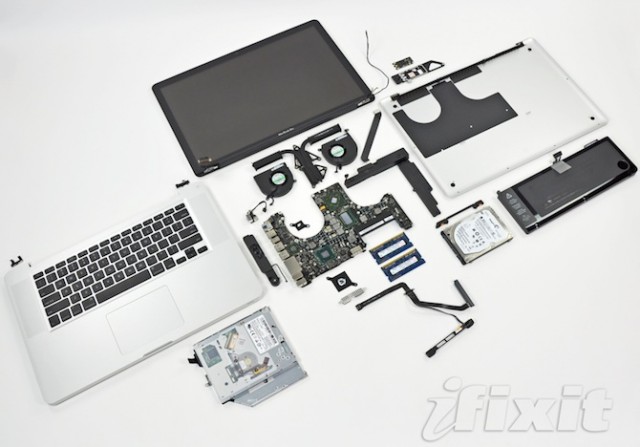
As is their wont, the boys and girls over at iFixIt rushed out to the Apple Store and picked themselves up a new 15-inch MacBook Pro to spill its guts for all of us to see.

Although externally not much has changed, internally, there’s some nice design revisions that have led iFixIt to bump the MacBook Pro up a notch on their repairability scale. It now rates a 7 out of 10, which makes the new Pros one of the more self-repairable Apple computers of recent memory: Cupertino’s engineers chose to eschew their new pentalobe torx screws entirely in the 2011 Pros.

The RAM of the new Pros has been upgraded to PC3-10600, which is the same RAM used in the 2010 revision of the iMac line, and a welcome speed boost over earlier models. The wireless card has also gotten a bit of a bump and now includes four antennas instead of three, so it might hold onto your wifi connection a little bit better.

The biggest eyebrow archer about the new MacBook Pros is this observation from iFixIt:

We uncovered gobs of thermal paste on the CPU and GPU when we removed the main heat sink. The excess paste may cause overheating issues down the road, but only time will tell.

This alarms me. The original MacBook Pros similarly used too much thermal paste, and their consequent overheating issues are now legendary. As iFixIt says, only time will tell, but it’s enough to be wary about.

  • Subscribe to the Newsletter

    Our daily roundup of Apple news, reviews and how-tos. Plus the best Apple tweets, fun polls and inspiring Steve Jobs bons mots. Our readers say: "Love what you do" -- Christi Cardenas. "Absolutely love the content!" -- Harshita Arora. "Genuinely one of the highlights of my inbox" -- Lee Barnett.

23 responses to “iFixIt’s 2011 MacBook Pro Teardown: Better Repairability, But May Be Prone To Overheating”

  1. Guest says:

    The original Macbook Pros did not overheat because of the thermal paste. The paste changed about 1-5 degrees on average. There were probably other reasons such as a hot first-gen dual core CPU and a hot dedicated grafics chip. I can say that because I had a first-gen MBP *and* went through five logic boards, where I had the technician re-do the paste on several ones. Didn’t really change anything.

  2. Beast_m says:

    Laptops are should die in my own opinion. I have a laptop and I kind of regret owning one.
    It always over heats, under performs, and over priced, and it doesn’t live as long as the desktop.

    In the future tablets should be sold in a case with a keyboard, where you can lift the screen and it will be just like the current ipad.

    tablets like the iPad should be much more capable of doing pc like stuff, but not so much that you need an actual desktop.

    it will kill the laptop market, ipad or desktop

  3. Download says:

    Interesting and useful post

  4. Sky says:

    Totally agree King. I don’t understand why a pad + BT keyboard form factor has not already prevailed. I actually prefer typing on an iPad versus a laptop, because with the latter I need to reach over the large touchpad. The BT configuration is the best of all worlds, with virtual or physical keyboard available depending on where the pad is being used.

  5. Grandtime001 says:

    mine overheated,,,froze up…i returned it…for money back…not happy..apple come on……

  6. Egbokalaka says:

    My quad core MBP 15″ with external display locks up due to overheating when the high performance graphics have been running a while. The issue is the fans. They do not properly track the core temperatures, and thus allow the overheating. Using smcFanControl is a workaround for me. By running the fans more aggressively, that utility prevents the overheating and the lockups. But having locked up several times due to the overheating, I’m definitely going to ask for another one.

  7. Kevin43 says:

    Repasting with arctic silver lowered my temperatures by 10 degrees and it hasn’t changed in the 2 years I’ve had it. Plenty of other stories out there of success.

  8. Kevin43 says:

    Because you’re content surfing and emailing, basically not smart enough to actually “use” a computer.

  9. shanus says:

    I am having this very overheating issue now. Machine is brought to a complete halt after stress. Guaranteed reproducible using this app…smallluxgpu @ 8cores + GPU setting. Probably hangs in 10s requiring a cold restart. The funny thing is that audio continues to be played, etc.

  10. Egbokalaka says:

    It turns out that most of the time my issue comes up after a fair amount of play in WoW. But it also occasionally occurs more frequently. I thought that smcFanControl was addressing the problem, but in fact I had just flipped from frequent failure mode into less frequent failure mode. The problem is associated with the high performance graphics, but it may not be heat relatedl. I went through a lot of troubleshooting with Apple support on this. After I loaded the latest WoW client on a virgin installation of OS X, I was able to get the laptop to lock up. It also occurred with HL2 episode 1. I sent the machine back to Apple engineering in Cupertino, and got a replacement machine very quickly. Tonight I discovered that the lockups persist in WoW on the new machine.

    The app you mention exercises the GPU using OpenCL. That could raise the card’s temperature, or it could be exercising a bug in the implementation somewhere. I’ll try it on my machine and report back.

  11. Egbokalaka says:

    I’ve confirmed that smallluxgpu hangs my system in a way similar to WoW. When WoW triggers the problem, I can ssh in from another system and and poke around. I can do ‘ps -ef’ and top. But if I try to kill WoW from the command line, the shell hangs, and from that point forward, although I can still log in, any attempt to get the process list hangs. These are exactly the same symptoms a hang with smalluxgpu causes. For me, it won’t lock running the benchmarks, but an attempt to render one of the samples with 1CPU+GPU did the trick.

    Thanks for pointing this out. It will give me more to discuss with Apple support tomorrow. :)

  12. shanus says:

    That’s tough that your new machine also hangs. I’m hoping its not directly a heat issue, but certainly heat related. As soon as the CPU temp goes above 90 degrees C it locks up. I’ve now confirmed that skype also locks up the machine. My new replacement unit should be here in a week, hopefully this batch is better. Funny thing is….i was able to duplicate the issue on a quad 2.3GHZ i7 that they had in the apple store on display. The genius almost fell to the floor & basically conceded that it’s very likely that my next machine will also have the same issue.

Leave a Reply

