Leander Kahney is the editor and publisher of Cult of Mac.
Leander is a longtime technology reporter and the author of six acclaimed books about Apple, including two New York Times bestsellers: Jony Ive: The Genius Behind Apple’s Greatest Products and Inside Steve’s Brain, a biography of Steve Jobs.
He’s also written a top-selling biography of Apple CEO Tim Cook and authored Cult of Mac and Cult of iPod, which both won prestigious design awards. Most recently, he was co-author of Cult of Mac, 2nd Edition.
Leander has been reporting about Apple and technology for nearly 30 years.
Before founding Cult of Mac as an independent publication, Leander was news editor at Wired.com, where he was responsible for the day-to-day running of the Wired.com website. He headed up a team of six section editors, a dozen reporters and a large pool of freelancers. Together the team produced a daily digest of stories about the impact of science and technology, and won several awards, including several Webby Awards, 2X Knight-Batten Awards for Innovation in Journalism and the 2010 MIN (Magazine Industry Newsletter) award for best blog, among others.
Before being promoted to news editor, Leander was Wired.com’s senior reporter, primarily covering Apple. During that time, Leander published a ton of scoops, including the first in-depth report about the development of the iPod. Leander attended almost every keynote speech and special product launch presented by Steve Jobs, including the historic launches of the iPhone and iPad. He also reported from almost every Macworld Expo in the late ’90s and early ‘2000s, including, sadly, the last shows in Boston, San Francisco and Tokyo. His reporting for Wired.com formed the basis of the first Cult of Mac book, and subsequently this website.
Before joining Wired, Leander was a senior reporter at the legendary MacWeek, the storied and long-running weekly that documented Apple and its community in the 1980s and ’90s.
Leander has written for Wired magazine (including the Issue 16.04 cover story about Steve Jobs’ leadership at Apple, entitled Evil/Genius), Scientific American, The Guardian, The Observer, The San Francisco Chronicle and many other publications.
Leander has a postgrad diploma in artificial intelligence from the University of Aberdeen, and a BSc (Hons) in experimental psychology from the University of Sussex.
He has a diploma in journalism from the UK’s National Council for the Training of Journalists.
Leander lives in San Francisco, California, and is married with four children. He’s an avid biker and has ridden in many long-distance bike events, including California’s legendary Death Ride.
You can find out more about Leander on LinkedIn and Facebook. You can follow him on X at @lkahney or Instagram.
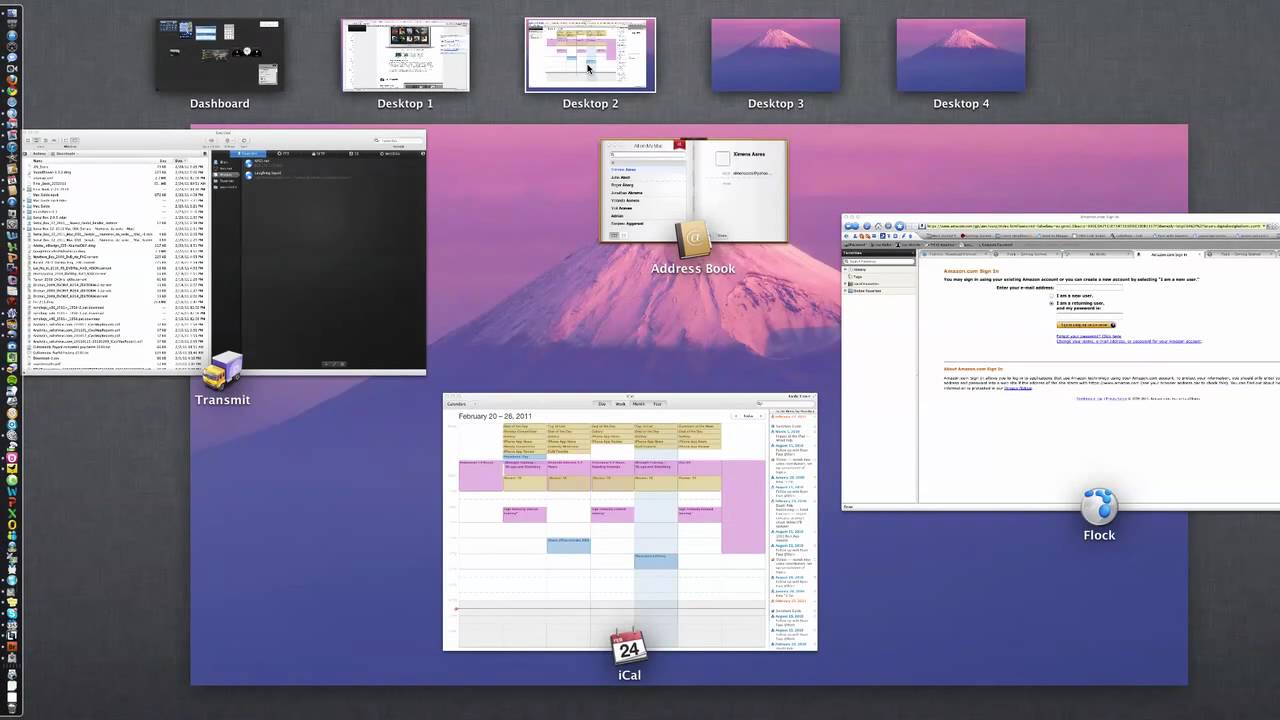
34 responses to “First Look: Mission Control and Launchpad In OS X Lion. One’s Good, One Not So”
I agree about mission control. Will be very useful. Launch pad on the other hand is no different in my eyes than clicking on go/applications. It seems like a waste of time personally, but no doubt I’ll end up using it all the time… I love the new mail.app and Safari 5.1 is quite nice too… Still getting used to the ipad-style scrolling though.
I think (right now) LaunchPad is for our parents and people who don’t like computers. They probably only use 4 or 5 apps in total, and they’ll all fit on the first home screen, and there won’t be any clutter. Of course, I’m not sure how that’s simpler than the Dock… but I have a feeling LaunchPad will be useful for power-users once some “convertible macbook pros” come out. I mean, with touch-sensitive displays that can flip around so the back of the display is touching (and hiding) they keyboard, which can be used either as tablets or as laptops. LaunchPad icons are easy to touch with your fingers, whereas app icons in the finder are not. Similarly, the spotlight icon would be hard to tap, but a quick left swipe from LaunchPad could reveal it just like on iOS. Lion’s change in how scrolling works is a big tip-off that that’s the direction we’re heading.
I agree that LaunchPad leaves a bit to be desired BUT I think it could be good with a few minor tweaks.
1) give us the ability to hide applications from it: For example, I have adobe cs5 on my laptop at the moment. There are a metric ton of little apps that I never need to run unless I’m uninstalling the darn thing and others that are run automatically. They’re cluttering up the launch pad screen. I want to hide/remove them from LP but I can’t.
2) Give us a way of organizing the icons that isn’t in the actual LaunchPad interface.
Mission Control looks very cool, but more importantly:
What have they done to the address book!?
This atrocity that started with the iPad has to stop. I would expect better taste in Apple than copying the paper counterparts of things.
AH! Look at that serial box icon! :D
Are there folders in launchpad?
Scrollbars are great. I’m experiencing some problems with Safari 5.1 and fullscreen mode but that’s temporarily. Launchpad needs it’s own PrefPane in System Preferences. As for Mission Control – I’ve never used Spaces and Dashboard so I like Expose more. And new Address Book reminds me old WinAmp 3 with it’s freaking skins. Also window resizing works bad for me – when I place mouse pointer over window edge – cursor just disappears, but I still can resize the window. Mail are cool except one thing – “Hide mailbox list” button should be somewhere else and not on Favorites Bar, because I hide Favorites Bar :).
Seems to me that different people will uses things differently. I do not think I would use launchpad a lot – my most used apps are always in the doc. But I do think it would be helpful for those rarely used apps. Much better (in my mind) a nice big group of icons than a finder list of names – especially when I am looking for “what was that app that did xxx?” :)
Thanks for the review!
Launch Pad is meant to be used with Folders, just like on the iphone and iPad. That way, one could eliminate pages and pages of icons, such as is shown on the video.
Interesting and useful post
when one installs the OSX Lion Beta does it erase everything on the HDD and start from scratch?
or does it work as an upgrade and leaves files intact?
Thanks in advance.
Is the video hosted anywhere else since Youtube took it down?
It works as an upgrade, everythings stays as is. Most third party applications still run like a charm, only a few like TotalFinder will require an appropriate update.
Dock and Launchpad seem to be a little redundant indeed, however Launchpad provides a nice way to group application. So even as a power user, there’s value in it. I used to have >200 applications on my old MacBookPro and used tools like ‘Overflow’ to achieve exactly that. Launchpad, although it’s still a little buggy, will just substitute such third party apps.
I am missing navigation with keyboard in mission control, that was much better in expose. now i am forced to use the mouse
i seem to be one of the only people who really like launchpad. i can organize all my apps without cluttering up the dock. It took a while to organize everything, but once everything was in the correct folder, it worked great and really sped everything up.
For Launchpad, I managed to make it completely usable for my purposes. I used a great App to clear everything off Launchpad, and then add only my occasional programs, ones that I use every so often but regularly. Everyday programs are on my Dock. For all others, I have the Applications folder, and Spotlight – http://goo.gl/Ygw9C.
For Mission Control, I love the Desktops now, having hated it when I first installed Lion. I found that what I hated most was not knowing what Desktop I was on, which in Spaces was for me the most useful feature. I got around that by creating a simple set of Desktop Wallpapers that let me see easily which desktop I was on, but at the same time retaining a simple feel – http://goo.gl/YQGTv
for those wishing to make Lion more like Snow Leopard: http://www.totalapps.net/mac/l…

