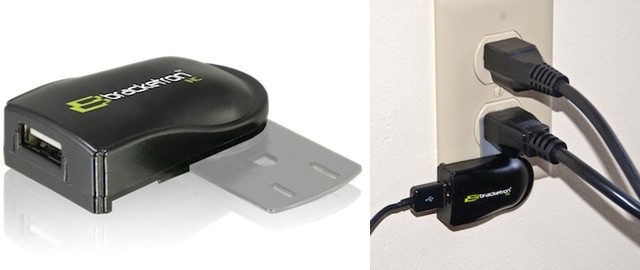
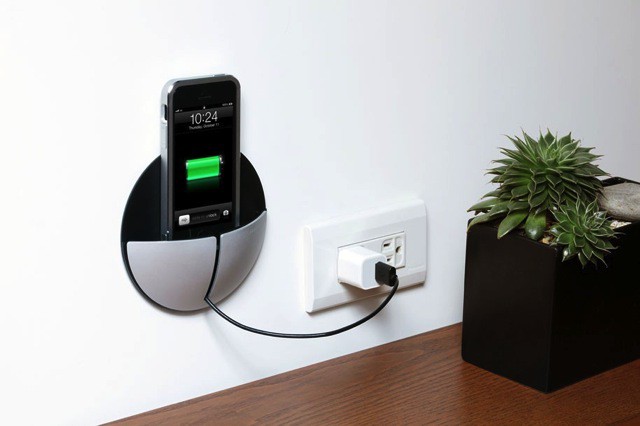
Cute and practical, that’s the Itomaki adapter from Softbank. The charger is shaped like a kind of smoothed-off cotton reel, and – surprise – lets you wrap the charger cable around it when not in use.
Samsung loves bashing its competitors, and it often does so in advertisements for new Galaxy products. So it’s no surprise that the Korean company has programmed its S Voice assistant to bash the iPhone. Ask it if it’s ever used Apple’s popular smartphone and S Voice delivers a scolding response.
They say that a picture is worth a thousand words, which is clearly nonsense. My mother’s family photos, for instance, are worth three (Flash. Too. Bright). But this simple photo, from LifeProTips on Twitter, really does explain everything…
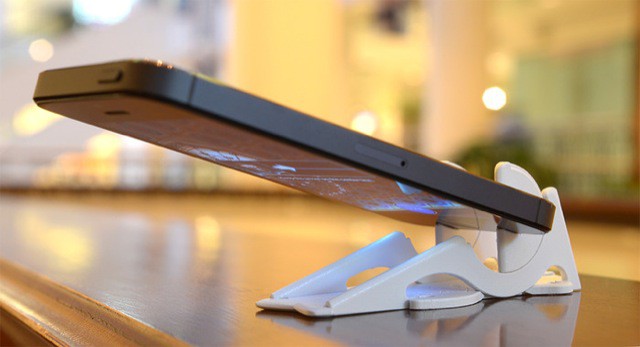
If you’re going to make an iPhone stand that slips onto a keyring, you may as well make it look like a key, amirite? Right? Hello?
Ok, so that part of the design is a little dumb, but the Keyprop itself is pretty ingenious, especially the way it manages to work with both the iPhones 4 and 5.
Eton’s new BoostSolar a) is here just in time for sunny summer and b) solves many of the problems usually present in solar chargers. It also looks pretty cool, and less like the utili-hippy designs beloved of rivals.
Process, the step-based photo-editing app for the iPad, has gotten bumped to version 4.0. With that update come live, almost full-res previews, blend mode support and – supposedly – less crashes.
If I see another app which promises a "distraction free" mode, I’m gonna…. Wait. Where was I? Ah, yes. Write is now available for the iPad. You might remember the iPhone version of this text editor for its clever UI and stunning good looks. The iPad version has all this and some clever extras.
The venerable Microsoft office suite gets a new update today, bringing a bunch of new issue and bug fixes, an added font necessary for document sharing, and brings Office 365 closer to reality on the Mac, letting you move to a subscription model of Office software. Ooh, boy. The new update also adds an easier way to save Word files directly to SkyDrive and Sharepoint.
This is the single most important bit of news you will read all day: the artist formerly known as Snoop Dogg has a new game coming out for the iPhone. The d-o-double-g, who now calls himself “Snoop Lion” and pretends to be from Jamaica, will be releasing Way of the Dogg in an App Store near you very soon.
I often forget that the Do Not Disturb toggle in iOS 6 exists. It’s a great feature for quickly shutting out the noise, but the problem is that you have to open the Settings app to enable. Do Not Disturb feels like something that should immediately accessible.
Luna is a new jailbreak tweak based on a concept we showed you at the beginning of the year. From the iPhone’s lockscreen, pull down on the time to enable Do Not Disturb. Pull down again to disable. It’s that simple.
I don’t use Do Not Disturb that often, but this tweak makes toggling it on and off incredibly fluid. When you want the notifications to stop pouring in, just swipe on the lockscreen. Genius.
Nintendo -- stamping on your hopes for an iOS port of Mario since 2007. Photo: Nintendo
Since the dawn of the App Store, and by extension, gaming on smartphones and tablets, one iconic brand has remained absent from the revolution: Nintendo. Perhaps the most beloved and historically innovative game maker in the world will have nothing to do with the idea of Super Mario Bros. for iOS.
The daring decision to not ride the success of the App Store is starting to come at a cost. Nintendo is bleeding money as sales of living room consoles like the Wii U plummet. And now the Japanese company is wanting mobile game developers to port their titles to the Wii U. Nintendo understands that mobile-centric games could help sell its traditional consoles, and yet we still aren’t getting any of Nintendo’s own games in the App Store. It’s a frustrating conundrum.
Apple’s Passbook app and system lets you use passes that contain time-sensitive or location-sensitive information. For example, you might have a pass that triggers when you enter a specific store, like Target. Or, you might have airplane tickets going through Passbook, if you use that specific airline’s iOS app.
The ideal here is that the passes show up on your lock screen, so you don’t have to launch an app. This doesn’t always work, however. What can you do when it doesn’t? I’m glad you asked.
After giving Gmail some link support for Chrome, YouTube and Google Maps yesterday, Google is now ready to help developers integrate Chrome for iOS into their apps.
Google just published a new blog post reminding developers of some new Chrome integration tools for iOS developers that will let users open a webpage in Chrome and then come back to the app with just a tap. Despite iOS’s closed system that doesn’t let users set a default browser, the new Chrome tools will let users have the choice to open a link in Safari or Chrome.
Looks smallish, holds a lot: Lowepro's Event Messenger 150.
Gadgets! Camera bag crafters know that, these days, if you’re carrying photo stuffs, you’re likely also bringing some kind of computer, and other electronic knick-knacks, along for the ride.
Lowepro Event Messenger 150 by Lowepro Category: Backpacks Works With: DSLRs, lenses, iPads Price: $70
A lot of bags concede that means a small Macbook Pro or Air will need a lift, but Lowepro’s Event Messenger 150 bag knows true technorati stroll with only the essentials: a lens or two, a camera body, and an iPad. So that’s what the sleek-looking Event Messenger 150 (EM 150) was built to transport. I took it for a spin to see how it performs.
Apple has been facing a number of privacy issues and lawsuits in the U.S. for the last year or so, but things aren’t going any better abroad either. A German court ruled that Apple will have to change some of its practices for how it handles consumer data.
The Berlin court recently struck down 8 of 15 provisions Apple’s listed in its general data-use terms. The court found that the 8 terms deviate too much from German laws because Apple is asking for “global consent” to use consumer data without telling them how the data will be used.
Finding pizza late at night can be difficult. You go to one restaurant and it’s closed. By the time you make it to your next option you realize it sucks and there’s something better down the way. There’s a new app that’s going to change all that, and it’s called Pizza Compass.
Pizza Compass isn’t just an app, it’s a tool for slice success. The app basically helps you find the nearest pizza joint in a hurry. You can spin the pizza slice to discover pizza joints nearby and the slice will steam when you’re close to a good place.
You can share you favorite pizza spots with friends, find restaurant hours and see reviews so you know you’re not going to eat something that tastes like cardboard. It sounds like a silly app, but it’s probably the greatest tool ever invented for those that like to do some late night drinking on the town.
Check out the Pizza Compass promo video and just try and tell me you’re not excited to give into your next pizza craving:
For the last couple months the Internet has been chalk full of rumors that Apple is losing its edge, and that the iPhone isn’t as cool as it once was. Maybe some of those rumors are right, maybe not, but Apple’s ex-Ad Guru, Ken Segall, predicts that the iPhone’s biggest years are still ahead of it.
In a recent blog post, Segall speculates that the iPhone will follow a similar development cycle as the iPod. For the first few years Apple has worked on evolving and perfecting the device, but 2013 will be the year that Segall thinks we’ll finally get an iPhone Mini, iPhones in color, and maybe even a big iPhone.
This great new Audi commercial featuring two generations of Spocks — Leonard Nimoy and Zachary Quinto — smack talking, swearing, racing and singing “The Ballad of Bilbo Baggins” is awesome for a lot of ways, but for iPad enthusiasts, the cream on top is at the very beginning, when Old Spock and New Spock play 3D Chess against each other on their iPads.
Sadly, the app itself doesn’t actually seem to exist. How have you overlooked doing a proper 3D Chess app, devs?
Our last “name your own price bundle” performed so well that we’re bringing a second one to our Cult of Mac readers. And once again we’ve delivered 10 top Mac Apps for a price that only you can name with The Name Your Own Price Bundle 2.0!
That’s right. You pay what you want for 3 different Mac Apps that will make you faster and more efficient on your Mac including: HoudahSpot, Elmedia Player Pro, and PhotoBulk. And, if you pay more than the average price, you’ll also receive Snapz Pro X, CrossOver XI, DiskTools Pro, Gemini, Mac Blu-Ray Player, Musictube, and Paperless.
We’ve chosen three charities, Child’s Play, World Wildlife Fund, and Creative Commons, that we believe make a significant positive impact across the globe. 10% of your entire purchase will go to help one of those charities – whichever one you choose!
The Boingo app for iOS now allows users to buy Wi-Fi using in-app purchases that are charged to your iTunes account. It makes it quicker and easier to get connected on your iPhone, iPad, or iPod touch, and means you no longer have to navigate Boingo’s website.
It might just be the dozen-odd years I was spent chained to the wall in my grandmother’s basement, a stain on the orange shag carpet my only friend, but I have a natural affinity for slapping wood panneling on any gadget I have. Especially Apple products.
One of the companies that has helped me in this quest of mine is RAW BKNY, a Brooklyn-based woodworking and laser-etching shop which has put out some really bitching wood veneers for the iPhone and Macbook.
Now they’ve got a new Kickstarter, and I’m super psyched about it: how’d you like wooden keys for your Mac?
The RunKeeper apps for Android and iOS have today been updated to add a number of new features, the biggest of which is support for the Pebble smartwatch. Users can now see all kinds of data, such as their pace and the distance they’ve ran, with a quick glance at their wrist while they’re on the go.
iPhone 6 maker Foxconn is looking to lower its reliance on Apple.
Foxconn has been forced to make preparations for life after Apple following reduced demand for the iPhone and other iOS devices which has caused the company’s revenue to nosedive, The New York Times reports.
The manufacturer has been doing well off the back of Apple’s hugely successful devices in recent years, which have been contributing at least 40% of its revenue, according to analyst estimates. But after suffering a 19.2% drop in revenue during the first quarter of the year, thanks to declining iPhone and iPad orders, Foxconn is now looking at ways in which it can be less reliant on Apple.
In OS X Mountain Lion, you can set a Calendar notification for a repeating event on your iPhone, then get that notification on your Mac. Heck, you can even set a Calendar event on your Mac and get it when you’re out and about with your iPhone or iPad. It’s all a part of Apple’s iCloud integration, and it works pretty well, most days.
But what if you really don’t want to be notified of a certain type of event when you’re on your Mac? With OS X Mountain Lion, at least, you have a few more options for notifications that come from Calendar. Check it out.