Apple is testing adding two more widgets to the iPhone Duo’s Lock Screen. The feature looks like it’s switched off for now, though.
The experiment hints Apple is still exploring ways to use screen space on the first-ever foldable iPhone. But it’s still unclear if the idea will ever ship.
iPhone Duo Lock Screen could fit more widgets
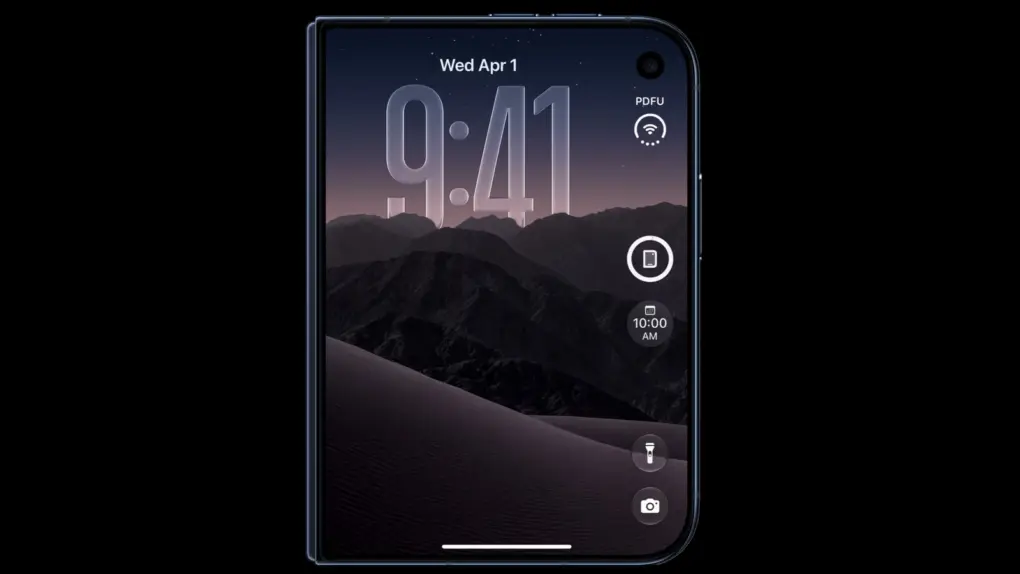
Currently, widgets on the iPhone Duo Lock Screen sit along the right edge of the screen, at top and bottom. Two default shortcuts, Camera and Flashlight, sit at the bottom-right corner of the screen, while the Wi-Fi and cellular icon appears at the top right
Code explorer pdfu spotted a change and shared it on X on Sunday. A placce for two additional widgets has been added to the right edge of the screen, between the current widgets.
Apple has tested a “complication column” for iPhone Duo’s Lock Screen. It fits two circular widgets along the right edge.
Flag: SpringBoard/Ionic (disabled). First seen in iOS 27.1, with no code changes since. pic.twitter.com/orjOuvM1Xs
— pdfu (@itspdfu) November 22, 2026
The feature is currently disabled
The column currently sits behind a feature flag labeled SpringBoard/Ionic, and that flag is disabled, says pdfu. It first appeared on iOS 27.1, but the code hasn’t changed since.
iOS 27.1 is the version Apple shipped on iPhone Duo in October. It has since been replaced with iOS 27.2 and iOS 27.2.1.
Because the code hasn’t changed, it’s unclear if Apple is still working on the feature or if it has scrapped it.
This isn’t pdfu’s first iPhone Duo find. In early October, the leaker showed off a Focus toggle above the camera and flashlight icons on the Lock Screen.
But features buried in code don’t always reach users. If you own an iPhone Duo, you won’t find the column on your Lock Screen today because the feature is switched off.

Anurag Chawake is a tech-focused writer specializing in smartphones, apps and consumer technology. His interest in computers began during the Windows 98 era, eventually leading him to explore everything from operating systems to mobile devices and PC hardware. Anurag previously contributed to The Indian Express, covering Apple, Android, gaming and the broader technology landscape.