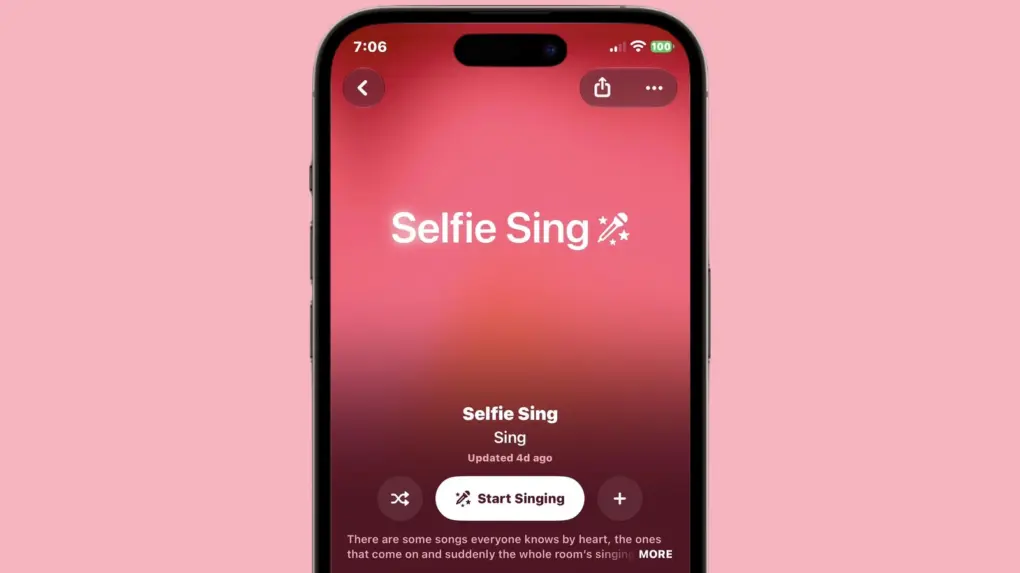
Apple Music is getting Selfie Sing, an upcoming feature that films you belting out a hit with lyrics scrolling on your iPhone’s screen. It builds on Apple Music Sing, the singalong feature introduced in iOS 16.2. And no extra app is needed to shoot the clip.
The feature debuts with iOS 27.3, currently in beta.
How Apple Music Selfie Sing works
Karaoke videos have become a popular form of self-expression on social media, where users post clips of themselves singing along to favorite songs. TikTok, Instagram and other platforms have helped turn amateur performances into shareable entertainment, whether someone is showing off genuine vocal talent or simply having fun with friends. Apple Music Selfie Sing taps into that trend by making it easier to record a polished-looking performance without switching between apps.
The current Apple Music Sing dims the original singer so your voice can take over. The upcoming Selfie Sing points the front camera at you. Tap it, hit record and the words start moving up the screen as you film.
Once the song wraps, you can choose to make your voice louder or quieter. You can also choose to layer on a sound treatment: Megaphone, Echo, Concert Hall, or Studio. After that, the clip can either go to your gallery or friends.
Developer Aaron Perris first spotted the feature and posted a video on X. The nine-second demo clip uses a boar Animoji instead of his face. But he noted that the feature itself doesn’t include Animoji.
Here is your first look at Selfie Sing, new in iOS 27.3, inside of Apple Music
Record a video selfie, adjusting vocals to make it yours, and share your performance with friends
(Animoji is not available for this feature, I used it so I don’t have to post a video of me singing) pic.twitter.com/fLQ3B5DV4N
— Aaron (@aaronp613) November 4, 2026
Which songs work with Selfie Sing
Looks like only certain songs are wired for this. The list favors familiar karaoke staples, like “Respect”, “Wonderwall”, “Hungry Like the Wolf”, and “Like a Virgin.”
As Apple says on the Selfie Sing screen:
“There are some songs everyone knows by heart, the ones that come on and suddenly the whole room’s singing along. This playlist is loaded with them, each one ready to become your next Selfie Sing. Pick your favorite, record a Selfie Sing, add mic effects to your voice, then save or share your video selfie with anyone you like. No pitch-perfect anything required – just you, the song and the moment. Oh, and make sure you’ve updated to the latest iOS before getting started.”
Early limits and what comes next
Anyone can browse the playlist, even if they are on iOS 27.2. But filming requires an iPhone running iOS 27.3 beta.
Early hands-on say the clips come out vertical only. iPhone Duo users can film only with the rear lenses, with the lyrics moving to the outer screen.
Apple has experimented with sharing-focused video apps before. Clips came in 2017, and vanished from the App Store in October last year. Selfie Sing seems to cater to a similar idea.
Apple hasn’t posted documentation for the feature as of now, so it may change before the public release of iOS 27.3.

Anurag Chawake is a tech-focused writer specializing in smartphones, apps and consumer technology. His interest in computers began during the Windows 98 era, eventually leading him to explore everything from operating systems to mobile devices and PC hardware. Anurag previously contributed to The Indian Express, covering Apple, Android, gaming and the broader technology landscape.