What a surprise: software updates don’t fix problems in hardware.
Check out our video above. An iPhone 4 running the 4.1 beta loses a couple of bars when held in a “death grip.”
What a surprise: software updates don’t fix problems in hardware.
Check out our video above. An iPhone 4 running the 4.1 beta loses a couple of bars when held in a “death grip.”
Apple iPhone Configuration Utility hits version 3.0. The new version was released today and includes enhanced support for iOS 4 and bug fixes. I highly recommend this often under utilized tool as something to have in your arsenal of tools for advanced iOS troubleshooting.
Earlier today, Apple released an update to iOS 4 and the corresponding SDK to developers, bringing the current version of both to 4.1 beta. The update follows the release of iOS 4 last month.
There are a plethora of problems being reported about the iPhone 4 and iOS 4 and I hope that this update will address them. I’d particularly like to see fixes for the sensitivity of my proximity sensor and the Jawbone bluetooth connectivity issues reported earlier on Cult of Mac. I’ve personally experienced both of these issues on my iPhone 4.
It will also be interesting to see if this update includes the new signal strength formula or not and what effect if any this will have on the problems reported with the iPhone 4 antenna.
Registered iOS developers can grab a copy of the new beta at developer.apple.com/iphone.
I have not yet heard about any new features in this beta, but these details will likely surface soon. If you find out anything new about this update feel free to tell us all about it in the comments.
httpvhd://www.youtube.com/watch?v=_uH8K-TUhfk
The guys at ColorWare will take pretty much any gadget under the sun and dip it into a couple of cans of Pantone-coded paint for you. No surprise, then, that they’re now applying their multi-chromatic treatment to the iPhone 4.
Like usual, you just pick out a color scheme, write a check for $250, send them your phone and wait for them to send it back to you, as prettily painted as a surfer girl’s toe nails.
However, what makes the ColorWare treatment more interesting this time around is that a coat of paint on the antenna might be just enough to thwart the iPhone 4’s infamous ” grip of death” reception issues.
ColorWare’s not promising anything just yet, but they are testing their latest iPhone 4 coloring process in the lab to see if it has measurable effect on reception. Either way, this might be the first ColorWare paintjob that transcends the decorative for the prophylactic.
Apple’s antennagate issue has been in the news for weeks now. It’s the dominant story about the iPhone 4. This is why PR experts have compared Apple to Toyota. Not because the two problems are equivalent — they aren’t — but because the media equates Prius with dodgy brake pedals, and the iPhone 4 with dodgy reception issues. Note: No one said it’s a Prius-style problem; they said it’s a Prius-style PR problem.
Apple’s stock is taking a pounding today after Consumer Reports‘ negative iPhone review, and our story that the company may have to issue a hardware recall.
Apple’s share price fell 3-4% in heavy trading today, reports VentureBeat:
Apple’s stock price fell 3 percent on Tuesday after Consumer Reports gave a negative review of the iPhone 4 because of its reception problems.
… In the wake of the Consumer Reports review, experts speculated that Apple would have to recall the units it has sold to fix the antenna problem, which may be more complicated than the software fix that Apple talked about on July 2.
VentureBeat: Apple shares slide after bad iPhone 4 review, recall concerns
httpvhd://www.youtube.com/watch?v=6_TFHqIHBqM
A lot has been made of the iPhone 4’s incredible Retina Display, but the handset’s unprecedented screen clarity won’t do you any favors if you’re blind.
Even so, it seems like iOS might be built from the ground-up to support blind users, as this video from musician Victor Tsaran reveals: he was able to effortlessly pair his iPhone 4 with a Bluetooth Braillant 32 display. Coupled with iOS’ innate (and somewhat hyperactive) voice-over accessibility feature, Victor is able to easily take advantage of most of his iPhone 4’s core functionality. Now that’s an attention to detail.
[via Gadget Lab]
Having issues getting FaceTime to work on your home network? Your firewall might be the problem. Apple’s just posted a note to their support website giving tips on getting FaceTime through your router’s prophylactic layer.
According to Apple, the ports FaceTime needs to be open are 53, 80, 443, 4080, 5223 and the 16393 – 16472 UDP block. Obviously, opening these ports up is going to differ according to your network setup, so check your router’s manual for instructions before fiddling around.
Last week, the Fring iPhone application supported Skype video conferencing over 3G. This week, it doesn’t, ending a four year relationship between Fring and Skype. What the heck happened?
According to Fring, their recent update to the iPhone app resulted in such a huge volume of video calls that they needed to temporarily “reduce support” for Skype, after which point, Skype demanded Fring not restore connectivity.
But that’s not what Skype is saying. According to the VoIP company: “There is no truth to Fring’s claims that Skype blocked them, it was their decision and choice to withdraw Skype functionality.” They then go on to say that Fring “misus[ed] the Skype software in ways which it was not designed for and which does not scale to meet consumer demand.”
It’s really hard to parse this bickering. Was Skype just upset that Fring beat them to the 3G video-conferencing punch, using their own API? Or was Fring’s decision to pull Skype support violate their licensing agreement somehow?
Either way, the only clear winner here is Apple’s FaceTime. The cross-platform video chat providers just can’t seem to get their act together.
Animated Knots by Grog is a great app that teaches you to tie all kinds of handy knots. This is the first app we’ve reviewed to earn five Black Turtlenecks using our rating system!
Apple will be forced to recall the iPhone 4 following Consumer Reports tests proving the “Death Grip” antenna issue is not software related, but a hardware flaw, PR experts say.
“Apple will be forced to do a recall of this product,” said Professor Matthew Seeger, an expert in crisis communication. “It’s critically important. The brand image is the most important thing Apple has. This is potentially devastating.”
A number of Cult of Mac readers, and numerous more on Apple’s Discussion boards, have reported a bevy of problems–some large, some small–after upgrading to iOS 4 or the iPhone 4. I don’t plan on boring you with a list of what users were complaining about. Instead, I will give you four troubleshooting tips that generally fix most, but not necessarily all iPhone and iOS problems.
Consumer Reports‘ conclusion that the iPhone 4 Death Grip is hardware-related is a huge blow for Apple. This isn’t something Apple can ignore — or brush off as a software problem that is easily fixed. Consumer Reportsis too big and important. Apple must respond.
But is the Death Grip a fuss about nothing? Given all the complexities of cell-phone networks, is the Death Grip something that doesn’t have much effect in day-to-day use?
[polldaddy poll=3462464]
Consumer Reports says the iPhone 4 has a design flaw with the antenna that adversly affects reception, and cannot recommend buying the iPhone.
The leading consumer magazine says the “death grip” reception problems are not software related, as Apple earlier claimed, and cannot be fixed with an update.
“When your finger or hand touches a spot on the phone’s lower left side—an easy thing, especially for lefties—the signal can significantly degrade enough to cause you to lose your connection altogether if you’re in an area with a weak signal, ” the Consumer Reports wrote in a blogpost. “Due to this problem, we can’t recommend the iPhone 4.”
The magazine tested three iPhone 4s in a radio frequency isolation chamber, which cuts off outside radio signals, and connected the phones to a special cell-tower emulator inside the chamber. The magazine also tested an iPhone 3GS and Palm Pre and found none had reception issues. The magazine says its tests question Apple’s honesty about the issue.
Our findings call into question the recent claim by Apple that the iPhone 4’s signal-strength issues were largely an optical illusion caused by faulty software that “mistakenly displays 2 more bars than it should for a given signal strength.”
Consumer Reports is instead recommending consumers buy — or keep — the older iPhone 3GS or check out another kind of smartphone altogether.
If you still want an iPhone 4, or already own one, the magazine advises covering the antenna gap with a piece of duct tape or another thick, non-conductive material. “It may not be pretty, but it works,” the magazine said. This quick fix is in lieu of a case, which the magazine admits it hasn’t been able to test yet.
Consumer Reports had earlier reported that the iPhone 4 death grip was probably no big deal.
Via Consumerist
A federal judge greenlighted a monopoly abuse case against Apple and AT&T Inc.’s mobile phone unit, it can now move forward as a class action suit.
The June 2008 complaint took aim at locking-in iPhones for use on the AT&T network and its control over what iPhone users can install and use on the devices.
The lawsuit also says Apple secretly made AT&T its exclusive iPhone partner in the U.S. for five years. Consumers agreed to two-year contracts but found themselves bound to a half-decade relationship with AT&T, the lawsuit argued.
Judge James Ware of the U.S. District Court for the Northern District of California said parts of the lawsuit that deal with violations to antitrust law can continue as a class action, according to court documents filed July 8.
Anyone who bought an iPhone with a two-year AT&T agreement since the device first went on sale in June 2007 can join the class suit.
The lawsuit seeks an injunction to keep Apple from selling locked iPhones in the U.S. and from determining what iPhone programs people can install. It also seeks damages to cover legal fees and other costs.
Will you join this class action suit or not?
Via AP
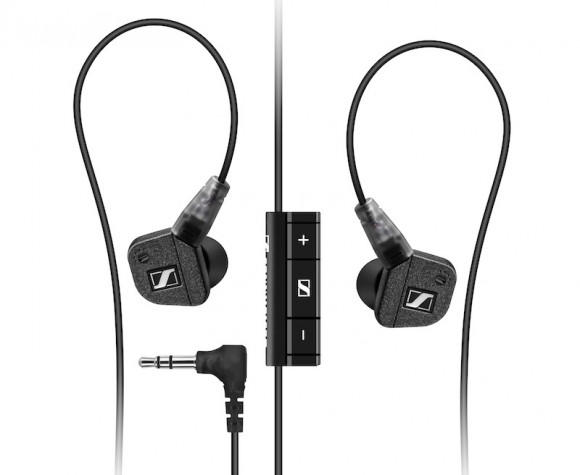
Noise-canceling ear buds deliver impressively clear sound, but at the expense of the added bulk of the in-line noise canceling unit. Blackbox’s latest i10 Noise Canceling Earphones get rid of the bulk, though, by getting rid of the usual bulk-adding battery housed in the noise-canceling unit. They’ve accomplished this by also ditching the traditional 3.5mm headphone jack; instead, the i10s use an Apple 30 pin dock connector which allows these earbuds to draw power directly from your iPhone or iPod.
That makes these $125 earbuds something of a gamble, since they’ll only work with Apple’s audio players…and even then, only as long as Apple sticks with its current 30-pin connector format.
Kirk to Enterprise: iPhoneSavior brings us news today that CBS Mobile has sanctioned and rereleased a previously banned Star Trek Communicator app for the iPhone, with classic lines and sound effects:
The newly reimagined Star Trek Original Series Communicator ($2.99) for iPhone is packed full of the kind of classic fodder Star Trek fans are certain to drool over. In addition to a hidden, functional dialing pad that accesses the iPhone’s address book to make calls, the app includes several sound bites featuring Captain Kirk, one says; “Two to beam up Scotty.”
I just beamed this onto my iPhone, definitely a hoot. Now if they can only get the transporter working…
UPDATE: The app price has been lowered to US$1.99
Courtesy of Brian Freeland of Freeland Studios comes this steampunk update of his original iRetrofone, the iRetrofone Steampunk Copper Edition.
It’s admittedly a more attractive dock than the original, although in this case, “Steampunk Copper” seems to mean “brown with lots of functionless plastic molded gears.” I’d rather see what the likes of Jake von Slatt could do with the concept of a steampunk iPhone dock than spend $450 on this one, but your taste might well vary.
ARSoccer from Laan Labs is the first soccer game in the App Store to use augmented reality, along with your iPhone’s camera, to juggle a virtual ball with your feet.
There are two game modes; Free Play, which pretty much explains itself, allowing you to practice at will and perfect your skills; and Arcade Mode in which you try to keep the ball from dropping to the floor and get as many “hits” as you can for your highest score.
The best way to see how this game works is to check out the video here.
It’s a fantastic concept and it’s a great way to get involved in a game. I wouldn’t advise you play at the bus stop, however – you may get some funny looks.
At just $0.99, ARSoccer is a bargain! Get it in the App Store here.
Wow I heard rumors this was going to happen, but I thought we would end up with a web app. Instead we’ve got a new free iPhone 4 app (iTunes Link) that kind of resembles the famous Chatroulette website. Sorry, but it doesn’t work on other iPhones since it uses the new front facing camera to set you up with a random chat between users.
Early today in Fring’s 3G Videochat App Is Must-Have for iPhone 4 we reported that the popular Fring app for iPhone was updated to include video chat over 3G (Apple’s FaceTime only works over Wi-Fi).
The immediate popularity of the app and how it interfaces to Skype video and voice calls has resulted in the removal of Skype support from the app. Fring wants to concentrate on Fring-to-Fring video calling so Skype support is being temporarily reduced until some system capacity issues can be addressed.
Fring’s official statement can be found on their website.
If you haven’t updated your Fring app on your iPhone 4 or in iTunes yet you should refrain from doing so. You may still be able to access Skype using the older version. The new version without Skype support is 3.3.0.9. If retaining the old version of Fring still works with Skype for you please leave us a comment.
With outstanding 3D visuals and impressive gameplay, Glu’s best-selling Deer Hunter 3D is recognized as the greatest hunting game available for the iPhone & iPod Touch. Now Deer Hunter 3D for iPad has hit the App Store and gives fans the opportunity to enjoy this highly popular game on the iPad’s high-resolution screen.
Popular multi-IM and voice-chat service Fring has just been updated to bring 2-way video calling on iPhone 4 over 3G (Apple’s FaceTime is Wi-Fi only), as well as voice and text chat.
We’ve tested it out; while it has a few minor issues, Fring has freed videochat from Wi-Fi. If you like to videochat on your new iPhone 4, it’s a must-have app.
Here’s a new, strange little app; Gyro Draw lets users draw with the iPhone 4’s gyroscope, by sliding a piece of virtual paper (responding to inputs from the gyroscope) under a stationary virtual pencil. Don’t have a 4? It also works with the older iPhone’s accelerometer, only in this mode it’s the pencil that moves. Also works on the iPad.
Not sure this app’ll produce anything prettier than the etch-a-sketch masterpieces I made when I was five, but it’s free right now for a limited time, so it might be cool for a quick impress-your-gyroscopeless-friends session.
For the last few days, numerous iPhone users in major AT&T network hubs have noticed apparent 3G upload throttling. AT&T has just released a statement concerning the problem: its a bug with the Alcatel-Lucent HSUPA hardware, and they are working on it.
“AT&T and Alcatel-Lucent jointly identified a software defect — triggered under certain conditions – that impacted uplink performance for Laptop Connect and smartphone customers using 3G HSUPA-capable wireless devices in markets with Alcatel-Lucent equipment. This impacts less than two percent of our wireless customer base. While Alcatel-Lucent develops the appropriate software fix, we are providing normal 3G uplink speeds and consistent performance for affected customers with HSUPA-capable devices.
In other words, something went kablooey, and until Alcatel-Lucent gets around to fixing the problem, users with HSUPA-capable devices like the iPhone 4 will be limited to regular 3G UMTS upload speeds.
Wonder if you’re affected? If you’re in NYC, Central Jersey, Boston, Orlando, Seattle, South Jersey/Philly, Columbus, Cleveland, West Houston, Phoenix, Northern Colorado, St. Paul/Minnesota, Suffolk County/Long Island, Quad Cities, South Jersey, Denver, Detroit Metro, Cincinnati, Baltimore, Salt Lake City, Las Vegas, Kansas City, Fairfax and Minneapolis… well, could be.