Mobile menu toggle

iPhone - page 401

New Apple Hiring Indicates Shift from Aluminum to Carbon Fiber for Future Devices

By

Image courtesy of 9to5 Mac

The hiring of a Senior Composites Engineer at Apple has fuelled more speculation that the company could move away from aluminum for building future devices, choosing to use carbon fiber instead. Kevin Kenny began work at the Cupertino campus this month after spending 14 years building carbon fiber bicycles for Kestral Bicycles, where he was the President and CEO.

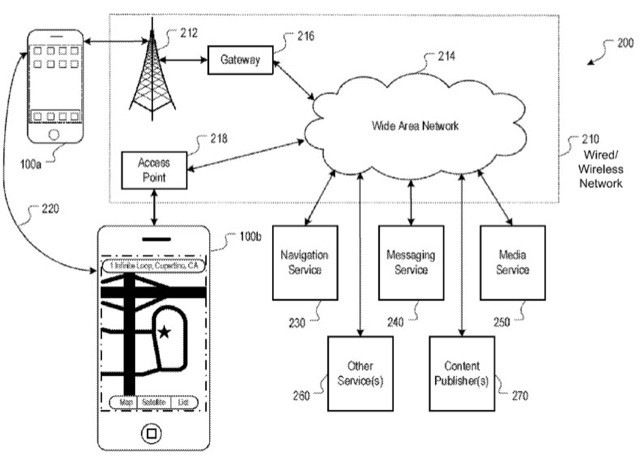
This isn’t the first time Kenny has worked with Apple; a patent called “Reinforced Device Housing” filed by the company in 2009 had Kenny’s name on it, and depicted an outer casing for electronic devices made from ultra-strong carbon fiber. The patent reveals Kenny was clearly working with Apple for a long time before he became a full-time employee.

Pixel Face Puts The Fun Into Pixelated Pics [iPhone Photography]

By

20110408-pixelface.jpg

There are plenty of photo apps that do pixellation effects, but Pixel Face grabbed my attention because of the way it embraces the whole 8-bit world of pixels.

It’s not just the photos that look colorful and retro, it’s the app itself. The buttons are cheerfully bright, the sounds are like something your games console used to do back in the 1980s.

Sega Hit ‘ChuChu Rocket!’ for iPhone is Free For Today Only

By

ChuChu-Rocket-iPhone.png

ChuChu Rocket! is packed with over 500 puzzles and frantic 4 player multiplayer action, and the Sega Dreamcast classic, which has proven to be a massive iOS hit in the App Store, has gone completely free for one day only.

10 years ago, a cute group of ChuChu’s invaded the hearts and minds of gamers as they looked for an escape plane away from the evil KapuKapus into their cozy rocket ships. now, you get to re-live the glory days of frantic puzzle fun on your iPhone, iPod touch, and iPad!

ChuChu Rocket! features four different difficulty levels to maximise its replay value; in addition to a free-for-all and team battle multiplayer mode with support for up to 4 players. Battle it out over Bluetooth and Wi-Fi across 25 intense multiplayer levels.

As one of the most popular puzzle games in the App Store, ChuChu Rocket! is a surefire way to cure your weekend boredom. Grab it now while it’s free!

iKeyGuard is the First Key Logger for iPhone

By

iKeyGuard-iPhone.png

A new application called iKeyGuard is the first key logger for the iPhone, and is now available to jailbroken devices through Cydia. The application runs discretely in the background and keeps a record of every single key pressed on the device.

iKeyGuard is $9.99 and is simple to install; just download the package from Cydia and it will start working as soon as it’s installed. The application’s main menu is accessed through Safari in order to be discrete, and this is where you can access your archive of key logs. You can also have them emailed to you at different intervals.

Its developer advertises iKeyGuard as a way of ensuring your employees are keeping your data safe, but we’re sure its main use will be to spy on kids and spouses.

If you want to be a little creepy, you can access the package from the BigBoss repo, which is installed with Cydia as default. Let us know what you think in the comments.

[via iPhone Download Blog]

iOS 4.3.2 to be Released in Next Two Weeks?

By

iOS-43

According to a source for Boy Genius Report, Apple is working on the next release of iOS and planning to release the firmware to the public during the next two weeks. iOS 4.3.2 will include a few enhancements, address security issues, and fix several bugs that have effected some users.

Unfortunately the details handed over to BGR are a little limited, so we’re unable to report what enhancements or bug fixes will be made in the next iOS release. Although, issues with Wi-Fi that effects users with certain routers, and a problem with the taking photographs on the iPad 2, have been picked up in iOS 4.3.1.

BGR sources seem to have been consistent with their information in recent months, revealing on March 21st that iOS 4.2.1 would launch within two weeks – 4 days before it went live.

As always, we’ll let you know when iOS 4.3.2 is available to download.

‘Atari’s Greatest Hits’ Brings 100 Classic Atari Titles to iOS

By

Atari-Greatest-Hits-iOS.png

Retro gamers can now enjoy 100 classic Atari titles on their iOS devices thanks to the launch of Atari’s Greatest Hits. The application is a free download that comes bundled with Pong, and through in-app purchases users can download additional game packs at $0.99 each, or the entire collection of 100 games for $14.99.

The collection of classic hits includes 18 Atari arcade games and 92 Atari 2600 games. But the fun doesn’t stop there; the app also boasts head-to-head multiplayer over Bluetooth and original cabinet and box art.

Check out the entire list of games available – and those that support Bluetooth multiplayer – after the break.

10 of the Best AirPlay Ready iOS Apps

By

best-airplay-apps.png

The iOS 4.3 update enabled third-party applications to take advantage of AirPlay and stream content to the AppleTV and other compatible devices. Since it went live, developers have been updating their apps to include AirPlay support, and we’ve put together a list of the top 10 iOS apps that are currently AirPlay ready. We’ve chosen apps to keep you entertained, up to date with the latest news, and even one to help you workout.

Check them out after the break!

iPhone 4 Game Blends Asteroids with Virtual Reality…on the Holodeck [Daily Freebie]

By

ball pit

If you’re lucky enough to posses an iPhone 4 and haven’t already downloaded freebie Ball Pit, do it now and play around with it a little. Go ahead, I’ll wait.

Pretty cool, right? For those of you at work or still saving for an iPhone 4, the game is basically a first-person shooter set in the middle of a what looks like a holodeck from the later Star Trek shows, with the objective of shooting down the spheres that happen to be floating around in the big room with you.

‘Gift Plan’ Ensures You’ll Never Miss a Birthday or Anniversary Again, and Today it’s Free!

By

gift_plan

Gift Plan(Free for today – usually $0.99) iPhone – Productivity

Gift Plan is a fantastic little application for the iPhone that could save you a lot of trouble. Usually $0.99 – but free for 24 hours – it will remind you of special occasions and ensure you never miss a birthday or anniversary again.

App That Displays Blocked Callers Spent 201 Days in App Store Review Process

By

trapcal.png

TrapCall is an application by Tel Tech Systems that enables an iPhone user to find out who’s calling them from blocked or private telephone numbers. It just arrived in the App Store, but the developers submitted the application to Apple months ago – waiting a staggering 201 days for their app to be approved.

By using the TrapCall service and accompanying iPhone application, users who receive calls from a blocked number can tap the sleep button twice to decline it and pass it over toTrapCall. Almost instantly, the service will then send the user a text message with the name, telephone number and address of their caller.

MapMyFitness Apps Now Work with Wahoo Fisica Dongle

By

mapmyfitness 3

With an estimated 2.5 million users, MapMyFitness is almost certainly one of the top fitness-tracking services on the web and the iPhone;  which means last week’s announcement that their apps now fully integrate with the Wahoo Fisica dongle should make a lot of people happy.

The MMF website and apps, most of which are free, are already chock-full of features like a deep library of user-generated maps, mapping functions (like route elevation profile generation) and their new nutrition-tracking feature; adding the ability to record sensor data should catapult the system to the top of the heap. The integration with the ANT+ Fisica sensor dongle doesn’t quite extend across MapMyFitness’s whole suite of apps, but hits the major ones, like MapMyRun, MapMyRide and MapMyFitness (all three of which are really almost identical).


How Apple Made the World Safe for the Future of Keyboards

By

IronMan_Keyboard

It’s hard to recall now, but the number-one complaint about the iPhone when it first came out was the on-screen keyboard.

Engadget’s Ryan Block asked: “Will the iPhone be undone by its keyboard?” People talked about how on-screen typing would destroy the iPhone in the same way that the hand-writing recognition system helped kill the Newton.

Even more incredibly, one of the main iPad criticisms when it first came out was the visibility of finger smudges on the screen when you turn the power off.

These concerns seem quaint now, textbook examples of the limited human-ape mind trying to grapple with novelty. It’s like people complaining about their new “motor car” a hundred years ago by saying the infernal contraption fails to slow down when they say, “whoa, Nellie!” and won’t speed up when they whip the fender with a riding crop. “It’ll never catch on!”

Many annoying tech pundits (including and especially Yours Truly) bitched and moaned about Apple’s global ban on the sale of third-party physical keyboard and refusal to create one of their own.

I believe Apple deliberately used its red-hot iPhone product to force the world to accept and learn to appreciate on-screen keyboards, and break them of their physical keyboard habit. When Apple released the iPad a year ago, it was usable with two Apple keyboards (the standard Bluetooth keyboard and a new cradle keyboard). But no matter. The on-screen keyboard idea had already been accepted by a critical mass of users.

Despite widespread acceptance, people are still divided on whether on-screen keyboards are good or bad, and most still prefer a physical keyboard. But let’s look at the big picture.

Reporting Suspicious Activity? There’s a Homeland Security app for that

By

Picture 18

Concerned citizens in Kentucky can report “suspicious activity” to their state branch of Homeland Security through an iPhone app.

Called Eyes and Ears of Kentucky, the app is offered gratis on iTunes. The handiwork of developers NICUSA, it has been in the store since March 7. So far, it has not received enough reviews to reach an average rating. Through the app, you can report a suspicious incident or activity along with details about the alleged subjects and their vehicles.

Recreate The Game Boy Camera With 8-Bit Pocket Camera App [Photography]

By

20110330-8bpc.jpg

Those of you of a certain age might remember the Game Boy Camera, an ingenious add-on for the original Nintendo Game Boy that snapped tiny 128×112 pictures.

It was briefly one of the most exciting ideas in handheld consoles – suddenly the Game Boy wasn’t just for games, it was for other fun stuff too!

Better still, if you had the money to spare, you could buy a Game Boy Printer and print out your pixellated works of art to give to friends.

All that’s ancient history, which is precisely what makes it the ideal starting point for an iOS app.

It’s called 8 Bit Pocket Camera, and it’s lots of fun and, at just a dollar, excellent value.

Woman Dies in iPhone Theft

By

32_50_stoleniphone04_z


A thief fleeing with an iPhone pushed a woman to her death down a flight of metro stairs in Chicago.


At rush hour on Monday, a man snatched an iPhone from a woman who was using it at Fullerton station platform in the Lincoln Park neighborhood.


As he ran off, the man knocked over Sally Katona-King, 68, on her way home from her church receptionist’s job.

Katona-King died yesterday after tumbling down the station stairs. Hospital officials believe that she suffered a cerebral hemorrhage.


“It’s a worldwide problem where iPhones are being taken, resold to fences, which are then resold for a higher price,” detective Cmdr. Gary Yamashiroya said. “It’s something that police departments across the country are trying to find solutions to.”


Police have not located the perp, though they hope video surveillance footage will help lead them to him.


Via Chicago Daily News

These Are Not Your Father’s Valpak Coupons

By

valpak

Daily coupon upstarts like Groupon and Living Social have become so massively popular that it’s gotta be increasingly difficult for older and more fogey-ish coupon flingers like Valpak to keep up.

So what Valpak has done is team up with the Junaio augmented reality app to provide an AR channel for Valpak deals in the area. Which is cool, because since Junaio is location based, rather than flip through Valpak’s iPhone app (yeah, they have an iPhone app now too) any potential coupon would just pop up on the screen when standing right outside the store.

Unfortunately, Valpak still seems to have retained its stodgy image; a pity, because the deals are actually pretty good. The Junaio channel’s a start though.


Digifit Churns Out New Bike Hardware, App And Connectivity Improvements

By

digifit case

The folks at Digifit seem to have been working feverishly on evolving their iPhone-linked fitness-monitoring system since the last time we covered them, a few months ago.


In fact, the system seems to be evolving very closely along the lines of Wahoo’s Fisica system — so closely that their new $50 Digifit Connect 2 dongle (that’s it pictured below) looks the spitting image of Wahoo’s version. No surprise then that the $15 Digifit app is now also compatible with the Wahoo dongle. In addition, there’s a new $120, water-resistant, iPhone 3/4-compatible Digifit Connect Case for mounting on bicycle handlebars.

Instacast Closes One of iPhone’s Most Glaring Gaps [Review]

By

home_screen2

Way back in the early days of the App Store, an early hot property in the store was Podcaster, a simple utility that allowed users to browse, subscribe to, and download podcasts to the iPhone. It was very useful, both for finding new things to listen to on the go, but also for eliminating one of the key reasons for unnecessary and redundant syncing to a computer.

Naturally, Apple had it removed. Then it came back as RSS Player a few months later. And got stripped out again, in both cases for providing redundant functionality, an absurd claim, as Apple’s built-in iTunes app is only capable of searching for podcasts — subscriptions aren’t allowed. Fortunately, Apple has  finallycome to its senses and now allows podcasting apps to be installed on non-jailbroken phones again, including the original Podcaster. Better still, the choices have multiplied, which brings us to the stellar subject of this review, Instacast.

This $1.99 app (a price I happily paid), approaches phone-based podcast management exactly the way I would like it. Its sole focus is on subscriptions rather than individual files. It uses a simple search mechanism that was able to track down every podcast I wanted to track. It also offers recommendations for popular series. You can also subscribe to any podcast you currently have loaded onto your iPhone. Rather than downloading these podcasts immediately (a potential nightmare), Instacast snags episode descriptions including links to either download or stream any given podcast. Piece of cake.

But the simple power of the app only becomes clearer with longer term use as you build out your library. It implements the increasingly-standard swipe down to refresh gesture first seen in Tweetie. This pulls down descriptions for any newly released episodes within your existing subscriptions and adds them to the existing queue. I have only synced my iPhone once since I downloaded Instacast, and that was to install iOS 4.3.1. I’m actually strongly considering deleting my podcast subscriptions from iTunes.

Now, the app isn’t perfect. Though the UI is fairly intuitive (usually through borrowing conventions of Twitter/Tweetie and Reeder) it has a few oddities, including an easy-to-miss play button, no on-screen volume controls, and no obvious way to delete a downloaded episode (you have to mark it as read). I assume such issues will be resolved in the near future, and the positives definitely outweigh the disadvantages.

In short, Instacast fixes part of a problem of both the iPhone and iPad: much as Apple has defined a new class of mobile computers that doesn’t rely on a desktop or laptop for full functionality, the company has also pushed administration of such devices onto desktop and laptop devices. It’s impossible to boot up an iPad for the first time without syncing it to a computer, and neither machine can install its own software updates without a tether. While this attitude is understandable for firmware and OS updates, it makes no sense for podcasts and other kinds of content. The longer I use Instacast, the more it feels like I’m finally cutting the cable.

Cult of Mac rated: [xrr rating=8/10]

iOS 4.3.1 Already Jailbroken Thanks to PwnageTool (Tethered)

By

ios431-jailbreak.png

iOS 4.3.1 was only released a couple of days ago, but thanks to one hacker, it’s already possible to jailbreak the software with PwnageTool 4.2. Before you jump into this, however, there are some things you need to know…

This is a tethered jailbreak, so you’ll have to hook your device up to your computer every time you need to reboot – this could pose a problem if your device crashes while you’re out and about and away from your computer. At the moment, this jailbreak is still in its early stages and not considered a stable release – it’s best not to perform this on your primary device.

With that said, if you’d still like to perform the jailbreak, you’ll need the following things:

  • PwnageTool 4.2
  • iOS 4.3.1 firmware
  • iTunes 10.2.1
  • Mac OS X
  • PwnageTool bundle for iOS 4.3.1
  • Universal Ramdisk Fixer
  • tetheredboot utility

You can then follow the step-by-step guide over at Redmond Pie to have your way with your device. Good luck!

iOS 5 to Preview at WWDC, Delayed Until Fall, to Bring Major Revamp?

By

ios5

According to two “solid sources” for TechCruch, Apple’s forthcoming iOS 5 software may bring with it a major revamp of the operating system built around the cloud, but we’ll have to wait for a fall release to enjoy its new features.

A fall release would break the pattern of previous iOS releases, which have typically been unveiled in early spring and released alongside a new iPhone in the summer. However, it’s believed iOS 5 may come with a third-generation iPad rumored to launch later this year.

The TechCrunch sources say that:

  • iOS 5 will launch in the fall and will be a major revamp of the OS.
  • It could well be previewed at WWDC, it just won’t be released then.
  • The iOS 5 launch is also likely to coincide with the release of the iPad 3.
  • The new iOS will be heavily built around the cloud, and we could see several new services launch from Apple that take advantage of this.
  • Yes, one of those is very likely a “music locker” service. There is also a fall launch aim for this, during Apple’s annual music-themed event.
  • But much of the cloud stuff will first be talked about at WWDC, Apple’s developer event which will take place in June.
  • One of the new cloud service elements is likely a location service that focuses on finding friends and family members.
  • OS X Lion is still on pace for a summer release — some of the new cloud components are likely to be baked into it as well.

Earlier reports had suggested that iOS 5 would be previewed at Apple’s iPad 2 keynote earlier this year, and when that didn’t happen, new reports then rumored that another event in April would take place to talk about iOS 5 and a revamped MobileMe. If the TechCrunch sources are correct, it seems this event won’t go ahead either.

Unfortunately, these sources didn’t provide any details on the iPhone 5, but we’re guessing the device is still on track for its unveiling at WWDC with a launch this summer. Of course, if that is the case, the device will launch with the latest version of iOS 4 and not iOS 5.

Why You’ll Use Color (Or Something Like It)

By

color

iPhone users are downloading, and VCs are throwing money at, a new iPhone app called Color.

Don’t get it? You’re not alone.

What the Naysayers are Naysaying

The general reception to Color has been overwhelmingly negative — even worse than the initial reception to the Apple iPad.

Gizmodo quipped that Color’s main purpose is to “amuse yourself by creeping out strangers.”

All Things Digital said Color reminds them of a mock news story created by The Onion, in which investigators establish the cause of a fire by examining the “43,000 pictures taken by students at a party.”

Fortune called Color a “whimsical” “Trojan horse.”

Computerworld called it a “social network for voyeurs.”

Daring Fireball says Color is a “breathlessly overhyped piece of crap.”

The app is currently rated by users with only two stars out of five in the iTunes App Store. Compare that with, say, the 99-cent “Mr. Ninja” game app, which is getting five stars.

The two main strains of criticism center around uselessness and privacy. People aren’t understanding how to use Color, nor why they might want to. Also: The app doesn’t give you any way to know who’s seeing your pictures, and enables creepy weirdos to potentially observe others unwisely sharing private or inappropriate moments. Also: Many users I’ve talked to don’t realize that when you connect to others at a specific event, Color then gives you access not only to their photos and videos taken at the same event, but all taken by them previously elsewhere as well.

All this criticism and mockery is interesting, but largely misguided. I’ll tell you why below, but first lets understand what Color actually is.

SuperTooth Releases More Powerful Hand-Free Bluetooth Speakerphone

By

SuperTooth HD 1a

By now, seems to be pretty well accepted that texting while driving is even more dangerous than driving while intoxicated. SuperTooth, a French company behind a variety of Bluetooth gadgets, released a version of their hands-free Bluetooth speakerphone earlier this week at the CTIA mobile conference in Florida.

The SuperTooth HD is a more powerful version of the company’s other models, like the SuperTooth Voice, and features two speakers outputting a relatively powerful a 5 watts through a 5.4 watt amplifier (which SuperTooth says is three times as powerful as any other speakerphone out there). Pair that with dual mics, and you’ve got what sounds like a fairly formidable hands-free package.

The HD also has the same voice-control and text-to-speech features as some of the company’s earlier offerings, like answering calls, retrieving voicemail and composing Facebook, Twitter, e-mail and text messages. The SuperTooth HD will be available next month for $129.