Mobile menu toggle

iPhone - page 329

Massive LinkedIn Security Breach Leads To 6.5 Million Stolen Passwords

By •

Massive data breach exposes 6.5 million LinkedIn passwords

Professional social network giant LinkedIn has acknowledged that it is looking into a massive data breach. As a result of the breach as many as 6.5 million user accounts may have been compromised. Account data including login information and passwords have been leaked and posted to a Russian hacker site. Although LinkedIn hasn’t confirmed the breach or detailed which accounts might have been impacted, the fact that the company is acknowledging the potential threat and investigating it is a big cause for concern.

At this time, it’s better to err on the side of caution.

If you use LinkedIn, you should consider that your account data has been compromised and change your password immediately.


Best Camera And Photo Accessories [Best Of]

By •

best-of-photo-stuff.jpg

Photo accessories for iPhones and regular cameras.

Best Of Photo Accessories [Best Of]

We have noticed a big crossover between Apple users and camera geeks. And while the iPhone’s own camera continues to get better and better, your old SLR still has some life in it yet. And whatever you shoot with, there are accessories that can perk up your interest or let you catch an otherwise-impossible shot. These are the best of them.

Unlock Apple’s Hidden Emoji Icons In iOS 5.1+ With This Simple Tweak [Jailbreak]

By •

iOS-5-1-emoji2-icons
These are the emoji icons that Apple is hiding in your iOS 5.1+ devices.

Apple extended its library of iOS emoji icons in its iOS 5.1 release, and the icons have been present in every firmware build that has landed ever since. However, the Cupertino company is yet to activate the latest set, and so they remain hidden within your device’s software. Fortunately, a new jailbreak tweak called Emoji2 for iOS 5.1+ unlocks them all for you.

The ClamBook Turns Your iPhone Or Android Smartphone Into A Beautiful MacBook Air Lookalike

By •

post-171677-image-dc0a975cc69cb1be3bb9c46c4f18ea4d-jpeg
The ClamBook it the prettiest notebook dock I've ever seen.

We’ve seen a handful of tablet cases — especially for the iPad — that aim to turn your slate into a MacBook Air lookalike. But the ClamBook  from ClamCase is the first solution we’ve seen that’s designed for the iPhone and Android smartphones, and it promises to “change the way you view smartphones.”

Built from sleek aluminum, the ClamBook is incredibly thin and light. It comes to life when you hook it up to your smartphone to see its content on the widescreen display, which is accompanied by a full-size QWERTY keyboard and a multitouch trackpad.

How To Make Your iPhone’s Notification Center Shut Up [Jailbreak]

By •

Need some peace and quiet?

Have you ever been making a phone call and had an email notification chime in your ear? Or how bout a banner notification pop up during a game or video? Sometimes you may just want to get away from alerts and incoming messages. Instead of notification after notification endlessly causing vibrations in your pocket, why not tell your iPhone that you’re out for lunch?

It would be nice for Apple to implement a “Do Not Disturb” feature into the iOS Notification Center, but until that day comes, jailbreakers can tell Notification Center to shut up with a couple of handy Cydia tweaks.

Stilla 3-D Photography App Is How Postcards Would Look In Minority Report

By •

cult_logo_featured_image_missing_default1920x1080

Imagine that you stood in one place and took a bunch of photos in different directions. Now imagine that you printed these photos onto glass sheets and arranged them in the same planes that they were shot: the picture you took of the sky is horizontal, facing down. The mountain off to the left is upright and facing right.

Now imagine that these pieces of glass magically intersect to make a lattice which you can turn to view, and that those pieces of glass disappear from view when they are edge on.

You just imagined Stilla, a great new iPhone app which does all of this for you, without harming a single sheet of glass.

Favs Favorite-Collecting App Comes To The iPhone

By •

favs-iphone.jpg

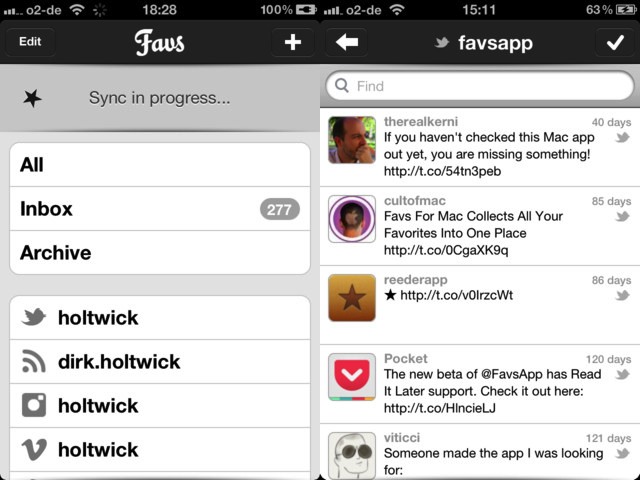
Favs: Now on the iPhone, too.

Remember Favs, the Mac app which collects your favorite items from pretty much any service on the internet and puts them all together in one place? Well, now you can use it on the iPhone, too: Favs for iOS just launched and it looks like a great way to keep track of your starred items when on the go.

Is That A Wookiee In Your Pocket, Or Is That Just Your New Star Wars iPhone Case?

By •

Screen Shot 2012-06-05 at 10.47.57 AM

These official Star Wars iPhone cases just announced by PowerA are just super cute. At $40, they’re pretty pricy, but LucasArts licensing ain’t cheap. Each case distills the iconic style of Star Wars‘s core characters — C-3PO, Darth Vader, R2-D2 and Chewbacca — into an attractive, quasi-abstract pattern. I particularly like the fur matting on the Chewbacca one.

Hey, who says a fanboy can’t look smart? These cases should be out later in the year.

Source: PowerA

PasswordPilot Pro Automatically Inserts Your Apple ID Password For Downloading New Apps And Updates [Jailbreak]

By •

PasswordPilot Pro manages your Apple ID password for you.

Have you ever wished that iOS would automatically fill in your Apple ID password when making purchases in the App Store? Apple requires the user to confirm the password associated with an Apple ID before purchasing and downloading new apps and updates. Once you enter your password, iOS keeps your account logged in for a short time, but you’ll have to re-enter your password again after a few minutes.

What if you only had to enter your password once and never worry about it again? A new jailbreak tweak called PasswordPilot Pro automatically inserts your Apple ID password for you, making the process of buying and updating apps faster and more efficient.

See Full Track Info On Your iPhone [iOS Tips]

By •

Music App Tip

It’s sometimes hard to remember that the ubiquitous iPhone had its genesis as a humble music player, the iPod. Remember those? In fact, the Music app was originally called iPod app, right?

Sometimes, when you have a particularly long song name, like with the podcasts or compilation albums in the images above, the small screen of the iPhone doesn’t quite do the full info name justice, leaving off with a disappointing elipsis. What if you want to see the whole thing? With iOS 5.1, you can.

Mobilisafe Detects And Protects Against iPhone/iPad Security Risks

By •

Mobilisafe brings network security and threat assessment to mobile devices and BYOD programs
Mobilisafe brings network security threat assessment to mobile devices and BYOD programs

We first looked at Mobilisafe a couple of months ago when the company’s signature mobile management suite was still in private beta. The company, which was started by former T-Mobile Android engineers, seeks to offer broad mobile device and data security without requiring the types on-device agents or profiles used by most mobile device and application management suites.

Mobilisafe executives describe their product as a mobile risk management solution rather than as a device or application management tool. The distinction being that Mobilisafe helps IT departments identify specific threats that can then be mitigated rather than simply locking specific apps and restricting access to on-device features like blocking an iPhone user’s ability to snap photos and upload them to iCloud.

Xbox Smart Glass Will Let You Beam Your Favorite Console Games To Your iPhone Or iPad

By •

original

Microsoft has officially announced their newest product for the Xbox 360, Xbox Smart Glass, and it will turn your iPhone, iPad or iPod touch into an extension of your favorite console games.

Imagine playing a game of Halo and using your iPhone to show you the mini-map, or your iPad to talk with team mates, and you have the right idea. And while you won’t be able to stream full games from your Xbox 360 to your iPhone or iPad, this still sounds pretty great.

CarXpenses Aims To Save You Money At The Gas Pump

By •

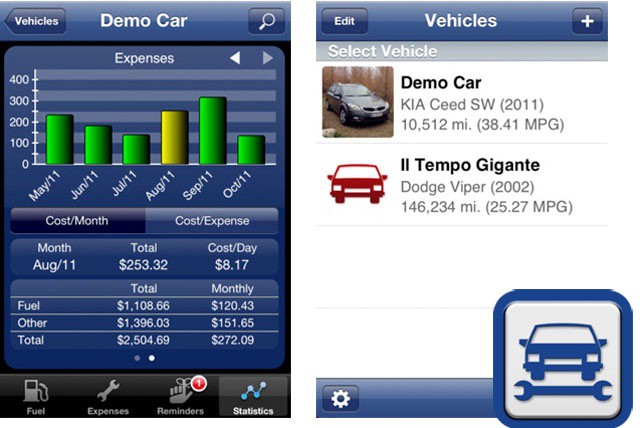
CarXpenses  update adds cloud sync, spreadsheet export features
CarXpenses update adds cloud sync, spreadsheet export features.

There’s an old and very accurate adage that says the second you drive a car, it begins losing value the second you drive it out of the showroom. It also immediately becomes an ongoing expense. The biggest sign of that expense is the number of trips to the gas station. Most of us tend to tend to just pay for the gas, regular maintenance, and monthly payments and not think about whether we’re getting the best gas mileage possible.

Tracking fuel economy and other car expense data can ultimately save you a fair amount of money. Tracking gas mileage and common maintenance tasks can help you optimize when to have your oil changed for maximum oil life and fuel economy, encourage you to check your tire pressure, and even plan more fuel-efficient routes for your daily commute and other regular trips. All of that can add up to real savings over the long-term.

AT&T Plans To Give Users A Free Ride But Only For Certain Content

By •

post-171211-image-46d5ad42c5b1cd767530803e3ff4fab0-jpg
AT&T "toll free" plans will provide free access to some online content

Unlimited data plans are becoming scarce options for smartphone and tablet users. Sprint remains the only carrier to offer an unlimited data plans. Most Verizon and AT&T customers, however, need to make do with tiered data plans. Tiered data plans get more cash from customers and deter customers from overloading mobile networks with excessive data use.

As a result, a lot of us try to avoid excessive data use by limiting the types and amount of content that we access when using a device’s 3G or LTE connection. That, in turn, blocks many content companies from capturing ad or subscription revenue from mobile users. That reality is leading major content companies to complain to the carriers and which AT&T CEO Randall Stephenson recently said may lead to “toll free” data plans.

Great Solutions For Traveling With Your iPhone [Feature]

By •

iphone_travel

Summer time is travel time for a lot of folks here in the US and abroad. In the US, at least, it’s a time for families with kids home from school to head out into the great wide world and see places, people, and resorts across the country.

Traveling with an iPhone is inevitable. If you’re heading abroad or staying in your own country, there are tips, tricks, and potential pitfalls when using your calling and data plans. There are lots of apps, cases, and extra power solutions out there, as well. We’ve spent a little time figuring some of this out so you don’t have to. Keep reading for some great tips on using your iPhone when you’re traveling. As always, let us know what you think in the comments, as well – we love a good conversation.

This Week’s Must-Have iOS Games: Razor: Salvation, Inferno+, Axon Runners & More [Roundup]

By •

Screen Shot 2012-06-02 at 00.40.26

Opening this week’s must-have games roundup is a stunning first-person shooter that has you protecting planet Earth from invasion from the “Xenos,” who are on a mission to infect every civilian that gets in their way. We also have a crazy dual-stick shooter that has made the leap from Xbox LIVE to your pocket, an update to Angry Birds Space, and lots more.

If You Bring Your iPhone To Work, Who Owns Your Phone Number When You Leave The Company?

By •

One often overlooked issue with BYOD is ownership of  mobile phone numbers
One often overlooked issue with BYOD is ownership of mobile phone numbers

A decade ago, your mobile phone number may not have meant much. In the days before number porting, mobile phone numbers were transient. If you switched carriers or moved, you got a new number.

Things are a bit different today. You can take your number with you from one mobile carrier to another, you can port it VOIP services like Vonage, or forwarding services like Google Voice, and you can even port it to a landline phone. Your phone number, much like your personal email address or Twitter account, belongs to you for as long as you want to keep it.

That can create a problem for companies implementing BYOD programs. If an employees bring their own phones, they also bring their own numbers. For many employees, particularly those that are mobile professionals, their mobile number is the go-to number to reach them. When such an employee leaves that company, what happens to his or her phone number?

Keep Your iPhone Charged And Safe On Vacation [iOS Tips]

By •

safeandcharged

When traveling, keeping your iPhone safe, charged, and accessible is pretty much a constant battle. What kinds of accessories you need to do so will depend on your destination, your transportation, and (obviously) your budget. Here are a few suggestions for stuff that you might find helpful when travelling with an iPhone.

Jailbreak Concepts That Apple Should Add In iOS 6 [Feature]

By •

In what ways will iOS 6 borrow ideas from the jailbreak community?

Click here to see Cult of Mac's full jailbreak archives!

Apple is expected to unveil iOS 6, the next major iteration of its software platform for the iPhone, iPad and iPod touch, at WWDC in two weeks. Not much is known about iOS 6, other than the new Maps app and the possibility of a more metallic look. Many have been speculating about what Apple could introduce, and we at Cult of Mac have a few ideas we’d like to see come to fruition.

The iOS jailbreak community has been innovating at a quicker pace than Apple for years. Jailbreakers had multitasking first, tethering first, iTunes WiFi sync first, and so on. There are many jailbreak concepts currently available for iOS 5 that we’d love to see Apple implement in iOS 6. That’s not to say that Apple will adopt all of these concepts, but we expect at least a few to show up in a way that only Apple can make happen.

Carriers Still Don’t Know How To Implement iPhone Shared Family Data Plans

By •

Despite the call for shared data plans, no one knows for sure the impact they'll have

The concept of shared data plans has been floating around in the U.S. mobile industry for a while.  So far, however, only Verizon has announced plans to offer them. This idea of shared data plans is based on the various family and business plans available from almost all major carriers in which multiple lines and corresponding devices are bundled as a single plan on a single account. That allows all the devices share the same pool of minutes.

While it seems like shared data would function in a similar manner, the issue isn’t quite so clear-cut from the perspective of mobile carriers. In fact, according to AT&T CFO John Stephens, carriers still aren’t sure how to configure shared data options or how much money they would make or lose by implementing them.