Mobile menu toggle

iPhone - page 232

Apple’s eBooks Tragedy Reads Like Shakespeare

By •

tragedy

Apple was found guilty in July of conspiring with publishers to fix the price of eBooks. As punishment, Apple must delete existing contracts with publishers and negotiate new ones, one at a time to avoid new conspiracy. The government is also pushing for Apple to let Amazon and others sell their books from Apple’s iPhones and iPads.

The whole story is framed like this: Apple and publishers are the bad guys, conspiring against victim Amazon to screw readers out of reasonably priced eBooks. So government, the hero, steps in and sets it right. Everyone lives happily every after.

It sounds like a bad fairy tale. Unfortunately, the true story that nobody is telling is actually something of a Shakespearean tragedy.

Here’s the true and tragic story of how Apple ended up helping Amazon become the Mother of All Monopolies. 

Plants Vs. Zombies 2 Passes 25 Million Downloads

By •

pvz2


Plants vs Zombies 2: It’s About Time has only been out a couple of weeks, but it’s quickly climbed up the App Store charts and shattered records. EA announced this afternoon that PvZ2 has been downloaded nearly 25 million times, smashing the total lifetime downloads number set by the original Plants vs Zombies game.

Over 10 million plants have been planted during the 81 thousand players have logged in the first week. EA announced last week that a “Far Future” expansion for the game soon will be released soon, but in the meantime, they’ve shared the following infographic to celebrate the 25 million download milestone:

The Impossible Line Is A One-Trick Pony, But It’s A Pretty Cool Trick [Review]

By •

The Impossible Line

Is your iPhone’s screen shamefully free of smudges? Do you want to test your memory, spatial awareness, and patience simultaneously? Do you love chalk?

The Impossible Line by Motion Imaging
Category: iOS Games
Works With: iPhone, iPad
Price: Free

If your answer to any of the previous questions was anything above “Yeah, I guess,” then you might want to check out publisher Chillingo’s puzzle offering, The Impossible Line. It’s out now, it works on your iPhone or iPad, and it does one thing really well: make you swear at a tiny triangle.

Apple Confirms iPhone Trade-In Program Available Nationwide Today

By •

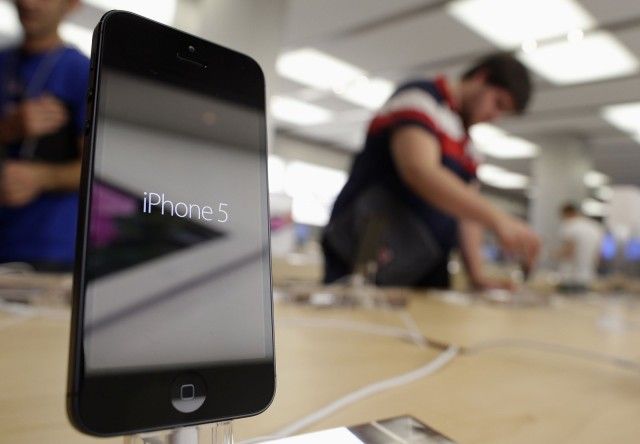
iPhone 5 Apple Store

Apple has confirmed to CNBC that a new iPhone trade-in program will be available in Apple Stores across the United States today — less than two weeks before the Cupertino company is set to announce the iPhone 5S and iPhone 5C.

Customers will be able to exchange their old Apple smartphone for a gift card, which can then be redeemed against a new device with a new two-year contract.

Griffin Survivor Case Gets Way More Manly With Camo Color Option

By •

griffin-survivor-camo-mossy-oak


Half the country is perhaps unaware of this, but out in places like Tennessee, where Griffin is based, the camouflage color scheme is a pretty big deal. Obviously there are camo shirts, pants and gun cases. But there’s also a good selection of camo bedding, camo welding helmets and of course, camo lingerie (don’t worry, link is more or less SFW).

So it makes perfect sense that Griffin’s tough-as-nails Survivor case is now available in camouflage.

T-Mobile Employee Schedule Suggests Next iPhone Launch On September 20th

By •

T-Mobile-sign-shop

We’re still waiting on Apple to send out the invites for its all-but-confirmed iPhone event on September 10th. While Apple is expected to announce the new iPhone(s) that day, nothing substantial has been rumored about in-store availability, until now.

According to an internal T-Mobile employee schedule, it looks like this year’s iPhone launch weekend will be September 20th-22nd. T-Mobile has blacked out these dates so employees can’t take vacations, which is the typical all-hands-on-deck approach that carriers reserve for new iPhone launches. Another report has said that the new iPhones will go on sale in Japan on the 20th as well.

“Like all good rumors, we should take this with the standard “subject to change” warning but my sources suggest this could be iPhone related,” reports TmoNews. Apple is expected to debut the iPhone 5S and iPhone 5C next month, but it’s unknown if both devices will go on sale during the same weekend.

Source: TmoNews

Woz Says He Wants Apple To Make An iWatch And iPhones With Bigger Displays

By •

Woz believes Siri went downhill the day Apple bought it.
"Siri, make me an iWatch."

Apple co-founder Steve Wozniak is one to shy away from sharing his opinions on the state of Apple, but rather than giving a speech on the advice he would impart to Tim Cook, Woz recently shared his Apple product wishlist, which includes wearable computers and bigger displays.

During a recent interview with Reuters, Woz says that he wants Apple to make an iWatch that is as complete in functionality as the current iPhone. The wishlist also includes larger screens on the iPhone, more customizations, and a happy room full of Dreamers thinking up how to change the world with a product that you wouldn’t call a phone.

Here’s the full interview:

Twitter For iOS Update Makes It Easier To Track Conversations

By •

twitter

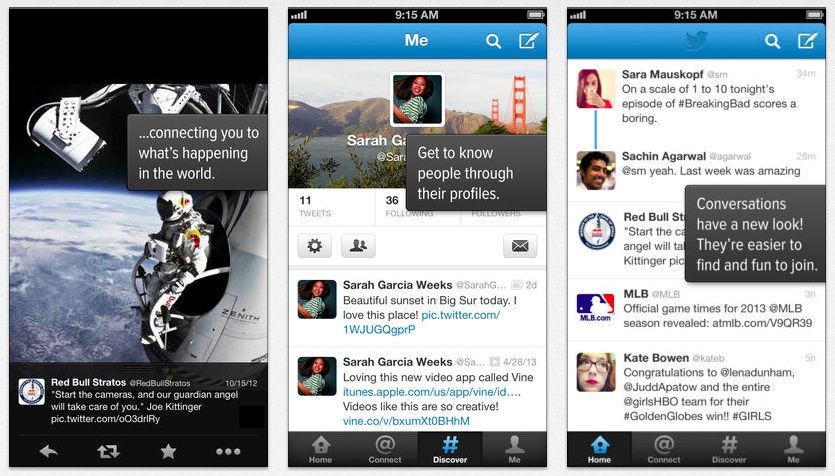
Twitter released a new update for its iOS app that makes it easier for users to keep track of conversations between friends. To keep tabs on who’s saying what to whom and when, Twitter has added a blue line that connects conversations and displays replies to tweets in chronological order.

Conversations can now be expanded by tapping the blue line to see more replies from people you don’t follow. Twitter also added new notification settings and bug fixes.

Here’s a video on how the blue line works:

Why The iRig iMic Is A Great Addition To Your iOS Toolbox [Deals]

By •

CoM-iRigMic-01

I’m a podcaster.

And I’m not just a podcaster that sits at home and records on my MacBook Air with my Blue Spark Digital microphone. I’m a podcaster that likes to record on the go. That means I need to have something that allows me to record top-notch sound in a portable package.

So when I team up my iPhone with the iRig iMic, I’m able to do what I do…and do it well.

Bloomberg: New iPads Will Be Unveiled Alongside New iPhones On September 10 [Update: Nope]

By •

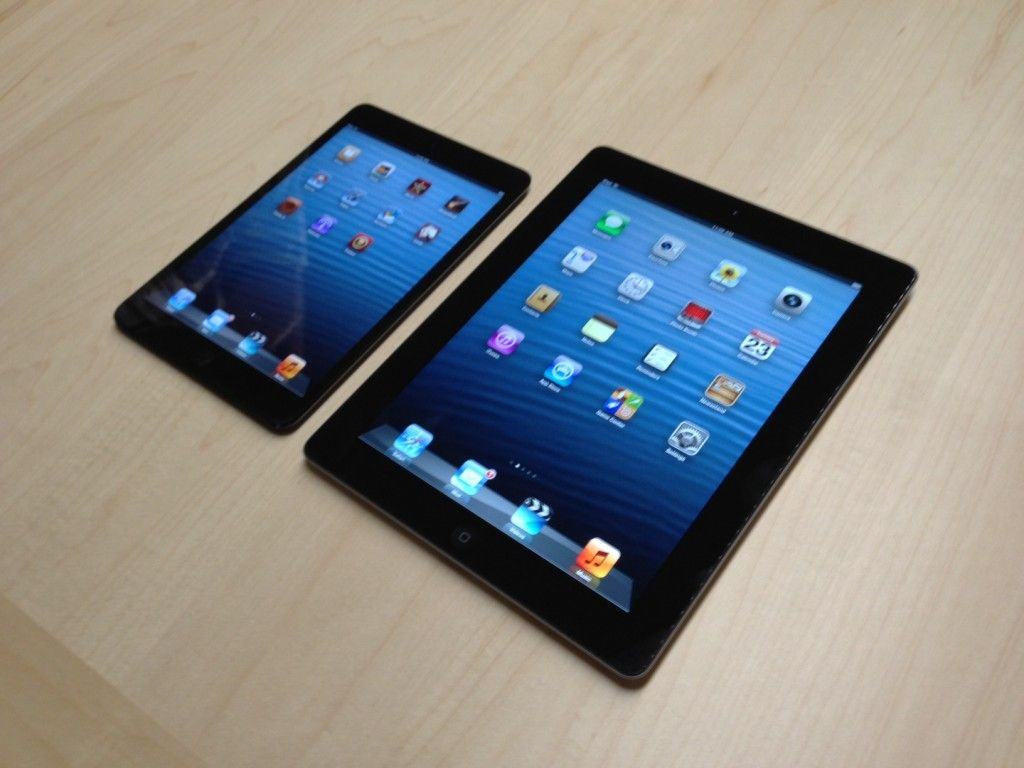
ipad-mini-2-1024x768

An Apple iPhone event for September 10 has been all but confirmed in recent weeks, and we’re almost certain that we’ll see the unveiling of both the iPhone 5S and the iPhone 5C. But what about new iPads? There have been rumors that claim they won’t arrive until October, but according to a new Bloomberg report, they’ll be part of the September 10 event as well.

Rapidly Mutating iblazr LED iDevice Flash Now Works With DSLRs Too

By •

iblazr-cold-shoe

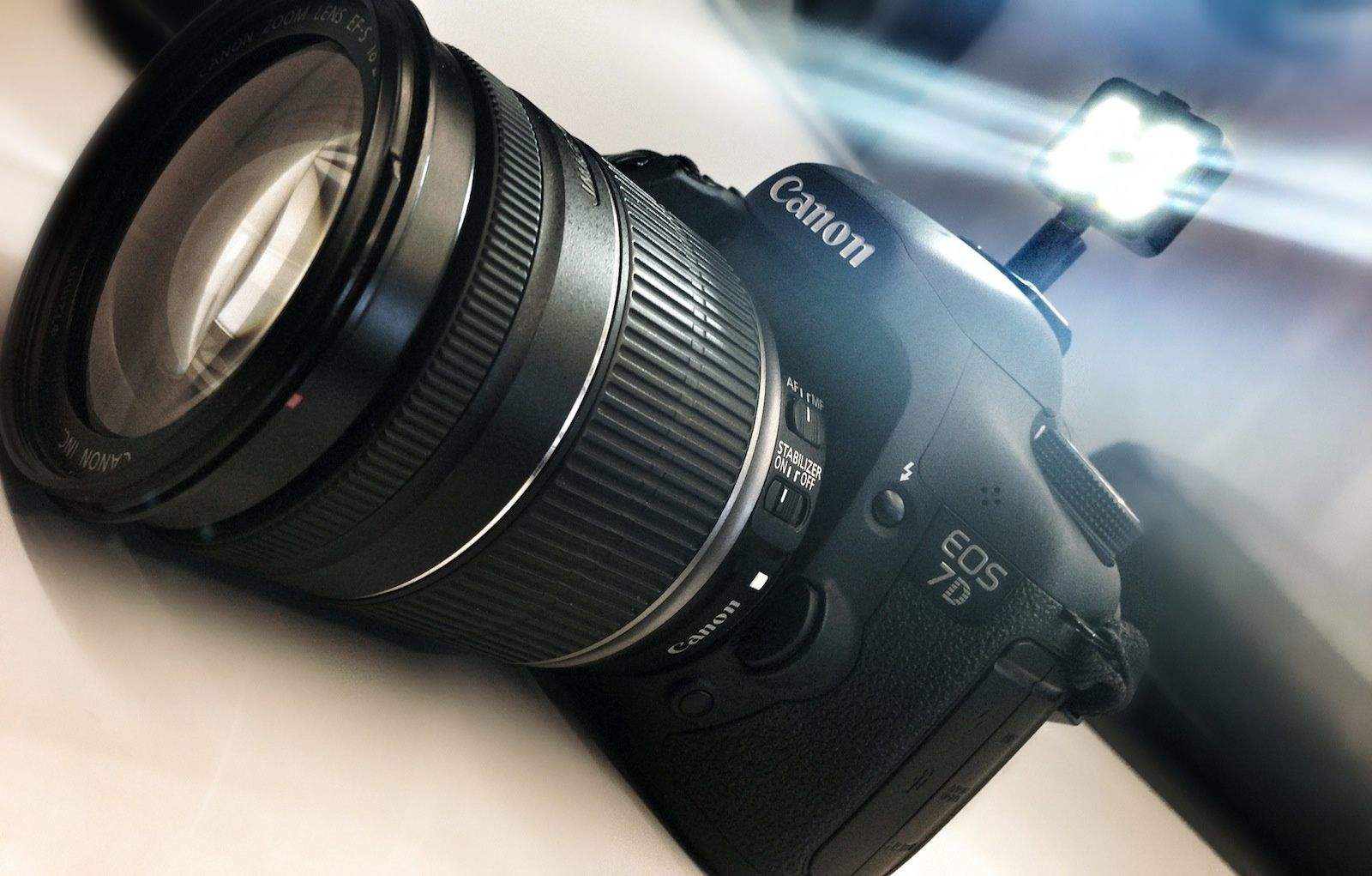
The dizzying pace of iblazr‘s evolution has been difficult to keep up with over the last month.

It started out as an iDevice flash with four Cree-made LEDs that plugs into the 3.5mm jack. Then it gained a diffuser, and a short while later its designers added a reflective backing and redesigned the lens over the LEDs.

Now, the little flash has a cold-shoe adapter that’ll allow it to be mounted onto a DSLR.

Triple Click The Home Button For Accessibility Options [iOS Tips]

By •

IMG_0269

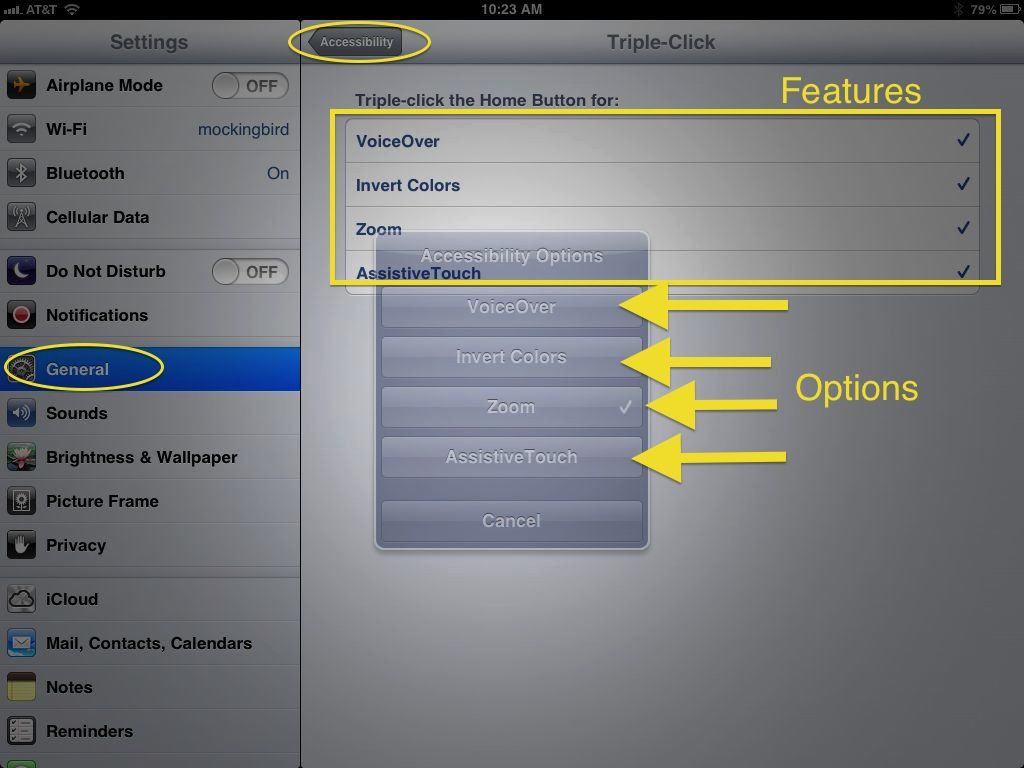
There are a host of accessibility options within iOS, and many of them can be the difference between someone being able to use a mobile device and not being able to use it. There are also a ton of reasons why those of us without a disability might want to check them out.

That said, it can be time consuming and even difficult to hop into the Accessibility section to activate specific features, especially if you are dealing with some sort of disability. That’s why Apple has set iOS up to make them easier to access right from the Home button. Here’s how to set it up and use it.

EA Releases Free-To-Play Madden 25 On iOS

By •

Madden25iOS

Football season is nearly upon us and that means an all-new version of Madden is ready to bust onto screens. Madden 25 for iOS was released this morning and for the first time ever, EA Sports has made the game free-to-play while also offering in-app purchases.

Madden 25 boasts a new Ultimate Team feature that allows players to custom build their own NFL superstar team by collecting player cards or purchasing them from the Auction House. The game sports some new tap & swipe controls for a more intuitive experience, along with the new Solo Challenges, head-to-head mode, and more.

Here are the full release notes:

How Instagram Intelligently Straightens The Wonky Photos Taken On Your iPhone

By •

Instagram-straightening

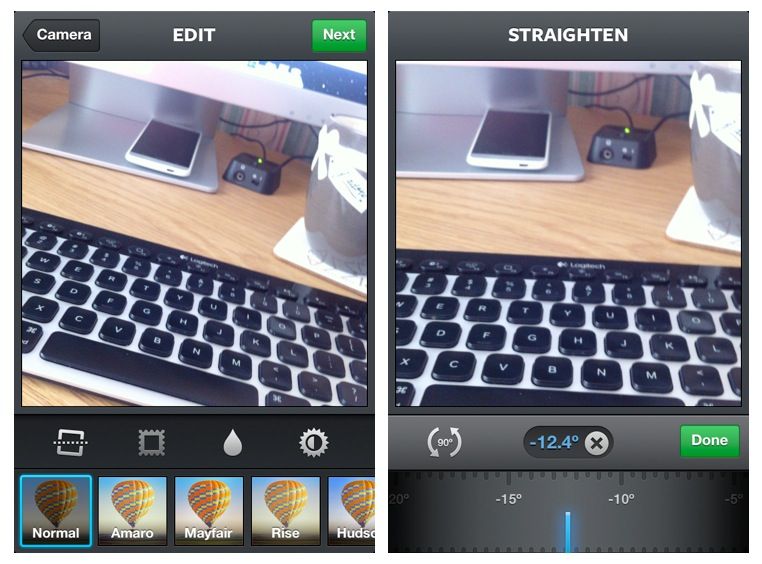
There’s a nifty image editing feature inside Instagram for iPhone that helps you quickly straighten out wonky images before you upload them. It’s fast, and it seems to do a great job of straightening out your photo without any manual tweaking.

That’s thanks to Instagram’s intelligent correction technology, which uses data captured by your iPhone’s internal sensors to establish the orientation of your device when your image was taken.

Asphalt 8: Airborne Is Ridiculously Fun, Once You Figure Out How To Make It Go [Review]

By •

Asphalt 8: Airborne

Do you remember the Burnout series?

Asphalt 8: Airborne by Gameloft
Category: iOS Games
Works With: iPhone, iPad
Price: $0.99

Developer Criterion’s crash-centric racing franchise for consoles was basically the exact opposite of more staid simulation racers like Forza Motorsport or Gran Turismo. It was about speed and stunts. It featured absurd crashes that played out in almost fetishistic slow motion with metal and glass separating from cars and sailing through the air like doves in a John Woo movie. The physics were loose, the action was intense, and the event types included several things that were almost, but not quite, entirely unlike racing.

Why do I bring this up? Because Asphalt 8: Airborne is Burnout for your mobile device.

Set Up & Manage Your Chromecast With Google’s New iOS App

By •

Chromecast-iOS-app

Unlike Apple, Google likes to make its hardware compatible with all of your other gadgets — regardless of which platform they’re running. So you may have purchased a $35 Chromecast dongle to work with your iOS devices. If so, you’ll be interested in Google’s new Chromecast app, which lets you set up and manage your dongle from your iPhone, iPad, and iPod touch.

This Android-Powered iPhone 5C Clone Will Cost Just $100 In China

By •

post-242555-image-17a9c94b67aa381e0e5c0f9f438fa731-jpg

While the iPhone 5C will certainly be cheaper than Apple’s high-end iPhone 5S, it’s likely to be too expensive still for many in emerging markets. But smartphone clone specialists Goophone already have an Android-powered alternative in the pipeline that will sell for just $100 in China.

Called the “i5C,” the device looks almost identical to the real iPhone 5C based on the leaks we’ve seen. Just don’t expect a Retina display.

Mojo Refuel, The iPhone Battery Case With Removable Batteries

By •

shot

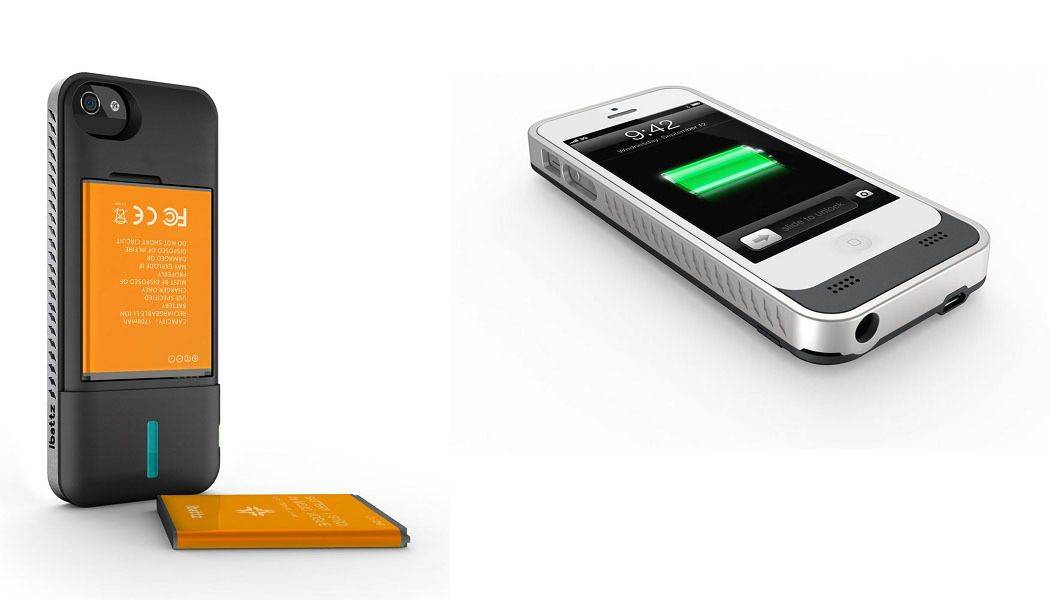
You know how when the iPhone first came out and people were all complaining about how you couldn’t take out the battery? I know, right? The market swiftly moved in to solve the “problem” by supplying battery packs that could be added only when you needed them, and without rebooting the phone to swap them, and in whichever sizes you needed.

Now we have come full circle, as they say, with the Mojo Refuel for iPhone 5. It’s an external battery pack which — get this — has its own removable battery.

Jump Right To The Now Playing Song With Control Center In iOS 7 Beta [iOS Tips]

By •

photo 1

Every once in a while, I’m listening to a song via the Music app on my iPhone, or (lately) listening to iTunes Radio on my iPad through a bluetooth speaker in the house, when I want to quickly figure out what’s playing, or maybe mess with the controls, skip a song, or something like that.

Typically, I’d double click the Home button to get a basic controller to pause or skip a song, or click into the home screen, find the Music app, launch it, then tap the Now Playing button, and then make any adjustments.

Now, however, with iOS 7 beta’s new Control Center, you can tap right through to the Now Playing song with a swipe and a tap. Here’s how.

The HiRise Is The Best Docking Stand For Your iPhone Or iPad, But It’s A Pain To Put Together [Review]

By •

Screen Shot 2013-08-26 at 3.18.28 PM


An iPhone or iPad dock is a very nice thing to have for keeping one’s desktop regimented and tidy, but they have drawbacks.

HiRise by Twelve South
Category: Docks / Stands
Works With: iPad, iPhone
Price: $35

For one, a dock that you buy for one generation of iPhone might not work if Apple changes the handset design in the next generation. In addition, iPhone and iPad docks tend not to be cross-compatible, so if you have a dock that fits your iPhone, you usually can’t force an iPad into it, and vice versa. And then, of course, there’s the case problem. Docks and cases tend not to play well together, but most of us like to use a case to protect our devices. That means we usually go without a dock.

Twelve South’s latest product, the HiRise for iPhone and iPad mini, is a combination dock and stand that very cleverly finds a way around all of these problems. We love using it, but putting it together? That’s another story.

Plex For iPhone, iPad Drops To $1.99 For A Limited Time [Deals]

By •

Two of the best streaming media apps are coming to the new Apple TV.
Photo: Cult of Mac

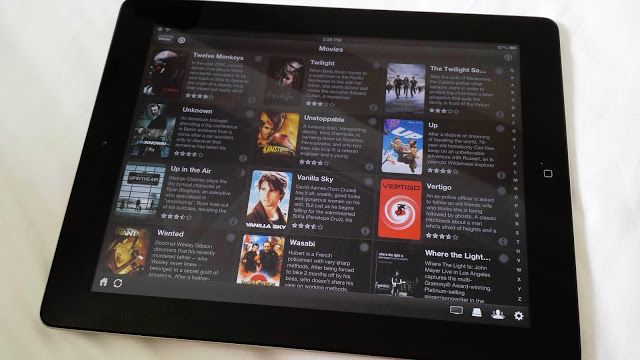
You know what everyone should do if they have an Apple TV? Install Plex, the incredible media server that can stream any digital media file on your Mac to your Apple TV, no jailbreak required.

I’m dead serious: Plex is awesome, and installing it on my Mac has been a total game changer in regards to the way I watch media in my own house. From my Apple TV, my MacBook Air, my iPad or my iPhone, I can stream my entire video library anywhere with no hassle.

2 Ways To Avoid Losing Your iOS Data [Deals]

By •

CoM - ios_recovery_mainframe_630x473

Since we’re so reliant on our iPhones and iPads – especially as iOS becomes more prevalent – that we need to give thought on things beyond security on these devices. We need to think about what to do in order to keep our data safe from accidental deletion — including looking at software solutions beyond what’s included with our Mac.

With that in mind, here are 2 things you can do to make sure the chances of losing your iOS data is as slim as possible: