Mobile menu toggle

iPhone apps - page 50

Is This iPad Game Running on HDTV with iPhone As Controller The Future of Apple TV?

By •

post-40759-image-76994123a83878387b53f77df317e812-jpg

httpvhd://www.youtube.com/watch?v=Fyx7U7TH2bQ

This fantastic proof of concept video by the guys over at Magic Jungle Software demonstrates their forthcoming game, Chopper 2, being output from an iPad to a 42-inch HDTV, with an iPhone or iPod Touch used as the game’s controller.

It looks incredible, but perhaps more interesting is Distorted Loop’s take on the video, which is that this would be a fantastic direction for a relaunched Apple TV to take: an audio-visual, app-running console hooked up to your television that can be controlled by an iPhone, iPod Touch or even a “future low-cost touch sensitive remote control” that would ship in the box.

A product like that would not only finally realize the wasted potential of the Apple TV product line, but put Apple on track to compete with the likes of the Wii, Xbox 360 and PlayStation 3 as furiously as the iPhone currently competes with the Nintendo DS.

iPhone App Named in Sexual Assault Case

By •

post-40642-image-924c34eaadcd162cdc9211b0e5297b10-jpg
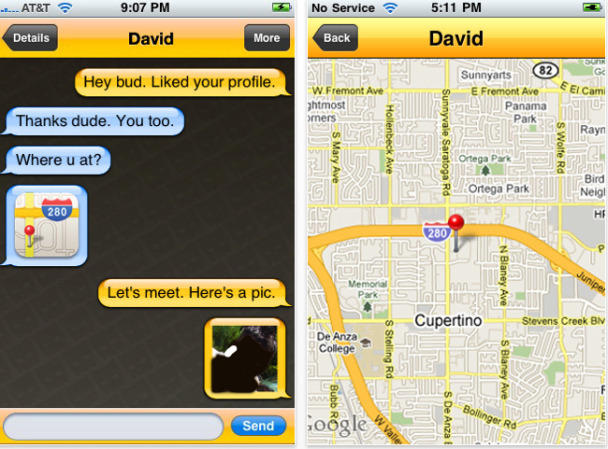
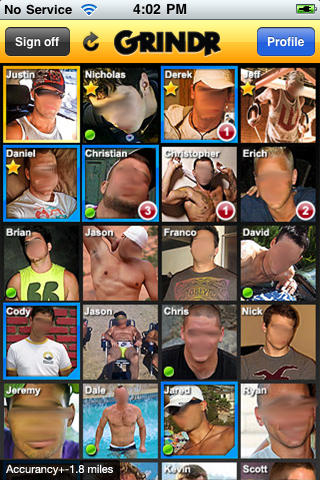
Grindr in action. The faces have been blurred upon request from models.

A 15-year old teen is pointing the finger at social networking iPhone app Grindr for being assaulted by a 54-year-old man.

The incident happened in Vancouver, where Brent Tynan is being charged with sexual interference, invitation to sexual touching and sexual assault following an incident that took place last August. Tynan, who was arrested April 13, is expected back in court today.

Tynan met the teen through free app Grindr, which uses GPS in order to connect users to nearby gay and bisexual men.

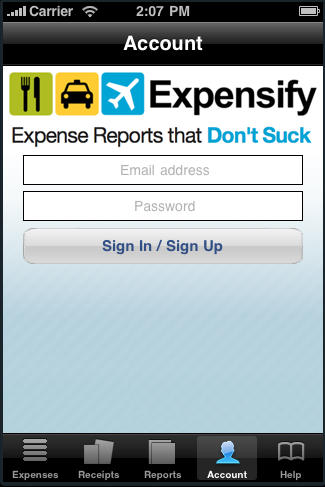
Expensify: An Expense Report App that Doesn’t Suck! [Review]

By •

post-39943-image-ca0b4bcaf12f403b8b5b4e1affafc7ca-jpg

I love to travel. Whether it be for work or for pleasure, nothing beats exploring the country or the world. What I don’t like about work travel is keeping up with expenses. It sucks out any fun I may be having and adds on to any frustrations I might be experiencing.

The only way to make expense reports even worse is to try and tackle them on the flight home in coach with a one-year-old behind you screaming and kicking your seat. But a free new iPhone app, Expensify, makes expense reports easier for those who travel with an iPhone.

Read on for the full review:

Wi-Fi Sync: Wireless Sync Coming To The App Store

By •

post-40046-image-42370924462d75acf294349a5e05d315-jpg

In an age when voice and video from half a world away can be sucked up from the soup of electromagnetic radiation invisibly swirling around us, plugging in my iPhone to sync with iTunes makes me feel like a caveman. I’ve been waiting for an app that would allow me to wirelessly sync my iDevices for awhile, and now, it looks like it might be here: Wi-Fi Sync by Greg Hughes allows you to pair your iPhone, iPad or iPod Touch to your computer through WiFi, no wires required.

Apple Travel App Patent Hints At Ticketless Airlines

By •

travelphone

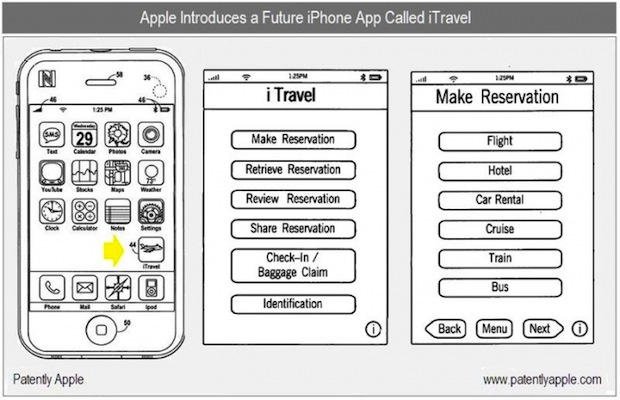
Apple has filed a very interesting patent for a travel app called iTravel that books flights, hotels and car reservations. But the most interesting part is how it uses a radio chip to check you in at the airport, whisk you through security and allows you to wireless board your flight.

The iTravel app uses Near Field Communications, a short-range wireless technology that is starting to become widely used in cell phones for mobile ticketing, payment and electronic keys, especially in countries like Japan.

Apple is rumored to be adding NFC chipset to the next iPhone. If so, it could turn the iPhone into an electronic wallet, allowing you to for everything, from a cup of coffee to a subway ride. Your iPhone could unlock your car, pick up e-coupons at the local mall, and pay for all your supermarket groceries just by laying it on top of the checkout.

iPhone App Unlocks Secrets of the Uffizi Gallery

By •

post-38947-image-4d39663cacab58b9656b9d2ba1125966-jpg


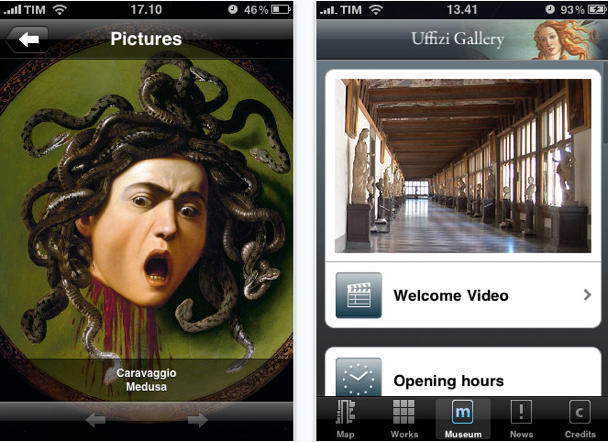
The Uffizi Gallery in Florence is one of the largest treasure troves of Renaissance art in the world, but getting around the meandering rooms searching for sparse or missing signage can be a challenge.

Getting good information about the paintings usually means bringing a guide book and often overlooking anything but the A-list paintings.

Enter the official Uffizi iPhone app, which will get you from Giotto to Botticelli and back again in Italian and English.  The best part:  you can download it for free for the first two weeks, until April 26.

This isn’t the first time the gallery has tried to get more hands on with visitors: they also recently launched a touch screen system to give more info about the paintings.

Via the Uffizi web site

Bing Sets Music Free on iPhone App

By •

post-39003-image-f74e6333ca6b6d7f216957369b140946-jpg

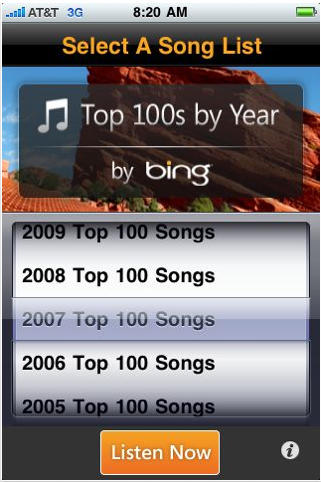
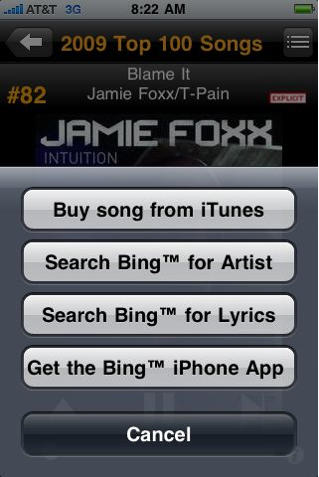
Microsoft and its upstart search engine Bing have partnered with mobile music system developer Melodeo to bring iPhone, iPod Touch and iPad users 100 great songs from every year between 1947 – 2009 – for free. Since coming out earlier in April at $1.99, the app Top 100s by Year has taken on sponsorship by Bing, been transformed into Top 100s by Year by Bing and is now free “for a limited time” on the iTunes App Store.

The app allows users to pick any year from ’47 – ’09 and hear 100 “songs that have stood the test of time to become the greatest songs for any given year” (according to the app description), streamed in random order over WiFi, 3G or Edge networks. Users can view a list of songs for any year and listen to a short preview of each, as well as buy the song on iTunes — but listening to songs in their entirety requires listening to the randomized stream. If a distasteful song comes up in the stream users can tap to move on to the next tune.

Bing, of course, offers up ads promoting its search engine every four or five tunes, though ads can be disappeared with a tap.

Another downside is that, unlike listening to songs from an iTunes library on the iPod app, Top 100s won’t permit other apps to run on a user’s device while it’s playing, at least not until iPhone OS 4.0 comes out and Melodeo upgrades the app to take advantage of the new OS’s multitasking functionality.

But hey, what do you expect for free?

Monday Giveaways: Touch Pad for iPhone, iPod Touch, and iPad

By •

touch pad for iphone, ipod touch, and ipad

The Touch Pad App is in my opinion, Edovia’s best application for your mobile Mac devices and now the iPad. For those of you who use a Mac Mini for your home entertainment and digital storage set up in your living room or bedroom, you must get this application. Basically, it turns your iPhone, iPod Touch, or iPad into a touch pad similar to the one on the Macbook. It can also act as an Apple remote. There have been some glitches and movements that didn’t work like the touch pads on the Macbooks, but Edovia just came out with their latest version of the app (3.1), and they cleaned up a lot of those issues. Still, this is a great app to have, and guess what, we’re giving it away for FREE today!

We’re doing something a little different today. In order to get this app, you gotta be on your “A” game with your Cult of Mac knowledge. We’re going to ask you trivia from articles published since last Tuesday (April 13th). Make note that the app codes we’re giving away are only good for the United States version of iTunes. Sorry to all of our international readers, but when we get sent promo codes, they’re usually always the U.S. version. We’ll try to ask for some international codes in the future.

  1. Become a fan of our Facebook page if you aren’t already.
  2. Throughout the day, we’ll post a trivia question, and the first person that answers correctly will win one of the Touch Pad app codes. We have six codes to give away, so we’ll be doing six different trivia questions.
  3. To redeem the app code, you can do so through iTunes or directly no the device you want to install it on. For instance, on the iPhone, you can go to the “App Store” app, scroll down, and tap on the “Redeem” button, then type the code in that we provide you and it will automatically download on your phone.

This is a $3.99 app, and if you’re like me, I hate paying for anything over a $1, so have some fun with this one, make sure you’re up to speed on what was going on with Cult of Mac last week, and keep refreshing our Facebook page every now and then today. Good luck!

Amazing Roguelike iPhone Game “Sword of Fargoal” Free Today Only!

By •

post-38661-image-50a03d47beb60c690c3d6006a018ba22-jpg

Looking for something to play this weekend? The amazing rogue-like RPG, Sword of Fargoal for the iPhone and iPod Touch is free to download for today only. I bought it for $4.99 a month ago, and it was worth every penny.

Fargoal going free is serendipitous, since this is an especially good time to grab the game: a new patch adding a chunk of new content is imminent, and the developers have been firmly committed to not just expanding the existing game, but evolving it in fresh new ways as well.

Apple Asks Rejected Cartoonist To Resubmit App

By •

cult_logo_featured_image_missing_default1920x1080

Above: Mark Fiore’s “Learn to Speak Teabag” cartoon, which Apple considers too objectionable for the App Store.

Thanks to a stink in the press, Apple has called Pultizer Prize-winning cartoonist Mark Fiore and asked him to resubmit his rejected app, the Wall Street Journal reports.

Apple initially rejected Fiore’s political satire app because it ridiculed public figures, which is against the App Store rules.

iFranco Joins Growing Ranks of Controversial Leader iPhone Apps

By •

post-38538-image-5de6392c2046d508d836de72e826f6aa-jpg

First came iPhone apps for iMussolini then Che Guevara, now there’s an app for Spanish dictator Francisco Franco.

Just like the other ones, iFranco is a compendium of speeches, messages, videos and audio El Caudillo made during his 36-year reign.

It also appears that, like the others, the $0.99 app was approved from a non-US iTunes store but is available in the US.

Pulitzer Prize Winning Web Cartoonist Banned From App Store For Ridiculing Public Figures

By •

500x_newstoons

Political caricaturist Mark Fiore was awarded the first Pulitzer Prize for editorial cartooning to ever be awarded to a web-only cartoonist, so obviously he’s got some artistic and editorial merit… but not in Apple’s eyes.

Word from the Nieman Journalism Lab reports that Fiore submitted his iPhone app, NewsToons, back in December, but was rejected for “ridiculing public figures.”

$2 Joypad App Turns Your iPhone Into A Wireless Video Game Controller

By •

post-38274-image-be7b3b97fca80000af96af50c02f3b43-jpg

httpvhd://www.youtube.com/watch?v=6bvdYhlbjRc

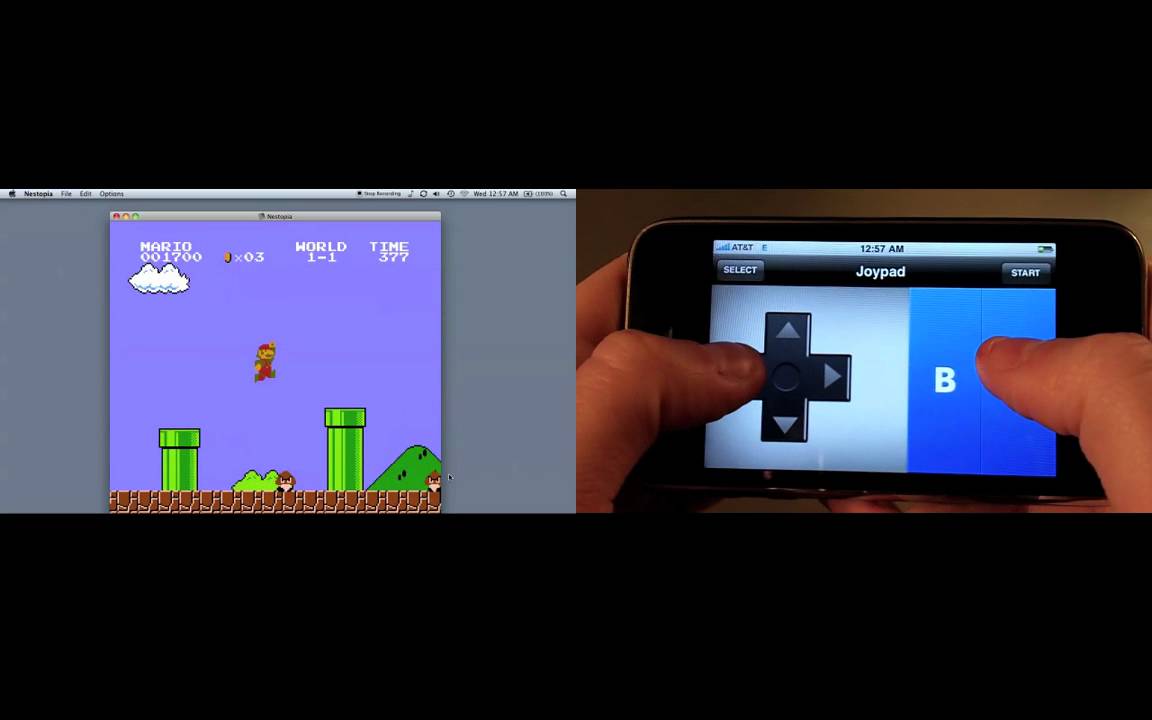
Utterly fantastic. Joypad is an iPhone app that operates as a virtual, touch-controlled gaming pad for emulators on your Mac. All you do is run a free helper program under OS X, launch the iPhone app and you’re ready to crush some Koopas. It seems to work pretty well, and at $2, is cheaper than even the most remedial USB pad you can find. You may not be able to play emulated games on your iPhone, but that’s not to say you can’t control them.

[via Gadget Lab]

Zombie Killing Doesn’t Get Better Than “Alive 4-Ever Returns”

By •

post-38266-image-e4d80a4f311419038e89ee548d84fcb8-jpg

httpvhd://www.youtube.com/watch?v=u7ksSDAc9ns

There’s no shortage of ways to kill zombies on the iPhone. Blast them in the head with a shotgun, gobble them up with a venus flytrap, or hit them with a car. Even so, Meridian Digital Entertainment’s Smash TV like, Alive 4-Ever, was one of the more satisfying ways to blow apart fetid corpse flesh around… and the upcoming sequel, Alive 4-Ever Returns, while out-stupiding the naming paradigm of its predecessor, looks even better with its new graphics engine, zombies, skills, power-ups, weapons and environmental effects. It should be available later this month.

Quick Review: Atomic Web Browser for iPad, iPhone Has Tabs, AdBlock, Offline Mode and More

By •

IMG_0002

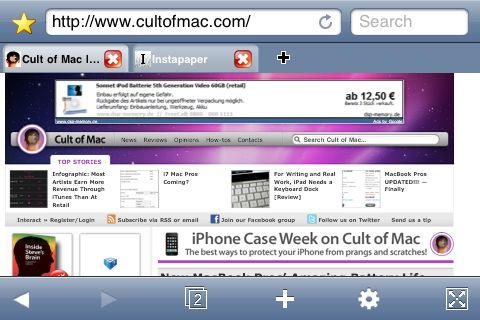
Mobile Safari’s method of handling multiple pages groks well with the iPhone’s small touchscreen, but on the iPad, it seems slow and cumbersome when there’s plenty of real estate for desktop Safari’s standard method of navigating between open websites: tabs.

Atomic Web Browser ($0.99, Free) brings tabs back to the iPhone OS. Better, it does so elegantly even on an iPhone or iPod Touch.

Twitter Management Making Developers Nervous?

By •

post-38216-image-c79496ff4d4b83579aa9e1bafcdede1f-jpg

The tweet-world is in a tizzy after news last week that Twitter snapped up both the Tweetie desktop client and iPhone app, as a first step to re-releasing the $3 app as Twitter’s free, official iPhone client.

While iPhone twittaholics might be pretty pumped about the move — the Cult’s Pete Mortensen has said Tweetie 2 is not just the best Twitter app, but “the best iPhone app, period” — Twitter app developers are less jazzed.

In fact, Mashable says there seemed to be a lot of nervousness and uncertainty at an investment panel Wednesday during day one of Chirp, the first Twitter developers conference, in San Francisco — the problem being that Twitter has apparently been leaving developers in the dark with regard to its plans, as last week’s sudden and unexpected acquisition illustrates.

[via Mashable]

Opera Mini Tops iTunes Downloads Worldwide

By •

post-38165-image-1c57c71ca6fe4b4a4c0dc79d98792061-jpg

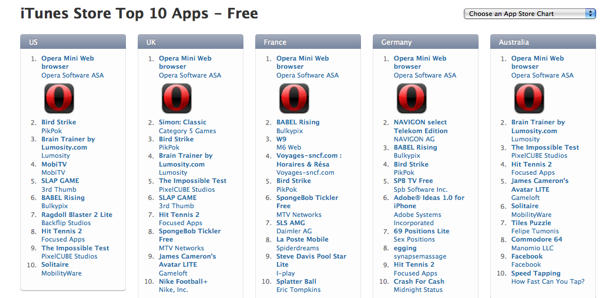
Just a day after Apple approved it,  the Opera Mini Web Browser app is topping free downloads on iTunes stores around the world. At this writing, it is number one of the top ten free iTunes downloads in all 22 iTunes stores — from Japan to Sweden,  Australia to Austria.

In the 20 days it took to get a thumbs up from Apple, expectations were high, and as our reviewer Giles Turnbull discovered, mostly met: it’s a fast workhorse that plows through downloads even with spotty connections. On the downside, Giles found the zoom controls a little stiff and the overview display somewhat basic.

So, users of the Opera mini-browser: does it warrant the first-place spot or are the massive downloads just a fad?

“Vertigo Rogue” brings “Grand Theft Auto” to 3D App Store Skies

By •

post-38109-image-b1cc4fd5a503e7a98503f4ce8fa59430-jpg

httpvhd://www.youtube.com/watch?v=kJ7_MOs9ffw

One of the great things about the App Store is how it’s leveled the game development playing field: for the first time since the late 80s, a single developer coding in his bedroom can be competitive both graphically and presentationally with larger developers.

Case in point: Brainphant’s Vertigo Rogue, an action game that literally came out of nowhere and is to helicopters what Grand Theft Auto: Chinatown Wars was to cars. Not only does it feature intuitive controls, a huge, detailed 3D city and frenetic blow-em-all-up action, but Brainphant even programmed in stereoscopic 3D glasses support. You know, like James Cameron used.

At $4.99, Brainphant’s Vertigo Rogue is looking like a strong contender for my weekend time sink. If you need more convincing, check out Touch Arcade’s spot-on review.

Review: Opera Mini For iPhone

By •

20100413-operamini.jpg

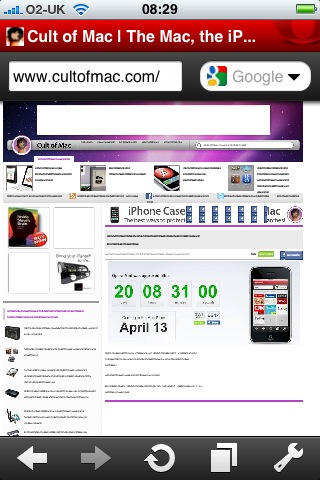
I’ve been messing around with Opera Mini as much as I can today, and here’s what I make of it so far.

First thing: it’s fast. Most of the time, you get your complete web page downloaded and readable quicker than you would using Safari.

It also does a great job of downloading over crummy network connections. I spent most of the afternoon on a beach, at the bottom of a cliff that blocks out all but one bar of my phone network signal. 3G? Forget it. Even so, I was able to read about the new MacBook Pros, and even go browsing on apple.com to check out details, using Opera Mini.

Callooh! Callay! “Alice in Wonderland” for iPad

By •

post-37800-image-75e6ef9a13eea6d50a4990b05e9a786d-jpg

httpvhd://www.youtube.com/watch?v=gew68Qj5kxw

Atomic Antelope’s Alice in Wonderland app for the iPad is certainly plenty frabjous — and makes a strange case for the iPad as the twenty-first century’s digital successor to the pop-up book — but what I really want to see is how the iPad changes the reading game when it comes to drier books.

As beautiful as this adaptation of Alice in Wonderland is, it’s also an easy approach. But how will people use the iPad’s capability to expand upon the text of a book like Mervyn Peake’s Titus Groan or Nabokov’s Ada, or Adror, or Eco’s The Name of the Rose, or other less playful and anarchic works? I can’t wait to see.

iPhone Apps Put Shroud of Turin in Focus

By •

Picture 3

Pilgrims trekking Italy to ogle the the Shroud of Turin, on public display for the first time in a decade, now have iPhone apps to help them see more.

Last time thousands of visitors flocked to peek at the yellowed cloth said to depict the face of Jesus, the best mobile option was probably some lame WAP browser.

This time around, iPhone apps can help negotiate the challenges of Italian travel — opening hours, monuments off the grid — with the flick of a finger.

iSindone (“sindone” is Italian for holy shroud) costs $0.99, and offers opening times, directions for getting there and info on the cathedral. There’s also a hi-res image of the shroud, rumored to be a medieval fake, which may give you a better look than the quick drive-by visitors get of the real thing.

Instant Turin, gratis for the next two weeks in honor of the shroud unveiling, promises to steer you clear of restaurants with dreaded tourist menus and get you to the Mole on time.

The official app,  also called Sindone, hasn’t been released yet. Registering on the web site will give you details when it launches,  we’re going to hope before the shroud display ends May 23.

And, if you need to walk off the chocolate and Barolo, try the sprawling gardens of  Venaria Reale outside Turin — just remember to get bus times and hours handy or printed out or you will risk getting stranded.

How To Play Bullet Hell SHMUP “ESPGALUDA II” On Your iPod Touch 3rd Gen Right Now

By •

espgaluda

Last week, I wrote about an upcoming bullet hell SHMUP from Cave called ESPGALUDA II due to hit the App Store last Saturday. As promised, it did, and at a special low introductory price of $4.99 to boot.

Unfortunately, though, ESPGALUDA II came with some big problems.

For one, it would only run on the iPhone 3Gs or iPad. Even worse? Due to a developer error, third generation iPod Touches like mine were inexplicably incapable of running the game, even though the hardware supports it. This put iPod Touch owners in a nasty position: they either dropped five bucks on the ESPGALUDA II app now and hoped an update came along soon to fix the install problem, or waited for the fix and risk paying an extra four bucks for the game later.

If you’re a SHMUP-loving iPod Touch 3rd Gen owner, though, don’t despair. There’s an easy way to get ESPGALUDA II running on your device right now. Just follow the instructions below.

iPhone 4.0 ditches Rate on Delete

By •

091124-rating

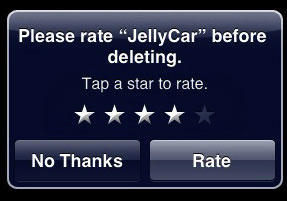
Introduced way back in iPhone OS 2.2, the “Rate on Delete” feature was a great example of how even Apple sometimes get it wrong.

The intention, of course, was to prompt users to actually rate the apps on their iPhone in a non-intrusive way, but if you never deleted an app, you were never prompted to rate it. Combined with the fact that people deleting apps tend not to care much for them and you had a system that promoted app reviews but with a slant to the negative.

Now MacRumors is reporting that Apple has fixed its mistake and removed Rate on Delete from OS 4.0

I’m not sure this is the right tack. You still want user ratings, it’s just the current system skews towards bad ratings. Why not supplement Rate on Delete with a one-time Rate prompt the fifth time you open an app? That would cover all the bases.