Mobile menu toggle

iPhone apps - page 39

Foursquare Brings “Social Voting” To The iPhone

By

Hip To Be Square, Foursquare That Is: US Voters With iPhones Can Share Their Experiences With Friends
Hip to be Square, Foursquare that is: US Voters with iPhones can share their experiences with friends

During the final stretch of the 2008 U.S. presidential campaign, a number of different media organizations set up different kinds of maps to track real-time activities at the polls. Wired.com, for example, set up a voting machine problem map where voters could use a ZeeMap we had set up to tell us what went wrong in their experience.

Fast-forward to 2010. Foursquare, the mobile social geolocation service, has teamed up with Google, Pew, a couple of get-out-the-vote groups and a couple of Washington DC-based technology and design firms to update that idea.

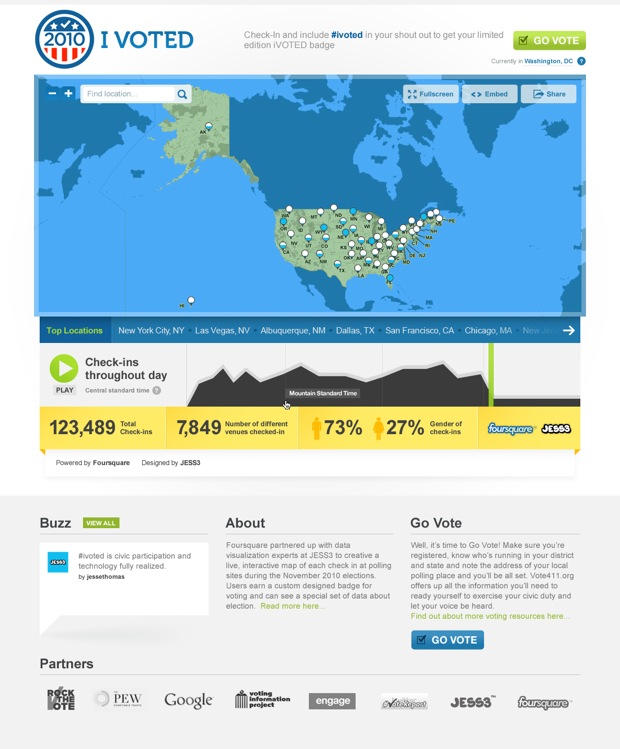
The coalition recently launched its “I Voted” project, which enables iPhone Foursquare users to broadcast the fact that they voted to their friends, and to report what it was like, and whether there were problems like long lines or voter intimidation.

The idea is to harness the attributes of peer pressure and political campaigns’ competitive spirit to spur more people to actually vote. Another side benefit of this project is that it could potentially uncover trending problems at polling places.

On election day itself, all the data emanating from this activity on Foursquare will stream to an online map to give people a big-picture portrait.

The project so far is an experiment. It started off as an idea being batted around between some young political technology consultants on Twitter this June.

Mindy Finn, a co-founder of EngageDC, one of the participants that set up this project, sees the application’s use this election day as a dry run for the 2012 presidential election. Political campaigns could possibly use it to ignite socially-inspired viral voting campaigns.

“We’re certainly not at critical mass right now,” Finn said. “But the potential for this type of social voting, and the use of geolocation services to encourage civic engagement, the potential is just huge.”

Now Find Local Haunted Houses, Trick-Or-Treat Zones With Trapster

By

trapster med

Halloween, with its legions of black-clad kids running around and darting out into the street, introduces its own variety of driving perils. So in addition to warning other users of speed traps and red-light cameras, Trapster users can now mark two new location types on its map this Halloween: haunted houses and trick-or-treat zones.

The free app works through crowdsourcing, which means any registered user can add markers which then become viewable to other Trapster users; and if users find a marker that’s inaccurate (say, if some user tagged their in-laws place as a haunted house), it can be removed with enough votes against it. Now if only the had a marker for houses with the best candy…

The Death of Channel Surfing? Peel Hopes So

By

peel

On Monday, we mentioned the launch of Peel, a new app that uses an algorithm similar to the one used by Netflix to try and figure out what its user should watch. Here’s the second half: A peek under the hood, excerpts from a chat with Peel’s (née Zelfy) VP of marketing, and a look at an accompanying piece of hardware that’s (maybe) coming next.

NYC Subway Riders Captured With SketchBook for iPhone

By

Molinsky

New York City is full of characters — that’s one of the biggest attractions of living there.

Freelance radio producer and artist/animator Eric Molinsky spends his commuting time on the city’s subway system capturing the visual aspects of those characters using Autodesk’s SketchBook Mobile application, as the New York Times notes in a blog post profiling Molinsky on Friday.

The results are available for all to see on Molinsky’s iPhone Sketchbook Drawing blog.

From the beaky-nosed, middle-aged woman in a blue hat to other characters whose faces are artfully-shaded, each of these portraits manages to capture the spirit or mood of a person, a bit like a Richard Avedon portrait. In my mind, the pictures look as if they should be in an edition of the New Yorker magazine illustrating some story, or in the Times‘ “Metropolitan Diary” section illustrating some anecdote.

There’s something utterly romantic and wonderful about bringing the timeless art of sketching to a device like the iPhone — in my experience, it’s actually cool functionality like this that seems to have  converted a lot of my older technophobe friends  into iPhone and iPAD devotees.

As you’ll see from the comments on the Times blog post, it turns out that Molinsky’s hobby isn’t that unusual: a lot of other people have been using apps like Brushes to do sketches too.

Above: A subway rider on the 3 train August 9, 2010, sketch by Eric Molinsky.

Send Real-World Postcards Straight From Your iPhone [New App]

By

simply postcards

Apple is making a big deal about the jazzed-up photo book capabilities in iLife ’11, and for good reason — being able to cradle a vibrant, printed image still trumps the digital alternative. But iPhoto isn’t the only way to transform pixels into ink.

Simply Postcards lets users grab any photo off their iPhone and snail-mail it to an address in the U.S. or elsewhere. Postcards ship the day after ordering them, and prices range from $1-$2 for a stateside address to double that for international cards.

The app is free, and so is the first postcard; the Cult is going to use its free credits to brighten the Microsoft HQ mailbox with images of our new MacBook Airs!

New TV App Mimics Netflix Suggestions [First Look]

By

peel 106

Couch potatoes take note: Peel, a free app that’s a sort of mix between Netflix’s movie suggestions and TV Guide, made its debut last week.

And it’s got a star-studded development team backing it up. Core members of the original iTunes team helped create Peel’s interface, and a team that beat Netfilx’s movie-suggestion algorithm in a competition worked on Peels innards.

BiCycle Is The Most Expensive GPS Bike App, And It’s Almost Worth It [Review]

By

b.icycle

One expects great things from an app costing double its nearest competitor (which happens to be the excellent $5 Cyclemeter). And for the most part, BiCycle — a $10 cycling app that uses the iPhone’s GPS receiver to log data — delivers. But while the app is well-designed and contains features not found elsewhere, there’re a few gaping holes that should make potential purchasers pause before taking the plunge.

DataMan App Saves Money By Warning Of Data Overages

By

dataman

For new iPhoners, the idea of gulping down unlimited swathes of data is just a magical thing of the past, spoken of with hushed tones, in the days before fear of data overages gripped the iPhone universe.

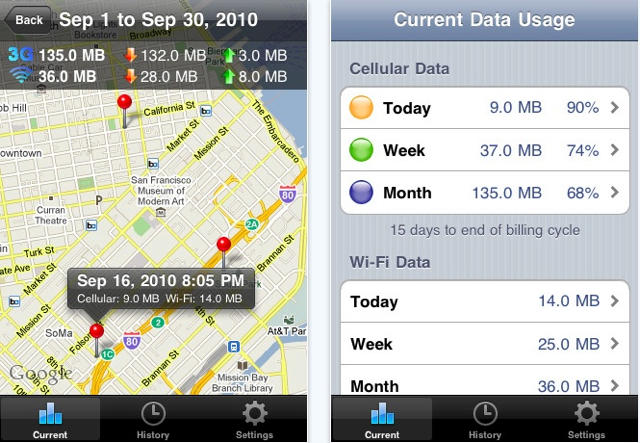
Fear not though, new iPhoner — the tools exist to keep from accidentally punching through the monthly 3G data allotment. Readers who’ve been following our Essential App series (and who live in the States) have no doubt already equipped their iPhones with AT&T’s free myWireless app, which counts and bar graphs data usage; but there’s an even more precise and powerful weapon available: DataMan

Democrats Take the Pain Out of Canvassing With iPhone App

By

OFA2010CANVAS

If you’ve ever participated in any kind of canvassing for a political party or for pet causes, you know what an excruciating experience it can be on every level.

From having to put on a cheesy smile as you approach busy strangers in the street to having to put all the information together back in the office, it’s just one of the most tedious tasks around, apart from, say, taking out the garbage.

The Democratic National Committee and Organizing for America have gone a long way to address all of that with their thoughtfully-designed iPhone/iPAD/iPOD Touch canvassing and organizing application, which was launched earlier this month. It’s one of the best tools I’ve seen.

Halloween-Themed ‘Devil Voice’ Alters Voices In Real Time [New App]

By

devil voice

It doesn’t do much — no fancy vocal wizardry, just adjusts the pitch of the user’s voice up or down — but Devil Voice looks like the first instance of a real-time voice-changing app, without the need to record a user’s voice first before playback — though it can, if desired.

The app is a dollar, and  comes out just in time for Halloween; see our forthcoming Halloween Guide for examples on how to duct tape it and attached speakers into a Darth Vader mask and whatnot.

Check The Status Of Your Battery — Your Chevy Volt’s Battery, That Is [New App]

By

Apparently, OnStar thinks the iPhone isn't photogenic enough; their promo images exclusively feature Droids. Hmmm...

Potential and current (see what I did there) Chevrolet Volt owners will be pleased to hear that the mostly electric car’s iPhone app will finally be hitting the App Store at the end of October.

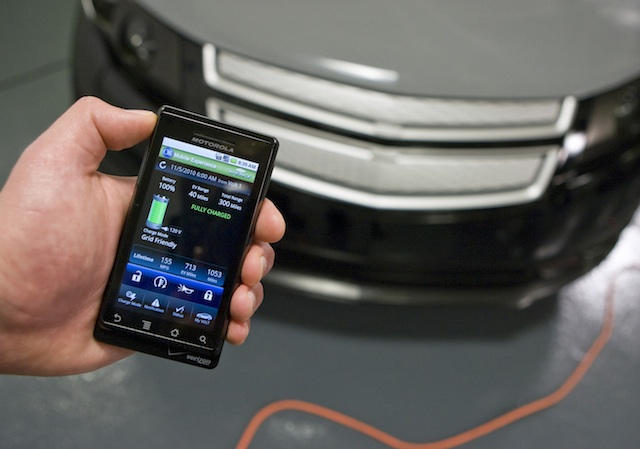
The app includes a ton of interesting controls and features: Charge the Volt immediately or schedule a charge time; check charge status and battery level; display expected range; and display various data tracked while driving like how many miles were electric-only, how many were gas. That’s on top flashy functions like being able to start the car from the app and mess with the door locks.

An OnStar spokesperson told us the Volt comes with five years of free OnStar service — other cars get six months free — and that the app will be free for the iPhone (and the Droid — sorry, Blackberry). Not impressed with (mostly) electric vehicles? OnStar will be making the app (sans Volt-specific functions) available for about a dozen or so additional OnStar-equipped cars in the near future.

Stay Cool Through Convention Hell With GPS Mapping, Instant Event Updates [New App]

By

expo tec

Cast your mind back to June; remember reading about an app that used the iPhone’s GPS to bulls-eye the user’s location on any map imported into it? Well, the developer, Fog Technologies,  is back with Expo Tec, an app that starts with the same basic principle, but narrows its focus to convention-like events and adds some features to help the user through his chaos-laden convention visit.

The developer says it’s pretty easy for event planners to create “event packs” through a web interface designed for the app, which then shunts the pack to users of the app. Besides a GPS-enabled event map, the app provides event schedules, instant event updates, detailed vendor info and general event info.

Expo Tec is $4, and boasts that it’s a “fist-in-the-industry” solution. Yeah, sure, it was probably supposed to read “first-in-the-industry,” but we like the fist version better; “we’re angry as hell (about getting lost) and we’re not going to take (poor convention info) anymore!” Or something.

Yahoo Messenger App Gets Big Upgrade With Video Calling, Low-Cost International Voice Calls

By

yahoo messenger2

As if its frenetically gleeful yellow and purple icon wasn’t enough enticement to download, yesterday saw Yahoo make its free Yahoo Messenger app even more appealing with some beefy upgrades: backgrounding, voice calling and the biggie, video calling.

We tested it briefly and found the video calling works pretty well over wifi, even with a 3GS — though, obviously, the person on the other end won’t see a face unless the 3GS is turned around — with decent transmission of both voice and picture. But the app suffers from a few issues, which fellow Cultist David Martin will reveal in a full review later this week.

While voice and video calls will only work between users of the app, Yahoo also yesterday added the Skype-like ability to make voice calls (including international calls) to landlines or mobiles at low fees via a Yahoo Voice Phone Out account.

iPhone App Counts Calories for Pudgy Pets

By

post-62987-image-34c9e89172571cc4e01aa73b6d08ccb9-jpg

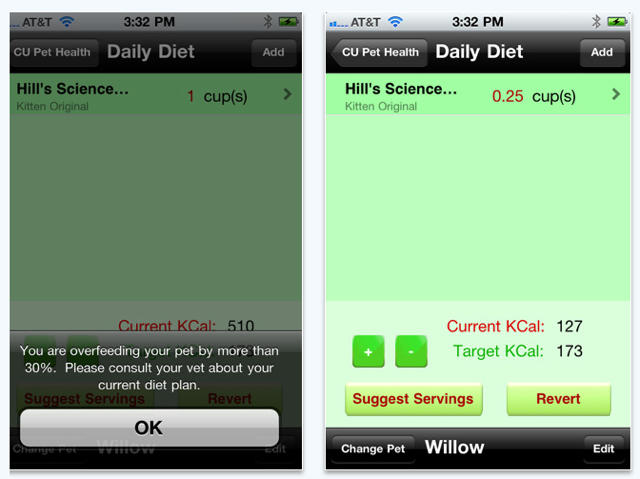
With pudgy poodles and tubby tabbies becoming the norm in the US, an iPhone app promises to help keep pet calorie counts under control.

Called CUPetHealth, the $3.99 app was developed by a team of seven computer science students at Cornell as part of a class project and vetted by the university’s veterinary experts for accuracy.

The app is meant to take the guess work out of feeding for the household’s four-legged companions. After entering the daily diet and noting several lifestyle variables to determine the appropriate number of calories each day, the app responds with “overfeeding,” “underfeeding” or “appropriate.” The app also keeps track of medication and vaccine and flea control information.

Pogoplug Adds Background Music-Streaming To Its App

By

pogoplug 105

Pogoplug has updated their free app over the weekend, and it now sports the ability to stream and play music in the background over either a wifi or 3G connection from a network-attached storage device running the Pogoplug engine — which currently means either a Pogoplug unit or one from Seagate.

The big advantage the Pogoplug app’s new function has over, say, the free Zumocast app (which debuted last month and does the same thing), is that the Pogoplug version doesn’t require a computer running from which to stream music. Downside? You’ll need to pop for a Pogoplug-equipped NAS unit, if you don’t already have one. The app also gains background photo uploading and fast app-switching.

Next, hopefully Pogoplug will improve the app’s movie-streaming capability, which sorely lacks the ability to convert videos on the fly to a streaming-freindly format, like Zumocast does.

WTF App Of The Week: Badger Face

By

20101011-badgerface.jpg

People who have been desperate to turn friends into badgers – your prayers have finally, finally been answered.

Because for you, Badger Face is likely to be the best dollar you’ve ever spent on an iPhone/iPod touch application with turning-people-into-badgers functionality.

For the rest of us? Well, for the rest of us, Badger Face will make us momentarily double-take as we browse the App Store for amazing stuff. It will make us choke on our badger burgers as we read the app description. Badger Face is simultaneously the weirdest thing we have seen this week, and it is this week’s Best (Badger-Related) Thing Ever.

Who knows what will come next? The user comments suggest Dinosaur Face, but why stop there? What about Panda Face? Squirrel Face? Unicorn Face? And for A-Team fans, Face Face?

Quick-Tunes Makes Playing Music A Breeze [Review]

By

quick-tunes

Let’s face it — for a multi-purpose device heavily weighted toward music, the iPhone’s music-player interface is crap. Dealing with those tiny buttons crammed onto the bottom of the screen is bad enough under most conditions, worse for meaty-fingered users and infuriating when the iPhone is docked or when movement is involved.

Enter Quick-Tunes, a $1 app that replaces the iPhones native chintzy soft controls with a big, meaty, attractive buttons. It also adds cool additional functions around the main play/pause button that let the user play more songs from the same artist, genre or album.

Handicap? Psha! Golf Vision Plots Your Putt [New App]

By

post-62452-image-e6c709c0b3ff1124d9bd1842afb5d306-jpg

in case you missed it, last month saw the debut of Golf Vision Green Analyzer, an app that uses the iPhone’s accelerometer to calculate the perfect putting angle to sink a ball on the green; just measure the slope angle at the hole and at the ball by laying the iPhone on the ground, then set the green speed, and the app does its magic calculations and overlays the premium angle graphically over a still photo of your view to the hole.

Skeptical? That’s ok, the developers have just released a free version to try before considering the $5 full version. Unfortunately, the free version uses a generic photo to overlay the calculations on, and more importantly, only allows for slope measurements at one end, so results may not be as accurate as with the full version.

Now Your iPhone Can (Burp) Taste Food [New App]

By

foodmatic2

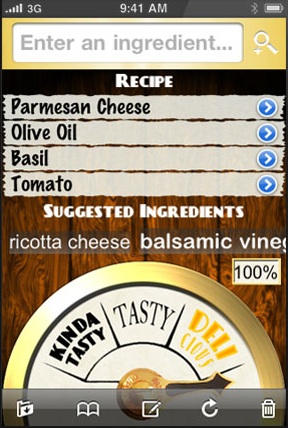
Foodmatic‘s fun website suggests you might want this app if you’re trying to become “the next top chef,” a suggestion we think can only lead to a rash of contestants staggering off Chef Ramsay’s Hell’s Kitchen with iPhones lodged in various body cavities.

That’s because the app employs a proprietary algorithm and built-in database with hundreds of ingredients to score the tastiness of ingredients the user wants to combine. The app will even suggest ingredients that compliment any already input. The app includes info on ingredients in the database and the ability to save successful (or not) concoctions.

Foodmatic is currently $1, but the app’s Store page says that’s not likely to last.

Western Digital’s New iOS App Will Let You Stream Your Photos From Your External HDD

By

wdphotos-sg

My external hard drive doesn’t get much use, except for one thing: archiving massive libraries of RAW images. The only problem with this solution is accessing the images once they’re off my computer requires finding the drive, plugging it in and trying to search through thousands of images for the one I want to show to someone.

Phooey. What a hassle. That’s what I like about Western Digital’s free new photo viewing application for iOS devices that works with its line of external hard drive like My Book World Edition, My Book Live and WD ShareSpace, which allows users to access and stream up to 285,000 images placed in a shared folder.

The app will slurp up your photos wherever you have an Internet connection. Certainly beats trying to load ten years of photos onto your iPhone through iTunes.

Tennis, Anyone? First, Check Your Racquet’s Strings With Your iPhone [New App]

By

racquettune

Seems the iPhone’s become a superb diagnostic tool through sound analysis — not only can it evaluate watermelon ripeness, but now it can also be used to measure the tension of tennis or squash racquet strings with the racquetTune app.

The $1 app sports a slick, clean interface that displays a string’s tension after a few taps; there’s also a swingweight calculator thrown in for good measure.

The Swedish developers say racquetTune has been tested at the Royal Institute of Technology in Stockholm to good result — who knows, perhaps even by Bjorn Borg himself.

Star Wars: Battle For Hoth Should Just Be Abandoned To The Empire [Review]

By

post-62017-image-07ad7884241a4a061a31ed8765a638e1-jpg

I figure there’re two ways an iOS tower-defense game set in the Star Wars universe might succeed: by being an excellent example of the genre, like TowerMadness Zero, or by immersing the player in the Star Wars universe, like Star Wars: Trench Run.

Unfortunately, Star Wars: Battle for Hoth (by THQ, who also put out Trench Run) does neither, and ends up being only slightly more pleasant than crawling into the slit belly of a dead Tauntaun.

Shift Instantly Between iPhone 4 Cameras While Shooting Video [New App]

By

flexicorder

Yes that’s right, now you can capture yourself throwing up while filming a first-person view of the rails as you fly through that new 120 mph ride at Six Flags — all with the same iPhone (so long as it’s an iPhone 4).

Flexicorder ($1) features on-the-fly switching from shooting video normally with the rear camera to shooting with the front facing camera; it also lets the user adjust video resolution.and aspect ratio. Images captured through the forward-facing camera normally appear horizontally flipped, so the app also flips the image to look as if they were shot with the rear-facing lens.

Sonic the Hedgehog 4 for iPhone and iPad Coming To The App Store Tomorrow

By

cult_logo_featured_image_missing_default1920x1080

[

Sega’s long-awaited return to the 2D roots of their most famous speedster rodent is coming to the App Store tomorrow, and as you can see in the trailer above, Sonic the Hedgehog 4 looks pretty faithful to the original Sonic games for the Sega Genesis… you know, before the whole franchise leapt into 3D and was marketed predominantly at furries with masturbatory echidna fantasies.

Looking pretty good, and I know loads of iPhone gamers will be excited about this, but on my part, I’ve never found running at 1000 miles per hour into an undodgable wall of spikes very fun, which seems to be the defining element of the series. I think I’ll probably give Sonic 4 a pass.

Forgotten Doom Engine Game ‘HacX’ Now Available On The App Store… For Free

By

post-61959-image-da06c0d4105de3c117aaf882a00053d7-jpg

httpvhd://www.youtube.com/watch?v=i31omgvWDTQ

Up until 1996, id software’s Doom engine was pretty much the de facto technology driving the best and most advanced PC computer games on the market, including Doom, Doom 2, Heretic, Hexen and Strife. Then id software released their next game engine, Quake, which boasted true 3D environments, and any game that still ran on Doom’s 2.5D engine was barely worth a laugh.

That was very unfortunate for HacX when it was released in 1997. The last commercial game using the Doom engine, HacX boasted some incredible enemy, weapons and level design, but was ultimately as ignored at retail (where it was passed over for flashier games running on truly 3D engines) as it has been forgotten by all but the most die-hard retro gamers.

I was delighted to hear, then, that HacX has gotten a new lease on life, as it has been ported as a free app for the iPhone and iPad. It’s still using the Doom engine, just this time it’s using the updated iPhone engine released by id software’s own lead programmer, John Carmack.

Here’s hoping that HacX can finally get some of the recognition it deserves this time around.