Mobile menu toggle

iOS - page 160

Mac OS X Lion to Introduce iOS-Like Application Removal

By

Lion-app-uninstall.png

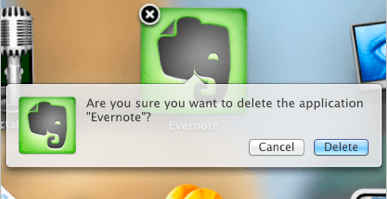
The latest build of Mac OS X Lion introduces an iOS-like method of removing applications installed via the Mac App Store. Within the new Launchpad application, users can click and hold on an app’s icon to start the ‘jiggling’ – just like in iOS – and an ‘X’ button appears in the corner of each icon which users can click to uninstall applications.

Don’t worry about deleting applications accidentally, however; just like iOS, users will be greeted with a message that asks them whether they’re sure they wish to delete the application. Clicking delete will move the application, and any files associated with it, to the Trash.

This feature currently only works with applications purchased from the Mac App Store, but I’m hoping it works with any application installed on your Mac when Lion is finally released.

[via MacRumors]

‘Comic Life’ Comes to iPad for Awesome Comic Book Creation On The Go

By

Comic-Life-iPad.png

Remember Comic Life – the awesome application for creating comic books out of your photos that used to be bundled with Intel Macs? Well, now it’s available on the iPad; taking the latest functionality from the desktop application and wrapping it up into an easy to use touch interface.

Comic Life for iPad has everything you need for creating and sharing comics, including fun and quirky templates, stylized image filters, and an easy-to-use drag and drop placement. You have full control over the design of your comics with a huge selection design options – colors, fonts, gradients, balloons, captions, panels and more.

Create comics out of the photos in your device’s photo library, then add balloons, captions, lettering and templates to tell your story; while the smart text layout and image filtering functions ensure your projects always look fantastic.

Use the integrated e-reader to view your creations in fullscreen, and when they’re ready for the big time, share them with your friends via Facebook and email. You can also print your comics via AirPrint and share them between other iPads with the intuitive ‘drag & drop’ feature.

Comic Life from Plasq is currently on sale for a limited time to celebrate its App Store release. Grab it now for $7.99!

Apple Working on Fitness Center App for iPhone

By

Apple-fitness-center-app-patent

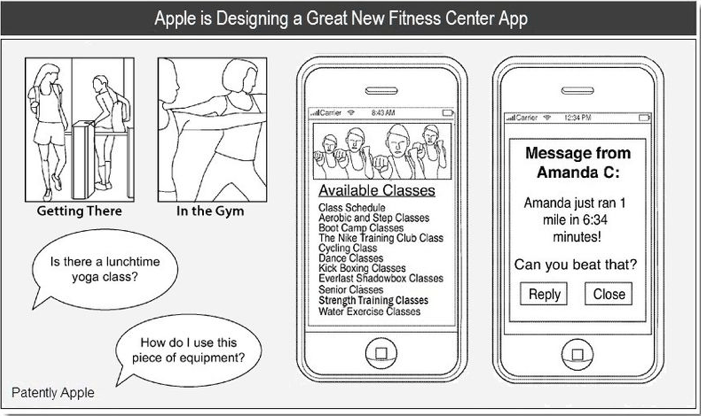
A new patent discovered by Patently Apple reveals that Apple is working on its own fitness center application for the iPhone.

The patent titled “Systems and Methods for Accessing Personalized Fitness Services Using a Portable Electronic Device” was originally filed in October, 2009, and describes an app that can benefit its users by helping them with their diet; suggesting when they should go to the gym and what exercises they should do; and allowing them to compete with friends and be ranked on their performance.

Services are broken down into four categories: New Customers, Getting There, In the Gym, and Post Workout; which will help users find their nearest fitness center and motivate them to actively attend, encourage them to workout and suggest different exercises, and provide post-workout motivation and fitness tracking features.

‘Fring’ Update Brings Group Video Calling to iOS

By

Fring-group-video-chat.png

Fring – the popular video chat and VoIP application for iPhone and iPod touch – has just been updated to introduce group video calling with up to three other people. It’s the first application in the App Store to offer this feature, and it’s completely free.

To use Fring for video calling, you will obviously need a compatible device, such as the iPhone 4, the iPad 2, and the latest iPod touch. Fring is also available on compatible Android devices and supports cross-platform communication, so you can call and video chat between iOS and Android. The application works over 3G, 4G and Wi-Fi.

Fring uses a feature called ‘Dynamic Video Quality’ (DVC) that automatically and continuously adjusts your video call quality to match your connectivity; which its developers say provides you with the best audio and video quality possible.

If you’ve tried the new group video calling feature, let us know what it’s like in the comments.

Apple Now Testing iOS 5 with Third-Party Apps

By

FutureTap-iOS-5-crash-log.png

A crash report received by iOS developer FutureTap reveals that Apple is currently field testing the next major release of its iOS firmware using third-party applications from the App Store. In a message posted to Twitter, FutureTap discloses a crash log from a device running iOS 5.0:

Just received the first iOS 5.0 crash report. MKUserLocationBreadCrumb sounds interesting.

FutureTap followed up the message with a screenshot (above) of the crash log, highlighting the “MKUserLocationBreadCrumb” API. MKUserLocation is part of the iOS MapKit Framework, which is used to find your device’s current location; while the “BreadCrumb” element is said to indicate a new tracking feature.

It’s possible the new feature has something to do with the new mapping technology that Apple revealed it was working on in a press release yesterday, however, this isn’t expected to appear as a finished product for another couple of years.

While there’s nothing major here, this crash report reveals – unsurprisingly – that Apple is readying its iOS 5 firmware for its announcement at WWDC in June. We will probably see its release alongside the fifth-generation iPhone – expected this fall.

[via AppleInsider]

‘Order & Chaos’ is Gameloft’s WoW-Like MMORPG for iOS – Available Now

By

order-of-chaos-ios-1.png

Gameloft is famous for using hugely popular games as the inspiration for some of its iOS releases. For example, Modern Combat 2 is not too dissimilar to Modern Warfare 2; N.O.V.A. bears some resemblance to Halo, and Starfront’s similarities to Starcraft are uncanny. As a keen iOS gamer, I like this. Though some game developers are beginning to offer iOS versions of their most popular releases, some still aren’t, and I admire how Gameloft offers a substitute to some of my favorite console and PC games.

Gameloft’s latest release is called Order & Chaos Online – and is their iOS answer to World of Warcraft (WoW). It just hit the App Store and comes with a $6.99 (universal) price tag. That’s not too bad for an iOS game, but you’ll also need to pay a subscription fee. You get three months free when you first login, and to continue playing after that you’ll have to pay $0.99 per month, $1.99 for three months, or $2.99 for six months.

Order & Chaos Online is a true real-time, full 3D massively multiplayer online role playing game, or ‘MMORPG’. It features a vast fantasy world for your to explore with thousands of other players from around the world. When you begin the game, you use the character creation system to cuztomize your hero.

‘ipswDownloader’ Makes it Easy to Find & Download iOS Firmware

By

ipswDownloader.png

ipswDownloader is a great new tool that makes the process of finding and downloading iOS firmware releases incredibly simple. Developed by Vitaly Parovishnik, and available for both Mac and Windows, the app supports every iOS device there is – including AppleTV – and features iOS firmware from version 1.0.1.

What’s great about ipswDownloader is that once you’ve selected your device and the firmware version you want to download, it provides additional details on the release that jailbreakers in particular will find incredibly valuable; such as the baseband version, whether the firmware can be jailbroken and unlocked, and the size of the download.

ipswDownloader is completely free to download and use. The full list of supported devices can be found after the break.

The Best First-Person Shooters for iOS [App List]

By

best-fps-games-iOS

As a massive fan of first-person shooter games, I’m always looking for great iOS shooters that will help me get my fix when I’m away from a console. Thankfully, the App Store is home to some great FPS games from developers such as Gameloft, EA Games, Treyarch and Villain.

Our latest app list is a collection of the best FPS games in the App Store – check them out after the break!

This Week’s Must-Have iOS Games: Back to the Future, Real Racing 2, Final Fantasy III & More!

By

Screen-shot-2011-04-25-at-12.09.44.png

This week’s roundup of must-have iOS games includes the second episode in a series of five Back to the Future games from Telltale – with a brand new story for Marty and Doc.

We’ve also got Real Racing 2 HD – which has just been updated to feature dual-screen gaming, allowing you to connect your iPad to your HDTV and enjoy the ultimate racing game at 1080p.

Final Fantasy III also makes our list of favorites. This 90s classic has been around on the iPhone for a few weeks, but it now features new and improved 3D visuals and story sequences exclusive to the iPad.

Find out more about the games above and check out the rest of this week’s must-have’s – including Bunny the Zombie Slayer and NBA Jam – after the break!

This Week’s Must-Have iOS Apps: News.me, Crackle, RockMelt & More!

By

Screen shot 2011-04-22 at 14.32.09

This week’s selection of must-have iOS apps features a brand new social news experience called News.me. Created by Bit.ly, with backing from The New York Times, this app shows you not just what your friends are sharing, but also what they’re reading.

Sony’s new Crackle application offers a library of over 100 great movies and TV shows, such as The Da Vinci Code, Ghostbusters, Seinfield and Spider-Man – all of which are completely free to watch.

RockMelt also makes this week’s must-haves – a web browser that seamlessly integrates social networking and syncs with RockMelt on your computer.

Find out more about the applications above, and check out the rest of week’s must-haves – including Seamless, Photosynth and FindOne – after the break!

Social Media Browser RockMelt Shrunk to an iPhone App

By

cult_logo_featured_image_missing_default1920x1080

https://www.youtube.com/watch?v=AS1iXdqOVC8&feature=player_embedded

With the Flock browser going the way of the dodo, there’s really only one social-media-enhanced browser left: RockMelt. And yesterday, they released an iPhone version of the browser.

RockMelt is pretty handy for those of us who like to post news and blog posts straight to our Facebook and Twitter feeds from the web on our iPhones. It also functions as a basic newsreader, and It’ll sync with the browser’s Mac version so you can access bookmarks and posts that have been tagged with its “View Later” feature. Best of all, it’s free.


The Best iOS Apps for Instant Messaging [App List]

By

best-im-apps.png

Whether it’s Facebook, AIM, or Yahoo, everyone is signed up to a service that provides them with instant messaging. Besides a phone call, it’s one of the quickest ways to have a conversation with our fellow man, and because it’s completely free, it’s also one of the most popular.

To make the most out of instant messaging on your iOS device, you’ll need a decent application. We’ve put together a list of the best apps currently available; check them out after the break!

‘Back to the Future’ Episode 2 Now Available for iPad

By

back-to-the-future-episode-2-iPad


The second in a series of five Back to the Future games for the iPad has finally hit the App Store today. This touch-based puzzle adventure from Telltale Games delivers a mesmerising experience that remains true to the original trilogy, with innovative touch controls and impressive visuals.

This episode is called “Get Tannen,” and its App Store description reads:

Marty is keeping an eye on Doc Brown’s proverbial date with scientific destiny when he and 1980s Doc must prevent gang boss Kid Tannen from wreaking havoc on Marty’s family and erasing his girlfriend from the future!

Just like the first episode, this one is $6.99 and compatible with the iPad only. If you’re a fan of this movie and a lover of adventure games, this title is guaranteed to please.

New ‘Untrackerd’ Jailbreak Hack Stops iOS From Storing Location Data

By

untrackered1.jpg

Reports yesterday revealed that your iPhone and iPad 3G have been secretly logging the date, time, latitude and longitude of every place you have ever been, then storing this information in an unencrypted file on your computer when you sync your device with iTunes.

Untrackerd is a new jaibreak utility that promises to stamp out this invasion of your privacy:

This package installs a daemon (process that can run in the background) to clean consolidated.db file) No new icons are added to your homescreen. There are no options to configure.

Enter to Win Free Download Codes for FX Photo Studio App for iOS Devices

By

Egret - Pencil Sketch-Burnt Paper
Made with FX Photo Studio © Lonnie Lazar

Perhaps you caught our recent review for the killer iOS photo app, FX Photo Studio. If you didn’t rush out and buy it right away based on the stunning (cough, cough) examples in the accompanying gallery, or – heaven forfend – on the basis of its five stars, then here’s your chance to get it on your device for FREE.

Just go to Cult of Mac’s Facebook page and like us before midnight Friday PST (that’s about 36 hours from the time of this post) and you’ll be entered into a drawing for one of six free download codes for FX Photo Studio for iPhone and iPad.

That’s it. If you already like us on Facebook (yay!) you’re already entered, so don’t feel the need to “unlike” and then “Like” again to get in on this awesome opportunity.

Winners will be notified of their bounty and good fortune during the day on Friday.

In the Battle of Beautiful Applications, iPhone Beats Android Every Time

By

facebook-ios-vs-android

The App Store has spawned some pretty good looking applications for iOS devices; apps for iPhone and iPad are largely renowned for their simplicity and alluring design. With that said, you’d think iOS applications that have an Android sibling – from the same developer – would be just as pretty, right? Wrong.

Here’s a gallery of screenshots that compares iOS apps with their Android versions and highlights some of the differences:

Music As It Should Be, Brought To You By Sonos

By

Sonos_S5_Bedroom

With Sonos announcing only yesterday that Airplay support was coming to the Sonos range, as well as updating their iPhone and iPad apps – we thought it was about time we took the Sonos for a spin.

Let me start this by saying the Sonos multi-room system is the best solution available for getting multiple sources of music playing throughout your home – period. It’s not necessarily the cheapest, but it is without doubt the most complete solution you will find – and we love it!

White iPhone 4 Discovered With Expose-Like Multitasking, New Spotlight Search, 64GB Storage

By

iphone-expose-ui.png

An iPhone 4 running a “test version” of iOS has been discovered by Vietnamese site tinhte.vn, and reveals a new Expose-like multitasking UI and a revamped Spotlight search function. Two videos published by the site demonstrate these new features, along with some pretty interesting hardware in the form a white, 64GB iPhone 4.

In this test version of iOS, double-tapping the home button displays your multitasking applications in a manner similar to that of Expose on your Mac. Instead of icons for the applications you have running – like you currently see in iOS 4 – you see a preview window for each application.