After a long week of tips on how to make your Mac look more like iOS, how about a tip on how to make it ACT more like iOS?
On the iPhone, it’s become de rigueur to use a tap and pull to refresh motion. I first noticed it with the Twitter apps, and now more and more apps are using this style of refresh. I wish I was able to do it on my Mac. Oh, wait, I can – at least in my browser. Here’s how.
Hackers are one step ahead of Apple when it comes to iOS 6.
Apple is expected to give us a sneak peek at iOS 6 during its Worldwide Developers Conference this June, and after its announcement, the company is likely to issue the first beta to registered developers. Until then, no one knows what iOS 6 will have in store for us, but that isn’t preventing hackers from making progress on its jailbreak.
They haven’t even released the untethered jailbreak for iOS 5.1.1 yet — though it’s expected to go live very shortly — and already Pod2g and his team “have a part” of the jailbreak for Apple’s next-generation iOS operating system.
Absolute Manage can be a single source option for mobile, desktop, and IT management
May is Mobile Management Month at Cult of Mac, where we will be profiling a different mobile management company every weekday. You can find all previous entries here and read our Mobile Management manifesto here.
Absolute Manage MDM provides all the major mobile management capabilities. In addition device and app management, Absolute Manage MDM offers a secure on-device file store option called AbsoluteSafe that can be used to deliver files directly to user devices. AbsoluteSafe includes the ability to automate access to files by policies or schedule in addition to on-demand file deployment, removal, or access rights adjustments. The suite integrates with the company’s Absolute desktop client management (Mac and Windows) and deployment suite, together they can provide complete IT and lifecycle management features mobile devices, Macs, PCs, and software.
When you jailbreak an iOS device, you are given access to Cydia, the wild west frontier of tweaks, themes and apps you can’t get in Apple’s own App Store. Jailbreaking gives you the freedom to customize your device the way you see fit by installing various plugins, system-level extensions, tweaks and apps from Cydia.
After awhile, you can amass quite a few Cydia apps and packages, and it’s important to keep your purchases and downloads backed up for safe keeping. Whether it’s a jailbreak tweak you paid $2 for or a free one, you don’t want to lose what you find during your jailbreaking career.
Every several months a new jailbreak will come out for the latest version of iOS, and you’ll need to re-jailbreak your iOS device. Restoring to a stock version of iOS before jailbreaking removes all of your jailbreak apps and tweaks. In Cult of Mac’s ultimate roundup, we’ll show you the best ways to backup and restore your Cydia apps on your jailbroken iOS device.
Here we go again, more numbers, more Android and iOS domination. According to IDC, 8 out of 10 smartphones shipped in the first quarter of 2012 included either iOS or Android. Android continues to lead the pack with a total of 59% of the 152.3 million smartphones shipped, while iOS accounted for 23% respectively. Combined they populate 82% of the smartphone market, up 27.6% since Q1 2011. These numbers are an amazing testament to Android’s growth as well as iOS’s stability (which is amazing considering they only have a few devices).
TSA plans massive pilot project using $3 million worth of Apple products
TSA is the latest U.S. federal agency to make a significant investment in Apple technologies in what may be a move away from RIM’s BlackBerry and Windows PCs. The agency is set to start a pilot program that will run over the next three years and will involve heavy investment in Macs, iPhones, iPads, and even Apple TVs.
According to federal documents (PDF link), the security agency plans to spend $3 million on Apple products and has an amazingly wide range of uses for them in mind. The plans go well beyond the scope of Apple investments made by other U.S. government agencies like the EPA and FAA, which focus primarily on iPhones and/or iPads.
Coming on the heels of Facebook’s $1 billion Instagram acquisition, but otherwise pretty much out of nowhere, the social networking giant just released a brand new Camera app called Facebook Camera… and it’s so much like Instagram that you have to wonder if Facebook bought the up-and-coming app just so it could put a bullet through its head before it became a real threat.
If you’ve ever wanted to learn how to build an iPhone & iPad game but didn’t know how to code, you’ve come to the right place. The latest Cult of Mac Deals offer is a video course featuring over 8.5 hours of information that will teach you how to build an iPhone/iPad game using Game Salad – a free third-party piece of software.
This course is aimed at beginners who want to make games today but have no desire to program (or want an easier starting point than traditional coding courses). This offer is aimed at people who want to save money in the process, as you’ll get access to The iOS Games Workshop for only $79 for a limited time!
iPad growth offer advertisers new kinds of opportunities
Lead by the iPad, tablets, and other non-phone devices accounted for 20% of mobile ads during the first quarter of 2012. That number is up 5% from the first quarter of last year. The increase reflects a change in the mix of mobile devices that people use to consume content and may have implications for the entire ad industry – mobile and otherwise.
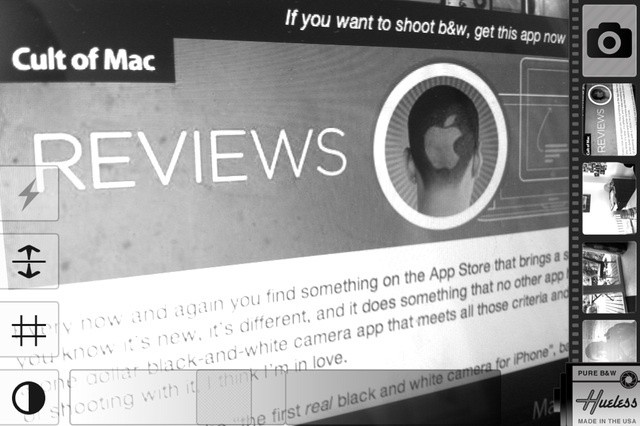
Every now and again you find something on the App Store that brings a smile to your face because you know it’s new, it’s different, and it does something that no other app has done before. Hueless is a one dollar black-and-white camera app that meets all those criteria and more, and after just a day of shooting with it, I think I’m in love.
May is Mobile Management Month at Cult of Mac, where we will be profiling a different mobile management company every weekday. You can find all previous entries here and read our Mobile Management manifesto here.
This post is brought to you by SolarWinds, an IT software management company with more than 93,000 customers worldwide – from Fortune 500 enterprises to small businesses. Click here to download a free 30-Day Trial of Mobile Admin from SolarWinds. Author: Denny LeCompte Coauthor: Stephanie Mitchell.
Which smartphone or tablet are you bringing to work?
With the constant stream of news emerging in the Apple versus Android battle, we think it’s time to look at which devices the IT pros are choosing, and how recent trends are affecting what devices are brought into work.
Download the second Infinity Blade II content update now.
Infinity Blade II is one of those essential games that every iOS user should own. Its intense hack and slash gameplay makes it a joy to play over and over again, and its stunning 3D visuals are the perfect masterpiece for showcasing the abilities of your iOS device. What’s more, it just keeps getting better with each and every update.
The latest, version 1.2, is named ‘Vault of Fears’, and it delivers new areas with new secrets, new enemies, and new items.
One interesting moment during last year’s WWDC keynote was when Steve Jobs said that Apple was moving beyond the digital hub strategy it had embraced for years. He talked about how our computers are no longer the hub of our digital life and said that Apple was demoting the Macs and PCs and making them just another device like an iPhone or iPad.
That message set the stage for iCloud and for cord-free iOS devices that don’t need a Mac or PC for activation, backup, or sync.
There was also a much subtler message, however, that no one really picked up on at that time. In making the Mac just another device, Apple was likely laying the groundwork to change how companies and schools manage Macs – essentially treating them as just another device and bringing the mobile device management (MDM) paradigm introduced in iOS 4 to OS X and Mac management.
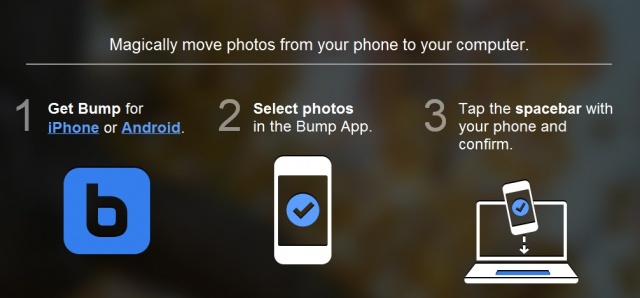
The creators of the popular Bump app that lets you share contact information and photos by simply bumping two phones together has bumped up their magic to include your computer. Thanks to today’s update, users will now be able to “magically” transfer their photos from their phone to their computer by simply bumping their phone against their keyboards spacebar. Say what? Yea, and the best part is there’s no additional software needed!
While the majority of Americans celebrate Memorial Day with barbecues and lawn darts, Rockstar Games is celebrating with pimps, hoes, and enough bloodshed to paint any street red. Now until May 28th, Rockstar Games will be offering its sandbox hit Grand Theft Auto III for $.99 (that’s 80% off). For less than the cost of a hotdog, you’ll be able to enjoy:
Apple's One to One sessions are ideal for those who want to learn more about their Mac or iOS devices.
Apple has today introduced a number of new features to its One to One program, which provides personal and group training to those with Mac and iOS devices. In addition to a redesigned website, the $99 per year subscription service now offers shorter, 30-minute sessions; more tutorial videos; VoiceOver support for the visually impaired, and more.
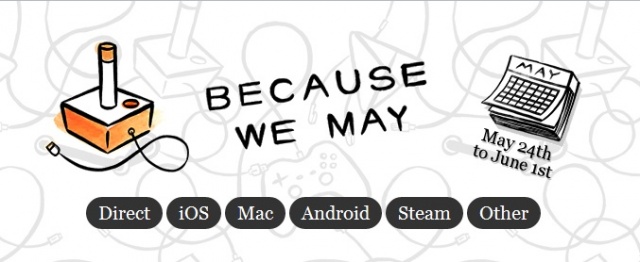
A group of developers have banded together to celebrate their freedom to price their games how they like within specific online stores. Most online app stores give developers this freedom, but others such as the Amazon App Store do not. Amazon allows a developer to set a recommended price for their app but reserves the right to change that price whenever they want. I can’t really think of another app store besides the Amazon App Store, so this coalition almost feels like an anti-Amazon App Store celebration to me.
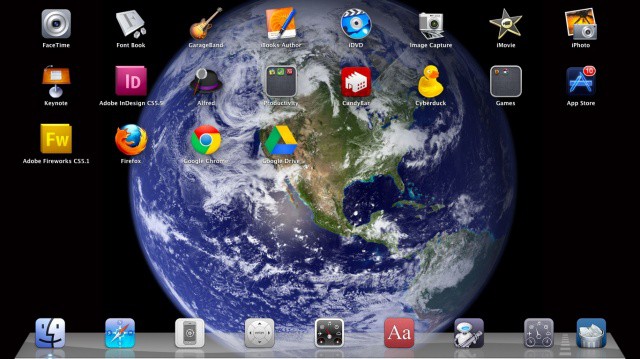
Launchpad brings the iOS Home screen look to the Mac.
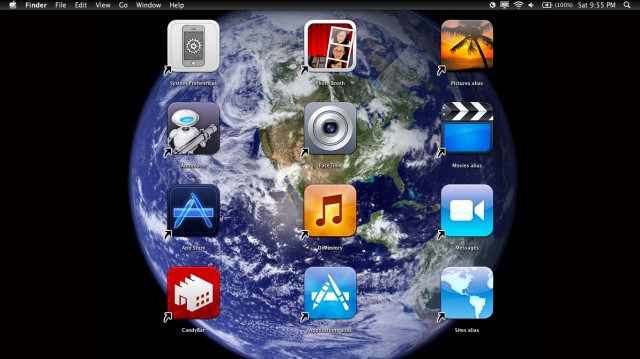
When Launchpad first rocketed (sorry) onto the scene in Mac OS X Lion, most people were firmly in the “hate it” or “love it” camp. There didn’t seem to be much in between, but maybe that’s just due to the contentious nature of the internets. Regardless, today’s tip is firmly in the “love it” camp, showing you how to clean up Launchpad, add in just the Apps you want to use, and then a quick trick for clearing the background to show off that cool iOS-like Earth from space picture.
May is Mobile Management Month at Cult of Mac, where we will be profiling a different mobile management company every weekday. You can find all previous entries here and read our Mobile Management manifesto here.
Tarmac is a fairly focused device management option from Mac and iOS developer equinux (makers of the Mac utility VPN Tracker). Tarmac focuses on delivering the core iOS management needs with low overhead. equinux’s narrow focus on just iOS allows the company to provide a wide range of enterprise systems integration options. Tarmac specifically targets the small business market with separate small/medium business and larger enterprise versions.
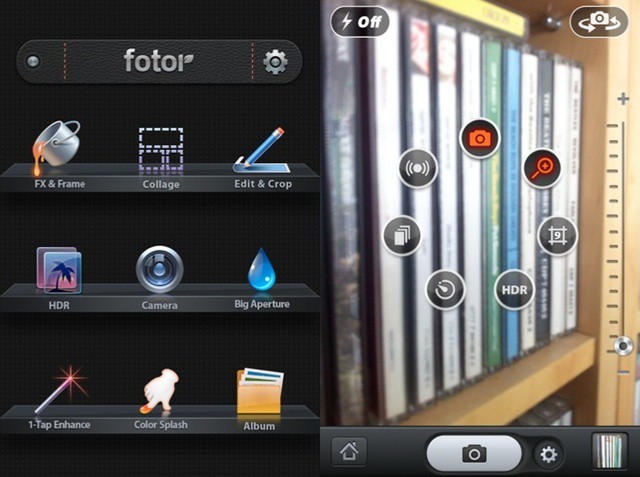
Another day, another all-singing and all-dancing photography app. This one is called Fotor, priced at one dollar. Do we need more of these? Probably not. Is this one any good? Yeah, mostly. But it doesn’t stand out in the crowd.
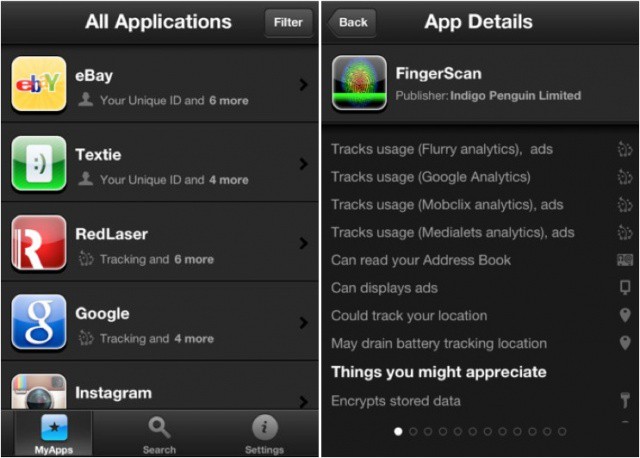
Clueful promises to identify "misdemeanant apps on your iPhone."
There has recently been a lot of concern into the way in which our iOS apps access our personal data, and then what they do with it once it has been collected. Since the whole Path debacle in particular, users seem to be more concerned by the issue than ever before.
BitDefender is one security firm looking to capitalize upon that concern with a new app called Clueful, which promises reveal what each of your apps is doing with your data and identify the “misdemeanant apps on your iPhone.”
The “Netflix For Games” giant, GameFLy, has decided to test its controllers at mobile gaming. Announced today, GameFLy plans to become a mobile game publisher for both Android and iOS games. GameFLy has set aside a stockpile of cash to help financially burdened mobile developers fund their next great project. GameFLy expects to publish its first game this summer and encourages developers to submit their application to [email protected].
I don’t know about you, but I’m constantly reaching up to swipe or tap on my Macbook Air display, unconsciously attempting to use it like an iPad. While today’s tip may make things even worse by turning the Finder into an iPad-like grid of iOS-style icons, I’m willing to take the risk to make my Mac look that much cooler.
Jony Ive, Apple’s Senior Vice President of Industrial Design, swapped sunny Cupertino for London today to receive his knighthood from Princess Royal at Buckingham Palace. The 45-year-old Brit, who is responsible for the iconic designs behind Apple’s computers and iOS devices, said he is “both humbled and sincerely grateful” for the “absolutely thrilling honor.”
While in the capital, Ive also gave what is likely his most revealing interview yet to British broadsheet The Telegraph, in which he talks about Apple’s design and its focus on simplicity, Steve Jobs, and the company’s current projects.
Let’s be honest, at some point we’ve all dreamt about dusting off our funeral suit and fighting aliens with Will Smith as a Men in Black agent. Thanks to Gameloft, that dream is now a reality… on your Android or iOS device.
Men in Black 3, the official game of one of this year’s biggest action blockbusters, is now available from the App Store and Google Play, giving you the opportunity to create and manage your own MiB agency and protect New York from the scum of the universe — for free.