Mobile menu toggle

iOS - page 111

Welcome To Piglantis: Angry Birds Seasons Updated With Water Physics And 30 New Levels

By

post-173827-image-1b4c873c0d906e65fa1b6523469d37f8-jpg

Rovio’s Angry Birds updates are becoming more and more creative. The next batch of summer fun transports our favorite angry aviators to the land of aquatics. Down in the depths of the ocean lives a mythical green beast whose appetite for destruction can only be satisfied by the souls of the avian unborn.

Protect The City Of Gotham This Summer In The Dark Knight Rises From Gameloft

By

post-173766-image-3f3077c9fd81fe9c987db9e6e84331fd-jpg

Gameloft continues to make friends with all the right people as Hollywood seems to be trusting them to create the official mobile games to accompany their summer blockbusters. First they teamed up with Marvel and Sony Pictures to bring the official Amazing Spiderman and now they’ve teamed up with Warner Brothers Games and DC Comics to bring the official Dark Knight Rises to Android and iOS this summer.

Steve Wozniak Has Been “Disappointed” By Siri Since Apple Bought It

By

Woz believes Siri went downhill the day Apple bought it.

If you’ve been an iPhone user for a number of years, you may remember that Siri was a third-party app long before it was purchased by Apple and integrated into the iOS operating system. Back then, although it couldn’t remind you to take out the trash or compose text messages, it offered a lot of the same search functionality it does today.

In fact, according to Steve Wozniak, Siri was actually better back then.

New In iOS 6: Receive Government AMBER & Emergency Notifications

By

Yet another new feature buried within iOS 6.

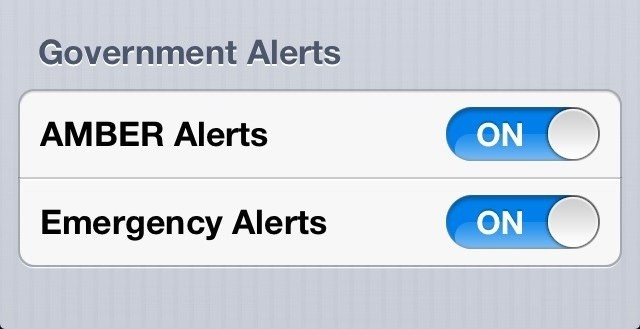
The iOS 6 beta has been available for four days now, but we’re still stumbling across new features that Apple didn’t mention during WWDC. One of those is the ability to receive government AMBER and emergency alerts automatically on your iPhone, iPad, or iPod touch.

How To Install iOS 6 Without A Developer Account

By

We're still digging up new iOS 6 features. Image courtesy of William Gamache (madmonorailprods@bell.net).
Too impatient to wait for iOS 6's public release? Install it now. Image courtesy of William Gamache ([email protected]).

Itching to get your hands on the iOS 6 beta Apple released on Monday? Well, right now, it’s only available to registered developers. But according to some, there is a way you can install iOS 6 on your device. The process is incredibly simple, and all you need is the latest iTunes release and the iOS 6 .ipsw file for your device.

iOS 6 Beta Gets Tethered Jailbreak For Developers

By

Well, that didn't take long.

It’s been just four days since Apple released its first iOS 6 beta to registered developers, and it has already been jailbroken by the iPhone Dev-Team. There was some concern that the Cupertino company’s latest iOS release would make jailbreaking very difficult, but the team behind the latest iOS 5.1.1 untethered exploit have now released an iOS 6 beta jailbreak for developers.

New In iOS 6: Siri Supports Location Services Internationally

By

Siri will finally find places internationally.

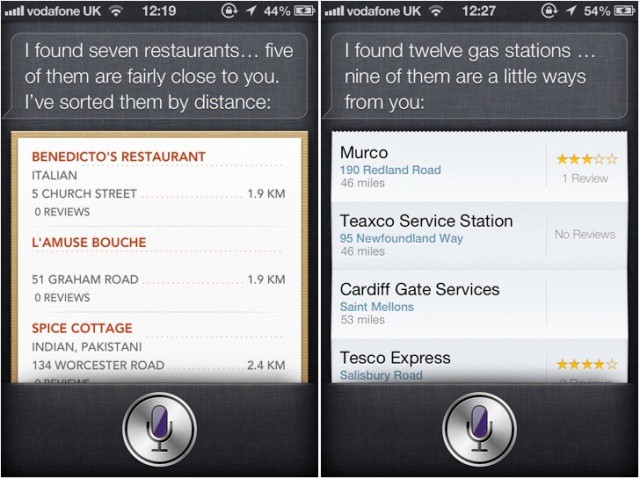
Being a Brit, one of the most disappointing things about Siri is that it doesn’t support location services in the United Kingdom. Unlike iPhone 4S users in the United States, I can’t ask Siri to find me a nice restaurant nearby, or for the nearest gas station. However, that’s no longer the case in iOS 6, because Siri now supports location services internationally.

Reeder For iPhone Gets Rewritten From The Ground Up, Delivers Stacks Of New Features

By

Reeder-iPhone-3-0
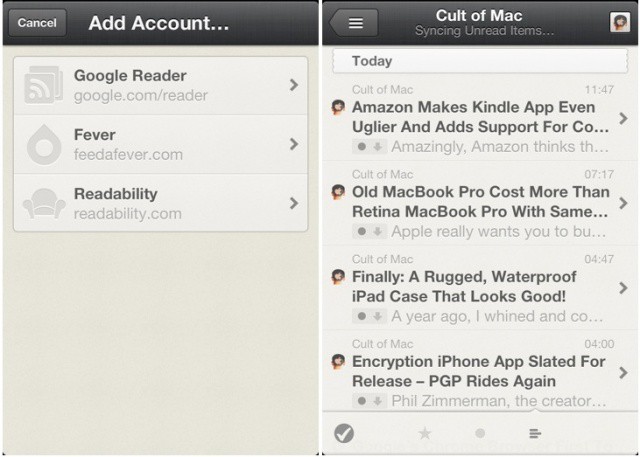
The iPhone's best Google Reader client is now even better.

Reeder is, in my opinion, by far the best Google Reader client for both Mac and iOS. And it just got even better on the iPhone. After being rewritten from the ground up, Reeder now offers stacks of new features, like Fever syncing, support for multiple accounts, the ability to subscribe and unsubscribe from feeds, and more. It even has a pretty new icon.

Apple Has Hidden The iPhone’s Stocks App On The iPad In iOS 6

By

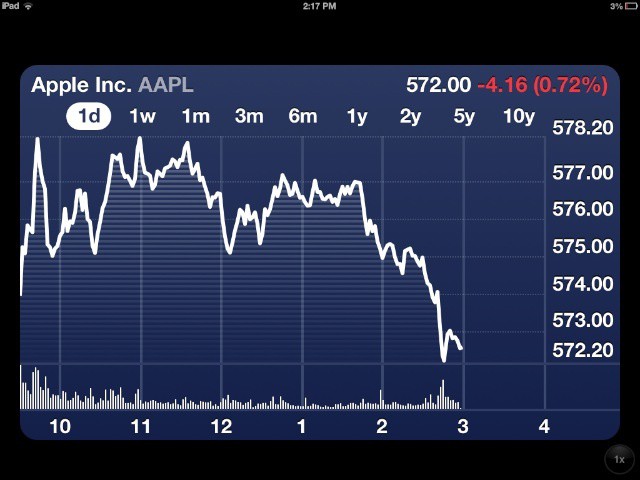
Stocks

Since its introduction, the iPad has been missing some of the iPhone’s built in applications, such as Weather, Stocks, and Calculator. Until now, there’s been no sign of these apps making it to the iPad. With the introduction of iOS 6, though, it appears that Apple may finally be thinking about bringing the remaining iPhone apps over to the iPad.

7 Awesome Features Apple Left Out Of iOS 6

By

iOS 6 has some awesome new features, but here's 7 things it's still missing.

We’re super excited for iOS 6. Although it isn’t the complete iOS overhaul many users were hoping for, it does deliver a whole host of new features — like a new Maps app, user interface enhancements, improvements to stock apps, and Siri support on iPad — that we’re certainly looking forward to.

However, it’s hard to ignore the fact that iOS 6 still has some things missing. Things we’ve been waiting for for some time. Here are seven of them.

Apple’s Incredible Attention To Detail In iOS 6 Means Slider Reflections Change As You Tilt Your Device

By

Notice the slight difference in reflection on these sliders, which I got just by tilting my iPhone?

Apple is renowned for its obsession with detail and making even the slightest things — such as internal components — just as beautiful as the devices that house them. That’s why, during his recent WWDC keynote, Tim Cook said Apple’s new MacBook Pro was more beautiful on the inside than rival machines are on the outside.

This attention to detail is evident in iOS 6, where the slider reflections change as you tilt your device.

Something To Think About: Say Goodbye To Google Street View On iOS

By

Google knows how much we love Street View.
Goodbye, Google Street View. I'll miss you.

The new Maps app that Apple showed off at WWDC yesterday has made it pretty clear that the company will be ditching Google Maps in iOS 6. That means beautiful new 3D maps, voice guided turn-by-turn navigation, and more. But before you get too excited, just remember this: As soon as Google leaved, so does Street View.

iPhone 3GS, iPhone 4 Won’t Get Turn-By-Turn Navigation Or 3D Maps In iOS 6

By

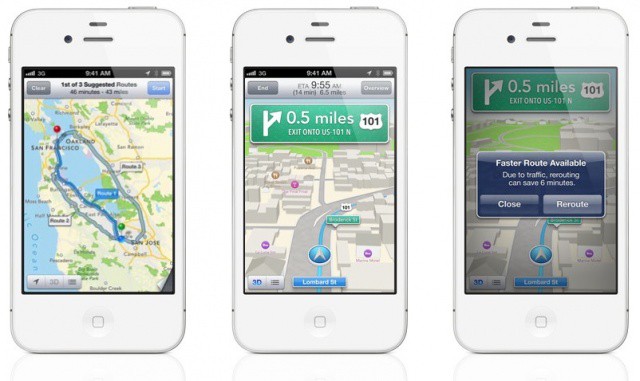
Turn-by-turn looks incredible, but it won't be coming to your iPhone 3GS.

Although iOS 6 looks a lot like iOS 5 at a glance, it represents a huge change to some of Apple’s core iOS features. Apps and services like Maps, Mail, Phone, Notification Center and more have all received new features worth talking about, while several new ones have been introduced.

The great thing about it is, is supports a whole host of devices, including every iPhone from the iPhone 3GS onwards. Some devices won’t get access to all features, however. Only the iPhone 4S and the first- and second-generation iPads will enjoy turn-by-turn navigation and 3D maps.

New In iOS 6: Passwords No Longer Required For App Store Updates & Previous Purchases

By

I didn't need to enter my password to download this, because I already owned it.

I’ve never really like the way in which the App Store handles security. Sure, I like the fact that if my iPhone is stolen, thieves can’t run up a huge iTunes bill. But I don’t understand why I have to enter my password each and every time I need to download updates or previous purchases. These have already been paid for; why is this necessary?

Thankfully, in iOS 6 and OS X Mountain Lion, it isn’t.

New In iOS 6: More Emoji Icons, Banners For “New” Apps, Badges For Reminders App

By

We're still digging up new iOS 6 features. Image courtesy of William Gamache (madmonorailprods@bell.net).
iOS 6 contains plenty of new features that Apple didn't mention at WWDC. Image courtesy of William Gamache ([email protected]).

We’re still trawling through the new iOS 6 beta releases that Apple pushed out after its WWDC keynote yesterday, and we continue to find nice new features and improvements. If you’re as excited about iOS 6 as we are, you’d probably like to hear about them.

Here’s a few changes Apple has made to emoji, Reminders, and more.

iOS 6 Will Be Great For Local Businesses, Here’s Why [Opinion]

By

iOS 6 offers huge potential for local businesses to attract and retain customers


If I had to pick on adjective for Apple’s upcoming iOS 6, it’d be “local” – Apple is integrating an immense range of local features and giving businesses amazing tools for attracting new customers. Regardless of whether you’re talking about a large chain like Starbucks or a family owned local business, Apple is offering virtually any customer-facing company an immense range of tools to attract and retain new customers.

AnimateLockscreen Breathes New Life Into Your iOS Device’s Boring Lock Screen [Jailbreak]

By

Spice up your lock screen with animated boot logos, thanks to AnimateLockscreen.

Since iOS 5 was introduced last summer, our lock screens finally do something worthwhile, and that is present all of our unread notifications in one place, so that we can see what we’ve missed at a glance. However, when you have no outstanding notifications, the lock screen is stall a rather boring place.

AnimateLockscreen is a new jailbreak tweak that aims to change that, by breathing new life into your lock screen with gorgeous animated wallpapers.

Never Worry About Your Data Limit Again With DataMan Pro for iPad [Review]

By

dataman-pro-ipad-1

Having the ability to connect to the ‘net over a cellular network from almost anywhere is a huge asset, and one of the best things abput the iPad (if you have the 3G/4G version — which you should). But there’s nothing like the shock of suddenly discovering a $300 bill for data overage to make one extremely skittish about ever using data again — which completely ruins the whole point of getting a 4G iPad in the first place (unless, of course, you just bought it for the GPS receiver).

To banish this evil conundrum, you’ll need DataMan Pro for iPad ($4), an app that watches your data usage like a hawk and alerts you when you’re gobbling data too quickly. It’ll even tell you which apps are the most data hungry.

This Week’s Must-Have iOS Apps: Color Splash Studio, Vjay, Analytics Tiles & More [Roundup]

By

MacPhun's Color Splash Studio is finally on iOS, and it's leading this week's must-have apps roundup.

Heading up this week’s must-have apps roundup is Color Splash Studio, a terrific photo manipulation tool originally built for Mac OS X, which has finally made the leap from Mac App Store to iPhone. We also have a great music video mixing tool from Algoriddim, the guys behind Djay; a camera app that’s perfect for your kids, and more.

This Week’s Must-Have iOS Games: Uplink, Project 83113, Golf KingDoms & More [Roundup]

By

Computer hacking, side-scrolling golf, European soccer, and more — all in this week's must-have games roundup.

Kicking off this week’s must-have games roundup is Uplink, a title you may remember from 2001, when it made its debut on PC. This computer hacking simulator has now been remastered for the iPad’s touchscreen, and despite being 11 years old, it’s still an awesome game.

Accompanying Uplink is a hugely enjoyable platformer, a unique take on golf, a first-person catapulting game, and more.

Give Your iPhone A New Look With This Drop Dead Gorgeous iOS Theme [Jailbreak]

By

Screen Shot 2012-06-08 at 6.52.15 PM

I’ve never been particularly interested in theming iOS on my jailbroken iPhone. Apple’s stock iOS design is simplistic and efficient. The last thing anyone wants is to look at an over-designed interface every day.

With that said, I’ve also been wanting a change of pace recently. With iOS 6 on the near horizon, I’ve been looking for beautiful and interesting jailbreak themes to switch things up on iOS 5.1.1. It just so happens that one of the most gorgeous themes ever made was just released in Cydia.

Facebook’s App Center Launches In The US, Debuts With Just Over 600 Apps

By

post-172299-image-46e01e9c4cd8c47b4fce2132241859c9-jpg

U.S. Facebook users should start seeing Facebook’s new App Center when they log into Facebook via the web, Android app, or iOS apps. Facebook’s new App Center is less of an “App Store” and more of a central location for Facebook users to discover new apps. In reality, it’s just a way for Facebook to keep users in Facebook or using Facebook integrated apps.

iSimplyConnect Reinvents VPN For iPad Business Users

By

iSimplyConnect makes support remote iPad and iPhone users simple and cost-effective.

Secure remote access has always been important for companies with mobile workers. As Apple and other mobile technology companies enable an increasingly mobile workforce, however, those remote access needs are increasing rapidly and can easily strain existing VPN setups.

Increasing capacity can be accomplished with the traditional appliance or server-driven VPN solutions, but that can get expensive and doesn’t guarantee that even more capacity won’t be needed in a few months or a couple of years. One company offering a scalable and cost-effective solution to these challenges is iSimplyConnect.

Terrific Color Splash Studio Makes The Leap From Mac App Store To iPhone

By

Add a splash of color to your images with Color Splash Studio for iPhone.

Color Splash Studio, a terrific photo manipulation tool for Mac OS X, has made the leap from Mac App Store to iPhone today. Priced at just $0.99 — with 60% to celebrate its launch — the app allows you to convert your images to black and white, and then inject color back into specific areas.

“You have tools and powers no similar app offers,” its description promises.

Verizon’s Summer Forecast: Blazing With A High Of 4G LTE

By

post-172202-image-29a5d48b824579459f45dd829724b915-jpg

Verizon continues to put other carriers to shame with their 4G LTE network. In one day, Verizon manages to blanket more markets than most carriers do in months. At the current rate of expansion, I’d say most other carriers are year’s behind, and according to Verizon’s current forecast, it’s going to get worse.